
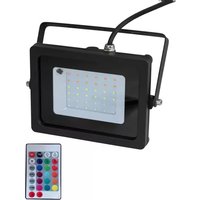
LED THA-100F TRC - Projector Eurolite - Free user manual and instructions
Find the device manual for free LED THA-100F TRC Eurolite in PDF.


Pick your language and provide your email: we'll send you a specifically translated version.
| Product Type | LED Moving Head Projector |
| Model | LED THA-100F TRC |
| Brand | Eurolite |
| Light Source | 100W White LED |
| Beam Angle | 15° - 25° (motorized zoom) |
| DMX Channels | 16 channels |
| Control | DMX512, master/slave, standalone |
| Display | OLED with touch buttons |
| Pan/Tilt | 540° pan / 270° tilt |
| Color Wheel | 7 colors + white |
| Gobo Wheel | 7 rotating gobos + spot |
| Dimmer/Shutter | 0-100% linear dimming, strobe effect |
| Power Consumption | 150W max |
| Power Supply | AC 100-240V, 50/60Hz |
| Dimensions (LxWxH) | 290 x 230 x 410 mm |
| Weight | 5.5 kg |
| Mounting | Omega brackets for truss or floor |
| Cooling | Intelligent fan, low noise |
| Ingress Protection | Indoor use only (IP20) |
| Maintenance | Clean lens with soft cloth; check ventilation regularly |
| Safety | Use safety cable; disconnect before servicing |
| Spare Parts | LED module, power supply, main board available from Eurolite |
| Repairability | Modular design for easy replacement of components |
Frequently Asked Questions - LED THA-100F TRC Eurolite
How do I connect the projector to a DMX controller?
Use a standard 3-pin XLR cable to connect the DMX IN of the projector to your controller's DMX OUT. Set the starting address via the menu.
What is the recommended cleaning method for the lens?
Use a soft, lint-free cloth slightly dampened with isopropyl alcohol. Do not use abrasive cleaners. Clean gently to avoid scratches.
How can I reset the fixture to factory settings?
Go to the menu, select 'Reset' or 'Factory Default', and confirm. This will erase all custom settings.
The projector does not respond to DMX. What should I check?
1. Verify the DMX cable is fully inserted. 2. Check that the DMX address matches the controller. 3. Ensure terminator is used at the end of the chain. 4. Test with a known working cable.
What is the maximum number of units I can daisy-chain?
You can daisy-chain up to 32 units on a single DMX line. For longer runs, use a DMX booster/splitter.
How do I replace the LED module?
The LED module is replaceable. Disconnect power, remove the cover, and unscrew the LED assembly. Install the new module and re-secure. Contact Eurolite for spare parts.
The fan is loud. Is this normal?
The fan speed adjusts automatically based on temperature. If it is excessively loud, check whether ventilation slots are blocked. If problem persists, the fan may need replacement.
Can I use the projector outdoors?
No, the THA-100F TRC is designed for indoor use only (IP20). Exposure to rain or moisture can cause damage.
How do I set the projector to sound-activated mode?
Press the MENU button, navigate to 'Sound Activated' or 'Audio Mode', and enable it. The fixture will react to music via its built-in microphone.
What does the TRC suffix stand for?
TRC likely stands for Thomann Reference Class, indicating a higher build quality and performance level within Eurolite's range.
User questions about LED THA-100F TRC Eurolite
0 question about this device. Answer the ones you know or ask your own.
Ask a new question about this device
No questions yet. Be the first to ask one.
Download the instructions for your Projector in PDF format for free! Find your manual LED THA-100F TRC - Eurolite and take your electronic device back in hand. On this page are published all the documents necessary for the use of your device. LED THA-100F TRC by Eurolite.
USER MANUAL LED THA-100F TRC Eurolite


Manual assistant
Powered by Anthropic
Waiting for your message
Product information
Brand : Eurolite
Model : LED THA-100F TRC
Category : Projector