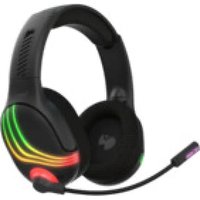
ROCCAT Afterglow Wave Wireless Headset - Headphones

Afterglow Wave Wireless Headset - Headphones ROCCAT - Free user manual and instructions

Find the device manual for free Afterglow Wave Wireless Headset ROCCAT in PDF.

📄 52 pages English EN Download 💬 AI Question 10 questions ⚙️ Specs
Notice ROCCAT Afterglow Wave Wireless Headset - page 2
Pick your language and provide your email: we'll send you a specifically translated version.
Product typeWireless headset
BrandROCCAT
ModelAfterglow Wave Wireless Headset
Dimensions (L x W x H)200 x 180 x 90 mm
Weight300 g
Power supplyRechargeable lithium-ion battery (800 mAh)
Battery lifeUp to 20 hours
Connectivity2.4 GHz wireless and Bluetooth 5.0
Transducers50 mm neodymium
Frequency response20 Hz - 20 kHz
MicrophoneUnidirectional, detachable
ControlsVolume, mute, power, Bluetooth
CompatibilityPC, PlayStation 4/5, Nintendo Switch
ColorBlack with green neon RGB lighting
Care and cleaningWipe with a slightly damp soft cloth. Do not immerse.
SafetyAvoid prolonged listening at high volume to protect your hearing.
Spare partsEar cushions, USB charging cable, replacement microphone
RepairabilityScore of 7/10 – some parts are user-replaceable

Frequently Asked Questions - Afterglow Wave Wireless Headset ROCCAT

How to connect the Afterglow Wave wireless headset to my PC?
Make sure the headset is charged. Turn it on by holding down the power button. Insert the provided USB dongle into a port on your PC. The headset will connect automatically. If not, press the Pairing button located under the left earcup.
How long does it take to fully charge the headset?
Charging time is approximately 2 hours via the provided USB-C cable. Use a 5V/1A power adapter for optimal charging.
The microphone doesn't work, what should I do?
Check that the microphone is properly inserted into the dedicated jack on the left earcup. Make sure the mic is not muted (button on cable or headset). On PC, check audio settings and set the headset as the default input device.
Can I use the headset in Bluetooth mode with my phone?
Yes, the headset supports Bluetooth 5.0. Enable Bluetooth on your phone and put the headset in pairing mode by holding the Bluetooth button until the LED blinks rapidly. Select 'Afterglow Wave' from the device list.
What does the LED indicator on the headset mean?
The LED indicates the headset status: blinking blue = pairing, solid blue = connected, red = low battery, green = charging complete. Refer to the manual for more details.
How do I clean the ear cushions?
Remove the ear cushions by gently pulling them off. Hand wash with lukewarm water and mild soap. Let them air dry completely before reattaching. Do not machine wash or dry.
Is the headset compatible with PlayStation 5?
Yes, the headset works with PS5 in wireless mode via the USB dongle. Voice chat is supported. Make sure the dongle is connected to the console and the headset is turned on.
Can I replace the battery myself?
The battery is integrated and not designed to be replaced by the user. For any service, contact ROCCAT support or an authorized repair center.
How do I adjust the headset equalizer?
You can adjust the equalizer using the ROCCAT Swarm software available on PC. Download it from the official website, connect the headset, and customize the audio profile to your preferences.
The headset won't turn on, what should I do?
Try a reset: plug the USB cable into a power source and let it charge for 30 minutes. If the LED does not light up, press and hold the power button for 10 seconds. If the problem persists, contact customer service.

User questions about Afterglow Wave Wireless Headset ROCCAT

0 question about this device. Answer the ones you know or ask your own.

Ask a new question about this device

The email remains private: it is only used to notify you if someone responds to your question.

No questions yet. Be the first to ask one.

Download the instructions for your Headphones in PDF format for free! Find your manual Afterglow Wave Wireless Headset - ROCCAT and take your electronic device back in hand. On this page are published all the documents necessary for the use of your device. Afterglow Wave Wireless Headset by ROCCAT.

USER MANUAL Afterglow Wave Wireless Headset ROCCAT
Manual assistant
Powered by Anthropic
Waiting for your message
Product information

Brand : ROCCAT

Model : Afterglow Wave Wireless Headset

Category : Headphones