Kulo 7.1 USB - Headphones ROCCAT - Free user manual and instructions
Find the device manual for free Kulo 7.1 USB ROCCAT in PDF.


Pick your language and provide your email: we'll send you a specifically translated version.
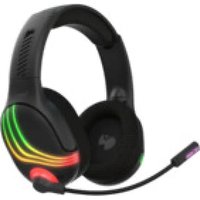
| Type | Gaming headset |
| Connectivity | USB 2.0 |
| Driver size | 50 mm neodymium |
| Frequency response | 20 - 20000 Hz |
| Impedance | 32 Ω |
| Surround sound | 7.1 virtual via ROCCAT Kulo driver |
| Microphone | Noise-cancelling, bendable |
| Microphone frequency | 100 - 10000 Hz |
| Cable length | 2.5 m braided |
| Weight | 290 g |
| Ear cushions | Memory foam with leatherette |
| Headband | Adjustable, steel reinforced |
| Controls | In-line remote: volume wheel and microphone mute |
| Compatibility | PC (Windows 7 or later), Mac OS X |
| Power | USB powered, no external battery |
| Dimensions | 20 x 19 x 9 cm (approx.) |
| Maintenance | Wipe with soft dry cloth; do not immerse in water |
| Safety | Keep away from small children; avoid prolonged use at high volume |
| Spare parts | Replacement ear cushions and cable available from ROCCAT support |
| Warranty | 2 years limited |
| Package contents | Headset, quick start guide |
Frequently Asked Questions - Kulo 7.1 USB ROCCAT
How do I enable 7.1 surround sound on my ROCCAT Kulo 7.1 USB?
Install the ROCCAT Kulo driver from the official website, then enable 7.1 mode in the ROCCAT control panel. The headset's virtual surround is processed via a dedicated DSP chip.
Does the headset work with PlayStation 4 or Xbox?
No, it is designed specifically for PC and Mac due to its USB driver requirements. It will not function properly on consoles.
Why is there no sound coming from the headset?
Check that the USB is fully plugged in, ensure the in-line volume wheel is turned up, and verify the correct output device is selected in your OS settings. Also, try a different USB port.
How do I use the microphone?
The microphone is integrated and automatically recognized. Mute it via the in-line remote. Adjust mic settings in your OS to ensure it's selected as the recording device.
Can I replace the ear cushions?
Yes, the ear cushions are removable and replaceable. Contact ROCCAT support for genuine spares.
Is the headset compatible with Windows 10?
Yes, it works with Windows 7 and later, including Windows 10. Install the latest driver for best performance.
What is the frequency response of the headphones?
The headset delivers a frequency response of 20 Hz to 20 kHz, covering the full audible range.
How do I clean the headset?
Use a soft, dry cloth to wipe the exterior. Do not use solvents or water. Remove the ear cushions for cleaning with a damp cloth and air dry them completely.
Does the headset have a built-in battery?
No, it is powered directly from the USB connection, so no charging or battery replacement is needed.
The microphone is not picking up my voice. What should I do?
Ensure the mic is not muted via the in-line remote or OS settings. Check privacy settings in Windows to allow app access to the mic. Test the mic in the recording devices panel.
User questions about Kulo 7.1 USB ROCCAT
0 question about this device. Answer the ones you know or ask your own.
Ask a new question about this device
No questions yet. Be the first to ask one.
Download the instructions for your Headphones in PDF format for free! Find your manual Kulo 7.1 USB - ROCCAT and take your electronic device back in hand. On this page are published all the documents necessary for the use of your device. Kulo 7.1 USB by ROCCAT.
USER MANUAL Kulo 7.1 USB ROCCAT

Manual assistant
Powered by Anthropic
Waiting for your message
Product information
Brand : ROCCAT
Model : Kulo 7.1 USB
Category : Headphones