EOE 100K-2XLB - Scale Kern - Free user manual and instructions
Find the device manual for free EOE 100K-2XLB Kern in PDF.


Pick your language and provide your email: we'll send you a specifically translated version.
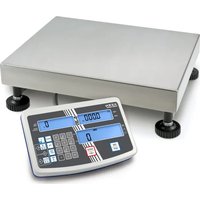
| Product Type | Laboratory Balance |
| Brand | Kern |
| Model | EOE 100K-2XLB |
| Maximum Capacity | 100 kg |
| Resolution | 0.5 g |
| Units of Measurement | kg, g, lb, oz |
| Platform Material | Stainless Steel |
| Platform Dimensions | 400 x 300 mm |
| Device Dimensions (W x D x H) | 500 x 400 x 120 mm |
| Net Weight | 15 kg |
| Power Supply | Mains 230 V / 50 Hz |
| Display Type | Backlit LCD |
| Main Functions | Weighing, tare, zeroing, counting, internal calibration, unit conversion |
| Data Interface | RS-232, USB |
| Operating Temperature | 10 to 30 °C |
| Maintenance and Cleaning | Clean with a damp cloth and mild detergent. Do not use abrasives. |
| Safety | Do not exceed the maximum load. Use on a stable and level surface. Overload protection. |
| Spare Parts | Replacement platform, power adapter, data cable |
| Repairability | Calibration and repair by a Kern certified technician |
| Warranty | 2 years |
Frequently Asked Questions - EOE 100K-2XLB Kern
How to turn off the Kern EOE 100K-2XLB scale?
Press and hold the ON/OFF key for about 2 seconds until the display turns off.
How to perform zeroing?
Make sure no load is applied to the platform, then press the TARE/ZERO key. The display should show 0.
What is the maximum capacity of this scale?
The maximum capacity is 100 kg. Never exceed this limit to avoid damaging the device.
How to clean the scale?
Use a soft cloth slightly dampened with mild detergent. Do not use solvents or immerse the scale in water.
Can I use a non-certified replacement platform?
It is recommended to use only original Kern spare parts to ensure accuracy and safety.
How to perform calibration?
The scale has internal calibration. Refer to the manual for the detailed procedure. Use a certified reference weight if necessary.
What to do if the display shows 'Err'?
This may indicate an overload or malfunction. Remove the load and turn off the scale. If the error persists, contact customer service.
Can the scale be connected to a computer?
Yes, via the RS-232 or USB interfaces. You will need the appropriate software for data transmission.
What is the accuracy of the scale?
The resolution is 0.5 g, offering high precision for laboratory weighing.
How to adjust the backlight?
Press and hold the corresponding function key (see manual) to enable or disable the backlight. Some models allow adjusting the intensity.
User questions about EOE 100K-2XLB Kern
0 question about this device. Answer the ones you know or ask your own.
Ask a new question about this device
No questions yet. Be the first to ask one.
Download the instructions for your Scale in PDF format for free! Find your manual EOE 100K-2XLB - Kern and take your electronic device back in hand. On this page are published all the documents necessary for the use of your device. EOE 100K-2XLB by Kern.
USER MANUAL EOE 100K-2XLB Kern
Manual assistant
Powered by Anthropic
Waiting for your message
Product information
Brand : Kern
Model : EOE 100K-2XLB
Category : Scale