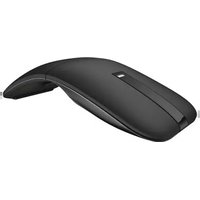
MS300 - Mouse DELL - Free user manual and instructions
Find the device manual for free MS300 DELL in PDF.


Pick your language and provide your email: we'll send you a specifically translated version.
| Product Type | Mouse |
| Model | MS300 |
| Brand | Dell |
| Connection Type | Wired USB |
| Dimensions (approx.) | 100 x 60 x 35 mm |
| Weight (approx.) | 100 g |
| Number of Buttons | 3 (Left, Right, Scroll Wheel) |
| Scroll Wheel | Yes, with click function |
| Optical Sensor | Yes |
| Resolution | 1000 dpi |
| Compatible Operating Systems | Windows, macOS, Linux |
| Cable Length (approx.) | 1.8 m |
| Power Source | USB bus power |
| Maintenance | Clean with dry, lint-free cloth |
| Safety Notes | Avoid exposure to liquids; do not disassemble |
| Spare Parts & Repairability | Not user-serviceable; contact Dell support |
| General Information | Designed for reliable everyday use |
Frequently Asked Questions - MS300 DELL
How do I connect the Dell MS300 mouse?
Simply plug the USB cable into an available USB port on your computer. The mouse is plug-and-play and does not require additional drivers.
What should I do if the cursor is not moving?
Check that the USB cable is securely connected. Try plugging it into a different USB port. If using a USB hub, connect directly to the computer. Restart your computer if the issue persists.
How can I clean the mouse?
Disconnect the mouse from the computer. Use a soft, dry cloth to wipe the exterior. For stubborn dirt, slightly dampen the cloth with water. Do not use any solvents or abrasive cleaners.
Is the Dell MS300 compatible with Mac computers?
Yes, the mouse works with macOS as a standard USB mouse. Basic functions like cursor movement and clicking will function without additional software.
Can I replace the mouse cable if it gets damaged?
No, the cable is integrated and not user-replaceable. If the cable is damaged, please contact Dell support for repair or replacement options.
Does the mouse have a scroll wheel that clicks?
Yes, the scroll wheel can be pressed down to act as a middle button (third button). This can be used for functions like auto-scroll or opening links in new tabs.
What is the DPI of the MS300 mouse?
The mouse has a fixed optical resolution of 1000 dpi, suitable for most everyday tasks like browsing and office work.
Is the mouse left-handed compatible?
The mouse is symmetrically shaped, so it can be used comfortably with either hand. Button functions can be reassigned in the operating system settings.
How long is the warranty for this mouse?
Dell typically offers a 1-year limited hardware warranty. Please check your purchase documentation or contact Dell support for specific warranty terms.
Can I use the mouse with Linux?
Yes, the mouse is recognized as a standard HID device and works with most Linux distributions without additional configuration.
User questions about MS300 DELL
0 question about this device. Answer the ones you know or ask your own.
Ask a new question about this device
No questions yet. Be the first to ask one.
Download the instructions for your Mouse in PDF format for free! Find your manual MS300 - DELL and take your electronic device back in hand. On this page are published all the documents necessary for the use of your device. MS300 by DELL.
USER MANUAL MS300 DELL


Manual assistant
Powered by Anthropic
Waiting for your message
Product information
Brand : DELL
Model : MS300
Category : Mouse