
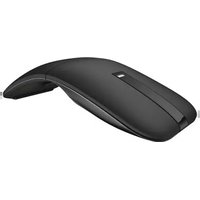
MS700 - Mouse DELL - Free user manual and instructions
Find the device manual for free MS700 DELL in PDF.


Pick your language and provide your email: we'll send you a specifically translated version.
| Product Type | Wireless Mouse |
| Brand | Dell |
| Model | MS700 |
| Dimensions (Approx.) | 100 x 60 x 35 mm |
| Weight | ~70 g |
| Power Source | 1x AA battery (not included) |
| Connection Type | 2.4 GHz wireless with USB nano receiver |
| Sensor Type | Optical |
| Number of Buttons | 3 (Left, Right, Scroll Wheel) |
| Scroll Wheel | Yes |
| Color | Black |
| Operating Range | Up to 10 m |
| Compatibility | Windows, macOS |
| Cleaning | Wipe with a soft, dry cloth |
| Maintenance | Keep away from liquids and extreme temperatures |
| Safety | Do not immerse in water or use abrasive cleaners |
| Spare Parts | Not available separately |
| Repairability | Not user-serviceable; contact Dell support for issues |
Frequently Asked Questions - MS700 DELL
How do I pair the Dell MS700 mouse with my computer?
Insert the USB receiver into a USB port on your computer. Turn on the mouse using the power switch (usually on the bottom). The mouse should connect automatically. If not, press the connect button on the bottom of the mouse and the receiver.
What type of battery does the Dell MS700 use and how do I replace it?
The mouse uses one AA battery. To replace, remove the battery cover on the bottom, insert a new AA battery with correct polarity, and close the cover.
How long does the battery last on the Dell MS700?
Battery life is typically up to 12 months depending on usage. The mouse may have an indicator light that flashes when battery is low.
Is the Dell MS700 compatible with macOS?
Yes, the Dell MS700 is compatible with Windows and macOS. It works as a standard HID device without additional drivers.
My Dell MS700 mouse is not moving. What should I do?
Check the battery, ensure the power switch is on, and re-pair the mouse by removing and reinserting the USB receiver. Also try a different USB port. If the issue persists, replace the battery.
How do I clean the Dell MS700 mouse?
Use a soft, dry cloth to wipe the exterior. For stubborn dirt, slightly dampen the cloth with water. Do not use harsh chemicals or immerse the mouse in liquid.
Does the Dell MS700 have a scroll wheel that can also click?
Yes, the scroll wheel can be pressed down to act as a middle button (third button).
Can I use the Dell MS700 without the USB receiver?
No, this model uses 2.4 GHz wireless technology and requires the included USB receiver. It does not support Bluetooth.
What should I do if the mouse cursor jumps or lags?
Ensure the receiver is close to the mouse (within 10m) and free from interference. Try using the mouse on a non-reflective surface. Replace the battery if low.
Is the Dell MS700 mouse repairable?
The mouse is not designed to be user-serviceable. If it malfunctions, contact Dell support for assistance or replacement options.
User questions about MS700 DELL
0 question about this device. Answer the ones you know or ask your own.
Ask a new question about this device
No questions yet. Be the first to ask one.
Download the instructions for your Mouse in PDF format for free! Find your manual MS700 - DELL and take your electronic device back in hand. On this page are published all the documents necessary for the use of your device. MS700 by DELL.
USER MANUAL MS700 DELL

Manual assistant
Powered by Anthropic
Waiting for your message
Product information
Brand : DELL
Model : MS700
Category : Mouse