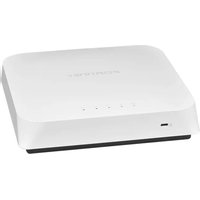
FortiAP 320C - Access Point Fortinet - Free user manual and instructions
Find the device manual for free FortiAP 320C Fortinet in PDF.


Pick your language and provide your email: we'll send you a specifically translated version.
| Product Type | 802.11ac Wave 2 Dual-Band Access Point |
| Model | FortiAP 320C |
| Brand | Fortinet |
| WiFi Standards | 802.11a/b/g/n/ac Wave 2 |
| MIMO Configuration | 2x2 SU-MIMO, 2x2 MU-MIMO |
| Frequency Bands | 2.4 GHz (up to 400 Mbps) & 5 GHz (up to 867 Mbps) |
| Antenna Type | Internal dual-band antennas (2.4 dBi gain) |
| Ethernet Ports | 1x 10/100/1000 Base-T (PoE-in) |
| Power Supply | 802.3af PoE (Power over Ethernet) or optional 12V DC adapter |
| Power Consumption | 12.5 W (typical) |
| Dimensions (W x D x H) | 200 x 200 x 40 mm (7.9 x 7.9 x 1.6 in) |
| Weight | 0.5 kg (1.1 lb) |
| Mounting | Ceiling or wall mount (bracket included) |
| Security Features | WPA2/WPA3, 802.1X, MAC authentication, captive portal, rogue AP detection |
| Management | Cloud-managed (FortiCloud) or on-premises (FortiGate) |
| Operating Temperature | 0°C to 45°C (32°F to 113°F) |
| Humidity | 10% to 90% (non-condensing) |
| Maintenance | Clean with a soft, dry cloth. Do not use liquids or solvents. |
| Spare Parts & Repairability | No user-serviceable parts. Contact Fortinet support for repairs. |
| General Information | Designed for enterprise indoor use; supports up to 128 concurrent clients |
Frequently Asked Questions - FortiAP 320C Fortinet
How do I mount the FortiAP 320C on a ceiling?
Use the included mounting bracket. Attach the bracket to the ceiling with screws (not included), then slide the FortiAP 320C onto the bracket until it clicks securely.
What power options are available for the FortiAP 320C?
The device supports 802.3af Power over Ethernet (PoE) via the Ethernet port. An optional 12V DC power adapter (sold separately) can also be used.
How do I reset the FortiAP 320C to factory defaults?
Locate the reset button on the back panel. Use a paperclip to press and hold the button for about 10 seconds until the LEDs flash. The access point will reboot with factory settings.
Can the FortiAP 320C be used as a mesh node?
Yes, when managed by FortiGate or FortiCloud, the FortiAP 320C can operate in mesh mode to extend wireless coverage without wired backhaul.
How do I update the firmware on the FortiAP 320C?
Firmware updates are typically pushed automatically from the management controller (FortiGate or FortiCloud). You can also manually upload a firmware image via the web interface if standalone mode is supported.
What is the maximum number of concurrent users supported?
The FortiAP 320C can support up to 128 concurrent clients under typical conditions, depending on network traffic and environment.
Does the FortiAP 320C support VLANs?
Yes, it supports 802.1Q VLAN tagging for segregating traffic. VLAN assignments are configured on the managing FortiGate or FortiCloud platform.
How do I connect the FortiAP 320C to a FortiGate firewall?
Connect the Ethernet port of the access point to a PoE switch that is linked to the FortiGate. The FortiAP will be automatically discovered by the FortiGate if CAPWAP is enabled. Alternatively, use FortiCloud for remote management.
What should I do if the FortiAP 320C is not powering on?
Check that the Ethernet cable is properly connected and the switch provides 802.3af PoE. If using a DC adapter, verify the adapter is 12V and the barrel plug is correctly inserted. Try a different cable or port.
Is the FortiAP 320C compatible with third-party access points?
The FortiAP 320C is designed to work exclusively in a Fortinet ecosystem. It cannot be directly integrated with non-Fortinet controllers. However, it can coexist on the same network as other access points.
User questions about FortiAP 320C Fortinet
0 question about this device. Answer the ones you know or ask your own.
Ask a new question about this device
No questions yet. Be the first to ask one.
Download the instructions for your Access Point in PDF format for free! Find your manual FortiAP 320C - Fortinet and take your electronic device back in hand. On this page are published all the documents necessary for the use of your device. FortiAP 320C by Fortinet.
USER MANUAL FortiAP 320C Fortinet
Manual assistant
Powered by Anthropic
Waiting for your message
Product information
Brand : Fortinet
Model : FortiAP 320C
Category : Access Point