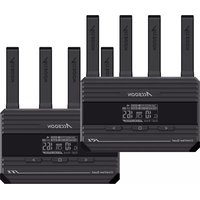
CineView Quad - Hi-fi system Accsoon - Free user manual and instructions
Find the device manual for free CineView Quad Accsoon in PDF.


Pick your language and provide your email: we'll send you a specifically translated version.
| Product Type | Wireless Video Transmission System |
| Brand | Accsoon |
| Model | CineView Quad |
| Video Resolution | Up to 4K 30fps |
| Transmission Range | Up to 150 meters (line of sight) |
| Latency | ~60 ms |
| Video Inputs | 4 x HDMI (Type A) / 4 x SDI (BNC) |
| Video Outputs | 2 x HDMI (Type A) / 2 x SDI (BNC) |
| Wireless Frequency | 5 GHz (dual-band) |
| Battery Mount | NP-F series (L-series) compatible |
| Power Input | DC 6.5-16V via 5.5mm barrel or USB-C PD |
| Dimensions (Transmitter) | 135 x 78 x 35 mm |
| Weight (Transmitter) | ~250 g |
| Cooling | Passive heatsink / internal fan |
| Display | 1.3 inch OLED status screen |
| Mounting | Multiple 1/4"-20 threaded holes on transmitter and receiver |
| Antenna | 4 x RP-SMA external antennas |
| Compliance | FCC, CE, IC, KC |
| Operating Temperature | 0°C to 40°C |
| Storage Temperature | -20°C to 60°C |
| Included Accessories | Transmitter, receiver, 8 x antennas, power adapters, HDMI/SDI cables, carrying case |
| Cleaning and Maintenance | Use soft cloth; avoid liquids; keep vents clear |
| Safety | Do not block ventilation; use only approved power supplies |
| Spare Parts and Repairability | Batteries and antennas replaceable; no user-serviceable internal parts |
Frequently Asked Questions - CineView Quad Accsoon
How do I pair the transmitter and receiver?
Press and hold the PAIR button on both units until they beep and the LED turns solid green. Pairing is automatic.
What is the maximum transmission range?
The system can transmit up to 150 meters in line-of-sight conditions. Obstacles may reduce range.
Can I use different batteries than NP-F?
Yes, you can power the device via the DC input (6.5-16V) or USB-C PD. A D-Tap to DC cable is also available.
How do I update the firmware?
Download the latest firmware from accsoon.com, copy to a FAT32 USB drive, insert into the USB port, and follow on-screen prompts.
What video formats are supported?
Up to 4K 30fps with 4:2:2 10-bit color. Lower resolutions and frame rates are also supported.
The fan is noisy. Is this normal?
The internal fan activates automatically when the unit heats up. It is normal but can be minimized by ensuring adequate ventilation.
Can I use multiple transmitters with one receiver?
Yes, you can pair up to 4 transmitters with one receiver and switch between them via the menu.
What do the LEDs indicate?
Solid green: paired and connected; blinking green: pairing; red: no signal or error. See manual for full chart.
How do I clean the device?
Use a soft, dry cloth to wipe the exterior. Do not use liquids or spray cleaners. Keep ventilation slots dust-free.
Is the system compatible with SDI cameras?
Yes, the CineView Quad has both HDMI and SDI inputs/outputs, supporting standard SDI signals up to 3G.
User questions about CineView Quad Accsoon
0 question about this device. Answer the ones you know or ask your own.
Ask a new question about this device
No questions yet. Be the first to ask one.
Download the instructions for your Hi-fi system in PDF format for free! Find your manual CineView Quad - Accsoon and take your electronic device back in hand. On this page are published all the documents necessary for the use of your device. CineView Quad by Accsoon.
USER MANUAL CineView Quad Accsoon


Manual assistant
Powered by Anthropic
Waiting for your message
Product information
Brand : Accsoon
Model : CineView Quad
Category : Hi-fi system