SeeMo Pro - Video accessory Accsoon - Free user manual and instructions
Find the device manual for free SeeMo Pro Accsoon in PDF.


Pick your language and provide your email: we'll send you a specifically translated version.
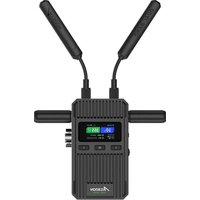
| Type | Wireless video transmitter/receiver with monitor |
| Brand | Accsoon |
| Model | SeeMo Pro |
| Category | Video accessory |
| Dimensions | 150 x 90 x 30 mm |
| Weight | 200 g |
| Power source | Internal rechargeable lithium-ion battery, 7.4V 3000mAh |
| Battery life | Approximately 2 hours |
| Video input/output | HDMI (Type A) input, HDMI (Type A) output, SDI output (optional) |
| Max video resolution | 1080p 60fps |
| Wireless range | Up to 150 meters (line of sight) |
| Transmission latency | Less than 0.1 second |
| Wireless frequency | 2.4 GHz / 5 GHz dual-band |
| Monitor panel | 5.5-inch IPS, 1920x1080, 400 nits |
| Touchscreen | Yes, capacitive |
| Functions | Wireless transmission, monitor display, waveform, histogram, focus assist, false color, LUT import |
| Operating temperature | 0°C to 40°C |
| Storage temperature | -10°C to 50°C |
| Maintenance | Clean with dry soft cloth; avoid moisture and dust |
| Safety | Do not expose to water or extreme temperatures; use only with certified accessories |
| Spare parts and repairability | Contact Accsoon support for service; no user-serviceable parts |
| General information | Compatible with most cameras with HDMI output; firmware update via USB |
Frequently Asked Questions - SeeMo Pro Accsoon
How do I connect the SeeMo Pro to my camera?
Connect an HDMI cable from your camera's HDMI output to the HDMI input on the SeeMo Pro. Ensure the device is powered on. It will automatically start transmitting wirelessly.
What is the wireless range of the SeeMo Pro?
The SeeMo Pro has a wireless range of up to 150 meters (line of sight) under optimal conditions. Obstacles like walls can reduce range.
How do I update the firmware?
Download the latest firmware from the Accsoon website. Copy the firmware file to a USB drive, insert it into the SeeMo Pro, and follow the on-screen instructions.
Can I use the SeeMo Pro as a standalone monitor?
Yes, the SeeMo Pro can function as a standalone monitor when an HDMI source is connected, even without wireless transmission.
What power adapter does the SeeMo Pro use?
The SeeMo Pro uses a 5V 2A USB-C power adapter for charging. It also supports USB PD fast charging.
How do I pair the SeeMo Pro with a receiver?
The SeeMo Pro automatically pairs with Accsoon receivers. If needed, use the 'Pair' function in the settings menu. Hold the pair button on both devices.
What is the latency of the SeeMo Pro?
The SeeMo Pro has a latency of less than 0.1 seconds, making it suitable for real-time monitoring.
How do I maintain the SeeMo Pro?
Clean the screen and body with a dry, soft cloth. Avoid exposing the device to moisture or dust. Store in a cool, dry place.
Is the SeeMo Pro compatible with all cameras?
The SeeMo Pro works with any camera that has an HDMI output. Some advanced features may require compatible cameras or additional settings.
What should I do if the device does not turn on?
Ensure the battery is charged. Press and hold the power button for 3 seconds. If still off, connect to USB power. If it still fails, contact Accsoon support.
User questions about SeeMo Pro Accsoon
0 question about this device. Answer the ones you know or ask your own.
Ask a new question about this device
No questions yet. Be the first to ask one.
Download the instructions for your Video accessory in PDF format for free! Find your manual SeeMo Pro - Accsoon and take your electronic device back in hand. On this page are published all the documents necessary for the use of your device. SeeMo Pro by Accsoon.
USER MANUAL SeeMo Pro Accsoon


Manual assistant
Powered by Anthropic
Waiting for your message
Product information
Brand : Accsoon
Model : SeeMo Pro
Category : Video accessory