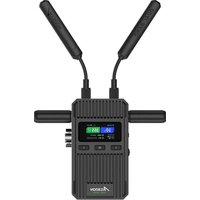
CineView 2 SDI - Wireless video transmitter Accsoon - Free user manual and instructions
Find the device manual for free CineView 2 SDI Accsoon in PDF.


Pick your language and provide your email: we'll send you a specifically translated version.
| Type | Wireless Video Transmitter/Receiver System |
| Model | CineView 2 SDI |
| Brand | Accsoon |
| Video Input | 3G-SDI, HDMI (loop out) |
| Video Output | 3G-SDI, HDMI |
| Wireless Range | Up to 500 meters (line-of-sight) |
| Latency | < 60 ms |
| Resolution Support | 1080p up to 60fps |
| Frequency Band | 5.1–5.9 GHz (auto-switching) |
| Transmission Power | CE: 14 dBm, FCC: 18 dBm |
| Dimensions (Transmitter) | 118 x 68 x 28 mm |
| Weight (Transmitter) | 185 g |
| Power Input | 7–17 V DC via barrel connector or Sony L-series battery plate |
| Power Consumption | ~8 W (typical) |
| Cooling | Fan-assisted passive cooling |
| Mounting | 1/4-20 thread on bottom |
| Operating Temperature | 0°C to 40°C |
| Maintenance | Keep vents clean; avoid moisture; store in dry environment |
| Safety | Use only approved power supplies; do not disassemble; avoid exposure to liquids |
| Spare Parts | Antennas, power cables, battery plates (contact Accsoon) |
| Repairability | Service center recommended for internal repairs |
| Warranty | 1 year (check local distributor) |
Frequently Asked Questions - CineView 2 SDI Accsoon
How do I pair the transmitter and receiver?
Turn on both units. They will automatically pair within seconds. If not, press the Pair button on each unit simultaneously.
What is the maximum transmission range?
The CineView 2 SDI offers up to 500 meters line-of-sight range. Walls and obstacles reduce range.
Can I use it with a smartphone or tablet?
No, this system transmits video only to the dedicated receiver. For smartphone monitoring, you need an additional HDMI capture device.
What input voltages are supported?
It accepts 7–17V DC via the barrel connector or directly from a Sony L-series battery.
Does it support dual video output?
Yes. The receiver has both HDMI and SDI outputs, allowing you to monitor on multiple displays simultaneously.
How do I update the firmware?
Download the latest firmware from the Accsoon website. Connect the device via USB to a computer and follow the update utility instructions.
What is the latency of this system?
The latency is typically under 60 ms, making it suitable for live monitoring and run-and-gun shooting.
Can I use multiple receivers with one transmitter?
Yes, the CineView 2 SDI supports one-to-many transmission. Each receiver pairs independently with the same transmitter.
How do I clean the device?
Use a soft dry cloth to wipe the exterior. Do not use liquids or compressed air near the vents.
What should I do if the video signal drops?
Check for obstructions between units, ensure antennas are fully attached, and try changing the channel by pressing the Channel button on the transmitter.
User questions about CineView 2 SDI Accsoon
0 question about this device. Answer the ones you know or ask your own.
Ask a new question about this device
No questions yet. Be the first to ask one.
Download the instructions for your Wireless video transmitter in PDF format for free! Find your manual CineView 2 SDI - Accsoon and take your electronic device back in hand. On this page are published all the documents necessary for the use of your device. CineView 2 SDI by Accsoon.
USER MANUAL CineView 2 SDI Accsoon


Manual assistant
Powered by Anthropic
Waiting for your message
Product information
Brand : Accsoon
Model : CineView 2 SDI
Category : Wireless video transmitter