P56201BUF - Thermostat Emos - Free user manual and instructions
Find the device manual for free P56201BUF Emos in PDF.


Pick your language and provide your email: we'll send you a specifically translated version.
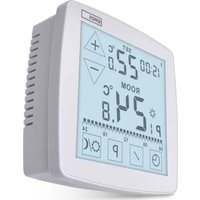
| Product type | Programmable room thermostat |
| Brand | Emos |
| Model | P56201BUF |
| Power supply | 2 AAA batteries (not included) or 230 V via mains adapter |
| Dimensions (W x H x D) | 86 x 86 x 30 mm |
| Weight | 180 g (without batteries) |
| Display type | Backlit LCD screen |
| Operating temperature | 0 °C to 40 °C |
| Measurement accuracy | ± 0.5 °C |
| Weekly programming | Yes, up to 6 periods per day |
| Holiday function | Yes, with reduced temperature |
| Heating/cooling mode | Heating only |
| Compatibility | Gas, oil, electric boilers, heat pumps |
| Contact type | Dry contact (NO/NC) |
| IP protection | IP20 |
| Certification | CE |
| Care and cleaning | Clean with a soft, dry cloth. Do not use abrasive products. |
| Safety | Child lock, frost protection, emergency stop |
| Spare parts and repairability | Replacement batteries available. For any repair, contact a professional. |
| Warranty | 2 years |
Frequently Asked Questions - P56201BUF Emos
How to set the temperature on the Emos P56201BUF thermostat?
Use the + and - buttons to adjust the desired temperature. The room temperature is displayed on the screen.
How to program the heating schedules?
Press Menu, select Programming. You can set up to 6 periods per day for each day of the week.
What to do if the screen does not turn on?
Check the batteries: replace them if necessary. If the device is plugged into the mains, check the power supply.
How to activate the holiday mode?
Press Menu, then select Holiday. Set the reduced temperature and the duration of your absence.
The thermostat is no longer responding, how to reset it?
Remove the batteries and wait 30 seconds before putting them back. You can also use the Reset button on the back.
What is the minimum set temperature?
The minimum temperature is 5 °C (frost protection). You can lower it to 5 °C in frost-free mode.
Can I use this thermostat with a heat pump?
Yes, it is compatible with heat pumps, provided the contact is suitable (dry contact).
How to change the batteries?
Unclip the unit from the wall mount. Remove the used batteries and insert two new AAA batteries, respecting polarity.
The indicator is flashing, what does it mean?
A slow flash indicates a heating request. A fast flash may indicate an error (see the manual).
How to clean the thermostat?
Use a soft, dry cloth. Do not use chemical or abrasive products that could damage the screen.
User questions about P56201BUF Emos
0 question about this device. Answer the ones you know or ask your own.
Ask a new question about this device
No questions yet. Be the first to ask one.
Download the instructions for your Thermostat in PDF format for free! Find your manual P56201BUF - Emos and take your electronic device back in hand. On this page are published all the documents necessary for the use of your device. P56201BUF by Emos.
USER MANUAL P56201BUF Emos

Manual assistant
Powered by Anthropic
Waiting for your message
Product information
Brand : Emos
Model : P56201BUF
Category : Thermostat