
PG-9063 - Controller IPEGA - Free user manual and instructions
Find the device manual for free PG-9063 IPEGA in PDF.


Pick your language and provide your email: we'll send you a specifically translated version.
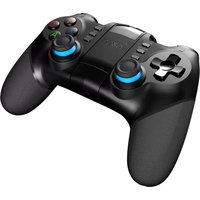
| Type | Wireless Game Controller |
| Model | PG-9063 |
| Brand | IPEGA |
| Dimensions | 155 x 105 x 55 mm (6.1 x 4.1 x 2.2 in) |
| Weight | Approx. 200 g (7.05 oz) |
| Power Source | Built-in rechargeable lithium battery, 400 mAh |
| Charging Time | Approx. 2-3 hours |
| Battery Life | Up to 10 hours of gameplay |
| Connectivity | Bluetooth 3.0 |
| Wireless Range | Up to 10 m (33 ft) |
| Compatibility | Android, iOS, Windows, PC |
| Inputs | 2 analog joysticks, D-pad, 4 action buttons (A/B/X/Y), 4 shoulder buttons (L1/R1/L2/R2), Start/Select, Home, Turbo |
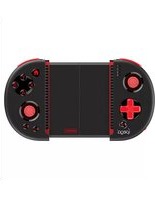
| Additional Features | Turbo function, adjustable smartphone clip, LED indicator |
| Material | Plastic casing with rubberized grips |
| Color | Black |
| Maintenance | Wipe with a soft, dry cloth. Do not use harsh chemicals. |
| Safety Precautions | Avoid exposure to water, extreme temperatures, and dropping. Do not disassemble. |
| Spare Parts & Repairability | Contact manufacturer for replacement parts. No user-serviceable components. |
| General Information | Designed for mobile gaming with ergonomic grip and responsive controls. |
Frequently Asked Questions - PG-9063 IPEGA
How do I pair the IPEGA PG-9063 controller with my phone?
Turn on the controller by pressing the Home button. The LED will flash. On your phone, enable Bluetooth and select 'IPEGA PG-9063' from the list. If pairing fails, turn off and on again.
How long does the battery last on a full charge?
The controller has a 400 mAh battery that provides up to 10 hours of continuous gameplay after a 2-3 hour charge.
Can I use the PG-9063 with my PC?
Yes, it works with Windows PC via Bluetooth. It also supports USB connection if you have the optional cable.
What is the Turbo function and how do I use it?
Turbo allows you to auto-repeat a button press. Hold the Turbo button and press the desired action button (A/B/X/Y). To disable, repeat the process.
Does the controller support iOS devices?
Yes, it is compatible with iOS running version 7.0 or later. Ensure Bluetooth is enabled and pair as you would with Android.
How do I charge the controller?
Use the included Micro-USB cable. Connect to a 5V USB charger (not included) or a computer USB port. The LED turns off when fully charged.
The controller is not responding. What should I do?
First, check if the battery is charged. Then turn off the controller and phone Bluetooth, then turn both on again. If still not working, reset the controller by inserting a pin into the small hole on the back for 3 seconds.
Can I adjust the smartphone clip?
Yes, the clip extends to hold phones up to 6.5 inches. Pull the clip open and place your phone, then adjust the holder to secure it.
How do I clean the controller?
Use a soft, dry cloth to wipe the controller. Do not use alcohol or other solvents. Keep away from liquids.
Is the controller compatible with game emulators?
Yes, it works with most emulators that support external controllers, such as PPSSPP, RetroArch, and MAME. You may need to configure button mapping in the app.
User questions about PG-9063 IPEGA
0 question about this device. Answer the ones you know or ask your own.
Ask a new question about this device
No questions yet. Be the first to ask one.
Download the instructions for your Controller in PDF format for free! Find your manual PG-9063 - IPEGA and take your electronic device back in hand. On this page are published all the documents necessary for the use of your device. PG-9063 by IPEGA.
USER MANUAL PG-9063 IPEGA

Manual assistant
Powered by Anthropic
Waiting for your message
Product information
Brand : IPEGA
Model : PG-9063
Category : Controller