
PG-P5012 - Charging station IPEGA - Free user manual and instructions
Find the device manual for free PG-P5012 IPEGA in PDF.


| Type | Charging Station |
| Brand | IPEGA |
| Model | PG-P5012 |
| Compatibility | PS5 Controller (DualSense) |
| Number of Controller Slots | 2 |
| Input Voltage | DC 4.8V - 5.2V |
| Input Current | < 2A |
| Charging Current per Controller | < 600 mA |
| Charging Time (full charge) | Approximately 5 hours |
| Power Connection | USB Type-C (cable included) or dedicated DC 5V/2A adapter |
| Indicator Lights | Power indicator on station; orange charging indicator on controller (turns off when fully charged) |
| Included Accessories | Charge Station, User Manual, Type-C USB Cable |
| Patent Number | ZL202030201789.1 |
| Operating Temperature | Not specified; avoid high temperature |
| Storage Conditions | Avoid direct sunlight, rain, dampness, heat; well-ventilated area |
| Safety Protection | Use with standard power adapter with protection function to prevent damage |
Frequently Asked Questions - PG-P5012 IPEGA
User questions about PG-P5012 IPEGA
0 question about this device. Answer the ones you know or ask your own.
Ask a new question about this device
Download the instructions for your Charging station in PDF format for free! Find your manual PG-P5012 - IPEGA and take your electronic device back in hand. On this page are published all the documents necessary for the use of your device. PG-P5012 by IPEGA.
USER MANUAL PG-P5012 IPEGA
natural_image
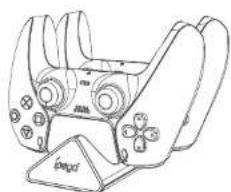
Line drawing of a handheld gaming device with no visible text or symbols产品特点

Charge Station For P5 Controller
Product Manual(PG-P5012)
natural_image
Line drawing of a handheld gaming controller with a stand (no text or symbols)Features:
- The charging station used for PS controller.
- Supprot two controllers charging at same time, saving space and power.
Product appearance illustration:

Product parameter
Working voltage: DC4.8V - 5.2V;
input current: <2A
Charging current: < 600 mA(single controller): Charging time: 5H
Product Instructions:
- Connect the product to the DCSV 2A power adapter or game console with USB port, the power indicator will lights up.
- Insert the PS controller into the interface of the charging stand, wait for about 3 seconds the orange charging indicator of the PS controller will lights.
up, now the controller under charging state; when controller fully charged, the indicator on controller will turn off.

Connect to DC5V < 2A power
Notes:
- When using this product, need a standard power adapter with protection function to prevent accidental damage to the product and controller;
- Please do not charge in high temperature environment!
- Avoid exposure to the sun, rain, damp and heat
- It is not suitable to place it in a place with poor ventilation for charging.
Included;

Charge Station X1 User Manual x1

Type-C USB cable
Patent NO.: ZL202030201789.1

Brand : IPEGA
Model : PG-P5012
Category : Charging station