
EF-KG985 - Smartphone accessory SAMSUNG - Free user manual and instructions
Find the device manual for free EF-KG985 SAMSUNG in PDF.


 FR
FR
 BG
BG
 CS
CS
 DA
DA
 DE
DE
 EL
EL
 EN
EN
 ES
ES
 ET
ET
 FI
FI
 HU
HU
 IT
IT
 KK
KK
 KO
KO
 LT
LT
 LV
LV
 NL
NL
 NO
NO
 PL
PL
 PT
PT
 RO
RO
 RU
RU
 SK
SK
 SL
SL
 SV
SV
 TR
TR
 UK
UK
 ZH
ZH
| Product Type | Keyboard cover with wrist rest and touchpad |
| Compatibility | Samsung Galaxy Tab S7 FE (SM-T730, T733, T735, T736) |
| Material | Synthetic leather exterior, microfiber interior |
| Dimensions | Approximately 284 x 217 x 9 mm |
| Weight | Approximately 540 g |
| Color | Black |
| Keyboard layout | AZERTY (French) with function keys |
| Touchpad | Integrated, multi-gesture support |
| Connectivity | POGO pins (direct tablet connection) |
| Tablet stand | Adjustable integrated kickstand |
| Protection | MIL-STD-810G certified (shock resistant) |
| Power | None (powered by tablet via POGO) |
| Maintenance | Clean with a slightly damp soft cloth |
| Safety | No electrical risk (no battery) |
| Spare parts and repairability | Not user-serviceable; spare parts available via Samsung after-sales service |
| Box contents | Front keyboard cover, back cover, quick start guide |
| Warranty | 1 year (according to legislation) |
Frequently Asked Questions - EF-KG985 SAMSUNG
User questions about EF-KG985 SAMSUNG
0 question about this device. Answer the ones you know or ask your own.
Ask a new question about this device
Download the instructions for your Smartphone accessory in PDF format for free! Find your manual EF-KG985 - SAMSUNG and take your electronic device back in hand. On this page are published all the documents necessary for the use of your device. EF-KG985 by SAMSUNG.
USER MANUAL EF-KG985 SAMSUNG
Please read this manual before using the device to ensure safe and proper use.
- Images may differ in appearance from the actual product. Content is subject to change without prior notice.
- Before using the LED Cover, make sure it is compatible with your device.
- Verify that the NFC function is working properly before using the device with the LED functions active.
- If your device is running Mobile Device Management (MDM) or is located near a metallic object, the NFC function may not work properly.
Instructional icons

Warning: situations that could cause injury to yourself or others

Caution: situations that could cause damage to your device or other equipment

Notice: notes, usage tips, or additional information
Getting started
Package contents
Check the product box for the following items:
- LED Cover
- Quick start guide

- The items supplied with the device and any available accessories may vary depending on the region or service provider.
- The supplied items are designed only for this device and may not be compatible with other devices.
- Appearances and specifications are subject to change without prior notice.
- You can purchase additional accessories from your local Samsung retailer. Make sure they are compatible with the device before purchase.
- Use only Samsung-approved accessories. Using unapproved accessories may cause performance problems and malfunctions that are not covered by the warranty.
- Availability of all accessories is subject to change depending entirely on manufacturing companies. For more information about available accessories, refer to the Samsung website.
Device layout

Using the LED Cover
Attaching or detaching the LED Cover
Attach the LED Cover to the back of your mobile device.
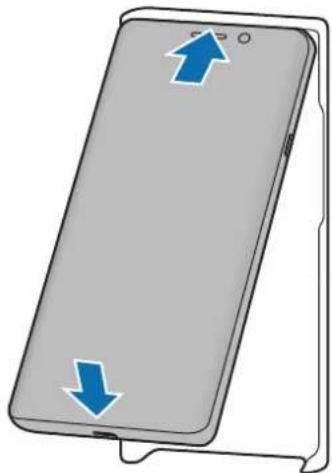

You can download specialized content for the LED Cover on your mobile device after you agree to the terms of use.
To detach the LED Cover, pull on the bottom of it to remove it from the mobile device.

LED notifications
You can see whether the mobile device has received a notification, such as a new message, through the LED Cover.
When the mobile device receives notifications or is flipped to the back, the whole LED Cover will light up.

- The LED Cover does not work while wireless charging.
- It is recommended to remove your device cover before using the Wireless PowerShare feature.
Using the LED window
Viewing incoming calls
When your mobile device is receiving a call, an LED image will appear on the LED window.
Using the rear camera
When you take a photo with the mobile device's rear camera after setting up the timer feature, a countdown timer will appear on the LED window.
LED settings
You can adjust the settings of the LED Cover. You can also turn the LED on or off manually.
On your mobile device, tap Settings → Advanced features → Accessories, and configure the settings as you want.
You can also use the LED Cover app that appears when you attach the LED Cover to the mobile device.
Copyright
Copyright © 2020 Samsung Electronics
This manual is protected under international copyright laws.
No part of this manual may be reproduced, distributed, translated, or transmitted in any form or by any means, electronic or mechanical, including photocopying, recording, or storing in any information storage and retrieval system.
Trademarks
• SAMSUNG and the SAMSUNG logo are registered trademarks of Samsung Electronics. - All other trademarks and copyrights are the property of their respective owners.

LED notifications
Copyright © 2020 Samsung Electronics

Copyright © 2020 Samsung Electronics

LED notifications
Copyright © 2020 Samsung Electronics

LED notifications
Copyright © 2020 Samsung Electronics

LED notifications
Copyright © 2020 Samsung Electronics

LED notifications
Copyright © 2020 Samsung Electronics

LED notifications

LED notifications
Copyright © 2020 Samsung Electronics
- LED Cover
- Quick Start Guide

Using the LED Cover
Attaching or removing the LED Cover
Attach the LED Cover to the back of your mobile device.


Copyright © 2020 Samsung Electronics

You can download special content for the LED Cover on your mobile device after accepting the terms of use.
Copyright © 2020 Samsung Electronics
This manual is protected by international copyright laws.
No part of this manual may be reproduced, distributed, translated, or transmitted in any form or by any means, electronic or mechanical, including photocopying, recording, or storage in any information storage and retrieval system.
Trademarks
- SAMSUNG and the SAMSUNG logo are registered trademarks of Samsung Electronics. • All other trademarks and copyrights are the property of their respective owners.
Read me first
Using the LED Cover
Attaching or removing the LED Cover

LED Notifications
Copyright © 2020 Samsung Electronics
This manual is protected by international copyright laws.
Using the LED Cover

LED Notifications

LED Notifications

LED Notifications
Copyright © 2020 Samsung Electronics
- LED Cover
- Quick Start Guide


LED Notifications
Copyright © 2020 Samsung Electronics

LED Notifications
Copyright © 2020 Samsung Electronics

LED Notifications

LED notifications
- LED Cover
- Quick start


LED notifications

LED notifications
Using the LED Cover
Attaching or removing the LED Cover
Attach the LED Cover to the back of the device.


LED notifications

LED notifications

LED notifications

LED notifications
Copyright © 2020 Samsung Electronics
LED notifications
LED notifications
Copyright © 2020 Samsung Electronics

LED notifications
© Samsung Electronics, 2020.

LED notifications
© Samsung Electronics, 2020

LED notifications
Copyright © 2020 Samsung Electronics
Please read this manual before using the device to ensure safe and proper use.
- Images may differ in appearance from the actual product. Content is subject to change without prior notice.
- Before using the LED Cover, make sure it is compatible with your device.
- Verify that the NFC function is working properly before using the device with the LED functions active.
- If your device is running Mobile Device Management (MDM) or is located near a metallic object, the NFC function may not work properly.
Instructional icons

Warning: situations that could cause injury to yourself or others

Caution: situations that could cause damage to your device or other equipment

Notice: notes, usage tips, or additional information
Getting started
Package contents
Check the product box for the following items:
- LED Cover
- Quick start guide

- The items supplied with the device and any available accessories may vary depending on the region or service provider.
- The supplied items are designed only for this device and may not be compatible with other devices. Appearances and specifications are subject to change without prior notice.
- You can purchase additional accessories from your local Samsung retailer. Make sure they are compatible with the device before purchase.
- Use only Samsung-approved accessories. Using unapproved accessories may cause performance problems and malfunctions that are not covered by the warranty.
- Availability of all accessories is subject to change depending entirely on manufacturing companies. For more information about available accessories, refer to the Samsung website.
Device layout

Using the LED Cover
Attaching or detaching the LED Cover
Attach the LED Cover to the back of your mobile device.
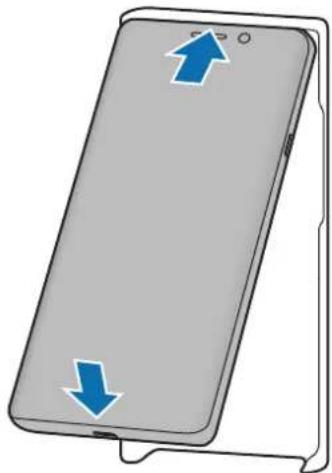

You can download specialized content for the LED Cover on your mobile device after you agree to the terms of use.
To detach the LED Cover, pull on the bottom of it to remove it from the mobile device.

LED notifications
You can see whether the mobile device has received a notification, such as a new message, through the LED Cover.
When the mobile device receives notifications or is flipped to the back, the whole LED Cover will light up.

- The LED Cover does not work while wireless charging.
- It is recommended to remove your device cover before using the Wireless PowerShare feature.
Using the LED window
Viewing incoming calls
When your mobile device is receiving a call, an LED image will appear on the LED window.
Using the rear camera
When you take a photo with the mobile device's rear camera after setting up the timer feature, a countdown timer will appear on the LED window.
LED settings
You can adjust the settings of the LED Cover. You can also turn the LED on or off manually.
On your mobile device, tap Settings → Advanced features → Accessories, and configure the settings as you want.
You can also use the LED Cover app that appears when you attach the LED Cover to the mobile device.
Copyright
Copyright © 2020 Samsung Electronics
This manual is protected under international copyright laws.
No part of this manual may be reproduced, distributed, translated, or transmitted in any form or by any means, electronic or mechanical, including photocopying, recording, or storing in any information storage and retrieval system.
Trademarks
• SAMSUNG and the SAMSUNG logo are registered trademarks of Samsung Electronics. • All other trademarks and copyrights are the property of their respective owners.

LED notifications
Copyright © 2020 Samsung Electronics

LED notifications

LED notifications
This manual is protected by international copyright laws.

LED notifications
Using the LED Cover
Attaching or removing the LED Cover

LED notifications

LED notifications


Brand : SAMSUNG
Model : EF-KG985
Category : Smartphone accessory