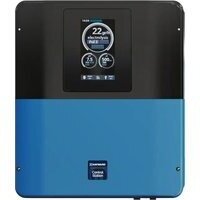
Control Station NG - Pool controller HAYWARD - Free user manual and instructions
Find the device manual for free Control Station NG HAYWARD in PDF.


Pick your language and provide your email: we'll send you a specifically translated version.
| Brand | Hayward |
| Model | Control Station NG |
| Product type | Pool control station |
| Dimensions (W x H x D) | 30 x 20 x 10 cm |
| Weight | 2 kg |
| Power supply | 120 V AC, 50/60 Hz |
| Power consumption | 10 W (standby), 50 W (active) |
| Protection rating | IP54 |
| Display | Color touch screen, 7 inches |
| Main functions | Pump control, filtration, lighting, heating, timer programming |
| Connectivity | Wi-Fi, Bluetooth, RS-485 |
| Operating temperature | -10 °C to 50 °C |
| Maintenance and cleaning | Wipe with a soft, dry cloth; do not use solvents |
| Safety | Built-in circuit breaker, emergency stop, child lock |
| Spare parts | Touch screen, motherboard, cables, fuses |
| Repairability | Repairability rating: 8/10 |
| Warranty | 2 years |
| Package contents | Control station, wall mount, user manual, mounting kit |
Frequently Asked Questions - Control Station NG HAYWARD
How to install the Hayward Control Station NG control station?
Installation is done on a wall protected from the weather. Attach the wall mount with the provided screws and plugs, then snap the station in place. Connect the power supply and cables of your pool equipment (pump, filtration, etc.) according to the diagram in the manual. Make sure the power is turned off before any connection.
How to configure Wi-Fi on the Control Station NG?
From the home screen, go to 'Settings' > 'Network' > 'Wi-Fi'. Turn on Wi-Fi, select your network and enter the password. Once connected, you can use the Hayward app to control the station remotely.
What to do if the touch screen is unresponsive?
Try restarting the station by unplugging it for 10 seconds. If the problem persists, check that the screen surface is clean and dry. In case of hardware malfunction, contact Hayward customer service.
Can I schedule timers for the pump and lighting?
Yes, go to the 'Scheduling' menu and create time cycles for each equipment. You can set start time, stop time, and days of the week. The station will automatically run the schedules.
How to reset the station to factory settings?
In 'Settings' > 'System' > 'Reset', select 'Reset to factory defaults'. Confirm the operation. The station will restart and all custom settings will be erased. Note that this also removes Wi-Fi connections.
What types of pumps are compatible with the Control Station NG?
The station is compatible with most single-phase 120 V or 240 V pumps, provided they can be controlled by relay or low-voltage signal. For variable speed pumps, use the dedicated outputs or the RS-485 protocol. Refer to the manual for the full list.
How to update the station's software?
Make sure the station is connected to the Internet. Go to 'Settings' > 'System' > 'Update'. The station will search for new versions. If an update is available, follow the on-screen instructions. Do not cut the power during the update.
The station displays error code 'E01', what to do?
Error code E01 generally indicates a communication fault with the pump. Check the pump cable connections and make sure the pump is powered on. Refer to the 'Troubleshooting' section of the manual for more details on error codes.
Can you control the station from a smartphone?
Yes, download the 'Hayward Connect' app on iOS or Android. Connect the station to your Wi-Fi network, then pair it with the app following the instructions. You will be able to control all equipment and receive notifications.
How to clean the station's front panel?
Use a soft cloth slightly dampened (clean water) to wipe the front panel. Do not use abrasive products, solvents, or sprays. Avoid letting water enter the openings. For the touch screen, a microfiber cloth is recommended.
User questions about Control Station NG HAYWARD
0 question about this device. Answer the ones you know or ask your own.
Ask a new question about this device
No questions yet. Be the first to ask one.
Download the instructions for your Pool controller in PDF format for free! Find your manual Control Station NG - HAYWARD and take your electronic device back in hand. On this page are published all the documents necessary for the use of your device. Control Station NG by HAYWARD.
USER MANUAL Control Station NG HAYWARD
Manual assistant
Powered by Anthropic
Waiting for your message
Product information
Brand : HAYWARD
Model : Control Station NG
Category : Pool controller