
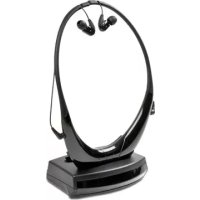
HP FLASH BASE - Earphones MELICONI - Free user manual and instructions
Find the device manual for free HP FLASH BASE MELICONI in PDF.


| Product type | Headphones (earphones) |
| Brand | Meliconi |
| Model | HP FLASH BASE |
| Dimensions (approx.) | 20 x 15 x 5 cm |
| Weight (approx.) | 200 g |
| Power supply | 3.5 mm jack (wired) |
| Main functions | Music listening, hands-free calling |
| Care and cleaning | Clean with a soft, dry cloth; avoid liquids |
| Safety | Do not expose to moisture; do not listen at high volume for extended periods |
| Spare parts and repairability | Replaceable ear pads |
| General information | Designed for daily use; compatible with most audio devices |
Frequently Asked Questions - HP FLASH BASE MELICONI
User questions about HP FLASH BASE MELICONI
0 question about this device. Answer the ones you know or ask your own.
Ask a new question about this device
Download the instructions for your Earphones in PDF format for free! Find your manual HP FLASH BASE - MELICONI and take your electronic device back in hand. On this page are published all the documents necessary for the use of your device. HP FLASH BASE by MELICONI.
USER MANUAL HP FLASH BASE MELICONI
BLUETOOTH® TV HEADPHONES
Scan the Qrcode for instructions in further languages

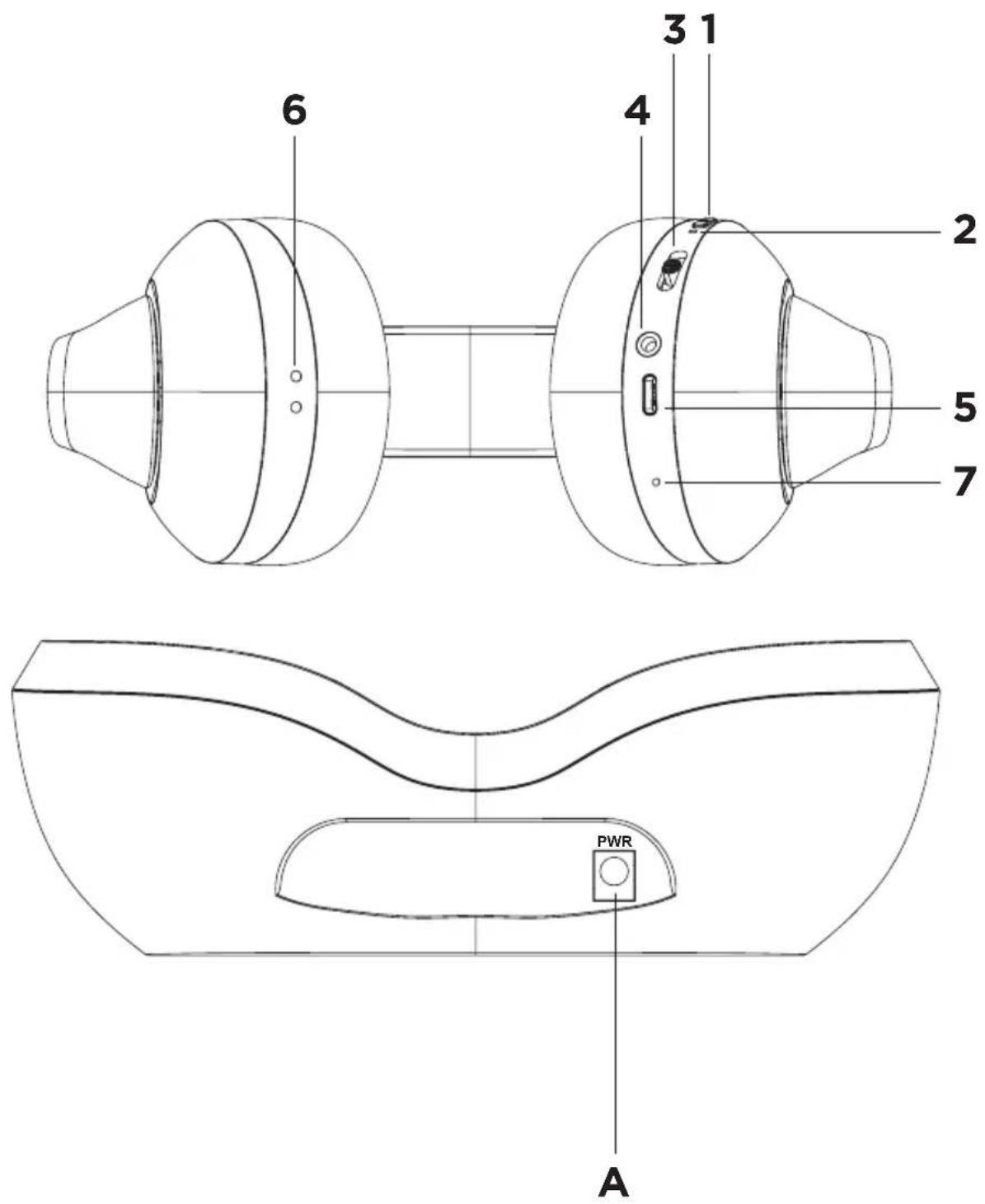
HP FLASH BASE
[6] Contacts de charge
[7] Microphone [MIC]
10. Temoins lumineux led
Thank you for purchasing a Meliconi product!
[1] Power ON - OFF button
[2] Multicoloured LED indicator
[3] UP: [VOLUME +] button / next track
[3] DOWN: [VOLUME -] button / previous track
[4] 3.5 mm stereo audio input (AUX-IN)
[5] USB type C charging socket
[6] Charging contacts
[7] Microphone (MIC)
[A] Base recharge socket
Before starting to use the product, please read this manual and the safety warnings carefully and completely. When passing the product on to third parties, always enclose this manual and the safety instructions.

Safety Warnings
The product contains Lithium batteries: the following indications are to avoid dangerous situations:
- Keep the product away from sources of excessive heat (>60°C): never dispose of in fire, do not leave in direct sunlight, do not leave in the passenger compartment of a car in the sun;
- Keep the product away from water and liquids in general. Never immerse in water or liquids;
- Never attempt to dry the product by heating it (e.g. with a hairdryer, oven, microwave oven);
- The product contains small parts which could come off and be swallowed (choking hazard), keep away from children and pets.
- In case of accidental ingestion, immediately contact a doctor/ first aid station for removal;
- It is prohibited to use this product while driving a vehicle; use of this product while driving may be illegal in some areas/countries;
- Magnetic fields generated by this product may cause interference with pacemaker components (and/or similar devices). During use, the distance between the product and pacemaker components (and/or similar devices) should be at least 15 cm. We recommend consulting your doctor for safety.
- Only use suitable and approved chargers for charging the headset via a USB cable.
- Do not install the device in an enclosed space, ensure adequate ventilation.
- In order to allow the device to be separated from the mains, the AC power supply unit must be in an easily accessible position.
- To avoid electric shock, do not tamper with or attempt to open the unit.
• Refer all repairs to qualified personnel only. - If you notice a malfunction in the AC adapter, unplug it from the socket immediately.
- Disconnect the equipment from the mains before making connections.
- The product contains a lithium battery that cannot be replaced by the user. If you need to dispose of the product, or at the end of its life, please refer to the 'Disposal of the product' section of this manual.
- Do not open the product or attempt to replace batteries;
- Do not use a damaged product;
- If a burning smell is detected during charging, disconnect the product and contact Service;
- If the battery should leak liquid, remove it without touching it directly with your hands (irritating and corrosive), do not use the product any more and contact Service;
- The product is equipped with a safety device that prevents the battery from being recharged if the ambient temperature is outside the permitted limits (temperature too high or too low). Make sure that the temperature is within the limits of use when recharging the product.
- If the product will not be used for a long time, recharge the battery at least every 6 months and keep it in a cool place.
| Operating temperature (°C) 0 ~ 45 | |
| Charging temperature (°C) 0 ~ 45 |

Hearing safety
To avoid possible hearing damage, do not use headphones at high volume for long periods of time. Under certain circumstances, the volume should be reduced or listening should be interrupted to prevent the sound from distracting and/or masking ambient noise, leading to dangerous situations.
Package contents
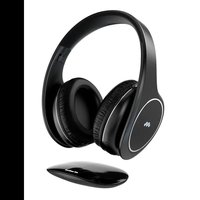
- HEADSET Fig. 1 (HP FLASH BASE stereo TV headset)
-
BASE Fig. 2
-
AC adapter 5V 1000mA
- Charging cable (USB - USB type C)
- nstruction booklet
1. Presentation
The 'HP Flash BASE' wireless TV headset allows you to:
- listen to your TV audio wirelessly
- automatically switch to receive a call while listening to TV audio
- listen to TV audio even if the battery has run out or from sources that do not have a Bluetooth® interface (Aux audio cable mode)
- listen to music from smartphones/tablets/stereos equipped with Bluetooth® technology
- make calls with your smartphone without using your hands (hands-free function)
2. Base Installation
- Connect the AC power supply cable to connector 'A' (PWR) on the rear of the base.
- Connect the AC power supply to the mains.
- The blue LED lights up, indicating that the base is correctly powered.
3. Charging the battery
CAUTION: Do not wear the headset while charging the battery.
Before using the headset, recharge it fully (approx. 2.5h)
There are 2 ways to recharge the battery.
A. Charging via base: Place the headset on the base slots to charge the battery. The first charge should be at least 4/5 hours.
- Base LED colours:
• during charging flashes red
• fully charged: steady green
B. Charging via USB Type C cable: Insert the USB Type C connector of the supplied cable into the USB Type C charging socket [5].
Insert the other end of the USB cable into an available USB port of an approved charger.
When the headset is charging, the LED indicator [2] lights up steady red.
When the headset is fully charged, the LED indicator [2] remains solidly lit in green.
When the battery is low and needs recharging, a warning tone will be heard in the headset, and LED [2] will flash red.
4. Pairing the headset with the TV
A. The first time you use the HP Flash BASE headset with a Bluetooth® enabled TV you must perform the Pairing operation. Press the ON/OFF button [1] for about 5 seconds: the LED [2] will start flashing blue and red alternately. (the headset will emit the power-on tone)
B. Activate the Bluetooth ® Device Search function on your TV.
C. On your TV, check the list of Bluetooth ® devices found and search for 'HP FLASH BASE'.
D. Follow the instructions on your TV's screen to pair it with the HP FLASH BASE headset (Check your TV's user manual for more details)
Once pairing is complete, the headset will automatically connect to the TV if it is turned on
5. Pairing the headset with your mobile phone or other Bluetooth® source
- When using the HP Flash BASE headset with a Bluetooth ® phone for the first time, you must perform the Pairing operation. Press the ON/OFF button [1] for about 5 seconds: the LED [2] will start flashing blue and red alternately. (the headset will emit the ON tone)
- Activate the Bluetooth ® Device Search function on your phone. Make sure your phone has the ‘visible to all’ option activated.
- On your phone check the list of Bluetooth ® devices found and search for 'HP FLASH BASE'.
- Follow the instructions on your phone's screen to pair it with the HP FLASH BASE headset (Check your phone's user manual for more details)
- If a password is required, enter '0000' (4 times zero, not necessary for recent devices).
Once pairing is complete, the headset will automatically connect to your phone if it is turned on and is within its Bluetooth® range (approx. 10 metres)
6. Switching the headset on and off (after first pairing)
- Switch on the headset by pressing the ON/OFF button [1] for approx. 5 seconds until the blue and red LED [2] flashes. (the headset emits the switch-on tone). If available, the headset automatically connects with the TV set (LED [2] turns blue), otherwise you have to switch the headset off and on again.
- Switch off the headset by pressing the ON/OFF button [1] for approx. 3 seconds until the LED [2] flashes red and then goes out (headset emits the switch-off tone)
7. Using the audio and call controls
Volume control: in music or talk mode, press button [3] briefly downwards to decrease the volume (VOLUME - ); and briefly upwards to increase the volume .(VOLUME +)
A high-pitched tone informs you that the maximum volume has been reached.
Change channel (in TV mode): if available, in TV mode, press and hold the [3] button upwards for 2 seconds to change to the next channel and downwards to change to the previous channel
Change track (in music listening mode): When available, in music mode, press and hold the [3] button upwards for 2 seconds to move to the next track and downwards to move to the previous track.
MUTE (in TV mode): When available during audio playback, briefly press the ON/OFF [1] button to activate MUTE, press again to resume audio playback.
Pause / Play (in music listening mode): When available during audio playback, briefly press ON/OFF [1] button to pause, press again to resume audio playback.
Answer / End calls: Briefly press the ON/OFF button [1] once to answer incoming calls or to end the conversation
Call Rejection: Press and hold the ON/OFF button [1] for 2 seconds to reject incoming calls
Virtual Assistant: Press the ON/OFF button [1] three times, when released the virtual assistant of your device will be called up: Siri (for Apple systems) or Google Assistant (for Android systems)
Last Number Redial: Press the ON/OFF [1] button twice in rapid sequence to automatically redial the last phone number displayed on the connected phone.
8. Listening to TV (and music) with audio cable
- Plug the audio cable into the AUX-IN headphone socket [4] to listen to TV using the cable.
- Attention: When inserting the audio cable into the AUX-IN socket, all Bluetooth® functions will be automatically switched off and the volume, pause and previous/next track controls disabled.
- This mode allows the headset to be used even when the battery is flat.
9. Pairing to 2 Bluetooth ® devices at the same time
The HP FLASH BASE headset can be paired with 2 Bluetooth ® devices at the same time. This function is useful, for example, when you are connected to a TV and, at the same time, you want to keep your smartphone also connected to receive phone calls via Bluetooth ® .
Proceed as follows:
- Pair with your mobile phone (see section 'Pairing the headset with your mobile phone or other Bluetooth® source')
- Switch off the HP FLASH BASE headset and the Bluetooth ® from your mobile phone.
- Switch on the HP FLASH BASE headset
- Pair with the TV (see section 'Pairing the headset with the TV')
- Switch your mobile phone's Bluetooth® back on and select 'HP FLASH BASE' in the device list
The headset is now connected to two source devices (audio will only be played by one device at a time); if this is not the case, repeat the procedure.
Note: when the devices are switched off and then on, the automatic association of HP FLASH BASE will take place for ONE DEVICE ONLY; the second device must always be added manually following the previous procedure.
Note2: The two devices to be paired must be of different types (for example: TV and smartphone).
10. Led lamp
The LED indicator [2] on the headphone provides a useful indication of the headphone's operating status through its colour and flashing mode.
| LED INDICATORON THE HEADPHONE | INDICATION |
| BLUE/RED ALTERNATELY Bluetooth® pairing: Red and blue lights flash alternately | |
| BLUE FLASHING SLOWLY | Connection to a device / Audio playback via Bluetooth®: blue LED flashes slowly (every 5s) |
| RED STEADY Battery charging in progress | |
| STEADY GREEN | Recharge completed |
| LED INDICATORON THE BASE | INDICATION |
| RED STEADY | Battery charging in progress |
| BLUE STEADY | Base correctly powered |
| GREEN STEADY | Recharge completed |
Headphone specifications
| Driver Size 40mm | |
| Speaker Impedance 32Ω | |
| Frequency Response 20Hz-20K Hz | |
| Bluetooth® version V5.3 | |
| Frequencies used 2.400GHz~2.4835 GHz | |
| Transmission range up to 10m (open field) | |
| Rechargeable Battery 3.7V, 600mAh, 2.2Wh | |
| Charging time 2.5 hours | |
| Battery Life 75 hours (*Note1) | |
| Weight 186g |
Note1: with new battery, after full charge, Bluetooth® connection, continuous playback at 25°C at medium volume
Declaration of Conformity
The manufacturer, Meliconi S.p.A., declares that the type of radio equipment, Bluetooth ® Headset HP Flash BASE, is in conformity with the Directive 2014/53/EU (RED). The full text of the EU Declaration of Conformity is available at the following address: www.meliconi.com/doc/hpflashbase

The European Directive 2012/19/EU on Waste Electrical and Electronic Equipment (WEEE) requires that these appliances should not be disposed of in the normal municipal solid waste stream, but should be collected separately in order to optimise the recovery and recycling of their constituent materials and to prevent potential damage to health and the environment due to the presence of potentially hazardous substances. The crossed-out bin symbol is displayed on all products as a reminder. Waste can be taken to the appropriate collection centres, or it can be handed over free of charge to the distributor where the equipment was purchased when purchasing a new equivalent. For further information on the correct disposal of these appliances, please contact the relevant public service department. The removal of batteries from the product is the responsibility of the consortium that will dispose of the product.
This symbol indicates that the product contains integrated rechargeable batteries subject to European Regulation (EU) 2023/1542 and therefore cannot be disposed of with normal household waste. The product must be taken to an appropriate separate collection point or handed over to the retailer.
HP FLASH BASE
External Power Supply Technical Specifications
| Manufacturer's name or trade mark | Shenzhen Boyaxuan Technology Development Co., Ltd |
| Commercial registration number N | 91440300552142170T |
| Address | 3/F, 1st Building Xing Wei (Feng Huang) Third Industrial Area, Fuyong Street, 518103 Shenzhen, P.R. of CHINA |
| Model identifier BYX2-0501000 | |
| Input voltage 100-240V~ | |
| Input AC frequency 50-60Hz | |
| Output voltage | 5.0V --- |
| Output current 1.0A | |
| Output power 5.0W | |
| Average active efficiency 73.63% min | |
| No-load power consumption 0.03W max |

- HP FLASH BASE
- TEMOINS LUMINEUX LED
- THANK YOU FOR PURCHASING A MELICONI PRODUCT
- SAFETY WARNINGS
- THE PRODUCT CONTAINS LITHIUM BATTERIES: THE FOLLOWING INDICATIONS ARE TO AVOID DANGEROUS SITUATIONS
- HEARING SAFETY
- PACKAGE CONTENTS
- PRESENTATION
- THE 'HP FLASH BASE' WIRELESS TV HEADSET ALLOWS YOU TO
- BASE INSTALLATION
- CHARGING THE BATTERY
- CAUTION: DO NOT WEAR THE HEADSET WHILE CHARGING THE BATTERY
- THERE ARE 2 WAYS TO RECHARGE THE BATTERY
- BASE LED COLOURS
- PAIRING THE HEADSET WITH THE TV
- PAIRING THE HEADSET WITH YOUR MOBILE PHONE OR OTHER BLUETOOTH® SOURCE
- SWITCHING THE HEADSET ON AND OFF (AFTER FIRST PAIRING)
- USING THE AUDIO AND CALL CONTROLS
- LISTENING TO TV (AND MUSIC) WITH AUDIO CABLE
- PAIRING TO 2 BLUETOOTH ® DEVICES AT THE SAME TIME
- PROCEED AS FOLLOWS
- LED LAMP
- DECLARATION OF CONFORMITY
Brand : MELICONI
Model : HP FLASH BASE
Category : Earphones