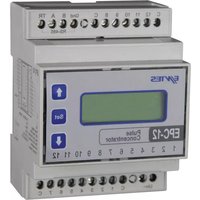
EPC-12 - Measuring equipment ENTES - Free user manual and instructions
Find the device manual for free EPC-12 ENTES in PDF.


| Product Type | Measuring Equipment |
| Model | EPC-12 |
| Brand | ENTES |
| Dimensions (W x H x D) | 96 x 96 x 100 mm |
| Weight | 0.3 kg |
| Power Supply | 100-240 VAC, 50/60 Hz |
| Display | LCD with backlight |
| Measurement Functions | Voltage, Current, Power, Frequency, Power Factor |
| Accuracy | ±0.5% of reading |
| Communication Interface | RS-485 Modbus |
| Operating Temperature | -10°C to +55°C |
| Storage Temperature | -20°C to +70°C |
| Protection Rating | IP40 (front panel) |
| Safety Standards | IEC 61010-1 |
| Maintenance | Clean with dry cloth; no user-serviceable parts inside |
| Spare Parts | Replacement fuses, terminal covers |
| Repairability | Repairs only by authorized service center |
| General Information | Indoor use only, altitude up to 2000 m |
Frequently Asked Questions - EPC-12 ENTES
User questions about EPC-12 ENTES
0 question about this device. Answer the ones you know or ask your own.
Ask a new question about this device
Download the instructions for your Measuring equipment in PDF format for free! Find your manual EPC-12 - ENTES and take your electronic device back in hand. On this page are published all the documents necessary for the use of your device. EPC-12 by ENTES.
USER MANUAL EPC-12 ENTES
Ignoring the instructions in this manual may result in serious injuries or death.
- Disconnect all power supply inputs before connecting the device.
- Do not remove the front panel when device is connected to the mains.
- Do not clean the device with solvents alike. Only clean with dry cloth.
– Verify correct terminal connections before energizing the device. - Contact your authorized reseller in case problems occur with your device.
– Device is only for rail mounting. - An F Type Fuse must be used and its current limit must be 1 A.

No responsibility is assured by manufacturer or any of its subsidiaries for any consequences arising out of disregard the above precautions.
SECURITY

Read the User Manual entirely before using the device.

Warnings
- Connect a button or a circuit breaker between mains and the device.
- Connected button or circuit breaker must be in close proximity of the device.
- Connected button or circuit breaker must be marked to indicate that it disconnects the device from the mains.
Battery life is 5 years at +45°C storing temperature. It is between 8 and 10 years for typical applications. The battery can only be replaced by ENTES A.S. The battery is used to keep the internal real time clock in case of power outages.
– During power outages, the device will not count incoming pulses.
Standards Applied to the Device
EN 61010-1, EN 62053-31, EN 62054-21
WARRANTY
The device has a 2 (two) year warranty. In case of a fault, the device must only be serviced by manufacturing company. Otherwise, the warranty of the device will be void.

Index
- INTRODUCTION.... 4
1.1. APPLICATIONS.... 4
1.2.GENERAL FEATURES....4
1.3. FRONT PANEL 5
1.4. HARDWARE FEATURES.... 6
- UTILIZATION OF DEVICE 7
2.1. SETTINGS THAT ARE CHANGED FROM THE DEVICE..... 7
2.1.1. RS-485 (Information for communicating with a PC) MENU.....10
2.1.2. PASSWORD MENU....13
2.1.3. ESCAPE MENU....17
2.2. SETTINGS THAT ARE CHANGED FROM THE PC 18
2.2.1.RS-485 SETTINGS....18
2.2.2. GENERAL SETTINGS....19
2.2.3. COUNTER SETTINGS 19
2.2.4. DATE - TIME SETTINGS 22
2.2.5. TARIFF SETTINGS 23
2.2.6. DEVICE INFORMATION 32
2.2.7. TOTAL COUNTER INDEXES 32
2.2.8. COUNTER INDEXES WITH TARIFF 36
2.2.9 DEVICE STATUS....46
2.3. MEMORY - LOGGING FEATURES 48
-
EPC-12 CONFIGURATION (INTERFACE) SOFTWARE 48
-
DIMENSIONS.... 49
4.1. CONNECTION DIAGRAM....50
- TECHNICAL DATA.... 55
③
1. INTRODUCTION
1.1. APPLICATIONS
EPC-12, is a microprocessor-based device that can separately collect incoming pulses from various meters (electricity, water, gas, etc.) connected to its 12 inputs according to 8 tariffs based on time, record them in real time with its internal clock chip and flash memory and transmit data via RS-485 line with Modbus RTU protocol.
1.2. GENERAL FEATURES
Device Features
1) Total counter indexes of 12 pulse inputs with tariff and unit information, date and time information and alarm states can be displayed on the 2x12 characters LCD screen automatically with intervals of 5 seconds or manually by pressing up and down buttons.
2) Enabling the backlight for 20 seconds by pressing any button to provide easy reading on the screen.
3) Data communication with a PC via RS-485 output,
4) Storing the contents of each pulse input with tariff information in 1-60 minutes intervals on the 2 MB
permanent memory of the device with date and time information,
5) Preventing changes to settings by unauthorized users by defining a 4-digit user password.
EPC-12 Configuration Software Features
1) Transferring stored parameters to a PC and reviewing them,
2) Entering different multiplier and denominator coefficients for each pulse input,
3) Defining different units for each pulse input.
4) Changing date and time settings,
5) Changing communication settings,
④
6) Activating password protection and defining a new password.
7) Changing the log save period,
8) Activating DST(Daylight Savings Time),
9) Holiday, saturday, sunday and week day tariffs can be programmed (6 for each)*
10) Monitoring counters with tariff and total counters,
11) Resetting counters with tariff and total counters,
12) Assigning index to counters with tariff when Counter Set from device menu is activated,
13) Monitoring date and time, tariff, next record number to be written and alarm states at that time,
* A tariff between 1 and 8 can be selected but a selected tariff (for example T1) can be selected more than one time as long as its time range doesn't overlap with another tariff.
1.3. FRONT PANEL

⑤
1) Up and Down Button: It is used to display total counter indexes of 12 pulse inputs, date and time information and alarm states on the monitoring screen. While in the menu screen, they are used to browse between menu items and to increase/decrease a numerical value.
2) Set button: It is used to enter the menu screen when pressed for 3 seconds. It is used to enter a sub-menu or upper-menu, to exit from a menu, to switch the indicator to the right while entering a numerical value and to save the committed change.
3) Count (C): It indicates which pulse input's total counter index is displayed at that moment.
4) Tariff Information (T): It indicates which tariff is active at that moment. If there is a tariff overlap or the clock is faulty, pulses at that moment are saved to T1 tariff and a cautionary flashing will occur on the tariff display. In that case, the user will be informed of the problem's cause in the Alarm section of display (For Example: Wrong Time, No Tariff, etc.). Additionally, the problem can be monitored by using the Alarm section on the Configuration Software.
5) Unit : It indicates the unit of the index counted by pulse input displayed at that moment.
6) Total Counter Index : It is the total counter index of the pulse input displayed at that moment. It can have a maximum value of 34.359.738.360 (5x2word). Total counters consist of the summation of 8 counters with tariff. Each counter with tariff has a capacity of 2 word which means it can have a maximum value of 4.294.967.295. Each counter with tariff that fills its 2 word capacity is reset to zero automatically and continues to count.
7) Pulse LEDs: It is for indicating an incoming pulse to the associated pulse input by flashing.
8) 2x12 characters LCD screen.
9) Backlight
1.4. HARDWARE FEATURES
1) Pulse and Corn Inputs (12 pin Pulse Inputs, 4 pin Corn Input)
2) Supply Input (2 pin)
3) RS-485 terminals (4 pin)
⑥
2. UTILIZATION OF DEVICE
For security reasons, only a portion of the settings are permitted to be changed directly from the device. Therefore, device settings will be explained under two headlines as "Changed from the Device" and "Changed via Modbus protocol using PC".
2.1. Settings that are changed from the device
After you connected the device as described in the connection diagram, energize the device. In order for your measurements and applications to be accurate, make the necessary adjustments by using the menus.
Monitoring Screen
The display changes automatically in 5 second intervals on the monitoring screen. You can also browse between displays by using up and down buttons. Total counter indexes, tariffs and unit information of all counters from 1st to 12th, clock, date and alarm information is displayed on this screen and after alarm display, it shows the 1st counter again.

flowchart
graph TD
    A["Count 1 Tariff Unit Total Counter Indexes"] --> B["0"]
    C["Count 2 Tariff Unit Total Counter Indexes"] --> D["0"]
    E["Count 3 Tariff Unit Total Counter Indexes"] --> F["0"]
    G["Count 4 Tariff Unit Total Counter Indexes"] --> H["0"]
    I["Count 5 Tariff Unit Total Counter Indexes"] --> J["0↑↓0"]
    K["Count 6 Tariff Unit Total Counter Indexes"] --> L["0↑↓0"]
    M["Count 7 Tariff Unit Total Counter Indexes"] --> N["0↑↓0"]
    O["Count 8 Tariff Unit Total Counter Indexes"] --> P["0↑↓0"]
    Q["Count 9 Tariff Unit Total Counter Indexes"] --> R["0↑↓0"]
    S["Date Day/month/Year"] --> T["Time: four minutes/second"]
    T --> U["Count 12 Tariff Unit Total Counter Indexes"]
    U --> V["Count 11 Tariff Unit Total Counter Indexes"]
    V --> W["Count 10 Tariff Unit Total Counter Indexes"]
    X["Alarm!"] --> Y["0↑↓0"]


Main Menus
There are 3 main menus on the device. These menus are RS-485. PASSWORD and ESCAPE. When SET button is pressed for 3 seconds on the monitoring screen, main menu is accessed. Sub-menus are accessed while on any main menu by pressing set button. If the password protection feature is active, a password* will be asked before entering the main menu when set button is pressed for 3 seconds. * Factory setting for password is 1234. Enter your password with Up, Down and Set buttons. Finally, main menu will appear when you press the Set button. By using Up and Down buttons, you can browse main menu options. The device does not get blocked when the password is entered incorrectly. Committed changes are saved to device memory and do not get lost in case of a power outage. If none of the buttons are pressed for 20 seconds while on the menu, monitoring screen is displayed. Any committed change will be discarded.

In order for a change that you made in the menu to take effect, you must approve the Save query. Otherwise, committed changes will not take effect.

flowchart
graph TD
    A["Monitoring Screen"] --> B["RS-483"]
    B --> C["PASSWORD ESCAPE"]
    C --> D["Press Release"]
    D --> A
    style A fill:#90EE90,stroke:#333
    style B fill:#FFB6C1,stroke:#333
    style C fill:#FFA500,stroke:#333
    style D fill:#FFD700,stroke:#333
⑨
2.1.1. RS-485 (Information for communicating with a PC) Menu
The device has MODBUS RTU communication protocol. All measured values can be transferred to a PC by using the EPC-12 configuration software. Also, you can adjust all the settings that you can adjust directly from the device except "Counter Set" by using this configuration software on a PC. In order for the communication with a PC to occur; Baud Rate, Parity, Address values must be entered on the device

flowchart
graph LR
    A["RS-485"] --> B["Baud Rate 9600"]
    B --> C["Parity No"]
    C --> D["Address 001"]
    D --> E["Counter Set Disable"]
    E --> F["Back"]
    F --> B
    B --> G["0"]
    D --> H["0"]
    E --> I["0"]
    F --> J["0"]
⑩
Selecting Baud Rate value
You can select Baud Rate value as 1200, 2400, 4800, 9600, 19200 or 38400 bps.

flowchart
graph LR
    A["Baud Rate 9800"] --> B["Baud Rate 19200"]
    B --> C["Baud Rate 38400"]
    C --> D["Baud Rate 5500"]
    D --> E["Baud Rate 4800"]
    E --> F["Baud Rate 2400"]
    F --> G["Baud Rate 19200"]
    B -->|0| H["0"]
    C -->|0| I["0"]
    D -->|0| J["0"]
    E -->|0| K["0"]
    F -->|0| L["0"]
⑪
Selecting Parity value
You can select Parity option as No, Odd or Even.
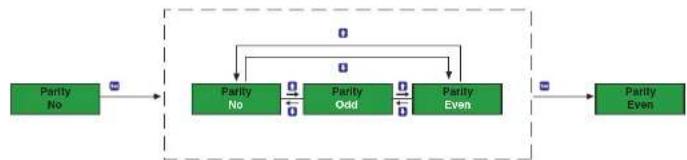
flowchart
graph LR
    A["Parity No"] --> B["Parity No"]
    B --> C["Parity Odd"]
    B --> D["Parity Even"]
    C --> E["Parity Even"]
    D --> E
Entering Address Information
Address information can be entered between 1 and 247.

flowchart
graph LR
    A["Address 001"] --> B["Address 01"]
    B --> C["Address 247"]
    C --> D["Address 247"]
    B -.->|D 0| C
    C -.->|B| D
⑫
Counter Set Setting (Activating index writing to counters with tariff)
If Counter Set menu is set as Disable, no other value than 0 is allowed to be written to counters with tariffs with the configuration software. However; if Counter Set menu is set as Enable, you can write index between 0 and 4.294.967.295 (2 word) to counters with tariff.

flowchart
graph LR
    A["Counter Set Disable"] --> B["Counter Set Disable"]
    B --> C["Counter Set Enable"]
    C --> D["Counter Set Enable"]
    D -->|Feedback Loop| B
    B -->|Feedback Loop| C
User password is defined and activated in this menu. In order to prevent changes to device settings by unauthorized users, you must define a 4-digit password in this menu and activate it.

flowchart
graph TD
    A["PASSWORD Enable Charge Back"] --> B["0"]
    B --> C["0"]
    C --> D["0"]
    D --> E["0"]
    E --> F["0"]
    F --> G["0"]
    G --> H["0"]
    H --> I["0"]
    I --> J["0"]
    J --> K["0"]
    K --> L["0"]
    L --> M["0"]
    M --> N["0"]
    N --> O["0"]
    O --> P["0"]
    P --> Q["0"]
    Q --> R["0"]
    R --> S["0"]
    S --> T["0"]
    T --> U["0"]
    U --> V["0"]
    V --> W["0"]
    W --> X["0"]
    X --> Y["0"]
    Y --> Z["0"]
    Z --> A
Enable (Activating user password protection)
Password protection is activated or deactivated in this menu.
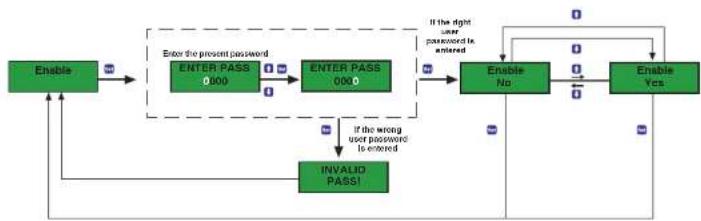
flowchart
graph TD
    A["Enable"] --> B["ENTER PASS 000"]
    B --> C["ENTER PASS 000"]
    C --> D{If the right user password is entered}
    D -->|Yes| E["Enable No"]
    D -->|No| F["Enable Yes"]
    E --> G{If the wrong user password is entered}
    G -->|Yes| H["INVALID PASS!"]
    G -->|No| I["End"]
    H --> J["Enable"]
    I --> K["Enable"]
    J --> L["Enable"]
    K --> M["Enable"]
    L --> N["Enable"]
    M --> O["Enable"]
    N --> P["Enable"]
    O --> Q["Enable"]
    P --> R["Enable"]
    Q --> S["Enable"]
    R --> T["Enable"]
    S --> U["Enable"]
    T --> V["Enable"]
    U --> W["Enable"]
    V --> X["Enable"]
    W --> Y["Enable"]
    X --> Z["Enable"]
    Y --> AA["Enable"]
    Z --> AB["Enable"]
14
Change (Changing user password)
User password is changed in this menu.

flowchart
graph TD
    A["Change"] --> B["Old Pass 0000"]
    B --> C["Old Pass 0000"]
    C --> D{If the right user password is entered}
    D -->|Yes| E["New Pass 0000"]
    E --> F["New Pass 0000"]
    F --> G{enter the new password again}
    G -->|Yes| H["Confirm Pass 0000"]
    H --> I["Confirm Pass 0000"]
    I --> J{If the right user password is entered}
    J -->|No| K["INVALID PASS1"]
    K --> L["Invalid PASS1"]
    L --> A
    style A fill:#99ccff,stroke:#333
    style B fill:#99ccff,stroke:#333
    style C fill:#99ccff,stroke:#333
    style D fill:#99ccff,stroke:#333
    style E fill:#99ccff,stroke:#333
    style F fill:#99ccff,stroke:#333
    style G fill:#99ccff,stroke:#333
    style H fill:#99ccff,stroke:#333
    style I fill:#99ccff,stroke:#333
    style J fill:#99ccff,stroke:#333
    style K fill:#99ccff,stroke:#333
    style L fill:#99ccff,stroke:#333
    style_M["Change"] --> N["End"]
    style N --> O["Final Pass"]
    style O --> P["Final Pass"]


2.1.3. ESCAPE Menu
It is used to exit from the main menu. An approval is asked to save any changes that has been made in the main menus. If no change has been made, monitoring menu is displayed directly.

flowchart
graph TD
    A["ESCAPE"] --> B["Save No"]
    B --> C{Committed change is not saved!}
    B --> D{Committed change is saved!}
    C --> E["Monitoring Screen"]
    D --> F["Save Yes"]
    F --> G["Saved!"]
    G --> B
⑰
2.2. Settings that are changed from the PC
2.2.1. RS-485 Settings
You can change RS-485 settings that you can change from the device such as Baud Rate, Parity and Address by using the configuration software. When you change EPC-12 RS-485 settings, communication between device and PC will be disconnected. You can establish communications by setting the RS-485 Settings of the device and PC the same and you can continue to adjust settings from the PC.
| RS-485 SETTINGS | ADDRESS | ADDRESS (HEX) | REGISTER R/W RANGE | FORMAT | ||
| 32768 | 8000 | BAUD RATE | R/W | 0-5 | unsigned int | |
| 32769 | 8001 | PARITY | R/W | 0-2 | unsigned int | |
| 32770 | 8002 | COMMUNICATION ADDRESS | R/W | 1-247 | unsigned int | |
BAUD RATE: PARITY:
0 = 1200 bps 0 = No
1 = 2400 bps 1 = Odd
2 = 4800 bps 2 = Even
3 = 9600 bps
4 = 19200 bps
5 = 38400 bps
19
2.2.2. General Settings
Under general settings, you can do password defining (changing) and password activating/deactivating operations which you can do from the device too. Additionally, you can define how often (in minutes) you want to receive log records and you can activate/deactivate DST (Daylight Savings Time) option. When you activate DST, the clock of the device is moved forward 1 hour from 3:00 AM to 4:00 AM on the last sunday of March and is moved backward 1 hour from 4:00 AM to 3:00 AM on the last sunday of October.
| GENERAL SETTINGS | ADDRESS | ADDRESS (HEX) | REGISTER | R/W RANGE | FORMAT | |
| 32771 | 8003 | PASSWORD | R/W | 0-9999 | unsigned int | |
| 32772 | 8004 | PASSWORD ACTIVATION | R/W | 0-1 | unsigned int | |
| 32773 | 8005 | LOG RECORD PERIOD | R/W | 1-60 | unsigned int | |
| 32774 | 8006 | DAYLIGHT SAVINGS TIME | R/W | 0-1 | unsigned int | |
PASSWORD ACTIVATION: DAYLIGHT SAVINGS TIME:
0 = Inactive 0 = Inactive
1 = Active 1 = Active
2.2.3. Counter Settings
Under counter settings, you can specify multiplier and denominator coefficients separately for each pulse input and you can define the unit of the pulse that you measure. For example, if a multiplier of 5, a denominator of 2 and a unit of Wh is entered for 1st pulse input and 4 pulses arrive at 1st pulse input, the measurement of the device will be 4x5:2 = 10 Wh.
| COUNTER SETTINGS | ADDRESS | ADDRESS (HEX) | REGISTER R/W RANGE | FORMAT | ||
| 32775 | 8007 | IN1 MULTIPLIER | R/W | 0-65535 unsigned int | ||
| 32776 | 8008 | IN2 MULTIPLIER 0-65535R/W | unsigned int | |||
| 32777 | 8009 | IN3 MULTIPLIER | R/W | 0-65535 | unsigned int | |
| 32778 | 800A R/W unsigned intIN4 MULTIPLIER | 0-65535 | ||||
| 32779 | 800B | IN5 MULTIPLIER | R/W | 0-65535 unsigned int | ||
| 32780 | 800C | IN6 MULTIPLIER 0-65535R/W | unsigned int | |||
| 32781 | 800D | IN7 MULTIPLIER | R/W | 0-65535 | unsigned int | |
| 32782 | 800E R/W unsigned intIN8 MULTIPLIER | 0-65535 | ||||
| 32783 | 800F | IN9 MULTIPLIER | R/W | 0-65535 unsigned int | ||
| 32784 | 8010 | IN10 MULTIPLIER 0-65535R/W | unsigned int | |||
| 32785 | 8011 | IN11 MULTIPLIER | R/W | 0-65535 | unsigned int | |
| 32786 | 8012 R/W unsigned intIN12 MULTIPLIER | 0-65535 | ||||
| 32787 8013 R/W unsigned intIN1 DENOMINATOR | 1-65535 | |||||
| 32788 | 8014 | IN2 DENOMINATOR | R/W | 1-65535 unsigned int | ||
| 32789 | 8015 | IN3 DENOMINATOR | R/W | 1-65535 | unsigned int | |
| 32790 | 8016 | IN4 DENOMINATOR | R/W | 1-65535 | unsigned int | |
| 32791 | 8017 R/W unsigned intIN5 DENOMINATOR | 1-65535 | ||||
| UNIT: | |||||
| 0 = No Unit | 9 = iVArh | 18 = kcal | 28 = yd ^2 | 37 = t | 46 = in |
| 1 = Wh | 10 = CVAr | 19 = BTU | 29 = gal | 38 = GTN | 47 = ft |
| 2 = VAh | 11 = imkWh | 20 = TEP | 30 = bol | 39 = lo | 48 = yd |
| 3 = VArh | 12 = ExkWh | 21 = erg | 31 = gi | 40 = oz | 49 = ml |
| 4 = kWh | 13 = kVAh | 23 = m€ | 32 = pk | 41 = qtr | 50 = nm |
| 5 = kVAh | 14 = CKVAh | 24 = mi | 33 = pt | 42 = mm | 51 = s |
| 6 = kVAh | 15 = J | 25 = cl | 34 = qt | 43 = cm | 52 = min |
| 7 = ImWh | 16 = kJ | 26 = In€ | 35 = g | 44 = m | 53 = h |
| 8 = ExWh | 17 = cal | 27 = fi ^2 | 36 = kg | 45 = km | 54 = d |
2.2.4. Date-Time Settings
While EPC-12 date and time is adjusted, date and time control is done automatically. Thereby, the user is not permitted to enter a nonexisting date and time. For example, February 30 2012, February 29 2013, April 31, 24:00:00, 23:60:60, etc. are not permitted to be entered. Since the day of the week will be automatically set when you entered the date, the user is not permitted to adjust the day of the week.
| DATE-TIME SETTINGS | ADDRESS | ADDRESS (HEX) | REGISTER | R/W RANGE | FORMAT | |
| 32811 | 802B | DAY | R/W | 1-31 | unsigned int | |
| 32812 | 802C | MONTH | R/W | 1-12 | unsigned int | |
| 32813 | 802D | YEAR | R/W | 0-99 | unsigned int | |
| 32814 | 802E | HOUR | R/W | 0-23 | unsigned int | |
| 32815 | 802F | MINUTE | R/W | 0-59 | unsigned int | |
| 32816 | 8030 | SECOND | R/W | 0-59 | unsigned int | |
| 32817 | 8031 | DAY OF THE WEEK | R | 0-6 | unsigned int | |
DAY OF THE WEEK:
0 = Sunday
1 = Monday
2 = Tuesday
3 = Wednesday
4 = Thursday
5 = Friday
6 = Saturday
2.2.5. Tariff Settings
Holiday, saturday, sunday and week day tariffs can be programmed (8 for each) under tariff settings. You can name your set tariffs as numbers from 1 to 8. A selected tariff (for example T1) can be selected more than one time as long as its time range doesn't overlap with another tariff. When you set the tariff as 0, it means that tariff range is deactivated. In this case, the device saves the incoming pulses to T1 tariff. If all tariffs are set to 0 and deactivated to make the device operate without any tariffs, T1 tariff indexes will be equal to total counter indexes.
Tariffs set as holiday have priority over tariffs set as saturday, sunday and work day tariffs. For example; if the 5th day of June is set as holiday tariff at T7, the holiday tariff will be activated on the 5th day of June. Any other tariffs set as saturday, sunday or week day in this time slot will be deactivated for that day.
If there are overlapping tariffs or if the device lost its hour settings, T1 tariff will be active for security reasons. Then, the tariff indicator on the device display will start to flash and the cause of the problem will be reported to the user on the ALARM screen. Additionally, the user can see the cause of the problem on the PC from address 249.
Holiday Tariff Settings
Starting year, starting month, starting day, starting hour and ending year, ending month, ending day, ending hour values and finally, the number of the tariff that will be active in that time interval are entered in that order under holiday tariff settings.
Since starting year/month, starting day/hour, ending year/month, ending day/hour settings requires the user to enter two information into the same address; the information have to be entered by using the following mathematical formula.
STARTING YEAR / MONTH: Year (between 0 - 99), Month (between 1 - 12) can be entered.* Value to be written = Year x 256 + Month
STARTING DAY / HOUR: Day (between 1 - 31), Hour (between 0 - 23) can be entered.* Value to be written = Day x 256 + Hour
ENDING YEAR / MONTH: Year (between 0 - 99), Month (between 1 - 12) can be entered.* Value to be entered = Year x 256 + Month
ENDING DAY / HOUR: Day (between 1 - 31), Hour (between 0 - 24) can be entered.* Value to be entered = Day x 256 + Hour
* The date you adjust must really exist. Date control is done in tariff settings just like in date-time settings. For example, it is not permitted to enter a date like February 30 because there is no such date. Additionally, since your tariff settings will not function if your starting dates are bigger than your ending dates or they are each the same these kinds of adjustments are also automatically not permitted.
| HOLIDAY TARIFF SETTINGS | ADDRESS | ADDRESS (HEX) | REGISTER R/W RANGE | FORMAT | ||
| 32848 | 8050 | STARTING YEAR / MONTH | R/W 0-99 I 1-12 unsigned int | |||
| 32849 | 8051 | STARTING DAY / HOUR 1-31 I 6:30 | unsigned int | |||
| 32850 | 8052 | ENDING YEAR / MONTH | R/W | 0-99 I 1-12 | unsigned int | |
| 32851 | 8053 R/W | unsigned intENDING DAY / HOUR | 1-31 I 0-24 | |||
| 32852 | 8054 | TARIFF | R/W 0-8 unsigned int | |||
| 32853 | 8055 | STARTING YEAR / MONTH | R/W | 0-99 I 1-12 | unsigned int | |
| 32854 | 8056 | STARTING DAY / HOUR | R/W | 1-31 I 0-23 | unsigned int | |
| 32855 8057 | R/W unsigned | ENDING YEAR / MONTH | 0-99 I 1-12 | |||
| 32856 | 8058 | ENDING DAY / HOUR | R/W unsigned | id4 | ||
| 32857 | 8059 | TARIFF | R/W | 0-8 | unsigned int | |
| 32858 | 805A | STARTING YEAR / MONTH | R/W | 0-99 I 1-12 | unsigned int | |
| 32859 | 805B R/W | UNSTANDING DAY / HOUR | 1-31 I 0-23 | |||
| 32860 805C R/W unsigned | ENDING YEAR / MONTH | 0-99 I 1-12 | ||||
| 32861 | 805D | ENDING DAY / HOUR | R/W unsigned | in4 | ||
| 32862 | 805F | TARIFF | R/W | 0-8 | unsigned int | |
| 32863 | 805F | STARTING YEAR / MONTH | R/W | 0-99 I 1-12 | unsigned int | |
| 32864 | 8060 R/W | UNSTANDING DAY / HOUR | 1-31 I 0-23 | |||
| 32865 8061 R/W unsigned | ENDING YEAR / MONTH | 0-99 I 1-12 | ||||
| 32866 8062 R/W unsigned | ENDING DAY / HOUR | 1-31 I 0-24 | ||||
| 32867 8063 R/W unsigned int | TARIFF | 0-8 | ||||
25
| HOLIDAY TARIFF SETTINGS | ADDRESS | ADDRESS (HEX) | REGISTER R/W RANGE | FORMAT | |||
| 32868 | 8064 | STARTING YEAR / MONTH | R/W unsigned int | 0-99 1-12 | |||
| 32869 | 8065 | STARTING DAY / HOUR | R/W | 1-31 1-0-23 | unsigned int | ||
| 32870 | 8066 | ENDING YEAR / MONTH | R/W | 0-99 1-1-12 | unsigned int | ||
| 32871 | 8067 R/W | unsigned inENDING DAY / HOUR | 1-31 1-0-24 | ||||
| 32872 | 8068 | TARIFF | R/W unsigned int | ||||
| 32873 | 8069 | STARTING YEAR / MONTH | R/W | 0-99 1-1-12 | unsigned int | ||
| 32874 | 806A | STARTING DAY / HOUR | R/W | 1-31 1-0-23 | unsigned int | ||
| 32875 | 806B | ENDING YEAR / MONTH | R/W unsigned int | ||||
| 32876 | 806C | ENDING DAY / HOUR | R/W unsigned int | ||||
| 32877 | 806D | TARIFF | R/W | 0-8 | unsigned int | ||
| 32878 | 806E | STARTING YEAR / MONTH | R/W | 0-99 1-1-12 | unsigned int | ||
| 32879 | 806F R/W | STARTING DAY / HOUR | 1-31 1-0-23 | ||||
| 32880 | 8070 R/W | ENDING YEAR / MONTH | 0-99 1-1-12 | ||||
| 32881 | 8071 | ENDING DAY / HOUR | R/W unsigned int | ||||
| 32882 | 8072 | TARIFF | R/W | 0-8 | unsigned int | ||
| 32883 | 8073 | STARTING YEAR / MONTH | R/W | 0-99 1-1-12 | unsigned int | ||
| 32884 | 8074 R/W | unsigned DAY / HOUR | 1-31 1-0-23 | ||||
| 32885 | 8075 R/W | unsigned YEAR / MONTH | 0-99 1-1-12 | ||||
| 32886 | 8076 R/W | unsigned DAY / HOUR | 1-31 1-0-24 | ||||
| 32887 | 8077 | TARIFF | R/W | 0-8 | unsigned int | ||
26
Saturday – Sunday – Week Day Tariff Settings
Additional to the holiday tariff setting, the device also has tariff settings that repeat each week. A tariff set as a Saturday tariff will be active every Saturday. Same goes for Sunday and Week Day tariffs. Starting year, starting month, starting day, starting hour and ending year, ending month, ending day, ending hour values and finally, the number of the tariff that will be active in that time interval are entered in that order under Saturday, Sunday and Week Day tariff settings. Since starting hour/minute, ending hour/minute settings require the user to enter two information into the same address; the information have to be entered by using the following mathematical formula.
STARTING HOUR / MINUTE: Hour (between 0 - 23), Minute (between 0 - 59) can be entered. Value to be written = Hour x 256 + Minute
ENDING HOUR / MINUTE: Hour (between 0 - 24), Minute (between 0 - 59) can be entered. Value to be written = Hour x 256 + Minute
27
| SATURDAY TARIFF SETTINGS | ADDRESS | ADDRESS (HEX) | REGISTER R/W RANGE | FORMAT | ||
| 32888 | 8078 | STARTING HOUR / MINUTE | R/W | 0-2310-59 | unsigned int | |
| 32889 | 8079 | ENDING HOUR / MINUTE | R/W | 0-2410-59 | unsigned int | |
| 32890 | 807A | TARIFF | R/W | 0-8 | unsigned int | |
| 32891 | 807B R/W | STARTING HOUR / MINUTE | 0-2310-59 | |||
| 32892 | 807C | ENDING HOUR / MINUTE | R/W | 0-2410-60 | ||
| 32893 | 807D | TARIFF | R/W | 0-8 | unsigned int | |
| 32894 | 807E | STARTING HOUR / MINUTE | R/W | 0-2310-59 | unsigned int | |
| 32895 | 807F | ENDING HOUR / MINUTE | R/W | 0-2410-60 | ||
| 32896 | 8080 | TARIFF | R/W | 0-2410-60 | ||
| 32897 | 8081 | STARTING HOUR / MINUTE | R/W | 0-2310-59 | unsigned int | |
| 32898 | 8082 | ENDING HOUR / MINUTE | R/W | 0-2410-59 | unsigned int | |
| 32899 | 8083 R/W | UNSIGNED TARIFF | 0-8 | |||
| 32900 | 8084 R/W | UNSIGNED HOUR / MINUTE | 0-2310-59 | |||
| 32901 | 8085 | ENDING HOUR / MINUTE | R/W | 0-2410-60 | ||
| 32902 | 8086 | TARIFF | R/W | 0-8 | unsigned int | |
| 32903 | 8087 | STARTING HOUR / MINUTE | R/W | 0-2310-59 | unsigned int | |
| 32904 | 8088 R/W | UNSIGNED HOUR / MINUTE | 0-2410-59 | |||
| 32905 | 8089 R/W | UNSIGNED TARIFF | 0-8 | |||
| 32906 | 808A R/W | UNSIGNED HOUR / MINUTE | 0-2310-59 | |||
| 32907 | 808B | ENDING HOUR / MINUTE | R/W | 0-2410-59 | unsigned int |
28
| SATURDAY TARIFF SETTINGS | ADDRESS | ADDRESS (HEX) | REGISTER R/W RANGE | FORMAT | ||
| 32908 | 808C | TARIFF | R/W unsigned int | |||
| 32909 | 808D | STARTING HOUR / MINUTE | R/W | 0-23 10-59 | unsigned int | |
| 32910 | 808E | ENDING HOUR / MINUTE | R/W | 0-24 10-59 | unsigned int | |
| 32911 | 808F | TARIFF | R/W unsigned int | |||
| SUNDAY TARIFF SETTINGS | ADDRESS | ADDRESS (HEX) | REGISTER R/W RANGE | FORMAT | ||
| 32912 | 8090 | STARTING HOUR / MINUTE | R/W unsigned int | |||
| 32913 | 8091 | ENDING HOUR / MINUTE | R/W | 0-24 10-59 | unsigned int | |
| 32914 | 8092 | TARIFF | R/W | 0-8 | unsigned int | |
| 32915 | 8093 R/W | STARTING HOUR / MINUTE | 0-23 10-59 | |||
| 32916 | 8094 | ENDING HOUR / MINUTE | R/W unsigned int | |||
| 32917 | 8095 | TARIFF | R/W | 0-8 | unsigned int | |
| 32918 | 8096 | STARTING HOUR / MINUTE | R/W | 0-23 10-59 | unsigned int | |
| 32919 | 8097 | ENDING HOUR / MINUTE | R/W unsigned int | |||
| 32920 | 8098 | TARIFF | R/W unsigned int | |||
| 32921 | 8099 | STARTING HOUR / MINUTE | R/W | 0-23 10-59 | unsigned int | |
| 32922 | 809A | ENDING HOUR / MINUTE | R/W | 0-24 10-59 | unsigned int | |
| 32923 | 809B R/W | UNSIGNED TARIFF | 0-8 | |||
| 32924 | 809C R/W | UNSIGNED HOUR / MINUTE | 0-23 10-59 |
| SUNDAY TARIFF SETTINGS | ADDRESS | ADDRESS(HEX) | REGISTER R/W RANGE | FORMAT | ||
| 32925 | 809D | ENDING HOUR / MINUTE | R/W unsigned int 0-59 | |||
| 32926 | 809E | TARIFF | R/W | C-8 | unsigned int | |
| 32927 | 809F | STARTING HOUR / MINUTE | R/W | 0-23 10-59 | unsigned int | |
| 32928 | 80A0 R/W | UNSIGED HOUR / MINUTE | 0-24 10-59 | |||
| 32929 | 80A1 R/W | UNSIGED IN TARIFF | C-8 | |||
| 32930 | 80A2 | STARTING HOUR / MINUTE | R/W unsigned int 0-59 | |||
| 32931 | 80A3 | ENDING HOUR / MINUTE | R/W | 0-24 10-59 | unsigned int | |
| 32932 | 80A4 R/W | UNSIGED IN TARIFF | C-8 | |||
| 32933 | 80A5 R/W | UNSIGED IN HOUR / MINUTE | 0-23 10-59 | |||
| 32934 | 80A6 R/W | ENDING HOUR / MINUTE | 0-24 10-59 | |||
| 32935 | 80A7 | TARIFF | R/W unsigned int | |||
| WEEKDAY TARIFF SETTINGS | ADDRESS | ADDRESS(HEX) | REGISTER R/W RANGE | FORMAT | ||
| 32936 | 80A8 | STARTING HOUR / MINUTE | R/W unsigned int 0-59 | |||
| 32937 | 80A9 | ENDING HOUR / MINUTE | R/W | 0-24 10-59 | unsigned int | |
| 32938 | 80AA | TARIFF | R/W | 0-8 | unsigned int | |
| 32939 | 80AB R/W | STARTING HOUR / MINUTE | 0-23 10-59 | |||
| 32940 | 80AC R/W | ENDING HOUR / MINUTE | 0-24 10-59 | |||
| 32941 | 80AD | TARIFF | R/W unsigned int | |||
| WEEKDAY TARIFF SETTINGS | ADDRESS | ADDRESS (HEX) | REGISTER R/W RANGE | FORMAT | ||
| 32942 | 80AE | STARTING HOUR / MINUTE | R/W | 0-23 10-59 | unsigned int | |
| 32943 | 80AF | ENDING HOUR / MINUTE | R/W | 0-24 10-59 | unsigned int | |
| 32944 | 80B0 | TARIFF | R/W | 0-8 | unsigned int | |
| 32945 | 80B1 | STARTING HOUR / MINUTE | R/W unsigned int | |||
| 32946 | 80B2 | ENDING HOUR / MINUTE | R/W unsigned int | |||
| 32947 | 80B3 | TARIFF | R/W | 0-8 | unsigned int | |
| 32948 | 80B4 | STARTING HOUR / MINUTE | R/W | 0-23 10-59 | unsigned int | |
| 32949 | 80B5 | ENDING HOUR / MINUTE | R/W unsigned int | |||
| 32950 | 80B6 | TARIFF | R/W unsigned int | |||
| 32951 | 80B7 | STARTING HOUR / MINUTE | R/W | 0-23 10-59 | unsigned int | |
| 32952 | 80B8 | ENDING HOUR / MINUTE | R/W | 0-24 10-59 | unsigned int | |
| 32953 | 80B9 | TARIFF | R/W unsigned int | |||
| 32954 | 80BA | STARTING HOUR / MINUTE | R/W unsigned int | |||
| 32955 | 80BB | ENDING HOUR / MINUTE | R/W unsigned int | |||
| 32956 | 80BC | TARIFF | R/W | 0-8 | unsigned int | |
| 32957 | 80BD | STARTING HOUR / MINUTE | R/W | 0-23 10-59 | unsigned int | |
| 32958 | 80BE | ENDING HOUR / MINUTE | R/W unsigned int | |||
| 32959 | 80BF | TARIFF | R/W unsigned int | |||
2.2.6. Device Information
These are information that can only be read and not changed by the user. Device ID/version and serial number is assigned to the device internally during manufacturing. This way, you can report your device from the device information addresses and request help when there is a problem with your device.
| DEVICE INFORMATION | ADDRESS | ADDRESS (HEX) | REGISTER R/W RANGE | FORMAT | ||
| 60416 | EC00 | DEVICE ID | R unsigned X#D201 | |||
| 60417 | EC01 | DEVICE ID / VERSION NO | R | 0X0111 - 0X01FF | unsigned int | |
| 60418 | EC02 | SERIAL NO | R | 0X0000 - 0XFFFF | unsigned int | |
| 60419 | EC03 R unsigned int | 0X0001 - 0XFFFF | ||||
2.2.7. Total Counter Indexes
Total counter indexes state the summation of 8 counter indexes with tariff. No other value than 0 is allowed to be written to total counters. When total counters are reset, all counter indexes with tariff in relevance to the pulse input will be reset. The index value that you will write to counters with tariff will change the total counter indexes as much.
| TOTAL COUNTER INDEXES | ADDRESS | ADDRESS (HEX) | REGISTER R/W RANGE | FORMAT | ||
| 0 | 0 | IN1 TOTAL COUNTER | R/W unsigned | long long int | ||
| 1 | 1 | |||||
| 2 | 2 | |||||
| 3 | 3 | |||||
| 4 | 4 | IN2 TOTAL COUNTER | R/W | 0 | unsigned long long int | |
| 5 | 5 | |||||
| 6 | 6 | |||||
| 7 | 7 | |||||
| 8 | 8 | IN3 TOTAL COUNTER | R/W | 0 | unsigned long long int | |
| 9 | 9 | |||||
| 10 | A | |||||
| 11 | B | |||||
| 12 | C | IN4 TOTAL COUNTER | R/W | 0 | unsigned long long int | |
| 13 | D | |||||
| 14 | E | |||||
| 15 | F | |||||
| TOTAL COUNTER INDEXES | ADDRESS | ADDRESS (HEX) | REGISTER R/W RANGE | FORMAT | ||
| 16 | 10 | IN5 TOTAL COUNTER | R/W unsigned | long long int | ||
| 17 | 11 | |||||
| 18 | 12 | |||||
| 19 | 13 | |||||
| 20 | 14 | IN6 TOTAL COUNTER | R/W | 0 | unsigned long long int | |
| 21 | 15 | |||||
| 22 | 16 | |||||
| 23 | 17 | |||||
| 24 | 18 | IN7 TOTAL COUNTER | R/W | 0 | unsigned long long int | |
| 25 | 19 | |||||
| 26 | 1A | |||||
| 27 | 19 | |||||
| 28 | 1C | IN8 TOTAL COUNTER | R/W | 0 | unsigned long long int | |
| 29 | 1D | |||||
| 30 | 1E | |||||
| 31 | 1F | |||||
35
2.2.8. Counter Indexes with Tariff
In order to change index values, "Counter Set" menu on the EPC-12 device has to set as "Enable".
| COUNTER WITH TARIFF INDEXES | ADDRESS | ADDRESS (HEX) | REGISTER R/W RANGE | FORMAT | ||
| 48 | 30 | IN1 T1 COUNTER WITH TARIFF | R/W | 0-65535 | unsigned int | |
| 49 | 31 | 0-65535 | unsigned int | |||
| 50 | 32 | IN2 T1 COUNTER WITH TARIFF | R/W | 0-65535 | unsigned int | |
| 51 | 33 | 0-65535 | unsigned int | |||
| 52 | 34 | IN3 T1 COUNTER WITH TARIFF | R/W | 0-65535 | unsigned int | |
| 53 | 35 | 0-65535 | unsigned int | |||
| 54 | 36 | IN4 T1 COUNTER WITH TARIFF | R/W | 0-65535 | unsigned int | |
| 55 | 37 | 0-65535 | unsigned int | |||
| 56 | 38 | IN5 T1 COUNTER WITH TARIFF | R/W | 0-65535 | unsigned int | |
| 57 | 39 | 0-65535 | unsigned int | |||
| 58 | 3A | IN6 T1 COUNTER WITH TARIFF | R/W | 0-65535 | unsigned int | |
| 59 | 3B | 0-65535 | unsigned int | |||
| 60 | 3C | IN7 T1 COUNTER WITH TARIFF | R/W | 0-65535 | unsigned int | |
| 61 | 3D | 0-65535 | unsigned int | |||
| 62 | 3E | IN8 T1 COUNTER WITH TARIFF | R/W | 0-65535 | unsigned int | |
| 63 | 3F | 0-65535 | unsigned int | |||
36
| COUNTER WITH TARIFF INDEXES | ADDRESS | ADDRESS (HEX) | REGISTER R/W RANGE | FORMAT | ||
| 64 | 40 | IN9 T1 COUNTER WITH TARIFF | R/W | 0-65535 | unsigned int | |
| 65 | 41 | 0-65535 | unsigned int | |||
| 66 | 42 | IN10 T1 COUNTER WITH TARIFF | R/W | 0-65535 | unsigned int | |
| 67 | 43 | 0-65535 | unsigned int | |||
| 68 | 44 | IN11 T1 COUNTER WITH TARIFF | R/W | 0-65535 | unsigned int | |
| 69 | 45 | 0-65535 | unsigned int | |||
| 70 | 46 | IN12 T1 COUNTER WITH TARIFF | R/W | 0-65535 | unsigned int | |
| 71 | 47 | 0-65535 | unsigned int | |||
| 72 | 48 | IN1 T2 COUNTER WITH TARIFF | R/W | 0-65535 | unsigned int | |
| 73 | 49 | 0-65535 | unsigned int | |||
| 74 | 4A | IN2 T2 COUNTER WITH TARIFF | R/W | 0-65535 | unsigned int | |
| 75 | 4B | 0-65535 | unsigned int | |||
| 76 | 4C | IN3 T2 COUNTER WITH TARIFF | R/W | 0-65535 | unsigned int | |
| 77 | 4D | 0-65535 | unsigned int | |||
| 78 | 4E | IN4 T2 COUNTER WITH TARIFF | R/W | 0-65535 | unsigned int | |
| 79 | 4F | 0-65535 | unsigned int | |||
| 80 | 50 | IN5 T2 COUNTER WITH TARIFF | R/W | 0-65535 | unsigned int | |
| 81 | 51 | 0-65535 | unsigned int | |||
| COUNTER WITH TARIFF INDEXES | ADDRESS | ADDRESS (HEX) | REGISTER R/W RANGE | FORMAT | ||
| 82 | 52 | IN6 T2 COUNTER WITH TARIFF | R/W | 0-65535 | unsigned int | |
| 83 | 53 | 0-65535 | unsigned int | |||
| 84 | 54 | IN7 T2 COUNTER WITH TARIFF | R/W | 0-65535 | unsigned int | |
| 85 | 55 | 0-65535 | unsigned int | |||
| 86 | 56 | IN8 T2 COUNTER WITH TARIFF | R/W | 0-65535 | unsigned int | |
| 87 | 57 | 0-65535 | unsigned int | |||
| 88 | 58 | IN9 T2 COUNTER WITH TARIFF | R/W | 0-65535 | unsigned int | |
| 89 | 59 | 0-65535 | unsigned int | |||
| 90 | 5A | IN10 T2 COUNTER WITH TARIFF | R/W | 0-65535 | unsigned int | |
| 91 | 5B | 0-65535 | unsigned int | |||
| 92 | 5C | IN11 T2 COUNTER WITH TARIFF | R/W | 0-65535 | unsigned int | |
| 93 | 5D | 0-65535 | unsigned int | |||
| 94 | 5E | IN12 T2 COUNTER WITH TARIFF | R/W | 0-65535 | unsigned int | |
| 95 | 5F | 0-65535 | unsigned int | |||
| 96 | 60 | IN1 T3 COUNTER WITH TARIFF | R/W | 0-65535 | unsigned int | |
| 97 | 61 | 0-65535 | unsigned int | |||
| 98 | 62 | IN2 T3 COUNTER WITH TARIFF | R/W | 0-65535 | unsigned int | |
| 99 | 63 | 0-65535 | unsigned int | |||
| COUNTER WITH TARIFF INDEXES | ADDRESS | ADDRESS (HEX) | REGISTER R/W RANGE | FORMAT | ||
| 118 | 76 | IN12 T3 COUNTER WITH TARIFF | R/W | 0-65535 | unsigned int | |
| 119 | 77 | 0-65535 | unsigned int | |||
| 120 | 78 | IN1 T4 COUNTER WITH TARIFF | R/W | 0-65535 | unsigned int | |
| 121 | 79 | 0-65535 | unsigned int | |||
| 122 | 7A | IN2 T4 COUNTER WITH TARIFF | R/W | 0-65535 | unsigned int | |
| 123 | 7B | 0-65535 | unsigned int | |||
| 124 | 7C | IN3 T4 COUNTER WITH TARIFF | R/W | 0-65535 | unsigned int | |
| 125 | 7D | 0-65535 | unsigned int | |||
| 108 | 7E | IN4 T4 COUNTER WITH TARIFF | R/W | 0-65535 | unsigned int | |
| 127 | 7F | 0-65535 | unsigned int | |||
| 128 | 80 | IN5 T4 COUNTER WITH TARIFF | R/W | 0-65535 | unsigned int | |
| 129 | 81 | 0-65535 | unsigned int | |||
| 130 | 82 | IN6 T4 COUNTER WITH TARIFF | R/W | 0-65535 | unsigned int | |
| 131 | 83 | 0-65535 | unsigned int | |||
| 132 | 84 | IN7 T4 COUNTER WITH TARIFF | R/W | 0-65535 | unsigned int | |
| 133 | 85 | 0-65535 | unsigned int | |||
| 134 | 86 | IN8 T4 COUNTER WITH TARIFF | R/W | 0-65535 | unsigned int | |
| 135 | 87 | 0-65535 | unsigned int | |||
| COUNTER WITH TARIFF INDEXES | ADDRESS | ADDRESS (HEX) | REGISTER R/W RANGE | FORMAT | ||
| 154 | 9A | IN8 T5 COUNTER WITH TARIFF | R/W | 0-65535 | unsigned int | |
| 155 | 9B | 0-65535 | unsigned int | |||
| 156 | 9C | IN7 T5 COUNTER WITH TARIFF | R/W | 0-65535 | unsigned int | |
| 157 | 9D | 0-65535 | unsigned int | |||
| 158 | 9E | IN8 T5 COUNTER WITH TARIFF | R/W | 0-65535 | unsigned int | |
| 159 | 9F | 0-65535 | unsigned int | |||
| 160 | A0 | IN9 T5 COUNTER WITH TARIFF | R/W | 0-65535 | unsigned int | |
| 161 | A1 | 0-65535 | unsigned int | |||
| 162 | A2 | IN10 T5 COUNTER WITH TARIFF | R/W | 0-65535 | unsigned int | |
| 163 | A3 | 0-65535 | unsigned int | |||
| 164 | A4 | IN11 T5 COUNTER WITH TARIFF | R/W | 0-65535 | unsigned int | |
| 165 | A5 | 0-65535 | unsigned int | |||
| 166 | A6 | IN12 T5 COUNTER WITH TARIFF | R/W | 0-65535 | unsigned int | |
| 167 | A7 | 0-65535 | unsigned int | |||
| 168 | A8 | IN1 T6 COUNTER WITH TARIFF | R/W | 0-65535 | unsigned int | |
| 169 | A9 | 0-65535 | unsigned int | |||
| 170 | AA | IN2 T6 COUNTER WITH TARIFF | R/W | 0-65535 | unsigned int | |
| 171 | AB | 0-65535 | unsigned int | |||
| COUNTER WITH TARIFF INDEXES | ADDRESS | ADDRESS (HEX) | REGISTER R/W RANGE | FORMAT | ||
| 190 | BE | IN12 T6 COUNTER WITH TARIFF | R/W | 0-65535 | unsigned int | |
| 191 | BF | 0-65535 | unsigned int | |||
| 192 | C0 | IN1 T7 COUNTER WITH TARIFF | R/W | 0-65535 | unsigned int | |
| 193 | C1 | 0-65535 | unsigned int | |||
| 194 | C2 | IN2 T7 COUNTER WITH TARIFF | R/W | 0-65535 | unsigned int | |
| 195 | C3 | 0-65535 | unsigned int | |||
| 196 | C4 | IN3 T7 COUNTER WITH TARIFF | R/W | 0-65535 | unsigned int | |
| 197 | C5 | 0-65535 | unsigned int | |||
| 198 | C6 | IN4 T7 COUNTER WITH TARIFF | R/W | 0-65535 | unsigned int | |
| 199 | C7 | 0-65535 | unsigned int | |||
| 200 | C8 | IN5 T7 COUNTER WITH TARIFF | R/W | 0-65535 | unsigned int | |
| 201 | C9 | 0-65535 | unsigned int | |||
| 202 | CA | IN6 T7 COUNTER WITH TARIFF | R/W | 0-65535 | unsigned int | |
| 203 | CB | 0-65535 | unsigned int | |||
| 204 | CC | IN7 T7 COUNTER WITH TARIFF | R/W | 0-65535 | unsigned int | |
| 205 | CD | 0-65535 | unsigned int | |||
| 206 | CE | IN8 T7 COUNTER WITH TARIFF | R/W | 0-65535 | unsigned int | |
| 207 | CF | 0-65535 | unsigned int | |||
| COUNTER WITH TARIFF INDEXES | ADDRESS | ADDRESS (HEX) | REGISTER R/W RANGE | FORMAT | ||
| 226 | D0 | IN6 T8 COUNTER WITH TARIFF | R/W | 0-65535 | unsigned int | |
| 227 | D1 | 0-65535 | unsigned int | |||
| 228 | D2 | IN7 T8 COUNTER WITH TARIFF | R/W | 0-65535 | unsigned int | |
| 229 | D3 | 0-65535 | unsigned int | |||
| 230 | D4 | IN8 T8 COUNTER WITH TARIFF | R/W | 0-65535 | unsigned int | |
| 231 | D5 | 0-65535 | unsigned int | |||
| 232 | D6 | IN9 T8 COUNTER WITH TARIFF | R/W | 0-65535 | unsigned int | |
| 233 | D7 | 0-65535 | unsigned int | |||
| 234 | D8 | IN10 T8 COUNTER WITH TARIFF | R/W | 0-65535 | unsigned int | |
| 235 | D9 | 0-65535 | unsigned int | |||
| 236 | DA | IN11 T8 COUNTER WITH TARIFF | R/W | 0-65535 | unsigned int | |
| 237 | DB | 0-65535 | unsigned int | |||
| 238 | DC | IN12 T8 COUNTER WITH TARIFF | R/W | 0-65535 | unsigned int | |
| 239 | DD | 0-65535 | unsigned int | |||
2.2.9. Device Status
Hour, date and tariff at that moment; the next record number to be written and alarm states are reported to the user under device state menu.
In how many minutes the next record number will increase by one is determined by the set log record period setting of the device.
| DEVICE STATUS | ADDRESS | ADDRESS (HEX) | REGISTER R/W RANGE | FORMAT | ||
| 240 | F0 | DAY | R 1-31 unsigned int | |||
| 241 | F1 | MONTH 1-12 | R | unsigned int | ||
| 242 | F2 | YEAR | R | 0-99 | unsigned int | |
| 243 | F3 R unsigned int HOUR | 0-23 | ||||
| 244 | F4 | MINUTE | R 0-59 unsigned int | |||
| 245 | F5 | SECOND 0-59 | R | unsigned int | ||
| 246 | F6 | DAY OF THE WEEK | R | 0-6 | unsigned int | |
| 247 | F7 R unsigned int TARIFF | 1-8 | ||||
| 248 | F8 | RECORD NO TO BE WRITTEN NEXT | R 0-16383 unsigned int | |||
| 249 | F9 | R | unsigned int AL | |||
ALARM
0 = Normal
1 = Wrong Time
2 = Wrong Date
3 = Wrong Date
4 - No Tariff
4 = NO Tariff
5 = No Tariff
6 = No Tariff
7 = No Tariff
2.3. Memory - Logging Features :
The 2MB flash memory stores data with programmable intervals between 1 and 60 minutes. This memory consists of 32 sectors. Each sector contains 65536 byte. Each record occupies 128 byte sized blocks on the flash memory. Each sector holds 512 block records. 16384 block savings can be accomplished on the 2MB flash memory. When the flash memory becomes full, 0th sector is cleaned and records start to be saved from the start to the flash memory. During data logging before the last record of a sector (511st record, including 0) is saved, the next sector is completely deleted. The user can monitor which record the device will log from address 248 on Modbus.
3. EPC-12 CONFIGURATION (INTERFACE) SOFTWARE
A User Interface Software has been prepared for settings that are done from a PC. The purpose of this software is an easier and faster way when changing the settings which has to be done from a ARM OFC. You can access the interface software and its manual from the included CD. Details on how to use the interface software are available in the Interface Software User Manual.
4.DIMENSIONS

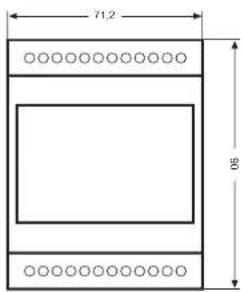
Dimensions are in millimeters.
4.1. CONNECTION DIAGRAM
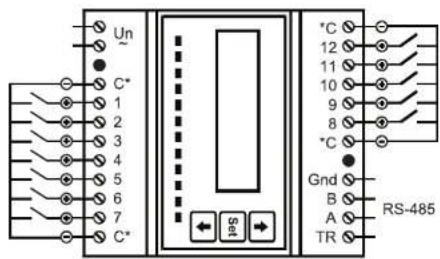
* Common Lead (Using any one of them will suffice.) When a counter with NPN output is connected to EPC-12, collector lead is connected to In (+) input and emitter lead is connected to Com (-) input. When a counter with PNP output is connected to EPC-12, emitter lead is connected to In (+) input and collector lead is connected to Com (-) input.
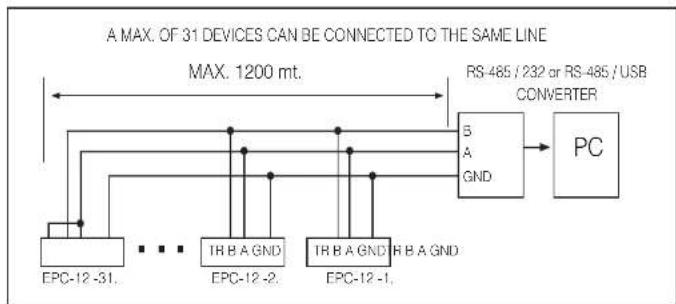
flowchart
graph LR
    A["Max. 1200 mt."] --> B["PS-485 / 232 or RS-485 / USB CONVERTER"]
    B --> C["PC"]
    D["EPC-12 -31"] --> E["..."]
    F["EPC-12 -2"] --> G["..."]
    H["EPC-12 -1"] --> I["..."]
    J["EPC-12 -31"] --> K["..."]
    L["EPC-12 -2"] --> M["..."]
    N["EPC-12 -1"] --> O["..."]
    P["PC"] --> Q["RS-485 / 232 or RS-485 / USB CONVERTER"]
51
BY USING A REPEATER, 247 DEVICES CAN BE CONNECTED TO THE SAME LINE.

flowchart
graph TD
    A["TRB A9A0"] --> B["Max. 1200 M"]
    C["EPC-12 247"] --> D["Max. 1200 M"]
    E["REFTEATOR"] --> F["Max. 1200 M"]
    G["EPC-12 31"] --> H["Max. 1200 M"]
    I["EPC-12 1EPC-12"] --> J["Max. 1200 M"]
    K["RS-485/USB CONVERTER"] --> L["PC"]
    L --> M["3 A GND"]
    M --> N["Ground"]
52

flowchart
graph TD
    A["GEM-10"] --> B["RS-48S"]
    B --> C["EPC-12"]
    B --> D["EPC-12"]
    B --> E["EPC-12"]
    B --> F["EPC-12"]
    C --> G["ES-32L"]
    D --> H["ES-32L"]
    E --> I["ES-32L"]
    F --> J["ES-32L"]
    G --> K["Water meter"]
    H --> L["Water meter"]
    I --> M["Water meter"]
    J --> N["Water meter"]
    K --> O["Gas meter"]
    L --> P["Gas meter"]
    M --> Q["Gas meter"]
    N --> R["Gas meter"]
    O --> S["Gas meter"]
    P --> T["Gas meter"]
    Q --> U["Gas meter"]
    R --> V["Max. 12"]
    S --> W["Max. 12"]
⑤3
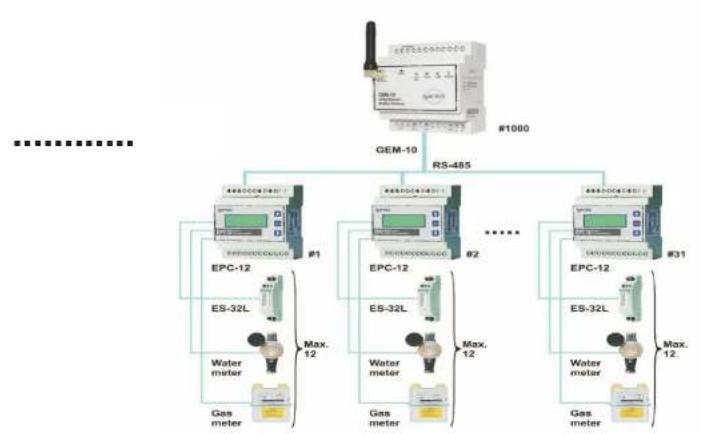
flowchart
graph TD
    A["GEM-10"] --> B["RS-485"]
    B --> C["EPC-12"]
    B --> D["EPC-12"]
    B --> E["EPC-12"]
    C --> F["ES-32L"]
    D --> G["ES-32L"]
    E --> H["ES-32L"]
    F --> I["Water meter"]
    G --> J["Water meter"]
    H --> K["Gas meter"]
    I --> L["Gas meter"]
    J --> M["Gas meter"]
    K --> N["Gas meter"]
    style A fill:#f9f,stroke:#333
    style B fill:#ccf,stroke:#333
    style C fill:#cfc,stroke:#333
    style D fill:#cfc,stroke:#333
    style E fill:#cfc,stroke:#333
    style F fill:#fcc,stroke:#333
    style G fill:#fcc,stroke:#333
    style H fill:#fcc,stroke:#333
    style I fill:#cff,stroke:#333
    style J fill:#cff,stroke:#333
    style K fill:#cff,stroke:#333
    style L fill:#cff,stroke:#333
⑤4
5. TECHNICAL DATA
Operating Voltage (Un) = Please see device labels.
Operating Frequency (I) = 45-65Hz
Supply Input Power Consumption = <5VA
Communication (Insulated) = MODBUS RTU (RS485)
Baud Rate = 1200 - 38400 bps
Adress = 1 - 247
Parity = No. Odd. Even
Stop Bit = 1
Max Communication Distance = 1200 m (MODBUS/RS-485 side, using signal amplifier)
Pulse Inputs (12 pcs, Insulated) = Complies with EN 62053-31.
Minimum Pulse Duration = 10 ms
Minimum Time Between Pulses = 30 ms
Minimum pulse period = 60 ms
Maximum Pulse Frequency = 16 Hz
Maximum Contact Resistance = 800 Ohm
Pulse Voltage = 10-12V
Trigger Edge = Rising and Pulse width control
Distance between meters
to be connected to EPC-12 = 1000 m
Total Counter Capacity = 34.359.738.360
Ambient Temperature = -25...+55 C ^c .
Storage Temperature = -25...+70 C
Humidity = %95
Display = Backlight 2x12 LCD
Dimensions = DIN4 (PK27)
Device Protection Class = Double Insulated Front panel = IR40
Front panel = IP40 Terminals = IP20
Enclosure Material = Nonflammable
Installation = Rail mount
Cable Thickness for Voltage Connection = max. 2.5 mm ^2
Cable Thickness for Pulse Connection = max. 2.5 mm²
Cable Thickness for RS-485 Connection = CAT 5 cable
Weight = 456.4 gr
Internal Memory = 2MB
Factory Default Settings
Baud Rate = 9600
Parity = No
Address = 1 Counter Set Div
Counter Set = Disable PASSWORD = 1234
PASSWORD = 1204 PASSWORD Enable = No
PASSWORD Enable = No Log Save Period = 30 min
Daylight Savings Time application = Active
Multiplier = 1
Denominator = 1
Unit = None
Tariff = None
Counters = 0
Alarm = Normal

- SECURITY
- Warnings
- Standards Applied to the Device
- WARRANTY
- Index
- INTRODUCTION
- APPLICATIONS
- GENERAL FEATURES
- Device Features
- EPC-12 Configuration Software Features
- FRONT PANEL
- HARDWARE FEATURES
- UTILIZATION OF DEVICE
- Settings that are changed from the device
- Monitoring Screen
- Main Menus
- RS-485 (Information for communicating with a PC) Menu
- Selecting Baud Rate value
- Selecting Parity value
- Entering Address Information
- Counter Set Setting (Activating index writing to counters with tariff)
- Enable (Activating user password protection)
- ESCAPE Menu
- Settings that are changed from the PC
- RS-485 Settings
- General Settings
- Counter Settings
- Date-Time Settings
- Tariff Settings
- Holiday Tariff Settings
- Saturday – Sunday – Week Day Tariff Settings
- Device Information
- Total Counter Indexes
- Counter Indexes with Tariff
- Device Status
- Memory - Logging Features :
- EPC-12 CONFIGURATION (INTERFACE) SOFTWARE
- TECHNICAL DATA
Brand : ENTES
Model : EPC-12
Category : Measuring equipment