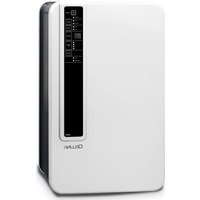
CD25W - Dehumidifier Cellini - Free user manual and instructions
Find the device manual for free CD25W Cellini in PDF.


| Product Type | Portable Dehumidifier |
| Model | CD25W |
| Brand | Cellini |
| Dehumidification Capacity | 25 L/day (30°C, 80% RH) |
| Dimensions (W x D x H) | 35 x 24 x 50 cm |
| Weight | 10 kg |
| Power Supply | 220-240 V ~ 50 Hz |
| Power Consumption | 280 W |
| Refrigerant | R290 |
| Water Tank Capacity | 2.5 L |
| Airflow Rate | 150 m³/h |
| Noise Level | 42 dB(A) |
| Operating Temperature Range | 5°C to 35°C |
| Functions | Dehumidification, Continuous Drainage, Auto Defrost, Timer, Fan Speed |
| Control Type | Electronic with LED Display |
| Humidity Set Range | 30% to 80% RH |
| Filter Type | Washable Pre-Filter |
| Maintenance | Clean filter every 2 weeks; empty tank or connect hose |
| Safety Features | Auto Shut-off when tank full, Overheat Protection |
| Spare Parts | Filters, water tank, drainage hose (available separately) |
| Repairability | User-replaceable filters; professional service for refrigerant circuit |
| Warranty | 2 years |
Frequently Asked Questions - CD25W Cellini
User questions about CD25W Cellini
0 question about this device. Answer the ones you know or ask your own.
Ask a new question about this device
Download the instructions for your Dehumidifier in PDF format for free! Find your manual CD25W - Cellini and take your electronic device back in hand. On this page are published all the documents necessary for the use of your device. CD25W by Cellini.
USER MANUAL CD25W Cellini
natural_image
Line drawing of a rectangular electronic device with a vertical panel and control buttons (no text or symbols)請仔細閱讀並妥善保存此說明書
Read and save these instructions
主要部件:
natural_image
Technical line drawing of a multi-chamber electric heater unit (no text or symbols)natural_image
Pure mechanical diagram showing a pipe joint with no text or symbols清洗
natural_image
Line drawing of a multi-free air conditioner unit (no text or symbols)貯藏
如果機器長時間不用,請遵照一下步驟:
natural_image
Illustration of a server or electronic device with a labeled component (no text or symbols present)
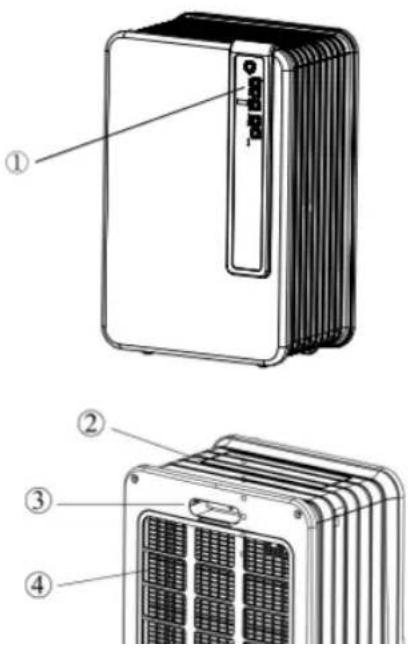
Main components:
① Control panel
② The Outlet for dry air
③ Handle
④ Filter
⑤ Hole for drainage hose
Safety tips
The installation of the unit must observe the local regulation, law and rule. And the machine only available to be put on the place which are dry or indoor. The ground wire must be connected and the voltage and frequency should be 220-240V / 50 Hz.
Tips
- In order to make it work in best performance, pls don't put the machine nearly the radiator or other heater
- In order to make it work in highest-efficiency, pls close all the window.
- The machine's dehumidification capacity mainly depends on indoor's temperature and humidity. Under the lower temperature, the dehumidification is very small.
● Always keep the filter clean to avoid unnecessary consumption losing, and then it can arrive the best dehumidification efficiency. - If the power supply is stopped suddenly, the machine will stop 3 minute, then start up automatically. This kind of delay can make the compressor not be damaged.

Tips:
The installment must be connected with ground wire. Please don't connect the machine, if it isn't connected with ground wire.
Please read this instruction and observe them strictly.
Notice:
The unit must be stand up straightly at least 2 hours before start it up.
Before connecting with the power, the below items should be highly noted:
● The voltage supplying must coincide with rated voltage on rating lab
- The socket and power must coincide with the standard on rating lable.
● The power plug must be suitable for wall socket.
● The machine must be put on the flat place.
● The current supplying must coincide CE standard.
- Don't cover the air inlet.
- Please empty the water on water tank before remove the machine.
- Please make the machine far away from the chemical substance.
- Don't spray water on the unit or submerge the unit in the water.
- Don't let other articles blocking machine's inlet or outlet.
- Please pull out the plug when cleaning or replace the components.
- Don't connect any branching with the powercord, if the socket is not suitable pls contact specialized technician to install suitable wall socket.
- For the sake of safety, don't let the children to approach or use the unit,
- When repair the unit ,pls contact specialized electrician or supplier.The operation and maintainess should follow the instruction carefully.
- PIs unplug the unit when not using the machine.
- When the powercord or plug is damaged, pls stop using immediately and ask specialized electrician or supplier to replace.

Notice
- Don't using damaged powercord, plug, out casing and control panel. Don't curve the powercord, Don't make sharp instrument touch the unit,
- If the users don't observe the manual, the warranty of the unit may be invalid.
● Operation Of Key Pads

1、POWER—Switch on/off the power.
2、SPEED—select the fan blower working at "high speed" level or "Low speed" level and corresponding indicator will illuminate.(when in dry mode,the speed key is out of function)
3、TIMER(Hr)—set time for swtich on/off automatically and 1h、2h、4h、8h、no timer can be setted。When appliance is powered off or in standby state, press this key to set time for swtich on, while When appliance is powered on, press this key to set time for swtich off.
4、DEHUM—press “DEHUM” to make it circulating among continuous-40%-45%-50%-55%-60%-65%-70%-75%-80% -continuous.... Note:①、If power supply is cut off when the appliance is running, once power restoration,the unit is default set to restart at ②、When in dry mode,the dehumidify and speed key are out of function,and press dehumidify key for 5 seconds,the ambient temperature ratio will be displayed on nixie tube.③、Press the dehumidify key to set desired humidity ratio, The settings will be scrubbed off within 3 seconds of no action and current ambient humidity will be displayed on digital tube.④、Press dehumidify key for 5 seconds,the ambient temperature ratio will be displayed on nixie tube.⑤、When ambient humidity<30%RH,"LO"mark will be displayed on nixie tube; When ambient humidity>90%RH, "HI"mark will be displayed on digital tube.⑥、Each gap of humidity setting is 5%, ⑦、When“DEHUM”indicator illuminates,
5、SWING—setting airplane opening or closing.
Note:①、When in water-full status, the airplate will be closed automatically.②、When the unit runs, in any mode, the swing can be setted.
6、MODE—Dry mode or dehumidify mode can be setted.
7、TIMER(Hr) INDICATOR
8、FULL INDICATOR—When the watertank is full, this indicator illuminates.
9、DEFROST INDICATOR—①When the unit is defrosting, the defrost indicator illuminates ②、When the NTC on the evaporator is open circuit or short circuit, this indicator will twinkle; ③、When the NTC on the evaporator detects the copper'temperature >40^ , the defrost indicator twinkle 2 times and illuminate 1 time. ④、When the temperature&humidity sensor detects ambient temperature ≥ 40^ and the NTC on the temperature&humidity sensor is short circuit, the run indicator and the defrost indicator illuminate at the same time.
10、RUN INDICATOR—①、When the unit runs, this indicator illuminates②、When the T&H sensor detects ambient temperature≤5℃, this indicator twinkle③、When the temperature&humidity sensor detects ambient temperature ≥40℃ and the NTC on the temperature&humidity sensor is short circuit, the run indicator and the defrost indicator illuminate at the same time.
11、HIGH INDICATOR—When the fan motor runs at high speed, this indicator illuminates
12、LOW INDICATOR—When the fan motor runs at low speed, this indicator illuminates
13、DRY INDICATOR—When this indicator illuminates, the fan motor runs at high speed automatically.
14、DEHUM INDICATOR When the unit runs at given humidity or continuous dehumidification, this indicator illuminates.
15、DIGITAL TUBE—①、When the DEHUM indicator don't illuminate, press the DEHUM key ,the
ambient temperature is displayed on digital tube②、Press the DEHUM key for 5 seconds, the digital tube shows ambient temperature, if press the DEHUM key all the time, the digital tube shows ambient temperature all the time and stop pressing the key ,the digital tube shows ambient humidity ③、When the DEHUM indicator illuminates, press the DEHUM key, the ambient humidity is displayed on digital tube④、When the T&H sensor isn't connected, the mark "CO" twinkle on the digital tube and the unit keep running at continuous dehumidification status.
Operation
When plug into power socket, all indicators and digital tube illuminate and go out after 1 seconds, and the buzzer will alarm 3 times.
1、POWER—switch on/off.
(a)、Press the "ON/OFF" button to turn on the unit. One time beep signal can be heard. The airplane startup automatically at 90 degree, and the indicator of run, high speed, dehumidify illuminate and ambient humidity is displayed on digital tube. and the unit is in the status of constant dehumidifying
(b)、Press the "ON/OFF" button again, one time long beep signal can be heard. the unit will stop working and the airplate close.
2、SPEED—press “SPEED” to make it circulating among low-high-low……
3、DEHUM—press “DEHUM” to make it circulating among continuous-40%-45%-50%-55%-60%-65%-70%-75%-80% -continuous....
(Note: Press "MODE" to make the dehumidify indicator illuminated before setting humidity ratio)
- SWING—When appliance is powered on, press to oscillate airplatevautomatically. Press again to fix a stationary angle.
5、MODE
(a)、Press the mode key for the first time to choose the dry mode, in this mode, the dry indicator illuminates and the fan motor runs at high speed.
(b)、Press the mode key for the second time to choose the DEHUM mode, in this mode, the dehumidify indicator illuminates and press “DEHUM” to make it circulating among continuous-40%-45%-50%-55%-60%-65%-70%-75%-80% -continuous....
6、TIMER(Hr)—set time for swtich on/off automatically and 1h、2h、4h、8h、no timer can be setted。
(a)、When appliance is powered off or in standby state, press this key to set time circulating among 1h\~2h\~4h\~8h\~no timer\~1h ... for swtich on, and corresponding timer indicator illuminates.
(b)、When appliance is powered on, press this key to set time circulating among 1h\~2h\~4h\~8h\~no timer\~1h ... for switch off. and corresponding timer indicator illuminates.
7、Water-full
When the watertank is full, the compressor and fan stop working and the buzzer will alarm 10 times.the water-full indicator illuminates all the time.
8、Protection of compressor
When the compressor shut off, it takes 3 minutes to rework for protection period.
(Note: The run indicator still illuminates)
9、Memory function
(a). When switch on the unit again after switching off (don't unplug the plug), the unit will memorize the last setted mode automatically and recover back to the last setted mode.
(b)、If power supply is cut off when the appliance is running (unplug the plug), once power restoration, the unit runs at continuous dehumidify mode automatically.
Drainage device
-When the watertank is full, the alarm sound can be heard and the compressor stop working automatically, the unit stops dehumidifying.

natural_image
Technical line drawing of a multi-chamber electric fan or heat exchanger unit (no text or symbols visible)-Remove the watertank and empty the water ,the reinstall the watertank,the compressor restart after 3 minutes.
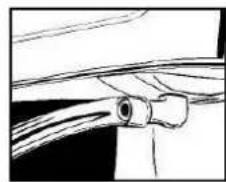
If you need continuous drainage, connect the drainage hose to the water outlet and ensure that the end of the hose is lower than the the water outlet, otherwise the water will not drain and flooding may occur.
natural_image
Pure mechanical diagram showing a pipe joint with no text or symbolsPlace the end of the drainage hose in a water outlet.
When you no longer wish to use the permanent water drainage, disconnect the drainage tube from the device. Ensure that the water tank is positioned correctly.
Cleaning
Before cleaning, switch off the unit and unplug the plug.
Cleaning for out casing
Only use a soft clean cloth to clean the out casing, if the machine is very dirty, could add moderate Cleanser on damp cloth to clean the out casing, never spray water to clean the machine.
Air filter
If often using the machine, the filter is likely to be blocked by tiny dust, so it's advised to clean the air filter one time every two weeks as below steps:
1 Remove the filter
2 Using vacuum cleaner or water to clean the filter, then reinstall the filter after it is dry.

natural_image
Technical line drawing of a multi-tiered air conditioner unit (no text or symbols visible)
Never using the machine without the filter
Storage
If don't use the machine for a long time ,pls follow the below stips:
1 Unplug the machine and empty the water of watertank, keep the watertank and the machine dry
2 Clean the filter
3 Pack it with polybag and put it in dry and ventilated place.
TROUBLE SHOOTING
Check the following before contacting technical support:
| Problem | Cause | Solution |
| The unit does not work. | The power is not connected. | Insert the plug into the wall outlet. |
| The device does not dehumidify. | The water container is full. | Remove the water from the container. |
| The water container has not been replaced correctly. | Place the water container in the correct position. | |
| The air filter is clogged. | Clean the air filter. | |
| The temperature or relative humidity in the room where the device is operating is too low. | It is normal that the device does not dehumidify in these conditions | |
| The dehumidifier works, but reduces the relative humidity insufficiently. | The room is too large. | We recommend using a dehumidifier with a greater capacity. |
| There is too wet or the humidity is too high. | We recommend using a dehumidifier with a greater capacity. | |
| There is too much ventilation. | Reduce ventilation (e.g. close windows and shut doors.) |
Specification
| Model | CD25W |
| Power rated | 400W |
| Voltage | 220-240V / 1Ph / 50Hz |
| Dehumidification | 25 Liters / day (at 30°C, 80%RH) |
| Capacity of Water Tank | 4.2 Liters |
| Appliable space | 130-230 m^3 |
| Working temperature | 5 – 35 °C |
| Deforst | Yes |
| Type of compressor | Rotary |
| Refrigerant | R134a (165g) |
| Unit dimension (W x D x H) | 356 x 240 x 593 mm |
| Net weight | 13.62kg |
| Gross weight | 14.72kg |
請記錄下列產品資料
Proudly Serviced by:

a Gilman Group Company
太平家庭電器


Brand : Cellini
Model : CD25W
Category : Dehumidifier