
CMD60W - Dehumidifier Cellini - Free user manual and instructions
Find the device manual for free CMD60W Cellini in PDF.


| Product Type | Dehumidifier |
| Brand | Cellini |
| Model | CMD60W |
| Dehumidification Capacity | Approx. 20 L/day (30°C, 80% RH) |
| Suitable Area | Approx. 30-50 m² |
| Water Tank Capacity | 3.0 L |
| Power Supply | 220-240V ~ 50Hz |
| Rated Power | 300 W |
| Refrigerant | R290 |
| Noise Level | ≤ 45 dB(A) |
| Dimensions (W×D×H) | 350 × 250 × 500 mm |
| Net Weight | 12.0 kg |
| Operation Modes | Dehumidification, Clothes Drying, Continuous Dehumidification, Sleep Mode |
| Humidity Setting Range | 40% - 80% RH |
| Timer Function | 1-24 hour timer on/off |
| Auto Defrost | Supported |
| Drainage Method | Water tank drainage / Continuous drainage (external drain hose) |
| Filter | Washable high-efficiency filter |
| Safety Protection | Overload protection, tank full shutdown, auto restart |
| Cleaning and Maintenance | Clean filter every two weeks, clean tank regularly |
| Accessories | Drain hose, user manual |
Frequently Asked Questions - CMD60W Cellini
User questions about CMD60W Cellini
0 question about this device. Answer the ones you know or ask your own.
Ask a new question about this device
Download the instructions for your Dehumidifier in PDF format for free! Find your manual CMD60W - Cellini and take your electronic device back in hand. On this page are published all the documents necessary for the use of your device. CMD60W by Cellini.
USER MANUAL CMD60W Cellini
natural_image
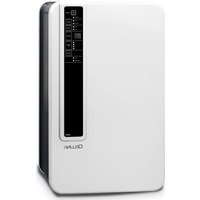
Line drawing of a Cellini UV power supply unit (no text or symbols on the device body)INSTRUCTION MANUAL 產品說明書
CE

Please read this instruction manual carefully before use and keep it for future reference. 請於使用前仔細閱讀本說明書並加以保存。
A: 前面板
B: 控制面板
C: 水箱
D: 後面板
E: 進風口
F: 出風口
G: 電源線
H: 浮子
1: 出水口
J: 抽濕時的進水口
K: 水箱盖
L: 內置的出風過濾網及UV燈位置
控制面板介紹

Thanks for purchasing this product. Please read all the instructions before attempting to operate this product and save this instruction manual for future re-ference. This portable mini dehumidifier is with low power consumption and for your rooms, closets and any storage area.
IMPORTANT SAFEGUARDS
- When using an electrical appliance, basic safety precautions should always be observed, including the followings.
WARNING: To reduce the risk of fire, electrical shock, injury or damage, please read all the below instructions before use.
- This product is only suitable for general household use, not for industrial or commercial purposes.
- Note: Remember not to overturn or tear down the mini dehumidifier, the water may come out to wet the floor.
- If the power cord or plug is damaged, please do not use it in case of any electric shock.
- This appliance is not a toy, please do not allow children to use it alone. When using this one nearby children or pets, please pay more attention and do not leave them alone with it.
- Use this machine only as described in this manual. Use only manufacturer's approved and supplied parts and accessories. Use other than ours accessorise is not recommended and will void the warranty.
- Do not use the product near explosive materials, inflammable liquids or any type of gas; it may cause fire or explosions.
-
Do not use this product in a high temperature environment. Do not place this product near heated objects or equipment. The product may be damaged.
-
If the operation is abnormal, please contact our after-sales service centre for repair. Please do not try to repair it by yourselves.
- This appliance is not intended for use by persons (including children) with reduced physical, sensory or mental capabilities, or lack of experience and knowledge, unless they have been given supervision or instruction concerning use of appliance by a person responsible for their safety.
- Store the appliance in a cool, dry and safety place after use.
- Please unplug the appliance and empty the water tank timely after use.
PRODUCT FEATURES
- Semiconductor dehumidification technology, no compressor design, environmental pollution
• Photocatalyst, anion purification and UV triple air purification - Removable transparent water tank, 2.5L translucent water tank
• Automatic switch off when the tank is full of water - Very low noise
- Compressor free, environmental friendly
• Daily capacity: 600ml/24hours (at 30°C and 80%RH) - Low power consumption: 65W (at 30^ and 80% RH )
• Applicable to storage room, wardrobe, room and so on
BASIC FUNCTIONS
This Mini Dehumidifier uses semiconductor technology (no compressor) which makes it light and quiet. Poor ventilation causes musty odours and damp in small area & mobile areas, such as room, larders, closet, cabinets & mobile container etc. The energysaving Mini Dehumidifier eliminates this problem by keeping them free of unwanted moisture.
PARTS NAME

A : Front panel
B : Control Panel
C: Water tank
D : Rear panel
E : Air inlet
F : Air Outlet
G : Power cord
H : Float
I: Water Outlet
J: water intake during operation
K : Water Tank cover
L : Built-in filter & UV Light location
Control Panel Introduction
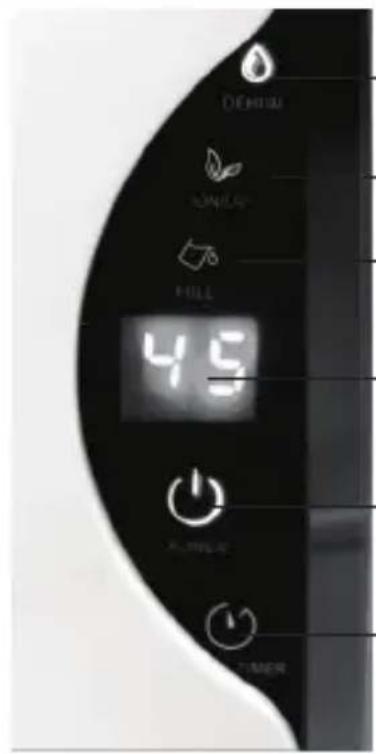


Power key
When press the Power Key 🔊, the Power Key 🔊 will be ON and becomes blue colour. The UV light inside the air outlet turns on and the LED Dispay 🔊 shows the current humidity(%) in your room. The machine will start the dehumidification. Meanwhile, the dehumidify indicator 🔊 turns to blue, and the air purifying indicator 🔊 turns to green colour. Press the Power Key 🔊 again, the machine will stop dehumidifying. All the indicators will be turned off and the inter fan will stop running after 10 seconds.

Timer key
-
When the machine is operating, press the timer key once to enter the timer shutdown setting interface. Press the timer key to select the desired shutdown hour, the range is from 01 to 24 hours as a cycle. After set the desired hours and wait for 5 seconds, the machine will start the countdown automatically, LED display shows the current indoor humidity(%). Once the timer reaches the set hour, the machine will stop operation and enter into the stand by state.
-
Connect the power and enter the stand by state "--", press the timer key 🔍 to enter the timer settings interface, set the desired hour for the machine timer on function with the same steps above. The machine will automatically turn on when reaches the set time and begins to dehumidify.
- In the timer setting interface, hold the timer key 🔊 for 5 seconds, the LED display ⏻ will show the current room temperature.
- In the timer setting interface, if the selected time is 00 hours, the timer function will be disabled.

Dehumidify Indicator
When the machine is operating, the Dehumidify Indicator 🖼️ turns to blue colour. When machine is stopped, this indicator turns off and the machine stop working.

LED Display
When the machine is operating, the LED Display 88 shows the current room humidity(%). When the user sets the timer function, the LED Display 88 will show the hour set time.

Air Purify Indicator
When the machine starts, the air purify function starts working automatically. The Air Purify Indicator 📋 turns to green colour. The UV light and lonizer air purify functions work automatically.

Full water Indicator
When the water tank is full of water, the machine stops working automatically. The full water Indicator 📋 turns on and becomes red colour. Then the user needs to empty the tank then put it back in the machine. After that, the full water Indicator 📋 will turn off and the machine will start to work automatically.
DRAIN
When the machine is working and remove the water tank suddenly, the machine will stop working. The full water indicator will become red colour and the machine start to have a "BEEP" warning sound, up to 15 seconds. When tank installs back to the machine properly, the machine will restart. The full water indicator will turn off and the warning sound of "BEEP" stops.
REMOVE AND INSTALL THE WATER TANK
1) When the water tank is full with approximately 2.5L of water, the machine starts to have a "BEEP" warning sound and stops the dehumidification automatically. The full water indicator light will turn to red color.
2) Please turn off the power key before remove the water tank. Hold the tank to pull out the water tank, it is not necessary to open the lid of water tank, pour out water directly from water outlet. CAUTION: Please make sure the appliance is turned off before removing the water tank.
3) After the water are completely poured out and then put the water tank back in the machine. Please restart the machine if need to dehumidify, the Dehumidify indicator light turns blue colour for normal operation.
4) Please turn off the power and unplug the cord after use, then empty the water tank. Store the mini dehumidifier in a cool and dry place.
CARE AND MAINTENANCE
CAUTION: Turn off the power and unplug the power cord before performing any maintenance or repair.
- Turn off the mini dehumidifier and unplug the plug before cleaning.
- Use a clean, soft towel to wipe the surface of the fuselage, and then clean the air inlet and exhaust dust with a clean brush.
- Do not use the rough towel to clean the body and avoid to damage the glossy surface.
- Do not clean the machine in water or under the tap. Water may cause damage to the machine.
- Do not use any destructive cleaning agents to wipe the body surface.
If you are not going to use the machine for a long time:
- The water in the tank should be dry and ensure no residue inside.
- Wrap up the power cord.
- The machine should be stored in a cool, dry place to avoid direct sunlight, extreme temperatures and dusty environment.
CAUTIONS
- Turn off the power key and unplug the power cord after every use.
- Avoid using the product in places where it is too wet or accumulated water. The wires should be placed in a ventilated position when in use.
- Keep the air inlet and air outlet clear to aroid blocking the openings. Do not obstruct the air openings with soft items such as clothes, plastic bags, paper...etc.
- If there is a problem with the power cord, please contact our after-sales service for assistance. Do not repair the machine by yourself as there is risk of electric shock.
- WARNING! When the mini dehumidifier is operating, the mini dehumidifier should stand vertical, can not be tilted or pushed down to avoid water leakage and wet the floor or the possibility of electric shock.
- The dehumidifying capacity is measured based on ambient condition of 30^ C and 80% RH. The dehumidifying capacity will be affected by ambient temperature and relative humidity. At a lower ambient temperature or relative humidity, the amount water collected will be less.
PRODUCT SPECIFICATION
• Daily capacity: 600 ml (at 30°C and 80% RH)
• Water tank capacity: 2.5L
- Low power consumption: 65W (at 30^ and 80% RH)
• Product dimension(W x H x D): 240 x 363 x 135(mm)
• Power cord length: Around 2.2 Metre
• MODEL NO.: CMD60W
請記錄下列產品資料
Proudly Serviced by:
ToolBox
a Gilman Group Company
太平家庭電器
2/F, Shing Dao Industrial Building, 232 Aberdeen Main Road, Hong Kong 香港香港仔大道232號城都工業大廈2樓

- 控制面板介紹
- IMPORTANT SAFEGUARDS
- PRODUCT FEATURES
- BASIC FUNCTIONS
- PARTS NAME
- Control Panel Introduction
- Power key
- Timer key
- Dehumidify Indicator
- LED Display
- Air Purify Indicator
- Full water Indicator
- DRAIN
- REMOVE AND INSTALL THE WATER TANK
- CARE AND MAINTENANCE
- CAUTIONS
- PRODUCT SPECIFICATION
- 請記錄下列產品資料
- 太平家庭電器
Brand : Cellini
Model : CMD60W
Category : Dehumidifier