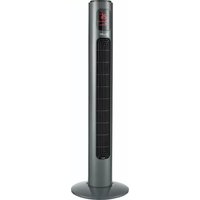
CTF38 - Fan Cellini - Free user manual and instructions
Find the device manual for free CTF38 Cellini in PDF.


| Product Type | Fan |
| Model | CTF38 |
| Brand | Cellini |
| Color | White / Black |
| Height | 120 cm (47.2 in) |
| Base Diameter | 30 cm (11.8 in) |
| Weight | 4.5 kg (9.9 lbs) |
| Power Supply | 220-240 V ~ 50/60 Hz |
| Power Consumption | 45 W |
| Speed Settings | 3 speeds (Low, Medium, High) |
| Oscillation | Automatic 90° |
| Remote Control | Yes, included |
| Timer | 1-8 hours |
| Airflow Capacity | 1200 m³/h |
| Noise Level | ≤ 55 dB(A) |
| Material | ABS plastic, metal stand |
| Safety Features | Overheat protection, tip-over switch |
| Cleaning Instructions | Unplug and wipe with damp cloth; do not immerse |
| Replacement Parts | Remote control, blade assembly available |
| Warranty | 2 years |
Frequently Asked Questions - CTF38 Cellini
User questions about CTF38 Cellini
0 question about this device. Answer the ones you know or ask your own.
Ask a new question about this device
Download the instructions for your Fan in PDF format for free! Find your manual CTF38 - Cellini and take your electronic device back in hand. On this page are published all the documents necessary for the use of your device. CTF38 by Cellini.
USER MANUAL CTF38 Cellini
natural_image
Exterior view of a modern office building (no signage)CE

Before using your product for the first time, please read this instruction manual.
請於使用前細閱本說明書並加以保存
SAFETY INSTRUCTION
Thank you for purchasing this fan. This product has passed through extensive quality assurance process. Every care has been taken to ensure that it reaches you in perfect condition.
Attention! When using electric tools, basic safety precautions should be followed to reduce the risk of fire, electric shock and personal injury, including the following,
Read all these instructions before operating this product and keep these instructions for easy reference.
- Check the voltage indicated on the rating plate. This fan is designed for a 220-240V\~50/60Hz electric supply.
- Do not use electrical extension cord with this fan.
- Do not introduce your fingers through the front housing. Do not let children put any objects into the front housing.
- Do not let hair, curtains, tablecloth, clothes or other objects next to the air outlet of the fan. They could be sucked into the fan, causing damage or injuries.
- Do not use the fan having a cord or a plug damage, operation failure the fan is fallen or have been damage by any method.
- Periodically check the electric cable of this fan. If the electric cable is damaged, it must be replaced by the After-sales Service Center or by a similar qualified person in order to avoid a danger.
- Do not use this fan outdoor.
- Do not use this fan in a damp area such as bathroom.
- Do not use this fan on a window.
- Do not use this fan with any semi-conductors speed control.
- The fan should not be operated without a base nor used laying on its side.
- Do not cover the electrical cord by any objects. Do not overlay the cord with little covers or such element. Place the cord in an area where there are not any risk to stumble over it.
- The fan must be unplugged when not in-use. To unplug the fan, all the switches must be on the position "OFF", and then the plug could be disconnected.
- Do not operate the fan in an area where gasoline painting or such flammable liquids is used or stocked.
- Use this fan only as it is describe in this manual.
- Do not try to disassemble this fan and fix it by user, If you need maintenance, please send back the fan to our After-sales Service Center.
- All components of this fan must not be replaced by the user.
- If the supply cord is damaged, it must be replaced by the After-sales Service Center or a similarly qualified person in order to avoid a hazard.
- The safety standard of this fan is without earth connection.
- Keep this fan out of reach from Children or infirm persons and do not let them use the fan without supervision.
WARNING:
-
This appliance can be used by children aged from 8 years and above and persons with reduced physical, sensory or mental capabilities or lack of experience and knowledge if they have been given supervision or instruction concerning use of the appliance in a safe way and understand the hazards involved.
-
Children shall not play with the appliance. Cleaning and user maintenance shall not be made by children without supervised.
NOTE:
There are no serviceable parts in this unit. Do not attempt to disassemble.
WARNING: Never use this fan with any solid-state speed control device.
Doing so will create fire and/or shock hazards.
APPLIANCE COMPONENTS

CAUTION: THIS FAN MUST OPERATE IN THE UPRIGHT POSITION ONLY. DO NOT LAY FAN ON ITS SIDE OR IN ANY OTHER POSITION. DOING SO MAY CAUSE DAMAGE TO THE FAN AND/OR PERSONAL PROPERTY. DO NOT USE THIS FAN WITHOUT ITS BASE.
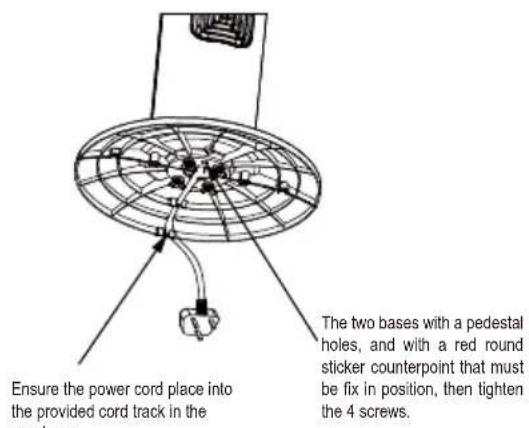
FAN BASE ASSEMBLY
- Remove all items of packing from the tower fan.
- Pass the power cord through the middle of the two base pieces.
- Position base piece onto the support posts of the other base piece to create the base assembly.
-
Turn the tower body upside down position the base assembly onto the pedestal tube. Ensure that the pedestal tube is sitting flush in the base assembly.
-
Screw the base assembly onto the pedestal tube with the supplied 4pcs of screws.
- Position the power cord into the provided cord track in the rear base.
- Turn the tower fan back to upright position after assembled. It is now ready for use.

OPERATION
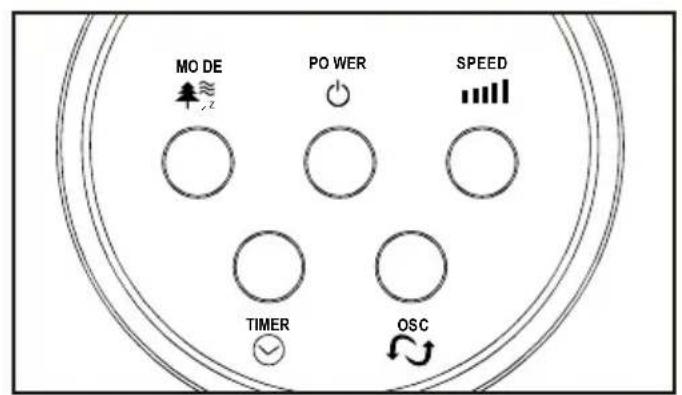
Control Panel

LED screen
The fan can be operated by the control panel located on the top of the Fan or by the remote controller(except Ionic function).
- Place the Fan on a stable and flat surface. Plug the power cord into a.c. 220 - 240V electrical outlet. The LED screen will display the current ambient temperature ^ C.
- POWER: Turn the Fan ON by pressing the POWER ⏻ button, the fan will start at Low speed 🎯.
- SPEED: Adjust the Fan speed to the desired level: Low, Medium, or High by pressing SPEED ▪ button. The speed setting is displayed on the LED screen.
-
MODE: Press the MODE ↗ ≈ z button to set the Fan as Normal ***, Natural 🌐, or Sleep ⚙z mode. The mode is displayed on the LED screen.
-
OSC: Press the OSC 📋 button to allow the Fan to oscillate the wind direction. To stop the oscillation, press the button again. The maximum angle is 70^ .
-
ION: The ionic function can only be selected from the remote controller. Press ION button to operate with ionic air purifying function or press 🐘 ≈ button 3-5 seconds of control panel to start the lonizer for air purification..
The ION icon will be shown on the LED screen.
-
TIMER: Press the TIMER ⏻ button to set desired auto power off time. There are 12 hours intervals, from 1 hour to 12 hours.
-
Power save mode: when at the 'Sleep' mode or the 'Timer' setting is on, the main LED screen will be off automatically after 30 seconds, and you can press any button to turn on the LED screen again.
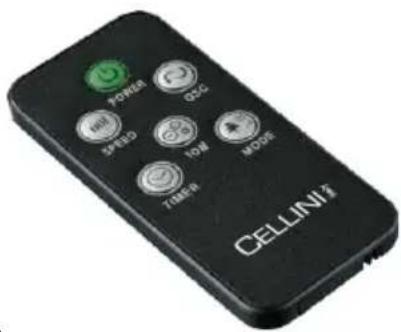
Remote Controller:
-
Remote controller can be stored at the back storage slot of the fan body.
-
Before using the remote controller, remove the plastic protection from the battery.
-
All the functions performed on the Remote Controller work identically to the main Control panel (except ionic function).
-
The remote controller uses battery(One battery of: CR2025 is included).
CLEANING & MAINTENANCE
- Always disconnect the fan from the mains by switching it off and removing the plug from the power outlet before cleaning.
- Do not allow water to penetrate into the motor during cleaning.
- It is advisable to use a neutral detergent and a soft cloth and to rub dry. Do not use solvents, acidic detergents, petrol or alcohol etc. to clean the plastic components, as these could cause deformed or damaged.
- Pack the fan in the original box and place it in a dry, well-ventilated place when it is not to be used for a long period of time.
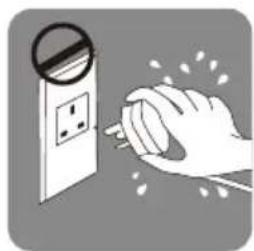
natural_image
Illustration of a hand using a power plug to trigger electrical hazard (no text or symbols)
CAUTION

The symbol on the product means that at the end of its life, the appliance must not be considered normal waste but hazardous waste and, as such, must be disposed of in specific recovery and disposal areas, as prescribed by the EC Directive 2002/96/EC (WEEE). By disposing of this product correctly, you can prevent negative consequences for the environment and for human health, due to the presence of potentially hazardous substances in the product.
TECHNICAL DATA
Model No. CTF38
220-240V\~ 50/60HzPower supply:
Power: 45W
Product Dimensions: 315 x 315 x 960mm (with base)
Net Weight: 3.30kg
重要安全事項
natural_image
Illustration of a hand using a power plug to clean electrical outlets (no text or symbols)

Proudly Serviced by:
ToolBox
a Gilman Group Company
太平家庭電器
2/F, Shing Dao Industrial Building, 232 Aberdeen Main Road, Hong Kong 香港香港仔大道232號城都工業大廈2樓

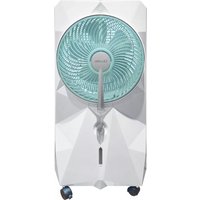
Brand : Cellini
Model : CTF38
Category : Fan