Protect It! SUPER7TEL - Wall socket Tripp Lite - Free user manual and instructions
Find the device manual for free Protect It! SUPER7TEL Tripp Lite in PDF.


Pick your language and provide your email: we'll send you a specifically translated version.
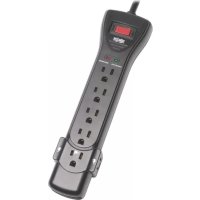
| Product Type | Surge Suppressor Wall Tap |
| Brand | Tripp Lite |
| Model | Protect It! SUPER7TEL |
| Category | Wall Tap with Telephone Protection |
| Dimensions (L x W x H) | Approximately 10 x 5 x 15 cm |
| Weight | 0.5 kg |
| Input Voltage | 120 V AC |
| Rated Current | 15 A |
| Number of Outlets | 7 AC outlets |
| Telephone Protection | 2 RJ11/45 lines |
| Coaxial Protection | Not included |
| LED Indicator | Green LED for active protection |
| Noise Filter | Built-in EMI/RFI filter |
| Operating Temperature | 0 °C to 40 °C |
| Humidity | 10% to 90% non-condensing |
| Maintenance | No special maintenance required |
| Cleaning | Wipe with a dry, lint-free cloth |
| Safety Instructions | For indoor use only, do not plug into an extension cord or power strip |
| Repairability | Not user-serviceable, contact customer support |
| Warranty | Limited 3-year warranty |
| Country of Origin | China |
| Housing Material | Fire-resistant ABS plastic |
Frequently Asked Questions - Protect It! SUPER7TEL Tripp Lite
What should I do if the protection LED is off?
If the green LED is off, the surge protection may be defective. Unplug the device and replace it immediately.
Can I plug a power strip into this wall tap?
No, it is not recommended to plug a power strip or extension cord, as this could reduce protection effectiveness and create a risk of overload.
How do I install the Protect It! SUPER7TEL?
Simply plug the wall tap into a standard AC outlet (120V). Ensure it is fully inserted and the green LED illuminates.
What does a red LED mean?
This model does not have a red LED. Only a green LED indicates active protection. If off, protection has failed.
Does it protect against lightning?
The Protect It! SUPER7TEL provides transient surge protection, including from lightning, but cannot guarantee absolute protection.
What devices can I plug in?
You can plug sensitive electronic devices such as computers, TVs, modems, phones, etc. Do not exceed 15A total.
How do I clean the wall tap?
Unplug it first. Use a dry, lint-free cloth to wipe the surface. Do not use chemicals or water.
Can I use it outdoors?
No, this device is designed only for indoor use, away from moisture and weather.
What if the protection stops working?
If the LED is off or connected devices are no longer protected, stop using the device and replace it. It is not repairable.
Where can I find spare parts?
This product has no user-replaceable spare parts. In case of failure, contact Tripp Lite customer service.
User questions about Protect It! SUPER7TEL Tripp Lite
0 question about this device. Answer the ones you know or ask your own.
Ask a new question about this device
No questions yet. Be the first to ask one.
Download the instructions for your Wall socket in PDF format for free! Find your manual Protect It! SUPER7TEL - Tripp Lite and take your electronic device back in hand. On this page are published all the documents necessary for the use of your device. Protect It! SUPER7TEL by Tripp Lite.
USER MANUAL Protect It! SUPER7TEL Tripp Lite
Manual assistant
Powered by Anthropic
Waiting for your message
Product information
Brand : Tripp Lite
Model : Protect It! SUPER7TEL
Category : Wall socket