
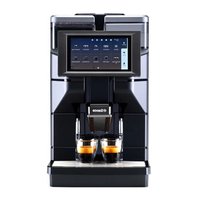
ROYAL COFFEE BAR - MANUAL 2 - Coffee machine SAECO - Free user manual and instructions
Find the device manual for free ROYAL COFFEE BAR - MANUAL 2 SAECO in PDF.




| Product type | Automatic coffee machine with built-in grinder |
| Brand | SAECO |
| Model | ROYAL COFFEE BAR - MANUAL 2 |
| Dimensions (W x D x H) | 480 x 380 x 395 mm |
| Weight | 16 kg |
| Power supply | 220-240 V ~ 50 Hz (according to rating plate) |
| Nominal power | Approx. 1350 W (according to rating plate) |
| Water tank capacity | 2.4 L |
| Coffee bean hopper capacity | 300 g |
| Percolation system | Continuous flow boiler with oscillating piston pump |
| Grind adjustment | Fine adjustment with increments (from 1 to 8) |
| Ground coffee dosage | Adjustable from 6 to 9 g |
| Coffee types | Espresso, long coffee, normal coffee, ground coffee |
| Additional functions | Hot water, steam, cappuccino (with cappuccinatore) |
| Programming | Language, water hardness, temperature, pre-infusion, pre-grinding, timer, energy saving |
| Display | LCD screen with text messages |
| Safety | Overheating protection, automatic shut-off when door open, stone detector |
| Maintenance | Removable brewing group, wash cycle, automatic or manual descaling |
| Included accessories | Measuring spoon for ground coffee, key for brewing group, cleaning brush, pH strips |
| Warranty | According to attached certificate |
Frequently Asked Questions - ROYAL COFFEE BAR - MANUAL 2 SAECO
User questions about ROYAL COFFEE BAR - MANUAL 2 SAECO
0 question about this device. Answer the ones you know or ask your own.
Ask a new question about this device
Download the instructions for your Coffee machine in PDF format for free! Find your manual ROYAL COFFEE BAR - MANUAL 2 - SAECO and take your electronic device back in hand. On this page are published all the documents necessary for the use of your device. ROYAL COFFEE BAR - MANUAL 2 by SAECO.
USER MANUAL ROYAL COFFEE BAR - MANUAL 2 SAECO
We congratulate you on having bought this top-quality espresso machine and thank you for choosing Saeco.
Before operating the machine, we recommend that you read the following instructions thoroughly, as they explain how to use, clean, and maintain the machine.

Fully automatic coffee machine
Dear Customer,
This fully automatic coffee machine allows you to brew either espresso or regular coffee, using both whole beans and pre-ground coffee.
Like all electric appliances, this coffee machine must be used with particular caution to avoid harm to people or damage to the machine itself. Before starting the machine, carefully read the following instructions and always observe the safety norms contained herein.
Do not use the machine if these instructions have not been carefully read!
Warning
The manufacturer declines any responsibility for damages occurring as a result of:
- improper use of the machine
- repairs not carried out by authorized personnel;
- use of non-genuine spare parts and accessories.
The above-mentioned cases void the warranty.
"TOTALE CAFFE 123...
"1 CAFFE LUNGO" "TOTALE 35"
"1 CAFFE" "TOTALE 201"
"1 ESPRESSO" "TOTALE 228"
"1 CAFFE LUNGO" "TOTALE 0
"1 Caffe" "TOTALE 0
"1 ESPRESSO" "TOTALE 0
"1 Kaffee lang" "Total 35"
"1 Kaffee
"Total 201"
"1 Espresso
"Total 228"
"Hot water
"Total 210"
"Counter
"Lock 0"
"Counter
"Cycles 0"
Code
RINSE PROG.CAPPUC.
WATER HARDNESS TOTAL COFFEES
HOT PLATE DESCALING
COFFEE TEMP. DESCALING SIGNAL
COFFEE TEMP. TIMER
COFFEE TEMP. EX. VENDING
PREINFUSION CLEANING
PRE-GRINDING WATER DRAIN
Cappuccino programming
"CHANGE CODE" 0...
"1 LONG COFFEE" TOTAL 0
"1 ESPRESSO" TOTAL 0...
"HOT WATER" TOTAL 0...
"HYDRAULIC CONNECTION" "ACTIVATED"
"FULL DRAW" "MACHINE READY"
"HOT WATER" "QUANTITY PROG."
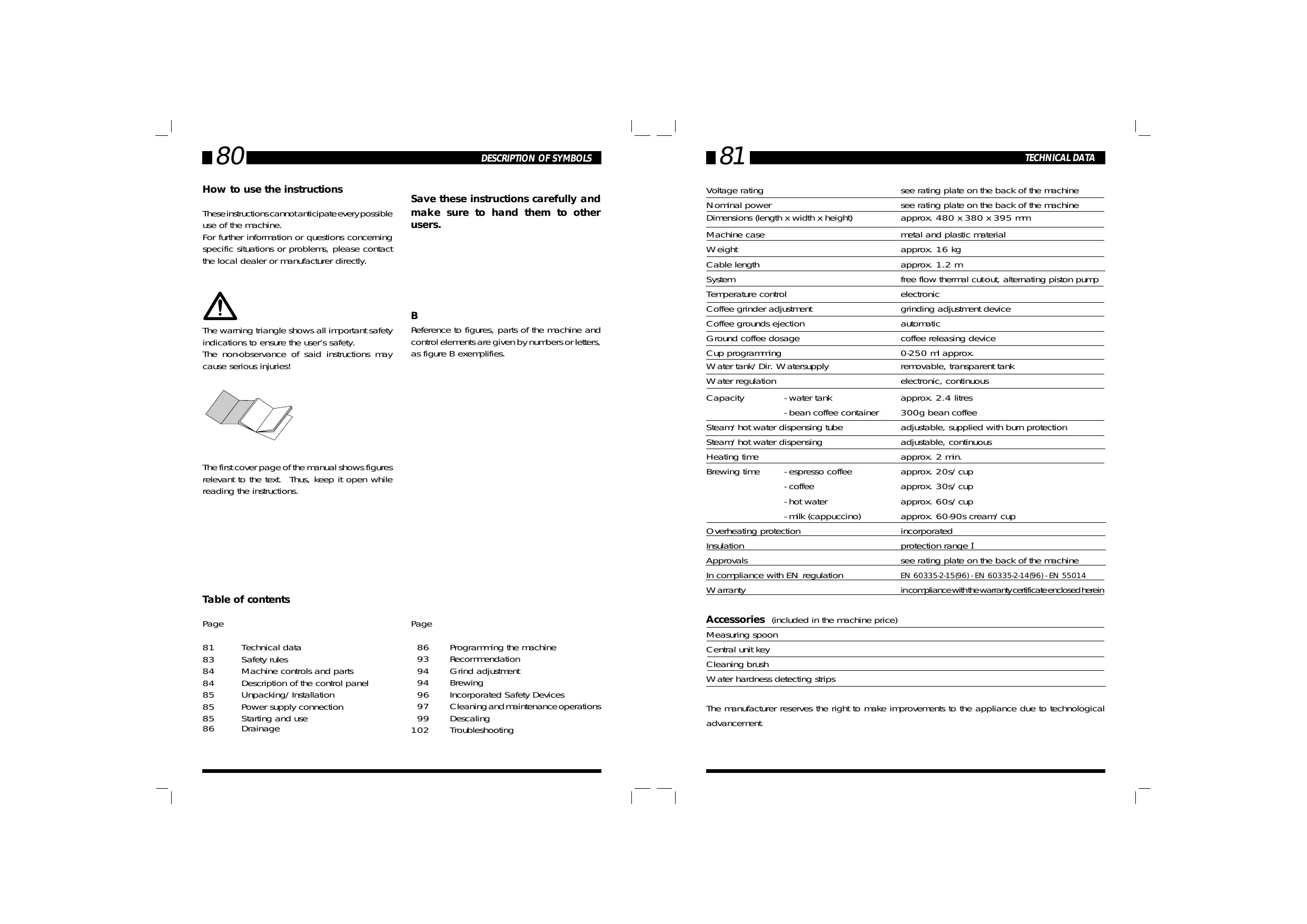
How to use the instructions
These instructions cannot anticipate every possible use of the machine.
For further information or questions concerning specific situations or problems, please contact the local dealer or manufacturer directly.

The warning triangle shows all important safety indications to ensure the user's safety.
The non-observance of said instructions may cause serious injuries!
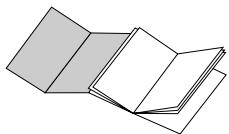
The first cover page of the manual shows figures relevant to the text. Thus, keep it open while reading the instructions.
Table of contents
Page 83 Safety rules 93 Recommendation
81 Technical data 86 84 Machine controls and parts 94 84 Description of the control panel 85 Unpacking/Installation 85 Power supply connection 85 Starting and use 86 Drainage
Save these instructions carefully and make sure to hand them to other users.
B
Reference to figures, parts of the machine and control elements are given by numbers or letters, as figure B exemplifies.
Page 86 Programming the machine 93 Recommendation 94 Grind adjustment 94 Brewing 96 Incorporated Safety Devices 97 Cleaning and maintenance operations 99 Descaling 102 Troubleshooting
| Voltage rating | see rating plate on the back of the machine | |
| Nominal power | see rating plate on the back of the machine | |
| Dimensions (length x width x height) | approx. 480 x 380 x 395 mm | |
| Machine case | metal and plastic material | |
| Weight | approx. 16 kg | |
| Cable length | approx. 1.2 m | |
| System | free flow thermal cut-out, alternating piston pump | |
| Temperature control | electronic | |
| Coffee grinder adjustment | grinding adjustment device | |
| Coffee grounds ejection | automatic | |
| Ground coffee dosage | coffee releasing device | |
| Cup programming | 0-250 ml approx. | |
| Water tank/Dir. Watersupply | removable, transparent tank | |
| Water regulation | electronic, continuous | |
| Capacity | - water tank | approx. 2.4 litres |
| - bean coffee container | 300g bean coffee | |
| Steam/hot water dispensing tube | adjustable, supplied with burn protection | |
| Steam/hot water dispensing | adjustable, continuous | |
| Heating time | approx. 2 min. | |
| Brewing time | - espresso coffee | approx. 20s/cup |
| - coffee | approx. 30s/cup | |
| - hot water | approx. 60s/cup | |
| - milk (cappuccino) | approx. 60-90s cream/cup | |
| Overheating protection | incorporated | |
| Insulation | protection range I | |
| Approvals | see rating plate on the back of the machine | |
| In compliance with EN regulation | EN 60335-2-15(96) - EN 60335-2-14(96) - EN 55014 | |
| Warranty | incompliance with the warranty certificate enclosed herein | |
Accessories (included in the machine price)
| Measuring spoon |
| Central unit key |
| Cleaning brush |
| Water hardness detecting strips |
The manufacturer reserves the right to make improvements to the appliance due to technological advancement.
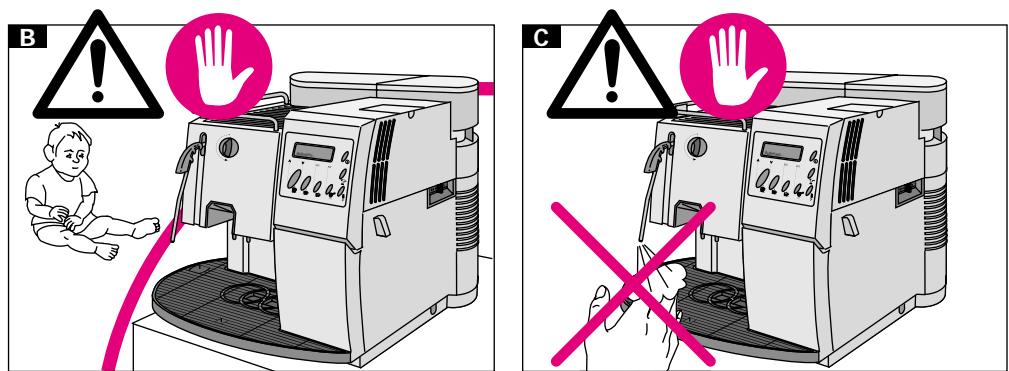
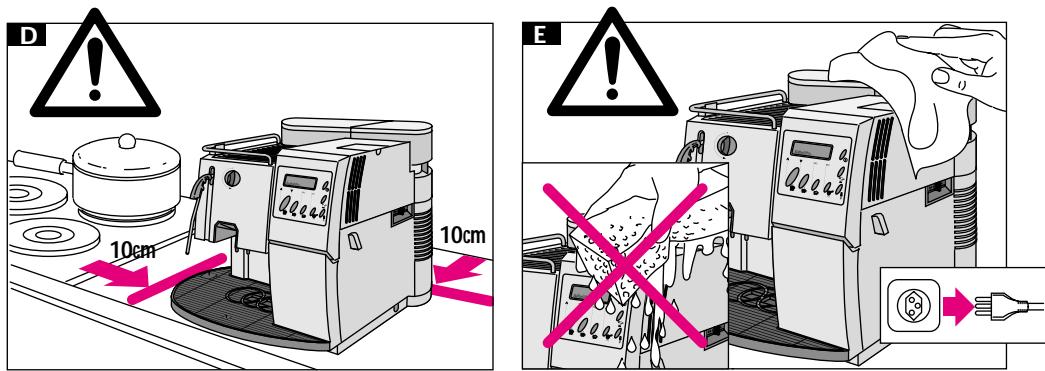

Electrical parts should never be in contact with water: danger of short-circuit! Steam and hot water may cause burns. Never direct steam or water jets towards the body; special attention must be paid when touching the steam/hot water spout and the heating plate: danger of burns!
This machine must be used exclusively for the purposes it has been manufactured.
Do not make technical changes for any reason whatsoever; any improper use is forbidden, due to the risks which might occur!
Warnings
The machine shall only be used by adults and properly instructed persons.
Voltage
Never touch parts under current! They might cause electric shocks, serious injuries, and death. The machine must be connected to a socket with suitable voltage. Voltage must correspond to the voltage shown on the appliance rating plate.
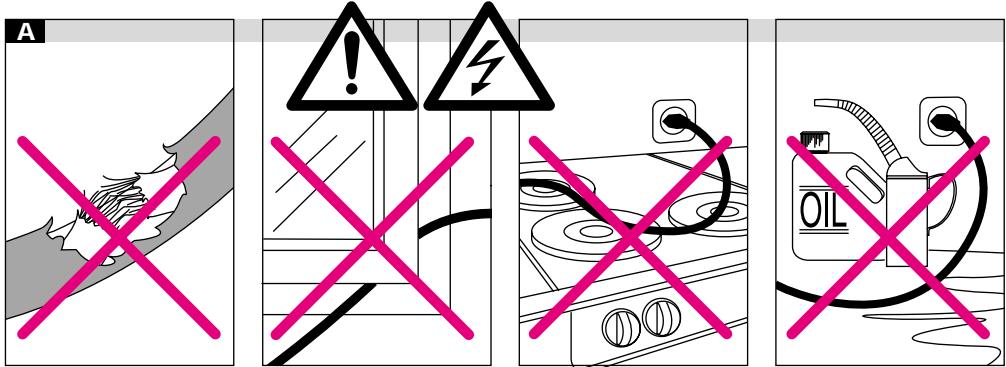
A
Power cord
Never use the machine with a defective power cord. Replace defective power cords and plugs, contacting authorized personnel. Do not extend the power cord around corners, sharp edges, or over hot parts, and protect it from oil. Do not shift or move the machine by pulling its power cord. Do not unplug the machine by pulling the power cord, and never touch it with wet hands. Make sure the power cord does not hang from tables or shelves.
B
Keep children away
Do not allow children to play with the machine. Children are not aware of the potential danger caused by electric appliances.
Positioning
Place the machine on a plane surface, where nobody can turn it upside down or be hurt. Hot water or overheated steam might escape from the machine: danger of burns! Never use the coffee machine outdoors or inside rooms with low temperature conditions. Do not place the machine on hot surfaces or in the proximity of open flames to avoid possible damages to the case.
C
Danger of burns
Do not direct the overheated steam or hot water jet towards you or other people. Do not touch hot surfaces, such as the steam/hot water spout.
D
Necessary space
For a proper operation of the machine it is advisable to keep to the following indications:
- choose a levelled surface
- choose a properly lit and hygienic room provided with accessible sockets
- leave a minimum distance of 100 mm between the machine and the wall
Cleaning
Before cleaning the machine, make sure to switch off all keys and unplug the machine. Wait until the machine cools down. Never plunge the machine into water! Do not tamper with the inner parts of the machine and never open the machine.
Repair/maintenance
In case of defect or suspected damage following a fall, unplug the machine immediately. Never use a defective appliance. Only skilled personnel are authorised to carry out repairs. The manufacturer declines any liability whatsoever, should repairs fail to be carried out by authorised personnel.
In case of fires, use carbon dioxide (CO2) extinguishers. Never use water or powder extinguishers.
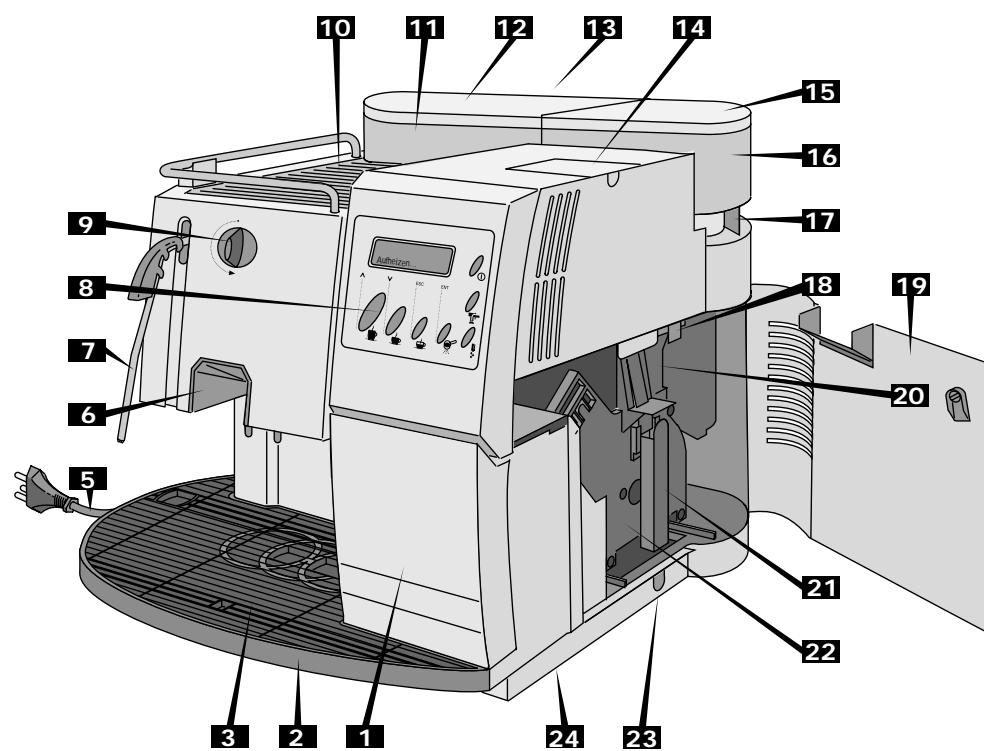
1 Coffee grounds container 2 Drip tray 3 Cup holder surface 4 Main switch 5 Power cord 6 Coffee dispensing unit 7 Steam/hot water spout with burn-protection 8 Control panel 9 Steam knob 10 Cup heating plate 11 Water tank 12 Water tank cover 13 Water level 14 Pre-ground coffee container with cover 15 Coffee bean container cover
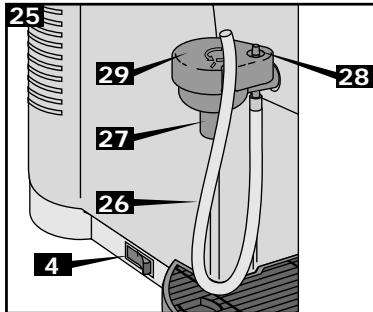
16 Coffee bean container 17 Grind adjustment lever 18 Coffee dosage adjustment lever 19 Service door 20 Filling funnel 21 Handle for assembling and disassembling of central unit 22 Central unit 23 Coffee rest drawer 24 Swivel 25 Cappuccinatore 26 Suction pipe 27 Dispenser 28 Cappuccinatore adjusting valve 29 Cappuccinatore cover
Description of the control panel
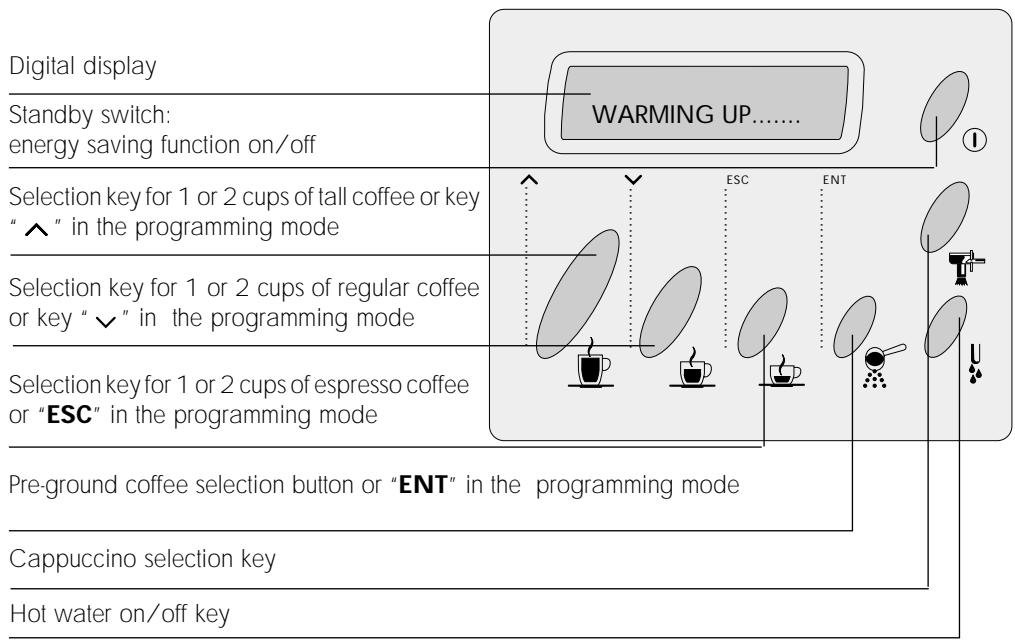
Unpacking/installation
Standard packing is strong enough to protect the machine during mail shipping. Keep this package to return the machine to the manufacturer, whenever necessary.
Before installing the machine, keep to the safety indications at page 71.
Whenever possible, use the machine with swivel (24). When installing the machine, make sure the swivel is always fitted in the provided area on the lower side of the machine.
Power supply connection

Warning: electric current may cause death! Always keep to safety rules.
The coffee machine must be connected to an adequate socket. Voltage must suit the voltage specified on the appliance rating plate.

Never use defective power cords! Defective power cords and plugs must be replaced by authorized personnel.

Should an extension cord be used, check its perfect conditions. The extension cord must have a minimum section of 1 mm² and must be supplied with a three-pole plug/socket.
Starting and use

Parts under current shall never be in contact with water: danger of short-circuit! Overheated steam and hot water may cause burns. Do not direct steam or water jet towards the body; furthermore, great attention must be given when touching either the steam/hot water spout or the heating plate: danger of burns!

Never use the machine without water or coffee beans.
Remove measuring spoon, brush and the central unit key from the coffee grounds container (1) and keep them within reach.
Unwind the power cord (5) from the rear side of the machine.
30
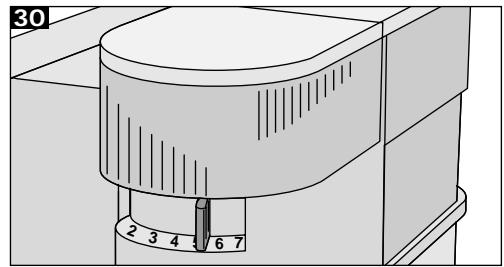
Remove the cover (15) and fill the container with coffee beans (approx. 300 g), then replace the cover. Adjust the grind using the grind adjustment lever (17), setting it to point "5" on the scale.

Never fill the coffee bean container with other products, as they might damage the machine!

Before filling the container with coffee beans, make sure the pre-ground coffee container (14) is closed to prevent coffee beans from falling into it. They might damage the machine!
Remove the water tank (11) from the machine, remove its cover (12), and fill it with cold water (approx. 2.4 l). A valve on the tank bottom prevents water from escaping.
Before installing the water tank in the machine, make sure the coffee bean container cover is properly fitted.
31
Install the water tank, pressing slightly on it to fit the valve, which will open automatically.

Do not fill the tank with an excessive quantity of water.

Always fill the tank with fresh water only: hot water as well as other fluids might damage the tank. Never use carbonated water.

Do not switch on the machine if the water tank is empty: always make sure there is enough water in the tank!
Connect the plug to the socket and press the main switch. The following message will be displayed:
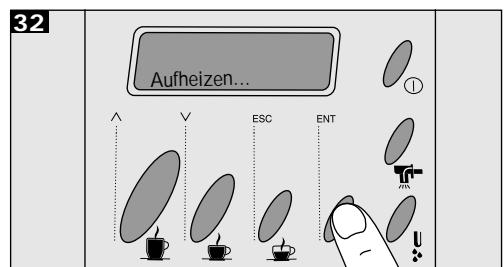
"WARMING UP...
Should
ENERGY SAVING
be displayed, press button ① "Standby" to deactivate the energy saving mode.
Drainage
Direct the steam/hot water spout on the drip tray (2). Place a cup or another suitable container under the dispensing tube, then turn the steam/hot water knob counterclockwise. The pump starts automatically. Wait until a regular water jet is obtained, then close the knob. The machine is now drained and ready to work.
The following message will be displayed:
"SELECT PRODUCT" "READY FOR USE"
Important: It is advisable to drain the machine before the first start, after a prolonged period the machine has not been used or whenever the water tank has been completely emptied.
Furthermore, should the pump be defective, the display shows:
"VENTILATE"
Programming the machine
32
To enter the programming mode, press the key ENT (pre-ground coffee) when the machine is on and keep it pressed until the first two lines of the programming mode are displayed:
"LANGUAGE" "RINSING"
At the end of the line a blinking asterisk is displayed, which can be moved up and down with the keys (tall and regular coffee). If the asterisk is on the first menu, press button to move it on the second menu and vice versa. The display shows the following sequence of
messages:
LANGUAGE PROGR.H.WATER
RINSING PROG. CAPPUC.
WATER HARDN. TOTAL COFFEE
CUP HEATER DESCALING
TEMP. L. COFFEE SIGN. DESCAL
TEMP. COFFEE TIMER
TEMP. S. COFFEE VENDING
PREBREWING RINSING CYCLE
PREGRINDING DIR. WATER SUPPLY
In order to exit from the program mode, press the ESC key (). The machine is in normal mode again.
Rinsing cycle function
If the rinsing cycle function is activated, the machine that is started after a period of inactivity starts a water rinsing cycle to the coffee dispensing units automatically.
Move the asterisk to the menu item RINSING using the keys \wedge \vee and press ENT to activate it.
The display shows:
"RINSING "ON
You can modify the chosen item with the key \wedge \vee : on, off.
Selecting single menus
Select the different menu items by means of the keys . The key ENT allows you to activate the selected item. It is possible to modify the selected figures in a menu item using the keys . The key ENT memorizes the selected options (for instance "ON" for the cup heating plate).
Should you accidentally change some data, press ESC (to leave the menu item without saving the new options which were selected accidentally.
Language selection
Move the asterisk to the menu item "LANGUAGE" using the keys . Press ENT to activate this item. The following message will be displayed:
"LANGUAGE " ENGLISH
Water hardness adjustment
In order to adjust the water hardness, it is necessary to test the water using the strip supplied with the machine. Dip the strip into the water for a second, shake off excess water gently, wait approx. 1 minute and read the results.
Move the asterisk at the end of the line to the menu item "WATER HARDN." using the keys and select it by means of the ENT button.
The following message will be displayed:
"WATER HARDN. " "HARDNESS3
The keys allow you to change the set options:

HARDNESS 4
(hard water)
HARDNESS 3
(medium water)
HARDNESS 2
(soft water)
HARDNESS 4
(very soft water)
Cup heating plate connection
ROYAL COFFEE BAR is equipped with a useful cup heating plate which can be disconnected, if required.
Press keys ∧ ∨ to move the asterisk to item "CUP HEATER". Press ENT to activate this function.
The following message will be displayed:
"CUP HEATER ON
The keys ∧ ∨ allow you to change the set options "ON" or "OFF".
Temperature selection
With ROYAL COFFEE BAR a precise adjustment of the coffee temperature can be executed. Move the asterisk at the end of the line to the menu items "Temp. I. coffee", "Temp. coffee" or "Temp. s. coffee" and select it by means of the ENT key.
Depending on the selection, the following messages will be displayed:
"TEMP. L. COFFEE "
"MEDIUM
"TEMP. COFFEE
"MEDIUM
"TEMP. S. COFFEE
"MEDIUM
The keys allow you to change the set options "Minimum", "low", "medium", "high" or "maximum".
Pre-brewing function
As soon as the coffee has been moistened, the pump stops for a while in order to allow a better utilization of the coffee powder.
Move the asterisk at the end of the line to the menu item "PREBREWING" and select it by means of the ENT key.
The following message will be displayed:
"PREBREWING
"ON
The keys allow you to change the set options "ON", "OFF", "LONG" (in the latter case the pump stop is longer).
Pregrinding function
By activating this function, grinding occurs every time the doser is empty. So a ground coffee portion is always ready in the doser, allowing a time saving whenever the machine is often used. This function is not recommended in all other cases, because fresh ground coffee is by far better.
Press the up/down arrow keys to move the asterisk to the item "PREGRINDING". Press ENT to activate this function.
The following message is displayed:
"PREGRINDING
"ON
The up/down arrow keys allow you to change the set options "ON", "OFF".
Hot water programming
Whenever this function is enabled, the selected water amount is constantly dispensed. On the contrary, whenever this function is disabled, hot water is dispensed until the user stops the dispensing. Hot water amount can only be programmed with programming mode enabled.
- "PROG. H. WATER". Press ENT to activate this function.
The following message will be displayed:
"DESCALING
"PROG.H.WATER "ON
For the descaling procedure, see page 99.
The up/down arrow keys allow you to change the set options: "ON", "OFF".
Timer
The timer enables the automatic switching off of the machine after a preset period, which can be set from 15 minutes to 12 hours after last dispensing. If after a few seconds coffee is brewed again, the timer is reset. If the value set is 0:00, the timer function is not activated and the machine does not switch off.
Cappuccino programming
Whenever this function is enabled, the same amount of cappuccino is constantly dispensed. On the contrary, whenever this function is disabled, cappuccino is brewed until the user stops the dispensing. Cappuccino amount can only be programmed with programming mode enabled.
Press keys to move the asterisk to item "PROG.CAPUC." Press ENT to activate this function:
The following message will be displayed:
"PROG.CAPUC.
"ON
Move the asterisk at the end of the line to menu item "Timer" by means of the keys Press ENT to select this item.
The following message will be displayed:
"STANDBY
"AFTER
By means of the same keys , select the suitable time and confirm the value through ENT button.
The keys allow you to change the set options: "ON", "OFF".
When the selected time is over the following message is displayed:
Coffee counter
Press keys to move the asterisk to item "TOTAL COFFEE" and select it by means of the ENT key. The following message will be displayed:
"TOTAL COFFEE
1234...
"ENERGY
"SAVING
The machine stops and can be switched on again by means of button ① "standby".
Vending functions
This value cannot be modified. Quit the menu by means of the ENT or ESC keys.
Dscaling
Move the asterisk at the end of the line to menu item "Dscaling" and select it by means of the ENT key.
The following message will be displayed:
ROYAL COFFEE BAR is equipped with a counter allowing the machine statistic analysis while detecting the different dispensing operations. It is also equipped with another counter which is able to stop the dispensing operations after a certain number. These functions are protected by a special access code.
By means of keys ∧∨ move the asterisk to
item "VENDING" and select it through the ENT key. From the displayed submenu it is possible to select one of the following items by means of the same keys ∧∨. On the contrary, if the hot water selection key ↓ is pressed, the submenu can be quit.
The following messages will be displayed:
"CODE " "" ^ { 其 } ^ { 其 } * ^ { 其 } * ^ { 其 }
The following message will be displayed:
"CHANGE CODE" 0...
"CODE" "" ^ 其 其 ^ 其
"1 LARGE COFFEE" "TOTAL 35"
"1 COFFEE" "TOTAL 201"
"1 SMALL COFFEE" "TOTAL 228"
"HOT WATER" "TOTAL 210"
"COUNTER" "LOCKING: 0"
"COUNTER" "CYCLES 0"
Code programming
A code protects the access to the machine counters; enter it for each programming section and before carrying out any modification. As soon as the code is entered, modifications can be carried out without entering it again as long as the programming function is enabled.
The machine is not supplied with a code. Keep to the following indications for code programming:
By means of keys move the asterisk to item "VENDING" and select it through the ENT key. The following message will be displayed:
By means of keys enter the number to be set on the first character and confirm the selection through the ENT key. The entered number is saved and the cursor moves automatically to the following character.
After having entered the complete new code, it is necessary to save it.
The following message will be displayed:
"NEW CODE=???? " SAVE NO
By means of keys the code can be saved or not saved: SI or NO.
Code entering
To enter the code, press keys and move the asterisk to the counter to be changed; select it through the ENT button.
The following message will be displayed:
"CODE?? " "" ^ 其 其 ^ 其
Enter the number to be set on the first character by means of keys and confirm the selection with ENT. The entered number is then saved and the cursor moves automatically to the following character. If a wrong code has been entered, the following message will be displayed for about two seconds:
"CODE FAULTY
After having entered three wrong codes, the
entering procedure is not allowed any longer.
Counter modification
Large coffee counter
"1 LARGE COFFEE " "TOTAL 0"
The counter shows the large coffee amount dispensed from the last reset.
From the VENDING menu, move the asterisk to the LARGE COFFEE menu using the keys ; confirm the selection with the ENT button.
Using the same keys , you can modify the selected value (for example, to reset the counter). Use the ENT button to save a new value. Press the ESC button to stop the new value entry procedure, and as a result, the former counter setting shall be considered.
Coffee counter
"1 COFFEE " "TOTAL 0"
The counter shows the amount of regular coffee dispensed since the last reset.
From the VENDING menu, move the asterisk to the COFFEE menu using the keys ; confirm the selection with ENT.
Using the same keys , you can modify the selected value (for example, to reset the counter). Press ENT to save a new value.
On the contrary, by pressing ESC, the new value entry is stopped, and as a result, the former counter setting shall be considered.
Small coffee counter
"1 SMALL COFFEE " "TOTAL 0"
The counter shows the amount of small coffee
dispensed since the last reset.
From the VENDING menu, move the asterisk to the SMALL COFFEE menu using the keys ; confirm the selection with ENT. Using the same keys , you can modify the selected value (for example, to reset the counter). Press ENT to save a new value. On the contrary, by pressing ESC, the new value entry is stopped, and as a result, the former counter setting shall be considered.
Hot water dispensing counter
"HOT WATER " TOTAL 0
The counter shows the hot water amount (in ml) dispensed from the last reset.
From the VENDING menu, move the asterisk to the HOT WATER menu using the keys ; confirm the selection with ENT. Using the same keys , you can modify the selected value (for example, to reset the counter). Press ENT to save a new value. On the contrary, pressing ESC stops the entry of the new value, and the former counter setting shall be considered.
Counter
"COUNTER " LOCKING: 0
After a certain number of cycles, this function allows you to stop coffee dispensing (excluding hot water, steam, and cappuccino dispensing operations). It can also be used, for example, to program machine servicing.
If the value 0 is set, the function is disabled. From the VENDING menu, move the asterisk to the COUNTER menu using the keys and confirm the selection with ENT.
Press the same keys to modify the selected value (for example, to set a new servicing limit). Through ENT, a new value can be saved. On the contrary, pressing ESC stops the entry of the new value, and the former counter setting shall be considered.
When the set limit has been reached, coffee dispensing stops and the following two messages are displayed:
"COFFEE DISPENS. "
"BLOCKED
"SELECT PRODUCT "
"READY FOR USE
Reset the counters by pressing the cappuccino selection key T.
Rinsing cycle
This appliance is equipped with a rinsing cycle program for the usual, daily, and weekly rinsing. If regularly used, this program effectively eliminates the greasiness of coffee in inaccessible parts and avoids alterations in the taste of coffee.
Depending on the way the appliance is used, it is advisable to rinse it every month or after max. 250 cups of coffee. The rinsing cycle lasts about 5 minutes, and it is divided into 4 cycles, including the rinsing with cold water. Each cycle is followed by a short pause of about 40 seconds.

Never stop the rinsing cycle.
Important: before starting the rinsing cycle, always fill completely the water tank and put a capacious container (min. 1 litre) under the
coffee dispensing unit, which is height-adjustable and can be removed for cleaning.
The rinsing cycle needs about 1 litre of water (including final rinsing). From time to time, empty the water tank.
By using the keys move the asterisk to the menu item RINSING CYCLE. To enable this menu item use the ENT key.
The following message appears on the display:
"RINSING CYCLE
This function starts the rinsing cycle with water of those parts concerned with the coffee dispensing. When the rinsing cycle ends, the following message appears on the display:
"SELECT PRODUCT "
"READY FOR USE
Dir. water supply
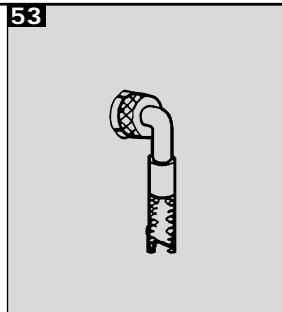
The ROYAL COFFEE BAR is provided with a connection to the water supply (53).
Connect the machine to a drinking water pipe having a pressure between 1,5 and 8 bar.
To do this, use a loading tube with adequate characteristics and connect it to the G3/4" sleeve placed on the rear part of the frame.
Important
It is advisable to connect the machine to water treated with a descaling device, especially in case of hard water or water high in calcium and magnesium.
(HARDNESS 4: hard water).
By pressing move the asterisk to the item "WATER CONNECTION" and select it by pressing ENT
The display shows:
"WATER CONNECTION "
93 RECOMMENDATIONS
"ON
By pressing the same you can modify the function "ON or OFF".
If water connection is on, when leaving the programming menu the machine displays the following message:
"EMPTY WATER TANK "
When the water tank is empty and replaced in its position, the display will show the following message:
"SELECT PRODUCT "
"READY FOR USE
If the machine hasn't been used for a prolonged period, it is advisable for hygienic reasons to run a rinse cycle through the machine.
Place a cup under the steam/hot water spout (7) and fill it with water by operating the hot water knob.
Preheating cups
Cups may be preheated by placing them on the special cup heating plate.
Temperature LED
When starting the machine, the following message is displayed:
"WARMING UP. . . . . .
From now on the water connection can be used.
If the water supply function is off, the machine will use the water tank as a stock.
As soon as the operating temperature has been reached, the following message is displayed:
"SELECT PRODUCT "
"READY FOR USE
Important: when using the machine for the first time, passing from the water tank to the water supply in the programming mode, a DRAINAGE must be carried out, as described at page 86. To perform DESCALING you have to set the following:
"WATER CONNECTION "
"OFF
Empty coffee bean container
When coffee beans run out, the coffee grinder stops and the following message is displayed:
"COF. BEANS EMPTY"
"READY FOR USE"
For DESCALING see page 99.
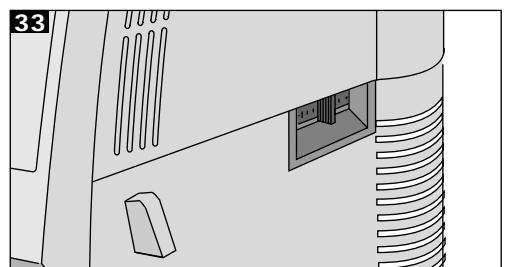
Dosage of ground coffee 33
The coffee dosage adjustment lever (18) allows the selection of the grinding coffee amount from 6 to 9 grams. Place lever (18) on the required position.
Fill the container and restart the cycle.
Empty water tank
When water runs out, the program stops automatically and the following message is displayed:
"WATERTANK EMPTY"
Fill the tank and restart the cycle.
RECOMMENDATIONS
Prolonged idleness
Grounds container warning light
As soon as there are 30 grounds in the container,
the following message is displayed:
"DREGDRAWER FULL" "READY FOR USE
The machine does not stop: remove the grounds container and empty it.
Grind adjustment
If the coffee flows too quickly (coarse grind) or too slowly (fine grind) into the cup, adjust the coffee grinder. The recommended grind level is position 5.
Should the grind be too coarse, adjust it to a lower value (e.g., from 5 to 3). On the contrary, should the grind be too fine, adjust it to a higher value (e.g., from 5 to 7).

Adjust the grind level only when the coffee grinder is running. Avoid any extreme adjustment (for instance, to position 1) whenever possible. It is preferable to try another coffee blend, since not all coffee blends are suitable.
Coffee blends
Make sure the coffee is fresh. An espresso roast is preferable.
In order to obtain a strong and aromatic espresso coffee, use special blends suitable for espresso coffee machines and special cups with thick sides.
Keep coffee in a cool place, in an hermetically sealed container.
Operation time
The machine may be kept on all day long. However, in case of a prolonged period of idleness, it is advisable to enable the energy saving function by pressing the standby ① switch. If the timer is properly programmed, this operation is automatic: for this purpose, see page 77.
In case of a prolonged period of idleness, it is advised to switch the main switch (4) off; once switched on again, the machine will be ready to be used within two minutes.
Switching off the machine
Switch the machine off only after the coffee cycle has been concluded.
BREWING
Cup level filling
This machine allows the precise dosage of the coffee quantity, according to the cup dimension. The desired quantity can be selected through the selection keys. The relevant messages will be displayed.
To set the quantity of coffee to be dispensed, it is necessary to press the relevant selection key till the desired quantity of coffee is obtained (max. 250 ml approx.).
During this operation, the following message is displayed:
"1 SMALL COFFEE
"PROGR. QUANTITY
The machine considers automatically the necessary amounts to brew two cups of coffee.
Attention! If the pre-brewing function is enabled during the cups dosage adjustment, keep the selected key pressed even during the pump stop until the desired amount is reached.
Double quantity of coffee or 2 cups of coffee
By pressing one of the three selection keys twice, before coffee dispensing begins, the machine will brew a double portion of coffee.
Coffee grinding
This machine grinds a portion of fresh coffee for each cup; for two cups, it grinds two portions of coffee, one after the other, thus ensuring optimum coffee quality.
Adjust the grinding degree according to the instructions mentioned at page 79.

Adjust the grinding degree only when the coffee grinder is running.
Coffee dispensing
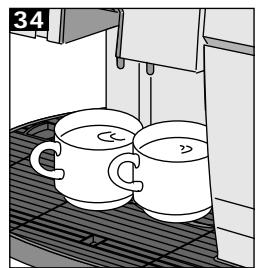
Place one or two preheated cups on the cupholder grill (3) under the dispenser (6). By pressing the relevant selection key, the machine will automatically dispense the selected coffee.
Dispensing may be interrupted by pressing one of the coffee selection keys, if an excessive water amount has been selected. Should you interrupt the coffee flow after the first of two coffees, the second is not dispensed.
Pre-ground coffee

Make sure to use pre-ground coffee only (medium ground). Never use whole beans or soluble coffee.

Right before brewing coffee, fill the container with freshly ground coffee. For best results, make sure coffee blend is fresh.
Remember that ground coffee ages soon, thus losing its quality!
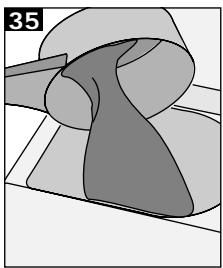
35
Important!
Use the measuring spoon supplied to fill the
container (14) with a single portion of ground coffee! Use a full measure only.
To dispense coffee, press pre-ground coffee button and the desired selection key (large coffee, coffee, small coffee) to obtain a cup of coffee.
Important! This function does not allow the double coffee cycle.
Dispensing may be interrupted by pressing one of the coffee selection keys, if an excessive water amount has been selected.
Hot water dispensing
Hot water dispensing is accomplished through an independent water circuit which ensures the correct temperature and supplies tasteless hot water to be used for tea, soup, etc.
Press the hot water key, the display will show:
"HOT WATER
During hot water dispensing, only the programmed amount is dispensed if the corresponding programming is enabled. On the contrary, dispensing should be stopped by pressing again the selection key when the desired amount is reached.
To program the hot water amount, it is necessary to keep the corresponding selection key pressed till the desired amount is reached.
Attention: hot water can only be programmed if the corresponding programming function is enabled (see page 88).
During the programming phase, the following message will be displayed:
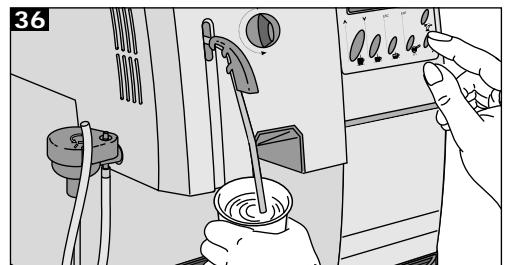
36
Place a glass or cup under the steam/hot water spout (7), then press the hot water selection key. Hot water will be automatically dispensed.
Steam dispensing
To heat milk or other drinks.

Always clean the spout with a damp cloth soon after the use; otherwise, it might be difficult to remove milk residues.
Turn the steam knob (9), the display will show:
"STEAM
Direct steam/hot water spout (7) on cup holder grill (3) and slightly open knob (9), turning it counterclockwise.
Wait until the remaining water has flown out of the spout. Then, move the spout outwards and plunge it deeply into the fluid to be heated.
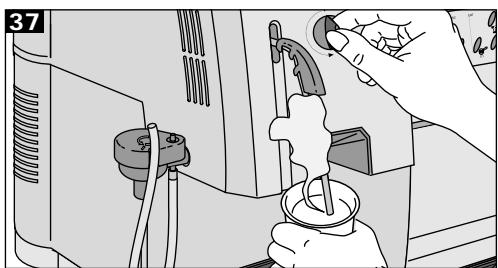
37
Slowly open the steam/hot water knob and heat the fluid, with a circular movement from the bottom to the top.
When the fluid has reached the desired temperature, close the knob and immediately clean the spout with a damp cloth.
Attention: the spout is hot, it may cause burns!
Cappuccino
Through the special Cappuccinatore, this machine can brew a real cappuccino without any problem.
Press the Cappuccino key, the display will show:
"CAPPUCCINO
INCORPORATED
SAFETY DEVICES
During the cappuccino dispensing, only the programmed amount is dispensed if the corresponding programming is enabled. On the contrary, dispensing should be stopped by pressing again the selection key when the desired cappuccino amount has been reached.
To program the cappuccino amount, it is necessary to keep the corresponding selection key pressed till the desired amount is reached.
Attention: cappuccino amount can only be programmed if the corresponding programming function is enabled (see page 89).
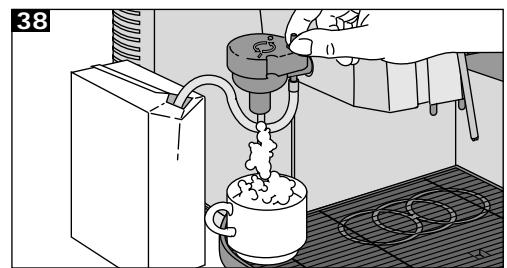
38
For cappuccino dispensing, fit suction pipe (26) of the Cappuccinatore (25) in a milk container or in another container. To prevent milk container deformation, pierce it on the top to allow air entry.
Place the cup under dispenser (27) and press the cappuccino selection key.
Cappuccino dispensing can be adjusted by turning the special Cappuccinatore adjustment valve (28).
Note: it is suggested to use milk with low fat amounts (1.5%).
For a better cappuccino dispensing, do not activate the steam (9).
Cappuccinatore cleaning
Let the Cappuccinatore drain a full water container after each cappuccino dispensing: in this way, the device will be perfectly cleaned.
Incorporated safety devices
Automatic off
Should the service door be open, the machine automatically switches off. If the central unit is not
mounted, only water and steam can be dispensed.
To ensure a good coffee quality and a longer working life, always keep the machine clean.
Electronic grinding time control
As soon as the coffee bean container is empty, grinding automatically stops after 20 seconds approx. Fill the container with coffee beans, as shown at page 73.

Before cleaning the machine, turn off the main switch, unplug the machine and wait until it cools down.
Electronic pump control
The machine switches off automatically as soon as the water in the tank is under the minimum level checked by a special water level indicator (73). Fill the tank according to the procedure shown at page 86.

Do not immerse the machine into water or other fluids: it may be irreparably damaged!
Electronic temperature adjustment
Said adjustment controls the correct temperature to brew coffee and to dispense hot water and steam. Coffee brewing is automatically interrupted should the water temperature be excessive (safety thermostat and overheating safety device activated).

Do not wash parts of the machine in the dishwasher!

Always handdry all parts of the machine, do not dry them in the oven or microwave oven!
Antigravel device
Even selected coffees may contain impurities. To avoid damages, the coffee grinder is fitted with an antigravel device against impurities. Should gravel end up into the coffee grinder, you will hear a strong and characteristic noise. Stop the machine immediately otherwise the machine will automatically stop within 20 seconds thanks to the special electronic protection system.
Important: Do not start the machine before the foreign body has been removed, otherwise the motor may be damaged. Procedures: see page 98, points 45-49.
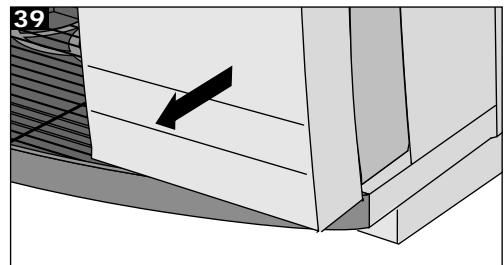
Water tank, drip tray, coffee grounds container and coffee dispenser 39
In order to keep the service area and the central unit (22) clean, daily empty the coffee grounds container (1), after machine use.
The water tank (11), drip tray (2), cup holder grill (3) and coffee grounds container (1) should be washed periodically, using a non-abrasive solvent and drying them carefully.
Cleaning and maintenance operations
General cleaning
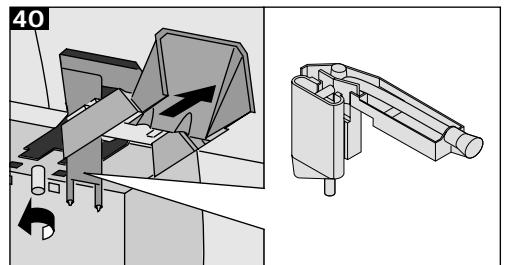
40
Coffee dispenser (4) may be removed for cleaning operations. Unloose the screws and rinse the dispensing tube thoroughly with hot water.
From time to time, clean the machine casing with a damp cloth and dry it.
Clean pre-ground coffee container (14) with the
aid of the brush supplied, whenever necessary.
Central unit
Clean central unit (22) whenever the coffee bean container is filled, or at least once a week.
Switch off the machine and open service door (19). Remove grounds coffee container (1).
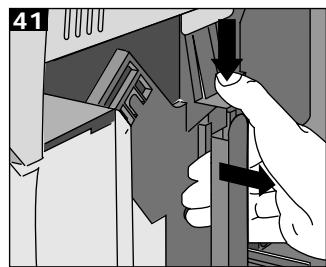
41
Remove central unit (22), by holding the handle and shortly pressing the PRESS key.
Wash the central unit with hot water; do not use any solvent.
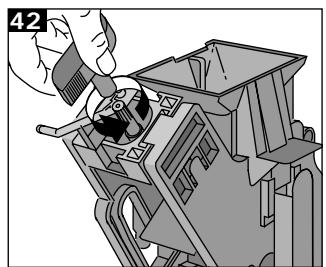
42
Make sure there are no coffee residues on the two steel filters: the upper filter can be removed by unloosening and turning the plastic pin anticlockwise using the tool supplied.
Dry thoroughly each central unit component, fit the filter again and tighten it properly with the screw .
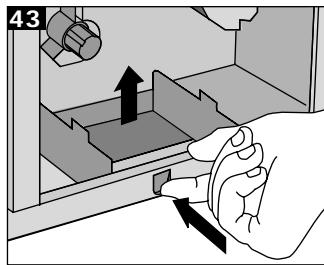
Remove coffee rest drawer (23) and clean it, using a non-abrasive solvent.
Clean the service area thoroughly and fit the coffee rest drawer again.
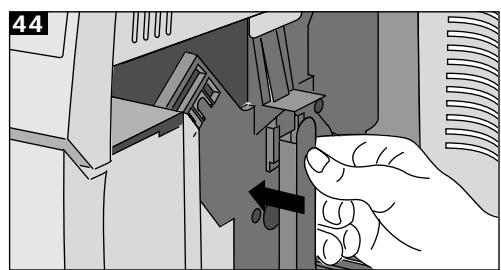
By holding the central unit by its handle, slide it back into its original position, making sure it is correctly engaged. Then close the door. Fit the coffee grounds container again.

When fitting the central unit, do not press "PRESS" button: it may cause irreparable damages to the machine!
Warning: if the central unit is not correctly fitted, the following message will be displayed:
"BREW UNIT MISS.
The machine cannot dispense coffee.
Coffee grinder

Never fill the coffee grinder with water: it may irreparably damage the machine!
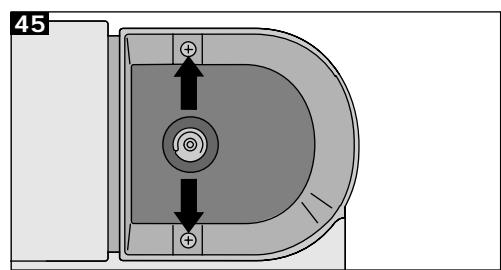
Clean the coffee beans container periodically; this operation should be accomplished by a qualified technician! Unplug the machine.
Empty the coffee container and unloose the two fastening screws. Now, the container can be removed and cleaned.
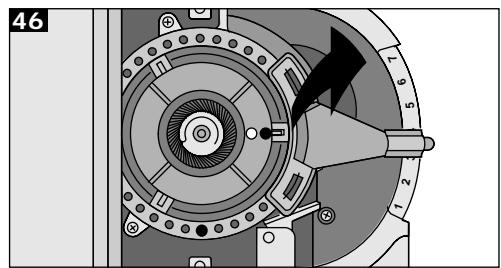
46
Carefully pull the adjustment lever upwards, previously setting the grinding degree.
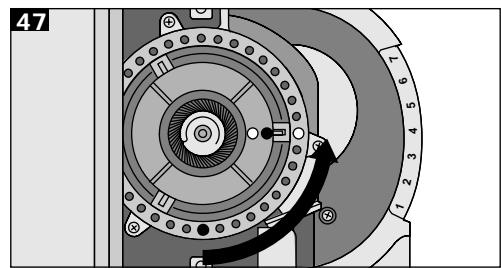
47
Turn the adjustment ring counterclockwise until the blue marks coincide.
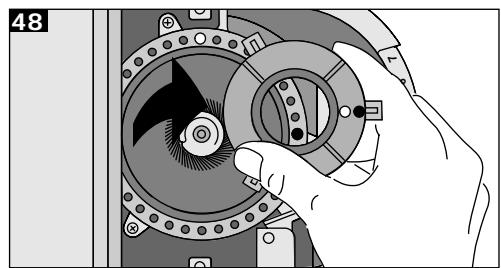
48
Now, it is possible to remove the grinding ring from the machine by slightly pulling it upwards.
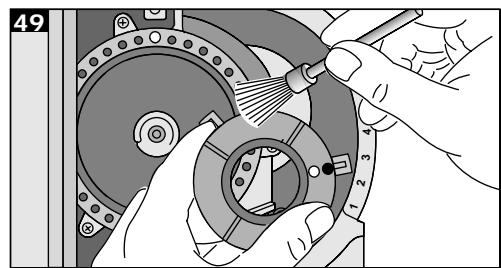
49
With the aid of a brush or a narrow vacuum hose, clean both the gear box and the grind ring support.
Make sure the position of the grind ring does not shift.
To reassemble the coffee grinder, carry out the reverse sequence, making sure the adjustment ring has not been shifted during cleaning. If that is the case, turn it until the blue mark coincides
with one of the three notches.
Assemble the grind ring support and make sure the blue marks coincide.
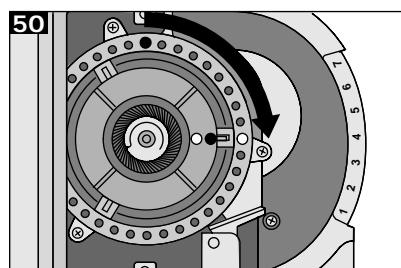
50
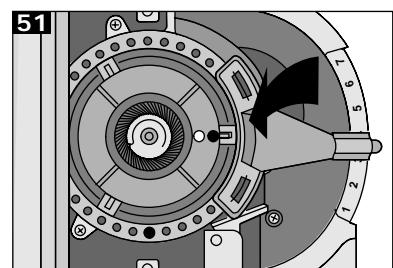
Turn the adjustment ring clockwise to make the red marks coincide.
51
Fit the adjustment lever on the ring, until it coincides with the previously set grinding degree.
Cappuccinatore
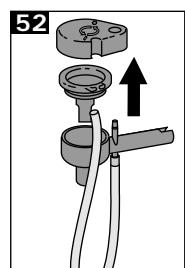
52
To quickly clean the cappuccinatore, immerse the suction pipe into warm water and let water flow through it.
For a more accurate cleaning, remove the cappuccinatore and open cover (29). Clean the outside part with warm water and rinse it with cleaned water.
Descaling
Warning: The descaling operations must be carried out when the machine components are cold.
Descaling removes limescale from all surfaces and holes, thus ensuring a perfect operation of valves, heating controls and other important parts.
Note: due to the complexity of the coffee machine hydraulic circuit, the following descaling cycles (automatic and standard) do not allow the descaling of all tubes.
In fact, easily accessible components such as the central unit (22) and its plastic connection are excluded.
The machine must be descaled every 3-4 months, depending on the water hardness degree.
A more frequent descaling is recommended
wherever the water hardness degree is very high. To avoid dangerous delays to users, this machine is supplied with a special control counter, reminding the user to perform this operation, according to the water hardness degree.
In this case, the following message will be displayed:
"DESCALE"
When this message is displayed, the machine does not stop; however, it is suggested to descale quickly the machine.
To cancel the message, see programming menu indications, page 100.
The machine has been adjusted on a 25°oH value, which causes the warning light to switch on after 150 l approx.
Should it be necessary, the water hardness value may be exactly programmed, following the instructions shown at page 75.
The following adjustments are possible:
Hardness 4: high water hardness, over 29° D (14°dH), i.e. 80 l water approx.
Hardness 3: medium water hardness, approx. 20 - 29°H (7-14°dH), approx. 150 l water passage.
Hardness 2:soft water, approx. 12 - 20°dH (4-7°dH) approx. 300 l water passage
Hardness 1:very soft water, less than 10° H ( 3° dH ), approx. 500 l water passage
In hard water regions, a filter should be used both to improve the coffee quality or to protect the machine, thus reducing the descending frequency.
Note: for this purpose, use a descending product suitable for coffee machines.
Never use vinegar!
Dscaling can be performed in two ways:
Automatic descending
Select this mode in the programming menu (see page 77).
By means of the keys ∧ ∨, move the asterisk at the end of the line on the menu item Descaling and confirm the selection with the ENT key.
The following message will be displayed:
"DESCALING
Pour a descaling solution into the water tank (according to the instructions on the product package). Switch the machine to programming mode. Place a large container under the steam/hot water spout and open slowly the steam knob. The automatic descaling starts: Small amounts of descaling solution are pumped into the circuit. Then the pump stops to let the solution take effect. During this phase, the following message is displayed:
"MACHINE IS "DESCALING
After approx. 45 minutes, when the procedure is accomplished, the following message will be displayed:
"DESCALING "FINISHED
Close the steam knob. The pump stops.
Press ENT button. A display message reminds you to rinse away any possible descaling residues from the machine.
"RINSE MACHINE
Remove water tank, rinse it accurately and fill it with fresh water. Turn the steam knob slowly on and let all the contents come out. The following
message will be displayed:
"RINSING " FINISHED
Close the steam knob. Go back to programming function by pressing the ENT key.
Note: By pressing the ESC key (hot water key), it is possible to quit descaling procedure.
Reset descending message
In programming function, by pressing keys move the asterisk till the end of the line on the menu Sign. Descal and confirm the selection with ENT button.
The following message will be displayed:
"RESET DESCALING " "No
By means of the same keys , it is possible to modify the value; Yes or no.
Through this reset operation, the internal counters of the two water systems are reset and the message DESCALE is erased.
If the function
"SIGN. DESCAL."
is selected without the displayed message
Descale, the following message will be displayed:
"QUANTITY WATER " NOT REACHED
Standard descaling
Switch off the machine. Pour a descending solution into the water tank (according to the instructions on the product package). Place a large container under the steam/hot water spout (7). Switch the machine on by pressing the main switch, press
the hot water key and let the descending solution in the water tank pour out of the spout for 1 minute approx.
Press hot water key to complete the operation. Switch the machine off and let the solution taking effect for 5 minutes approx. Repeat this procedure two or three times, to empty the water tank.
As soon as descending has been performed, rinse the water tank (1 1) thoroughly and fill it with fresh water.
Switch on the machine again and let water (2 I approx.) flow out of the steam/hot water dispensing tube in order to rinse away residues.
Important:
A periodic descending ensures a correct machine functioning and avoids expensive repairs. The machine warranty does not cover damages occurring as a result of the non-observance of descending procedures, improper use and non-observation of any other instruction contained herein. Maintain the manufacturer's adjustment if the water hardness degree is not known.
Disposal
Machines which are no longer operational should immediately be made non serviceable, by cutting the power cord. Machines should be delivered to a public disposal centre.
Switch off and unplug the machine if it will not be used for long periods.
Cut the supply power cord and deliver the machine to a public collecting point.

Should the machine not be used anymore, switch it off and unplug it.

Keep the machine in a dry place, far from the reach of children.
Should the machine not be used for a long period, keep it from dust and dirt
Maintenance
Periodically check the machine working and clean it in accordance to the instructions.
Troubleshooting

In case of failure, fault or suspected damage following a fall, unplug the machine immediately.
To fix problems, follow the instructions in the table. Otherwise contact authorised personnel.
Only skilled personnel are authorised to repair the machine. The user might incur serious injuries should repairs not be properly carried out.
The manufacturer declines any liability whatsoever, should repairs fail to be carried out according to the instructions contained in this manual: Furthermore in these cases warranty rights cannot be honored.
| Trouble | Possible causes | Solution |
| No message is displayed | The machine is not getting power | Turn the main switch on, check plug and fuse |
| The service door is open | Close the service door is | |
| The automatic coffee brewing does not start | BREW UNIT MISS. | Properly fit and lock the central unit |
| BREW UNIT BLOCK. | Clean the central unit (see page 98) | |
| WATERTANK EMPTY COF. BEANS EMPTY | Fill with water or coffee beans and restart the cycle | |
| DREGDRAWER MISS | Fit the coffee grounds container properly | |
| GRINDER BLOCKED | Service the coffee grinder (see page 98) | |
| Water is dispensed instead of coffee | Pre-ground coffee selection button has been pressed, but the relevant container is empty | Fill one measuring spoon of pre-ground coffee |
| Steam and hot water are not dispensed | The steam/hot water spout hole is clogged | Clear the hole with the aid of a thin needle |
| Coffee is dispensed too quickly | Grinding too coarse | Adjust the grinder on a finer grinding, e.g. from 5 to 3 |
| Coffee is dispensed too slowly | Grinding too fine | Adjust the grinder on a coarser grinding, e.g. from 5 to 7 |
| Coffee is not hot enough | The central unit filter is clogged | Clean the filter |
| The cup has not been preheated | Heat the cup on the heating plate | |
| Coffee is not creamy enough | The coffee blend is not suitable or is not fresh. Grinding is not correct (too fine or too coarse) | Try another coffee blend |
| The machine coffee brewing is reduced, it takes longer to heat and the dispensing is not sufficient | Descaling the machine | Descale the machine, as described at page 99 |
| The central unit cannot be removed | The central unit has not been correctly positioned | Switch the machine on, close the service door, fit the coffee grounds container and wait until the machine resets. |

- FULLY AUTOMATIC COFFEE MACHINE
- WARNING
- CODE
- CAPPUCCINO PROGRAMMING
- HOW TO USE THE INSTRUCTIONS
- TABLE OF CONTENTS
- B
- ACCESSORIES (INCLUDED IN THE MACHINE PRICE)
- WARNINGS
- VOLTAGE
- A
- POWER CORD
- KEEP CHILDREN AWAY
- POSITIONING
- C
- DANGER OF BURNS
- D
- NECESSARY SPACE
- CLEANING
- REPAIR/MAINTENANCE
- DESCRIPTION OF THE CONTROL PANEL
- UNPACKING/INSTALLATION
- POWER SUPPLY CONNECTION
- STARTING AND USE
- BEFORE INSTALLING THE WATER TANK IN THE MACHINE, MAKE SURE THE COFFEE BEAN CONTAINER COVER IS PROPERLY FITTED
- DRAINAGE
- IMPORTANT: IT IS ADVISABLE TO DRAIN THE MACHINE BEFORE THE FIRST START, AFTER A PROLONGED PERIOD THE MACHINE HAS NOT BEEN USED OR WHENEVER THE WATER TANK HAS BEEN COMPLETELY EMPTIED
- PROGRAMMING THE MACHINE
- RINSING CYCLE FUNCTION
- SELECTING SINGLE MENUS
- LANGUAGE SELECTION
- WATER HARDNESS ADJUSTMENT
- CUP HEATING PLATE CONNECTION
- TEMPERATURE SELECTION
- PRE-BREWING FUNCTION
- PREGRINDING FUNCTION
- HOT WATER PROGRAMMING
- TIMER
- COFFEE COUNTER
- VENDING FUNCTIONS
- DSCALING
- CODE PROGRAMMING
- CODE ENTERING
- COUNTER MODIFICATION
- LARGE COFFEE COUNTER
- SMALL COFFEE COUNTER
- HOT WATER DISPENSING COUNTER
- COUNTER
- RINSING CYCLE
- DIR. WATER SUPPLY
- IMPORTANT
- RECOMMENDATIONS
- ON
- EMPTY WATER TANK
- PREHEATING CUPS
- TEMPERATURE LED
- EMPTY COFFEE BEAN CONTAINER
- DOSAGE OF GROUND COFFEE
- GROUNDS CONTAINER WARNING LIGHT
- GRIND ADJUSTMENT
- COFFEE BLENDS
- OPERATION TIME
- SWITCHING OFF THE MACHINE
- BREWING
- CUP LEVEL FILLING
- DOUBLE QUANTITY OF COFFEE OR 2 CUPS OF COFFEE
- COFFEE GRINDING
- COFFEE DISPENSING
- PRE-GROUND COFFEE
- HOT WATER DISPENSING
- HOT WATER
- ATTENTION: HOT WATER CAN ONLY BE PROGRAMMED IF THE CORRESPONDING PROGRAMMING FUNCTION IS ENABLED (SEE PAGE 88)
- STEAM DISPENSING
- CAPPUCCINO
- INCORPORATED
- SAFETY DEVICES
- ATTENTION: CAPPUCCINO AMOUNT CAN ONLY BE PROGRAMMED IF THE CORRESPONDING PROGRAMMING FUNCTION IS ENABLED (SEE PAGE 89)
- CAPPUCCINATORE CLEANING
- INCORPORATED SAFETY DEVICES
- AUTOMATIC OFF
- ELECTRONIC GRINDING TIME CONTROL
- ELECTRONIC PUMP CONTROL
- ELECTRONIC TEMPERATURE ADJUSTMENT
- ANTIGRAVEL DEVICE
- WATER TANK, DRIP TRAY, COFFEE GROUNDS CONTAINER AND COFFEE DISPENSER
- CLEANING AND MAINTENANCE OPERATIONS
- CENTRAL UNIT
- COFFEE GRINDER
- CAPPUCCINATORE
- DESCALING
- WARNING: THE DESCALING OPERATIONS MUST BE CARRIED OUT WHEN THE MACHINE COMPONENTS ARE COLD
- DESCALE
- AUTOMATIC DESCENDING
- RESET DESCENDING MESSAGE
- STANDARD DESCALING
- DISPOSAL
- MAINTENANCE
- TROUBLESHOOTING
Brand : SAECO
Model : ROYAL COFFEE BAR - MANUAL 2
Category : Coffee machine