
MPS5502MB - Multifunction Printer OKI - Free user manual and instructions
Find the device manual for free MPS5502MB OKI in PDF.


| Brand | Oki |
| Model | MPS5502MB |
| Product type | Multifunction printer (print, copy, scan, fax) |
| Printing technology | LED (LED imaging array) |
| Power supply | 220-240 V AC, 50/60 Hz (230 V models); 120 V AC (120 V models) |
| Energy consumption | ENERGY STAR compliant |
| Dimensions (approx.) | 650 x 600 x 550 mm (estimated) |
| Weight (approx.) | 35 kg (estimated) |
| Operating temperature | 15.6 °C to 32.2 °C |
| Operating humidity | 20% to 80% RH |
| Noise level | Less than 70 dB(A) (EN ISO 7779) |
| Main functions | Print, copy, scan, fax |
| Maintenance and cleaning | Unplug before cleaning; use a damp cloth only; no liquid or aerosol cleaners |
| Safety | Grounded plug; do not use near water; avoid unsuitable extension cords; do not block vents |
| Warranty | 1 year parts and labor (US/Canada); print head: 5 years parts |
| After-sales service | 24/7 support at 1-800-OKI-DATA; on-site repair possible (US/Canada) |
| Consumables | Black toner (ref. 45460508, 45460509, 45460510, 45460501); imaging drum |
| Regulatory compliance | FCC Class A (US); ICES-003 Class A (Canada); European directives 2004/108/EC and 2006/95/EC |
Frequently Asked Questions - MPS5502MB OKI
User questions about MPS5502MB OKI
0 question about this device. Answer the ones you know or ask your own.
Ask a new question about this device
Download the instructions for your Multifunction Printer in PDF format for free! Find your manual MPS5502MB - OKI and take your electronic device back in hand. On this page are published all the documents necessary for the use of your device. MPS5502MB by OKI.
USER MANUAL MPS5502MB OKI
Safety, Warranty and Regulatory Information 2
Warranty Information 4
Service and Support. 5
Regulatory Information 7
Material Safety Data Sheet (MSDS) 9
Français
Regulatory Information. 7
Material Safety Data Sheet (MSDS) 9
America Latina (otro), Latin America (other)
Espanol
Safety Information. 2
Regulatory Information. 7
Material Safety Data Sheet (MSDS) 9
Brasil, Brazil
Portugues
Informacoes de seguranca 42
Informacoes sobre a garantia 45
Informacoes normativas 46
Safety Information. 2
Regulatory Information. 7
Material Safety Data Sheet (MSDS) 9
Safety, Warranty and Regulatory Information
Safety Information, 120-Volt Models
Your OKI product has been carefully designed to give you years of safe, reliable performance. As with all electrical equipment, there are a few basic precautions you should take to avoid hurting yourself or damaging the product.
- Carefully read the provided setup and operating instructions.
- Save all provided documentation for future reference.
- Read and follow all warning and instruction labels on the product itself.
- Unplug the product before you clean it. Use only a damp cloth; do not use liquid or aerosol cleaners.
- Place your product on a firm, solid surface. If you put it on something unsteady, it may fall and be damaged. If you place it on a soft surface, such as a rug, sofa, or cushion, the vents may be blocked, causing the product to overheat.
- Protect your product from overheating. Make sure no obstructions block the openings of the product. Do not put the product on or near a heat source (such as a radiator or heat register). Keep the product out of direct sunlight.
- Always use this product in a well ventilated area. Allow enough room around the product for adequate ventilation and easy access to the paper trays. If you put the product in any kind of enclosure, make sure the enclosure is well ventilated.
- Do not use your product near water. Do not spill liquid of any kind into it.
- Be certain that your power source matches the rating listed on the back of the product. If you are not sure, check with your dealer or with your local power company.
- Do not connect this product to an uninterruptible power supply (UPS). For further information please contact Oki Data at 1-800-OKI-DATA.
- Your product has a grounded, three-prong plug as a safety feature. This plug only fits into a grounded outlet. If the plug does not fit, the outlet may be an older, non-grounded type. Contact an electrician to have the outlet replaced. Do not use an adapter to defeat the grounding.
- Install the product near an easily accessed power outlet.
- Avoid damaging the power cord. Do not put anything on it or place it where it will be walked on. If the cord becomes damaged or frayed, replace it immediately.
- If you are using an extension cord or power strip with the product, make sure that the total of the amperes required by all the equipment on the extension is less than the extension's rating. The total ratings of all equipment plugged into the outlet should not exceed 15 amperes.
-
Important! A telephone cable using 26 AWG wire or larger must be used with this equipment.
-
Do not poke anything into the ventilation slots of the product. You could get an electrical shock or cause hazardous electrical arcing, which could cause a fire.
- Aside from the routine maintenance described in the documentation, do not try to service the product yourself. Removing the cover may expose you to shocks or other hazards.
- Do not make any adjustments other than those outlined in the documentation. You may cause damage that will require extensive repair work. The provided documentation explains how to get your product serviced by qualified Oki Data technicians.
If anything happens that indicates that your product is not working properly or has been damaged, unplug it immediately and follow the procedures in the provided documentation for having your product serviced.
Here are some of the things to look for.
- The power cord or plug is frayed or damaged.
- Liquid has been spilled into the product, or the product has been exposed to water.
- The product has been dropped, or the cabinet is damaged.
- The product does not function normally when you are following the operating instructions.
Additional Safety Information for Telecommunications Equipment
When using your telephone equipment, basic safety precautions should always be followed to reduce the risk of fire, electric shock and injury to persons, including the following:
- Do not use this product near water—for example, near a bathtub, washbowl, kitchen sink or laundry tub—in a wet basement, or near a swimming pool.
- Avoid using a telephone (other than a cordless type) during an electrical storm. There may be a remote risk of electric shock from lightning.
- Do not use the telephone to report a gas leak in the vicinity of the leak.
- Use only the power cord and batteries indicated in this manual. Do not dispose of batteries in a fire. They may explode. Check with local codes for possible special disposal instructions.
SAVE THESE INSTRUCTIONS.
Safety Information, 220/240-Volt Models
This product has been carefully designed to give years of safe, reliable performance. As with all electrical equipment, however, there are a few basic precautions that should be taken to avoid injury or damage:

Ensure this and all other documentation is both read carefully and retained for future reference.

Ensure all warning and instruction labels on the product are read, understood and followed in order to prevent any risk of injury.

This product may be heavy. Please check the weight of the product and take all necessary precautions to prevent the risk of personal injury.

The product must be placed on a flat solid surface strong enough to support its weight to prevent any risk of injury.

Ensure that there is adequate ventilation all around the product to prevent overheating and any risk of fire.

Keep the product away from direct heat sources such as radiators and out of direct sunlight to prevent any risk of overheating.

The power supply required for this product is 220-240 VAC, 50 / 60Hz . Refer to your product's rating label on the machine for full power rating details. Ensure that you have a suitable power supply before connecting the product. If in doubt contact your dealer or check with your local power provider.

Ensure both the product and mains power switches are in the OFF position before connecting the AC power cable.

Do not connect or disconnect the power plug with a wet hand as this may cause electric shock.

Always hold the power plug to connect/disconnect the power cable to/from the mains socket. Unplugging by pulling on the cable can cause fraying and may lead to fire or electric k.

This product has an earthed plug as a safety feature and will only connect to an earthed socket. Do not attempt to defeat the earthing or there is a risk of fire or shock.

If using an extension cable or power strip ensure that the total current rating (amperes) of all connected equipment is less than the maximum rating of the extension cable, power strip or wall outlet. If the product is already supplied with a fitted power strip then no additional power strip or extension cable should be used to connect to the mains wall outlet. Otherwise, fire or shock may occur.

Ensure the power cable is routed so as not to be damaged or cause a trip hazard. If the cable becomes frayed or damaged replace it immediately to prevent any risk of shock.

Do not twist, constrict or knot the power cable as this can cause overheating which may lead to fire or electric shock.

Ensure the power socket to which the product is connected is easily accessible at all times and not obstructed.

Use only the power cable supplied. Using a power cable not intended for this product may lead to fire or electric shock.

To avoid risk of fire and electric shock, do not use the power cable supplied with this product for any other electrical equipment.

If you do not connect the power cord or any other cables only as directed in the User's Guide, this may result in a fire.

It is recommended that the machine is switched off prior to opening covers; otherwise there is a risk of electric shock.

When the product cover is open, do not touch the fuser unit or print head as you may receive burns. Allow it to cool before touching.

If the product casing gets extremely hot or smoke, unusual smells or abnormal noises are emitted from the product, there is a risk of fire. Unplug the mains connector and contact your dealer.

If the product has been knocked over or damaged, there is a risk of electric shock, fire and/or injury. Unplug the mains connector and contact your dealer.

If any liquid (for example water) is allowed to enter the product, there is a risk of fire. Unplug the mains connector and contact your dealer.

Do not place containers containing liquid on the product as electric shock, fire and/or injuries may occur.

If any foreign objects (for example clips) are allowed to enter the product, there is a risk of electric shock, fire and/or injury. Unplug the mains connector before removing the

Do not introduce foreign objects into the ventilation holes or operate this product with any covers open or doors removed as electric shock, fire and/or injuries may occur.

Do not use an extremely flammable spray near the product as the product contains high temperature parts that may cause a fire.

Switch the product off before cleaning to prevent any risk of injury. Clean using a damp cloth. Do not use liquid or aerosol cleaners.

Ensure loose clothing and hair is kept clear of moving parts when the product is in operation to prevent possible risk of injury.

Do not carry out any operations on the product that are not specified in the User's Guide. This may result in electric shock, fire and/or injury.

Do not touch the battery if one is fitted to the product. There is a risk of explosion if the battery is replaced by an incorrect type. The product battery should not require replacement during the life of the product.

Do not throw toner cartridges or image drum cartridges into a fire as you may receive burns from a dust explosion.

After installing additional memory, hard disk drive, or any other internally fitted option, any covers removed or doors opened must be closed or replaced and secured to prevent risk of fire.

The acoustic noise of this product is less than 70 dB (A) as measured in accordance with EN ISO 7779.

The operating condition range for your product is: 15.6 to 32.2^ and 20 to 80% RH. Operation of the product outside this range could result in damage to the product.

If a scanner, finisher etc. is fitted, exercise care when moving these items so as to avoid risk of entrapment or personal injury.

If the product is installed on a cabinet or high capacity feeder, ensure wheel locks are applied once placed in final position for use, to prevent risk of movement or injury.
To avoid safety risks, you must adhere to one of the following recommended configurations.
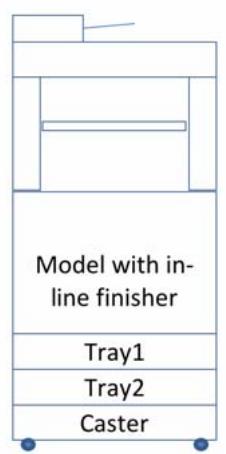
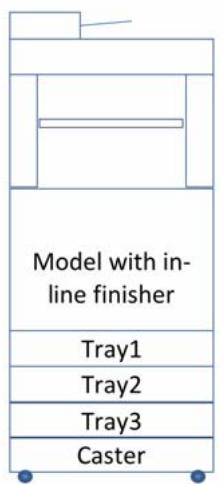
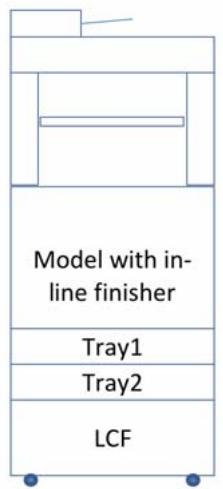
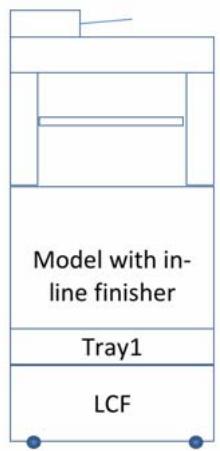
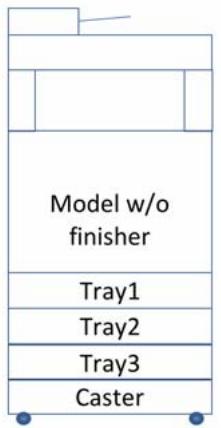
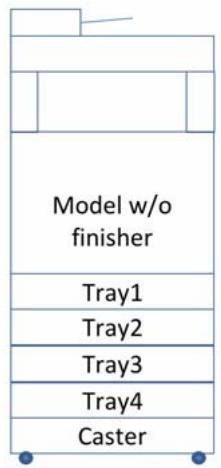
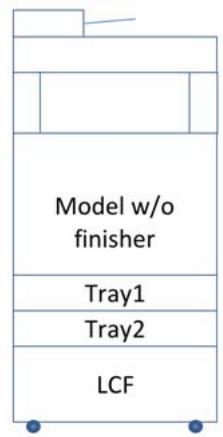
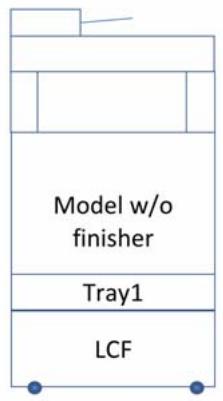
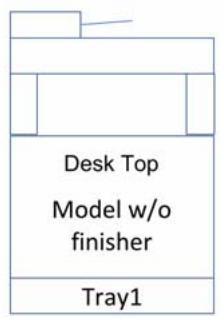
When using the Caster Unit or the Large Capacity Feeder, you must also use the Anti-tip Feet for stability.
For Additional Trays, Spacers, or LCF you must also use the supplied Joint Options to join them together to ensure safe operation.
Fix the tray with the joint-option and tighten the screws with the screw-knob.
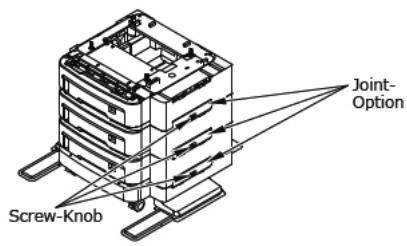
Tighten them on both sides.
Limited Warranty, US and Canada
U.S. and Canada only
Oki Data Americas, Inc. (Oki Data) warrants this MB760/ MB770/MB770f/MB770fx/MPS5502mb/MPS5502mbf/ MPS5502mbfx (hereinafter "the Product") to be free from defects in material and workmanship and will remedy any such defect according to, the terms of this Limited Warranty.
Oki Data will repair or at its option, replace, with the same or its functional equivalent, at no charge, any defective component(s) of the Product for one (1) year from the date of purchase except for the printhead (LED imaging array), which is warranted for a period of five (5) years from the date of purchase.
This Limited Warranty only extends to the original purchaser of the warranted item. This Limited Warranty is not transferable. This Limited Warranty does not extend to consumable items or supplies, such as toner cartridges, image drums, ribbon cartridges, fuses, etc.
On-Site Repair
Note: On-Site Repair is available in the United States and Canada only. On-Site Repair does not include the replacement or repair of Product consumables or supplies.
Oki Data will, for a period of one (1) year from the date of original purchase, repair or replace (at Oki Data's option) on-site at the original purchaser's facility and without charge, any defective component(s) of the Product provided that the warranty service is performed by an Oki Data authorized service provider. The printheads (LED imaging arrays) have a 5-year parts only warranty from date of original purchase. Following the first year of warranty coverage, the printheads will be replaced by an authorized Oki Data service provider at Oki Data's then current labor rates.
To make request or claim for service under the one (1) year parts and labor coverage of this Limited Warranty, contact your Oki Data Authorized Dealer, authorized third-party service provider, or Oki Data. Oki Data reserves the right to use new and/or refurbished parts for the warranty repair.
As a condition of this Limited Warranty, requests for On-Site Repair must include the name and phone number of a fully competent and responsible adult with the authority to consent to the entry of the servicing technician to the premises where the Product is located, and who will remain with the servicing technician while the service work is performed. Any and all dangerous conditions must be removed from the site prior to and throughout the time a service technician is present. The service technician may refrain from entering the premises or continuing to provide services at any site, if in the servicing technician's reasonable judgement the site poses a risk of physical harm or danger. If warranty services cannot be performed or completed due to any of the foregoing reasons the On-Site service option is null and void and the Product must be returned to an authorized Oki Data service location for warranty repair service.
To make a request or claim for service under this Limited Warranty, contact your local Oki Data authorized service center, Oki Data at 1-800-654-3282 (1-800-OKI-DATA), or www.okiprintingsolutions.com.
Once the one (1) year on-site period is over, the original purchaser must return the Product, shipping prepaid, in the original shipping container or equivalent to Oki Data or an authorized Oki Data service center and assume the risk of loss or damage in transit.
A written receipt for the Product, showing the date of purchase, dealer's name, and both the model and serial numbers of this Product must accompany any request or claim for work to be performed under this Limited Warranty.
This Limited Warranty shall not apply to normal wear and tear and shall not apply if the Product has been damaged due to abuse, misuse, misapplication, accident, improper storage, or installation, an unsuitable physical operating environment, or as a result of service or modification by any other than an authorized Oki Data service center.
THERE ARE NO EXPRESS WARRANTYES OTHER THAN THOSE ON THE FACE HEREOF AND DESCRIBED ABOVE. NO WARRANTYIES WHETHER EXPRESS OR IMPLIED, INCLUDING, BUT NOT LIMITED TO, ANY IMPLIED WARRANTYES OF MERCHANTABILITY OR FITNESS FOR A PARTICULAR PURPOSE, SHALL EXTEND BEYOND THE RESPECTIVE WARRANTY PERIODS DESCRIBED ABOVE.
Some states do not allow limitations on how long an implied warranty lasts, so the above limitation may not apply to you.
IN NO EVENT SHALL OKI DATA OR ITS AFFILIATES BE LIABLE TO A PURCHASER OR ANY OTHER PERSON FOR SPECIAL, COLLATERAL, PUNITIVE, INCIDENTAL OR CONSEQUENTIAL DAMAGES INCLUDING LOST PROFITS, BUSINESS REVENUE, GOODWILL OR ANTICIPATED SAVINGS IN CONNECTION WITH OR ARISING OUT OF THE PURCHASE OR USE OF THE OKI DATA PRODUCT, WHETHER ARISING IN CONTRACT OR IN TORT, WHETHER OR NOT CUSTOMER SHALL HAVE INFORMED OKI DATA OF THE POSSIBILITY OR LIKELIHOOD OF ANY SUCH DAMAGES.
Some states do not allow the exclusion or limitation of incidental or consequential damages, so the above exclusion may not apply to you.
ADDITIONAL WARRANTY DISCLAIMERS FOR ALL PURCHASERS EXCEPT CONSUMERS:
WHEN ANY OKI DATA PRODUCT SHALL BE PURCHASED BY ANY PERSON SUCH THAT THE OKI DATA PRODUCT IS NOT A "CONSUMER GOOD" (AS DEFINED IN THE UNIFORM COMMERCIAL CODE ADOPTED IN THE STATE OF PURCHASE OR IN OTHER APPLICABLE LAW), OKI DATA EXPRESSLY DISCLAIMS ALL IMPLIED WARRANTYES, INCLUDING WITHOUT LIMITATION THE IMPLIED WARRANTYES OF MERCHANTABILITY AND FITNESS FOR A PARTICULAR PURPOSE.
Additional information on obtaining service under this Limited Warranty in the U.S. and Canada is available by contacting the Oki Data dealer from whom the Product was purchased, by contacting Oki Data directly at 1-800-654-3282 (1-800-OKI-DATA), or by contacting one of the
service locations listed below. Spanish Only: call 1-856-222-5276. Canada Only: call 1-905-238-4275.
| United States | Canada |
| Oki Data Americas, Inc. | Oki Data Americas, Inc. |
| 2000 Bishops Gate Blvd. | 4140B Sladeview Crescent Unit |
| Mt. Laurel, NJ 08054 | 7 & 8 |
| Phone: 1-800-654-3282 | Mississauga, Ontario |
| Fax: 1-856-222-5247 | Canada L5L 6A1 |
| Phone: 1-905-608-5000 | |
| Fax: 1-905-608-5040 |
This Limited Warranty applies to this Product. However, the procedure for obtaining service may vary outside the continental United States. Contact your Oki Data dealer for such warranty service information.
This warranty gives you specific legal rights, and you may also have other rights which vary from state to state.
Service and Support, US and Canada
U.S. and Canada only
Oki Data is firmly committed to the satisfaction of our customers. If you have a problem that your customer documentation cannot solve, contact the listed sources for service or support.
Oki Data Authorized Service Providers
For the most comprehensive, up-to-date listing of Oki Data authorized Service Centers in the United States and Canada:
- In the U.S. go to www.okiprintingsolutions.com.
- In Canada and the U.S., call 1-800-654-3282 (1-800-OKI-DATA).
Oki Data Contact Locations
| United States | Canada |
| Oki Data Americas, Inc. | Oki Data Americas, Inc. |
| 2000 Bishops Gate Blvd. | 4140B Sladeview Crescent Unit |
| Mt. Laurel, NJ 08054 | 7 & 8 |
| Phone: 1-800-654-3282 | Mississauga, Ontario |
| Fax: 1-856-222-5247 | Canada L5L 6A1 |
| Phone: 1-905-608-5000 | |
| Fax: 1-905-608-5040 |
Sales and Service Dealers
Consult the store location where you purchased your machine, or contact Oki Data for the location of the nearest Authorized Oki Data Service Dealer.
- Prices and minimum charges may vary.
- Proof of purchase is required for warranty work. Be sure to retain your purchase documents.
Automated Services for Your Convenience
Quick Referrals
To get quick referrals for a local Sales and Service Authorized Reseller, including products, parts and consumable supplies, contact us at any time:
1-800-654-3282 (1-800-OKI-DATA)
- www.okiprintingsolutions.com
Your Own Personal Solutions Center
my.okidata.com Your Personal Solutions Center
You can easily create your own Personal Solutions Center providing up-to-the-minute Oki information specifically for your product, including:
Product news
- Manuals
- Drivers and utilities
Material Safety Data Sheets
- Searchable knowledge base
and much more!
Just take a few minutes setting it up once, then you can check your Personal Solutions Center for the latest information at any time.
Get started today by visiting http://MY.OKDATA.com.
Customer Support Representatives 1-800-654-3282 (1-800-OKI-DATA)
Customer Support Representatives are available 24 hours a day, 7 days a week. Please have the model number and serial number for your machine handy. Be sure that you are calling from a telephone close to your machine so you can describe your problem accurately and follow up on the suggestions of the Customer Support Representative right while you are on the phone. Our Customer Support Representatives are trained on all current OKI products. They can answer your questions regarding:
- Locations of sales and service dealers
Installation of your machine
Usage/normal maintenance of your machine - Error message interpretation/solutions
- Parts and supplies identification
Consumer relations
Note: Customer Support Representatives are not trained to provide assistance with the use of commercial software packages. Please consult your software user's manual for times and availability of their support.
Regulatory Information

ENERGY STAR®
As an ENERGY STAR Partner, Oki Data has determined that this product meets the ENERGY STAR guidelines for energy efficiency.
Federal Communications Commission (FCC)
Declaration of Conformity
| Product Name | Model Name |
| MB760, 120V | N22400A |
| MB770, 120V | N22400A |
| MPS5502mb, 120V | N22400A |
| MB770f, 120V | N22401A |
| MB770fx, 120V | N22401A |
| MPS5502mbf, 120V | N22401A |
| MPS5502mbfx, 120V | N22401A |
| MB760, 230V | N22400B |
| MB770, 230V | N22400B |
| MPS5502mb, 230V | N22400B |
| MB770f, 230V | N22401B |
| MB770fx, 230V | N22401B |
| MPS5502mbf, 230V | N22401B |
| MPS5502mbfx, 230V | N22401B |
1. Statement
This device complies with Part 15 of the FCC Rules. Operation is subject to the following two conditions: (1) This device may not cause harmful interference, and (2) this device must accept any interference received, including interference that may cause undesired operation.
2. Responsible Party
Oki Data Americas, Inc.
2000 Bishops Gate Boulevard
FCC Radio Frequency Interference Statement
WARNING: This equipment has been tested and found to comply with the limits for a Class A digital device, pursuant to Part 15 of the FCC rules. These limits are designed to provide reasonable protection against harmful interference in a commercial environment. This equipment generates, uses and can radiate radio frequency energy and, if not installed and used in accordance with the instructions, may cause harmful interference to radio communications. Operation of this equipment in a residential area is likely to cause harmful interference in which case the user will be required to correct the interference at their own expense.
Note: It is the responsibility of the user to obtain the required shielded cable in order to ensure compliance of this equipment with FCC regulations.
Changes or modifications not expressly approved by Oki Data may void your authority to operate this device.
FCC Administrative Council for Terminal Attachment Requirements for End Users
This device has been granted a registration number by the Administrative Council for Terminal Attachment (ACTA), under Part 68 and ACTA rules and regulations for direct connection to the telephone lines. In order to comply with these FCC rules, the following instructions must be carefully read and applicable portions followed completely.
- This equipment complies with Part 68 of FCC rules and the requirements adopted by the ACTA. On the back of the equipment is a label that contains, among other information, a product identifier in the format US:AAAEQ##TXXXX. If requested, this inf
- The following USOC jacks may be used with this equipment: RJ11C.
- A plug and jack used to connect this equipment to the premises wiring and telephone network must comply with the applicable FCC Part 68 rules and requirements adopted by the ACTA. A compliant telephone cord and modular plug is provided with this product. It is designed to be connected to a compatible modular jack that is also compliant. See installation instructions for details.
- The REN is used to determine the quantity of devices which may be connected to the telephone line. Excessive RENs on the telephone line may result in the devices not ringing in response to an incoming call. In most, but not all areas, the sum of the RENs should not exceed five (5.0). To be certain of the number of devices that may be connected to the line, as determined by the total RENs, contact the local telephone company. For products approved after July 23, 2001, the REN for this product is part of the product identifier that has the format US:AAAEQ##TXXXX. The digits represented by ## are the REN without a decimal point (e.g., 03 is a REN of 0.3). For earlier products, the REN is separately shown on the label.
- If the equipment, MB760/MB770/MB770f/MB770fx/ MPS5502mb/MPS5502mbf/MPS5502mbfx, causes harm to the telephone network, the telephone company will notify you in advance that temporary discontinuance of service may be required. But if advance notice isn't practical, the telephone company will notify the customer as soon as possible. Also, you will be advised of your right to file a complaint with the FCC if you believe it is necessary.
- The telephone company may make changes in its facilities, equipment, operations, or procedures that could affect the operation of the equipment. If this happens, the telephone company will provide advance notice in order for you to make the necessary modifications to maintain uninterrupted service.
- If trouble is experienced with this equipment (MB760/ MB770/MB770f/MB770fx/MPS5502mb/MPS5502mbf/ MPS5502mbfx), please contact the following for repair and/or warranty information: Oki Data Americas, Inc. 2000 Bishops Gate Blvd. Mount Laurel, N.J. 08054-4620 Telephone: (856) 235-2600 or (800)-OKIDATA (800-654-3282)
If the equipment is causing harm to the telephone network, the telephone company may request that you disconnect the equipment until the problem is resolved.
8. This equipment contains no user serviceable parts. Please contact Oki Data for service.
9. This equipment cannot be used on public coin service provided by the telephone company. Connection to Party Line Service is subject to state tariffs. Contact your state Public Utility Commission, Public Service Commission, or Corporate Commission for information.
10. If your home has specially wired alarm equipment connected to the telephone line, ensure the installation of this MB760/MB770/MB770f/MB770fx/MPS5502mb/ MPS5502mbf/MPS5502mbfx does not disable your alarm equipment. If you have questions about what will disable alarm equipment, consult your telephone company or a qualified installer.
FCC Telephone Consumer Protection Act
The Telephone Consumer Protection Act of 1991 makes it unlawful for any person to use a computer or other electronic device, including FAX machines, to send any message unless such message clearly contains in a margin at the top or bottom of each transmitted page or on the first page of the transmission, the date and time it is sent and an identification of the business or other entity, or other individual sending the message, and the telephone number of the sending machine or such business, other entity, or individual. (The telephone number provided may not be a 900 number or any other number for which charges exceed local or long-distance transmission charges.)
To comply with this law, you must enter the following information in your fax unit:
- Date and time: see "Changing the Date and Time" under Setting Your Terminal in the User's Guide for instructions on doing this.
Name and telephone number which identify the source of your fax transmission: see Your fax number/ your name under Setting Your Terminal in the User's Guide for instructions on doing this.
California Requirement
Perchlorate Warning Applicable to Lithium Batteries Sold and/or Distributed in California
Perchlorate Material: special handling may apply.
See www.dtsc.ca.gov/hazardouswaste/perchlorate.
Industry Canada (IC) Requirements for End Users
This product meets the applicable Industry Canada technical specifications.
The Ringer Equivalence Number is an indication of the maximum number of devices allowed to be connected to a telephone interface. The termination on an interface may consist of any combination of devices subject only to the requirement that the sum of the RENs of all the devices does not exceed five.
Industry Canada (IC) Radio Interference Statements
This Oki Data apparatus complies with the Class A limits for radio interference as specified in the IC Radio Interference Regulations.
European Union Council of the European Communities Statements of Conformance for 220/240-Volt Models
Electromagnetic Conformance
This product complies with the requirements of the Council Directive 2004/108/EC on the approximation of the laws of the member states relating to electromagnetic compatibility.
Safety Conformance
This product is in conformity with Directive 2006/95/EC on the harmonization of the laws of Member States relating to electrical equipment designed for use within certain voltage limits.
Black Toner: P/N 45460508, 45460509, 45460510, 45460501
1. Identification of the substance/preparation and of the company/undertaking
For more information, contact OKI Data at: 2000 Bishops Gate
Boulevard, Mount Laurel, NJ 08054-4620.
Emergency Information: call 1-800-654-3282; US and Canada only.
2. Hazards identification
Emergency Overview
The product contains no substances which, in the form utilized and at their given concentrations, are considered to be hazardous to health.
Color
Appearance
Physical
Odor
Black
State
Solid
Faint
Potential Health Effects
Principal Routes of
Exposure
Acute toxicity
Eyes
Skin
Inhalation
Ingestion
Chronic Effects
Chronic toxicity
Inhalation
No known effect.
No known effect.
No known effect.
No known effect.
No known effects under normal use conditions. Repeated or prolonged inhalation may cause irritation of the respiratory tract as can occur with the inhalation of any non-toxic dust. Minimum respiratory or eye irritation may occur as with exposure to large amounts of any non-toxic dust.
Overexposure may cause: mild respiratory irritation similar to nuisance dust.
None under normal use
conditions.
See Section 12 for additional
Ecological Information.
None required.
Main Symptoms
Aggravated Medical
Conditions
Environmental
hazard
Risk Phrase
formation on ingredients .
| Chemical Name | CAS No. | Weight % |
| Polymer | 292629-36-8 | 70-90 |
| Wax | Trade Secret | 5-15 |
| Carbon Black | 1333-86-4 | 1-5 |
| Additive | Trade Secret | 1-5 |
4. First aid measures
General advice
For external use only. When symptoms persist or in all cases of doubt seek medical advice. Show this material safety data sheet to the doctor in attendance.
Eye contact
Immediately flush with plenty of water. After initial flushing, remove any contact lenses and continue flushing for at least 15 minutes.
Skin contact
Wash skin with soap and water.
Move to fresh air.
Inhalation
Rinse mouth with water and afterwards drink plenty of water or milk.
Ingestion
Treat symptomatically. No special protective equipment required.
5. Fire-fighting measures
Flammable Properties
Not flammable. Will not readily ignite.
Flash point
Not applicable.
Suitable Extinguishing
Use water spray or fog; do not use straight streams, foam.
Media
Do not use a solid water stream as it may scatter and spread fire.
Unsuitable
Hazardous decomposition
Extinguishing Media
products due to incomplete combustion. Carbon oxides, Nitrogen oxides (NOx).
Hazardous Combustion
Products
Explosion Data
Sensitivity to
Not impact sensitive.
Mechanical Impact
Fine dust dispersed in air, in sufficient concentrations, and in the presence of an ignition source is a potential dust explosion hazard.
Sensitivity to Static
Discharge
Specific hazards arising from the chemical
Fine dust dispersed in air, in sufficient concentrations, and in the presence of an ignition source is a potential dust explosion hazard.
Protective Equipment and Precautions for Firefighters
In the event of fire and/or explosion do not breathe fumes. Wear fire/flame resistant/retardant clothing. Use self-contained pressure-demand breathing apparatus if needed to prevent exposure to smoke or airborne toxins.
| Consumer use | Health Hazard 0 | Flammability 1 | Stability 0 | Special Hazard None |
| Bulk Packaging | Health Hazard 0 | Flammability 3 | Stability 0 | Special Hazard None |
6. Accidental release measures
| Personal precautions | Avoid breathing dust. |
| Environmental | No special environmental precautions required. |
| Precautions | Prevent dust cloud. |
| Methods for containment | |
| Methods for cleaning up | Prevent dust cloud. Sweep up vacuum up spillage and collect suitable container for disposal. Use non-sparking tools and equipment. |
| Other information | See Section 12 for additional information. |
7. Handling and storage
| Advice on safe handling | Handle in accordance with good industrial hygiene and safety practice. Prevent dust cloud. Keep container tightly closed in a dry and well-ventilated place. Store at room temperature. None under normal use conditions. |
| Technical measures/ Storage conditions | |
| Hygiene measures | |
| Industrial User | Do not eat, drink or smoke when using this product. Wash hands before eating, drinking, chewing gum, using tobacco, or using toilet. Wash hands before breaks and at the end of workday. Provide regular cleaning of equipment, work area and clothing. |
8. Exposure controls/personal protection
Exposure Guidelines
Product Information
| ACGIH TLV TWA | 10 mg/m3 (inhalable particles) |
| ACGIH TLV TWA | 3 mg/m3 (respirable particles) |
| OSHA PEL TWA | 15 mg/m3 (total dust) |
| OSHA PEL TWA | 5 mg/m3 (respirable dust) |
Other information
The results obtained from Chronic Toner Inhalation Study demonstrated no lung changes in rats for the lowest (1mg/m3) exposure level (the level most relevant to potential human exposure). A very slight degree of fibrosis was noted in 25% of animals at the middle (4mg/m3) exposure level, while a slight degree of fibrosis was noted in all the animals at the highest (16mg/m3) exposure level. These findings are attributed to "lung overloading", a generic response to excessive amounts of any dust retained in the lungs for a prolonged period. This study was conducted using a special test toner to comply with an EPA testing protocol.
Biological standards
This product, as supplied, does not contain any hazardous materials with biological limits established by the region specific regulatory bodies.
Occupational Exposure Controls
| Engineering Measures | None under normal use conditions. |
| Industrial use | Avoid dust formation. |
| Ensure all equipment is electrically grounded before beginning transfer operations. | |
| Provide appropriate exhaust ventilation at places where dust is formed. |
Personal Protective Equipment
| Consumer use | These recommendations apply to the product as supplied. |
| Respiratory protection | No special protective equipment required. |
| Eye/Face Protection | No special protective equipment required. |
| Skin and body protection | No special protective equipment required. |
| Hand Protection | No special protective equipment required. |
| Industrial use | In case of insufficient ventilation: Wear protective eyewear (goggles). Effective dust mask. |
9. Physical and chemical properties
| Appearance | Powder |
| Odor | Faint |
| Odor Threshold | Not applicable |
| Physical State | Solid |
| pH | Not applicable |
| Color | Black |
| Flash Point | Not applicable |
| Boiling Point/Range | Not applicable |
| Softening Point | 49-60°C / 120-140°F |
| Autoignition | Not applicable |
| temperature | |
| Flammability Limits in | Not applicable |
| Air |
| Explosive properties | Fine dust dispersed in air, in sufficient concentrations, and in the presence of an ignition source is a potential dust explosion hazard. |
| Vapor pressure | Not applicable |
| Vapor density | Not applicable |
| Water Solubility | Negligible |
| Viscosity | Not applicable |
| Partition coefficient | Not applicable |
| Evaporation Rate | Not applicable |
| Melting point/range | Not determined |
| Freezing Point | Not applicable |
| Specific Gravity | Not applicable |
10. Stability and reactivity
Reactivity
Stability Incompatible products Conditions to Avoid
Hazardous
Decomposition
Products
Hazardous
Polymerization
Hazardous Reactions
No dangerous reaction known under conditions of normal use. Stable under normal conditions. None.
Prevent dust cloud. Fine dust dispersed in air, in sufficient concentrations, an ignition source is and in the presence of a potential dust explosion hazard. None under normal use.
Hazardous polymerization does not occur.
None under normal processing.
11. Toxicological information
The toxicity data noted below is based on the test result of similar reprographic materials.
Acute toxicity
Product Information
Irritation
LD50 Oral:
LD50 Dermal:
LC50 Inhalation:
No skin irritation. No eye irritation.
5g/kg (rat)
5g/kg (rabbit)
5mg/L (rat, 4 hr)
Eyes
Skin
Inhalation
Ingestion
No known effect
No known effect
No known effect
No known effect
Chronic toxicity
Product Information
Chronic Effects
No known effects under normal use conditions. Repeated or prolonged inhalation may cause irritation of the respiratory tract as can occur with the inhalation of any non- toxic dust. Minimum respiratory or eye irritation may occur as with exposure to large amounts of any non-toxic dust. Overexposure may cause: mild respiratory irritation similar to nuisance dust.
Main symptoms
Aggravated Medical
Condition
None under normal use
conditions.
Carcinogenicity
See "Other Information" in this section.
| Chemical Name | IARC | NTP |
| Carbon Black | 2B |
Other Toxic Effects
Product Information
Sensitization
No sensitization responses were observed.
Mutagenic Effects
Not mutagenic in AMES Test.
Target Organ Effects
None known
Aspiration Hazard
Not applicable.
Other adverse effects
None known.
Other information
The IARC (International Agency for Research on Cancer) has listed carbon black as "possibly carcinogenic to humans".
The classification is based on studies evaluating pure, "free" carbon black. In contrast, toner is a formulation composed of specially prepared polymer and a small amount of carbon black (or other pigment).
In the process of making toner, the small amount of carbon black becomes encapsulated within a matrix. Regarding extensive testing of toner, including a chronic bioassay (test for potential carcinogenicity), exposure to toner did not produce evidence of cancer in exposed animals. The results were submitted to regulatory agencies and published extensively.
12. Ecological information
Ecotoxicity
The environmental impact of this product has not been fully investigated. However, this preparation is not expected to present significant adverse environmental effects.
13. Disposal considerations
Waste Disposal Methods
This material, as supplied, is not a hazardous waste according to Federal regulations(40 CFR 261). This material could become a hazardous waste if it is mixed with or otherwise comes in contact with a hazardous waste, if chemical additions are made to this material, or if the material is processed or otherwise altered. Consult 40 CFR 261 to determine whether the altered material is a hazardous waste. Consult the appropriate state, regional, or local regulations for additional
Contaminated packaging
Dispose of in accordance with local regulations.
14. Transport information
Note
This material is not subject to regulation as a hazardous material for shipping.
15. Regulatory information
International Inventories
TSCADSL/NDSL
Complies Complies
U.S. Federal Regulations
SARA 313
Section 313 of Title of the Superfund Amendments and Reauthorization Act of 1986(SARA). This product does not contain any chemicals which are subject to the reporting requirements of the Act and Title 40 of the Code of Federal Regulations, Part 372.
SARA 311/312 Hazard Categories
Acute Health Hazard No Chronic Health Hazard No Fire Hazard No Sudden Release of No Pressure Hazard Reactive Hazard No
Clean Water Act
This product is not regulated as a pollutant pursuant to the Clean Water Act(40 CFR 122.21 and 40 CFR 122.42).
Clean Air Act, Section 112 Hazardous Air Pollutants (HAPs) (see 40 CFR 61)
This product is not regulated as a hazardous air pollutant (HAPS) under Section 112 of the Clean Air Act Amendments of 1990.
CERCLA
This material, as supplied, does not contain any substances regulated as hazardous substances under the Comprehensive Environmental Response Compensation and Liability Act (CERCLA) (40CFR 302) or the Superfund Amendments and Reauthorization Act (SARA) (40 CFR 355). There may be specific reporting requirements at the local, regional, or state level pertaining to releases of this material.
TSCA
TSCA 12b does not apply to this product.
U.S. State Regulations
California Proposition 65
Carbon black is regulated under California Proposition 65 only if in the form of "airborne, unbound particles of respirable size". Toner products do not contain carbon black in the form of "airborne, unbound particles of respirable size". Therefore, the requirements of Proposition 65 do not apply to this product.
| Chemical Name | CAS-No | California Prop.65 |
| Carbon Black | 1333-86-4 | Carcinogen |
U.S. State Right-to-Know Regulations
Although this product contains substances included in some U.S. State Right-to-Know regulations, the particles are bound in a unique matrix and, therefore, the product does not pose any specific hazard.
Canada
This product has been classified in accordance with the hazard criteria of the Controlled Products Regulations (CPR) and the MSDS contains all the information required by the CPR.
WHMIS Hazard Class
Not subject to WHMIS classification.
16. Other information
Disclaimer
The information provided on this MSDS is correct to the best of our knowledge, information and belief at the date of its publication. The information given is designed only as a guide for safe handling, use, processing, storage, transportation, disposal and release and is not to be considered as a warranty or quality specification. The information relates only to the specific material designated and may not be valid for such material used in combination with any other material or in any process, unless specified in the text.
17. Preparation Date of MSDS
Date: March 29, 2013
Prepared by:
OKI Data Americas, Inc.
Engineering Services Department
2000 Bishops Gate Blvd.
http://www.okiprintingsolutions.com
my.okidata.com
Oki Data Americas, Inc. 2000 Bishops Gate Blvd. Mt. Laurel, NJ 08054
Telephone: 1-800-654-3282
Télécopieur: 1-856-222-5247
Canada
Oki Data Americas, Inc.
4140B Sladeview Crescent Unit
7 & 8
Mississauga, Ontario Canada L5L 6A1
Telephone: 1-905-608-5000
Federal Communications Commission (FCC)
2. Partie responsible
Oki Data Americas, Inc.
2000 Bishops Gate Boulevard
Conditions medicales
aggravées
California Proposition 65
U.S. State Right-to-Know Regulations
Engineering Services Department
2000 Bishops Gate Blvd.
http://www.okiprintingsolutions.com
my.okidata.com
Oki Data Americas, Inc.
2000 Bishops Gate Blvd.
Oki Data Americas, Inc.
4140B Sladeview Crescent
Unit 7 & 8
Mississauga, Ontario
Canada L5L 6A1
Tel: 1-905-608-5000
Fax: 1-905-608-5040
Oki Data Americas, Inc. 2000 Bishops Gate Blvd. Mt. Laurel, NJ 08054
Espanol:
Tel: 1-856-222-5276
Fax: 1-856-222-5260
Email: LASatisfaction@okidata.com
3. Parte Responsible
Oki Data Americas, Inc.
2000 Bishops Gate Boulevard
2000Bishops Gate Boulevard, Mount Laurel, NJ 08054-4620.
Engineering Services Department
2000 Bishops Gate Blvd.
http://www.okiprintingsolutions.com
my.okidata.com
Oki Data Americas, Inc.
2000 Bishops Gate Boulevard
Oki Data Americas, Inc.
2000 Bishops Gate Blvd
Mount Laurel, N.J. 08054-4620
Telephone: (856) 235-2600 ou (800) - OKIDATA (800-654-3282)
Engineering Services Department
2000 Bishops Gate Blvd.
http://www.okiprintingsolutions.com
my.okidata.com
- Safety, Warranty and Regulatory Information 2
- Français
- America Latina (otro), Latin America (other)
- Espanol
- Brasil, Brazil
- Portugues
- Safety, Warranty and Regulatory Information
- Safety Information, 120-Volt Models
- Additional Safety Information for Telecommunications Equipment
- Safety Information, 220/240-Volt Models
- Limited Warranty, US and Canada
- U.S. and Canada only
- On-Site Repair
- Service and Support, US and Canada
- Oki Data Authorized Service Providers
- Oki Data Contact Locations
- Sales and Service Dealers
- Automated Services for Your Convenience
- Quick Referrals
- Your Own Personal Solutions Center
- my.okidata.com Your Personal Solutions Center
- Customer Support Representatives 1-800-654-3282 (1-800-OKI-DATA)
- Regulatory Information
- ENERGY STAR®
- Federal Communications Commission (FCC)
- Statement
- Responsible Party
- FCC Radio Frequency Interference Statement
- FCC Administrative Council for Terminal Attachment Requirements for End Users
- FCC Telephone Consumer Protection Act
- California Requirement
- Perchlorate Warning Applicable to Lithium Batteries Sold and/or Distributed in California
- Industry Canada (IC) Requirements for End Users
- Industry Canada (IC) Radio Interference Statements
- European Union Council of the European Communities Statements of Conformance for 220/240-Volt Models
- Electromagnetic Conformance
- Safety Conformance
- Identification of the substance/preparation and of the company/undertaking
- Hazards identification
- Emergency Overview
- formation on ingredients .
- First aid measures
- Fire-fighting measures
- Accidental release measures
- Handling and storage
- Exposure controls/personal protection
- Physical and chemical properties
- Stability and reactivity
- Toxicological information
- Acute toxicity
- Other Toxic Effects
- Ecological information
- Disposal considerations
- Transport information
- Regulatory information
- U.S. Federal Regulations
- CERCLA
- TSCA
- U.S. State Regulations
- U.S. State Right-to-Know Regulations
- Canada
- Other information
- Disclaimer
- Preparation Date of MSDS
- Partie responsible
- Parte Responsible
Brand : OKI
Model : MPS5502MB
Category : Multifunction Printer