
ML320TURBO - Dot Matrix Printer OKI - Free user manual and instructions
Find the device manual for free ML320TURBO OKI in PDF.


| Product type | 9-pin dot matrix printer |
| Brand | OKI |
| Model | ML320TURBO |
| Dimensions (L x l x H) | 457 x 305 x 152 mm |
| Weight | 7.7 kg |
| Power supply | 220-240 V, 50/60 Hz |
| Power consumption | 50 W in printing |
| Print speed | Up to 300 characters per second |
| Print resolution | 360 x 360 dpi |
| Interfaces | Parallel Centronics, serial RS-232 |
| Number of pins | 9 |
| Supported paper formats | Continuous paper, pin-feed sheets, labels |
| Tray capacity | Up to 100 sheets |
| Noise | 53 dB (A) in printing |
| Operating temperature | 5 to 40 °C |
| Humidity | 20 to 80 % without condensation |
| Maintenance | Clean the print heads with an approved cleaning kit |
| Safety | Unplug the printer before any maintenance operation |
| Spare parts | OKI 43330301 ink ribbon, print head |
| Repairability | Estimated repairability index 7.5/10 |
| Warranty | 1 year |
Frequently Asked Questions - ML320TURBO OKI
User questions about ML320TURBO OKI
0 question about this device. Answer the ones you know or ask your own.
Ask a new question about this device
Download the instructions for your Dot Matrix Printer in PDF format for free! Find your manual ML320TURBO - OKI and take your electronic device back in hand. On this page are published all the documents necessary for the use of your device. ML320TURBO by OKI.
USER MANUAL ML320TURBO OKI
Every effort has been made to ensure that the information in this document is complete, accurate and up-to-date. Okidata assumes no responsibility for the results of errors beyond its control. Okidata also cannot guarantee that changes in software and equipment made by other manufacturers, and referred to in this handbook, will not affect the applicability of the information in this manual. Mention of software products manufactured by other companies does not necessarily constitute endorsement by Okidata.
© 1994, 1995, 1996, 1997 by OKIDATA.
Revised edition June 1997.
Written and produced by the OKIDATA Publications Department. Please address any comments on this publication
by mail to:
Publications Services Department
OKIDATA
532 Fellowship Road
Mount Laurel, NJ 08054-3405
or by eMail to:
pubs@okidata.com
We welcome you to visit our web site:
http://www.okidata.com
OKIDATA and MICROLINE are registered trademarks of Oki Electric Industry Company, Ltd.; marques déposées de Oki Electric Industry Company, Ltd. OKIDATA—Marca Registrada, Oki Electric Industry Company, Ltd.
Epson is a registered trademark of Epson America, Inc.
IBM and PC are registered trademarks of International Business Machines Corporation.
Microsoft, MS-DOS and Windows are registered trademarks or trademarks of Microsoft Corporation in the United States and other countries.
Contents
How To Use This Manual . vii
How the Manual is Organized . vii
Conventions Used in this Manual VIII
Abbreviations & Acronyms ix
Command Summary xi
IBM Proprinter Commands xi
Epson FX Commands xix
Epson LQ Commands. xxv
Okidata MICROLINE Standard Commands xxxii
Chapter 1: Printer Drivers 1
Usable Drivers 1
Okidata Software Drivers 2
Software Driver Selection 4
Embedded Commands 4
Chapter 2: Character Set Commands 5
IBM Character Set Commands 5
Select IBM Set I Command (IBM) 5
Select IBM Set II Command (IBM) 5
Select All Character Set [IBM Set III] Command (Epson LQ) 6
Print Data from IBM All Characters Set [IBM Set III] Command (IBM)............6
Print One Character from IBM All Characters Set [IBM Set III] Command (IBM)............7
Epson Character Set Commands 7
Select Epson Set 1 [Slanted Characters] Command (Epson) 7
Select Epson Set 2 [Graphics Characters] Command (Epson) 7
MICROLINE Character Set Commands 8
Select MICROLINE Standard Character Set Command (ML) 8
Select MICROLINE Block Graphics Symbol Set Command (ML) 8
Select MICROLINE Line Character Set Command (ML) 8
International Character Set Commands 9
Select International Character Set Command (IBM/ML) 9
Select International Character Set Command (Epson) 10
Print from Code Page Command (IBM/ML) 11
Assign Code Page Command (Epson) 12
Upper Range Control Code Commands (Epson) 13
Select Code Page Set Command (Epson) 13
Chapter 3: Character Size & Spacing Commands. 15
Pitch Setting Commands 15
Pitch Setting Commands for Non-compressed Printing (IBM/E/ML) 15
Pitch Setting Commands for Compressed Printing (IBM) 16
Pitch Setting Commands for Compressed Printing (Epson) 16
Pitch Setting Commands for Compressed Printing (ML) 17
Select Character Pitch/Point Size Command (Epson) 17
Select Character Pitch/Point Size Command (IBM-Oki unique) 19
Superscript/Subscript Commands (IBM/E/ML) 20
Double Width Commands (IBM/E/ML) 21
Double Height Commands (E/ML) 21
Double Width & Height Printing Commands 22
Double Width & Height Printing Command, 9-Pin Printers (IBM) 22
Double Width & Height Printing Command, 24-Pin Printers (IBM) 23
Combined Print Features Command (ML) 24
Character Spacing Commands 25
Proportional Spacing Commands (IBM/E/ML) 25
Intercharacter Spacing Commands (IBM/E/ML) 26
Set Horizontal Motion Index [HMI] Command (Epson LQ) 27
Chapter 4: Character Style Commands 29
Print Mode & Fonts Commands 29
Individual Print Mode & Font Commands for 9-Pin Printers (IBM/E/ML) 29
Individual Print Mode & Font Commands for 24-Pin Printers (IBM/E) 30
Combined Select Font Command (IBM) 31
Select Font Command (IBM) 32
Combined Print Mode Command (Epson) 34
Italics Print Commands (IBM/E/ML) 35
Emphasized & Enhanced Print Commands (IBM/E/ML) 36
Underline/Overscore/Strike-Through Commands 36
Underline Commands (IBM/E/ML) 36
Overscore Commands (IBM) 37
Score Style Command (Epson) 37
Outline/Shadow Commands (IBM/E) 38
Chapter 5: Custom Character Commands 39
Custom Character Commands: 9-Pin Printers 39
Designing a Custom Character for 9-Pin Printers 39
IBM Custom Character Commands for 9-Pin Printers 40
Copy ROM to RAM Command for 9-Pin Printers (IBM) 40
Down Line Load Characters Command for 9-Pin Printers (IBM) 41
Epson Custom Character Commands for 9-Pin Printers 43
Copy ROM to RAM Command for 9-Pin Printers (Epson) 43
Down Line Load Characters Command for 9-Pin Printers (Epson) 43
Custom Character Set On/Off Commands for 9-Pin Printers (Epson) 44
Okidata MICROLINE Standard Custom Character Commands for 9-Pin Printers......45
Copy ROM to RAM Command for 9-Pin Printers (ML) 45
Down Line Load Characters Commands for 9-Pin Printers (ML) 45
Select DLL Font Commands for 9-Pin Printers (ML) 45
Custom Character Commands: 24-Pin Printers 46
Designing a Custom Character for 24-Pin Printers. 46
IBM Custom Character Commands for 24-Pin Printers 47
Down Line Load Characters Command for 24-Pin Printers (IBM) 47
Epson Custom Character Commands for 24-Pin Printers 49
Copy ROM to RAM Command for 24-Pin Printers (Epson) 49
Down Line Load Characters Command for 24-Pin Printers (Epson) .50
Custom Character Set On/Off Commands for 24-Pin Printers (Epson)............51
Load Custom Character Set into Upper ASCII Command for 24-Pin Printers (Epson)..51
Chapter 6: Graphics Commands for 9-Pin Printers 53
Overview 53
Programming Graphics in BASIC 54
Graphics Density Selection Commands (IBM/E) 54
Graphics Density Selection Commands (ML) 55
Graphics Select/Print Command (Epson) 55
Reassign Graphics Codes Command (Epson) 57
Select Graphics Command (Epson) 57
Select Graphics Mode Command (ML) 57
Graphics Print Mode Commands (ML) 59
Special Purpose Line Feed Commands (ML) 60
Chapter 7: Graphics Commands for 24-Pin Printers 61
Overview 61
Programming Graphics in BASIC 62
Graphics Density Selection Commands (IBM/E) 62
Graphics Select/Print Command (IBM AGM/E) 63
Reassign Graphics Codes Command (IBM AGM/E) 64
Graphics Resolution Command (IBM) 64
Select Graphics Aspect Ratio Command (IBM) 65
Select Graphics Mode Command (Epson) 65
Set/Reset Graphics Mode Command (Epson) 66
Print Raster Graphics Command (Epson) 66
Chapter 8: Horizontal Control Commands 69
Backspace & Carriage Return Commands (IBM/E/ML) 69
Margin Setting Commands 69
Set Left & Right Margins Command (IBM) 69
Left and Right Margin Commands (Epson) 70
Left and Right Margin Commands (ML) 72
Horizontal Tab Commands 73
Execute Horizontal Tab Command (IBM/E/ML) 73
Set Horizontal Tab Command (IBM/E) 73
Set Tabs by Character Space Command (ML) 74
Set Tabs by Dot Columns Command (ML) 74
Clear Horizontal Tab Settings Commands (IBM/E) 76
Clear Horizontal Tab Settings Commands (ML) 76
Horizontal Print Position Commands 76
Indent from Left Margin Command (IBM/ML) 76
Set Multiple Print Positions Command (IBM/E/ML) 77
Set Relative Dot Position Command (IBM) 79
Set Relative Dot Position Command (IBM) 80
Set Relative Dot Position Command (Epson) 80
Set Absolute Dot Position Command (Epson) 80
Move to the Right & Left Commands (ML) 81
Uni-Directional Printing Commands (IBM/E/ML) 82
Incremental Printing Commands (IBM/E/ML) 82
Justification Commands (Epson) 83
Chapter 9: Vertical Control Commands 85
Set Page Length Commands 85
Set Page Length in Inches Command (IBM/E/ML) 85
Set Page Length in Lines Command (IBM/E/ML) 85
Set Page Length in Defined Unit Comand (Epson) 86
Form Feed Command (IBM/E/ML) 87
Line Feed Commands 87
Line Feed with Carriage Return Command (IBM/E/ML) 87
Line Feed without Carriage Return Command (ML) 87
Line Feed & Carriage Return Selection Command (ML) 87
Fine Line Feed Commands (IBM/E/ML) 88
Perform Line Feed Command (IBM) 89
Auto Line Feed On/Off Commands (IBM) 89
Reverse Line Feed Commands (IBM/E/ML) 89
Line Spacing Commands (IBM/E/ML) 90
General Line Spacing Commands (IBM/E/ML) 90
Fine-Increment Line Spacing Commands for 9-Pin Printers (IBM/E/ML) 90
ESC A N Line Spacing Command for 24-Pin Printers (IBM/E) 91
ESC 3 n Line Spacing Command for 24-Pin Printers (IBM/E) 92
n/360-Inch Line Spacing Commands for 24-Pin Printers (IBM/E) 92
Set Vertical Units (IBM) 93
Vertical Tab Commands 93
Execute Vertical Tab Command (IBM/E/ML) 94
Set Vertical Tabs Command (IBM/E) 94
Clear Vertical Tabs Command (IBM/E) 94
Vertical Format Unit [VFU] Commands (Epson) 95
Vertical Format Unit [VFU] Commands (ML) 96
Vertical Position Commands 96
Skip Down Command (ML). 96
Set Relative Vertical Position Command (Epson) 97
Set Absolute Vertical Position Command (Epson) 97
Top of Form Commands (IBM/ML) 98
Set Page Format Command (Epson) 98
Skip Over Perforation Commands 99
Skip Over Perforation On/Off Commands (IBM/E) 99
Skip Over Perforation ON/Off Commands (ML) 100
Chapter 10: Bar Code Commands for 9-Pin Printers 101
Bar Code Commands 101
Code 39 Bar Code Commands 101
Select Code 39 Bar Code Command 102
Print Code 39 Bar Code Command 104
Code 128 Bar Code Commands 104
Select Code 128 Bar Code Command 104
Print Code 128 Bar Codes Command 105
Interleaved 2 of 5 Bar Code Commands. 106
Select Interleaved 2 of 5 Bar Code Command. 106
Print Interleaved 2 of 5 Bar Code Command 107
UPCA Bar Code Commands 107
Select UPC A Bar Code Command 107
Print UPC A Bar Code Command 108
UPC E Bar Code Commands 109
Select UPC E Bar Code Command 109
Print UPC E Bar Code Command 110
EAN 8 Bar Code Commands 110
Select EAN 8 Bar Code Command 110
Print EAN 8 Bar Code Command 111
EAN 13 Bar Code Commands. 111
Select EAN 13 Bar Code Command. 111
Print EAN 13 Bar Code Command 112
Bar Code Command 112
Select/Print Postnet Bar Code Data Command 112
Chapter 11: Bar Code Commands for 24-Pin Printers 113
Bar Code Commands 113
Code 39 Bar Code Commands 113
Select Code 39 Bar Code Command 113
Print Code 39 Bar Code Command 115
Code 128 Bar Code Commands 116
Select Code 128 Bar Code Command 116
Print Code 128 Bar Code Command 117
Interleaved 2 of 5 Bar Code Commands 117
Select Interleaved 2 of 5 Bar Code Command. 118
Print Interleaved 2 of 5 Bar Code Command 119
UPCA Bar Code Commands 119
Select UPC A Bar Code Command 119
Print UPC A Bar Code Command 120
UPC E Bar Code Commands 120
Select UPC E Bar Code Command 120
Print UPC E Bar Code Command 121
EAN 8 Bar Code Commands 121
Select EAN 8 Bar Code Command 121
Print EAN 8 Bar Code Command 122
EAN 13 Bar Code Commands. 122
Select EAN 13 Bar Code Command. 123
Print EAN 13 Bar Code Command 123
Postnet Bar Code Command 124
Select/Print Postnet Bar Code Data Command 124
Chapter 12: Miscellaneous Commands 125
Cancel Command (IBM/E/ML) 125
Change Emulation Command (IBM/E/ML) 125
Cut Sheet Feeder (CSF) Commands 126
CSF Commands (IBM/E) 126
Bin Select Command for Dual Bin CSF (IBM/E) 126
CSF Commands (ML) 126
Delete Command (Epson) 127
Half-Speed Printing Commands (E/ML) 127
Initialize Printer Commands (E/ML) 127
Most Significant Bit Commands (Epson) 128
Paper-Out Sensor Commands (IBM/E/ML) 128
Print Suppress Mode Commands 129
Print Suppress Mode On/Off Commands (IBM) 129
Print Suppress Mode On/Off Commands (E/ML) 129
Select Color Command (IBM/E) 130
Set Unit Command (Epson) 130
Software I-Prime Command (IBM/E/ML) 131
Stop Printing Command (IBM) 131
Appendix A: Interfacing 133
Parallel Interface 133
Serial Interface 134
Commonly Used Serial Cable Configurations 135
Appendix B: Listing of Tables 137
Index 141
How To Use this Manual
This Programmer's Guide/Reference Manual is a supplement to the manuals for the various model printers. It contains additional information on selecting printer drivers and on the printer commands, as well as interfacing specifications.
How the Manual is Organized
Command Summary
Tabular listings of the commands for each emulation, with references to the page in the manual on which the description for the command appears.
Chapter 1: Printer Drivers
Selecting printer drivers.
Chapters 2 through 12 -Commands
Chapter 2: Character Set Commands
- Chapter 3: Character Size & Spacing Commands
Chapter 4: Character Style Commands
Chapter 5: Custom Character Commands
Chapter 6: Graphics Commands for 9-Pin Printers
Chapter 7: Graphics Commands for 24-Pin Printers
Chapter 8: Horizontal Control Commands
Chapter 9: Vertical Control Commands
Chapter 10: Bar Code Commands for 9-Pin Printers
Chapter 11: Bar Code Commands for 24-Pin Printers
Chapter 12: Miscellaneous Commands
Appendix A: Interfacing
Pin-out diagrams for the parallel and serial interfaces. It also includes wiring diagrams for commonly used serial cable configurations.
Appendix B: Listing of Tables
Includes a complete listing of the tables in this manual.
Conventions Used in this Manual
The following conventions are used in the command chapters of this manual:
- The emulation(s) to which each command applies is given in parentheses at the end of the heading for the command. The emulations (IBM = IBM Proprinter, E = Epson FX, and ML = OKIDATA MICROLINE Standard) are described in Chapter 1.
For example:
Proportional Spacing Commands (IBM/E/ML)
- The printer models to which each command applies are given immediately below the command heading, preceded by a check mark () .
ML320 E/I, ML321 E/I = Models ML320 & ML321, Epson/IBM-Compatible
ML320 Std., ML321 Std. = Models ML320 & ML321, MICROLINE Standard Emulation
ML320T, ML321T = Models ML320 Turbo & ML321 Turbo
ML390T, ML391T = Models ML320 Turbo & ML321 Turbo
ML520, ML521 = Models ML520 & ML521
ML590, ML591 = Models ML590 and ML591
For example:
Proportional Spacing Commands (IBM/E/ML)
ML320 E/I, ML321 E/I
ML320T, ML321T
ML520,ML521
ML320 Std., ML321 Std.
ML390T, ML391T
ML590,ML591
- Text denoting lines of BASIC programming is set in the Courier font.
For example:
- Notes, which contain important information that you should read, are set in italics.
For example:
Note: If you send a location value outside the set left or right margin, this command will be ignored.
Abbreviations & Acronyms
The following abbreviations and acronyms are used in this manual:
ASCII American Standard Codes for Information Interchange
Cpi Characters per inch
Cpl Characters per line
CSF Cut Sheet Feeder
Dec Decimal
DLL Down Line Loading
Dpi Dots per inch
E Epson FX Emulation
E/I Epson/IBM Compatible Model
Hex Hexadecimal
HSD High Speed Draft
IBM IBM Proprinter Emulation
ML OKIDATA MICROLINE Standard Emulation
NLQ Near Letter Quality
ROM Read Only Memory
RAM Random Access Memory
Std. OKIDATA MICROLINE Standard Model
TOF Top of Form
UTL Utility
Command Summary
This summary is in four sections:
- IBM Commands
- Epson FX Commands
- Epson LQ Commands
- Okidata MICROLINE Standard Commands
Each is section arranged numerically by the decimal value for the ASCII command. The page number given in the last column refers you to the explanation of the command in this manual.
The printer models which include that particular command are listed in the third column:
Models ML320 and ML321 incorporate either the Epson FX and IBM Proprinter emulations (designated as "E/I" in the table) or the OKIDATA MICROLINE Standard emulation (designated as "Std." in the table).
Note: If you're not sure which version of the ML320 or ML321 printer you have, run the Self Test (hold LF button while turning on the printer), then look at the first line that prints: if you see EI, you have the Epson/IBM version; if you see OKI, you have the OKIDATA MICROLINE Standard version.
Models ML 320 Turbo, ML321 Turbo, ML520 and ML521 incorporate the IBM Proprinter, Epson FX and OKIDATA MICROLINE Standard emulations.
Models ML 390 Turbo, ML391 Turbo, ML590 and ML591 incorporate the IBM Proprinter, IBM Proprinter AGM, and Epson LQ emulations.
IBM Proprinter Commands
| IBM Command: ASCII Decimal | Function | Applies to Model(s) | Page |
| BS8 | Backspace | ML320/321 E/I,ML320T/321T, ML390T/391T,ML520/521, ML590/591 | 69 |
| HT9 | Execute horizontal tab | ML320/321 E/I,ML320T/321T, ML390T/391T,ML520/521, ML590/591 | 73 |
| LF10 | Line feed (with carriage return) | ML320/321 E/I,ML320T/321T, ML390T/391T,ML520/521, ML590/591 | 87 |
| VT11 | Vertical tab | ML320/321 E/I,ML320T/321T, ML390T/391T,ML520/521, ML590/591 | 94 |
| FF12 | Form feed | ML320/321 E/I,ML320T/321T, ML390T/391T,ML520/521, ML590/591 | 87 |
| CR13 | Carriage return | ML320/321 E/I,ML320T/321T, ML390T/391T,ML520/521, ML590/591 | 69 |
| SO14 | Begin double width printing line by line | ML320/321 E/I,ML320T/321T, ML390T/391T,ML520/521, ML590/591 | 21 |
| SI 15 | Select compressed pitch | ML320/321 E/I, ML320T/321T, ML390T/391T, ML520/521, ML590/591 | 16 |
| DC1 17 | Print suppress mode off | ML320/321 E/I, ML320T/321T, ML390T/391T, ML520/521, ML590/591 | 129 |
| DC2 18 | Select 10 cpi | ML320/321 E/I, ML320T/321T, ML390T/391T, ML520/521, ML590/591 | 15 |
| DC4 20 | End double width printing line by line | ML320/321 E/I, ML320T/321T, ML390T/391T, ML520/521, ML590/591 | 21 |
| CAN 24 | Cancel | ML320/321 E/I, ML320T/321T, ML390T/391T, ML520/521, ML590/591 | 125 |
| ESC SI 27 15 | Select 20 cpi | ML320/321 E/I, ML320T/321T, ML390T/391T, ML520/521, ML590/591 | 16 |
| ESC DLE @ PnA1A2P1P2P3P4 27 16 64 PnA1A2P1P2P3P4 | Set multiple print positions | ML320T/321T, ML390T/391T, ML520/521, ML590/591 | 77 |
| ESC DLE A m n1... n8 27 16 65 m n1... n8 | Select bar code type and size | ML320T/321T, ML520/521 | 101-112 |
| ESC DLE A m n1... n8 27 16 65 m n1... n8 | Select bar code type and size | ML390T/391T, ML590/591 | 113-122 |
| ESC DLE B m n [data] 27 16 66 m n [data] | Print bar code data | ML320T/321T, ML520/521 | 101-112 |
| ESC DLE B m n [data] 27 16 66 m n [data] | Print bar code data | ML390T/391T, ML590/591 | 113-122 |
| ESC DLE C P1 [data] 27 16 67 P1 [data] | Print Postnet bar code data | ML320T/321T, ML520/521 | 101,112 |
| ESC DLE C P1 [data] 27 16 67 P1 [data] | Print Postnet bar code data | ML390T/391T, ML590/591 | 113,124 |
| ESC DLE F PnoPnLpHp 27 16 70 PnoPnLpHp | Select character pitch/point size | ML320T/321T, ML390T/391T, ML590/591 | 19 |
| ESC EM 1 27 25 49 | Select Bin 1 of Dual-Bin CSF | ML390T/391T, ML590/591 | 126 |
| ESC EM 2 27 25 50 | Select Bin 2 of Dual-Bin CSF | ML390T/391T, ML590/591 | 126 |
| ESC EM I 27 25 73 | Insert Sheet (Cut Sheet Feeder) | ML320/321 E/I, ML320T/321T, ML390T/391T, ML520/521, ML590/591 | 126 |
| ESC EM R 27 25 82 | Eject sheet (Cut Sheet Feeder) | ML320/321, ML390T/391T, ML520/521, ML590/591 | 126 |
| ESC SP n 27 32 n | Set intercharacter spacing | ML390T/391T, ML590/591 | 26 |
| ESC ! n 27 33 n | Select international character set | ML320/321 E/I, ML320T/321T, ML390T/391T, ML520/521, ML590/591 | 9 |
| ESC # 0 27 35 48 | Select HSD print mode | ML320/321 E/I, ML320T/321T, ML520/521 | 29 |
| ESC 27 36 | Copy ROM character set to RAM character set | ML320/321 E/I, ML320T/321T, ML520/521 | 40 |
| ESC % 4 n 27 37 52 n | Perform n/360" line feed | ML390T/391T, ML590/591 | 88 |
| ESC % 5 n 27 37 53 n | Perform n/144" line feed | ML320/321 E/I, ML320T/321T, ML520/521, ML590/591 | 88 |
| ESC % 8 n 27 37 56 n | Set line spacing to n/360" | ML390T/391T, ML590/591 | 92 |
| ESC % 9 n 27 37 57 n | Set line spacing to n/144" | ML320/321 E/I, ML320T/321T, ML520/521 | 90 |
| ESC % B n1 n2 n3 n4 27 37 66 n1 n2 n3 n4 | Indent from left margin | ML320/321 E/I, ML320T/321T, ML520/521 | 76 |
| ESC % G 27 37 71 | Italic printing on | ML320/321 E/I, ML320T/321T, ML390T/391T, ML520/521, ML590/591 | 35 |
| ESC % H 27 37 72 | Italic printing off | ML320/321 E/I, ML320T/321T, ML390T/391T, ML520/521, ML590/591 | 35 |
| ESC * m n1 n2 [data] 27 42 n1 n2 [data] | Graphics select/print: AGM only | ML390T/391T, ML590/591 | 63 |
| ESC - 0 27 45 48 | Underline printing off | ML320/321 E/I, ML320T/321T, ML520/521, ML590/591 | 36 |
| ESC - 1 27 45 49 | Underline printing on | ML320/321 E/I, ML320T/321T, ML520/521, ML590/591 | 36 |
| ESC 0 27 48 | Set line spacing to 1/8" | ML320/321 E/I, ML320T/321T, ML390T/ML391T, ML520/521, ML590/591 | 90 |
| ESC 1 27 49 | Set line spacing to 7/72" | ML320/321 E/I, ML320T/321T, ML390T/ML391T, ML520/521, ML590/591 | 90 |
| ESC 2 27 50 | Set line feed stored by ESC A n | ML320/321 E/I, ML320T/321T, ML390T/ML391T, ML520/521, ML590/591 | 89 |
| ESC 3 n27 51 n | Set line spacing to n/216" | ML320/321 E/I,ML320T/321T,ML520/521, ML590/591 | 90 |
| ESC 3 n27 51 n | Set line spacing to n/216" in PPR, or to n/180" in AGM | ML390T/ML391T | 92 |
| ESC 427 52 | Set top of form | ML320/321 E/I,ML320T/321T, ML390T/391T,ML520/521, ML590/591 | 98 |
| ESC 5 027 53 48 | Auto line feed off | ML320/321 E/I,ML320T/321T, ML390T/391T,ML520/521, ML590/591 | 89 |
| ESC 5 127 53 49 | Auto line feed on | ML320/321 E/I,ML320T/321T, ML390T/391T,ML520/521, ML590/591 | 89 |
| ESC 627 54 | Select IBM Set II | ML320/321 E/I,ML320T/321T, ML390T/391T,ML520/521, ML590/591 | 5 |
| ESC 727 55 | Select IBM Set I | ML320/321 E/I,ML320T/321T, ML390T/391T,ML520/521, ML590/591 | 5 |
| ESC 827 56 | Paper-out sensor off | ML320/321 E/I,ML320T/321T, ML390T/391T,ML520/521, ML590/591 | 128 |
| ESC 927 57 | Paper-out sensor on | ML320/321 E/I,ML320T/321T, ML390T/391T,ML520/521, ML590/591 | 128 |
| ESC :27 58 | Select 12 cpi | ML320/321 E/I,ML320T/321T, ML390T/391T,ML520/521, ML590/591 | 15 |
| ESC = n1 n2 # a1 a2 a3 m ad1 ad2 id1id2d1d2d3d4d5 [data]26 61 n1 n2 35 a1 a2 a3 m ad1 ad2 id1id2d1d2d3d4d5 [data] | Down line load custome characters | ML590/591 | 47 |
| ESC = c1 c2 m n a1 a2 [data]27 61 c1 c2 m n a1 a2 [data] | Down line load characters | ML320/321 E/I,ML320T/321T,ML520/521, ML590/591 | 41 |
| ESC ? m n27 63 m n | Reassign graphics codes:Applies to IBM AGM only | ML390/391T,ML590/591 | 64 |
| ESC A n27 65 n | Set line spacing of n/72" | ML320/321 E/I,ML320T/321T,ML520/521, ML590/591 | 90 |
| ESC A n27 65 n | Set line spacing of n/72" in PPR, or to n/60" in AGM | ML390T/ML391T | 91 |
| ESC B NUL27 66 0 | Clear vertical tabs | ML320/321 E/I,ML320T/321T,ML520/521, ML590/591 | 94 |
| ESC B n1n2...nkNUL 27 66 n1n2...nk0 | Set vertical tabs | ML320/321 E/I, ML320T/321T, ML390T/391T, ML520/521, ML590/591 | 94 |
| ESC C n 27 67 n | Set page length in lines. | ML320/321 E/I, ML320T/321T, ML390T/391T, ML520/521, ML590/591 | 85 |
| ESC C NUL n 27 67 0 n | Set page length in inches. | ML320/321 E/I, ML320T/321T, ML390T/391T, ML520/521, ML590/591 | 85 |
| ESC D NUL NUL 27 68 0 0 | Clear horizontal tab settings | ML320/321 E/I, ML320T/321T, ML520/521, ML590/591 | 76 |
| ESC D n1n2...nkNUL 27 68 n1n2...nk0 | Set horizontal tab | ML320/321 E/I, ML320T/321T, ML390T/391T, ML520/521 | 73 |
| ESC E 27 69 | Emphasized printing on | ML320/321 E/I, ML320T/321T, ML390T/391T, ML520/521, ML590/591 | 36 |
| ESC F 27 70 | Emphasized printing off | ML320/321 E/I, ML320T/321T, ML390T/391T, ML520/521, ML590/591 | 36 |
| ESC G 27 71 | Enhanced printing on | ML320/321 E/I, ML320T/321T, ML390T/391T, ML520/521, ML590/591 | 36 |
| ESC H 27 72 | Enhanced printing off | ML320/321 E/I, ML320T/321T, ML390T/391T, ML520/521, ML590/591 | 36 |
| ESC I n 27 73 n | Combined select font | ML320/321 E/I, ML320T/321T, ML390T/391T, ML520/521, ML590/591 | 31 |
| ESC J n 27 74 n | Perform n/216" line feed | ML320/321 E/I, ML320T/321T, ML520/521, ML590/591 | 88 |
| ESC J n 27 74 n | Perform n/216" (PPR) or n/180" (AGM) line feed | ML390T/391T | 88 |
| ESC K LnHn[ data] 27 75 LnHn[ data] | Begin single density graphics | ML320/321 E/I, ML320T/321T, ML390T/391T, ML520/521, ML590/591 | 54 |
| ESC L LnHn[ data] 27 76 LnHn[ data] | Double density graphics | ML320/321 E/I, ML320T/321T, ML390T/391T, ML520/521, ML590/591 | 54 |
| ESC N n 27 78 n | Skip over perforation on | ML320/321 E/I, ML320T/321T, ML390T/391T, ML520/521, ML590/591 | 99 |
| ESC O 27 79 | Skip over perforation off | ML320/321 E/I, ML320T/321T, ML390T/391T, ML520/521, ML590/591 | 99 |
| ESC P 027 80 48 | Proportional spacing off | ML320/321 E/I,ML320T/321T, ML390T/391T,ML520/521, ML590/591 | 25 |
| ESC P 127 80 49 | Proportional spacing on | ML320/321 E/I,ML320T/321T, ML390T/391T,ML520/521, ML590/591 | 25 |
| ESC Q ETX27 81 3 | Print suppress mode on | ML320 E/I,ML320T,ML520 | 129 |
| ESC Q SYN27 81 16 | Print suppress mode on | ML321 E/I,ML321T,ML521 | 129 |
| ESC Q #27 81 23 | Print suppress mode on | ML391T,ML591 | 129 |
| ESC Q27 81 24 | Print suppress mode on | ML390T,ML590 | 129 |
| ESC R27 82 | Clear vertical tabs (retsets to default horizontal tabs) | ML320/321 E/I,ML320T/321T, ML390T/391T,ML520/521, ML590/591 | 94 |
| ESC S 027 83 48 | Start superscript printing | ML320/321 E/I,ML320T/321T, ML390T/391T,ML520/521, ML590/591 | 20 |
| ESC S 127 83 48 | Start subscript printing | ML320/321 E/I,ML320T/321T, ML390T/391T,ML520/521, ML590/591 | 20 |
| ESC T27 84 | Stop superscript/subscript printing | ML320/321 E/I,ML320T/321T, ML390T/391T,ML520/521, ML590/591 | 20 |
| ESC U 027 85 48 | Uni-directional printing off | ML320/321 E/I,ML320T/321T, ML390T/391T,ML520/521, ML590/591 | 82 |
| ESC U 127 85 49 | Uni-directional printing on | ML320/321 E/I,ML320T/321T, ML390T/391T,ML520/521, ML590/591 | 82 |
| ESC V n27 86 n | Set intercharacter spacing | ML320/321 E/I,ML320T/321T,ML520/521 | 26 |
| ESC W 027 87 48 | End double width printing | ML320/321 E/I,ML320T/321T, ML390T/391T,ML520/521, ML590/591 | 21 |
| ESC W 127 87 49 | Begin double width printing | ML320/321 E/I,ML320T/321T, ML390T/391T,ML520/521, ML590/591 | 21 |
| ESC X n m27 88 n m | Set left & right margins | ML320/321 E/I,ML320T/321T, ML390T/391T,ML520/521, ML590/591 | 69 |
| ESC Y Ln Hn [data]27 89 Ln Hn [data] | Double speed/ double density graphics | ML320/321 E/I,ML320T/321T, ML390T/391T,ML520/521, ML590/591 | 54 |
| ESC Z Ln Hn [data]27 90 Ln Hn [data] | Quadruple density graphics | ML320/321 E/I,ML320T/321T, ML390T/391T,ML520/521, ML590/591 | 54 |
| ESC [ @ Ln Hn NUL n1 n227 91 64 Ln Hn 0 0 n1 n2 | Set character width, line spacing and character height. | ML320/321 E/I,ML320T/321T,ML520/521, ML590/591 | 22 |
| ESC [ @ n1 n2 m1 m2 m3 m427 91 64 n1 n2 m1 m2 m3 m4 | Begin/end double height printing. | ML390T/391T | 23 |
| ESC [ T Ln Hn NUL NUL Hcp Lcp NUL27 91 84 Ln Hn 0 0 Hcp Lcp O | Print from code page | ML320T/321T, ML390T/391T,ML520/521, ML590/591 | 11 |
| ESC [ \ 4 0 0 0 n1 n227 91 92 52 48 48 48 n1 n2 | Set vertical units for the line spacing command. | ML390T/391T | 93 |
| ESC [ g n1 n2 m [data]27 91 103 n1 n2 m [data] | Set graphics resolution | ML390T/391T,ML590/591 | 64 |
| ESC [ I Ln Hn Hfd Lfd Hfwd Lfwd f a27 91 108 Ln Hn Hfd Lfd Hfwd Lfwd f a | Select font | ML390T/391T | 32 |
| ESC \ Ln Hn27 92 Ln Hn | Print data from the All Characters Set | ML320/321 E/I,ML320T/321T, ML390T/391T,ML520/521, ML590/591 | 6 |
| ESC ]27 93 | Reverse line feed | ML320/321 E/I,ML320T/321T,ML520/521, | 89 |
| ESC ^ n27 94 n | Print one character from the All Characters Set | ML320/321 E/I,ML320T/321T, ML390T/391T,ML520/521, ML590/591 | 7 |
| ESC _027 95 48 | End overscore printing | ML320/321 E/I,ML320T/321T, ML390T/391T,ML520/521, ML590/591 | 37 |
| ESC _127 95 49 | Begin overscore printing | ML320/321 E/I,ML320T/321T, ML390T/391T,ML520/521, ML590/591 | 37 |
| ESC d n, n227 100 n1 n2 | Set right relative position | ML390T/391T,ML590/591 | 80 |
| ESC e n1 n227 101 n1 n2 | Set left relative position | ML390T/391T,ML590/591 | 80 |
| ESC g27 103 | Select 15 cpi | ML390T/391T,ML520/521, ML590/591 | 15 |
| ESC i 027 105 48 | Incremental printing off | ML390T/391T, ML320T/321T | 82 |
| ESC i 127 105 49 | Incremental printing on | ML390T/391T, ML320T/321T | 82 |
| ESC j27 106 | Stop printing (deselect) | ML390T/391T, ML590/591 | 131 |
| ESC k n27 107 | Specify typeface | ML390T/391T, ML590/591 | 30 |
| ESC | Ln Hn27 108 Ln Hn | Set relative dot position | ML320T/321T,ML520/521 | 79 |
| ESC n Pn27 110 Pn | Select Graphics Aspect Ratio: PPR only | ML390T/391T, ML590/591 | 65 |
| ESC q n27 113 n | Specify outline/shadow | ML390T/391T, ML590/591 | 38 |
| ESC r n27 114 n | Select color | ML590/591 | 130 |
| ESC x 027 120 48 | Select Utility print mode | ML390/391T | 30 |
| ESC x 127 120 49 | Select LQ print mode | ML390/391T | 30 |
| ESC { n27 123 n | Change emulation | ML320/321 E/I, ML320T/321T, ML520/521 | 125 |
| ESC} NUL27 125 0 | Software I-Prime | ML320/321T,ML390/391T, ML520/521, ML590/591 | 131 |
Epson FX Commands
| Epson FX Command: ASCII Decimal | Function | Applies to Model(s) | Page |
| BS8 | Backspace | ML320/321 E/I,ML320T/321T,ML520/521 | 69 |
| HT9 | Execute horizontal tab | ML320/321 E/I,ML320T/321T,ML520/521 | 73 |
| LF10 | Line feed (with carriage return) | ML320/321 E/I,ML320T/321T,ML520/521 | 87 |
| VT11 | Vertical tab | ML320/321 E/I,ML320T/321T,ML520/521 | 94 |
| FF12 | Form feed | ML320/321 E/I,ML320T/321T,ML520/521 | 87 |
| CR13 | Carriage return | ML320/321 E/I,ML320T/321T,ML520/521 | 69 |
| SO14 | Begin double width printing line by line | ML320/321 E/I,ML320T/321T,ML520/521 | 21 |
| SI15 | Select compressed pitch | ML320/321 E/I,ML320T/321T,ML520/521 | 16 |
| DC117 | Print suppress mode off | ML320/321 E/I,ML320T/321T,ML520/521 | 129 |
| DC218 | Cancel 20 cpi | ML320/321 E/I,ML320T/321T,ML520/521 | 16 |
| DC319 | Print suppress mode on | ML320/321 E/I,ML320T/321T,ML520/521 | 129 |
| DC420 | End double width printing line by line | ML320/321 E/I,ML320T/321T,ML520/521 | 21 |
| CAN24 | Cancel | ML320/321 E/I,ML320T/321T,ML520/521 | 125 |
| ESC SO27 14 | Begin double width printing line by line | ML320/321 E/I,ML320T/321T,ML520/521 | 21 |
| ESC SI27 15 | Select 20 cpi | ML320/321 E/I,ML320T/321T,ML520/521 | 16 |
| ESC DLE @ PnA1A2P1P2P3P427 16 64 PnA1A2P1P2P3P4 | Set multiple print positions | ML320T/321T,ML520/521 | 77 |
| ESC DLE A m n1... n827 16 65 mn1... n8 | Select bar code type and size | ML320T/321T,ML520/521 | 101-112 |
| ESC DLE B m n [data]27 16 66 mn [data] | Print bar code data | ML320T/321T,ML520/521 | 101-112 |
| ESC DLE C P1 [data]27 16 67 P1 [data] | Print Postnet bar code data | ML320T/321T,ML520/521 | 113,124 |
| ESC EM I 27 25 73 | Insert sheet (Cut Sheet Feeder) | ML320/321 E/I, ML320T/321T, ML520/521 | 126 |
| ESC EM R 27 25 82 | Eject sheet (Cut Sheet Feeder) | ML320/321 E/I, ML320T/321T, ML520/521 | 126 |
| ESC SP n 27 32 n | Set intercharacter spacing | ML320/321 E/I, ML320T/321T, ML520/521 | 26 |
| ESC ! n 27 33 n | Combined print mode | ML320/321 E/I, ML320T/321T, ML520/521 | 34 |
| ESC # 27 35 | Cancel MSB control | ML320/321 E/I, ML320T/321T, ML520/521 | 128 |
| ESC $ L_n H_n 27 36 | Set absolute dot position | ML320/321 E/I, ML320T/321T, ML520/521 | 80 |
| ESC % 0 27 37 48 | Select standard character set | ML320/321 E/I, ML320T/321T, ML520/521 | 44 |
| ESC % 1 27 37 49 | Select custom character set | ML320/321 E/I, ML320T/321T, ML520/521 | 44 |
| ESC % 5 n 27 37 53 | Perform n/144" line feed | ML320/321 E/I, ML320T/321T, ML520/521 | 88 |
| ESC % 9 n 27 37 57 n | Set line spacing to n/144" | ML320/321 E/I, ML320T/321T, ML520/521 | 90 |
| ESC & NUL n1 n2 a [data] 27 38 0 n1 n2 a [data] | Down line load characters | ML320/321 E/I, ML320T/321T, ML520/521 | 43 |
| ESC (0 27 40 48 | Select HSD print mode | ML320/321 E/I, ML320T/321T, ML520/521 | 29 |
| ESC (t 3 0 Pn1 Pn2 Pn3 27 40 116 51 48 Pn1 Pn2 Pn3 | Assign code page | ML320/321T | 12 |
| ESC * m L_n H_n [data] 27 42 m L_n H_n [data] | Graphics select/print | ML320/321 E/I, ML320T/321T, ML520/521 | 55 |
| ESC - 0 27 45 48 | Underline printing off | ML320/321 E/I, ML320T/321T, ML390T/391T, ML520/521 | 36 |
| ESC - 1 27 45 49 | Underline printing on | ML320/321 E/I, ML320T/321T, ML390T/391T, ML520/521 | 36 |
| ESC / n 27 47 n | Select vertical tab channel | ML320/321 E/I, ML320T/321T, ML520/521 | 95 |
| ESC 0 27 48 | Set line spacing to 1/8" | ML320/321 E/I, ML320T/321T, ML520/521 | 90 |
| ESC 127 49 | Set line spacing to 7/72" | ML320/321 E/I,ML320T/321T,ML520/521 | 90 |
| ESC 227 50 | Set line spacing to 1/6" | ML320/321 E/I,ML320T/321T,ML520/521 | 90 |
| ESC 3 n27 51 n | Set line spacing to n/216" | ML320/321 E/I,ML320T/321T,ML520/521 | 90 |
| ESC 427 52 | Italic printing on | ML320/321 E/I,ML320T/321T,ML520/521 | 35 |
| ESC 527 53 | Italic printing off | ML320/321 E/I,ML320T/321T,ML520/521 | 35 |
| ESC 627 54 | Permit printing upper range control codes | ML320/321 E/I,ML320T/321T,ML520/521 | 13 |
| ESC 727 55 | Cancel printing upper range control codes | ML320/321 E/I,ML320T/321T,ML520/521 | 13 |
| ESC 827 56 | Paper-out sensor off | ML320/321 E/I,ML320T/321T,ML520/521 | 128 |
| ESC 927 57 | Paper-out sensor on | ML320/321 E/I,ML320T/321T,ML520/521 | 128 |
| ESC : NUL NUL NUL27 58 0 0 0 | Copy ROM character set to RAM character set | ML320/321 E/I,ML320T/321T | 43 |
| ESC : NUL n NUL27 58 0 n 0 | Copy ROM character set to RAM character set | ML520/521 | 43 |
| ESC <27 60 | Print uni-directional for one line only | ML320/321 E/I,ML320T/321T,ML520/521 | 82 |
| ESC =27 61 | Set Most Significant Bit (MSB) to zero | ML320/321 E/I,ML320T/321T,ML520/521 | 128 |
| ESC >27 62 | Set MSB to 1 | ML320/321 E/I,ML320T/321T,ML520/521 | 128 |
| ESC ? m n27 63 m n | Reassign graphics | ML320/321 E/I,ML320T/321T,ML520/521 | 57 |
| ESC @27 64 | Initialize printer | ML320/321 E/I,ML320T/321T,ML520/521 | 127 |
| ESC A n27 65 n | Set line spacing to n/72" | ML320/321 E/I,ML320T/321T,ML520/521 | 90 |
| ESC B NUL 27 66 0 | Clear vertical tabs | ML320/321 E/I, ML320T/321T, ML520/521 | 94 |
| ESC B n1n2...nkNUL 27 66 n1n2...nk0 | Set vertical tabs | ML320/321 E/I, ML320T/321T, ML520/521 | 94 |
| ESC C n 27 67 n | Set page length in lines. | ML320/321 E/I, ML320T/321T, ML520/521 | 85 |
| ESC C NUL n 27 67 0 n | Set page length in inches. | ML320/321 E/I, ML320T/321T, ML520/521 | 85 |
| ESC D NUL NUL 27 68 0 0 | Clear horizontal tab settings | ML320/321 E/I, ML320T/321T, ML520/521 | 76 |
| ESC D n1n2...nkNUL 27 68 n1n2...nk0 | Set horizontal tab | ML320/321 E/I, ML320T/321T, ML520/521 | 73 |
| ESC E 27 69 | Emphasized printing on | ML320/321 E/I, ML320T/321T, ML520/521 | 36 |
| ESC F 27 70 | Emphasized printing off | ML320/321 E/I, ML320T/321T, ML520/521 | 36 |
| ESC G 27 71 | Enhanced printing on | ML320/321 E/I, ML320T/321T, ML520/521 | 36 |
| ESC H 27 72 | Enhanced printing off | ML320/321 E/I, ML320T/321T, ML520/521 | 36 |
| ESC I 0 27 73 48 | Cancel printing upper range control codes | ML320/321 E/I, ML320T/321T, ML520/521 | 13 |
| ESC I 1 27 73 49 | Permit printing upper range control codes | ML320/321 E/I, ML320T/321T, ML520/521 | 13 |
| ESC K LnHn[ data] 27 75 LnHn[ data] | Begin single density graphics | ML320/321 E/I, ML320T/321T, ML520/521 | 54 |
| ESC L LnHn[ data] 27 76 LnHn[ data] | Double density graphics | ML320/321 E/I, ML320T/321T, ML520/521 | 54 |
| ESC M 27 77 | Select 12 cpi | ML320/321 E/I, ML320T/321T, ML520/521 | 15 |
| ESC N n 27 78 n | Skip over perforation on | ML320/321 E/I, ML320T/321T, ML520/521 | 99 |
| ESC O 27 79 | Skip over perforation off | ML320/321 E/I, ML320T/321T, ML520/521 | 99 |
| ESC P 27 80 | Select 10 cpi | ML320/321 E/I, ML320T/321T, ML520/521 | 15 |
| ESC Q n 27 81 n | Set right margin | ML320/321 E/I, ML320T/321T, ML520/521 | 70 |
| ESC R n 27 82 n | Select international character set | ML320/321 E/I, ML320T/321T, ML520/521 | 10 |
| ESC S 0 27 83 48 | Start superscript printing | ML320/321 E/I, ML320T/321T, ML520/521 | 20 |
| ESC S 1 27 83 49 | Start subscript printing | ML320/321 E/I, ML320T/321T, ML520/521 | 20 |
| ESC T 27 84 | Stop superscript/ subscript printing | ML320/321 E/I, ML320T/321T, ML520/521 | 20 |
| ESC U 027 85 48 | Uni-directional printing off | ML320/321 E/I,ML320T/321T, ML520/521 | 82 |
| ESC U 127 85 49 | Uni-directional printing on | ML320/321 E/I,ML320T/321T, ML520/521 | 82 |
| ESC W 027 88 48 | End double width printing | ML320/321 E/I,ML320T/321T, ML520/521 | 21 |
| ESC W 127 88 49 | Begin double width printing | ML320/321 E/I,ML320T/321T, ML520/521 | 21 |
| ESC Y Ln Hn [data]27 89 Ln Hn [data] | Double speed/double density graphics | ML320/321 E/I,ML320T/321T, ML520/521 | 54 |
| ESC Z Ln Hn [data]27 90 Ln Hn [data] | Quadruple density graphics | ML320/321 E/I,ML320T/321T, ML520/521 | 54 |
| ESC \ Ln Hn27 92 Ln Hn | Set relative dot position | ML320/321 E/I,ML320T/321T,ML520/521 | 80 |
| ESC ^ m Ln Hn [data]27 94 m Ln Hn [data] | Select 9-pin graphics printing | ML320/321 E/I,ML320T/321T,ML520/521 | 57 |
| ESC a 027 97 48 | Left justification | ML320/321 E/I,ML320T/321T,ML520/521 | 83 |
| ESC a 127 97 49 | Center justification | ML320/321 E/I,ML320T/321T, ML520/521 | 83 |
| ESC a 227 97 50 | Right justification | ML320/321 E/I,ML320T/321T, ML520/521 | 83 |
| ESC a 327 97 51 | Full (left and right) justification | ML320/321 E/I,ML320T/321T, ML520/521 | 83 |
| ESC b mn n1 n2 ... nk NUL27 98 mn n1 n2 ... n 0 | Set vertical format unit (VFU) | ML320/321 E/I,ML320T/321T, ML520/521 | 95 |
| ESC g27 103 | Select 15 cpi | ML520/521 | 15 |
| ESC i 027 105 48 | Incremental printing off | ML320T/321T | 82 |
| ESC i 127 105 49 | Incremental print on | ML320T/321T | 82 |
| ESC k n27 107 n | Select NLO print mode | ML320/321 E/I,ML320T/321T, ML520/521 | 29 |
| ESC l n27 108 n | Set left margin | ML320/321 E/I,ML320T/321T, ML520/521 | 70 |
| ESC p 027 112 48 | Proportional spacing off | ML320/321 E/I,ML320T/321T, ML520/521 | 25 |
| ESC p 127 112 49 | Proportional spacing on | ML320/321 E/I,ML320T/321T, ML520/521 | 25 |
| ESC s 027 115 48 | Half-speed printing off | ML320/321 E/I,ML320T/321T, ML520/521 | 127 |
| ESC s 127 115 49 | Half-speed printing on | ML320/321 E/I,ML320T/321T, ML520/521 | 127 |
| ESC t 027 116 48 | Select Epson Set 1 | ML320/321 E/I,ML320T/321T, ML520/521 | 7 |
| ESC t 127 116 49 | Select Epson Set 2 | ML320/321 E/I,ML320T/321T, ML520/521 | 7 |
| ESC w 027 119 48 | End double height printing | ML320/321 E/I,ML320T/321T, ML390T/391T,ML520/521 | 21 |
| ESC w 127 119 49 | Begin double height printing | ML320/321 E/I,ML320T/321T, ML390T/391T,ML520/521 | 21 |
| ESC x 027 120 48 | Select Utility print mode | ML320/321 E/I,ML320T/321T, ML520/521 | 29 |
| ESC x 127 120 49 | Select NLQ print mode | ML320/321 E/I,ML320T/321T, ML520/521 | 29 |
| ESC { n27 123 n | Change emulation | ML320/321 E/I,ML320T/321T,ML520/521 | 125 |
| ESC } NUL27 125 0 | Software I-Prime | ML520/521 | 131 |
| DEL127 | Delete one character | ML320/321 E/I,ML320T/321T,ML520/521 | 127 |
Epson LQ Commands
| Epson LQ Command: ASCII Decimal | Function | Applies to Model(s) | Page |
| BS8 | Backspace | ML390T/ML391T,ML590/591 | 69 |
| HT9 | Execute horizontal tab | ML390T/391T,ML590/591 | 73 |
| LF10 | Line feed (with carriage return) | ML390T/391T,ML590/591 | 87 |
| VT11 | Vertical tab | ML390T/391T,ML590/591 | 94 |
| FF12 | Form feed | ML590/591 | 87 |
| CR13 | Carriage return | ML390T/391T,ML590/591 | 69 |
| SO14 | Begin double width printing line by line | ML390T/391T,ML590/591 | 21 |
| SI15 | Select compressed pitch | ML390T/391T,ML590/591 | 16 |
| DC117 | Print suppress mode off | ML390T/391T,ML590/591 | 129 |
| DC218 | Cancel 20 cpi | ML390T/391T,ML590/591 | 16 |
| DC319 | Print suppress mode on | ML390T/391T,ML590/591 | 129 |
| DC420 | End double width printing line by line | ML390T/391T,ML590/591 | 21 |
| CAN24 | Cancel | ML390T/391T,ML590/591 | 125 |
| ESC SO27 14 | Begin double width printing line by line | ML390T/391T,ML590/591 | 21 |
| ESC SI27 15 | Select 20 cpi | ML390T/391T,ML590/591 | 16 |
| ESC DLE @ PnA1A2P1P2P3P427 16 64 PnA1A2P1P2P3P4 | Set multiple print positions | ML390T/391T,ML590/591 | 77 |
| ESC DLE A m n1...n827 16 65 m n1...n8 | Select bar code type and size | ML390T/391T,ML590/591 | 113-122 |
| ESC DLE B m n [data]27 16 66 m n [data] | Print bar code data | ML390T/391T,ML590/591 | 113-122 |
| ESC DLE C P1 [data]27 16 67 P1 [data] | Print Postnet bar code data | ML390T/391T,ML590/591 | 113,124 |
| ESC DLE G n 127 16 71 n 49 | Set/reset raster graphics | ML390/391T | 66 |
| ESC EM 127 25 49 | Select Bin 1 of Dual-Bin CSF | ML590/591 | 126 |
| ESC EM 227 25 50 | Select Bin 2 of Dual-Bin CSF | ML590/591 | 126 |
| ESC EM I 27 25 73 | Insert sheet (Cut Sheet Feeder) | ML390T/391T | 126 |
| ESC EM R 27 25 82 | Eject sheet (Cut Sheet Feeder) | ML390T/391T | 126 |
| ESC US 0 27 31 48 | End double height printing | ML390T/391T, ML590/591 | 21 |
| ESC US 1 27 31 49 | Begin double height printing | ML390T/391T, ML590/591 | 21 |
| ESC SP n 27 32 n | Set character spacing. | ML390T/391T, ML590/591 | 26 |
| ESC ! n 27 33 n | Combined print mode | ML390T/391T, ML590/591 | 34 |
| ESC # 27 35 | Cancel MSB control | ML390T/391T, ML590/591 | 128 |
| ESC $ Ln Hn 27 36 Ln Hn | Set absolute dot position | ML390T/391T, ML590/591 | 80 |
| ESC % 0 27 37 48 | Select standard character set | ML390T/391T, ML590/591 | 51 |
| ESC % 1 27 37 49 | Select custom character set | ML390T/391T, ML590/591 | 51 |
| ESC % 5 n 27 37 53 n | Perform n/144" line feed | ML590/591 | 88 |
| ESC & m n1 n2 d0 d1 d2 [data] 27 38 m n1 n2 d0 d1 d2 [data] | Down line load characters | ML390T/391T | 50 |
| ESC & NUL m n1 n2 d0 d1 d2 [data] 27 38 0 m n1 n2 d0 d1 d2 [data] | Down line load characters | ML590/591 | 50 |
| ESC (-Ln Hn Pn D1 D2 27 40 45 Ln Hn Pn D1 D2 | Select score style: underline, overscore, or strike through | ML390T/391T | 37 |
| ESC (C 20 Lp Hp 27 40 67 40 48 Lp Hp | Set Page Length | ML390T/391T | 86 |
| ESC (G Ln Hn Pn 27 40 71 Ln Hn Pn | Select graphics mode | ML390T/391T, ML590/591 | 65 |
| ESC (U Ln Hn Pn 27 40 85 Ln Hn Pn | Set increment of movement | ML390T/391T | 130 |
| ESC (V Ln Hn Lp Hp 27 40 86 Ln Hn Lp Hp | Absolute position line feed | ML390T/391T | 98 |
| ESC (^Ln Hn [data] 27 40 94 Ln Hn [data] | Select All Character Set | ML390T/391T, ML590/591 | 6 |
| ESC (c 20 Lt Ht Lb Hb 27 40 99 50 48 Ht Lt Ht Lb Hb | Set Page Format | ML390T/391T | 98 |
| ESC (t Ln Hn Pn t Pn2 Pn3 27 40 116 Ln Hn Pn1 Pn2 Pn3 | Select character table | ML390T/391T, ML590/591 | 13 |
| ESC (v Ln Hn Lp Hp 27 40 118 Ln Hn Lp Hp | Relative position line feed | ML390T/391T | 97 |
| ESC * m n1 n2 [data] 27 42 n1 n2 [data] | Graphics select/print | ML390T/391T, ML590/591 | 63 |
| ESC + n27 43 n | Set line spacing to n/360" | ML390T/391T,ML590/591 | 92 |
| ESC - 027 45 48 | Underline printing off | ML390T/391T,ML590/591 | 36 |
| ESC - 127 45 49 | Underline printing on | ML390T/391T,ML590/591 | 36 |
| ESC . PcPvPhPmLnHn [data]27 46 PcPvPhPmLnHn [data] | Print Raster Graphics | ML390T/391T,ML590/591 | 66 |
| ESC / n27 47 n | Select vertical tab channel. | ML390T/391T.ml590/591 | 95 |
| ESC 027 48 | Set line spacing to 1/8" | ML390T/ML391T | 90 |
| ESC 227 50 | Set line spacing to 1/6" | ML390T/ML391T,ML590/591 | 90 |
| ESC 3 n27 51 n | Set line spacing to n/180" | ML390T/ML391T | 92 |
| ESC 3 n27 51 n | Set line spacing to n/216" | ML590/591 | 92 |
| ESC 427 52 | Italic printing on | ML390T/391T | 35 |
| ESC 527 53 | Italic printing off | ML390T/391T | 35 |
| ESC 627 54 | Permit printing upper range control codes | ML390T/391T,ML590/591 | 13 |
| ESC 727 55 | Cancel printing upper range control codes | ML390T/391T,ML590/591 | 13 |
| ESC 827 56 | Paper-out sensor off | ML390T/391T,ML590/591 | 128 |
| ESC 927 57 | Paper-out sensor on | ML390T/391T,ML590/591 | 128 |
| ESC : NUL n NUL27 58 0 n 0 | Copy ROM character set to RAMcharacter set | ML390T, ML391T,ML590/591 | 49 |
| ESC <27 60 | Print uni-directional for one line only | ML390T, ML391T,ML590/591 | 82 |
| ESC =27 61 | Set Most Significant Bit (MSB) to zero | ML390T/391T,ML590/591 | 128 |
| ESC >27 62 | Set MSB to 1 | ML390T/391T,ML590/591 | 128 |
| ESC ? m n27 63 m n | Reassign graphics | ML390T, ML391T,ML590/591 | 64 |
| ESC @27 64 | Initialize printer | ML390T/391T,ML590/591 | 127 |
| ESC A n27 65 n | Set line spacing to n/60" | ML390T/ML391T,ML590/591 | 91 |
| ESC B NUL27 66 0 | Clear vertical tabs | ML590/591 | 94 |
| ESC B n, n2...nk NUL 27 66 n1 n2...nk0 | Set vertical tabs | ML390T/391T, ML590/591 | 94 |
| ESC C n 26 67 n | Set page length in lines. | ML390T/391T, ML590/591 | 85 |
| ESC C NUL n 27 67 0 n | Set page length in inches. | ML390T/391T, ML590/591 | 85 |
| ESC D NUL NUL 27 68 0 0 | Clear horizontal tab settings. | ML390T/391T, ML590/591 | 76 |
| ESC D n, n2...nk NUL 27 68 n1 n2...nk0 | Set horizontal tab | ML590/591 | 73 |
| ESC E 27 69 | Emphasized printing on | ML390T/391T, ML590/591 | 36 |
| ESC F 27 70 | Emphasized printing off | ML390T/391T, ML590/591 | 36 |
| ESC G 27 71 | Enhanced printing on | ML390T/391T, ML590/591 | 36 |
| ESC H 27 72 | Enhanced printing off | ML390T/391T, ML590/591 | 36 |
| ESC J n 27 74 n | Execute n/180" line feed. | ML390T/391T | 88 |
| ESC K LnHn[data] 27 75 LnHn[data] | Begin single density graphics | ML390T/391T, ML590/591 | 62 |
| ESC L LnHn[data] 27 76 LnHn[data] | Double density graphics | ML390T/391T, ML590/591 | 62 |
| ESC M 27 77 | Select 12 cpi | ML390T/391T, ML590/591 | 15 |
| ESC N n 27 78 n | Skip over perforation on | ML390T/391T, ML590/591 | 99 |
| ESC O 27 79 | Skip over perforation off | ML390T/391T, ML590/591 | 99 |
| ESC P 27 80 | Select 10 cpi | ML390T/391T, ML590/591 | 15 |
| ESC O n 27 81 n | Set right margin | ML390T/391T, ML590/591 | 70 |
| ESC R n 27 82 n | Select international character/Code Page set | ML390T/391T, ML590/591 | 10 |
| ESC S 0 27 83 48 | Start superscript printing | ML390T/391T, ML590/591 | 20 |
| ESC S 1 27 83 49 | Start subscript printing | ML390T/391T, ML590/591 | 20 |
| ESC T 27 84 | Stop superscript/ subscript printing | ML390T/391T, ML590/591 | 20 |
| ESC U 0 27 85 48 | Uni-directional printing off | ML390T/391T, ML590/591 | 82 |
| ESC U 1 27 85 49 | Uni-directional printing on | ML390T/391T, ML590/591 | 82 |
| ESC W 027 87 48 | End double width printing | ML390T/391T,ML590/591 | 21 |
| ESC W 127 87 49 | Begin double width printing | ML390T/391T,ML590/591 | 21 |
| ESC X p Pn Lp Hp27 88 70 Pn Lp Hp | Select character pitch/point size | ML390T/391T,ML590/591 | 17 |
| ESC Y Ln Hn [data]27 89 Ln Hn [data] | Double speed/double density graphics | ML390T/391T | 62 |
| ESC Z Ln Hn [data]27 90 Ln Hn [data] | Quadruple density graphics | ML390T/391T | 62 |
| ESC [ n27 91 n | Set line spacing to n/360" | ML390T/391T,ML590/591 | 92 |
| ESC \ Ln Hn27 92 Ln Hn | Set relative dot position | ML390T/391T,ML590/591 | 80 |
| ESC ] n27 93 n | Perform n/360" line feed | ML390T/391T,ML590/591 | 88 |
| ESC a 027 97 48 | Left justification | ML390T/391T,ML590/591 | 83 |
| ESC a 127 97 49 | Center justification | ML390T/391T,ML590/591 | 83 |
| ESC a 227 97 50 | Right justification | ML390T/391T,ML590/591 | 83 |
| ESC a 327 97 51 | Full (left and right) justification | ML390T/391T,ML590/591 | 83 |
| ESC b m n1 n2 ... nk NUL27 98 m n1 n2 ... nk 0 | Set vertical format unit (VFU) | ML390T/391T,ML590/591 | 95 |
| ESC c Lp Hp27 99 Lp Hp | Set Horizontal Motion Index | ML390T/391T,ML590/591 | 27 |
| ESC g27 103 | Select 15 cpi | ML390T/391T,ML590/591 | 15 |
| ESC i 027 105 48 | Incremental printing off | ML390T/391T | 82 |
| ESC i 127 105 49 | Incremental printing on | ML390T/391T | 82 |
| ESC j n27 106 n | n/180" reverse line feed | ML390T/391T,ML590/591 | 89 |
| ESC k n27 107 n | Specify typeface | ML390T/391T | 30 |
| ESC l n27 108 n | Set left margin | ML390T/391T,ML590/591 | 70 |
| ESC I 027 73 48 | Cancel printing upper range control codes | ML390/391T,ML590/591 | 13 |
| ESC I 127 73 49 | Permit printing upper range control codes | ML390/391T,ML590/591 | 13 |
| ESC n Pn27 110 Pn | Select Graphics Aspect Ratio | ML390/391T,ML590/591 | 65 |
| ESC p 027 112 48 | Proportional spacing off | ML390T/391T,ML590/591 | 25 |
| ESC p 127 112 49 | Proportional spacing on | ML390T/391T,ML590/591 | 25 |
| ESC q n27 113 n | Specify outline/shadow | ML390T/391T,ML590/591 | 38 |
| ESC r n27 114 n | Select color | ML590/591 | 130 |
| ESC s 027 115 48 | Half-speed printing off | ML390T/ML391T,ML590/591 | 127 |
| ESC s 127 115 49 | Half-speed printing on | ML390T/ML391T,ML590/591 | 127 |
| ESC t 027 116 48 | Select Epson Set 1 | ML390T/391T,ML590/591 | 7 |
| ESC t 127 116 49 | Select Epson Set 2 | ML390T/391T,ML590/591 | 7 |
| ESC t 227 116 50 | Select Custom Character Set | ML390T/391T,ML590/591 | 51 |
| ESC x n27 120 n | Specify print quality | ML390T/391T,ML590/591 | 29 |
| ESC } NUL27 125 0 | Software I-Prime | ML390/391T,ML590/591 | 131 |
| DEL127 | Delete one character | ML390T/ML391T,ML590/591 | 127 |
Okidata MICROLINE Standard Commands
| ML Standard Command: ASCII Decimal | Function | Applies to Model(s) | Page |
| ETX 3 | Select graphics print mode | ML320/321 Std., ML320T/321T, ML520/521 | 59 |
| ETX STX 3 2 | End graphics print mode | ML320/321 Std., ML320T/321T, ML520/521 | 59 |
| ETX ETX 3 3 | Store graphics data in one dot column buffer | ML320/321 Std., ML320T/321T, ML520/521 | 60 |
| ETX LF 3 10 | Graphics line feed with carriage return, text setting | ML320/321 Std., ML320T/321T, ML520/521 | 60 |
| ETX SO 3 14 | Graphics line feed with carriage return, graphics setting | ML320/321 Std., ML320T/321T, ML520/521 | 60 |
| ETX DC2 3 18 | Graphics line feed without carriage return, text setting | ML320/321 Std., ML320T/321T, ML520/521 | 60 |
| ETX DC4 3 20 | Graphics line feed without carriage return, graphics setting | ML320/321 Std., ML320T/321T, ML520/521 | 60 |
| BS 8 | Backspace | ML320/321 Std., ML320T/321T, ML520/521 | 69 |
| HT 9 | Execute horizontal tab | ML320/321 Std., ML320T/321T, ML520/521 | 73 |
| LF 10 | Line feed (with carriage return) | ML320/321 Std., ML320T/321T, ML520/521 | 87 |
| VT 11 | Vertical tab | ML320/321 Std., ML320T/321T, ML520/521 | 94 |
| VT n 11 n | Execute VFU vertical tab | ML320/321 Std., ML320T/321T, ML520/521 | 96 |
| FF 12 | Form feed | ML320/321 Std., ML320T/321T, ML520/521 | 87 |
| CR 13 | Carriage return | ML320/321 Std., ML320T/321T, ML520/521 | 69 |
| DC1 17 | Print suppress mode off | ML320/321 Std., ML320T/321T, ML520/521 | 129 |
| DC3 19 | Print suppress mode on | ML320/321 Std., ML320T/321T, ML520/521 | 129 |
| DC4 SP1...SP1 n ... SP...SP? 20 32...32 n ... 32...32 63 | Set vertical format unit (VFU) | ML320/321 Std., ML320T/321T, ML520/521 | 96 |
| CAN 24 | Cancel | ML320/321 Std., ML320T/321T, ML520/521 | 125 |
| ESC ETX x1y1z1w1 ... x16y16z16w16 CR 27 3 x1y1z1w1 ... x16y16z16w16 13 | Set horizontal tab by dot columns | ML320/321 Std., ML320T/321T, ML520/521 | 74 |
| ESC ETX O CR 27 3 48 13 | Clear horizontal tabs set by dot columns | ML320/321 Std., ML320T/321T, ML520/521 | 76 |
| ESC HT CR 27 9 13 | Clear horizontal tab settings | ML320/321 Std., ML320T/321T, ML520/521 | 76 |
| ESC HT x1y1z1 ... x16y16z16 CR 27 9 x1y1z1 ... x16y16z16 13 | Set horizontal tab by characters | ML320/321 Std., ML320T/321T, ML520/521 | 74 |
| ESC LF 27 10 | Reverse feed | ML320/321 Std., ML320T/321T, ML520/521 | 89 |
| ESC VT HnLn 27 11 HnLn | Skip down selected number of lines | ML320/321 Std., ML320T/321T, ML520/521 | 96 |
| ESC DLE @ Pn a1 a2 P1 P2 P3 P4 27 16 64 Pn a1 a2 P1 P2 P3 P4 | Set multiple print positions | ML320T/321T, ML520/521 | 77 |
| ESC DLE A m n1 ... n8 27 16 65 m n1 ... n8 | Select bar code type and size | ML320T/321T, ML520/521 | 101-112 |
| ESC DLE B m n [data] 27 16 66 m n [data] | Print bar code data | ML320T/321T, ML520/521 | 101-112 |
| ESC DLE C P1 [data] 27 16 67 P1 [data] | Print Postnet bar code data | ML320T/321T, ML520/521 | 101, 112 |
| ESC DC2 27 18 | Graphics line feed without carriage return) | ML320/321 Std., ML320T/321T, ML520/521 | 87 |
| ESC CAN 27 24 | Initialize printer | ML320/321 Std., ML320T/321T, ML520/521 | 127 |
| ESC US 0 27 31 48 | End double height printing | ML320/321 Std., ML320T/321T, ML520/521 | 21 |
| ESC US 1 27 31 49 | Begin double height printing | ML320/321 Std., ML320T/321T, ML520/521 | 21 |
| ESC ! n 27 33 n | Select international character set | ML320/321 Std., ML320T/321T, ML520/521 | 9 |
| ESC !* 27 33 42 | Italics printing off | ML320/321 Std., ML320T/321T, ML520/521 | 35 |
| ESC ! / 27 33 47 | Italics printing on | ML320/321 Std., ML320T/321T, ML520/521 | 35 |
| ESC ! 0 27 33 48 | Select standard character set | ML320/321 Std., ML320T/321T, ML520/521 | 8 |
| ESC ! 1 27 33 49 | Select block graphics character set | ML320/321 Std., ML320T/321T | 8 |
| ESC ! 2 27 33 50 | Select line character set | ML320/321 Std., ML320T/321T, ML520/521 | 8 |
| ESC # 0 27 35 48 | Select HSD print mode | ML320/321 Std., ML320T/321T, ML520/521 | 29 |
| ESC # 3 27 35 51 | Select 20 cpi | ML320/321 Std., ML320T/321T, ML520/521 | 17 |
| ESC # Q 27 35 81 | Double speed/ quadruple density graphics | ML320/321 Std., ML320T/321T, ML520/521 | 55 |
| ESC $ 27 36 | Copy ROM character set to RAM character set | ML320/321 Std., ML320T/321T, ML520/521 | 45 |
| ESC % 5 n 27 37 53 n | Perform n/144" feed | ML320/321 Std., ML320T/321T, ML520/521 | 88 |
| ESC % 9 n 27 37 57 n | Set spacing to n/144" | ML320/321 Std., ML320T/321T, ML520/521 | 90 |
| ESC % A m n1 ... n1127 37 65 m n1 ... n11 | Down load ascender characters | ML320/321 Std., ML320T/321T, ML520/521 | 45 |
| ESC % B n1 n2 n3 n427 37 66 n1 n2 n3 n4 | Indent from left margin | ML320/321 Std., ML320T/321T, ML520/521 | 76 |
| ESC % C n1 n2 n327 37 67 n1 n2 n3 | Set left margin | ML320/321 Std., ML320T/321T, ML520/521 | 72 |
| ESC % D m n1 ... n1127 37 68 m n1 ... n11 | Down load descender characters | ML320/321 Std., ML320T/321T, ML520/521 | 45 |
| ESC % E n1 n2 n3 n427 37 69 n1 n2 n3 n4 | Move to right | ML320/321 Std., ML320T/321T, ML520/521 | 81 |
| ESC % F n1 n2 n3 n427 37 70 n1 n2 n3 n4 | Move to left | ML320/321 Std., ML320T/321T, ML520/521 | 81 |
| ESC % R n1 n2 n3 n427 37 82 n1 n2 n3 n4 | Set right margin | ML320/321 Std., ML320T/321T, ML520/521 | 72 |
| ESC % S 027 37 83 48 | Skip over perforation off | ML320/321 Std., ML320T/321T, ML520/521 | 100 |
| ESC % S 127 37 83 49 | Skip over perforation on | ML320/321 Std., ML320T/321T, ML520/521 | 100 |
| ESC & n1 n2 n3 n4 :27 38 n1 n2 n3 n4 58 | Select print features | ML320/321 Std., ML320T/321T, ML520/521 | 24 |
| ESC * n1 n2 :27 42 n1 n2 58 | Select graphics mode | ML320/321 Std., ML320T/321T, ML520/521 | 57 |
| ESC -27 45 | Uni-directional printing on | ML320/321 Std., ML320T/321T, ML520/521 | 82 |
| ESC 027 48 | Select Utility print mode | ML320/321 Std., ML320T/321T, ML520/521 | 29 |
| ESC 127 49 | Select NLQ print mode | ML320/321 Std., ML320T/321T, ML520/521 | 29 |
| ESC 227 50 | Select DLL in Utility mode | ML320/321 Std., ML320T/321T, ML520/521 | 45 |
| ESC 327 51 | Select NLQ Gothic font | ML320/321 Std., ML320T/321T, ML520/521 | 29 |
| ESC 527 53 | Set top of form | ML320/321 Std., ML320T/321T, ML520/521 | 98 |
| ESC 627 54 | Set spacing to 1/6" | ML320/321 Std., ML320T/321T, ML520/521 | 90 |
| ESC 727 55 | Select DLL NLQ mode | ML320/321 Std., ML320T/321T, ML520/521 | 45 |
| ESC 827 56 | Set spacing to 1/8" | ML320/321 Std., ML320T/321T, ML520/521 | 90 |
| ESC <27 60 | Half-speed printing on | ML320/321 Std., ML320T/321T, ML520/521 | 127 |
| ESC =27 61 | Uni-directional printing off | ML320/321 Std., ML320T/321T, ML520/521 | 82 |
| ESC >27 62 | Half-speed printing off | ML320/321 Std., ML320T/321T, ML520/521 | 127 |
| ESC ? n : 27 63 n 58 | Carriage return/feed selection | ML320/321 Std., ML320T/321T, ML520/521 | 87 |
| ESC C 27 67 | Underline printing on | ML320/321 Std., ML320T/321T, ML520/521 | 36 |
| ESC D 27 68 | Underline printing off | ML320/321 Std., ML320T/321T, ML520/521 | 36 |
| ESC E O 27 69 48 | Paper-out sensor on | ML320/321 Std., ML320T/321T, ML520/521 | 128 |
| ESC E 1 27 69 49 | Paper-out sensor off | ML320/321 Std., ML320T/321T, ML520/521 | 128 |
| ESC F Hn Ln 27 70 Hn Ln | Page length set in lines | ML320/321 Std., ML320T/321T, ML520/521 | 85 |
| ESC G Hn Ln 26 71 Hn Ln | Page length set in inches | ML320/321 Std., ML320T/321T, ML520/521 | 85 |
| ESC H 27 72 | Enhanced printing on | ML320/321 Std., ML320T/321T, ML520/521 | 36 |
| ESC J 27 74 | Start superscript printing | ML320/321 Std., ML320T/321T, ML520/521 | 20 |
| ESC K 27 75 | Stop superscript printing | ML320/321 Std., ML320T/321T, ML520/521 | 20 |
| ESC L 27 76 | Start subscript printing | ML320/321 Std., ML320T/321T, ML520/521 | 20 |
| ESC M 27 77 | Stop subscript printing | ML320/321 Std., ML320T/321T, ML520/521 | 20 |
| ESC N n 27 78 n | Set intercharacter spacing | ML320/321 Std., ML320T/321T, ML520/521 | 26 |
| ESC P 27 80 | Single density graphics | ML320/321 Std., ML320T/321T, ML520/521 | 55 |
| ESC Q 27 81 | Single density graphics | ML320/321 Std., ML320T/321T, ML520/521 | 55 |
| ESC R 27 82 | Double density graphics | ML320/321 Std., ML320T/321T, ML520/521 | 55 |
| ESC S 27 83 | Insert sheet (Cut Sheet Feeder) | ML320/321 Std., ML320T/321T, ML520/521 | 126 |
| ESC T 27 84 | Emphasized printing on | ML320/321 Std., ML320T/321T, ML520/521 | 36 |
| ESC V 27 86 | Eject sheet (Cut Sheet Feeder) | ML320/321 Std., ML320T/321T, ML520/521 | 126 |
| ESC Y 27 89 | Proportional spacing on | ML320/321 Std., ML320T/321T, ML520/521 | 25 |
| ESC Z 27 90 | Proportional spacing off | ML320/321 Std., ML320T/321T, ML520/521 | 25 |
| ESC [TLnHnNULNULHcpLcpNUL 27 91 84 LnHn 0 0 HcpLcp 0 | Print from code page | ML320T/321T, ML520/521 | 11 |
| ESC g 27 103 | Select 15 cpi | ML520/521 | 15 |
| ESC I 027 105 48 | Incremental printing on | ML320/321T | 82 |
| ESC I 127 105 49 | Incremental printing off | ML320/321T | 82 |
| ESC I27 108 | Emphasized/enhanced printing off | ML320/321 Std.,ML320T/321T, ML520/521 | 36 |
| ESC { n27 123 n | Change emulation | ML320/321 Std.,ML320T/321T, ML520/521 | 125 |
| ESC} NUL27 125 0 | Software I-Prime | ML320/321T,ML520/521 | 131 |
| FS28 | Select 12 cpi | ML320/321 Std.,ML320T/321T, ML520/521 | 15 |
| GS29 | Select 17.1 cpi | ML320/321 Std.,ML320T/321T, ML520/521 | 15 |
| RS30 | Select 10 cpi | ML320/321 Std.,ML320T/321T, ML520/521 | 15 |
| US31 | Begin double width printing | ML320/321 Std.,ML320T/321T, ML520/521 | 21 |
Chapter 1: Printer Drivers
Usable Drivers
The tables below summarize usable drivers for each printer emulation. They are listed in order by decreasing compatibility as you go down the list: select one from as high up on the list as possible, based on what is available from among the drivers supplied with your software. If you don't see one from near the top of the list, give the software manufacturer a call to see if they have added any drivers to those supplied when you purchased your software.
Table 1: Printer Drivers for ML320 Epson/IBM & ML321 Epson/IBM
| IBM Proprinter Emulation | Epson FX Emulation |
| IBM Proprinter II | Epson FX86/286 |
| IBM Proprinter | Epson FX |
| IBM Graphics Printer | Epson EX800/1000 |
Table 2: Printer Drivers for ML320 MICROLINE Standard & ML321 MICROLINE Standard
| Okidata ML Emulation |
| Okidata Microline 320/321 |
| Okidata Microline 292/293 |
| Okidata Microline 192+/193+ |
| Okidata Microline 192/193 |
| Okidata Microline 182/183 |
| Okidata Microline 92/93 |
Table 3: Printer Drivers for Models ML320 Turbo & ML321 Turbo
| IBM Proprinter Emulation | Epson FX Emulation | Okidata ML Standard Emulation |
| Okidata ML 320/1T IBM | Okidata ML 320/1T Epson | Okidata Microline 320/321T |
| IBM Proprinter III | Epson FX286e | Okidata Microline 520/521 |
| IBM Proprinter II | Epson FX850/1050 | Okidata Microline 320/321 |
| IBM Proprinter | Epson FX86/286 | Okidata Microline 292/293 |
| IBM Graphics Printer | Epson FX | Okidata Microline 192/193 |
| Epson FX800/1000 | Okidata Microline 182/183 |
Table 4: Printer Drivers for Models ML390 Turbo & ML391 Turbo
| IBM Proprinter Emulation | IBM X24e AGM/XLe AGM Emulation | Epson LQ Emulation |
| Okidata ML390/1T IBM IBM Proprinter X24e/XL24e IBM Proprinter X24/XL24 IBM Proprinter XL | Use this emulation only when you have selected an IBM Proprinter X24e/XL24e driver and you need to use Epson LQ high-density graphics. | Okidata ML390/1T Epson Epson LQ 870/1170 Epson LQ 80/1000 Epson LQ 2500 Epson LQ 1500 Epson LQ 1050 |
Table 5: Printer Drivers for Models ML520 & ML521
| IBM Proprinter Emulation | Epson FX Emulation | Okidata ML Standard Emulation |
| Okidata ML 520/1 IBM | Okidata ML 520/1 Epson | Okidata Microline 520/521 |
| IBM Proprinter III | Epson FX850/1050 | Okidata Microline 320/321 |
| IBM Proprinter II | Epson FX86/286 | Okidata Microline 292/293 |
| IBM Proprinter | Epson FX | Okidata Microline 192/193 |
| IBM Graphics Printer | Epson EX800/1000 | Okidata Microline 182/183 |
| Okidata Microline 92/93 |
Table 6: Printer Drivers for Models ML590 & ML591
| IBM Proprinter Emulation | IBM X24e AGM/XLe AGM Emulation | Epson LQ Emulation |
| Okidata ML590/1 IBM IBM Proprinter X24e/XL24e IBM Proprinter X24/XL24 IBM Proprinter XL | Use this emulation only when you have selected an IBM Proprinter X24e/XL24e driver and you need to use Epson LQ high-density graphics. | Okidata ML590/1 Epson Epson LQ 850/1050 Epson LQ 860/2250 (use for color printing) Epson LQ 2500 Epson LQ 1500 Epson LQ |
Because there are some differences in characteristics such as speed or access to various features, you may wish to experiment with different drivers.
If you must select a driver that is not listed in the table, be sure to check it thoroughly for print features such as boldface, underline and changes in pitch. Don't be surprised if boldfaced items are printed twice, underlines are misplaced, wide spaces are left between lines or the printer behaves chaotically (turn off the printer if the latter occurs). These are all characteristics of an incompatible driver selection.
OKIDATA Software Drivers
Software Drivers Online
For fastest service, you can download the latest drivers for your printer directly through
- the Okidata Worldwide Web site: http://www.okidata.com
- the Okidata OKLINK® BBS: (609) 234-5344
-
CompuServe®:
-
GO PCHW
- In Library #2, select "Printer Utilities."
Table 7: Available Drivers
| Printer Models | Available Drivers | If you can not download the driver: |
| ML320 Epson/IBM ML320 Std. ML321 Epson/IBM ML321 Std. | Microsoft Windows: 3.0, 3.1, 95 Microsoft Word (DOS): 5.0, 5.5, 6.0 WordPerfect (DOS): 5.1, 5.2, 6.0 | To obtain a 3½HD diskette containing these drivers, call 1-800-OKIDATA. |
| ML320 Turbo ML321 Turbo | Microsoft Windows 3.1x, 95, NT 3.51 | To obtain a3½HD diskette containing the driver you need, send a written request to OKIDATA PO Box 4603 Trenton, NJ 08650-9852 Select one: #MS-9267 for Windows 3.1x #MS-9299 for Windows 95 #MS-9300 for Windows NT |
| ML390 Turbo ML391 Turbo | Microsoft Windows 3.1x, 95, NT 3.51, NT 4.0 | To obtain a3½HD diskette containing the driver you need, send a written request to OKIDATA PO Box 4603 Trenton, NJ 08650-9852 Select one: #MS-9351 for Windows 3.1x #MS-9352 for Windows 95 #MS-9353 for Windows NT 3.51 #MS-9354 for Windows NT 4.0 |
| ML520 ML521 | Microsoft Windows: 3.0, 3.1, 95 Microsoft Word (DOS): 5.0, 5.5, 6.0 WordPerfect (DOS): 5.1, 5.2, 6.0 | To obtain a diskette containing all these drivers, send a written request to OKIDATA PO Box 4603 Trenton, NJ 08650-9852 Select one: #MS-8838 for 3½HD diskette #MS-8839 for 5½HD diskette |
| ML590 ML591 | Microsoft Windows: 3.0, 3.1, 95 Microsoft Word (DOS): 5.0, 5.5, 6.0 WordPerfect (DOS): 5.1, 5.2, 6.0 | Drivers are shipped with the printer |
Software Driver Selection
Selecting a software printer driver is usually a part of the software application installation process. Changing printers may require use of an external routine, or may be possible from within the application through menu selection.
Note: Refer to your software documentation for information on installing printer drivers.
Embedded Commands
In some cases, commercial software packages will permit you to create and/or modify the printer driver. Even if a driver specifically designed for the printer is available, this option can provide additional room for customization.
Typically, the driver modification routine will present a list of operations with some method for entering printer commands, permitting substitution, such as entering the italic command in place of the underline command. It also permits modification of an existing driver to better fit your printer. Driver modification does require a basic familiarity with your printer's command set, so you should study the control codes in the chapters which follow thoroughly before attempting it.
Some programs also permit you to control your printer directly through embedded commands. Usage of these commands in programs can provide access to a wide range of printer capabilities that are not ordinarily supported, or, in programs like older versions of Lotus 1-2-3, printer commands can be entered as an initialization string to set the basic format for a document.
Chapter 2: Character Set Commands
This chapter describes the character set commands for your printer, including
- IBM Character Sets I, II, and III
- Epson Character Sets
- Microline Character Sets
International Character Sets
Code Page Character Sets - Upper Range Control Codes
- Character Table Selection
Special character sets can be substituted for the standard ASCII characters to provide foreign characters, line draw characters, non-printable characters such as back space (BS), form feed (FF), vertical tab (VT), etc. One of the Epson Character Sets provides italics characters.
IBM Character Set Commands
Select IBM Set I Command (IBM)
ML320 E/I, ML321 E/I
ML320 Turbo, ML321 Turbo
ML520,ML521
ML390 Turbo, ML391 Turbo
ML590,ML591
| Function | ASCII | Dec | Hex |
| Select IBM Set I | ESC 7 | 27 55 | 1B 37 |
This command selects IBM Character Set I in the IBM Proprinter emulation.
Select IBM Set II Command (IBM)
ML320 E/I, ML321 E/I
ML320 Turbo, ML321 Turbo
ML520,ML521
ML390 Turbo, ML391 Turbo
ML590,ML591
| Function | ASCII | Dec | Hex |
| Select IBM Set II | ESC 6 | 27 54 | 1B 36 |
This command selects IBM Character Set II in the IBM Proprinter emulation.
Select All Character Set [IBM Set III] Command (Epson LQ)
ML390 Turbo, ML391 Turbo
ML590,ML591
| Function | ASCII | Dec | Hex |
| Select All Character Set | ESC (^L_n H_n [data]) | 27 40 94 L_n H_n[data] | 1B 28 5E L_n H_n[data] |
Use this command to engage the All Character Set (IBM Set III) and apply it to the data which follows the command. This allows normally non-printable characters to print.
Parameters L_n and H_n
Parameters L_n and H_n are used to designate how many characters you wish to print using the All Character set:
Number of characters = L_n + (H_n × 256)
For fewer than 256 characters, substitute the number of characters for L_n and set H_n = 0 . For more than 256 characters, divide the number of characters by 256 and assign the whole number result to H_n , then assign the remainder to L_n .
L_n and H_n can have any value from 0 to 255 decimal.
Print Data from IBM All Characters Set [IBM Set III] Command (IBM)
ML320 E/I, ML321 E/I
ML320 Turbo, ML321 Turbo
ML520,ML521
ML390 Turbo, ML391 Turbo
ML590,ML591
| Function | ASCII | Dec | Hex |
| Print Specified Data from IBM All Characters Set | ESC \ Ln Hn | 27 92 Ln Hn | 1B 5C Ln Hn |
This command will print the amount of data you specify within the command, using the IBM All Characters set (also known as Character Set III).
The IBM All Characters set contains only printable characters with the exception of decimal codes 0 and 255, and gives you a broad range of graphics characters and other special symbols. This set is also a handy debugging tool for programmers, since you can print out and examine files that contain control codes and escape sequences.
In the above command, you must use parameters L_n and H_n to specify the total count of characters to be printed. The total count is calculated as
$$ L _ {n} + (H _ {n} \times 2 5 6) $$
If you are printing fewer than 256 characters, substitute the number of characters for the value of L_n and replace H_n with 0.
If you are printing 256 or more characters, divide the total number of characters you wish to print by 256. Replace H_n with the whole number result and assign the remainder to L_n .
Print One Character from IBM All Character Set [IBM Set III] Command (IBM)
ML320 E/I, ML321 E/I
ML320 Turbo, ML321 Turbo
ML520,ML521
ML390 Turbo, ML391 Turbo
ML590,ML591
| Function | ASCII | Dec | Hex |
| Print Specified Character from IBM Set III | ESC ^ n | 27 94 n | 1B 5E n |
This command will print only the one character you specify within the command, using IBM Character Set III (also known as the All Characters set).
When the printer receives this command, it will print the character "n" from IBM Character Set III. The value of n can be from 0 to 255 decimal (00 to FF hexadecimal).
Epson Character Set Commands
Select Epson Set 1 [Slanted Characters] Command (Epson)
ML320 E/I, ML321 E/I
ML320 Turbo, ML321 Turbo
ML520,ML521
ML390 Turbo, ML391 Turbo
ML590,ML591
| Function | ASCII | Dec | Hex |
| Select Epson Set 1 | ESC t 0 | 27 116 48 | 1B 74 30 |
In the Epson emulation, this command specifies Epson Character Set 1 for the upper ASCII range (decimal 128 to 256). Epson Character Set 1 contains slanted characters, equivalent to italics.
Select Epson Set 2 [Graphics Characters] Command (Epson)
ML320 E/I, ML321 E/I
ML320 Turbo, ML321 Turbo
ML520,ML521
ML390 Turbo, ML391 Turbo
ML590,ML591
| Function | ASCII | Dec | Hex |
| Select Epson Set 2 | ESC t 1 | 27 116 49 | 1B 74 31 |
In the Epson emulation, this command specifies Epson Character Set 2 for the upper ASCII range (decimal 128 to 256). Epson Character Set 2 contains graphics characters.
MICROLINE Character Set Commands
Select MICROLINE Standard Character Set Command (ML)
ML320 Std., ML321 Std.
ML320 Turbo, ML321 Turbo
ML520,ML521
| Function | ASCII | Dec | Hex |
| Select Standard Character Set | ESC ! 0 | 27 33 48 | 1B 21 30 |
In the Microline emulation, use this command to specify the standard Microline symbol set.
Select MICROLINE Block Graphics Symbol Set Command (ML)
ML320 Std., ML321 Std.
ML320 Turbo, ML321 Turbo
| Function | ASCII | Dec | Hex |
| Select Block Graphics Symbol Set | ESC ! 1 | 27 33 49 | 1B 21 31 |
In the Microline emulation, use this command to specify a set of block graphics characters that can be used for drawing simple images and bar graphs. This set of characters has the standard ASCII characters decimal 32 through 127 and the block graphics in the upper ASCII range, decimal 128 through 255.
Select MICROLINE Line Character Set Command (ML)
ML320 Std., ML321 Std.
ML320 Turbo, ML321 Turbo
ML520,ML521
| Function | ASCII | Dec | Hex |
| Select Line Character Set | ESC ! 2 | 27 33 50 | 1B 21 32 |
In the Microline emulation, use this command to specify the IBM (line graphics) symbol set which is comparable to IBM Set II. This set of characters has the standard ASCII characters decimal 32 through 127 and the line graphics in the upper ASCII characters, decimal 128 through 255.
International Character Set Commands
These commands allow you to select special international character sets which replace less-frequently used characters with symbols used in a variety of European languages or in the publishing industry.
Select International Character Set Command (IBM/ML)
ML320 E/I, ML321 E/I
ML320 Std., ML321 Std.
ML320 Turbo, ML321 Turbo
ML390 Turbo, ML391 Turbo
ML520,ML521
ML590,ML591
| Function | ASCII | Dec | Hex |
| Select International Character Set | ESC ! n | 27 33 n | 1B 21 n |
To access these characters, replace the n in the command with the appropriate value taken from column two in the table below.
Table 8: IBM/ML ESC! Command — International Character Substitutions
| Language | n | Character Corresponding to Decimal Value | |||||||||||||||
| 35 | 36 | 38 | 48 | 64 | 79 | 91 | 92 | 93 | 94 | 95 | 96 | 123 | 124 | 125 | 126 | ||
| American (slashed zero) | 64 | # | & | ∅ | @ | O | [ | \ | ] | ^ | - | ' | | | ~ | |||
| American (unslashed zero) | 65 | # | & | 0 | @ | O | [ | \ | ] | ^ | - | ' | { | | | } | ~ | |
| British | 66 | £ | & | 0 | @ | O | [ | \ | ] | ^ | - | ' | | | ~ | |||
| Danish | 70 | # | & | 0 | @ | O | Æ | Ø | Å | Ü | - | ' | æ | Ø | à | ü | |
| Dutch | 72 | £ | & | 0 | @ | O | [ | IJ | ] | ^ | - | ' | IJ | ~ | |||
| French | 68 | £ | & | 0 | à | O | · | ç | § | ^ | - | ' | é | ü | è | ü | |
| French Canadian | 74 | ü | è | ∅ | à | ∅ | à | ç | é | i | i | ö | é | ü | è | ü | |
| German | 67 | # | & | 0 | § | O | Ä | Ö | Ü | ^ | - | ' | ä | ö | ü | β | |
| Italian | 73 | £ | & | ∅ | § | O | ° | ç | é | ^ | - | ü | à | ö | è | ì | |
| Latin American | 76 | # | & | 0 | à | O | i | Ñ | i | é | - | ü | ì | ñ | ó | ú | |
| Norwegian | 71 | # | & | 0 | @ | O | Æ | Ø | Å | ^ | - | • | æ | Ø | à | ~ | |
| Publisher | 90 | # | & | 0 | § | O | ° | ' | " | ¶ | ±* | ' | © | ® | † | TM | |
| Spanish | 75 | ! | $ | & | 0 | i | O | Ñ | ñ | i | ü | - | á | é | í | ó | ú |
| Swedish | 69 | § | ☐ | & | 0 | É | O | Á | Ö | Å | ^ | - | é | à | ö | à | ü |
- For Models ML520 and ML521, character position number 95 in the Publisher Character Set is _ (underscore).
Select International Character Set Command (Epson)
ML320 E/I, ML321 E/I
ML320 Turbo, ML321 Turbo
ML520,ML521
ML390 Turbo, ML391 Turbo
ML590,ML591
| Function | ASCII | Dec | Hex |
| Select International Character Set | ESC R n | 27 82 n | 1B 52 n |
This command is used to use characters from the specified international character set to replace the standard characters. To access these characters, replace m in the command with the appropriate value taken from column two in the table below. For the ML390 Turbo and ML391 Turbo printers, substitute the value of n given in Table 3 to engage characters from the Code Page indicated.
Table 9: Epson ESC R Command - International Character Substitutions
| Language | n | Decimal Value of Character | ||||||||||||||
| 35 | 36 | 38 | 64 | 79 | 91 | 92 | 93 | 94 | 95 | 96 | 123 | 124 | 125 | 126 | ||
| American | 0 | # | & | @ | O | [ | \ | ] | ^ | - | ' | | | ~ | |||
| British | 3 | £ | & | @ | O | [ | \ | ] | ^ | - | ` | { | | | } | ~ | |
| Danish I | 4 | # | & | @ | O | Æ | Ø | Å | ^ | - | ` | æ | Ø | à | ~ | |
| Danish II | 10 | # | & | É | O | Æ | Ø | Å | Ü | - | é | æ | Ø | à | ü | |
| Dutch | 14 | £ | & | @ | O | [ | IJ | ] | ^ | - | ` | ij | ~ | |||
| French | 1 | # | & | à | O | • | ç | S | ^ | - | ` | é | ü | è | .. | |
| French Canadian | 13 | ü | è | à | Ø | à | ç | è | i | i | ó | é | ü | è | ü | |
| German | 2 | # | & | S | O | Ä | Ö | Ü | ^ | - | ' | ä | ö | ü | β | |
| Italian | 6 | # | & | @ | O | • | \ | é | ^ | - | ü | à | ò | è | i | |
| Japanese | 8 | # | & | @ | O | [ | ¥ | ] | ^ | - | ` | { | | | } | ~ | |
| Latin American | 12 | # | & | à | O | i | Ñ | i | é | - | ü | í | ñ | ó | ü | |
| Norwegian | 9 | # | ☐ | & | É | O | Æ | Ø | Å | Ü | - | é | æ | Ø | à | ü |
| Publisher | 64 | # | & | S | O | ° | ' | ` | ¶ | ±* | ` | © | ® | † | ||
| Spanish I | 7 | Pt | & | @ | O | i | Ñ | i | ^ | - | ` | ` | ñ | ~ | ||
| Spanish II | 11 | # | & | à | O | i | Ñ | i | é | - | ` | í | ñ | ó | ú | |
| Swedish | 5 | # | ☐ | & | É | O | Ä | Ö | Å | Ü | - | é | ä | ö | à | ü |
- For Models ML520 and ML521, character position number 95 in the Publisher Character Set is _ (underscore).
Table 10: Epson ESC R Command — Code Page Selections for ML390/391 Turbo
| Code Page | Value of n |
| Abicomp | 81 |
| BRASCII | 80 |
| Canada French | 43 |
| Multilingual 850 | 26 |
| Norway 865 | 27 |
| Portugal | 28 |
Print from Code Page Command (IBM/ML)
ML320 Turbo, ML321 Turbo
ML520,ML521
ML390 Turbo, ML391 Turbo
ML590,ML591
| Function | ASCII | Dec | Hex |
| Print from Code Page | ESC [TLnHn00HcpLcp0 | 27 91 84 LnHn00HcpLcp0 | 1B 5B 54 LnHn0000HcpLcp00 |
This command permits you to select a Code Page character set and to print the amount of data you specify within the command from that Code Page set. It applies to both the IBM emulation (all models listed) and the Okidata Microline emulation (Models ML320/321 Turbo and ML520/521 only).
Parameters L_n and H_n
These parameters specify the total count of characters to be printed. The total count is calculated as
$$ L _ {n} + (H _ {n} \times 2 5 6) $$
If you are printing less than 256 characters, substitute the number of characters for the value of L_n and replace H_n with 0.
If you are printing 256 or more characters, divide the total number of characters you wish to print by 256. Replace L_n with the whole number result and assign the remainder to H_n .
Parameters H_cp and L_cp
These parameters specify the Code Page set to be used when printing the characters as given in the table below.
Table 11: IBM/ML ESC [ T Command — Code Page Parameters
| Hcpvalue | Lcpvalue | Code Page Set |
| 1 | 181 | USA |
| 3 | 82 | Multilingual |
| 3 | 92 | Canadian French |
| 3 | 95 | Portugal |
| 3 | 97 | Norway |
| 4 | 16 | BRASCII* |
| 4 | 17 | Abicomp* |
*ML320/321 Turbo and ML390/391 Turbo only.
Assign Code Page Command (Epson)
ML320 Turbo, ML321 Turbo
| Function | ASCII | Dec | Hex |
| Assign Code Page to Character Set | ESC (t 3 0 Pn1 Pn2 Pn3) | 27 40 116 51 48 Pn1 Pn2 Pn3 | 1B 28 74 33 30 Pn1 Pn2 Pn3 |
This command allows you to assign a Code Page character set (see Appendix C) to Epson Character Set 1 or Set 2, which you can then select using ESC t 0 or ESC t 1, respectively.
Parameter _n1
This parameter specifies which character set you are replacing with a Code Page set:
P_n1 = 0 : replaces Epson Character Set 1
P_n1 = 1 : replaces Epson Character Set 2
Parameters _n2 and _n3
These parameters specify the Code Page set assigned to the designated Epson Character Set, as given in the table below.
Table 12: Epson 9-Pin ESC ( t Command — Code Page Parameters for P_n_2 and P_n_3 Values
| Pn2 Hex Value | Pn3 Hex Vvalue | Code Page Set |
| 0 | 0 | Italic |
| 1 | 0 | PC437 (USA) |
| 3 | 0 | PC850 (Multilingual) |
| 8 | 0 | PC863 (Canadian French) |
| 7 | 0 | PC860 (Portugal) |
| 9 | 0 | PC865 (Norway) |
| 25 | 0 | BRASCII |
| 26 | 0 | Abicomp |
Upper Range Control Code Commands (Epson)
ML320 E/I, ML321 E/I
ML320 Turbo, ML321 Turbo
ML390 Turbo, ML391 Turbo
ML520,ML521
ML590,ML591
| Function | ASCII | Dec | Hex |
| Permit Printing Upper Range Control Codes | ESC 6 | 27 54 | 1B 36 |
| or | or | or | |
| ESC I 1* | 27 73 49* | 1B 49 31* | |
| Cancel Printing Upper Range Control Codes | ESC 7 | 27 55 | 1B 37 |
| or | or | or | |
| ESC I 0* | 27 73 48* | 1B 49 30* |
- Not available for ML390 Turbo or ML391 Turbo.
In the Epson emulation, the ASCII characters from decimal 128 through 159 are normally interpreted as control codes and cannot be printed. In some cases, you may wish to store custom characters in these locations.
The ESC 6 and ESC 7 commands allow you to print custom characters stored in these areas and then return to "normal" printing. These commands are not necessary in the ML590 and ML591 printers.
The ESC In command allows you to print custom charters stored in the following ASCII areas: 00H to 06H, 10H, 11H, 15H to 17H, 19H to 1AH, 1CH to 1FH, 80H to 86H, 90H, 91H, 95H to 97H, 99H, 9AH, or 9CH to 9FH.
Select Code Page Set Command (Epson)
ML390 Turbo, ML391 Turbo ML590, ML591
Table 13: Epson 24-Pin ESC ( t Command —
| Function | ASCII | Dec | Hex |
| Select Code Page Set | ESC (t Ln Hn Pn1 Pn2 Pn3) | 27 40 116 Ln Hn Pn1 Pn2 Pn3 | 1B 28 74 Ln Hn Pn1 Pn2 Pn3 |
Use this command to store any four code page sets from the table below, engaged using the ESC t n command.
Parameters L_n and H_n
Parameters L_n and H_n are used to designate the number of bytes to follow in the subsequent parameters, where
$$ \text {N u m b e r o f b y t e s} = L _ {n} + \left(H _ {n} \times 2 5 6\right) $$
L_n and H_n can have any value from 0 to 255 decimal. Generally, L_n is set to 3 and H_n is set to 0.
Parameter P_n1 selects the table area in which the four code page sets will be stored. You can assign it to hexadecimal 00, 01, 02, 03, 30, 31, 32, or 33.
Parameters _n2 and _n3
Parameters Pn2 and Pn3 determine which code page set will be used, as follows:
Code Page Sets for P_n1 , P_n2 Values
| Pn2 | Pn3 | Code Page Set |
| 0 | 0 | Italic |
| 1 | 0 | PC-437 (USA) |
| 3 | 0 | PC-850 (Multilingual) |
| 7 | 0 | PC-860 (Portugal) |
| 8 | 0 | PC-863 (Canadian French) |
| 9 | 0 | PC-865 (Norway) |
| 25* | 0* | BRASCII* |
| 26* | 0* | Abicomp* |
- Applies only to ML390 Turbo and ML391 Turbo
For example, use the command
ESC (t03H 00H 03H 09H 00H
to store the PC-865 Norwegian code page set in table area 03.
Chapter 3: Character Size & Spacing Commands
This chapter describes the commands used to set the size and spacing of characters printed:
- Pitch Setting Commands
- Superscript & Subscript Commands
- Double Width & Height Commands
- Combined Print Features Command
- Character Spacing Commands
Pitch Setting Commands
These commands are used to select the pitch in characters per inch (cpi) used. For example, at 10 cpi, each character is 110 wide. The number of characters that will fit on a line depends on the pitch you have selected and on whether you have a narrow carriage or a wide carriage printer. You can also set pitch using the printer's front panel or the menu (see "Menu Mode" in your printer manual).
Table 14: Pitch Setting Commands — Characters Per Line (CPL) for Pitches
| Pitch | Characters per Line | |
| Narrow Carriage Models | Wide Carriage Models | |
| 10 cpi | 80 cpl | 136 cpl |
| 12 cpi | 96 cpl | 163 cpl |
| 15 cpi* | 120 cpl * | 204 cpl * |
| 17.1 cpi | 137 cpl | 233 cpl |
| 20 cpi | 160 cpl | 272 cpl |
- 15 cpi is not available on Models ML320/1 E/I, ML320/1 Std. or ML320/1 Turbo.
Pitch Setting Commands for Non-compressed Printing (IBM/E/ML)
ML320 E/I, ML321 E/I
ML320 Std., ML321 Std.
ML320 Turbo, ML321 Turbo
ML390 Turbo, ML391 Turbo
ML520,ML521
ML590,ML591
| Function | Command: IBM | Command: Epson | Command: ML |
| Select 10 cpi | ASCII: DC2 | ASCII: ESC P | ASCII: RS |
| Dec: 18 | Dec: 27 80 | Dec: 30 | |
| Hex: 12 | Hex: 1B 50 | Hex: 1E | |
| Select 12 cpi | ASCII: ESC : | ASCII: ESC M | ASCII: FS |
| Dec: 27 58 | Dec: 27 77 | Dec: 28 | |
| Hex: 1B 3A | Hex: 1B 4D | Hex: 1C | |
| Select 15 cpi* | ASCII: ESC g | ASCII: ESC g | ASCII: ESC g |
| Dec: 27 103 | Dec: 27 103 | Dec: 27 103 | |
| Hex: 1B 67 | Hex: 1B 67 | Hex: 1B 67 |
- 15 cpi is not available on Models ML320/1 E/I, ML320/1 Std. or ML320/1 Turbo.
Pitch Setting Commands for Compressed Printing (IBM)
ML320 E/I, ML321 E/I
ML320 Turbo, ML321 Turbo
ML520,ML521
ML590,ML591
| Function | Command | |
| Select Compressed Pitch | ASCII: SI or ESC SIDec: 15 or 27 15Hex: OF or 1B OF | |
| Cancel Compressed Pitch | Not applicable | |
ML390 Turbo, ML391 Turbo
| Function | Command | Notes |
| Select | ASCII: SI or ESC SI | |
| Compressed | Dec: 15 or 27 15 | |
| Pitch* | Hex: OF or 1B OF | SI Select item in the printer Menu must be set to 12 CPI in order to select compressed pitch. If 10 cpi character pitch is engaged, printer will go to 17.1 cpi pitch. If 12 cpi character pitch is engaged, printer will go to 20 cpi pitch. |
- To cancel compressed pitch, enter one of the non-compressed printing pitch setting commands.
Pitch Setting Commands for Compressed Printing (Epson)
ML320 E/I, ML321 E/I
ML320 Turbo, ML321 Turbo
ML520,ML521
ML390 Turbo, ML391 Turbo
ML590,ML591
| Function | Command | Notes |
| Select Compressed Pitch | ASCII: SI or ESC SI Dec: 15 or 27 15 Hex: OF or 1B Of | If 10 cpi is engaged, compressed pitch will be 17.1 cpi If 12 cpi is engaged, compressed pitch will be 20 cpi. |
| Cancel Compressed Pitch | ASCII: DC2 Dec: 18 Hex: 12 | If 17.1 cpi is engaged, pitch will revert to 10 cpi. If 20 cpi is engaged, pitch will revert to 12 cpi. |
Pitch Setting Commands for Compressed Printing (ML)
ML320 Std., ML321 Std.
ML320 Turbo, ML321 Turbo
ML520,ML521
| Function | ASCII | Dec. | Hex. |
| Select 17.1 cpi | ASCII: GS | Dec: 29 | Hex: 1D |
| Select 20 cpi | ASCII: ESC # 3 | Dec: 27 35 51 | Hex: 1B 23 33 |
Select Character Pitch/Point Size Command (Epson)
ML320 Turbo, ML321 Turbo
ML390 Turbo, ML391 Turbo ML590, ML591
| Function | ASCII | Dec | Hex |
| Select Character Pitch/Point Size | ESC X p Pn Lp Hp | 27 88 70 Pn Lp Hp | 1B 58 46 Pn Lp Hp |
Use this command to place the printer in the scalable font mode and to select the character pitch and the point size. Character pitch setting range is 5 to 20 characters per inch (cpi); point size setting range is 8 to 64 points.
For the ML590 and ML591 printers, you can select any character pitch from 5 to 20 cpi for the LQ Courier, LQ Roman and LQ Swiss typefaces. The Gothic, Orator, Prestige and Swiss Bold typefaces will only print in point sizes 10, 10.5 and 21. The table below shows which typeface will print in other sizes when these typefaces are selected.
Note: If you wish to use this command to print to an ML320/321 Turbo printer in a UNIX environment, you must reboot the system after the command is entered.
Table 15: Epson ESC X Command — Font Substitution for Models ML590 & ML591
| Typeface | Typeface that Prints | |
| 8 Point | 12 to 20 & 22 to 64 Point | |
| Gothic | Swiss | Courier |
| Orator | Swiss | Courier |
| Prestige | Roman | Courier |
| Swiss Bold | Swiss | Courier |
Parameter P_n is used to set the character pitch. It can have any value from 0 to 127 decimal for ML320/321 Turbo and for ML590/591 printers, or from 0 to 255 for ML390/391 Turbo.
Table 16: Epson ESC X Command — Character Pitch Settings for P_n Values
| Pn | Character Pitch |
| 0 | Remains unchanged |
| 1 | Proportional |
| 18 (2 to 19) | 20 cpi |
| 20 | 18 cpi |
| 21 (21 to 23) | 17.1 cpi |
| 24 (24 to 29) | 15 cpi |
| 30 (30 to 35) | 12 cpi |
| 36 (36 to 41) | 10 cpi |
| 42 (42 to 47) | 8.6 cpi |
| 48 (48 to 59) | 7.5 cpi |
| 60 (60 to 71) | 6 cpi |
| 72 (72 to 127) | 5 cpi |
Parameters L_p and H_p
Parameters L_p and H_p are used to set the point size according to the following equation:
$$ N _ {p} = \left[ L _ {p} + \left(H _ {p} \times 2 5 5 \right] \times 0. 5 \right. $$
L_p and H_p can have any value from 0 to 255 decimal.
Table 17: Epson ESC X Command — Point Sizes (1 point = 1/72") for N_p
| Np | Point Size |
| 0 | Unchanged |
| 16 | 8 pt |
| 20 | 10 pt |
| 21 | 10.5 pt |
| 22 | 11 pt |
| 24 | 12 pt |
| 26 | 13 pt |
| 28 | 14 pt |
| 30 | 15 pt |
| 32 | 16 pt |
| 34 | 17 pt |
| 36 | 18 pt |
| 38 | 19 pt |
| 40 | 20 pt |
| 42 | 21 pt |
| Np | Point Size |
| 44 | 22 pt |
| 46 | 23 pt |
| 48 | 24 pt |
| 50 | 25 pt |
| 52 | 26 pt |
| 54 | 27 pt |
| 56 | 28 pt |
| 58 | 29 pt |
| 60 | 30 pt |
| 62 | 31 pt |
| 64 | 32 pt |
| 66 | 33 pt |
| 68 | 34 pt |
| 70 | 35 pt |
| 72 | 36 pt |
| Np | Point Size |
| 74 | 37 pt |
| 76 | 38 pt |
| 78 | 39 pt |
| 80 | 50 pt |
| 82 | 41 pt |
| 84 | 42 pt |
| 86 | 43 pt |
| 90 | 45 pt |
| 92 | 46 pt |
| 94 | 47 pt |
| 96 | 48 pt |
| 98 | 49 pt |
| 100 | 50 pt |
| 102 | 51 pt |
| 104 | 52 pt |
| Np | Point Size |
| 106 | 53 pt |
| 108 | 54 pt |
| 110 | 55 pt |
| 112 | 56 pt |
| 114 | 57 pt |
| 116 | 58 pt |
| 118 | 59 pt |
| 120 | 60 pt |
| 122 | 61 pt |
| 124 | 62 pt |
| 126 | 63 pt |
| 128 | 64 pt |
Example
To set a point size (N_) of 216:
$$ N _ {p} = \left[ L _ {p} + \left(H _ {p} \times 2 5 5 \right] \times 0. 5 \right. $$
- Assign a value of 1 to H_p .
- Multiply 216 by 2: 216 × 2 = 432 .
- Subtract 255 from 432: 432 - 255 = 177 , then round this value down to the nearest even number, 176. Assign this value to L_p .
Here is a sample BASIC program to test your calculated values:
ESC = CHR(27)
LPRINT ESC; "@";
LPRINT "This is a test of the Select Pitch and Point Size Command."
LPRINT "This is the default text mode."
LPRINT "The characters below should be the maximum character height of 216 points."
LPRINT ESC; "X"; CHR(1); CHR(176); CHR(1)
LPRINT "Hy"
Select Character Pitch/Point Size Command (IBM-Oki unique)
ML320 Turbo, ML321 Turbo
ML390 Turbo, ML391 Turbo ML590, ML591
| Function | ASCII | Dec | Hex |
| Select Character Pitch/ Point Size | ESC DLE F P no Pn Lp Hp | 27 16 70 P no Pn Lp Hp | 1B 10 46 P no Pn Lp Hp |
Use this OKI unique command to select printable fonts by character pitch and point size.
Parameter P_no
This parameter is used to give the number of bytes to follow in the subsequent parameters. It can have any value from 0 to 255 decimal. Generally, a value of 3 is assigned to P_no .
Parameter P_n
Parameter P_n is used to set the character pitch. It can have the following values:
ML320 Turbo, ML321 Turbo: 0 1o 127
ML390 Turbo, ML391 Turbo: 0 to 255
ML590, ML591: 0 to 127
See "Table 16: Epson ESC X Command — Character Pitch Settings for P_n Values," above.
Parameters L_p and H_p
Parameters L_p and H_p are used to set the point size according to the following equation:
$$ N _ {p} = \left[ L _ {p} + \left(H _ {p} \times 2 5 5 \right] \times 0. 5 \right. $$
L_p and H_p can have any value from 0 to 255 decimal.
See "Table 17: Epson ESC X Command — Point Sizes for N_p Values," above.
Superscript/Subscript Commands (IBM/E/ML)
ML320 E/I, ML321 E/I
ML320 Std., ML321 Std.
ML320 Turbo, ML321 Turbo
ML390 Turbo, ML391 Turbo
ML520,ML521
ML590,ML591
| Function | IBM | Epson | ML |
| Start Superscript Printing | ASCII: ESC S 0Dec: 27 83 0Hex: 1B 53 00 | ASCII: ESC S 0Dec: 27 83 0Hex: 1B 53 00 | ASCII: ESC JDec: 27 74Hex: 1B 4A |
| Stop Superscript Printing | ASCII: ESC TDec: 27 84Hex: 1B 54 | ASCII: ESC TDec: 27 84Hex: 1B 54 | ASCII: ESC KDec: 27 75Hex: 1B 4B |
| Start Subscript Printing | ASCII: ESC S 1Dec: 27 83 1Hex: 1B 53 01 | ASCII: ESC S 1Dec: 27 83 1Hex: 1B 53 01 | ASCII: ESC LDec: 27 76Hex: 1B 4C |
| Stop Subscript Printing | ASCII: ESC TDec: 27 84Hex: 1B 54 | ASCII: ESC TDec: 27 84Hex: 1B 54 | ASCII: ESC MDec: 27 77Hex: 1B 4D |
Superscript characters are printed above the normal print line, and are used for exponents and special typographic effects (x^2) . Subscripts are handy for chemical formulas (H_2O)
Superscripts and subscripts will print as full-width characters. They cannot be used with double-height printing.
Double Width Commands (IBM/E/ML)
ML320 E/I, ML321 E/I
ML320 Std., ML321 Std.
ML320 Turbo, ML321 Turbo
ML390 Turbo, ML391 Turbo
ML520,ML521
ML590,ML591
| Function | IBM | Epson | ML |
| Begin Double Width Printing | ASCII: ESC W 1Dec: 27 87 49Hex: 1B 57 31 | ASCII: ESC W 1Dec: 27 87 49Hex: 1B 57 31 | ASCII: USDec: 31Hex: 1F |
| End Double Width Printing | ASCII: ESC W 0Dec: 27 87 48Hex: 1B 57 30 | ASCII: ESC W 0Dec: 27 87 48Hex: 1B 57 30 | Use any of the pitch selection commands. |
| Begin Double Width Printing Line by Line | ASCII: SODec: 14Hex: 0E | ASCII: SO or ESC SODec: 14 or 27 14Hex: 0E or 1B 0E | Not applicable |
| End Double Width Printing Line by Line | ASCII: DC4Dec: 20Hex: 14 | ASCII: DC4Dec: 20Hex: 14 | Not applicable |
Double Height Commands (E/ML)
ML320 E/I, ML321 E/I
ML320 Std., ML321 Std.
ML320 Turbo, ML321 Turbo
ML390 Turbo, ML391 Turbo
ML520,ML521
ML590,ML591
| Function | Epson | ML |
| Begin Double Height Printing | ASCII: ESC w 1Dec: 27 119 1Hex: 1B 77 01 | ASCII: ESC US 1*Dec: 27 31 49Hex: 1B 1F 31 |
| End Double Height Printing | ASCII: ESC w 0Dec: 27 119 0Hex: 1B 77 00 | ASCII: ESC US 0*Dec: 27 31 0Hex: 1B 1F 00 |
- This command is also valid for the ML390 Turbo, ML391 Turbo, ML590 and ML591 in Epson LQ emulation; it duplicates the ESC w command.
Double height printing produces characters that are twice as tall as normal size characters. It can be combined with double width and emphasized printing for an even more striking effect.
When you use double height printing, you will need to adjust the line spacing to accommodate the taller characters.
Double Width & Height Printing Commands
The double width & height commands allow you to select double width, double height, or double width and double height printing in the IBM emulation.
Double Width & Height Printing Command, 9-Pin Printers (IBM)
ML320 E/I, ML321 E/I
ML320 Turbo, ML321 Turbo
ML520,ML521
| Function | ASCII | Decimal | Hexadecimal |
| Double Width and/or Height Printing | ESC [ @ Ln Hn NUL NUL n1 n2 | 27 91 64 Ln Hn 0 0 n1 n2 | 1B 5B 40 Ln Hn 00 00 n1 n2 |
This command lets you specify character width and line spacing in addition to character height.
Parameters n_1 and n_2
Parameters n_1 and n_2 are used to set the width, line spacing and height used. Variable n_1 sets the character height and line spacing; variable n_2 sets the character width.
Parameters L_nH_n
These parameters specify the number of bytes of the modes, calculated as
$$ L _ {n} + (H _ {n} \times 2 5 6) $$
Generally, L_n is 4 and H_n is 0.
Table 18: IBM ESC [ @ Command — Character Height/Line Spacing for n_1 Values
| Decimal Value of n1 | Character Height | Line Spacing |
| 0 | Unchanged | Unchanged |
| 1 | Standard | Unchanged |
| 2 | Double | Unchanged |
| 16 | Unchanged | Single |
| 17 | Standard | Single |
| 18 | Double | Single |
| 32 | Unchanged | Double |
| 33 | Standard | Double |
| 34 | Double | Double |
Table 19: IBM ESC [ @ Command — Character Width for n_2 Values
| Decimal Value of n2 | Character Width |
| 0 | Unchanged |
| 1 | Standard |
| 2 | Double |
For example, to use double height characters with double the normal line spacing, without changing the width of the characters use this BASIC statement:
Double Height & Width Printing Command, 24-Pin Printers (IBM)
ML390 Turbo, ML391 Turbo
These variables specify the number of mode bytes in the command. Normally, n_1 is set to 4 and n_2 is set to 0.
Parameters m_1, m_2, m_3, m_4
These variables control the mode. Parameters m_1 and m_2 are set to 0. Parameter m_3 is used to set the line spacing and character height. Parameter m_4 is used to set the width of the character as shown in the tables below.
Table 20: IBM ESC [ @ Command — Character Height/Line Spacing for m_3 Values
| Decimal Value of m3 | Character Height | Line Spacing |
| 0 | Unchanged | Unchanged |
| 1 | Standard | Unchanged |
| 2 | Double | Unchanged |
| 16 | Unchanged | Single |
| 17 | Standard | Single |
| 18 | Double | Single |
| 32 | Unchanged | Double |
| 33 | Standard | Double |
| 34 | Double | Double |
Table 20a: IBM ESC [ @ Command — Character Width for m_4 Values
| Decimal Value of m4 | Character Width |
| 0 | Unchanged |
| 1 | Standard |
| 2 | Double |
Combined Print Features Command (ML)
ML320 Std., ML321 Std.
ML320 Turbo, ML321 Turbo
ML520,ML521
| Function | ASCII | Dec | Hex |
| Select Print Features | ESC & n1 n2 n3 n4 : | 27 38 n1 n2 n3 n4 58 | 1B 26 n1 n2 n3 n4 3A |
This command lets you select print quality, character pitch, and several other printing features with a single command. The values of the four variables (n_1 n_2 n_3 n_4) determine which features are selected.
To calculate the value for each variable, first find the features you want in the Variable Values table below. Next, add the corresponding values from column one for each variable. Then add the appropriate factor for each variable taken from Table 22.
Table 21: ML ESC & Command - Print Features for n_1, n_2, n_3 and n_4 Values
| Value | n1 | n2 | n3 | n4 |
| 1 | 10 cpi | Cancel super/subscripts | Utility | HSD |
| 2 | 12 cpi | Subscripts | NLQ | N/A |
| 4 | 17.1 cpi | Superscripts | Custom characters | Underlining |
| 8 | 20 cpi | Emphasized | Italics | Double height |
| 16 | Double width | Enhanced | N/A | N/A |
Table 22: ML ESC & Command — Variable Factors for n_1, n_2, n_3, n_4
| Variable | Factor |
| n1 | 32 |
| n2 | 64 |
| n3 | 96 |
| n4 | 112 |
Here are some pointers on using this command:
- You don't have to use all four variables; use only the ones that control the features you want to change.
- You can enter the variables in any order.
- Be sure to add in the variable factor when calculating the variable values—this number tells the printer which variable is which.
- You'll get unexpected results if you select incompatible features (e.g., if you pick both 10 and 12 cpi), or if you've added up the values incorrectly.
For example, to set 10 cpi, emphasized, NLQ and underlining using this command, you would calculate the values for n_1 , n_2 , n_3 , and n_4 as follows:
$$ \begin{array}{l} n _ {1} = 1 + 3 2 = 3 3 \ n _ {2} = 8 + 6 4 = 7 2 \ n _ {3} = 2 + 9 6 = 9 8 \ n _ {4} = 4 + 1 1 2 = 1 1 6 \ \end{array} $$
The resulting BASIC statement looks like this:
Character Spacing Commands
The character spacing commands include commands to turn proportional spacing on and off, as well as commands for increasing the standard spacing between characters at a fixed value.
Proportional Spacing Commands (IBM/E/ML)
ML320 E/I, ML321 E/I
ML320 Std., ML321 Std.
ML320 Turbo, ML321 Turbo
ML390 Turbo, ML391 Turbo
ML520,ML521
ML590,ML591
| Function | IBM | Epson | ML |
| Proportional Spacing On | ASCII: ESC P 1Dec: 27 80 1Hex: 1B 50 01 | ASCII: ESC p 1Dec: 27 112 1Hex: 1B 70 01 | ASCII: ESC YDec: 27 89Hex: 1B 59 |
| Proportional Spacing Off | ASCII: ESC P 0Dec: 27 80 0Hex: 1B 50 00 | ASCII: ESC p 0Dec: 27 112 0Hex: 1B 70 00 | ASCII: ESC ZDec: 27 90Hex: 1B 5A |
In the ML320 E/I, ML321 E/I, ML320 Std., ML321 Std., ML320 Turbo, ML321 Turbo, ML520, and ML521, proportional spacing is available only with Near Letter Quality (NLQ) and Utility (UTL) printing.
In the ML390 Turbo, ML391 Turbo, ML590 and ML591, proportional spacing is available only with Letter Quality (LQ) printing.
This command adjusts the space between letters to compensate for the varying widths of individual characters. Unlike fixed spacing, where all characters are formed within a matrix of uniform width at a specified pitch, proportional spacing gives more horizontal space to wide characters, like w or M, and less to narrow characters, like I or f. The resulting print is more attractive and easier to read than fixed-space printing.
Because the characters have different widths, proportionally spaced fonts have no fixed pitch; therefore margin settings are only approximate unless your software specifically supports proportional spacing.
You can also select proportional spacing using the printer menu or the front panel buttons. In addition, proportional spacing is one of the features available through the composite command in the Epson mode.
Intercharacter Spacing Commands (IBM/E/ML)
Note: Intercharacter spacing can NOT be set in the HSD and bit image graphics modes.
ML320 E/I, ML321 E/I
ML320 Std., ML321 Std.
ML320 Turbo, ML321 Turbo
ML520,ML521
| Function | IBM | Epson | ML |
| Set Intercharacter Spacing | ASCII: ESC V nDec: 27 86 nHex: 1B 56 n | ASCII: ESC SP nDec: 27 32 nHex: 1B 20 n | ASCII: ESC N nDec: 27 78 nHex: 1B 4E n |
| Values for n | n = 0 to 11 | n = 0 to 255 | n = 0 to 11 |
ML390 Turbo, ML391 Turbo ML590, ML591
| Function | IBM | Epson |
| Set Intercharacter Spacing | ML590/591 Only: ASCII: ESC SP n Dec: 27 32 n Hex: 1B 20 n | ASCII: ESC SP n Dec: 27 32 n Hex: 1B 20 n |
| Values for n | n = 0 to 255 | n = 0 to 255* |
- For the ML390 Turbo and ML391 Turbo, bit 7 is ignored.
The standard spacing between characters is 3 dots columns. These commands are used to add additional spacing between characters, added to the right of each character. The value is expressed in dots; the number of dots per inch depends on the current print mode. The table below shows the amount of space added for each cpi setting.
Table 23: IBM ESC V and ESC SP & Epson ESC SP Commands — Character Spacing (in Inches)
| Setting | Amount of space added |
| 10 cpi | n/120" |
| 12 cpi | n/144" |
| 15 cpi | n/180" |
| 17.1 cpi | n/206" |
| 20 cpi | n/240" |
For example, to add 8/120" spacing to your printing at 10 cpi, use this BASIC command:
Table 24: ML ESC N Command — Character Spacing (in Inches)
| Decimal Value of n | 10 cpi | 12 cpi | 17.1 cpi | 20 cpi |
| 0 | 3/120" | 3/144" | 3/206" | 3/240" |
| 1 | 4/120" | 4/144" | 4/206" | 4/240" |
| 2 | 5/120" | 5/144" | 5/206" | 5/240" |
| 3 | 6/120" | 6/144" | 6/206" | 6/240" |
| 4 | 7/120" | 7/144" | 7/206" | 7/240" |
| 5 | 8/120" | 8/144" | 8/206" | 8/240" |
| 6 | 9/120" | 9/144" | 9/206" | 9/240" |
| 7 | 10/120" | 10/144" | 10/206" | 10/240" |
| 8 | 11/120" | 11/144" | 11/206" | 11/240" |
| 9 | 12/120" | 12/144" | 12/206" | 12/240" |
| 10 | 13/120" | 13/144" | 13/206" | 13/240" |
| 11 | 14/120" | 14/144" | 14/206" | 14/240" |
For example, if you are printing at 10 cpi and want to set the character spacing at 11/120" , use this BASIC command:
Set Horizontal Motion Index [HMI] Command (Epson LQ)
ML390 Turbo, ML391 Turbo ML590, ML591
| Function | ASCII | Dec | Hex |
| Set Horizontal Motion Index (HMI) | ESC c Lp Hp | 27 99 Lp Hp | 1B 63 Lp Hp |
Use this command to set the character spacing in LQ and Utility modes to any value from 1/360" up to 3".
Parameters L_p and H_p
Parameters L_p and H_p can have any value from 0 to 255 decimal and are used to designate the Horizontal Motion Index (HMI) according to the following equation:
$$ \mathrm {H M I} (\text {i n c h e s}) = \left[ L _ {\mathrm {p}} + \left(H _ {\mathrm {p}} \times 2 5 6\right) \right] \div 3 6 0 $$
If the HMI value is set to greater than 3":
- ML390 Turbo and ML391 Turbo printers will ignore the command
- ML590and ML591 printers will use 1/10" spacing.
Chapter 4: Character Style Commands
This chapter describes the commands for selecting print style including the following:
- Print Mode & Fonts Commands
Italics Print Commands - Emphasized & Enhanced Print Commands
- Underline/Overscore/Strike-Through Commands
Outline/Shadow Commands
Print Mode & Fonts Commands
Individual Print Mode & Font Commands for 9-Pin Printers (IBM/E/ML)
ML320 E/I, ML321 E/I
ML320 Std., ML321 Std.
ML320 Turbo, ML321 Turbo
ML520,ML521
| Function | IBM | Epson | ML |
| Select HSD Print Mode | ASCII: ESC # 0Dec: 27 35 48Hex: 1B 23 30 | ASCII: ESC ( 0Dec: 27 40 48Hex: 1B 28 30 | ASCII: ESC # 0Dec: 27 35 48Hex: 1B 23 30 |
| Select Utility Print Mode | See CombinedCommands below | ASCII: ESC x 0Dec: 27 120 0Hex: 1B 78 00 | ASCII: ESC 0Dec: 27 48Hex: 1B 30 |
| Select NLQ Print Mode | See CombinedCommands below | ASCII: ESC x 1Dec: 27 120 49Hex: 1B 77 31andASCII: ESC k nDec: 27 107 nHex: 1B 6B n | ASCII: ESC 1Dec: 27 49Hex: 1B 31 |
| Select NLQ Gothic Font | See CombinedCommands below | Not applicable | ASCII: ESC 3Dec: 27 51Hex: 1B 33 |
Use High Speed Draft (HSD) or Utility (UTL) printing for drafts and other documents that you want to print quickly. HSD is faster and its characters somewhat rougher than utility.
Near Letter Quality (NLQ) printing is slower than HSD and UTL, but the characters are crisp and more like the characters produced by a typewriter. Use NLQ for final drafts and important documents where appearance matters.
You can also use your printer's front panel or the menu to set the print quality, but settings made using the front panel are likely to be overridden by software applications.
To select the NLQ print mode in the Epson emulation, you must send two commands: ESC x 1 and ESC k n. The ESC x 1 command must be sent to the printer first, followed by the ESC k n command. Parameter n designates which font will be used as follows:
n=0: Courier NLO
n=1: Sans Serif NLO
Individual Print Mode & Font Commands for 24-Pin Printers (IBM/E)
ML390 Turbo, ML391 Turbo
| Function | ASCII | Dec. | Hex. |
| Select Utility Print Mode | ESC x 0 | 27 120 48 | 1B 78 30 |
| Select LQ Print Mode | ESC x 1 | 27 120 49 | 1B 78 31 |
| Select LQ Print Mode & Font | ESC k n | 27 107 n | 1B 6B n |
Use Utility printing for drafts and other documents that you want to print quickly.
Letter Quality (LQ) printing is slower than utility printing, but the characters are much crisp and sharper. Use LQ for top-quality printing of final drafts and important documents, where appearance matters.
You can also use your printer's front panel or the menu to set the print quality, but settings made using the front panel are likely to be overridden by software applications.
The ESC k n command allows you to select a specific font for the LQ mode. Substitute a value for n from the table below.
Table 25: IBM/Epson ESC k Command — Fonts for n Values
| Hex. Value of n | Font |
| 00 | Roman |
| 01 | Swiss |
| 02 | Courier |
| 03 | Prestige |
| 04 | Script |
| 07 | Orator |
| 7A | Swiss Bold |
| 7C | Gothic |
| 7E | Menu Setting |
Combined Select Font Command (IBM)
ML320 E/I, ML321 E/I
ML320 Turbo, ML321 Turbo
ML520,ML521
ML390 Turbo, ML391 Turbo
ML590,ML591
| Function | ASCII | Decimal | Hexadecimal |
| Select Print Quality and Character Spacing | ESC I n | 27 73 n | 1B 49 n |
This command allows you to select print quality and character spacing for resident fonts for all models listed. It also allows you to select print quality and character spacing for downline loadable (DLL) fonts for all but Models ML390 Turbo and ML391 Turbo. Substitute a value for n from the table below.
Table 26: IBM ESC I Command — Print Modes Coresponding to n Values for All 9-Pin Models
| Value of n | Print mode |
| 0 | 10 cpi utility |
| 1 | 12 cpi HSD |
| 2 | NLQ Sans Serif |
| 3 | NLQ Courier |
| 4 | 10 cpi DLL utility |
| 5 | 12 cpi DLL utility |
| 6 | NLQ Sans Serif DLL |
| 7 | NLQ Courier DLL |
| 11 | NLQ Courier Italic* |
| 15 | NLQ Courier DLL Italic* |
- ML320T, ML321T, ML520, ML521 only
Table 27: IBM IBM ESC I Command—Print Modes for n Values for 24-Pin Models ML390T & ML391T
| Dec. Value of n | Print Mode |
| 0 | 10 cpi Utility |
| 2 | 10 cpi LQ |
| 3 | Proportional LQ |
| 8 | 12 cpi Utility |
| 10 | 12 cpi LQ |
| 16 | 17.1 cpi Utility |
| 18 | 17.1 cpi LQ |
| 24 | 15 cpi Utility |
| 26 | 15 cpi LQ |
| 32 | 20 cpi Utility |
| 34 | 20 cpi LQ |
Table 28: IBM ESC I Command — Print Modes Coresponding to n Values for 24-Pin Models ML590 & ML591
| Dec. Value of n | Print mode |
| 0 | 10 cpi Utility Resident |
| 2 | 10 cpi LQ Resident |
| 3 | Proportional LQ Resident |
| 4 | 10 cpi Utility DLL |
| 6 | 10 cpi LQ DLL |
| 7 | Proportional LQ DLL |
| 8 | 12 cpi Utility Resident |
| 10 | 12 cpi LQ Resident |
| 12 | 12 cpi Utility DLL |
| Dec. Value of n | Print mode |
| 14 | 12 cpi LQ DLL |
| 16 | 17.1 cpi Utility Resident |
| 18 | 17.1 cpi LQ Resident |
| 20 | 17.1 cpi Utility DLL |
| 22 | 17.1 cpi LQ DLL |
| 24 | 15 cpi Utility Resident |
| 26 | 15 cpi LQ Resident |
| 32 | 20 cpi Utility |
| 24 | 20 cpi Utility |
Select Font Command (IBM)
ML390 Turbo, ML391 Turbo
| Function | ASCII | Decimal | Hexadecimal |
| Select Typeface, Character Pitch and Spacing | ESC [ILnHnHfidLfidHfwdLfwdfa | 27 91 108 LnHnHfidLfidHfwdLfwdfa | 1B 5B 6C LnHnHfidLfwdHfwdLfwdfa |
This command can be used to select a typeface, plus a character pitch or proportional spacing.
Parameters L_n and H_n
Parameters L_n and H_n are used to set which of the following parameters will be activated. The value calculated by the equation
$$ L _ {n} + \left(H _ {n} \times 2 5 6\right) $$
is used to determine how the various parameters will be treated:
Table 29: IBM ESC [ / Command — Parameter Activated for Calculated L_n , H_n Values
| Value | Parameters Activated |
| 0 or 1 | Command invalid |
| 2 or 3 | Fidvalid; Fwdand faunchanged |
| 4 | Fidand Fwdvalid; faunchanged |
| 5 | Fid, Fwdand favalid |
| 6 or more | Fid, Fwdand favalid; parameter data dumped after 6 bytes |
Parameters H_fd and L_fd
Parameters H_fid and L_fid are used to select the font to be used. The value determined from the equation
$$ \left(H _ {\text {f i d}} \times 2 5 6\right) + L _ {\text {f i d}} $$
is used to select the font as follows:
Table 30: IBM ESC [ / Command — Fonts Selected for Calcuated Hfid, Lfid Values
Table 31: IBM ESC [ / Command —
| Font Selected | Value |
| Invalid | 0 |
| Courier 10 | 011 |
| Courier 10 Italic | 018 |
| Courier 10 Symbol | 008 |
| Courier 10/10 Shalom | 049 |
| Courier 12 | 085 |
| Courier 12 Italic | 092 |
| Courier 12/12 Shalom | 098 |
| Courier 15 | 223 |
| Courier 15/15 Shalom | 226 |
| Courier Proportional | 171 |
| Letter Gothic 12 | 087 |
| Letter Gothic 15 | 222 |
| Letter Gothic 17 | 255 |
| OCR-A 10 | 019 |
| OCR-B 10 | 003 |
| Orator 10 | 005 |
| Prestige Pica 10 | 012 |
| Prestige Elite 12 | 086 |
| Prestige Elite Symbol 12 | 080 |
| Prestige Elite 12/12 Yasmin | 100 |
| Prestige 15 | 221 |
| Prestige Proportional | 164 |
| Roman Bold Proportional | 159 |
| Roman Bold Italic Proportional | 155 |
| Roman Proportional/Proportional Barak | 167 |
| Roman Proportional/Proportional Yasmin | 166 |
| Script 12 | 084 |
Parameters Hfwd and Lfwd
Parameters H_fwd and L_fwd are used to select a character pitch. The value determined from the equation
$$ \left[ \left(\mathrm {H} _ {\mathrm {f w d}} \times 2 5 6\right) + \mathrm {L} _ {\mathrm {f w d}} \right] \times 1 / 1 4 4 0 ” $$
is used to select the character pitch as follows:
Character Pitch Settings for Calculated H_fwd , L_fwd Values
| Hex Value | Character Pitch |
| 00 | Command invalid |
| 90 | 10 cpi |
| 78 | 12 cpi |
| 60 | 15 cpi |
| 54 | 17 cpi |
| 48 | 20 cpi |
The setting made using the H_fwd and L_fwd parameters will automatically be overridden if the fa parameter is set to 02 hexadecimal.
Parameter f_a
Parameter f_a is used to engage proportional spacing.
f_a = 0.2 hexadecimal (2 decimal): engage proportional spacing
f_a = 00 hexadecimal (0 decimal):use character pitch set by parameters H_fwd and L_fwd
Combined Print Mode Command (Epson)
ML320 E/I, ML321 E/I
ML320 Turbo, ML321 Turbo
ML520,ML521
ML390 Turbo, ML391 Turbo
ML590,ML591
| Function | ASCII | Decimal | Hexadecimal |
| Select Print Features | ESC ! n | 27 33 n | 1B 21 n |
This command lets you use any combination of the features listed in the table below. The value of n can range from 0 to 255. To determine the value of n, add up the values for all the features you wish to use. To turn off all these features and return to 10 cpi printing, substitute 0 for n.
Table 32: Epson ESC! Command - Print Features for n Values
| Feature | Value |
| Compressed printing | 4 |
| Double width printing | 32 |
| 12 cpi (Elite) printing | 1 |
| Emphasized printing | 8 |
| Enhanced printing | 16 |
| Italics printing | 64 |
| Proportional printing | 2 |
| Underline printing | 128 |
For example, to print underlined italics at 12 cpi, assign n the value of 193 (128 + 64 + 1).
Each time you send this command, it sets or cancels the values for all nine of the features it controls (the eight features listed in the table, plus 10 cpi). This means that if you've requested 12 cpi underline italics, and then want to add emphasized printing to these features, you must add 8 to 193 and resend the command as ESC! 210. If you send the command ESC! 8, it will turn off all the other features as it turns on emphasized print.
To see the range of print styles you can produce with the ESC ! n command, run the following BASIC program which prints a sample of each possible combination. Please note that since the program prints all 256 combinations, it will take a few minutes and about 12 pages for the entire sample to print.
10 FOR I = 0 TO 255
20 LPRINT:LPRINT
30 LPRINT CHR(27);"!";CHR(I);"ESC !";I; " selects this combination."
40 NEXT I
Italics Print Commands (IBM/E/ML)
ML320 E/I, ML321 E/I
ML320 Std., ML321 Std.
ML320 Turbo, ML321 Turbo
ML390 Turbo, ML391 Turbo
ML520,ML521
ML590,ML591
| Function | IBM | Epson | ML |
| Italics Printing On | ASCII: ESC % GDec: 27 37 71Hex: 1B 25 47 | ASCII: ESC 4Dec: 27 52Hex: 1B 34 | ASCII: ESC !/Dec: 27 33 47Hex: 1B 21 2F |
| Italics Printing Off | ASCII: ESC % HDec: 27 37 72Hex: 1B 25 48 | ASCII: ESC 5Dec: 27 53Hex: 1B 35 | ASCII: ESC !*Dec: 27 33 42Hex: 1B 21 2A |
Italics printing is slanted, like this, and is used to lend emphasis to phrases, sentences, or entire paragraphs.
If you intend to print an entire document in italics, you can use the printer menu to select italics. You will find italics in the menu under the group "Font" and the setting "Style." See "Menu Mode" in your printer manual for more information on making changes in the menu settings.
Emphasized & Enhanced Print Commands (IBM/E/ML)
ML320 E/I, ML321 E/I
ML320 Std., ML321 Std.
ML320 Turbo, ML321 Turbo
ML390 Turbo, ML391 Turbo
ML520,ML521
ML590,ML591
| Function | IBM | Epson | ML |
| Emphasized Printing On | ASCII: ESC EDec: 27 69Hex: 1B 45 | ASCII: ESC EDec: 27 69Hex: 1B 45 | ASCII: ESC TDec: 27 84Hex: 1B 54 |
| Emphasized Printing Off | ASCII: ESC FDec: 27 70Hex: 1B 46 | ASCII: ESC FDec: 27 70Hex: 1B 46 | ASCII: ESC IDec: 27 73Hex: 1B 49 |
| Enhanced Printing On | ASCII: ESC GDec: 27 71Hex: 1B 47 | ASCII: ESC GDec: 27 71Hex: 1B 47 | ASCII: ESC HDec: 27 72Hex: 1B 48 |
| Enhanced Printing Off | ASCII: ESC HDec: 27 72Hex: 1B 48 | ASCII: ESC HDec: 27 72Hex: 1B 48 | ASCII: ESC IDec: 27 73Hex: 1B 49 |
Your printer produces bold type by printing each dot of a character twice instead of once. In emphasized printing, the pairs of dots are offset horizontally. In enhances printing, the pairs of dots are offset vertically.
You can combine emphasized and enhanced printing for an especially bold effect. For headlines, try using them in combination with double width characters; you can also combine emphasized printing with double height characters.
Underline/Overscore/Strike-Through Commands
Underline Commands (IBM/E/ML)
ML320 E/I, ML321 E/I
ML320 Std., ML321 Std.
ML320 Turbo, ML321 Turbo
ML390 Turbo, ML391 Turbo
ML520,ML521
ML590,ML591
| Function | IBM | Epson | ML |
| Underline Printing On | ASCII: ESC - 1Dec: 27 45 49Hex: 1B 2D 31 | ASCII: ESC - 1Dec: 27 45 49Hex: 1B 2D 31 | ASCII: ESC CDec: 27 67Hex: 1B 43 |
| Underline Printing Off | ASCII: ESC - 0Dec: 27 45 48Hex: 1B 2D 30 | ASCII: ESC - 0Dec: 27 45 48Hex: 1B 2D 30 | ASCII: ESC DDec: 27 68Hex: 1B 44 |
The underline feature underscores all characters, including the space character, but does not underscore graphics or the space produced by any horizontal positioning command such as horizontal tab.
In the Epson emulation, you can also use the Combined Print Mode (ESC ! n) command to engage underlining.
Overscore Commands (IBM)
ML320 E/I, ML321 E/I
ML320 Turbo, ML321 Turbo
ML520,ML521
ML390 Turbo, ML391 Turbo
ML590,ML591
| Function | ASCII | Dec | Hex |
| Overscore Printing On | ESC _ 1 | 27 95 1 | 1B 5F 01 |
| Overscore Printing Off | ESC _ 0 | 27 95 0 | 1B 5F 00 |
The overscore feature prints a continuous line over all characters, including the space character, but does not overscore the space produced by a horizontal tab command. This feature is available only in the IBM emulation.
Score Style Command (Epson)
ML390 Turbo, ML391 Turbo
| Function | ASCII | Decimal | Hexadecimal |
| Select Score Style | ESC (- Ln Hn Pn D1 D2 | 27 40 45 Ln Hn Pn D1 D2 | 1B 28 2D Ln Hn Pn D1 D2 |
This command lets you set underline, strike-through and underscore styles: continuous, dashed, single or double lines.
Parameter Pn
Parameter Pn is set to 01 hex (1 dec, SOH ASCII).
Parameters L_n and H_n
Parameters L_n and H_n designate the quantity of data to be scored, according to the following equation:
$$ L _ {n} + (H _ {n} \times 2 5 6) $$
If L_n and H_n are less than 3, the designated data will be dumped.
Parameters D_1 and D_2
Parameter D_1 is used to set the type of score and parameter D_2 is used to set the attributes, as indicated in the table.
Table 33: Epson ESC ( - Command — Score Styles for D_1 and D_2 Values
| D1 | D2 | Score Style |
| 1 | 1 | Continuous, single underline |
| 2 | 1 | Continuous, single strike-through |
| 3 | 1 | Continuous, single overscore |
| 1 | 2 | Continuous, double underline |
| 2 | 2 | Continuous, double strike-through |
| 3 | 2 | Continuous, double overscore |
| 1 | 5 | Dashed, single underline |
| 2 | 5 | Dashed, single strike-through |
| 3 | 5 | Dashed, single overscore |
| 1 | 6 | Dashed, double underline |
| 2 | 6 | Dashed, double strike-through |
| 3 | 6 | Dashed, double overscore |
Using a value of 0 for D_2 will cancel the score mode.
Note: Scores can only be used for printing characters: they can't be used to print line graphics
Outline/Shadow Commands (IBM/E)
ML390 Turbo, ML391 Turbo ML590, ML591
| Function | ASCII | Dec | Hex |
| Outline Printing On | ESC q 1 | 27 113 49 | 1B 71 31 |
| Shadow Printing On | ESC q 2 | 27 113 50 | 1B 71 32 |
| Outline and Shadow Printing On | ESC q 3 | 27 113 51 | 1B 71 33 |
| Outline and/or Shadow Printing Off | ESC q 0 | 27 113 48 | 1B 71 30 |
The outline feature prints characters as outlines with hollow center. The shadow feature prints characters with a shadow behind them. Combining the features produces outline characters with a shadow behind them. These features can be used to produce more interesting and stylish headings. They can be combined with emphasized and/or enhanced printing, double width, etc., for an even more striking effect.
Note: Outline and shadow can only be used for printing characters: they can't be used to print line graphics.
Chapter 5: Custom Character Commands
Your printer's custom (down line loadable) character feature enables you to design your own characters and symbols, even entire character sets if you choose, and download them from your computer to the printer. You can design and store multiple characters. The actual designing of these characters requires some work on your part and can become tedious. We strongly recommend using a commercial software package to help you create new characters and download them to your printer. There are also packages that provide character sets that have already been designed for you.
This chapter describes the custom character commands for your printer, including
ROM to RAM Copy Commands
- Down Line Loading Commands
- Custom Character Set Commands
- Select DLL Font Commands
The chapter is divided into two sections: one for the 9-pin printers and one for the 24-pin printers.
Custom Character Commands: 9-Pin Printers
Designing a Custom Character for 9-Pin Printers
The technique of designing your own custom characters is much like that of designing a graphic image, but on a much smaller scale. You can design characters in either Utility or Near Letter Quality mode: simply activate the desired mode before you download the characters.
Begin by designing your character on a grid. The height of the grid for a normal character is 7 dots, each corresponding to a pin on the printer's printhead. The width of the grid usable for a character is a maximum of 11 dots (the twelfth dot in the grid width is reserved as blank).
The 7-dot grid can be adjusted up or down several dot positions by using the attribute byte in the print command. This byte specifies whether the character is an ascender (top 7 rows) or a descender (bottom 7 rows). The attribute byte also contains other information about the character, as explained later.
The character's baseline lies below the seventh dot from the top if it is an ascender, or below the sixth dot from the top if it is a descender. The columns of the matrix to the left and right of your character affect where it will appear in relation to the characters on either side of it. There is one mandatory blank column at the end of the character (column 12). If you don't leave blank columns, adjacent characters may appear to run right into your character.
Your arrangement of dots is translated into code that tells your printer the exact location of each dot within each column. The example which follows illustrates how this works.
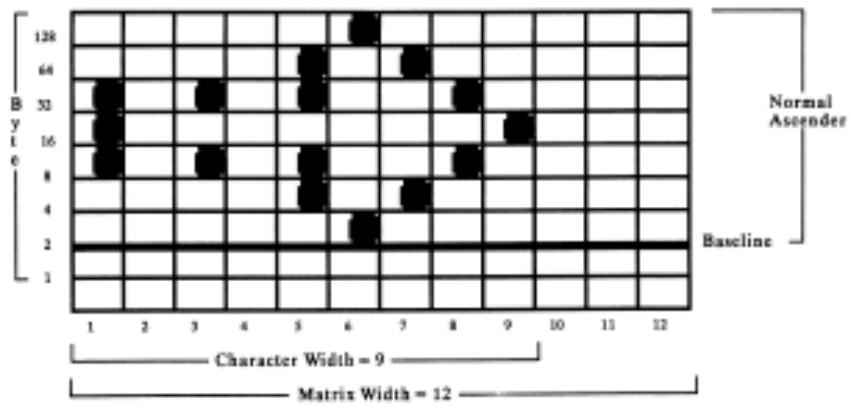
This character is 9 dots wide and is flush to the left. We'll print it in 10 cpi utility mode. Just like 8-pin graphics, each byte specifies a dot column, and the value of each byte is determined by adding up the values of its bits.
Note: In all print modes, you cannot place two dots next to each other horizontally-you must skip one column.
Now we need to give the commands that download this data to the printer.
IBM Custom Character Commands for 9-Pin Printers
Copy ROM to RAM Command for 9-Pin Printers (IBM)
ML320 E/I, ML321 E/I
ML320 Turbo, ML321 Turbo
ML520,ML521
| Function | ASCII | Dec | Hex |
| Copy ROM Character Set to RAM Character Set | ESC $ | 27 36 | 1B 24 |
This command copies a complete set of the characters resident in the printer to the area of its memory reserved for custom characters. The new character will become part of this character set. This makes it possible to mix standard characters with your custom characters when you print.
Down Line Load Characters Command for 9-Pin Printers (IBM)
ML320 E/I, ML321 E/I
ML320 Turbo, ML321 Turbo
ML520,ML521
| Function | ASCII | Decimal | Hexadecimal |
| Down Line Load Characters | ESC = c1c2mna1a2[data] | 27 61 c1c2mna1a2[data] | 1B 3D c1c2mna1a2[data] |
Use this command with the ML520 or the ML521 printer to begin downloading the characters.
Parameters c_1 and c_2
These parameters specify the total count of characters to be downloaded. How these variables are calculated depends on which mode is engaged: Utility printing or Near Letter Quality (NLO) printing.
For Utility printing:
$$ \text {v a l u e} = (# \text {o f c h a r a c t e r s t o b e c h a n g e d} \times 1 3) + 2 $$
For NLO printing:
$$ \text {v a l u e} = (# \text {o f c h a r a c t e r s t o b e c h a n g e d} \times 4 8) + 2 $$
If the value obtained is less than 256, substitute the value for c_1 and replace c_2 with 0.
If the value obtained is 256 or more, divide the value by 256. Replace c_2 with the whole number result and assign the remainder to c_1 .
Parameter m
This parameter selects the print quality:
$$ \begin{array}{l} m = 2 0: \text {U t i l i t y p r i n t i n g} \ m = 2 1: N L Q \text {p r i n t i n g} \ \end{array} $$
Parameter n
This parameter specifies the ASCII value of the starting character in the set to be redefined (characters must be redefined in sequence) and can be assigned any value in the range 0 to 255.
Parameters a_1 and a_2
These parameters designate the attributes of the character.
Parameter a_1
Parameter a_1 denotes whether the character is an ascender or descender:
$$ \begin{array}{l} a _ {1} = 0: \text {a s c e n d e r} \ a _ {1} = 1 2 8: \text {d e s c e n d e r} \ \end{array} $$
Here is a breakdown of the definitions for the various bit values for a_i :
Bit b_7 :
b7 = 0 : ascender
b7 = 1 : descender
Note: If b_0 or b_1 is 0, b_7 is ignored.
Bits b_6,b_5,b_4,b_3,b_2 : ignored
Bits b_1 and b_0 :
b_1, b_0 = 0, 0 : No expansion to 12 dots high: b_7 valid
b_1, b_0 = 0, 1 : Selects line draw characters; data is expanded to a total height of 12 dots in two passes: b_7 ignored.
b_1, b_0 = 1, 0 : Shaded character; data is expanded to a total height of 12 dots in two passes: b_7 ignored.
b_1, b_0 = 1, 1 : NUL is expanded to a total height of 12 dots in two passes: b_7 ignored.
Parameter a_2
Parameter a_2 denotes the total width of the character in dots.
Table 34: IBM ESC = Command — Character Widths for a_2 Values
| a2 (Decimal) | Character Width, in Dots |
| 0 | Ignored |
| 1 | 1 column wide |
| 2 | 2 columns wide |
| 3 | 3 columns wide |
| 4 | 4 columns wide |
| 5 | 5 columns wide |
| 6 | 6 columns wide |
| 7 | 7 columns wide |
| 8 | 8 columns wide |
| 9 | 9 columns wide |
| 10 | 10 columns wide |
| 11 | 11 columns wide |
End the command with the data for the character calculated from your grid. If you're downloading several characters, you only need one ESC & NUL command, and you only need to include m and n once, but you must include a value for parameter a in each set of character data.
Epson Custom Character Commands for 9-Pin Printers
Copy ROM to RAM Command for 9-Pin Printers (Epson)
ML320 E/I, ML321 E/I
ML320 Turbo, ML321 Turbo
| Function | ASCII | Dec | Hex |
| Copy ROM Character Set to RAM Character Set | ESC : NUL NUL NUL | 27 58 0 0 0 | 1B 3A 00 00 00 |
This command is used with the ML320 E/I, ML321 E/I, ML320T, or ML321T printer to copy a complete set of the characters resident in the printer to the area of its memory reserved for custom characters. The new character will become part of this character set.
ML520,ML521
| Function | ASCII | Dec | Hex |
| Copy ROM Character Set to RAM Character Set | ESC : NUL n NUL | 27 58 0 n 0 | 1B 3A 0 n 0 |
This command is used with the ML520 or ML521 printer to copy a complete set of the characters resident in the printer to the area of its memory reserved for custom characters. The new character will become part of this character set. This makes it possible to mix standard characters with your custom characters when you print.
Parameter n is used to specify the NLO font to be used:
n = 0: NLQ Courier
n = 1: NLQ Sans Serif
Down Line Load Characters Command for 9-Pin Printers (Epson)
ML320 E/I, ML321 E/I
ML320 Turbo, ML321 Turbo
ML520,ML521
| Function | ASCII | Dec | Hex |
| Down Line Load Characters | ESC & NUL n1 n2 a [data] | 27 38 0 n1 n2 a [data] | 1B 26 00 n1 n2 a [data] |
Use this command to begin downloading the character(s).
Parameters _1_2
These parameters specify the range of characters to be replaced with new ones. Multiple characters must be assigned to adjacent locations. Parameter n_1 indicates the first character that will be replaced; parameter n_2 indicates the last character that will be replaced.
Custom characters can normally be assigned to decimal locations 32 to 126 and 160 to 255. If IBM Character Set II is selected (ESC 6 command), characters can also be assigned to locations 128 to 159.
Parameter a
This parameter indicates how the character will be positioned within its grid as follows:
Ascenders: a is calculated as
last dot column of character + (first dot column x 16) + 128
Descenders: a is calculated as
last dot column of character + (first dot column x 16)
Parameter a can be assigned any value in the range 0 to 255.
End the command with the data for the character calculated from your grid.
If you're downloading several characters, you only need one ESC & NUL command, and you only need to include n_1 and n_2 once, but you must include a value for parameter a in each set of character data.
Custom Character Set On/Off Commands for 9-Pin Printers (Epson)
ML320 E/I, ML321 E/I
ML320 Turbo, ML321 Turbo
ML520,ML521
| Function | ASCII | Dec | Hex |
| Select Standard Character Set | ESC % 0 | 27 37 48 | 1B 25 30 |
| Select Custom Character Set | ESC % 1 | 27 37 49 | 1B 25 31 |
To switch from the standard character set to the custom character set, use the ESC % 1 command.
To switch back to the standard character set, use the ESC % 0 command. Otherwise, the custom character set will remain in the printer's memory until one of the following happens:
you turn off the printer
you reset the printer with the ESC @ command
you overwrite them with new custom characters
you use the ESC : NUL NUL NUL command to overwrite them with the standard character set.
Okidata MICROLINE Standard Custom Character Commands for 9-Pin Printers
Copy ROM to RAM Command for 9-Pin Printers (ML)
ML320 Std., ML321 Std.
ML320 Turbo, ML321 Turbo
ML520,ML521
| Function | ASCII | Dec | Hex |
| Copy ROM Character Set to RAM Character Set | ESC $ | 27 36 | 1B 24 |
This command copies a complete set of the characters resident in the printer to the area of its memory reserved for custom characters. The new character will become part of this character set. This makes it possible to mix standard characters with your custom characters when you go to print.
Down Line Load Characters Commands for 9-Pin Printers (ML)
ML320 Std., ML321 Std.
ML320 Turbo, ML321 Turbo
ML520,ML521
| Function | ASCII | Dec | Hex |
| Down Line Load Ascender Characters | ESC % A m n1 ... n11 | 27 37 65 m n1 ... n11 | 1B 25 41 m n1 ... n11 |
| Down Line Load Descender Characters | ESC % D m n1 ... n11 | 27 37 68 m n1 ... n11 | 1B 25 44 m n1 ... n11 |
To begin downloading an ascender character, use the ESC % A m n₁ ... n₁₁ command. This command specifies that the new character will be an ascender.
To begin downloading a descender character, use the ESC % D m n₁ ... n₁₁ command. This command specifies that the new character will be a descender.
Parameter m
This parameter specifies the character that will be replaced by the custom character. Custom characters can be assigned to decimal locations 32 to 127 and 160 to 223.
Data n_1 through n_11
n_1 through n_11 specify the data for the character, calculated from your grid.
Select DLL Font Commands for 9-Pin Printers (ML)
ML320 Std., ML321 Std.
ML320 Turbo, ML321 Turbo
ML520,ML521
| Function | ASCII | Dec | Hex |
| Select DLL in Utility Mode | ESC 2 | 27 50 | 1B 32 |
| Select DLL in Near Letter Quality Mode | ESC 7 | 27 55 | 1B 37 |
The ESC 2 command switches custom character printing on when the printer is set for the Utility mode.
The ESC 7 command switches custom character printing on when the printer is set for the Near Letter Quality (NLQ) print mode. NLQ custom characters are just like Utility custom characters, except that overprinting is used to make them match the NLQ character set.
Once you have selected the Custom Character Set, it will remain in memory until the printer is turned off. Any one of the following will also delete the Custom Character Set from the printer's
memory:
- you reset the printer with the ESC CAN command
- you overwrite them with new custom characters
- you use the ESC $ command to overwrite them with the Standard Character Set.
Custom Character Commands: 24-Pin Printers
Designing a Custom Character for 24-Pin Printers
The technique for designing your own custom characters is much like that of designing a graphic image, but on a much smaller scale. You can design characters in either Utility or LQ mode: simply activate the desired mode before you download the characters.
Begin by designing your character on a grid. The height of the grid is 24 dots, each corresponding to a pin on the printhead. The width of the grid, as well as the width of the character itself, depends on the print mode.
Table 35: Custom Character Commands — Character/Grid Width for Print Modes (24-Pin Printers)
| d0= space to the left of the character |
| d1= width of the character itself |
| d2= space to the right of the character |
| Print Mode | Max. Character Width (d1) | Max. Total Grid Width (d0 + d1 + d2) |
| Utility | 15 dots | 18 dots |
| LQ | 37 dots | 42 dost |
| Proportional | 37 dots | 42 dots |
Note: If the printer is in superscript or subscript mode, only the first two or last two bytes are needed for each column.
Characters are designed on a grid made up of columns of 24 dots. Each column, in turn, is divided into three 8-dot groups, and each 8-dot group is represented by a byte of data.
When designing a character, keep the intended use for the character in mind. If the character is to be included with text, leave the top and bottom two rows of the grid blank, in keeping with general font design standards. The character's baseline occurs at the sixth dot from the bottom. The columns of the grid to the left and right of your character affect where it will appear in relation to the characters on either side. If you don't leave blank columns, adjacent characters may appear to run right into your custom character.
Your arrangement of dots is translated into code that tells the printer the exact locations of each dot in each column. The example below shows how this works.
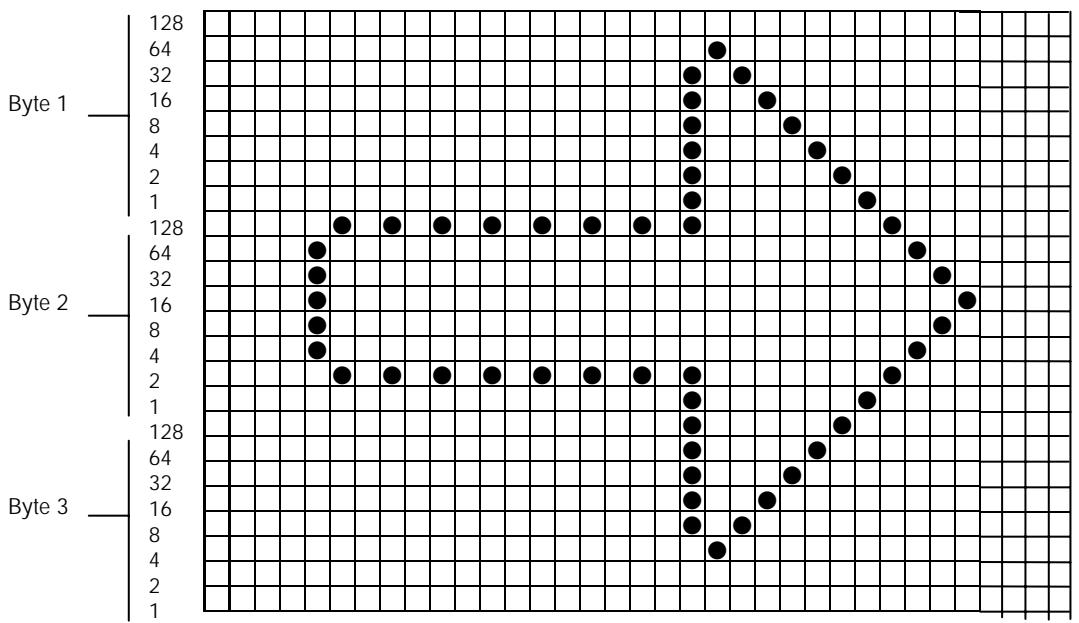
The width of the grid in dots depends on the printing mode in use. This example character is 27 dots wide and has 4 blank columns on either side. We'll print it in 10 cpi Letter Quality. Since the character is being printed in 24-pin mode, three bytes of data are required to specify a single column. Just like high resolution 24-pin graphics, the first three bytes specify dot positions for the second column, and so on up to the last column in which dots will appear. The value of each byte is determined by adding up the values of its bits.
Note: In all print modes, you can NOT place two dots next of each other horizontally-you must skip one column.
The commands below are used to download this data to the printer.
IBM Custom Character Commands for 24-Pin Printers
Down Line Load Characters Command (IBM)
ML590,ML591
| Function | ASCII | Dec | Hex |
| Download Custom Character | ESC = n1n2# a1a2a3m ad1ad2id1id2d1d2d3d4d5 [data] | 27 61 n1n2 35 a1a2a3m ad1ad2id1id2d1d2d3d4d5 [data] | 1B 3D n1n2 23 a1a2a3m ad1ad2id1id2d1d2d3d4d5 [data] |
Parameters _1_2
These parameters specify the number of bytes in the command string. The total number of bytes is calculated as follows:
$$ \text {N o . o f b y t e s} = n _ {1} + \left(n _ {2} \times 2 5 6\right) $$
Parameters a_1, a_2, a_3
Parameters a_1 and a_2 specify the starting address of the custom character data, calculated as
follows:
$$ \text {s t a r t i n g} = \mathrm {a} _ {1} + (\mathrm {a} _ {2} \times 2 5 6) $$
Parameter a_3 indicates the number of characters to be down loaded.
Note: If fewer than 256 characters are loaded, all character codes must be consecutive from the starting point.
Parameter m
The bits of this parameter determine the character pitch and print mode as follows:
b_0 : always 0
b_1 : ignored
b2, b3 = 0, 0 : Utility, all pitches
0,1:LQ,10cpi
1,0:LQ,12cpi
1, 1: LQ, proportional
b_6 = 0 : Last data table
1: Another data table follows
Note: The command up to parameter m need only be included once for each down loading sequence. The following parameters apply to the specific characters, and must be included for each individual character in the sequence.
Parameters ad1 ad2
These parameters specify the starting address of the character, as follows:
$$ \text {c h a r a c t e r} = \mathrm {a d} _ {1} + \left(\mathrm {a d} _ {2} \times 2 5 6\right) $$
Parameter id
Here is a breakdown of the bit values for id_1 :
b_0 to b_5 = Number of columns to be loaded (1 to 63)
b_6 = 0 : Load to RAM
1: Copied from ROM character generator
b_7 = 0 : Normal character
1: Elongated character
Parameter id,
Here is a breakdown of the bit values for id_2 :
b_0 to b_5 = Character width (1 to 63, proportional)
b6, b7 = 0, 0 : Data for pins 19 to 24 copied to pins 25 to 30
0, 1: Data for pins 23, 24, duplicated for pins 25, 26, 27, 28, 29, 30
1, 0: Underline
1, 1: No elongation
Parameters d_1d_2d_3d_4d_5
Each bit of the parameter bytes indicates whether the data in the specified column is identical to the previous column or is new.
bit = 0 : data is new
bit = 1 : data is a repeat of previous column
The parameters specify data repetition as follows:
d_1 :columns 1 to 8
d_2 : columns 9 to 16
d_3 :columns17to24
d_4 : columns 25 to 32
d_5 : columns 33 to 40
Epson Custom Character Commands for 24-Pin Printers
First use the Copy ROM to RAM command to copy a complete set of the characters resident in the printer at the area of its memory reserved for custom characters. The new character you designed will become part of this character set.
To begin downloading the custom character, use the Download Custom Characters Command to specify the range of characters that you will be replacing with new ones, to indicate how you have positioned the character within its grid, and to supply the data for the character(s), calculated from your grid(s).
To switch between the standard character set and your custom character set, use the Custom Character Set On/Off Command.
Copy ROM to RAM Command for 24-Pin Printers (Epson)
ML390 Turbo, ML391 Turbo ML590, ML591
| Function | ASCII | Dec | Hex |
| Copy ROM Character Set to RAM Character Set | ESC : NUL n NUL | 27 58 0 n 0 | 1B 3A 00 n 00 |
This command is used to copy a complete set of the characters resident in the printer to the area of its memory reserved for custom characters. The new character will become part of this character set.
Parameter n
Parameter n is used to specify the font to be used.
Table 36: Epson ESC : Command — Fonts for n Values
| Value of n | Font |
| 0 | Roman |
| 1 | Swiss |
| 2 | Courier (default) |
| 3 | Prestige |
| 4 | Script |
| 5 | OCR-B |
| Value of n | Font |
| 6 | OCR-A |
| 7 | Orator |
| 8 | Orator-S |
| 122 | Swiss Bold |
| 124 | Letter Gothic |
| 126 | Font set on Menu |
Down Line Load Characters Commands for 24-Pin Printers (Epson)
ML390 Turbo, ML391 Turbo
| Function | ASCII | Dec | Hex |
| Load Custom Characters | ESC & m n1 n2 d0 d1 d2 [data] | 27 38 m n1 n2 d0 d1 d2 [data] | 1B 26 m n1 n2 d0 d1 d2 [data] |
ML590,ML591
| Function | ASCII | Dec | Hex |
| Load Custom Characters | ESC & NUL m n1 n2 d0 d1 d2 [data] | 27 38 0 m n1 n2 d0 d1 d2 [data] | 1B 26 00 m n1 n2 d0 d1 d2 [data] |
Use these commands to begin downloading the character(s) to the printer.
Parameter m
This parameter selects the available area in RAM. The only available values/locations are m = 0 or m = 128 .
Parameters n_1n_2
These parameters specify the range of characters to be replaced with new ones. Multiple characters must be assigned to adjacent locations.
Parameter n_1 indicates the first character that will be replaced: range 0 to 127.
Parameter n_2 indicates the last character that will be replaced: range 1 to 127.
Parameters d_0 , d_1 , d_2
These parameters define the width of the character grid in dots as follows:
d_0 = width of space before the character
d_1 = width of the character
d_2 = width of space after the character
Follow these parameters with the data calculated from your grid as shown above in the section "Designing a Custom Character for 24-Pin Printers."
Custom Character Set On/Off Command for 24-Pin Printers (Epson)
ML390 Turbo, ML391 Turbo ML590, ML591
| Function | ASCII | Dec | Hex |
| Select Standard Character Set | ESC % 0 | 27 37 0 | 1B 25 00 |
| Select Custom Character Set | ESC % 1 | 27 37 1 | 1B 25 01 |
To switch from the standard character set to the custom character set, use the ESC % 1 command.
To switch back to the standard character set, use the ESC % 0 command. Otherwise, the custom character set will remain in the printer's memory until one of the following happens:
- you turn off the printer
- you reset the printer with the ESC @ command
- you overwrite them with new custom characters
- you use the ESC : NUL NUL NUL command to overwrite them with the standard character set.
Load Custom Character Set into Upper ASCII Command for 24-Pin Printers (Epson)
ML390 Turbo, ML391 Turbo ML590, ML591
| Function | ASCII | Dec | Hex |
| Select Custom Character Set | ESC t 2 | 27 116 2 | 1B 74 02 |
This command loads the custom character set (decimal 0 to 127) into the upper ASCII range (128 to 255).
Chapter 6: Graphics Commands for 9-Pin Printers
Overview
Your printhead has one column of pins. Images are created as the pins "fire," striking the ribbon against the paper to produce dots. White spaces appear where the pins don't fire. In 8-pin graphics, each column of dots is represented by a single byte of data. Models ML320, ML321, ML320 Turbo, ML321 Turbo, ML520, and ML521 use the 9-pin mode in cases where a slightly higher resolution is required: it uses two bytes to represent each dot column.
When you program a graphic image, your program has to describe the pattern of dots you want to print. Graphics data, like all other data sent to the printer, consists of a series of bytes. Each of the eight bits in a byte of graphics data corresponds to one pin on the printhead. A bit's value can be either 1 or 0. When the printer receives the data, it interprets a bit with a value of 1 as a command to fire the corresponding pin. Bits that are set to 0 don't cause pins to fire.
You can picture the byte as a column of 8 bits. In 8-pin graphics, the body of data is a series of these columns lined up next to each other. Instead of sending the data to the printer bit by bit, you'll probably want to convert this binary information into decimal or hexadecimal format for use with your programming language. In the figure below we show how to determine the decimal value for a given pattern of pins.
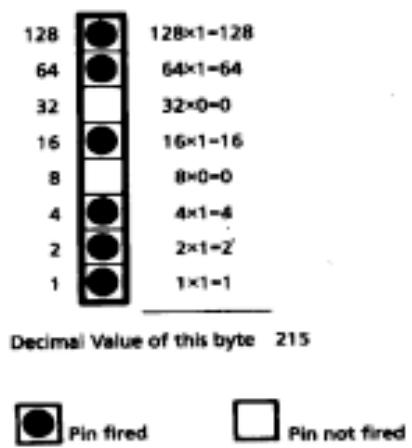
For optimum registration when printing graphics using bi-directional printing, use the Print Registration item in the printer menu to fine-tune the alignment of the vertical bars which print as part of the menu. Keep changing the setting until the lines of the vertical bar characters have the straightest vertical column.
Programming Graphics in BASIC
One important thing to remember when you're programming graphics is not to include extraneous line feeds in your programs. Using a semicolon after the data in an LPRINT statement will keep the print position on the same line.
However, there is an additional complication: by default, BASIC assigns to all printers a maximum line length of 80 characters. After the printer has received 80 bytes of data, it will automatically perform a carriage return and line feed. Since graphics data typically consists of many bytes, it's quite easy to exceed this limit. The resulting output will be garbled. You can work around this problem by setting the line length to the maximum allowable value, 255. Put one of these statements at the beginning of your program:
For parallel printers:
WIDTH"LPT1:",255
For serial printers that have been opened as #1:
WIDTH #1,255
Graphics Density Selection Commands (IBM/E)
ML320 E/I, ML321 E/I
ML320 Turbo, ML321 Turbo
ML520,ML521
| Function | ASCII | Dec | Hex |
| Begin Single Density Graphics | ESC K Ln Hn [data] | 27 75 Ln Hn [data] | 1B 4B Ln Hn [data] |
| Double Density Graphics Command | ESC L Ln Hn [data] | 27 76 Ln Hn [data] | 1B 4C Ln Hn [data] |
| Double Speed/ Double Density Graphics Command | ESC Y Ln Hn [data] | 27 89 Ln Hn [data] | 1B 59 Ln Hn [data] |
| Quadruple Density Graphics Command | ESC Z Ln Hn [data] | 27 90 Ln Hn [data] | 1B 5A Ln Hn [data] |
These graphics modes correspond to the 8-pin modes and are supported by most current DOS-based graphics software.
Parameters L_n and H_n
These parameters tell the printer how many bytes of graphics data to expect. Eight-pin graphics have one byte of data per column. To calculate the values for L_n and H_n' , first determine how many columns of dots there will be in your graphics image. Divide this number by 256 and assign the whole number result to H_n' ; assign the remainder to L_n .
Graphics Density Selection Commands (ML)
ML320 Std., ML321 Std.
ML320 Turbo, ML321 Turbo
ML520,ML521
| Function | ASCII | Dec | Hex |
| Select Single Density Graphics | ESC P or ESC Q | 27 80 or 27 81 | 1B 50 or 1B 51 |
| Select Double Density Graphics | ESC R | 27 82 | 1B 52 |
| Select Double Speed & Quadruple Density Graphics | ESC # Q | 27 35 81 | 1B 23 51 |
Use these commands to select the density of the printing that will be used: single density (60 dpi), double density (120 dpi), or quadruple density (240 dpi). The quadruple density selection command also engages double speed.
Graphics Select/Print Command (Epson)
ML320 Std., ML321 Std.
ML320 Turbo, ML321 Turbo
ML520,ML521
| Function | ASCII | Dec | Hex |
| Graphics Select/Print | ESC * m Ln Hn [data] | 27 42 m Ln Hn [data] | 1B 2A m Ln Hn [data] |
This command is used to select the density, to designate the number of columns of data you'll be sending, and to specify the data to be sent.
Parameter m
This parameter specifies which density to use when printing the graphic image. The table below indicates the type of density for each value of m.
Table 37: Epson ESC * m Command — 8-Pin Graphics Density Codes for m Values (9-Pin Printers)
| Value of m | Graphics Type | Horizontal Density (dots per inch) |
| 0 | Single Density | 60 dpi |
| 1 | Double Density | 120 dpi |
| 2 | High Speed Double Density | 120 dpi |
| 3 | Quadruple Density | 240 dpi |
| 4 | CRT I | 80 dpi |
| 5 | Plotter (Single Density) | 72 dpi |
| 6 | CRT II | 90 dpi |
| 7 | Double Density Plotter | 144 dpi |
Once you've selected the density you want to use, you have to design your graphic image.
Begin by mapping out the pattern you want to print on a piece of graph paper. Here is a sample pattern for a triangle:
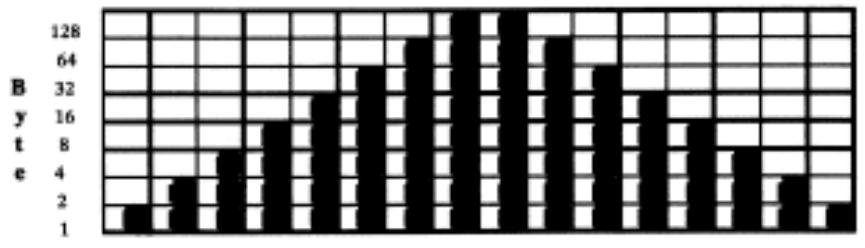
Parameters L_n and H_n
These parameters tell the printer how many columns of data you'll be sending: 8-pin modes have one byte of data per column. To calculate the values, first determine how many columns of dots there will be in your graphics image. Divide this number by 256 and assign the whole number to Hn' ; assign the remainder to Ln .
In our triangle example, each triangle requires 16 columns. We'll be printing a row of 6 triangles, so the total number of columns in the image is 6 × 16 , or 96. Dividing 96 by 256 gives a value of 0 for H_n with a remainder of 96, which we'll assign to L_n .
Next, we can write a BASIC statement that sends the command begin 8-pin graphics:
Note: Be sure to include the semicolon;) at the end of this statement. That way, the printer won't insert a carriage return and line feed before your graphics data.
The listing below is a BASIC program for the Epson emulation that will generate a row of six of our triangles in quadruple density. To print the pattern at another density, change the value of D in line 10 to one of the other density codes.
10 D=3 'Density code for quadruple density (Epson)
20WIDTH"LPT1:",255 'Set printer for maximum line width
30 LPRINT CHR(27) ;"*"; CHR (D) ; CHR(96) ; CHR (0);
40 REM CHR (D) is the density; in this case D = 3 for quadruple density
50 REM CHR (96) and CHR (0) indicate the number of columns
60 FOR I=1 TO 6 'Repeat triangle pattern six times
70 FOR J=1 TO 16 `Each triangle has 16 columns
80 READ A 'Read the column
90 LPRINT CHR\(A); 'Send the byte to the printer
100 NEXT J 'Now print the next column
110 RESTORE 'Go back to the beginning of the DATA statements
120 NEXT I 'Now print the next triangle
130 END
140 DATA 1,3,7,15,31,63,127,255,255,127,63,31,15,7,3,1
Your printout will look like this:

Reassign Graphics Codes Command (Epson)
ML320 E/I, ML321 E/I
ML320 Turbo, ML321 Turbo
ML520,ML521
| Function | ASCII | Dec | Hex |
| Reassign Graphics | ESC ? m n | 27 63 m n | 1B 3F m n |
You can use this command to reassign any of the 8-pin graphics modes to one of the graphics commands (ESC K, ESC L, ESC Y, or ESC Z).
Parameter m
This parameter designates which of the four commands you're redefining. Substitute one of the four letters (K, L, Y, or Z) for m in the command.
Parameter n
This parameter designates the density of the mode you are reassigning to the redefined code. Substitute the appropriate value (0 through 7) for the density you wish to select, as taken from the 8-Pin Graphics Density Codes table earlier in this chapter.
When you are ready to print a graphics pattern, send the redefined command, followed by the graphics data.
For example, the following BASIC statement reassigns quadruple density to the command ESC L:
LPRINT CHR(27);?"?";"L";CHR (3)
Select Graphics Command (Epson)
ML320 E/I, ML321 E/I
ML320 Turbo, ML321 Turbo
ML520,ML521
| Function | ASCII | Dec | Hex |
| Select 9-pin Graphics Printing | ESC ^ m Ln Hn [data] | 27 94 m Ln Hn [data] | 1B 5E m Ln Hn [data] |
This command permits use of all nine pins on the printhead. It operates exactly like the ESC * command, except that dot columns are given two bytes each instead of one. The first byte for each column represents the top eight pins, just like the ESC * command. The second byte is 128 if the bottom (9th) pin is to be fired, and zero if it's not to be fired.
Select Graphics Mode Command (ML)
ML320 Std., ML321 Std.
ML320 Turbo, ML321 Turbo
ML520,ML521
| Function | ASCII | Dec | Hex |
| Select Graphics Mode | ESC * n1 n2: | 27 42 n1 n2 58 | 1B 2A n1 n2 3A |
Use this command to select the density and to define the speed and "word size."
Parameter n_1
This parameter specifies the density. To calculate the value of n_1 , first select the dpi and density you want, then determine the n_1 values for each from the table below. Add them together, then add 96 to the total.
Table 38: ML ESC * Command — Densities for n_1 Values (9-Pin Printers)
| Dots per inch/Density | Value of n1 |
| 60 dpi | 1 |
| 72 dpi | 2 |
| Single density | 4 |
| Double density | 8 |
| Quadruple density | 16 |
For example, for 60 dpi printing at quadruple density, the value of n_1 would be calculated as follows:
$$ n _ {1} = 1 + 1 6 + 9 6 = 1 1 3 $$
Parameter n
This parameter specifies the speed of the printing and a word length of 8 bits. To calculate the value of n_2 , first select the speed and determine the value of n_2 for that speed from the table below. Next, select 7 or 8-bit graphics and determine the value of n_2 for that word size from the table. Add each of these two values together, then add 64 to the total.
Table 39: ML ESC * Command — Speed & Word Sizes for n_2 Values (9-Pin Printers)
| Speed/Word Size | Value n2 |
| Normal speed | 0 |
| Double speed | 8 |
| 7-bit graphics | 0 |
| 8-bit graphics | 16 |
For example, for double speed, 8-bit graphics, the value of n_2 would be calculated as follows:
$$ n _ {2} = 8 + 1 6 + 6 4 = 8 0 $$
Graphics Print Mode Commands (ML)
ML320 Std., ML321 Std.
ML320 Turbo, ML321 Turbo
ML520,ML521
| Function | ASCII | Dec | Hex |
| Select Graphics Print Mode | ETX | 3 | 03 |
| End Graphics Print Mode | ETX STX | 3 2 | 03 02 |
To begin printing graphics, you must first send the ETX command. This is followed by graphics data—bytes representing the individual dot columns you will be printing. The graphics data is followed by the ETX STX command which ends graphics printing. The listing below is a BASIC program that generates a row of six triangles in quadruple density.
10WIDTH"LPT1:,"255 'Set printer for maximum line width
20 LPRINT CHR(27);"*"; CHR (113); CHR(80);":"; CHR (3);
30 REM CHR(113) and CHR(80) are the attribute codes for normal speed, quadruple density graphics
40 REM CHR$(3) Begins graphics printing
50 FOR I=1 TO 6 `Repeat triangle pattern six times
60 FOR J=1 TO 16 'Each triangle has 16 columns
70 READ A 'Read the column
80 LPRINT CHR\(A); 'Send the byte to the printer
90 NEXT J 'Now print the next column
100 RESTORE 'Go back to the beginning of the DATA statements
110 NEXT I 'Now print the next triangle
120 LPRINT CHR(3);CHR(2); 'End graphics printing
130 END
140 DATA 128,192,224,240,248,252,254,255,255,254,252,248,240,224,192,128
Your printout will look like this:

Special Purpose Line Feed Commands (ML)
ML320 Std., ML321 Std.
ML320 Turbo, ML321 Turbo
ML520,ML521
If you are printing more than one line of graphics, you will need to use line feeds. In the Okidata MICROLINE Standard emulation, your printer has a variety of special purpose line feed commands for use in graphics printing:
| Function | Setting | ASCII | Dec | Hex |
| Graphics line feed with carriage return | Text | ETX LF | 3 10 | 03 0A |
| Graphics line feed with carriage return | Graphics | ETX SO | 3 14 | 03 0E |
| Graphics line feed without carriage return | Text | ETX DC2 | 3 18 | 03 12 |
| Graphics line feed without carriage return | Graphics | ETX DC4 | 3 20 | 03 14 |
| Stores graphics data in one dot column buffer | N/A | ETX ETX | 3 3 | 03 03 |
The graphics setting is determined by whether you are using 7 or 8-bit graphics. In 7-bit graphics mode, the graphics setting is 14 / 144'' ; in 8-bit graphics mode, it is 16 / 144'' .
The text setting is determined by the current text line spacing, as set by the ESC 6 and ESC 8 commands.
Chapter 7: Graphics Commands for 24-Pin Printers
Overview
Your printhead has one column of pins. Images are created as the pins "fire," striking the ribbon against the paper to produce dots. White spaces appear where the pins don't fire. In 8-pin graphics, each column of dots is represented by a single byte of data. In the Epson LQ mode, Models ML390 Turbo, ML391 Turbo, ML590 and ML591 support 24-pin graphics, in which each dot column is represented by three bytes of data.
When you program a graphic image, your program has to describe the pattern of dots you want to print. Graphics data, like all other data sent to the printer, consists of a series of bytes. Each of the eight bits in a byte of graphics data corresponds to one pin on the printhead. A bit's value can be either 1 or 0. When the printer receives the data, it interprets a bit with a value of 1 as a command to fire the corresponding pin. Bits that are set to 0 don't cause pins to fire.
You can picture the byte as a column of 8 bits. In 8-pin graphics, the body of data is a series of these columns lined up next to each other. Instead of sending the data to the printer bit by bit, you'll probably want to convert this binary information into decimal or hexadecimal format for use with your programming language. In the figure below we show how to determine the decimal value for a given pattern of pins. For 24-pin graphics, you must perform this process a total of three times.
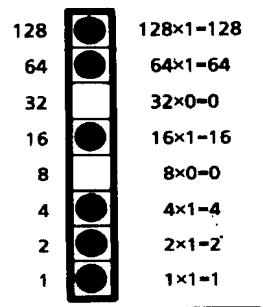
Decimal Value of this byte 215


For optimum registration when printing graphics using bi-directional printing, use the Print Registration item in the printer menu to fine-tune the alignment of the vertical bars which print as part of the menu. Keep changing the setting until the lines of the vertical bar characters have the straightest vertical column.
Programming Graphics in BASIC
One important thing to remember when you're programming graphics is not to include extraneous line feeds in your programs. Using a semicolon after the data in an LPRINT statement will keep the print position on the same line.
However, there is an additional complication: by default, BASIC assigns to all printers a maximum line length of 80 characters. After the printer has received 80 bytes of data, it will automatically perform a carriage return and line feed. Since graphics data typically consists of many bytes, it's quite easy to exceed this limit. The resulting output will be garbled. You can work around this problem by setting the line length to the maximum allowable value, 255. Put one of these statements at the beginning of your program:
For parallel printers:
WIDTH"LPT1:",255
For serial printers that have been opened as #1:
WIDTH #1,255
Graphics Density Selection Commands (IBM/E)
ML390 Turbo, ML391 Turbo ML590, ML591
| Function | ASCII | Dec | Hex |
| Begin Single Density Graphics | ESC K Ln Hn [data] | 27 75 Ln Hn [data] | 1B 4B Ln Hn [data] |
| Double Density Graphics Command | ESC L Ln Hn [data] | 27 76 Ln Hn [data] | 1B 4C Ln Hn [data] |
| Double Speed/ Double Density Graphics Command | ESC Y Ln Hn [data] | 27 89 Ln Hn [data] | 1B 59 Ln Hn [data] |
| Quadruple Density Graphics Command | ESC Z Ln Hn [data] | 27 90 Ln Hn [data] | 1B 5A Ln Hn [data] |
These graphics modes correspond to the 8-pin modes and are supported by most current DOS-based graphics software.
Parameters L_n and H_n
These parameters tell the printer how many bytes of graphics data to expect. Eight-pin graphics have one byte of data per column. To calculate the values for L_n and H_n' , first determine how many columns of dots there will be in your graphics image. Divide this number by 256 and assign the whole number result to H_n' ; assign the remainder to L_n .
Graphics Select/Print Command (IBM AGM/E)
ML390 Turbo, ML391 Turbo ML590, ML591
| Function | ASCII | Dec | Hex |
| Graphics Select/Print | ESC * m n1 n2 [data] | 27 42 m n1 n2 [data] | 1B 2A m n1 n2 [data] |
Note: The IBM AGM emulation combines the IBM Proprinter emulation with Epson LQ graphics for special graphics applications.
This command is used to select the density, to designate the number of columns of data you'll be sending, and to specify the data to be sent.
Parameter m
This parameter specifies which density to use when printing the graphic image. The table below indicates the type of density for each value of m.
Table 40: Epson ESC * m Command — 8-Pin Graphics Density Codes for m Values (24-Pin Printers)
| Value of m | Graphics Type | Pins | Horizontal Density (dots per inch) |
| 0 | Single Density | 8 | 60 dpi |
| 1 | Double Density | 8 | 120 dpi |
| 2 | High Speed Double Density | 8 | 120 dpi* |
| 3 | Quadruple Density | 8 | 240 dpi* |
| 4 | CRT I | 8 | 80 dpi |
| 6 | CRT II | 8 | 90 dpi |
| 32 | Single Density | 24 | 60 dpi |
| 33 | Double Density | 24 | 120 dpi |
| 38 | CRT III | 24 | 90 dpi |
| 39 | Triple Density | 24 | 180 dpi |
| 40 | Hex Density | 24 | 360 dpi* |
- Extrapolated (quasi density)
These parameters tell the printer how many columns of data you'll be sending: 8-pin modes have one byte of data per column, 24-pin modes have three bytes of data per column. These parameters can be assigned any value from 0 to 255. To calculate the values, first determine how many columns of dots there will be in your graphics image. Divide this number by 256 and assign the whole number to H_n ; assign the remainder to L_n .
Reassign Graphics Codes Command (IBM AGM/E)
ML390 Turbo, ML391 Turbo ML590, ML591
| Function | ASCII | Dec | Hex |
| Reassign Graphics | ESC ? m n | 27 63 m n | 1B 3F m n |
Note: The IBM AGM emulation combines the IBM Proprinter emulation with Epson LQ graphics for special graphics applications.
You can use this command to reassign any of the graphics modes to one of the graphics commands (ESC K, ESC L, ESC Y, or ESC Z).
Parameter m
This parameter designates which of the four commands you're redefining. Substitute one of the four letters—K (single density), L (double density), Y (high speed double density), or Z (quadruple density)—for m in the command.
Parameter n
This parameter designates the density of the mode you are reassigning to the redefined code. Substitute the appropriate value for the density you wish to select, as taken from the "Epson ESC * m Command — 8-Pin Graphics Density Codes for m Values (24-Pin Printers)" table in the previous command description.
When you are ready to print a graphics pattern, send the redefined command, followed by the graphics data.
Graphics Resolution Command (IBM)
ML390 Turbo, ML391 Turbo ML590, ML591
| Function | ASCII | Dec | Hex |
| Select Graphics Resolution/ Print | ESC [ g n1 n2 m [data] | 27 93 103 n1 n2 m [data] | 1B 5D 67 n1 n2 m [data] |
This command sets the graphics resolution and prints the graphic data.
Parameters n_1n_2
Range 0 to 255. These parameters specify the number of dot columns according to the following formula:
$$ \text {d o t c o l u m n s} = \mathrm {n} _ {1} + \left(\mathrm {n} _ {2} ^ {*} 2 5 6\right) + 1 $$
Parameter m
This parameter specifies the horizontal resolution of the graphics according to the following table.
Table 41: IBM ESC [g Command — Horizontal Graphics Resolution for m Values (24-Pin Printers)
| Value of m | Resolution (dpi) | Pins | Notes |
| 0 | 60 | 8 | Same as ESC K |
| 1 | 120 | 8 | Same as ESC L |
| 2 | 120 | 8 | Same as ESC Y |
| 3 | 240 | 8 | Same as ESC Z |
| 8 | 60 | 24 | High resolution for ESC K |
| 9 | 120 | 24 | High resolution for ESC L |
| 11 | 180 | 24 | |
| 12 | 360 | 24 |
Select Graphics Aspect Ratio Command (IBM)
ML390 Turbo, ML391 Turbo ML590, ML591
| Function | ASCII | Dec | Hex |
| Set graphics aspect ratio | ESC n Pn | 27 110 Pn | 1B 6E Pn |
This command sets the vertical-to-horizontal ratio of graphics printed using the ESC K, ESC L, ESC Y, and ESC Z graphics commands.
The possible values for P_n are:
P_n = 0,1 : Sets aspect ratio of 5:6
P_n = 2 : Sets aspect ratio of 1:1
Pn ≥ 3 : Dumps data up to receipt of ESC n pn command
Select Graphics Mode Command (Epson)
ML390 Turbo, ML391 Turbo ML590, ML591
| Function | ASCII | Dec | Hex |
| Select Graphics Mode | ESC (G Ln Hn Pn) | 27 40 71 Ln Hn Pn | 1B 28 47 Ln Hn Pn |
Use this command to place the printer in graphics mode.
Parameters L_n and H_n
Parameters L_n and H_n are used to designate the number of bytes to follow in the subsequent parameters, where
$$ \text {N u m b e r o f B y t e s} = L _ {n} + \left(H _ {n} \times 2 5 6\right) $$
L_n and H_n can have any value from 0 to 255 decimal. Generally, L_n is set to 1 and H_n is set to 0.
Parameter _n
Parameter P_n sets the graphics mode. It can have a hexadecimal value of 01 or 31.
Note: To cancel the graphics mode, enter the ESC @ command.
Set/Reset Graphics Mode Command (Epson)
ML390 Turbo, ML391 Turbo
| Function | ASCII | Dec | Hex |
| Engage Raster Graphics Mode | ESC DLE G n 1 | 27 16 71 n 49 | 1B 10 47 n 31 |
| Disengage Raster Graphics Mode | ESC DLE G n 0 | 27 16 71 n 48 | 1B 10 47 n 30 |
Use this command to engage and disengage the graphics mode.
Parameter n
This parameter determines how this command is handled:
$$ \begin{array}{l} n = 0: \text {C o m m a n d i n v a l i d} \ n = 1: \text {d a t a v i d} \ n > 1: \text {d a t a v i d}; \text {d a t a t h a t f o l l o w s i s d i s c a r d e d a f t e r e n t h e c o m m a n d h a s b e e n e x e c u t e d}. \ \end{array} $$
Print Raster Graphics Command (Epson)
ML390 Turbo, ML391 Turbo ML590, ML591
| Function | ASCII | Dec | Hex |
| Print Raster Graphics | ESC . PcPvPhPmLnHn [data] | 27 46 PcPvPhPmLnHn [data] | 1B 2E PcPvPhPmLnHn [data] |
Use this command to print bit-image graphics horizontally.
Parameter P_c
Parameter P_c sets the mode:
$$ P _ {c} = 0: \text {F u l l G r a p h i c s M o d e} $$
$$ P _ {c} = 1: \text {C o m p r e s s e d M o d e} $$
Parameter P_
Parameter P_v sets the vertical dot density:
P_v = 10 : 360 dots per inch (dpi)
P_v = 20 :180dpi
Parameter _h
Parameter P_h sets the horizontal dot density:
P_h = 10:360 (dpi)
P_h = 20:180 dpi
Parameter P_m
Parameter P_m sets the number of vertical dots.
Table 42: Epson ESC. Command — Valid Range of P_m Values for P_v Values
| PvValue | Valid PmRange |
| 10 | 0 to 48 |
| 20 | 0 to 24 |
Note: If P_m value is set to 0, graphics will not print.
Parameters L_n and H_n
Parameters L_n and H_n are used to designate the number of horizontal dots to be printed, where
$$ \text {N o . o f d o t s} = L _ {n} + \left(H _ {n} \times 2 5 6\right) $$
For fewer than 256 dots, substitute the number of dots for L_n and set H_n = 0 . For more than 256 dots, divide the number of dots by 256 and assign the whole number result to H_n' then assign the remainder to L_n .
L_n and H_n can have any value from 0 to 255 decimal.
The maximum number of dots allowed depends on the value of P_h and the width of the printer carriage as follows:
Table 43: Epson ESC. Command — Maximum Horizontal Dots for P_h Values
| P h Value | Model | Maximum Dots |
| 10 | ML590 | 2880 |
| ML591 | 4896 | |
| 20 | ML590 | 1440 |
| ML591 | 2448 |
Chapter 8: Horizontal Control Commands
This chapter describes the commands for horizontal control including the following:
Backspace/Carriage Return Commands
- Print Position Commands
- Margin Setting Commands
- Uni-directional Printing Commands
Horizontal Tab Commands
- Incremental Printing Commands
- Indent Commands
- Justification Commands
Backspace & Carriage Return Commands (IBM/E/ML)
ML320 E/I, ML321 E/I
ML320 Std., ML321 Std.
ML320 Turbo, ML321 Turbo
ML390 Turbo, ML391 Turbo
ML520,ML521
ML590,ML591
| Function | ASCII | Dec | Hex |
| Backspace | BS | 8 | 08 |
| Carriage Return | CR | 13 | 0D |
The backspace command moves the printhead one character to the left. The actual width of the backspace depends on the current pitch. If you're using proportional spacing, the BS command moves the printhead 1/10 to the left.
The carriage return command causes the printer to print data from the print buffer and return the printing position to the beginning of the line. If the printer menu item Auto LF (under Set-Up group) has been set to YES (factory default is NO), the printer automatically adds a line feed to each carriage return.
Margin Setting Commands
Set Left & Right Margins Command (IBM)
ML320 E/I, ML321 E/I
ML320 Turbo, ML321 Turbo
ML390 Turbo, ML391 Turbo
ML520,ML521
ML590,ML591
| Function | ASCII | Dec | Hex |
| Set Left & Right Margins | ESC X n m | 27 88 n m | 1B 58 n m |
In the IBM emulation, the margins set by the Left & Right Margin command are set by character columns. The actual position of the margin depends on the current pitch: a margin of 10 columns will come out as 1'' in 10 cpi and 1/2'' in 20 cpi. If the current pitch is proportional, the margin is set as though it were 10 cpi. However, once you've set a margin, its absolute position remains the same, even if you change the pitch, until you specifically reset the margin. This saves you the work of adjusting margins with every pitch change in your document.
Note: You should always send margin commands at the beginning of a line.
Parameter n
Parameter n sets the left margin and can be any value from 0 to 254. Use a value of 0 if you want to change the right margin only. The default setting for the left margin in the IBM emulation is 1.
Parameter m
Parameter m sets the right margin and can be any value from 0 to 255.
Note: Be sure to specify a right margin that is at least one more than the left margin. The only time you should use a value of 0 for the right margin is if you don't want to change the value for the right margin when you are changing the value for the left margin.
The default settings for the right margin are specified in the table below.
Table 44: IBM ESC X Command — Default Settings for Right Margin
| Pitch | Narrow Carriage Models | Wide Carriage Models |
| 10 cpi/proportional | 80 | 136 |
| 12 cpi | 96 | 163 |
| 15 cpi | 120 | 204 |
| 17.1 cpi | 137 | 233 |
| 20 cpi | 160 | 255 |
Left and Right Margin Commands (Epson)
ML320 E/I, ML321 E/I
ML320 Turbo, ML321 Turbo
ML520,ML521
ML390 Turbo, ML391 Turbo
ML590,ML591
| Function | ASCII | Dec | Hex |
| Set Left Margin | ESC I n | 27 108 n | 1B 6C n |
| Set Right Margin | ESC Q n | 27 81 n | 1B 51 n |
These commands set the margins by character columns. The actual position of the margin depends on the current pitch: a margin of 10 columns will come out as one inch in 10 cpi and one-half inch in 20 cpi. If the current pitch is proportional, the margin is set as though it were 10 cpi. However, once you've set a margin, its absolute position remains the same, even if you change the pitch, until you specifically reset the margin. This saves you the work of adjusting margins with every pitch change in your document.
Sending the left margin command will cancel any horizontal tab stops you may have set, returning the printer to its default setting (tab stops every eight columns).
You should always send margin commands at the beginning of a line.
Parameter n
This parameter can range in value from 0 to 254 for the left margin and from 1 to 255 for the right margin.
Note: You must always specify a right margin that is at least one more than the left margin.
Table 45: Epson ESC L and ESC Q Commands — Range of Margin Settings, All 9-Pin Printers
| Pitch | ML320 E/I, ML320 Turbo, ML520 | ML321 E/I, ML321 Turbo, ML521 | ||
| Left | Right | Left | Right | |
| 10 cpi | 0-79 | 1-80 | 0-135 | 1-136 |
| 12 cpi | 0-95 | 1-96 | 0-162 | 1-163 |
| 17.1 cpi | 0-136 | 1-137 | 0-232 | 1-233 |
| 20 cpi | 0-159 | 1-160 | 0-254 | 1-255 |
| Proportional | 0-79 | 1-80 | 0-135 | 1-136 |
Table 46: Epson ESC L and ESC Q Commands — Range of Margin Settings, 24-Pin Models ML390/391 Turbo
| Pitch | ML390 Turbo | ML391 Turbo | ||
| Left | Right | Left | Right | |
| 10 cpi | 0-70 | 4-80 | 0-126 | 4-136 |
| 12 cpi | 0-84 | 5-96 | 0-151 | 5-163 |
| 15 cpi | 0-105 | 6-120 | 0-189 | 6-204 |
| 17.1 cpi | 0-119 | 7-137 | 0-215 | 7-233 |
| 20 cpi | 0-140 | 8-160 | 0-252 | 8-255 |
| Proportional | 0-140 | 8-160 | 0-252 | 8-255 |
Table 47: Epson ESC L and ESC Q Commands — Range of Margin Settings, 24-Pin Models ML590/591
| Pitch | ML590 | ML591 | ||
| Left | Right | Left | Right | |
| 10 cpi | 0-76 | 4-80 | 0-132 | 4-136 |
| 12 cpi | 0-91 | 5-96 | 0-158 | 5-163 |
| 15 cpi | 0-114 | 6-120 | 0-198 | 6-204 |
| 17.1 cpi | 0-130 | 7-137 | 0-226 | 7-233 |
| 20 cpi | 0-152 | 8-160 | 0-255 | 8-255 |
| Proportional | 0-76 | 4-80 | 0-132 | 4-136 |
Left and Right Margin Commands (ML)
ML320 Std., ML321 Std.
ML320 Turbo, ML321 Turbo
ML520,ML521
| Function | ASCII | Dec | Hex |
| Set Left Margin | ESC % C n1 n2 n3 | 27 37 67 n1 n2 n3 | 1B 25 43 n1 n2 n3 |
| Set Right Margin | ESC % R n1 n2 n3 n4 | 27 37 82 n1 n2 n3 n4 | 1B 25 52 n1 n2 n3 n4 |
In the MICROLINE Standard emulation, margins for these commands are measured in units of 1/120" from the leftmost printing position.
Left Margin Parameters n_1, n_2, n_3
Parameters n_1, n_2, n_3 represent a three-digit ASCII number for the value of the location for the left margin. If the value you wish to assign to the left margin is 99 or less, use zero for the first digit.
Right Margin Parameters n_1, n_2, n_3, n_4
Parameters n_1, n_2, n_3, n_4 represent a four-digit ASCII number for the value of the location for the right margin. If the value you wish to assign is less than four digits, use zeros for the first digit(s). The right margin must be at least 60 units greater than the left margin. If no left margin has been set, the minimum value for the right margin is 60 units.
You must set the right margin before sending any data for the line on which it is to take effect.
The Maximum Margin Values table below lists the widest allowable margins.
Table 48: ML ESC % C and ESC % R Commands — Maximum Margin Values
| Model | Left Margin n Value | Right Margin n Value |
| ML320 Std., ML320 Turbo, ML520 | 0899 | 0960 |
| ML321 Std., ML321 Turbo, ML521 | 0999 | 1632 |
For example, suppose you want to set one-inch margins on a standard 8-1/2" page. The left margin will be 120120 from the leftmost position, so the command to set it is:
LPRINT CHR$ (27); "%C"; "120"
The right margin is 7-1/2", or 900/120" from the leftmost position, so the command to set it is:
LPRINT CHR$ (27); "%R"; "0900"
Horizontal Tab Commands
Execute Horizontal Tab Command (IBM/E/ML)
ML320 E/I, ML321 E/I
ML320 Std., ML321 Std.
ML320 Turbo, ML321 Turbo
ML390 Turbo, ML391 Turbo
ML520,ML521
ML590,ML591
| Function | ASCII | Dec | Hex |
| Execute Horizontal Tab | HT | 9 | 09 |
When you turn on your printer, its tab stops are automatically set for every eight columns. Each time you send the tab character (HT), the printhead moves eight columns to the right before printing the next character.
Set Horizontal Tab Command (IBM/E)
ML320 E/I, ML321 E/I
ML320 Turbo, ML321 Turbo
ML520,ML521
ML590,ML591
| Function | ASCII | Dec | Hex |
| Set Horizontal Tab | ESC D n1 n2 ... nk NUL | 27 68 n1 n2 ... nk 0 | 1B 44 n1 n2 ... nk 00 |
This command lets you set horizontal tab stops at specific columns on the page. As with margins, the actual position of the stops depends on the pitch you're using, and won't change if you switch to a different character width. Be sure to give the stops in ascending order. After you have specified all the stops, end the sequence with a NUL character (use CHR$(0) in BASIC).
If you send the command as ESC D NUL, with no stops specified, all horizontal tab stops will be cleared, including the 8-column default stops. Turning the printer off and on again restores the printer's default tab stops.
Table 49: IBM/Epson ESC D Command — Maximum Number of Horizontal Tab Stops
| Emulation | Max. Tab Stops |
| IBM | 28 |
| Epson | 32 |
Table 50: IBM/Epson ESC D Command — Maximum Values for Horizontal Tab Stops
| Pitch | Narrow Carriage models | Wide Carriage Models |
| 10 cpi/proportional | 79 | 135 |
| 12 cpi | 95 | 162 |
| 15 cpi* | 119 | 203 |
| 17.1 cpi | 136 | 232 |
| 20 cpi | 159 | 255 |
- 15 cpi available only on ML390/391 Turbo, ML520/521 and ML590/591.
Set Tabs by Character Space Command (ML)
ML320 Std., ML321 Std.
ML320 Turbo, ML321 Turbo
ML520,ML521
| Function | ASCII | Dec | Hex |
| Set Horizontal Tab by Characters | ESC HT x1y1z1... x16y16z16 CR | 27 9 x1y1z1... x16y16z16 13 | 1B 09 x1y1z1... x16y16z16 OD |
This command can be used to set up to 16 horizontal tab stops at the intervals of your choice. The actual distance represented by the tab depends on the character pitch in effect when the printer receives the HT command.
The tab information must be entered as three-digit ASCII numbers (xyz) separated by commas, and must be in ascending order. For tabs less than 100, enter a zero for the x and/or y digits as appropriate.
For example, suppose you wish to set tabs at the 5th, 10th, 15th and 20th columns. The value for x_1y_1z_1 would be 005; the value for x_2y_2z_2 would be 010, etc. So, you would enter the BASIC statement
LPRINT CHR\( (27);CHR\) (09);"005,010,015,020";CHR\) (13)
Here are the maximum values for x_ny_nz_n for each pitch and printer model:
Table 51: ML ESC HT Command — Maximum Values for x_ny_nz_n
| Pitch | Maximum xyzw | Maximum xyzw | ||
| ML320 | ML520 | ML321 | ML521 | |
| 10 cpi | 80 | 080 | 136 | 136 |
| 12 cpi | 96 | 096 | 163 | 163 |
| 15 cpi* | N/A | 120 | N/A | 204 |
| 17.1 cpi | 137 | 137 | 233 | 233 |
| 20 cpi | 160 | 160 | 272 | 272 |
- 15 cpi applies only to ML520 and ML521.
Set Tabs by Dot Columns Command (ML)
ML320 Std., ML321 Std.
ML320 Turbo, ML321 Turbo
ML520,ML521
| Function | ASCII | Dec | Hex |
| Set Horizontal Tab by Dot Columns | ESC ETX x1y1z1w1 ... x16y16z16w16 CR | 27 3 x1y1z1w1 ... x16y16z16w16 13 | 1B 03 x1y1z1w1 ... x16y16z16w16 0D |
This command can be used to set up to 16 horizontal tab stops at the intervals of your choice. Setting tabs by dot columns gives you more precise control than setting tabs by character space.
The distance represented by the tab (distance from the center of one dot to the center of the next dot) depends on the character pitch in effect when the printer receives the HT command, as follows:
Table 52: MML ESC ETX Command — Shift Increment for Character Pitches
| Pitch | Increment of Shift |
| 10 cpi | 1/120" |
| 12 cpi | 1/144" |
| 15 cpi* | 1/180" |
| 17.1 cpi | 1/206" |
| 20 cpi | 1/240" |
| Proportional | 1/120" |
- 15 cpi applies only to ML520 and ML521.
The tab information must be entered as four-digit ASCII numbers separated by commas, and must be in ascending order. For tab values less than 1000, enter a zero for the x, y and/or z digits as appropriate.
For example, suppose you want to set tabs by dot columns at (1/2", 2", 4",) and (6") from the left margin, using 12 cpi pitch. From the table above, at 12 cpi pitch, each dot produces a shift of (1/144". So, to move over (1/2") from the home position (0001, or (1/144" )), the value would be 0071 ([1/2 x 144 dpi] - 1); for (2",) the value would be 0287; for (4", 0575; ) and for (6", 0863). To set these tabs enter the BASIC statement
LPRINT CHR(27); CHR (3); "0071,0287,0575,0863"; CHR$ (13)
Here are the maximum values for x_ny_nz_nw_n for each pitch and printer model:
Table 53: ML ESC ETX Command — XYZW Values for Setting Horizontal Tabs
| Maximum xyzw | Maximum xyzw | |||
| Pitch | ML320 | ML520 | ML321 | ML521 |
| 10 cpi | 0959 | 0960 | 1631 | 1632 |
| 12 cpi | 1151 | 1152 | 1956 | 1956 |
| 15 cpi* | N/A | 1440 | N/A | 2448 |
| 17.1 cpi | 1643 | 1644 | 2795 | 2796 |
| 20 cpi | 1917 | 1920 | 3261 | 3264 |
- 15 cpi applies only to ML520 and ML521.
Note: Using the maximum value for the x_ny_nz_nw_n tab setting may not leave enough room between the tab stop and the right margin for a full character to print.
Clear Horizontal Tab Settings Commands (IBM/E)
ML320 E/I, ML321 E/I
ML320 Turbo, ML321 Turbo
ML520,ML521
ML390 Turbo, ML391 Turbo
ML590,ML591
| Function | IBM | Epson |
| Clear Horizontal Tab | ASCII: ESC D NUL NUL Dec: 27 68 0 0 Hex: 1B 44 00 00 | ASCII: ESC D NUL NUL Dec: 27 68 0 0 Hex: 1B 44 00 00 |
| Reset Horizontal Tabs to Default | ASCII: ESC R Dec: 27 82 Hex: 1B 52 | Not applicable |
In the IBM emulation, the ESC D NUL command will clear all horizontal tabs, including the default tabs. In the Epson and MICROLINE Standard emulations, these commands will clear out the tab settings and return the printer to the default horizontal tab settings (every eight spaces).
Clear Horizontal Tab Settings Commands (ML)
ML320 Std., ML321 Std.
ML320 Turbo, ML321 Turbo
ML520,ML521
| Function | ASCII | Dec | Hex |
| Clear Horizontal Tabs Set by Characters | ESC HT CR | 27 9 13 | 1B 09 0D |
| Clear Horizontal Tabs Set by Dot Columns | ESC ETX 0 CR | 27 3 48 141 | 1B 3 30 8D |
Horizontal Print Position Commands
Indent from Left Margin Command (IBM/ML)
ML320 E/I, ML321 E/I
ML320 Turbo, ML321 Turbo
ML520,ML521
ML320 Std., ML321 Std.
| Function | ASCII | Decimal | Hexadecimal |
| Indent from Left Margin | ESC % B n1 n2 n3 n4 | 27 37 66 n1 n2 n3 n4 | 1B 25 42 n1 n2 n3 n4 |
This command causes the printing to be indented from the left margin by the number of dot columns you specify (relative to home position, 0001).
The distance of the shift depends on the pitch engaged:
Table 54: IBM/ML ESC % B Command — Shift Increments for Left Margin Indents
| Pitch | Increment of Shift |
| 10 cpi | 1/120" |
| 12 cpi | 1/144" |
| 15 cpi | 1/180" |
| 17.1 cpi | 1/206" |
| 20 cpi | 1/240" |
| Proportional | 1/120" |
Parameters n_1 through n_4
These parameters represent a four-digit ASCII number. If the value you wish to assign is less than four digits, use zeros for the first digit(s). The value is calculated relative to the home position which is 0001 in from the left margin.
For example, suppose you wish to indent 1" from the left margin, using 12 cpi pitch. The print position will be indented 143/144" from the home position (1/144"), so the command to set it is:
LPRINT CHR$ (27) ; "%B"; "0144"
This command will be ignored if you set the print position outside either margin.
Set Multiple Print Positions Command (IBM/E/ML)
ML320 Turbo, ML321 Turbo ML520, ML521
ML390 Turbo, ML391 Turbo ML590, ML591
| Function | IBM | Epson | ML |
| Set Multiple Print Positions Command | ASCII: ESC DLE @ PnA1 A2 P1 P2 P3 P4Dec: 27 16 64 PnA1 A2 P1 P2 P3 P4Hex: 1B 10 40 PnA1 A2 P1 P2 P3 P4 | ASCII: ESC DLE @ PnA1 A2 P1 P2 P3 P4Dec: 27 16 64 PnA1 A2 P1 P2 P3 P4Hex: 1B 10 40 PnA1 A2 P1 P2 P3 P4 | ASCII: ESC DLE @ Pn a1 a2P1 P2 P3 P4Dec: 27 16 64 Pn a1 a2 P1P2 P3 P4Hex: 1B 10 40 Pn a1 a2 P1P2 P3 P4 |
This command is used to move the print position either to the right or to the left, either as an absolute print position or a relative print position.
value = 0 to 255 for ML390/391 Turbo & ML590/591
Parameter a_1
This parameter establishes whether the print position is absolute or relative:
a_1 = 0 : Absolute print position
a_1 = 1 : Relative print position
Parameter a_2
This parameter determines whether the movement will be to the left or right:
a_2 = 0 : Move to right (forward)
a_2 = 1 Move to left (backward)
These parameters represent a four-digit ASCII number for the value of the amount of movement to take place. If the value you wish to assign is less than four digits, use zeros for the first digit(s). The actual amount of movement depends on the pitch engaged:
Table 55: IBM/E/ML ESC DLE @ Command — Shift Increments for 9-Pin Models
| Pitch | Shift Increment |
| 10 cpi | 1/240" |
| 12 cpi | 1/288" |
| 15 cpi | 1/360" |
| 17.1 cpi | 1/411" |
| 20 cpi | 1/480" |
| Proportional | 1/240" for IBM & Epson, same as the corresponding value for each cpi for ML Std. |
Table 56: IBM/E/ML ESC DLE @ Command — Shift Increments for 24-Pin Models
| Print Quality | Shift Increment |
| Letter Quality | 1/360" |
| Utility | 1/240" |
Suppose you have your pitch set at 20 cpi and want your ML 520 printer to move to a relative dot position (a_1 = 1) 1" backwards (a_2 = 1) . From the table above, at 20 cpi your shift will be in increments of 1/480" , so the value of P_1P_2P_3P_4 would be 0480. Send the BASIC statement
LPRINT CHR(27); CHR (16); "@"; "1"; "1"; "0480"
The table below gives the maximum values which can be designated for P_1P_2P_3P_4 for each model printer, for each pitch, with the default margins engaged.
Note: If you send a location value outside the set left or right margin, this command will be ignored.
Table 57: IBM/E/ML ESC DLE @ Command — Maximum P_1P_2P_3P_4 Values for 9-Pin Models
| Pitch | ML320 Turbo, ML520 | ML321 Turbo, ML521 |
| 10 cpi | 1920 | 3264 |
| 12 cpi | 2304 | 3916 |
| 15 | 2880 | 4896 |
| 17.1 | 3291 | 5595 |
| 20 cpi | 3840 | 6528 |
Table 58: IBM/E/ML ESC DLE @ Command — Maximum P_1P_2P_3P_4 Values for 24-Pin Models
| Print Quality | ML390 Turbo, ML590 | ML391 Turbo, ML591 |
| Letter Quality | 2280 | 4896 |
| Utility | 1920 | 3264 |
Set Relative Dot Position Command (IBM)
ML320 Turbo,ML321 Turbo ML520,ML521
| Function | ASCII | Dec | Hex |
| Set Relative Dot Position | ESC | LnHn | 27 124 LnHn | 1B 7C LnHn |
This command lets you move the print position very precisely to either the right or the left of the current print position. Overscore and underline characters don't print in the space between the two positions.
Parameters L_n and H_n
These parameters set the amount and direction of the movement. To determine their value, first decide the distance you want to move the text or graphics, in dots, based on 120 dots per inch.
If you want to move to the right, multiply the distance by 120 dpi, then divide the result by 256. Assign the whole number result to H_n and the remainder to L_n . For example, to move 3'' to the right: (3 × 120) / 256 = 1 with a remainder of 104, so H_n = 1 and L_n = 104 .
If you want to move to the left, multiply the distance you wish to move by 120 dpi, then subtract the result from 65536. Take that value and divide it by 256: assign the whole number result to H_n and the remainder to L_n . For example, to move 3" to the left:
$$ 3 \times 1 2 0 = 3 6 0 $$
$$ 6 5 5 3 6 - 3 6 0 = 6 5 1 7 6 $$
$$ 6 5 1 7 6 / 2 5 6 = 2 5 4 \left(H _ {n}\right), \text {w i t h a r e m a i n d e r o f} 1 5 2 \left(L _ {n}\right) $$
Set Relative Dot Position Command (IBM)
ML390 Turbo, ML391 Turbo ML590, ML591
| Function | ASCII | Dec | Hex |
| Set Relative Dot Position to Right | ESC d n1 n2 | 27 100 n1 n2 | 1B 101 n1 n2 |
| Set Relative Dot Position to Left | ESC e n1 n2 | 27 64 n1 n2 | 1B 65 n1 n2 |
These commands move the printhead to the left or right of the current print position in increments of 1/120 . The number of increments equals n_1 + (n_2 × 255) . The maximum value is 1632.
Set Relative Dot Position Command (Epson)
ML320 E/I, ML321 E/I
ML390 Turbo, ML391 Turbo
ML520,ML521
ML590,ML591
| Function | ASCII | Dec | Hex |
| Set Relative Dot Position | ESC \ Ln Hn | 27 92 Ln Hn | 1B 5C Ln Hn |
This command lets you move the print position very precisely to either the right or the left of the current print position. Overscore characters don't print in the space between the two positions.
For the ML390 Turbo and ML391 Turbo printers, this command will move in increments established by the Set Unit command (see Chapter 12). The default basic increment of movement in the LQ mode is 1/80 ; in the Utility mode, 1/120 .
Parameters L_n and H_n
These parameters set the amount and direction of the movement. To determine their value, first decide the distance you want to move the text or graphics, in dots, then multiply the distance by 120 dots per inch. Next, divide the result by 256 Assign the whole number result to H_n and the remainder to L_n .
Set Absolute Dot Position Command (Epson)
ML320 E/I, ML321 E/I
ML320 Turbo, ML321 Turbo
ML520,ML521
ML390 Turbo, ML391 Turbo
ML590,ML591
| Function | ASCII | Dec | Hex |
| Set Absolute Dot Position | ESC $ L_n H_n | 27 36 L_n H_n | 1B 24 L_n H_n |
This command lets you place text or graphics very precisely on the page. It uses the left margin as a reference point, and moves the print position in 1/60 increments.
Parameters L_ and H_
These variables determine the amount of movement. To calculate their values, multiply the distance you wish to move by 60, then divide the result by 256 and assign the whole number result to H_n and the remainder to L_n .
For example:
to move the print position over 2'' :
$$ 2 \times 6 0 = 1 2 0 $$
120 / 256 = 0(H_n) with a remainder of 120(L_n)
to move the print position over 5":
$$ 5 \times 6 0 = 3 0 0 $$
300 / 256 = 1(Hn) with a remainder of 44(Ln)
Move to the Right & Left Commands (ML)
ML320 Std., ML321 Std.
ML320 Turbo, ML321 Turbo
ML520,ML521
| Function | ASCII | Dec | Hex |
| Move to Left | ESC % F n1 n2 n3 n4 | 27 37 70 F n1 n2 n3 n4 | 1B 25 46 F n1 n2 n3 n4 |
| Move to Right | ESC % E n1 n2 n3 n4 | 27 37 69 n1 n2 n3 n4 | 1B 25 45 n1 n2 n3 n4 |
These commands move the print position to the right or to the left of the current position in the amount you specify. Underline characters don't print in the space between the two positions.
These parameters represent a four-digit ASCII number for the value of the amount of movement to take place. If the value you wish to assign is less than four digits, use zeros for the first digit(s). The actual amount of movement depends on the pitch engaged:
Table 59: ML ESC % F and ESC % E Commands — Movement Increments for Pitch Settings
| Pitch | Movement Increments |
| 10 cpi | 1/120" |
| 12 cpi | 1/144" |
| 15 cpi | 1/180" |
| 17.1 cpi | 1/206" |
| 20 cpi | 1/240" |
| Proportional | Same as the corresponding value for each cpi |
For example, suppose you have your pitch set at 20 cpi and want your printer to move 1'' to the right. From the table above, at 20 cpi your shift will be in increments of 1/240'' , so the value of n_1n_2n_3n_4 would be 0240 ( 1'' / 1/240'' ). Send the BASIC statement
Note: If you send a location value outside the set left or right margin, this command will be ignored.
Uni-directional Printing Commands (IBM/E/ML)
ML320 E/I, ML321 E/I
ML320 Std., ML321 Std.
ML320 Turbo, ML321 Turbo
ML390 Turbo, ML391 Turbo
ML520,ML521
ML590,ML591
| Function | IBM | Epson | ML* |
| Uni-directional Printing On | ASCII: ESC U 1Dec: 27 85 1Hex: 1B 55 01 | ASCII: ESC U 1Dec: 27 85 1Hex: 1B 55 01 | ASCII: ESC -Dec: 27 45Hex: 1B 2D |
| Uni-directional Printing Off | ASCII: ESC U 0 Dec: 27 85 0 Hex: 1B 55 00 | ASCII: ESC U 0 Dec: 27 85 0 Hex: 1B 55 00 | ASCII: ESC = Dec: 27 61 Hex: 1B 3D |
| Print Uni-directional for One Line Only | Not applicable | ASCII: ESC < Dec: 27 60 Hex: 1B 3C | Not applicable |
Your printer is designed to maximize speed by printing alternately from the left and right (bi-directional printing), rather than moving the printhead back to the left margin so that each line prints from left to right (uni-directional printing). Use uni-directional printing when precise vertical alignment from line to line is critical.
You can also select uni-directional graphics printing in the printer menu (see "Menu Mode" in your printer manual).
Incremental Printing Commands (IBM/E/ML)
ML320 Turbo, ML321 Turbo
ML390 Turbo, ML391 Turbo
| Function | ASCII | Dec | Hex |
| Incremental Printing On | ESC i 1 | 27 105 1 | 1B 69 01 |
| Incremental Printing Off | ESC i 0 | 27 105 0 | 1B 69 00 |
The Incremental Printing On command causes the printer to print each individual character as it is received, as opposed to storing information and printing a line at a time. If you have a software application that passes information to the printer one keystroke at a time, this command allows your printer to function as a typewriter.
The print location of the next character is indicated by a red "M" to the left of the printhead on the ribbon shield.
Justification Commands (Epson)
ML320 E/I, ML321 E/I
ML320 Turbo, ML321 Turbo
ML390 Turbo, ML391 Turbo
ML520,ML521
ML590,ML591
| Function | ASCII | Dec | Hex |
| Select Left Justification | ESC a 0 | 27 97 0 | 1B 61 00 |
| Select Center Justification | ESC a 1 | 27 97 1 | 1B 61 01 |
| Select Right Justification | ESC a 2 | 27 97 2 | 1B 61 02 |
| Select Full (Left & Right) Justification | ESC a 3 | 27 97 3 | 1B 61 03 |
These commands let you specify the alignment of text on the page: along the left or right margin, centered between the margins, or along both the left and right margins. When you are using center, right or full justification, the backspace character (ASCII BS, decimal 8) and horizontal tabs won't function. If you're using full justification, use a carriage return only at the end of a paragraph, not at the end of each line.
Chapter 9: Vertical Control Commands
This chapter describes the commands for vertical control including the following:
Page Length Commands
Vertical Position Commands
- Form Feed Command
Top of Form Commands
Line Feed Commands
- Top & Bottom Margin Command
Line Spacing Commands
- Skip Over Perforation Commands
Vertical Tab Commands
Set Page Length Commands
Set Page Length in Inches Command (IBM/E/ML)
ML320 E/I, ML321 E/I
ML320 Turbo, ML321 Turbo
ML520,ML521
ML320 Std., ML321 Std.
ML390 Turbo, ML391 Turbo
ML590,ML591
| Function | IBM | Epson | ML |
| Set Page Length in Inches | ASCII: ESC C NUL n Dec: 27 67 0 n Hex: 1B 43 00 n | ASCII: ESC C NUL n Dec: 27 67 0 n Hex: 1B 43 00 n | ASCII: ESC G Hn Ln Dec: 27 71 Hn Ln Hex: 1B 47 Hn Ln |
This command sets the page length in inches. If you will most often be using one of the standard page lengths available through the printer menu (see "Menu Mode" in your printer manual), it's a good idea to use the printer menu to set the default page length and then use the page length command whenever you wish to change it temporarily.
To set the page length in inches in either the IBM or Epson emulation, use the command ESC C NUL n. This sets the page length in increments of 1" times the value of the variable "n." The value of n can be from 1 to 22.
To set the page length in inches in the MICROLINE Standard emulation, use the command ESC G Hn Ln. This sets the page length in increments of 12 x the value of the variables Hn Ln. Variables Hn Ln represent a 2-digit ASCII number ranging from 00 to 99. For lengths of less than 412 use a zero for Hn. For example, to set a page length of 14 inches, enter the BASIC statement
LPRINT CHR$ (27); "G"; "28"
Set Page Length in Lines Command (IBM/E/ML)
ML320 E/I, ML321 E/I
ML320 Turbo, ML321 Turbo
ML520,ML521
ML320 Std., ML321 Std.
ML390 Turbo, ML391 Turbo
ML590,ML591
| Function | IBM | Epson | ML |
| Set Page Length in Lines | ASCII: ESC C nDec: 27 67 nHex: 1B 43 n | ASCII: ESC C nDec: 27 67 nHex: 1B 43 n | ASCII: ESC F HnLnDec: 27 70 HnLnHex: 1B 46 HnLn |
You can set the page length in either inches or lines. If you will most often be using one of the standard page lengths available through the printer menu (see "Menu Mode" in your printer manual), it's a good idea to use the printer menu to set the default page length and then use the page length command whenever you wish to change it temporarily.
To set the page length by lines in either the IBM or Epson emulation, use the command ESC C
n. The page length will be the result of multiplying the line pitch by the value of the variable "n." In the IBM emulation, the value of n can be from 1 to 255; in the Epson emulation, it can be from 1 to 127. The actual page length will depend on the line spacing engaged.
To set the page length by lines in the MICROLINE Standard emulation, use the command ESC F Hn Ln. The page length will be the result of multiplying the line pitch by the value of the variables Hn Ln. Variables Hn Ln represent a 2-digit ASCII number ranging from 00 to 99. For Hn Ln numbers less than 10, use a zero for Hn. For example, to set a page length of nine lines, enter the BASIC statement
LPRINT CHR$ (27) ; "H" ; "09"
The actual page length will depend on the line pitch engaged.
Set Page Length in Defined Unit Command (Epson)
ML390 Turbo, ML391 Turbo
| Function | ASCII | Dec | Hex |
| Set Page Length in Defined Unit | ESC (C 2 0 Lp Hp) | 27 40 67 50 48 Lp Hp | 1B 28 43 32 30 Lp Hp |
You can use this command to set the page length in multiples of the line spacing established by the Set Unit command (see Chapter 12).
Parameters L_p and H_p
Parameters L_p and H_p are used to designate the page length, as a muliple of whatever line spacing is engaged:
Page length = [Lp + (Hp × 256)] × line spacing increment engaged
L_p and H_p can have any value from 0 to 255 decimal.
You can set the page length over a range of from 0 to 22 inches. If you will most often be using one of the standard page lengths available through the printer menu (see "Menu Mode" in your printer manual), it's a good idea to use the printer menu to set the default page length and then use this command whenever you wish to change it temporarily.
Form Feed Command (IBM/E/ML)
^+ ML320 E/I, ML321 E/I ^+ ML320 Std., ML321 S
^+ ML320 Turbo, ML321 Turbo ^+ ML390 Turbo, ML391 Turbo
^+ ML520,ML521 ^+ ML590,ML591
| Function | ASCII | Dec | Hex |
| Form Feed | FF | 12 | 0C |
When you send a form feed command, the printer prints any data that is in its buffer, and the print position moves to the top of the next page. You can also use the FORM FEED button on the control panel to feed a page through the printer.
Line Feed Commands
Line Feed with Carriage Return Command (IBM/E/ML)
^+ ML320 E/I, ML321 E/I ^+ ML320 Std., ML321 Std.
^+ ML320 Turbo, ML321 Turbo ^+ ML390 Turbo, ML391 Turbo
^+ ML520,ML521 ^+ ML590,ML591
| Function | ASCII | Dec | Hex |
| Line Feed, with Carriage Return | LF | 10 | 0A |
This command makes the printer print a line, then moves the print position down one line and executes a carriage return, putting the print position at the left margin. The amount of vertical movement depends on the current line spacing. (See "Line Spacing," below for details.) In the IBM and Epson emulations, this command cancels one-line double width printing.
Line Feed without Carriage Return Command (ML)
ML320 Std., ML321 Std.
ML320 Turbo, ML321 Turbo
ML520,ML521
| Function | ASCII | DEC | Hex |
| Graphics Line Feed, without Carriage Return | ESC DC2 | 27 18 | 1B 12 |
This command drops the printing down a line without returning to the left margin. This makes it possible to overstrike a line of printing or create special effects such as double underlines.
Line Feed & Carriage Return Selection Command (ML)
ML320 Std., ML321 Std.
ML320 Turbo, ML321 Turbo
ML520,ML521
| Function | ASCII | Dec | Hex |
| Select Line Feed & Carriage Return | ESC ? n : | 25 63 n 58 | 1B 3F n 3A |
This command performs a number of different carriage return/line feed combinations, depending on the value of n:
Table 60: ML ESC ? Command — Carriage Return/Line Feed Codes for n Values
| Value of n | Operation |
| 33 | Carriage return only |
| 34 | Forward line feed, no carriage return |
| 35 | Forward line feed with a carriage return |
| 48 | Reverse line feed, no carriage return |
| 49 | Reverse line feed with a carriage return |
Fine Line Feed Commands (IBM/E/ML)
ML320 E/I, ML321 E/I
ML320 Std., ML321 Std.
ML320 Turbo, ML321 Turbo
ML520,ML521
| Function | IBM | Epson | ML |
| Perform n/216" Line Feed | ASCII: ESC J nDec: 27 74 nHex: 1B 4A n | ASCII: ESC J nDec: 27 74 nHex: 1B 4A n | Not applicable |
| Perform n/144" Line Feed | ASCII: ESC % 5 nDec: 27 37 53 nHex: 1B 25 35 n | ASCII: ESC % 5 nDec: 27 37 53 nHex: 1B 25 35 n | ASCII: ESC % 5 nDec: 27 37 53 nHex: 1B 25 35 n |
ML390 Turbo, ML391 Turbo ML590, ML591
| Function | IBM | Epson | ML |
| Perform n/180" Line Feed | ASCII: ESC J nDec: 27 74 nHex: 1B 4A n | ASCII: ESC J nDec: 27 74 nHex: 1B 4A n | Not applicable |
| Perform n/360" Line Feed | ASCII: ESC % 4 nDec: 27 37 52 nHex: 1B 25 34 n | ASCII: ESC ] nDec: 27 93 nHex: 1B 5D n | Not applicable |
Unlike the ESC % 5 n command, the ESC J n command is not accompanied by a carriage return, and, in the IBM and Epson emulations, does not cancel one-line double width printing.
In the IBM and Epson simulations, the value of n can be any whole number from 0 to 255.
In the MICROLINE Standard emulation, the value of n can be any whole number from 0 to 127.
If you use n = 0 , no line feed will be performed.
Perform Line Feed Command (IBM)
ML320 E/I, ML321 E/I
ML320 Turbo, ML321 Turbo
ML520,ML521
ML390 Turbo, ML391 Turbo
ML590,ML591
| Function | ASCII | Dec | Hex |
| Set Line Feed Stored by ESC A n | ESC 2 | 27 50 | 1B 32 |
The ESC 2 command sets the line feed value stored using the ESC A n command described later in this chapter under "Line Spacing Commands." It must follow the ESC A n command—if it doesn't, the printer will reset the line spacing to the current menu setting.
Auto Line Feed On/Off Commands (IBM)
ML320 E/I, ML321 E/I
ML320 Turbo, ML321 Turbo
ML520,ML521
ML390 Turbo, ML391 Turbo
ML590,ML591
| Function | ASCII | Dec | Hex |
| Auto Line Feed On | ESC 5 1 | 27 53 1 | 1B 35 01 |
| Auto Line Feed Off | ESC 5 0 | 27 53 0 | 1B 35 00 |
When you activate automatic line feed, the printer will add a line feed to each carriage return code it receives. You can also control this feature through the printer menu (see "Menu Mode" in your printer manual).
Reverse Line Feed Commands (IBM/E/ML)
ML320 E/I, ML321 E/I
ML320 Turbo, ML321 Turbo
ML520,ML521
ML320 Std., ML321 Std.
ML590,ML591
| Function | IBM | Epson | ML |
| 9-Pin Models | |||
| Reverse Line Feed | ASCII: ESC ]Dec: 27 93Hex: 1B 5D | Set in multiples of 1/216": see command below | ASCII: ESC LF Dec: 27 10 Hex: 1B 0A |
| n/216" Reverse Line Feed | Not applicable | ASCII: ESC j nDec: 27 106 nHex: 1B 6A n | Not applicable |
| 24-Pin Models | |||
| n/180" Reverse Line Feed | Not applicable | ASCII: ESC j nDec: 27 106 nHex: 1B 6A n | Not applicable |
Use the reverse line feed command to move the print position up instead of down. Be careful when using reverse line feeds with the optional pull tractor: print registration may be affected.
In the Epson emulation, the reverse line feed command causes the printer to finish printing the line, then move the print position up an amount equal to n/216": n can be any whole number from 0 to 255. If you use n = 0, the command will be ignored. No carriage return is executed, regardless of the setting for Auto CR in the menu (see "Menu Mode" in your printer manual).
Line Spacing Commands
General Line Spacing Commands (IBM/E/ML)
ML320 E/I, ML321 E/I
ML320 Std., ML321 Std.
ML320 Turbo, ML321 Turbo
ML390 Turbo, ML391 Turbo
ML520,ML521
ML590,ML591
| Function | IBM PPR | IBM AGM | Epson | ML |
| Set Line Spacing to 1/6" | Not applicable | Not applicable | ASCII: ESC 2 | ASCII: ESC 6 |
| Dec: 27 50 | Dec: 27 54 | |||
| Hex: 1B 32 | Hex: 1B 36 | |||
| Set Line Spacing to 1/8" | ASCII: ESC 0 | ASCII: ESC 0 | ASCII: ESC 0 | ASCII: ESC 8 |
| Dec: 27 48 | Dec: 27 48 | Dec: 27 48 | Dec: 27 56 | |
| Hex: 1B 30 | Hex: 1B 30 | Hex: 1B 30 | Hex: 1B 38 | |
| Set Line Spacing to 7/72" | ASCII: ESC 1 | ASCII: ESC 1 | ASCII: ESC 1 | Not applicable |
| Dec: 27 49 | Dec: 27 49 | Dec: 27 49 | ||
| Hex: 1B 31 | Hex: 1B 31 | Hex: 1B 31 |
The most common line spacings for text are six and eight lines per inch (lpi). A spacing of 8 lpi works well with compressed character pitches, and lets you fit more lines on a page. In the IBM and Epson emulations you can also set a line spacing of 7/72" .
Fine-Increment Line Spacing Commands for 9-Pin Printers (IBM/E/ML)
ML320 E/I, ML321 E/I
ML320 Std., ML321 Std.
ML320 Turbo, ML321 Turbo
ML520,ML521
| Function | IBM | Epson | ML |
| Set Line Spacing to n/72" | ASCII: ESC A n* Dec: 27 65 n Hex: 1B 41 n | ASCII: ESC A n Dec: 27 65 n Hex: 1B 41 n | Not applicable |
| Set Line Spacing to n/144" | ASCII: ESC % 9 n Dec: 27 37 57 n Hex: 1B 25 39 n | ASCII: ESC % 9 n Dec: 27 37 57 n Hex: 1B 25 39 n | ASCII: ESC % 9 n Dec: 27 37 57 n Hex: 1B 25 39 n |
| Set Line Spacing to n/216" | ASCII: ESC 3 n Dec: 27 51 n Hex: 1B 33 n | ASCII: ESC 3 n Dec: 27 51 n Hex: 1B 33 n | Not applicable |
- In the IBM mode, the ESC A n command must be followed by the ESC 2 Perform Line Feed command (described earlier in this chapter) to set the value of n.
These commands let you control vertical movement in very fine increments, which helps with the precise placement of graphics. The actual amount of movement is set by the value of parameter n which can vary, depending on the emulation.
Table 61: IBM/E/ML Fine Increment Line Spacing Commands — Values of Parameter n
| Increment | Emulation | Values of n |
| n/72" | IBM | 0 to 255 |
| Epson | 0 to 85, 128 to 213 | |
| n/144" | IBM | 0 to 127 |
| Epson | 0 to 127 | |
| ML | 0 to 127 | |
| n/216" | IBM | 0 to 255 |
| Epson | 0 to 255 |
Whenever a value of zero is assigned to n , the line spacing command will be ignored.
ESC A n Line Spacing Command for 24-Pin Printers (IBM/E)
ML390 Turbo, ML391 Turbo ML590, ML591
| Function | IBM PPR | IBM AGM | Epson |
| Set Line Spacing to n/60 | Not applicable | ASCII: ESC A n Dec: 27 65 n Hex: 1B 41 n | ASCII: ESC A n Dec: 27 65 n Hex: 1B 41 n |
| Set Line Spacing to n/72" | ASCII: ESC A n* Dec: 27 65 n Hex: 1B 41 n | Not applicable | Not applicable |
- In the IBM ProPrinter mode, the ESC A n command must be followed by the ESC 2 Perform Line Feed command (described earlier in this chapter) to set the value of n.
This command sets the line spacing to either n/60" or n/72", depending on the emulation selected. The actual amount of movement is set by the value of parameter n which can vary, depending on the emulation:
Table 62: IBM/Epson ESC A Command — Values of Parameter n
| Increment | Emulation(s) | Values of n |
| n/60 | IBM AGM, Epson | 0 to 127 |
| n/72 | IBM PPR | 1 to 255 |
Whenever a value of zero is assigned to n , the line spacing command will be ignored.
ESC 3 n Line Spacing Command for 24-Pin Printers (IBM/E)
ML390 Turbo, ML391 Turbo ML590, ML591
| Function | IBM PPR | IBM AGM | Epson |
| Set Line Spacing to n/180" | Not applicable | ASCII: ESC 3 n**Dec: 27 51 nHex: 1B 33 n | ASCII: ESC 3 nDec: 27 51 nHex: 1B 33 n |
| Set Line Spacing to n/216" | ASCII: ESC 3 n**Dec: 27 51 nHex: 1B 33 n | ASCII: ESC 3 n**Dec: 27 51 nHex: 1B 33 n | Not applicable |
** In the IBM mode, the line spacing increment for the ESC 3 n command is controlled by the Set Vertical Unit commands described below.
This command lets you control vertical movement in fine increments, which helps with the precise placement of graphics.
In the IBM emulations, the increment of the line spacing set by this command is controlled by the Set Vertical Unit commands described below.
The actual amount of movement is set by the value of parameter n which can vary, depending on the emulation:
Table 63: IBM/Epson ESC 3 Command — Values of Parameter n
| Emulation | Values of n |
| IBM PPR | 1 to 255 |
| Epson, IBM AGM | 0 to 255 |
Whenever a value of zero is assigned to n , the line spacing command will be ignored.
n/360-Inch Line Spacing Commands for 24-Pin Printers (IBM/E)
ML390 Turbo, ML391 Turbo ML590, ML591
| Function | IBM PPR | Epson |
| Set Line Spacing to n/360" | ASCII: ESC % 8 nDec: 27 37 56 nHex: 1B 25 38 n | ASCII: ESC [ nDec: 27 91 nHex 1B 5B norASCII: ESC + nDec: 27 43 nHex: 1b 2b n |
These commands let you set the line spacing in 1/360 increments for precise placement of graphics. The actual amount of movement is set by the value of parameter n which can vary, depending on the emulation:
Table 64: IBM/Epson n/360" Line Spacing Commands — Values of Parameter n
| Emulation | Values of n |
| IBM | 1 to 255 |
| Epson | 0 to 255 |
Whenever a value of zero is assigned to n , the line spacing command will be ignored.
Set Vertical Units (IBM)
ML390 Turbo, ML391 Turbo ML590, ML591
| Function | ASCII | Dec | Hex |
| Set Vertical Units | ESC [ \ 4 0 0 0 0 0 n | 27 91 92 52 48 48 48 48 48 n | 1B 5B 5C 34 30 30 30 30 30 n |
This command defines the vertical spacing units used by the ESC 3 n command in the IBM emulation (described above), as follows:
Table 65: IBM ESC [ \ Command — Values of Parameter n
| Values of n | Spacing Unit |
| 180 | 1/180" |
| 216 | 1/216" |
Vertical Tab Commands
When you turn your printer on, it doesn't have any vertical tab stops. Sending a VT command with no stops set will produce a single line feed.
The commands described below are used to set vertical tab stops. In the Epson and MICROLINE Standard emulations, you have the option of entering a single set of vertical tab stops or of using the electronic Vertical Format Unit (VFU) to program multiple sets of vertical tabs, called channels. The IBM emulation permits you to enter one set of stops, but does not have the VFU feature.
The actual position of the stops depends on the line spacing in effect when you send the command. For example, at 6 lines per inch, a tab stop of 24 will appear four inches from the top of the page, whereas at 8 lines per inch, the stop will be positioned three inches from the top of the page. However, once you've set the vertical tab stops, their position is absolute, and won't move, even if you later change the line spacing.
Execute Vertical Tab Command (IBM/E/ML)
ML320 E/I, ML321 E/I
ML320 Std., ML321 Std.
ML320 Turbo, ML321 Turbo
ML390 Turbo, ML391 Turbo
ML520,ML521
ML590,ML591
| Function | ASCII | Dec | Hex |
| Execute Vertical Tab | VT | 11 | 1B |
Set Vertical Tabs Command (IBM/E)
ML320 E/I, ML321 E/I
ML320 Turbo, ML321 Turbo
ML390 Turbo, ML391 Turbo
ML520,ML521
ML590,ML591
| Function | IBM | Epson |
| Set Vertical Tabs | ASCII: ESC B n1 n2 ... nk NULDec: 27 66 n1 n2 ... nk 0Hex: 1B 42 n1 n2 ... nk 00 | ASCII: ESC B n1 n2 ... nk NULDec: 27 66 n1 n2 ... nk 0Hex: 1B 42 n1 n2 ... nk 00 |
In the IBM and Epson emulations, you can use the ESC B n₁ n₂ ... nₖ NUL command to set vertical tab stops. Once you've set the stops, each time you issue a VT command, the print position will move down to the next stop position.
Parameters n_1 through n_k
These parameters designate the individual stops. In the IBM emulation, you can set up to 64 stops (n1 through n64 ). In the Epson emulation, you can set up to 16 stops. In both emulations, the value of each n can be any whole number from 1 to 255 (0 to 255 for Models ML390T and ML391T), designating how many lines to skip down to that tab stop. You must enter the stops in increasing order (n_1 > n_2 > n_3, etc.), and end the series with the NUL character.
Clear Vertical Tabs Command (IBM/E)
ML320 E/I, ML321 E/I
ML320 Turbo, ML321 Turbo
ML520,ML521
ML590,ML591
| Function | IBM Only | IBM & Epson |
| Clear Vertical Tabs | ASCII: ESC R | ASCII: ESC B NUL |
| Dec: 27 82 | Dec: 27 66 0 | |
| Hex: 1B 52 | Hex: 1B 42 00 |
These commands will delete all vertical tab stops. In the IBM emulation, the ESC R command will reset the tabs to the default settings.
Vertical Format Unit [VFU] Commands (Epson)
ML320 E/I, ML321 E/I
ML320 Turbo, ML321 Turbo
ML520,ML521
ML390 Turbo, ML391 Turbo
ML590,ML591
| Function | ASCII | Dec | Hex |
| Set Vertical Format Unit (VFU) | ESC b m n1 n2 ... nk NUL | 27 98 m n1 n2 ... nk 0 | 1B 62 m n1 n2 ... nk 00 |
| Select Vertical Tab Channel | ESC / n | 27 47 n | 1B 2F n |
The Epson emulation gives you the option of setting up to eight separate channels of vertical tab stops using the command ESC b m n1 n2 ... nk NUL.
Parameter m
Parameter m designates the channel to which the tab stops are being assigned and can have any whole number value from 0 to 7.
Parameters n_ through n_
Parameters n_1 through n_k designate the individual stops for each channel. You can set up to 16 stops ( n_1 through n_16 ). The value of n can be any whole number from 0 to 255, designating how many lines to skip down to that tab stop. You must enter the stops in increasing order ( n_1 > n_2 > n_3i , etc.), and end the series with the NUL character.
Once you've set up the channels you're using, send the ESC / n command to specify which channel to select (replace n with desired channel number, 0 through 7), followed by the VT command to advance to the next tab stop in the selected sequence.
For example, the following BASIC program will set stops in three channels, and then perform a series of vertical tabs in the different channels:
5 REM Stops in channel 0: lines 10, 20, 30, 40, 50
10 LPRINT CHR(27) ; "b" ; CHR (0) ; CHR(10) ; CHR (20) ; CHR(30) ; CHR (40) ; CHR(50) ; CHR (0)
20 REM Stops in channel 1: lines 5, 15, 35, 45, 55 30 LPRINT CHR(27); "b"; CHR(1); CHR(5); CHR(15); CHR(35); CHR(45); CHR(55); CHR(0)
40 REM Stops in channel 2: lines 12, 24, 48
50 LPRINT CHR\ (27) ; "b"; CHR\ (2) ; CHR\ (12) ; CHR\ (24) ; CHR\ (48) ; CHR\ (0)
60 LPRINT CHR(27);"/";CHR(1): REM Select channel 1
70 LPRINT CHR\(11); "This prints on line 5"
80 LPRINT CHR\ 11);CHR\ 11; "This prints on line 35"
90 LPRINT CHR\ (27) ;"/"/CHR\ (2): REM Select channel 2
100 LPRINT CHR\(11); "This prints on line 48"
110 LPRINT CHR\ (27) ;"/";CHR\ (0): REM Select channel 0
120 LPRINT CHR\(11); "This prints on line 50"
In the MICROLINE Standard emulation, the electronic Vertical Format Unit lets you program up to 12 different sets of vertical tabs. You can load a maximum of 54 tab stops into one set of channels. The command DC4 SP...SP n ... SP...SP ? is used to set up the tabs. Then whenever the printer receives a VT code followed by a channel code, it will skip to the next tab stop in that channel.
To load in your selected tabs, follow the DC4 code with one SP code (decimal 32) for each line to be skipped to advance down the point where you want the first tab stop. For example, to advance down three lines, use DC4 SP SP SP. Then enter the value you wish to assign for the channel code n, taken from the table below. Next add more SP codes equal to the number of lines to be skipped down to the next tab stop, followed by the next channel code value. Continue this process until you've entered all the stops you want (up to a maximum of 12) for that channel. Add enough spaces at the end of the sequence so that the number of spaces in the sequence equals the number of lines on your page. Follow this with the ? character (decimal 63).
Once you've set up the channels, send the VT n command to execute a vertical tab to the next stop in the channel code sequence specified by n.
Table 66: ML VFU Commands — Usable Channel Codes for Parameter n
| ASCII | 1 | 2 | 3 | 4 | 5 | 6 | 7 | 8 | 9 | : | ; | < |
| Dec | 49 | 50 | 51 | 52 | 53 | 54 | 55 | 56 | 57 | 58 | 59 | 60 |
Vertical Position Commands
Skip Down Command (ML)
ML320 Std., ML321 Std.
ML320 Turbo, ML321 Turbo
ML520,ML521
| Function | ASCII | Dec | Hex |
| Skip Down Selected Number of Lines | ESC VT Hn Ln | 27 11 Hn Ln | 1B 0B Hn Ln |
The skip down command makes it easy to move rapidly down a page. This is a useful feature when you are creating headings or filling in forms. The variables H_nL_n represent a 2-digit ASCII number from 00 to 99 which allows you to skip up to 99 lines; a value of 00 for H_nL_n in the command results in no line feed.
Set Relative Vertical Position Command (Epson)
ML390 Turbo, ML391 Turbo
| Function | ASCII | Dec | Hex |
| Set Relative Vertical Print Position | ESC (v Ln Hn Lp Hp) | 27 40 118 Ln Hn Lp Hp | 1B 28 76 Ln Hn Lp Hp |
This command lets you move the print position very precisely either upward (up to 0.5-inch) or downward (up to 46.2 inches) from the current print position, in increments established by the Set Unit command (see Chapter 12).
Parameters L_n and H_n
Normally L_n is set to 2 and H_n is set to 0.
Parameters L_p and H_p
These parameters can have a value of 0 to 255 and are used to set the actual amount of vertical movement, using the following equation:
[Lp + (Hp × 256)] increment set by ESC (U L n H n P n command
For reverse (upward) movement, set bit 6 of H_p to 1. For forward (downward) movement, set bit 6 of H_p to 0.
Table 67: Epson ESC ( v Command — Hexadecimal Values for L_p H_p
| 1/360" | 1/180" | 1/120" | 1/90" | 1/72" | 1/60" | |
| Forward | 0001-3FFF | 0001-207F | 0001-15AA | 0001-103F | 0001-0CFF | 0001-0AD5 |
| Reverse | 7F40-7FFF | 7FA7-7FFF | 7FC5-7FFF | 7FD4-7FFF | 7FDD-7FFF | 7FE3-7FFF |
Notes: If the reverse line feed value exceeds the Top of Form position or the top margin, the print position will start at the TOF or top margin position.
If the forward line feed value exceeds the bottom margin, the print position will start at the top margin position on the following page. If Skip Over Perforation is set and the forward line feed value exceeds the skip over perforation area, the print position will start at the Top of Form position on the next page.
Set Absolute Vertical Position Command (Epson)
ML390 Turbo, ML391 Turbo
| Function | ASCII | Dec | Hex |
| Set Absolute Vertical Print Position | ESC (V Ln Hn Lp Hp) | 27 40 86 Ln Hn Lp Hp | 1B 28 56 Ln Hn Lp Hp |
This command lets you place text or graphics very precisely on the page. It uses the top margin as a reference point, and moves the print position in increments established by the Set Unit command (see Chapter 12).
Parameters L_n and H_n
Normally L_n is set to 2 and H_n is set to 0.
Parameters L_p and H_p
These parameters are used to set the actual amount of vertical movement, using the following equation:
$$ \left[ L _ {p} + \left(H _ {p} \times 2 5 6\right) \right] \times \text {i n c r e m e n t s e t b y E S C (U L} _ {n} H _ {n} P _ {n} \text {c o m m a n d} $$
Top of Form Commands (IBM/ML)
ML320 E/I, ML321 E/I
ML320 Std., ML321 Std.
ML320 Turbo, ML321 Turbo
ML390 Turbo, ML391 Turbo
ML520,ML521
ML590,ML591
| Function | IBM | ML |
| Set Top of Form | ASCII: ESC 4 | ASCII: ESC 5 |
| Dec: 27 52 | Dec: 27 53 | |
| Hex: 1B 34 | Hex: 1B 35 |
When you send these commands, a new top of form is set at the current position of the printhead. In both emulations, you can also set a new top of form using the front panel (see "Top of Form" in the index of your printer manual).
Set Page Format Command (Epson)
ML390 Turbo, ML391 Turbo
| Function | ASCII | Dec | Hex |
| Set Top & Bottom Margins | ESC ( c 2 0 L_t H_t L_b H_b | 27 40 99 50 48 L_t H_t L_b H_b | 1B 28 63 32 30 L_t H_t L_b H_b |
This command is used to set the top and bottom margins as a multiple of the line spacing increment established by the Set Unit command (see Chapter 12)..
Parameters L_t and H_t
Parameters L_t and H_t are used to set the top margin, as a multiple of whatever line spacing is engaged:
Top margin = [L_t + (H_t × 256)] × line spacing increment engaged
L_t and H_t can have any value from 0 to 255 decimal.
Note: The top margin must be set at a value less than the bottom margin.
Parameters L_b and H_b
Parameters L_b and H_b are used to set the top margin, as a muliple of whatever line spacing is engaged:
Bottom margin = [L_b + (H_b × 256)] x line spacing increment engaged
L_b and H_b can have any value from 0 to 255 decimal.
Note: The bottom margin must be set at a value greater than the top margin and less than the page length.
Skip Over Perforation Commands
Skip Over Perforation On/Off Commands (IBM/E)
ML320 E/I, ML321 E/I
ML320 Turbo, ML321 Turbo
ML520,ML521
ML390 Turbo, ML391 Turbo
ML590,ML591
| Function | ASCII | Dec | Hex |
| Skip Over Perforation On | ESC N n | 27 78 n | 1B 4E n |
| Skip Over Perforation Off | ESC O | 27 79 | 1B 4F |
If the skip over perforation is set to Yes (factory default is No) on the menu, the printer will automatically skip an inch from the bottom of one page to the top of the next.
This command changes the number of lines skipped at the bottom of the page for the IBM and Epson emulations.
Parameter n
This parameter sets the amount of the skip. "n" is any whole number from 1 to 255 for both emulations and all models except the ML390 Turbo and ML391 Turbo: for the Epson emulation in the ML390/391 Turbo printers, "n" is any whole number from 1 to 127.
The amount of skip is calculated by multiplying the current line spacing by the value of n. Once you've set the amount of skip, it won't increase or decrease if you change the line spacing.
To return the perforation skip to its default setting, enter the command ESC O.
Skip Over Perforation On/Off Commands (ML)
ML320 Std., ML321 Std.
ML320 Turbo, ML321 Turbo
ML520,ML521
| Function | ASCII | Dec | Hex |
| Skip Over Perforation On | ESC % S 1 | 27 37 83 49 | 1B 25 53 31 |
| Skip Over Perforation Off | ESC % S 0 | 27 37 83 48 | 1B 25 53 30 |
If the skip over perforation is set to Yes (factory default is No) on the menu, the printer will automatically skip an inch from the bottom of one page to the top of the next.
Chapter 10: Bar Code Commands for 9-Pin Printers
9-Pin models ML320 Turbo, ML321 Turbo, ML520 and ML521 incorporate eight bar codes in both the Epson FX and IBM emulations:
Code 39
- UPC* E
Code 128
EAN**8
Interleaved 2 of 5
EAN**13
- UPC* A
Postnet
*UPC = Universal Product Code
**EAN = European Article Numbering
These commands are the same as those given in Chapter 11 for the 24-pin printers; however, the values for the various parameters are different for the 24-pin printers.
Note: 9-pin models ML320 Epson/IBM, ML321 Epson/IBM, ML320 Standard and ML321 Standard do NOT have bar code commands
Bar Code Commands
ML320 Turbo, ML321 Turbo
ML520,ML521
| Function | ASCII | Dec | Hex |
| Select Bar Code Type and Size | ESC DLE A m n1 ... n8 | 27 16 65 m n1 ... n8 | 1B 10 41 m n1 ... n8 |
| Print Bar Code Data | ESC DLE B m n [data] | 27 16 66 m n [data] | 1B 10 42 m n [data] |
| Print Postnet Bar Code Data | ESC DLE C P1 [data] | 27 16 67 P1 [data] | 1B 10 43 P1 [data] |
To print bar codes other than Postnet, you must enter two commands:
- Select Bar Code Type & Size
- Print Bar Code Data (provides data and initiates printing)
To print Postnet bar codes, use the command ESC DLE C P1 [data] discussed at the end of this chapter.
Code 39 Bar Code Commands
Also known as 3 of 9 Code, Code 39 is used in non-retail applications. Each character has five bars and four spaces. Code patterns have been developed for 44 different alphabetic, numeric and graphic characters. The digits can be any ASCII character from SP to Z (32 to 102 Dec, 20 to 66 Hex).
Select Code 39 Bar Code Command
The command for selecting Code 39 is
$$ E S C D L E A m 2 0 n _ {3} n _ {4} n _ {5} n _ {6} n _ {7} n _ {8} $$
Code 39 Parameter m
Parameter m designated the number of parameters to be set. The value of m is normally set to hexadecimal 08.
Code 39 Parameters n_3 and n_4
These parameters set the vertical length of the bars in units of 6 / 72" , as calculated by the equation
$$ [ (n _ {3} \times 1 0) + n _ {4} ] \times 6 / 7 2" $$
where the total value must be less than or equal to 25.
Code 39 Parameter _5
This parameter sets the width of the narrow bars in 1/144" increments.
Table 68: IBM/Epson Select Code 39 Command — Narrow Bar Widths for Parameter n_5 Values (9-Pin Printers)
| Value of n5 | Character Width |
| 1 | 1/144" |
| 2 | 2/144" |
| 3 | 3/144" |
| 4 | 4/144" |
| 5 | 5/144" |
| 6 | 6/144" |
| 7 | 7/144" |
Code 39 Parameter _6
This parameter sets the width of the narrow space characters in 1/144" increments.
Table 69: IBM/Epson Select Code 39 Command — Narrow Space Widths for Parameter n_6 Values (9-Pin Printers)
| Value of n6 | Character Width |
| 1 | 4/144" |
| 2 | 5/144" |
| 3 | 6/144" |
| 4 | 7/144" |
| 5 | 8/144" |
| 6 | 9/144" |
| 7 | 10/144" |
Code 39 Parameter n_7
Parameter n_7 is used in combination with parameters n_5 and n_6 to set the width of the wide bars and the wide spaces.
Table 70: IBM/Epson Select Code 39 Command — Wide Bar Widths for Parameter n_5 , n_6 , n_7 Values (9-Pin Printers)
| n5=1 | n5=2 | n5=3 | n5=4 | n5=5 | n5=6 | n5=7 | |
| n7=1 | 4/144" | 6/144" | 8/144" | 10/144" | 12/144" | 14/144" | 16/144" |
| n7=2 | 5/144" | 7/144" | 10/144 | 12/144" | 15/144" | 17/144" | 20/144 |
| n7=3 | 6/144" | 9/144" | 12/144" | 15/144" | 18/144" | 21/144" | 24/144" |
| n7=4 | 7/144" | 11/144" | 14/144 | 18/144" | 21/144" | 25/144" | 28/144" |
| n7=5 | 9/144" | 13/144 | 17/144" | 21/144" | 25/144" | 29/144" | 33/144" |
| n7=6 | 10/144" | 14/144 | 19/144" | 23/144" | 28/144" | 32/144" | 37/144" |
| n7=7 | 11/144" | 16/144" | 21/144" | 26/144" | 31/144" | 36/144" | 41/144" |
Table 71: IBM/Epson Select Code 39 Command — Wide Space Widths for Parameter n_5, n_6, n_7 Values (9-Pin Printers)
| n6=1 | n6=2 | n6=3 | n6=4 | n6=5 | n6=6 | n6=7 | |
| n7=1 | 7/144" | 9/144" | 11/144" | 13/144" | 15/144" | 17/144" | 19/144" |
| n7=2 | 8/144" | 10/144" | 13/144" | 15/144" | 18/144" | 20/144" | 23/144" |
| n7=3 | 9/144" | 12/144" | 15/144" | 18/144" | 21/144" | 24/144" | 27/144" |
| n7=4 | 10/144" | 14/144" | 18/144" | 21/144" | 25/144" | 28/144" | 31/144" |
| n7=5 | 12/144" | 16/144" | 20/144" | 24/144" | 28/144" | 32/144" | 36/144" |
| n7=6 | 13/144" | 18/144" | 22/144" | 27/144" | 31/144" | 36/144" | 40/144" |
| n7=7 | 14/144" | 19/144" | 24/144" | 29/144" | 34/144" | 39/144" | 44/144" |
Code 39 Parameters n_5, n_6 , and n_7
Together, parameters n_5 through n_7 are used to calculate the maximum width of Code 39 characters and the start and stop characters by means of the following equation:
$$ [ (n _ {5} \times 5) + n _ {6} + 3 + A ] / 1 4 4 ” $$
The value of A is determined by n_6 and n_7 :
Code 39 Parameter _g
This parameter sets whether or not the readable characters are printed.
n_8 = 0 : print readable characters in Utility mode
n_8 = 1 : print readable characters in NLQ mode
Print Code 39 Bar Code Command
The command for printing Code 39 bar codes is
ESC DLE B m [data]
where parameter m designates the number of characters which will follow in the data. If you wish to include a check digit, enter the ASCII character @ (64 Dec, 40 Hex) at the end of the data.
Code 128 Bar Code Commands
Code 128 has 128 different characters, each of which can have any one of three different meanings, depending on which code set is engaged:
Table 72: IBM/Epson Select Code 128 Command — Usable Characters for Code Sets (9-Pin Printers)
| Code Set | Characters | ||
| ASCII | Dec | Hex | |
| A | NUL to ' | 0 to 96 | 00 to 60 |
| B | DC3 to DLE | 25 to 127 | 19 to 7F |
| C | 0 to 9 | 48 to 57 | 30 to 39, in 2-digit pairs |
A special code at the beginning indicates which set is engaged: three shift codes are also available for use within the bar code to indicate a change in the code set engaged.
Select Code 128 Bar Code Command
The command for selecting Code 128 is
$$ E S C D L E A m 4 0 n _ {3} n _ {4} n _ {5} 0 0 n _ {8} $$
Which set will be engaged is entered using the Print Code 128 Bar Code Command described below.
Code 128 Parameters n_3 and n_4
These parameters set the vertical length of the bars in 6 / 72" , as calculated by the equation
$$ [ (n _ {3} \times 1 0) + n _ {4} ] \times 6 / 7 2 ^ {\prime \prime} $$
where the total value must be less than or equal to 25.
Code 128 Parameter n_5
This parameter sets the maximum width of one character in 1/144" increments as follows:
Table 73: IBM/Epson Select Code 128 Command — Character Widths for Parameter n_5 Values (9-Pin Printers)
| Value of n5 | Character Width |
| 1 | 30/144" |
| 2 | 45/144" |
| 3 | 58/144" |
| 4 | 71/144" |
| 5 | 84/144" |
| 6 | 97/144" |
| 7 | 110/144" |
When calculating the width of the printout, you must take into consideration the Start and Stop Code patterns:
Table 74: IBM/Epson Select Code 128 Command — Start and Stop Codes for Parameter n_5 Values (9-Pin Printers)
| Value of n5 | Start Code | Stop Code |
| 1 | 30/144" | 32/144" |
| 2 | 45/144" | 45/144" |
| 3 | 58/144" | 58/144" |
| 4 | 71/144" | 71/144" |
| 5 | 84/144" | 84/144" |
| 6 | 97/144" | 97/144" |
| 7 | 110/144" | 110/144" |
Code 128 Parameter n_8
This parameter sets whether or not the readable characters are printed.
n_8 = 1 : print readable characters
n_8 = 0 : do not print readable characters
Print Code 128 Bar Code Command
The command for printing Code 128 bar codes is
ESC DLE B m [data]
where parameter m designates the number of characters which will follow in the data. To indicate which code set to use, use the set letter as the first digit of the data within the command.
Each set has a different check digit.
Table 75: IBM/Epson Print Code 128 Command - Check Digits for Code 128 Code Sets (9-Pin Printers)
| Code Set | Check Digit | ||
| ASCII | Dec | Hex | |
| A | g | 103 | 67 |
| B | CAN | 24 | 18 |
| C | @ | 64 | 40 |
Interleaved 2 of 5 Bar Code Commands
Interleaved 2 of 5 bar coding is used mainly in the distribution industry. Two digits are encoded: one in the bars and one in the spaces. Ten characters are encoded, each any ASCII character from 0 to 9 (48 to 57 Dec, 30 to 39 Hex).
The sum of the black bars and spaces becomes the maximum width of two characters.
Select Interleaved 2 of 5 Bar Code Command
The command for selecting Interleaved 2 of 5 is
$$ E S C D L E A m 3 0 n _ {3} n _ {4} n _ {5} n _ {6} n _ {7} n _ {8} $$
Interleaved 2 of 5 Parameters _3 and _4
These parameters set the vertical length of the bars in 6 / 72" , as calculated by the equation
$$ \left(n _ {3} \times 1 0\right) + n _ {4} ] \times 6 / 7 2" $$
where the total value must be less than or equal to 25.
Interleaved 2 of 5 Parameter n_5
Parameter n_5 is used in combination with parameter n_7 to set the width of one character of the black bars, as follows:
Table 76: IBM/Epson Select Interleaved 2 of 5 Command — Black Bar Width for Parameter n_5 , n_7 Values (9-Pin Printers)
| n5=1 | n5=2 | n5=3 | n5=4 | n5=5 | n5=6 | n5=7 | |
| n7=1 | 11/144" | 18/144" | 25/144" | 32/144" | 39/144" | 46/144" | 53/144" |
| n7=2 | 13/144" | 20/144" | 29/144" | 36/144" | 45/144" | 52/144" | 61/144" |
| n7=3 | 15/144" | 24/144" | 33/144" | 42/144" | 51/144" | 60/144" | 69/144" |
| n7=4 | 17/144" | 28/144" | 37/144" | 48/144" | 57/144" | 68/144" | 77/144" |
| n7=5 | 21/144" | 32/144" | 43/144" | 54/144" | 65/144" | 76/144" | 87/144" |
| n7=6 | 23/144" | 34/144" | 47/144" | 58/144" | 71/144" | 82/144" | 95/144" |
| n7=7 | 25/144" | 38/144" | 51/144" | 64/144" | 77/144" | 90/144" | 103/144" |
Interleaved 2 of 5 Parameter _6
Parameter n_6 is used in combination with parameter n_7 to set the width of one character of the spaces, as follows:
Table 77: IBM/Epson Select Interleaved 2 of 5 Command — Space Widths for Parameter n_6 , n_7 Values (9-Pin Printers)
| n6=1 | n6=2 | n6=3 | n6=4 | n6=5 | n6=6 | n6=7 | |
| n7=1 | 26/144" | 33/144" | 40/144" | 47/144" | 54/144" | 61/144" | 68/144" |
| n7=2 | 28/144" | 35/144" | 44/144" | 51/144" | 60/144" | 67/144" | 76/144" |
| n7=3 | 30/144" | 39/144" | 48/144" | 57/144" | 66/144" | 75/144" | 84/144" |
| n7=4 | 32/144" | 43/144" | 52/144" | 63/144" | 72/144" | 83/144" | 92/144" |
| n7=5 | 36/144" | 47/144" | 68/144" | 69144" | 80/144" | 91/144" | 102/144" |
| n7=6 | 38/144" | 51/144" | 62/144" | 75/144" | 86/144" | 99/144" | 110/144" |
| n7=7 | 40/144" | 53/144" | 66/144" | 79/144" | 92/144" | 105/144" | 118/144" |
Interleaved 2 of 5 Parameter _g
This parameter sets whether or not the readable characters are printed.
n_8 = 1 : print readable characters
n_8 = 0 : do not print readable characters
Print Interleaved 2 of 5 Bar Code Command
The command for printing Interleaved 2 of 5 bar codes is
ESC DLE B m [data]
where parameter m designates the number of characters which will follow in the data. If you wish to include a check digit, enter the ASCII character @ (64 Dec, 40 Hex) at the end of the data.
UPC A Bar Code Commands
UPC bar coding is used in the supermarket industry. UPC A coding contains twelve digits: the first six digits represent the manufacturer, the second six digits identify the product. The digits can be any ASCII character from 0 to 9 (48 to 57 Dec, 30 to 39 Hex).
Select UPC A Bar Code Command
The command for selecting UPC A is
$$ E S C D L E A m 1 0 n _ {3} n _ {4} n _ {5} 0 0 n _ {8} $$
These parameters set the vertical length of the bars in units of 6 / 72" , as calculated by the equation
$$ [ (n _ {3} \times 1 0) + n _ {4} ] \times 6 / 7 2" $$
where the total value must be less than or equal to 25.
UPC A Parameter n_5
This parameter sets the maximum width of one character in 1/144" increments as follows:
Table 78: IBM/Epson Select UPC A Command — Character Widths for Parameter n_5 Values (9-Pin Printers)
| Value of n5 | Character Width |
| 1 | 19/144" |
| 2 | 26/144" |
| 3 | 33/144" |
| 4 | 40/144" |
| 5 | 47/144" |
| 6 | 54/144" |
| 7 | 61/144" |
When calculating the width of the printout, you must take into consideration the Start Code pattern, the Center bar pattern, and the Stop Code pattern as shown in the table which follows.
Table 79: IBM/Epson Select UPC A Command — Start/Stop Codes and Center Bar Widths for Parameter n_5 Values (9-Pin Printers)
| Value of n5 | Start Code | Center Bar | Stop Code |
| 1 | 6/144" | 14/144" | 6/144" |
| 2 | 9/144" | 19/144" | 9/144" |
| 3 | 12/144" | 24/144" | 12/144" |
| 4 | 15/144" | 29/144" | 15/144" |
| 5 | 18/144" | 34/144" | 18/144" |
| 6 | 21/144" | 39/144" | 21/144" |
| 7 | 24/144" | 44/144" | 24/144" |
UPCA Parameter _8
This parameter sets whether or not the readable characters are printed.
n_8 = 1 : print readable characters
n_8 = 0 : do not print readable characters
Print UPC A Bar Code Command
The command for printing a UPC A bar code is
ESC DLE B m [data]
where parameter m designates the number of characters which will follow in the data. If you wish to include a check digit, enter the ASCII character @ (64 Dec, 40 Hex) at the end of the data.
UPC E Bar Code Commands
UPC E bar coding is a six-digit variation of UPC A, used for labeling small items. The digits can be any ASCII character from 0 to 9 (48 to 57 Dec, 30 to 39 Hex).
Select UPC E Bar Code Command
The command for selecting UPC E is
$$ E S C D L E A m 1 4 n _ {3} n _ {4} n _ {5} 0 0 n _ {8} $$
These parameters set the vertical length of the bars in units of 6 / 72" , as calculated by the equation
$$ [ (n _ {3} \times 1 0) + n _ {4} ] \times 6 / 7 2" $$
where the total value must be less than or equal to 25.
UPC E Parameter n_5
This parameter sets the maximum width of one character in 1/144" increments as follows:
Table 80: IBM/Epson Select UPC E Command — Character Widths for Parameter n_5 Values (9-Pin Printers)
| Value of n5 | Character Width |
| 1 | 19/144" |
| 2 | 26/144" |
| 3 | 33/144" |
| 4 | 40/144" |
| 5 | 47/144" |
| 6 | 54/144" |
| 7 | 61/144" |
When calculating the width of the printout, you must take into consideration the Start Code and Stop Code patterns as shown in the table which follows.
Table 81: IBM/Epson Select UPC E Command — Start and Stop Codes for Parameter n_5 Values (9-Pin Printers)
| Value of n5 | Start Code | Stop Code |
| 1 | 6/144" | 15/144" |
| 2 | 9/144" | 21/144" |
| 3 | 12/144" | 27/144" |
| 4 | 15/144" | 33/144" |
| 5 | 18/144" | 39/144" |
| 6 | 21/144" | 45/144" |
| 7 | 24/144" | 51/144" |
UPC E Parameter _g
This parameter sets whether or not the readable characters are printed.
n_8 = 1 : print readable characters
n_8 = 0 : do not print readable characters
Print UPC E Bar Code Command
The command for printing a UPC E bar code is
ESC DLE B m [data]
where m designates the number of characters which will follow in the data. A check digit cannot be used with UPC E bar codes.
EAN 8 Bar Code Command s
EAN bar coding is a variation of UPC coding. EAN 8 encodes eight digits. The digits can be any ASCII character from 0 to 9 (48 to 57 Dec, 30 to 39 Hex).
Select EAN 8 Bar Code Command
The command for selecting EAN 8 is
$$ E S C D L E A m 0 1 n _ {3} n _ {4} n _ {5} 0 0 n _ {8} $$
EAN 8 Parameters n_3 and n_4
These parameters set the vertical length of the bars in 6 / 72" , as calculated by the equation
$$ [ (n _ {3} \times 1 0) + n _ {4} ] \times 6 / 7 2" $$
where the total value must be less than or equal to 25.
EAN 8 Parameter n_5
This parameter sets the maximum width of one character in 1/144" increments as follows:
Table 82: IBM/Epson Select EAN 8 Command — Maximum Character Widths for Parameter n_5 Values (9-Pin Printers)
| Value of n5 | Character Width |
| 1 | 19/144" |
| 2 | 26/144" |
| 3 | 33/144" |
| 4 | 40/144" |
| 5 | 47/144" |
| 6 | 54/144" |
| 7 | 61/144" |
When calculating the width of the printout, you must take into consideration the left hand guard pattern, the center guard pattern and the right hand guard pattern.
EAN 8 Parameter n_8
This parameter sets whether or not the readable characters are printed.
n_8 = 1 : print readable characters
n_8 = 0 : do not print readable characters
Print EAN 8 Bar Code Command
The command for printing an EAN 8 bar code is
ESC DLE B m [data]
where parameter m designates the number of characters which will follow in the data. If you wish to include a check digit, enter the ASCII character @ (64 Dec, 40 Hex) at the end of the data.
EAN 13 Bar Code Commands
EAN 13 encodes 13 digits and contains the same number of bars as UPC A. The thirteenth digit combined with the twelfth digit provides a code representing a country. The digits can be any ASCII character from 0 to 9 (48 to 57 Dec, 30 to 39 Hex).
Select EAN 13 Bar Code Command
The command for selecting EAN 13 is
$$ E S C D L E A m 0 2 n _ {3} n _ {4} n _ {5} 0 0 n _ {8} $$
EAN 13 Parameters n_3 and n_4
These parameters set the vertical length of the bars in 6 / 72" , as calculated by the equation
$$ [ (n _ {3} \times 1 0) + n _ {4} ] \times 6 / 7 2" $$
where the total value must be less than or equal to 25.
EAN 13 Parameter n_5
This parameter sets the maximum width of one character in 1/144" increments as follows:
Table 83: IBM/Epson Select EAN 13 Command — Maximum Character Widths for Parameter n_5 Values (9-Pin Printers)
| Value of n5 | Character Width |
| 1 | 19/144" |
| 2 | 26/144" |
| 3 | 33/144" |
| 4 | 40/144" |
| 5 | 47/144" |
| 6 | 54/144" |
| 7 | 61/144" |
When calculating the width of the printout, you must take into consideration the left hand guard pattern, the center guard pattern and the right hand guard pattern.
EAN 13 Parameter n_8
This parameter sets whether or not the readable characters are printed.
n_8 = 1 : print readable characters
n_8 = 0 : do not print readable characters
Print EAN 13 Bar Code Command
The command for printing EAN 13 bar codes is
ESC DLE B m [data]
Chapter 10: Bar Code Commands for 9-Pin Printers
where parameter m designates the number of characters which will follow in the data. If you wish to include a check digit, enter the ASCII character @ (64 Dec, 40 Hex) at the end of the data.
Postnet Bar Code Command
Postnet bar coding is used by the United States Post Office for sorting mail by automated equipment. It incorporates a coding system using five bars and four spaces for each digit.
Select/Print Postnet Bar Code Data Command
The command
ESC DLE C P_1 [data]
selects Postnet bar codes and initiates the printing of the zip code + 4 data which you enter as part of the command. Each digit of data can be any ASCII character from 0 to 9 (48 to 57 Dec, 30 to 39 Hex). The data must be the full ZIP + 4 code.
Postnet Parameter P,
Parameter P_1 tells the printer how many bytes of bar code data to expect. Its value can be any ASCII character from NUL to DC4 (1 to 20 Dec, 01 to 14 Hex): any values for P_1 outside this range will cause the data to be ignored.
The print density for Postnet bar codes will be 240 dpi. Printing is accomplished in two print passes with a 1/144" line feed. The bar height will be as follows:
High Bar: 16/144" (eight dots in two passes)
Low Bar: 6/144" (three dots in two passes)
To include the check digit, enter the ASCII character @ (64 Dec, 40 Hex) at the end of the data.
Chapter 11: Bar Code Commands for 24-Pin Printers
24-pin models ML390 Turbo, ML391 Turbo, ML590 and ML591 incorporate eight bar codes, in both the Epson LQ and IBM emulations:
Code 39
- UPC* E
Code 128
EAN 8
- Interleaved 2 of 5
EAN*13
- UPC* A
Postnet
*UPC = Universal Product Code
**EAN = European Article Numbering
These commands are the same as those given in Chapter 10 for the 9-pin printers; however, the values for the various parameters are different for the 9-pin printers.
Bar Code Commands
ML390 Turbo, ML391 Turbo ML590, ML591
| Function | ASCII | Dec | Hex |
| Select Bar Code Type and Size | ESC DLE A m n1 ... n8 | 27 16 65 m n1 ... n8 | 1B 10 41 m n1 ... n8 |
| Print Bar Code Data | ESC DLE B m n [data] | 27 16 66 m n [data] | 1B 10 42 m n [data] |
| Print Postnet Bar Code Data | ESC DLE C P1 [data] | 27 16 67 P1 [data] | 1B 10 43 P1 [data] |
To print bar codes other than Postnet, you must enter two commands:
- Select Bar Code Type & Size
- Print Bar Code Data (provides data and initiates printing)
To print Postnet bar codes, use the command ESC DLE C P1 [data] discussed at the end of this chapter.
Code 39 Bar Code Command s
Also known as 3 of 9 Code, Code 39 is used in non-retail applications. Each character has five bars and four spaces. Code patterns have been developed for 44 different alphabetic, numeric and graphic characters. The digits can be any ASCII character from SP to Z (32 to 102 Dec, 20 to 66 Hex).
Select Code 39 Bar Code Command
The command for selecting Code 39 is
$$ E S C D L E A m 2 0 n _ {3} n _ {4} n _ {5} n _ {6} n _ {7} n _ {8} $$
Code 39 Parameters n_3 and n_4
These parameters set the vertical length of the bars in units of 15 / 180" , as calculated by the equation
$$ [ (n _ {3} \times 1 0) + n _ {4} ] \times 1 5 / 1 8 0 ^ {\prime \prime} $$
where the total value must be less than or equal to 25.
Code 39 Parameter _5
This parameter sets the width of the narrow bars in 1/360" increments.
Table 84: IBM/Epson Select Code 39 Command — Narrow Bar Widths for Parameter n_5 Values (24-Pin Printers)
| Value of n5 | Character Width |
| 1 | 2/360" |
| 2 | 4/360" |
| 3 | 7/360" |
| 4 | 9/360" |
| 5 | 12/360" |
| 6 | 14/360" |
| 7 | 17/360" |
Code 39 Parameter _6
This parameter sets the width of the narrow space characters in 1/360" increments.
Table 85: IBM/Epson Select Code 39 Command — Narrow Space Widths for Parameter n_6 Values (24-Pin Printers)
| Value of n6 | Character Width |
| 1 | 8/360" |
| 2 | 10/360" |
| 3 | 13/360" |
| 4 | 15/360" |
| 5 | 18/360" |
| 6 | 20/360" |
| 7 | 23/360" |
Code 39 Parameter n,
Parameter n_7 is used in combination with parameters n_5 and n_6 to set the width of the wide bars and the wide spaces.
Table 86: IBM/Epson Select Code 39 Command — Wide Bar Widths for Parameter n_5 , n_7 Values (24-Pin Printers)
| n5=1 | n5=2 | n5=3 | n5=4 | n5=5 | n5=6 | n5=7 | |
| n7=1 | 7/360" | 11/360" | 17/360" | 21/360" | 27/360" | 31/360" | 37/360" |
| n7=2 | 9/360" | 14/360" | 22/360" | 27/360" | 32/360" | 39/360" | 47/360" |
| n7=3 | 12/360" | 18/360" | 27/360" | 33/360" | 42/360" | 48/360" | 57/360" |
| n7=4 | 14/360" | 21/360" | 32/360" | 39/360" | 49/360" | 56/360" | 67/360" |
| n7=5 | 17/360" | 25/360" | 36/360" | 45/360" | 57/360" | 65/360" | 77/360" |
| n7=6 | 19/360" | 28/360" | 41/360" | 51/360" | 64/360" | 73/360" | 87/360" |
| n7=7 | 22/360" | 32/360" | 47/360" | 57/360" | 72/360" | 82/360" | 97/360" |
Table 87: IBM/Epson Select Code 39 Command — Wide Space Widths for Parameter n_6 , n_7 Values (24-Pin Printers)
| n6=1 | n6=2 | n6=3 | n6=4 | n6=5 | n6=6 | n6=7 | |
| n7=1 | 13/360" | 17/360" | 23/360" | 27/360" | 33/360" | 37/360" | 43/360" |
| n7=2 | 16/360" | 21/360" | 28/360" | 33/360" | 41/360" | 46/360" | 53/360" |
| n7=3 | 18/360" | 24/360" | 33/360" | 39/360" | 48/360" | 54/360" | 63/360" |
| n7=4 | 21/360" | 28/360" | 38/360" | 45/360" | 56/360" | 63/360" | 73/360" |
| n7=5 | 23/360" | 31/360" | 43/360" | 51/360" | 63/360" | 71/360" | 80/360" |
| n7=6 | 26/360" | 35/360" | 48/360" | 57/360" | 71/360" | 80/360" | 93/360" |
| n7=7 | 28/360" | 38/360" | 53/360" | 63/360" | 78/360" | 88/360" | 103/360" |
Code 39 Parameter _a
This parameter sets whether or not the readable characters are printed
n_8 = 1 : print readable characters
n_8 = 0 : do not print readable characters
Print Code 39 Bar Code Command
The command for printing Code 39 bar codes is
ESC DLE B m [data]
where parameter m designates the number of characters which will follow in the data. If you wish to include a check digit, enter the ASCII character @ (64 Dec, 40 Hex) at the end of the data.
Code 128 Bar Code Commands
Code 128 has 106 different characters, each of which can have any one of three different meanings depending on which code set is engaged:
Table 88: IBM/Epson Select Code 128 Command — Characters for Each Code Set (24-Pin Printers)
| Code Set | Characters | ||
| ASCII | Dec | Hex | |
| A | NUL to ' | 0 to 96 | 00 to 60 |
| B | DC3 to DLE | 25 to 127 | 19 to 7F |
| C | 0 to 9 | 48 to 57 | 30 to 39, in 2-digit pairs |
A special code at the beginning indicates which set is engaged: three shift codes are also available for use within the bar code to indicate a change in the code set engaged.
Select Code 128 Bar Code Command
The command for selecting Code 128 is
$$ E S C D L E A m 4 0 n _ {3} n _ {4} n _ {5} 0 0 n _ {8} $$
Which set will be engaged is entered using the Print Code 128 Bar Code Command described below.
Code 128 Parameters n_3 and n_4
These parameters set the vertical length of the bars in units of 15 / 180^ , as calculated by the equation
$$ [ (n _ {3} \times 1 0) + n _ {4} ] \times 1 5 / 1 8 0" $$
where the total value must be less than or equal to 25.
Code 128 Parameter _5
This parameter sets the maximum width of one character in 1/360" increments as follows:
Table 89: IBM/Epson Select Code 128 Command — Character Widths for Parameter n_5 Values (24-Pin Printers)
| Value of n5 | Character Width |
| 1 | 55/360" |
| 2 | 77/360" |
| 3 | 110/360" |
| 4 | 132/360" |
| 5 | 165/360" |
| 6 | 187/360" |
| 7 | 220/360" |
When calculating the width of the printout, you must take into consideration the Start and Stop Code patterns:
Table 90: IBM/Epson Select Code 128 Command — Start and Stop Codes for Parameter n_5 Values (24-Pin Printers)
| Value of n5 | Start Code | Stop Code |
| 1 | 55/360" | 62/360" |
| 2 | 77/360" | 88/360" |
| 3 | 110/360" | 127/360" |
| 4 | 132/360" | 153/360" |
| 5 | 165/360" | 192/360" |
| 6 | 187/360" | 218/360" |
| 7 | 220/360" | 257/360" |
Code 128 Parameter _g
This parameter sets whether or not the readable characters are printed.
n_8 = 1 : print readable characters
n_8 = 0 : do not print readable characters
Print Code 128 Bar Code Command
The command for printing Code 128 bar codes is
ESC DLE B m [data]
where parameter m designates the number of characters which will follow in the data. To indicate which set to use (A, B, or C), use the set letter as the first digit of the data within the command.
Each set has a different check digit.
Table 91: IBM/Epson Print Code 128 Command — Check Digits (24-Pin Printers)
| Code Set | Check Digit | ||
| ASCII | Dec | Hex | |
| A | g | 103 | 67 |
| B | CAN | 24 | 18 |
| C | @ | 64 | 40 |
Interleaved 2 of 5 Bar Code Commands
Interleaved 2 of 5 bar coding is used mainly in the distribution industry. Two digits are encoded: one in the bars and one in the spaces. Ten characters are encoded, each any ASCII character from 0 to 9 (48 to 57 Dec, 30 to 39 Hex).
The sum of the black bars and spaces becomes the maximum width of two characters.
Select Interleaved 2 of 5 Bar Code Command
The command for selecting Interleaved 2 of 5 is
$$ E S C D L E A m 3 0 n _ {3} n _ {4} n _ {5} n _ {6} n _ {7} n _ {8} $$
Interleaved 2 of 5 Parameters n_3 and n_4
These parameters set the vertical length of the bars in units of 15 / 180" , as calculated by the equation
$$ [ (n _ {3} \times 1 0) + n _ {4} ] \times 1 5 / 1 8 0 ^ {\prime \prime} $$
where the total value must be less than or equal to 25.
Interleaved 2 of 5 Parameter n_5
Parameter n_5 is used in combination with parameter n_7 to set the width of one character of the black bars, as follows:
Table 92: IBM/Epson Select Interleaved 2 of 5 Command — Black Bar Widths for Parameter n_5 , n_7 Values (24-Pin Printers)
| n5=1 | n5=2 | n5=3 | n5=4 | n5=5 | n5=6 | n5=7 | |
| n7=1 | 20/360" | 34/360" | 55/360" | 69/360" | 90/360" | 184/360" | 125/360" |
| n7=2 | 24/360" | 40/360" | 65/360" | 81/360" | 100/360" | 120/360" | 145/360" |
| n7=3 | 30/360" | 48/360" | 75/360" | 93/360" | 120/360" | 138/360" | 165/360" |
| n7=4 | 34/360" | 54/360" | 85/360" | 105/360" | 134/360" | 154/360" | 185/360" |
| n7=5 | 40/360" | 62/360" | 93/360" | 117/360" | 150/360" | 172/360" | 205/360" |
| n7=6 | 44/360" | 68/360" | 103/360" | 129/360" | 164/360" | 188/360" | 225/360" |
| n7=7 | 50/360" | 76/360" | 115/360" | 141/360" | 180/360" | 206/360" | 245/360" |
Interleaved 2 of 5 Parameter n_6
Parameter n_6 is used in combination with parameter n_7 to set the width of one character of the spaces, as follows:
Table 93: IBM/Epson Select Interleaved 2 of 5 Command — Space Widths for Parameter n_6 n_7 Values (24-Pin Printers)
| n6=1 | n6=2 | n6=3 | n6=4 | n6=5 | n6=6 | n6=7 | |
| n7=1 | 50/360" | 64/360" | 85/360" | 99/360" | 120/360" | 134/360" | 155/360" |
| n7=2 | 56/360" | 72/360" | 95/360" | 111/360" | 136/360" | 152/360" | 175/360" |
| n7=3 | 60/360" | 78/360" | 105/360" | 123/360" | 150/360" | 168/360" | 195/360" |
| n7=4 | 66/360" | 86/360" | 115/360" | 135/360" | 166/360" | 186/360" | 215/360" |
| n7=5 | 70/360" | 92/360" | 125/360" | 147/360" | 180/360" | 202/360" | 235/360" |
| n7=6 | 76/360" | 100/360" | 135/360" | 159/360" | 196/360" | 220/360" | 255/360" |
| n7=7 | 80/360" | 106/360" | 146/360" | 171/360" | 210/360" | 236/360" | 275/360" |
Interleaved 2 of 5 Parameter _8
This parameter sets whether or not the readable characters are printed.
n_8 = 1 : print readable characters
n_8 = 0 : do not print readable characters
Print Interleaved 2 of 5 Bar Code Command
The command for printing Interleaved 2 of 5 bar codes is
ESC DLE B m [data]
where parameter m designates the number of characters which will follow in the data. If you wish to include a check digit, enter the ASCII character @ (64 Dec, 40 Hex) at the end of the data.
UPC A Bar Code Commands
UPC bar coding is used in the supermarket industry. UPC A coding contains twelve digits: the first six digits represent the manufacturer, the second six digits identify the product. The digits can be any ASCII character from 0 to 9 (48 to 57 Dec, 30 to 39 Hex).
Select UPC A Bar Code Command
The command for selecting UPC A is
$$ E S C D L E A m 1 0 n _ {3} n _ {4} n _ {5} 0 0 n _ {8} $$
These parameters set the vertical length of the bars in units of 15 / 180" , as calculated by the equation
$$ [ (n _ {3} \times 1 0) + n _ {4} ] \times 1 5 / 1 8 0 ^ {\prime \prime} $$
where the total value must be less than or equal to 25.
UPCA Parameter n_5
This parameter sets the maximum width of one character in 1/360" increments as follows:
Table 94: IBM/Epson Select UPC A Command — Character Widths for Parameter n_5 Values (24-Pin Printers)
| Value of n5 | Character Width |
| 1 | 35/360" |
| 2 | 49/360" |
| 3 | 70/360" |
| 4 | 84/360" |
| 5 | 105/360" |
| 6 | 119/360" |
| 7 | 140/360" |
When calculating the width of the printout, you must take into consideration the Start Code pattern, the Center bar pattern, and the Stop Code pattern as shown in the table which follows.
Table 95: IBM/Epson Select UPC A Command — Start/Stop Codes and Center Bars for Parameter n_5 Values (24-Pin Printers)
| Value of n5 | Start Code | Center Bar | Stop Code |
| 1 | 12/360" | 28/360" | 12/360" |
| 2 | 18/360" | 38/360" | 18/360" |
| 3 | 27/360" | 53/360" | 27/360" |
| 4 | 33/360" | 63/360" | 33/360" |
| 5 | 42/360" | 78/360" | 42/360" |
| 6 | 48/360" | 88/360" | 48/360" |
| 7 | 57/360" | 103/360" | 57/360" |
UPCA Parameter _8
This parameter sets whether or not the readable characters are printed.
n_8 = 1 : print readable characters
n_8 = 0 : do not print readable characters
Print UPC A Bar Code Command
The command for printing a UPC A bar code is
ESC DLE B m [data]
where parameter m designates the number of characters which will follow in the data. If you wish to include a check digit, enter the ASCII character @ (64 Dec, 40 Hex) at the end of the data.
UPC E Bar Code Commands
UPC E bar coding is a six-digit variation of UPC A, used for labeling small items. The digits can be any ASCII character from 0 to 9 (48 to 57 Dec, 30 to 39 Hex).
Select UPC E Bar Code Command
The command for selecting UPC E is
$$ E S C D L E A m 1 4 n _ {3} n _ {4} n _ {5} 0 0 n _ {8} $$
These parameters set the vertical length of the bars in units of 15 / 180" , as calculated by the equation
$$ [ (n _ {3} \times 1 0) + n _ {4} ] \times 1 5 / 1 8 0 ^ {\prime \prime} $$
where the total value must be less than or equal to 25.
UPC E Parameter n_5
This parameter sets the maximum width of one character in 1/360" increments as follows:
Table 96: IBM/Epson Select UPC E Command — Maximum Character Widths for Parameter n_5 Values (24-Pin Printers)
| Value of n5 | Character Width |
| 1 | 35/360" |
| 2 | 49/360" |
| 3 | 70/360" |
| 4 | 84/360" |
| 5 | 105/360" |
| 6 | 119/360" |
| 7 | 140/360" |
When calculating the width of the printout, you must take into consideration the Start Code and Stop Code patterns as shown in the table which follows.
UPC E Parameter n_8
This parameter sets whether or not the readable characters are printed.
n_8 = 1 : print readable characters
n_8 = 0 : do not print readable characters
Print UPC E Bar Code Command
The command for printing a UPC E bar code is
ESC DLE B m [data]
where m designates the number of characters which will follow in the data. A check digit cannot be used with UPC E bar codes.
EAN 8 Bar Code Commands
EAN bar coding is a variation of UPC coding. EAN 8 encodes eight digits. The digits can be any ASCII character from 0 to 9 (48 to 57 Dec, 30 to 39 Hex).
Select EAN 8 Bar Code Command
The command for selecting EAN 8 is
$$ E S C D L E A m 0 1 n _ {3} n _ {4} n _ {5} 0 0 n _ {8} $$
EAN 8 Parameters n_3 and n_4
These parameters set the vertical length of the bars in units of 15 / 180" , as calculated by the equation
$$ [ (n _ {3} \times 1 0) + n _ {4} ] \times 1 5 / 1 8 0 ” $$
where the total value must be less than or equal to 25.
EAN 8 Parameter n_5
This parameter sets the maximum width of one character in 1/360" increments as follows:
Table 97: IBM/Epson Select EAN 8 Command — Maximum Character Widths for Parameter n_5 Values (24-Pin Printers)
| Value of n5 | Character Width |
| 1 | 35/360" |
| 2 | 49/360" |
| 3 | 70/360" |
| 4 | 84/360" |
| 5 | 105/360" |
| 6 | 119/360" |
| 7 | 140/360" |
When calculating the width of the printout, you must take into consideration the left hand guard pattern, the center guard pattern and the right hand guard pattern.
EAN 8 Parameter n_8
This parameter sets whether or not the readable characters are printed.
n_8 = 1 : print readable characters
n_8 = 0 : do not print readable characters
Print EAN 8 Bar Code Command
The command for printing an EAN 8 bar code is
ESC DLE B m [data]
where parameter m designates the number of characters which will follow in the data. If you wish to include a check digit, enter the ASCII character @ (64 Dec, 40 Hex) at the end of the data.
EAN 13 Bar Code Commands
EAN 13 encodes 13 digits and contains the same number of bars as UPC A. The thirteenth digit combined with the twelfth digit provides a code representing a country. The digits can be any ASCII character from 0 to 9 (48 to 57 Dec, 30 to 39 Hex).
Select EAN 13 Bar Code Command
The command for selecting EAN 13 is
$$ E S C D L E A m 0 2 n _ {3} n _ {4} n _ {5} 0 0 n _ {8} $$
EAN 13 Parameters n_3 and n_4
These parameters set the vertical length of the bars in units of 15 / 180" , as calculated by the equation
$$ [ (\mathsf {n} _ {3} \times 1 0) + \mathsf {n} _ {4} ] \times 1 5 / 1 8 0 ^ {\prime \prime} $$
where the total value must be less than or equal to 25.
EAN 13 Parameter n_5
This parameter sets the maximum width of one character in 1/360" increments as follows:
Table 98: IBM/Epson Select EAN 13 Command — Maximum Character Widths for Parameter n_5 Values (24-Pin Printers)
| Value of n5 | Character Width |
| 1 | 35/360" |
| 2 | 49/360" |
| 3 | 70/360" |
| 4 | 84/360" |
| 5 | 105/360" |
| 6 | 119/360" |
| 7 | 140/360" |
When calculating the width of the printout, you must take into consideration the left hand guard pattern, the center guard pattern and the right hand guard pattern.
EAN 13 Parameter n_8
This parameter sets whether or not the readable characters are printed.
n_8 = 1 : print readable characters
n_8 = 0 : do not print readable characters
Print EAN 13 Bar Code Command
The command for printing EAN 13 bar codes is
ESC DLE B m [data]
where parameter m designates the number of characters which will follow in the data. If you wish to include a check digit, enter the ASCII character @ (64 Dec, 40 Hex) at the end of the data.
Postnet Bar Code Command
Postnet bar coding is used by the United States Post Office for sorting mail by automated equipment. It incorporates a coding system using five bars and four spaces for each digit.
Select/Print Postnet Bar Code Data Command
The command
ESC DLE C P_1 [data]
selects Postnet bar codes and initiates the printing of the zip code + 4 data which you enter as part of the command. Each digit of data can be any ASCII character from 0 to 9 (48 to 57 Dec, 30 to 39 Hex). The data must be the full ZIP + 4 code.
Postnet Parameter P_1
Parameter P_1 tells the printer how many bytes of bar code data to expect. Its value can be any ASCII character from NUL to DC4 (1 to 20 Dec, 01 to 14 Hex): any values for P_1 outside this range will cause the data to be ignored.
The print density for Postnet bar codes will be 240 dpi. Printing is accomplished in two print passes with a 1/144" line feed. The bar height will be as follows:
High Bar: 16/144" (eight dots in two passes)
Low Bar: 6/144" (three dots in two passes)
To include the check digit, enter the ASCII character @ (64 Dec, 40 Hex) at the end of the data.
Chapter 12: Miscellaneous Commands
This chapter describes the following commands:
- Cancel Command
- Paper-Out Sensor Commands
- Change Emulation Command
- Print Suppress Mode Commands
- Cut Sheet Feeder Commands
- Select Color Command
- Delete Command
- Set Unit Command
Half-Speed Printing Command - Software I-Prime Command
- Initialize Printer Commands
- Stop Printing Command
- Most Significant Bit Commands
Cancel Command (IBM/E/ML)
ML320 E/I, ML321 E/I
ML320 Turbo, ML321 Turbo
ML520,ML521
ML320 Std., ML321 Std.
ML390 Turbo, ML391 Turbo
ML590,ML591
| Function | ASCII | Dec | Hex |
| Cancel | CAN | 24 | 18 |
This command clears all the data from the print buffer, but does not reset printing features that have been set using control codes.
Change Emulation Command (IBM/E/ML)
ML320 E/I, ML321 E/I
ML320 Turbo, ML321Turbo
ML520,ML521
| Function | ASCII | Dec | Hex |
| Change Emulation | ESC { n | 27 123 n | 1B 7B n |
This command allows you to change the emulation as follows:
Table 99: IBM/E/ML ESC { Command — Emulations for n Values
| Decimal Value of n | Emulation |
| 2 | IBM Proprinter III |
| 33 | OKIDATA MICROLINE Standard |
| 65 | Epson |
Appendix A: Interfacing
This appendix gives the pin assignments for the parallel and serial interfaces of MICROLINE printers. It also includes the most common serial cable configurations.
Parallel Interface
Note: The parallel cable should be no longer than 6 ft. (1.8m). The cable must be shielded in order to comply with FCC requirements.
Table 102: Pin Assignments for Parallel Interface Signals
| Pin | Signal | Return Pin | Direction |
| 1 | Strobe | 19 | To Printer |
| 2 | Data 1 | 20 | To Printer |
| 3 | Data 2 | 21 | To Printer |
| 4 | Data 3 | 22 | To Printer |
| 5 | Data 4 | 23 | To Printer |
| 6 | Data 5 | 24 | To Printer |
| 7 | Data 6 | 25 | To Printer |
| 8 | Data 7 | 26 | To Printer |
| 9 | Data 8 | 27 | To Printer |
| 10 | Acknowledge | 28 | From Printer |
| 11 | Busy | 29 | From Printer |
| 12 | Paper end | 30 | From Printer |
| 13 | Select | No return | From Printer |
| 14† | Autofeed | - | To Printer |
| 15 | Not used | - | - |
| 16 | 0V | No return | Signal Ground |
| 17 | Chassis Ground | No return | Frame Ground |
| 18† | +5V* | - | From Printer |
| 19-30 | 0V | - | Ground |
| 31† | I-Prime | - | To Printer |
| 32 | Fault | - | From Printer |
| 33 | 0V | - | Signal Ground |
| 34-35 | Not used | - | - |
† Pins controlled by jumper plugs in the printer.
* 50 mA maximum.
Serial Interface
See your Printer Handbook for serial menu settings
Note: The serial cable should be no longer than 50 ft. (15.25m). The cable must be shielded in order to comply with FCC requirements.
Table 103: Pin Assignments for Serial Interface Signals
| Pin | Signal | Symbol | Direction |
| 1 | Protective Ground | PG | - |
| 2 | Transmitted Data | TD | From Printer |
| 3 | Received Data | RD | To Printer |
| 4 | Request to Send | TRS | From Printer |
| 5 | Not used | - | - |
| 6 | Data Set Ready | DSR | To Printer |
| 7 | Signal Ground | SG | - |
| 8–10 | Not used | - | - |
| 11 | Supervisory Send Data | SSD | From Printer |
| 12–19 | Not used | - | - |
| 20 | Data Terminal Ready | DTR | From Printer |
| 21–25 | Not used | - | - |
Commonly Used Serial Cable Configurations
IBM 25-Pin Cable Configuration
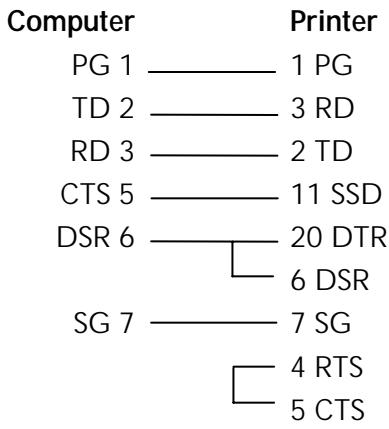
IBM 9-Pin Cable Configuration
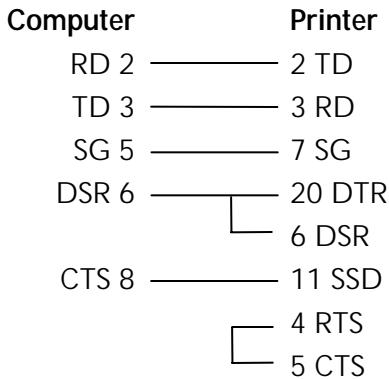
Cut Sheet Feeder (CSF) Commands
CSF Commands (IBM/E)
ML320 E/I, ML321 E/I
ML320 Turbo, ML321Turbo
ML520,ML521
ML390 Turbo, ML391 Turbo
ML590,ML591
| Function | ASCII | Dec | Hex |
| Insert Sheet | ESC EM I | 27 25 73 | 1B 19 49 |
| Eject Sheet | ESC EM R | 27 25 82 | 1B 19 52 |
The insert page command feeds a sheet of paper from the cut sheet feeder (CSF) to the top of form position. If CSF paper is already in the printer, the printer will eject the page and load another.
The eject page command prints data in the print buffer and ejects the page. A line feed code (LF) at the end of the page causes the next page to feed into the printer automatically.
Bin Select Command for Dual-Bin CSF (IBM/E)
ML520,ML521
ML590,ML591
| Function | ASCII | Dec | Hex |
| Select Bin 1 | ESC EM 1 | 27 25 49 | 1B 19 31 |
| Select Bin 2 | ESC EM 2 | 27 25 50 | 1B 19 32 |
The bin select command chooses the active bin when the optional dual-bin cut sheet feeder is installed.
CSF Commands (ML)
ML320 Std., ML321 Std.
ML320 Turbo, ML321Turbo
ML520,ML521
| Function | ASCII | Dec | Hex |
| Insert Sheet | ESC S | 27 83 | 1B 53 |
| Eject Sheet | ESC V | 27 86 | 1B 56 |
The insert page command feeds a sheet of paper from the cut sheet feeder (CSF) to the top of form position. If CSF paper is already in the printer, the printer will eject the page and load another.
The eject page command prints data in the print buffer and ejects the page. A line feed code (LF) at the end of the page causes the next page to feed into the printer automatically.
Delete Command (Epson)
ML320 E/I, ML321 E/I
ML320 Turbo, ML321Turbo
ML390 Turbo, ML391 Turbo
ML520,ML521
ML590,ML591
| Function | ASCII | Dec | Hex |
| Delete One Character Command | DEL | 127 | 7F |
This command deletes the last character sent to the printer. It will not delete graphics data.
Half-Speed Printing Commands (E/ML)
ML320 E/I, ML321 E/I
ML320 Std., ML321 Std.
ML320 Turbo, ML321Turbo
ML390 Turbo, ML391 Turbo
ML520,ML521
ML590,ML591
| Function | IBM | Epson | ML |
| Half-Speed Printing On | Not applicable | ASCII: ESC s 1Dec: 27 115 49Hex: 1B 73 31 | ASCII: ESC <Dec: 27 60Hex: 1B 3C |
| Half-Speed Printing Off | Not applicable | ASCII: ESC s 0Dec: 27 115 48Hex: 1B 73 30 | ASCII: ESC >Dec: 27 62Hex: 1B 3E |
This command controls the speed of printing. Half-speed printing is quieter than full speed.
Initialize Printer Commands (E/ML)
ML320 E/I, ML321 E/I
ML320 Std., ML321 Std.
ML320 Turbo, ML321Turbo
ML390 Turbo, ML391 Turbo
ML520,ML521
ML590,ML591
| Function | IBM | Epson | ML |
| Initialize Printer | Not applicable | ASCII: ESC @ Dec: 27 64 Hex: 1B 40 | ASCII: ESC CAN Dec: 27 24 Hex: 1B 18 |
These commands remove any data in the printer's buffer and return the printer to the current menu settings. They will override any features set on the printer's front panel or through previous commands. Also known as the initialize printer or reset commands.
Note: In order for this command to be effective, the Reset Inhibit item in the printer Menu must be set to NO (the factory default). If the setting has been changed to YES, this command will be ignored.
Most Significant Bit Commands (Epson)
ML320 E/I, ML321 E/I
ML320 Turbo, ML321Turbo
ML520,ML521
ML390 Turbo, ML391Turbo
ML590,ML591
| Function | ASCII | Dec | Hex |
| Set Most Significant Bit (MSB) to Zero | ESC = | 27 61 | 1B 3D |
| Set MSB to 1 | ESC > | 27 62 | 1B 3E |
| Cancel MSB Control | ESC # | 27 35 | 1B 23 |
The ESC = command sets the most significant bit (MSB) of an 8-bit data input to zero. The ESC > command sets the MSB to one. The ESC # command cancels the MSB control established by either command and all data is interpreted exactly as sent from the computer.
Paper-Out Sensor Commands (IBM/E/ML)
ML320 E/I, ML321 E/I
ML320 Std., ML321 Std.
ML320 Turbo, ML321Turbo
ML390 Turbo, ML391Turbo
ML520,ML521
ML590, ML591
| Function | IBM | Epson | ML |
| Paper-Out Sensor On | ASCII: ESC 9 | ASCII: ESC 9 | ASCII: ESC E 0 |
| Dec: 27 57 | Dec: 27 57 | Dec: 27 69 48 | |
| Hex: 1B 39 | Hex: 1B 39 | Hex: 1B 45 30 | |
| Paper-Out Sensor Off | ASCII: ESC 8 | ASCII: ESC 8 | ASCII: ESC E 1 |
| Dec: 27 56 | Dec: 27 56 | Dec: 27 69 49 | |
| Hex: 1B 38 | Hex: 1B 38 | Hex: 1B 45 31 |
The paper-out sensor detects when less than one inch of paper remains (0.5-inch for ML390/391T printers). When this happens, the alarm light goes on and the printer is deselected. This command overrides the sensor so that you can print closer to the bottom of the page. (The feature is also menu selectable.) Be careful if you use this feature, since it lets the printer continue printing when there's no more paper. This can cause loss of data and may damage the printhead.
Print Suppress Mode Commands
Print Suppress Mode On/Off Commands (IBM)
ML320 E/I, ML321 E/I
ML320 Turbo, ML321Turbo
ML520,ML521
ML390 Turbo, ML391Turbo
ML590,ML591
| Function | ML320 E/I, ML320T, ML520 | ML321 E/I, ML321T, ML521 | ML390T, ML590 | ML391T, ML591 |
| Print Suppress Mode On | ASCII: ESC Q ETX Dec: 27 81 3 Hex: 1B 51 03 | ASCII: ESC Q SYN Dec: 27 81 22 Hex: 1B 51 16 | ASCII: ESC Q $ Dec: 27 81 36 Hex: 1B 51 24 | ASCII: ESC Q # Dec: 27 81 35 Hex: 1B 51 23 |
| Print Suppress Mode Off | ASCII: DC1 Dec: 17 Hex: 11 | ASCII: DC1 Dec: 17 Hex: 11 | ASCII: DC1 Dec: 17 Hex: 11 | ASCII: DC1 Dec: 17 Hex: 11 |
When the printer receives the command to begin Print Suppress mode, it ignores all data until it receives the DC1 code. This means that any data will be lost. The SEL light blinks when the printer is in the Print Suppress mode. These commands will only work if the Print Suppress Effective item in the printer menu is set to Yes (the factory default).
Print Suppress Mode On/Off Commands (E/ML)
ML320 E/I, ML321 E/I
ML320 Turbo, ML321Turbo
ML590, ML591
ML320 Std., ML321 Std.
ML390 Turbo, ML391Turbo
ML520,ML521
| Function | ASCII | Dec | Hex |
| Print Suppress Mode On | DC3 | 19 | 13 |
| Print Suppress Mode Off | DC1 | 17 | 11 |
When the printer receives the command to begin Print Suppress mode, it ignores all data until it receives the DC1 code. This means that any data will be lost. The SEL light blinks when the printer is in the Print Suppress mode. These commands will only work if the Print Suppress Effective item in the printer menu is set to Yes (the factory default).
Select Color Command (IBM/E)
ML590,ML591
| Function | ASCII | Dec | Hex |
| Select Color | ESCR n | 27 114 n | 1B 72 n |
This command selects the color that will print when the printer has a color ribbon installed and the menu is set to any setting other than "Black Ribbon."
Table 100: IBM/Epson ESC r Command — Color Selections for n Values
| Value of n | Color |
| 0 | Black |
| 1 | Magenta |
| 2 | Cyan (blue) |
| 3 | Violet |
| 4 | Yellow |
| 5 | Orange |
| 6 | Green |
Set Unit Command (Epson)
ML390 Turbo, ML391 Turbo
| Function | ASCII | Dec | Hex |
| Set Increment of Movement | ESC (U Ln Hn Pn | 27 40 85 Ln Hn Pn | 1B 28 55 Ln Hn Pn |
This command is used to set the increment of movement used in conjunction with the following commands:
ESC (c L_nH_nL_tH_tL_bH_b Set Page Format (see Chapter 9)
ESC ( C 20 Lp Hp Set Page Length in Defined Unit (see Chapter 9)
ESC L_nH_n Set Relative Horizontal Dot Position (see Chapter 8)
ESC (V L n H n L p H p Set Absolute Vertical Position (see Chapter 9)
ESC (v Ln Hn Lp Hp Set Relative Vertical Position (see Chapter 9)
Parameters L_n and H_n
Parameters L_n and H_n are used to designate the quantity of data, as follows:
$$ L _ {n} + (H _ {n} \times 2 5 6) $$
Parameter _n
Parameter P_n sets the increment of movement. It can have any value from 0 to 255.
Table 101: Epson ESC ( U Command — Increments of Movement for P_n Values
| Pn | Increment |
| 0 to 9 | Unchanged |
| 10 to 19 | 1/360" |
| 20 to 29 | 11/80" |
| 30 to 39 | 1/120" |
| 40 to 49 | 1/90" |
| 50 to 59 | 1/72" |
| 60 to 69 | 1/60" |
| 70 to 255 | Unchanged |
Software I-Prime Command (IBM/E/ML)
ML320 Turbo, ML321 Turbo
ML520,ML521
ML390 Turbo, ML391Turbo
ML590,ML591
| Function | ASCII | Dec | Hex |
| Software I-Prime | ESC} NUL | 27 125 0 | 1B 7D 00 |
This command clears the print buffer and resets the printer to the default settings, regardless of the setting for the Reset Inhibit item in the printer menu.
If the Cut Sheet Feeder (CSF) is installed, this command will also eject any paper loaded into the printer from the CSF.
Stop Printing Command (IBM)
ML390 Turbo, ML391Turbo
ML590,ML591
| Function | ASCII | Dec | Hex |
| Stop Printing (Deselect) | ESC j | 27 106 | 1B 6A |
This command deselects the printer so that it will stop printing. To resume printing, press the SEL switch, or-if "Auto Select" is set to "Yes" in the menu-reload paper.
Appendix B: Listing of Tables
Table 1: Printer Drivers for ML320 Epson/IBM & ML321 Epson/IBM
Table 2: Printer Drivers for ML320 MICROLINE Standard & ML321 MICROLINE Standard ....... 1
Table 3: Printer Drivers for Models ML320 Turbo & ML321 Turbo. 1
Table 4: Printer Drivers for Models ML390 Turbo & ML391 Turbo. 1
Table 5: Printer Drivers for Models ML520 & ML521 2
Table 6: Printer Drivers for Models ML590 & ML591 2
Table 7: Available Drivers 3
Table 8: IBM/ML ESC! Command — International Character Substitutions. 9
Table 9: Epson ESC R Command — International Character Substitutions 10
Table 10: Epson ESC R Command — Code Page Selections for ML390/391Turbo. 10
Table 11: IBM/ML ESC [ T Command — Code Page Parameters. 11
Table 12: Epson 9-Pin ESC ( t Command — Code Page Set for Pn1,Pn2 Values . 12
Table 13: Epson 24-Pin ESC ( t Command — Code Page Set for Pn1,Pn2 Values. 14
Table 14: Pitch Setting Commands — Characters per Line (CPL) for Pitches. 15
Table 15: Epson ESC X Command — Font Substitution for Models ML590 & ML591. 17
Table 16: Epson ESC X Command — Character Pitch Settings for P_n Values. 18
Table 17: Epson ESC X Command — Point Sizes for N_p Values 18
Table 18: IBM ESC [ @ Command — Character Height/Line Spacing for n1 Values. 22
Table 19: IBM ESC [ @ Command — Character Width for n2 Values 22
Table 20: IBM ESC { @ Command — Character Height/Line Spacing for m3 Values. 23
Table 20a: IBM ESC { @ Command — Character Width for m_4 Values 23
Table 21: ML ESC & Command — Print Features for n_1 , n_2 , n_3 and n_4 Values 24
Table 22: ML ESC & Command — Variable Factors for n_1, n_2, n_3, n_4 24
Table 23: IBM ESC V and ESC SP & Epson ESC SP Commands — Character Spacing (in Inches) 26
Table 24: ML ESC N Command — Character Spacing (in Inches) 27
Table 25: IBM/Epson ESC k Command — Fonts for n Values. 30
Table 26: IBM ESC I Command — Print Modes Corresponding to n Values for All 9-Pin Models 31
Table 27: IBM ESC I Command — Print Modes Corresponding to n Values for 24-Pin Models ML390T & ML391T 31
Table 28: IBM ESC I Command — Print Modes Corresponding to n Values for 24-Pin Models ML590 & ML591 32
Table 29: IBM ESC [ I Command — Parameters Activated for Calculated Ln , Hn Values.......32
Table 30: IBM ESC [ I Command — Fonts Selected for Calculated H fid ,L _fid Values. 33
Table 31: IBM ESC [ I Command — Character Pitch Settings for Calculated Hfwd, Lfwd Values .. 34
Table 32: Epson ESC! Command -Print Features for n Values. 35
Table 33: Epson ESC (- Command — Score Styles for D_1 and D_2 Values. 38
Table 34: IBM ESC = Command — Character Widths for a_2 Values. 42
Table 35: Custom Character Commands — Character/Grid Width for Print Modes (24-Pin Printers) 46
Table 36: Epson ESC : Command — Fonts for n Values. 50
Table 37: Epson ESC * m Command — 8-Pin Graphics Density Codes for m Values 55
Table 38: ML ESC * Command — Densities (DPI) for n_1 Values. 58
Table 39: ML ESC * Command —Speed & Word Sizes for n_2 Values. 59
Table 40: Epson ESC * m Command — 8-Pin Graphics Density Codes 63
Table 41: IBM ESC [ g Command — Horizontal Graphics Resolution for m Values 65
Table 42: Epson ESC . Command — Valid Range of P_m Values for P_v Values 67
Table 43: Epson ESC . Command — Maximum Horizontal Dots for P h Values 67
Table 44: IBM ESC X Command — Default Settings for Right Margin. 70
Table 45: Epson ESC L and ESC Q Commands — Range of Margin Settings, All 9-Pin Printers 70
Table 46: Epson ESC L and ESC Q Commands — Range of Margin Settings, 24-Pin Models ML390/391 Turbo 70
Table 47: Epson ESC L and ESC Q Commands — Range of Margin Settings, 24-Pin Models ML590/591. 70
Table 48: ML ESC % C and ESC % R Commands — Maximum Margin Values 72
Table 49: IBM/Epson ESC D Command — Maximum Number of Horizontal Tab Stops...... 73
Table 50: IBM/Epson ESC D Command — Maximum Values for Horizontal Tab Stops...... 73
Table 51: ML ESC HT Command — Maximum Values for x_ny_nz_n 74
Table 52: ML ESC ETX Command — Shift Increment for Character Pitches 75
Table 53: ML ESC ETX Command — XYZW Values for Setting Horizontal Tabs. 75
Table 54: IBM/ML ESC % B Command — Shift Increments for Left Margin Indents. 77
Table 55: IBM/E/ML ESC DLE @ Command — Shift Increments for 9-Pin Models 78
Table 56: IBM/E/ML ESC DLE @ Command — Shift Increments for 24-Pin Models 78
Table 57: IBM/E/ML ESC DLE @ Command — Maximum P1P2P3P4 Values for 9-Pin Models.... 79
Table 58: IBM/E/ML ESC DLE @ Command — Maximum P1P2P3P4 Values for 24-Pin Models.. 79
Table 59: ML ESC % F and ESC % E Commands — Movement Increments for Pitch Settings.. 81
Table 60: ML ESC ? Command — Carriage Return/Line Feed Codes for n Values 88
Table 61: IBM/E/ML Fine Increment Line Spacing Commands — Values of Parameter n……… 91
Table 62: IBM/Epson ESC A Command — Values of Parameter n. 91
Table 63: IBM/Epson ESC 3 Command — Values of Parameter n 92
Table 64: IBM/Epson n/360" Line Spacing Commands — Values of Parameter n. 93
Table 65: IBM ESC [ \ Command — Values of Parameter n. 93
Table 66: ML VFU Commands — Usable Channel Codes for Parameter n 96
Table 67: Epson ESC ( v Command — Hexadecimal Values for L_pH_p 97
Table 68: IBM/Epson Select Code 39 Command — Narrow Bar Widths for Parameter n_5 Values (9-Pin Printers) 102
Table 69: IBM/Epson Select Code 39 Command — Narrow Space Widths for Parameter n_6 Values (9-Pin Printers) 102
Table 70: IBM/Epson Select Code 39 Command — Wide Bar Widths for Parameter n_5 , n_6 , n_7 Values (9-Pin Printers) 103
Table 71: IBM/Epson Select Code 39 Command — Wide Space Widths for Parameter n_5 , n_6 , n_7 Values (9-Pin Printers)
Table 72: IBM/Epson Select Code 128 Command — Usable Characters for Code 128 Code Sets (9-Pin Printers) 104
Table 73: IBM/Epson Select Code 128 Command — Character Widths for Parameter n_5 Values (9-Pin Printers) 105
Table 74: IBM/Epson Select Code 128 Command — Start and Stop Codes for Parameter n_5
Values (9-Pin Printers) 105
Table 75: IBM/Epson Print Code 128 Command — Check Digits for Code Sets (9-Pin Printers)105
Table 76: IBM/Epson Select Interleaved 2 of 5 Command — Black Bar Width for Parameter n_5 , n_7 Values (9-Pin Printers) 106
Table 77: IBM/Epson Select Interleaved 2 of 5 Command — Space Widths for Parameter n_6 , n_7 Values (9-Pin Printers) 106
Table 78: IBM/Epson Select UPC A Command — Character Widths for Parameter n_5 Values (9-Pin Printers) 107
Table 79: IBM/Epson Select UPC A Command — Start/Stop Codes and Center Bar Widths for Parameter n_5 Values (9-Pin Printers) 108
Table 80: IBM/Epson Select UPC E Command — Character Widths for Parameter n_5 Values (9-Pin Printers) 109
Table 81: IBM/Epson Select UPC E Command — Start and Stop Codes for Parameter n_5 Values (9-Pin Printers) 109
Table 82: IBM/Epson Select EAN 8 Command — Maximum Character Widths for Parameter n_5 Values (9-Pin Printers) 110
Table 83: IBM/Epson Select EAN 13 Command — Maximum Character Widths for Parameter n_5 Values (9-Pin Printers) 111
Table 84: IBM/Epson Select Code 39 Command — Narrow Bar Widths for Parameter n_5 Values (24-Pin Printers) 114
Table 85: IBM/Epson Select Code 39 Command — Narrow Space Widths for Parameter n_6 Values (24-Pin Printers) 114
Table 86: IBM/Epson Select Code 39 Command — Wide Bar Widths for Parameter n_5 , n_7 Values (24-Pin Printers) 115
Table 87: IBM/Epson Select Code 39 Command — Wide Space Widths for Parameter n_6 , n_7 Values (24-Pin Printers) 115
Table 88: IBM/Epson Select Code 128 Command — Usable Characters for Code 128 Code Sets (24-Pin Printers) 116
Table 89: IBM/Epson Select Code 128 Command — Character Widths for Parameter n_5 Values (24-Pin Printers) 116
Table 90: IBM/Epson Select Code 128 Command — Start and Stop Codes for Parameter n_5 Values (24-Pin Printers) 117
Table 91: IBM/Epson Print Code 128 Command — Check Digits (24-Pin Printers) 117
Table 92: IBM/Epson Select Interleaved 2 of 3 Command — Black Bar Widths for Parameter n_5 Values (24-Pin Printers) 118
Table 93: IBM/Epson Select Interleaved 2 of 3 Command — Space Widths for Parameter n_6 Values (24-Pin Printers) 118
Table 94: IBM/Epson Select UPC A Command — Character Widths for Parameter n_5 Values (24-Pin Printers). 119
Table 95: IBM/Epson Select UPC A Command — Start/Stop Codes and Center Bars for Parameter n_5 Values (24-Pin Printers) 120
Table 96: IBM/Epson Select UPC E Command — Maximum Character Widths for Parameter n_5 Values (24-Pin Printers) 121
Table 97: IBM/Epson Select EAN 8 Command — Maximum Character Widths for Parameter n_5 Values (24-Pin Printers) 122
Table 98: IBM/Epson Select EAN 13 Command — Maximum Character Widths for
Parameter n_5 Values (24-Pin Printers) 123
Table 99: IBM/E/ML ESC { Command — Emulations for n Values. 125
Table 100: IBM/Epson ESC r Command — Color Selections for n Values 130
Table 101: Epson ESC ( U Command — Increments of Movement for P. Values 131
Table 102: Pin Assignments for Parallel Interface Signals. 133
Table 103: Pin Assignments for Serial Interface Signals. 134
Index
9-pin graphics commands 53-60
24-pin graphics commands 61-66
A
Abbreviations ix
Abicomp code page commands 11-13
Absolute dot position command. 80
Acronyms. ix
Ascenders.39,41-42,44,45
Auto line feed commands......89
B
Backspace command 69
Bar code commands..... 101-124
Block graphics command......8
BRASCII code page commands 11-13
British character set commands 9-10
C
Canadian French code page commands. 11-13
Cancel command. 125
Carriage return command .69 /line feed commands .87
Center justification command 83
Change emulation command 125
Character set commands 5-13 size commands. 12-23
spacing commands..... 25-26 style commands. 29-38
Characters per line 15
Code page commands..... 11-13
Color command 130
Combined print features command 24 mode command 31
Command summary......xi-xxxvi
Compressed pitch. 16-19
Control code commands 13
CRT graphics commands 55-57, 63
Custom character commands 39-51 design 39-40, 46-47
Cut sheet feeder commands. 126
D
Danish character set commands. 9-10
Delete command 127
Descenders. 39, 41-42, 44, 45
Designing custom characters. 39-40, 46-47
Dot position commands....79-81
Double
density graphics
commands.....54-56, 62-63
height commands.....21-24
width commands.....21-24
Down line load commands... 41, 43, 45, 47, 50
Draft print commands.....29-32
Drivers, printer 1-4 Dutch character set commands. 9-10
E
Embedded commands. 4
Emphasized print commands. 31, 34, 36
Emulations 1-2
Enhanced print commands. 31, 34, 36
Epson command summary FX .xix-xxiv LO. xxv-xxxi emulation,drivers 1-2
F
Fine line feed commands. 88-89
Font commands 29-34
Form feed commands. 87
French Canadian character set commands 9-10
Full justification command.....83
G
German character set commands 9-10
Graphics commands. 53-67 line feed commands. 60
H
Half-speed command 127
Height, double, commands 21-24
Horizontal control
commands 69-83
motion index (HMI) 27
print position 76-81
tab 73-76
HSD print mode command. 29-32
1
I-Prime command. 131
IBM Proprinter command summary xi-xviii emulation,drivers 1-2
Incremental printing command. 82
Increment of movement command. 130-131
Indent commands.....69-72, 76
Initialize printer command... 127
Intercharacter spacing commands 25-26
Interfacing parallel 133 serial 134-135
International character set commands 9-10
Italian character set commands 9-10
Italics commands. 7, 35
J
Japanese character set command. 10
Justification commands. 83
L
Latin American character set commands. 9-10
Left justification command.....83 margin commands.69-72,76
Line
character set command....8
feed commands.....87-89
feed, graphics.....60
spacing commands.....90-93
Lotus 1-2-3. 4
M
Margin setting commands 69-72, 76
MICROLINE Standard command summary.xxxii-xxxvi emulation drivers. 1-2
Microsoft Windows. 3 Word. 3
Most significant bit commands. 128
Move to left/right commands 76-81
MSB commands 128
Multilingual code page command 11-13
Multiple print positions command 77-78
N
NLQ print mode command 29-32
Norway code page command 10-11
Norwegian character set commands 11-13
0
Okidata Microline Std command summary.xxxii-xxxvi
Okidata software drivers..... 2-3
Overscore commands 37
P
Page format command. 98 length commands.. 85-86
Paper-out sensor commands. 128
Parallel interface 133
Pitch commands 15-19
Plotter graphics commands. 55-57, 63
Portugal code page command 11-13
Postnet bar code commands. 112, 124
Print quality commands. 29-32 suppress mode commands. 129
Printer drivers 1-2
Programming graphics.....54,62
Proportional spacing commands. 25
Publisher character set commands. 9-10
Q
Quadruple density graphics commands.54-56, 62-63
R
Raster graphics command.....66
Reassign graphics command 57,64
Relative dot position commands. 79-80
Reverse line feed commands. 89
Right justification command.....83 margin commands.69-72
ROM to RAM copy
commands......40, 43, 45, 49
S
Serial interface. 134-135
Single density graphics commands 54-56, 62-63
Skip down command. 96
Skip over perforation commands 99-100
Software I-prime command..131
Spanish character set commands 9-10
Stop printing command 131
Subscript commands. 20, 24
Superscript commands.....20,24
Swedish character set commands 9-10
T
Tab commands horizontal 73-76 vertical 93-96
Top of form commands. 98
U
Underline commands 36
Uni-directional print commands 82
Upper range control code commands 13
USA code page command 11-13
Utility print mode commands 29-32
V
Vertical control commands.....85-100 format unit commands.95-96 tab commands.. 93-96 unit setting command ....... 93
W
Width, double, commands 21, 22-24
Windows 3
Word, Microsoft 3
WordPerfect 3
- Contents
- How To Use This Manual . vii
- Command Summary xi
- Chapter 1: Printer Drivers 1
- Chapter 2: Character Set Commands 5
- Chapter 3: Character Size & Spacing Commands. 15
- Chapter 4: Character Style Commands 29
- Chapter 5: Custom Character Commands 39
- Chapter 6: Graphics Commands for 9-Pin Printers 53
- Chapter 7: Graphics Commands for 24-Pin Printers 61
- Chapter 8: Horizontal Control Commands 69
- Chapter 9: Vertical Control Commands 85
- Chapter 10: Bar Code Commands for 9-Pin Printers 101
- How To Use this Manual
- How the Manual is Organized
- Command Summary
- Chapter 1: Printer Drivers
- Chapters 2 through 12 -Commands
- Appendix A: Interfacing
- Appendix B: Listing of Tables
- Conventions Used in this Manual
- Proportional Spacing Commands (IBM/E/ML)
- Abbreviations & Acronyms
- Usable Drivers
- OKIDATA Software Drivers
- Software Drivers Online
- Software Driver Selection
- Embedded Commands
- Chapter 2: Character Set Commands
- IBM Character Set Commands
- Select IBM Set I Command (IBM)
- Select IBM Set II Command (IBM)
- Select All Character Set [IBM Set III] Command (Epson LQ)
- Parameters L_n and H_n
- Print Data from IBM All Characters Set [IBM Set III] Command (IBM)
- Print One Character from IBM All Character Set [IBM Set III] Command (IBM)
- Epson Character Set Commands
- Select Epson Set 1 [Slanted Characters] Command (Epson)
- Select Epson Set 2 [Graphics Characters] Command (Epson)
- MICROLINE Character Set Commands
- Select MICROLINE Standard Character Set Command (ML)
- Select MICROLINE Block Graphics Symbol Set Command (ML)
- Select MICROLINE Line Character Set Command (ML)
- International Character Set Commands
- Select International Character Set Command (IBM/ML)
- Select International Character Set Command (Epson)
- Print from Code Page Command (IBM/ML)
- Parameters H_cp and L_cp
- Assign Code Page Command (Epson)
- Parameter P_n1
- Parameters P_n2 and P_n3
- Upper Range Control Code Commands (Epson)
- Select Code Page Set Command (Epson)
- Code Page Sets for P_n1 , P_n2 Values
- Chapter 3: Character Size & Spacing Commands
- Pitch Setting Commands
- Pitch Setting Commands for Non-compressed Printing (IBM/E/ML)
- Pitch Setting Commands for Compressed Printing (IBM)
- Pitch Setting Commands for Compressed Printing (Epson)
- Pitch Setting Commands for Compressed Printing (ML)
- Select Character Pitch/Point Size Command (Epson)
- Example
- Select Character Pitch/Point Size Command (IBM-Oki unique)
- Parameter P_no
- Parameter P_n
- Superscript/Subscript Commands (IBM/E/ML)
- Double Width Commands (IBM/E/ML)
- Double Height Commands (E/ML)
- Double Width & Height Printing Commands
- Double Width & Height Printing Command, 9-Pin Printers (IBM)
- Parameters n_1 and n_2
- Parameters L_nH_n
- Double Height & Width Printing Command, 24-Pin Printers (IBM)
- Parameters m_1, m_2, m_3, m_4
- Combined Print Features Command (ML)
- Character Spacing Commands
- Intercharacter Spacing Commands (IBM/E/ML)
- Set Horizontal Motion Index [HMI] Command (Epson LQ)
- Parameters L_p and H_p
- Chapter 4: Character Style Commands
- Print Mode & Fonts Commands
- Individual Print Mode & Font Commands for 24-Pin Printers (IBM/E)
- Combined Select Font Command (IBM)
- Select Font Command (IBM)
- Parameters H_fd and L_fd
- Character Pitch Settings for Calculated H_fwd , L_fwd Values
- Parameter f_a
- Combined Print Mode Command (Epson)
- Italics Print Commands (IBM/E/ML)
- Emphasized & Enhanced Print Commands (IBM/E/ML)
- Underline/Overscore/Strike-Through Commands
- Underline Commands (IBM/E/ML)
- Overscore Commands (IBM)
- Score Style Command (Epson)
- Parameter Pn
- Outline/Shadow Commands (IBM/E)
- Chapter 5: Custom Character Commands
- Custom Character Commands: 9-Pin Printers
- Designing a Custom Character for 9-Pin Printers
- IBM Custom Character Commands for 9-Pin Printers
- Down Line Load Characters Command for 9-Pin Printers (IBM)
- Parameters c_1 and c_2
- Parameter m
- Parameter n
- Parameters a_1 and a_2
- Parameter a_1
- Parameter a_2
- Epson Custom Character Commands for 9-Pin Printers
- Copy ROM to RAM Command for 9-Pin Printers (Epson)
- Down Line Load Characters Command for 9-Pin Printers (Epson)
- Parameters n_1n_2
- Parameter a
- Custom Character Set On/Off Commands for 9-Pin Printers (Epson)
- Okidata MICROLINE Standard Custom Character Commands for 9-Pin Printers
- Down Line Load Characters Commands for 9-Pin Printers (ML)
- Select DLL Font Commands for 9-Pin Printers (ML)
- Custom Character Commands: 24-Pin Printers
- Designing a Custom Character for 24-Pin Printers
- IBM Custom Character Commands for 24-Pin Printers
- Parameters a_1, a_2, a_3
- Parameters ad1 ad2
- Parameter id
- Parameter id,
- Parameters d_1d_2d_3d_4d_5
- Epson Custom Character Commands for 24-Pin Printers
- Copy ROM to RAM Command for 24-Pin Printers (Epson)
- Down Line Load Characters Commands for 24-Pin Printers (Epson)
- Parameters n_1n_2
- Parameters d_0 , d_1 , d_2
- Custom Character Set On/Off Command for 24-Pin Printers (Epson)
- Load Custom Character Set into Upper ASCII Command for 24-Pin Printers (Epson)
- Chapter 6: Graphics Commands for 9-Pin Printers
- Overview
- Programming Graphics in BASIC
- Graphics Density Selection Commands (IBM/E)
- Graphics Density Selection Commands (ML)
- Graphics Select/Print Command (Epson)
- Reassign Graphics Codes Command (Epson)
- Select Graphics Command (Epson)
- Select Graphics Mode Command (ML)
- Parameter n_1
- Graphics Print Mode Commands (ML)
- Special Purpose Line Feed Commands (ML)
- Chapter 7: Graphics Commands for 24-Pin Printers
- Graphics Select/Print Command (IBM AGM/E)
- Reassign Graphics Codes Command (IBM AGM/E)
- Graphics Resolution Command (IBM)
- Select Graphics Aspect Ratio Command (IBM)
- Select Graphics Mode Command (Epson)
- Set/Reset Graphics Mode Command (Epson)
- Print Raster Graphics Command (Epson)
- Chapter 8: Horizontal Control Commands
- Backspace & Carriage Return Commands (IBM/E/ML)
- Margin Setting Commands
- Set Left & Right Margins Command (IBM)
- Left and Right Margin Commands (Epson)
- Left and Right Margin Commands (ML)
- Left Margin Parameters n_1, n_2, n_3
- Right Margin Parameters n_1, n_2, n_3, n_4
- Horizontal Tab Commands
- Execute Horizontal Tab Command (IBM/E/ML)
- Set Horizontal Tab Command (IBM/E)
- Set Tabs by Character Space Command (ML)
- Set Tabs by Dot Columns Command (ML)
- Clear Horizontal Tab Settings Commands (IBM/E)
- Clear Horizontal Tab Settings Commands (ML)
- Horizontal Print Position Commands
- Indent from Left Margin Command (IBM/ML)
- Parameters n_1 through n_4
- Set Multiple Print Positions Command (IBM/E/ML)
- Parameter a_1
- Set Relative Dot Position Command (IBM)
- Set Relative Dot Position Command (Epson)
- Set Absolute Dot Position Command (Epson)
- Parameters L_n and H_n
- Move to the Right & Left Commands (ML)
- Uni-directional Printing Commands (IBM/E/ML)
- Incremental Printing Commands (IBM/E/ML)
- Justification Commands (Epson)
- Chapter 9: Vertical Control Commands
- Set Page Length Commands
- Set Page Length in Inches Command (IBM/E/ML)
- Set Page Length in Lines Command (IBM/E/ML)
- Set Page Length in Defined Unit Command (Epson)
- Form Feed Command (IBM/E/ML)
- Line Feed Commands
- Line Feed with Carriage Return Command (IBM/E/ML)
- Line Feed without Carriage Return Command (ML)
- Line Feed & Carriage Return Selection Command (ML)
- Fine Line Feed Commands (IBM/E/ML)
- Perform Line Feed Command (IBM)
- Auto Line Feed On/Off Commands (IBM)
- Reverse Line Feed Commands (IBM/E/ML)
- Line Spacing Commands
- General Line Spacing Commands (IBM/E/ML)
- Fine-Increment Line Spacing Commands for 9-Pin Printers (IBM/E/ML)
- ESC A n Line Spacing Command for 24-Pin Printers (IBM/E)
- ESC 3 n Line Spacing Command for 24-Pin Printers (IBM/E)
- n/360-Inch Line Spacing Commands for 24-Pin Printers (IBM/E)
- Set Vertical Units (IBM)
- Vertical Tab Commands
- Execute Vertical Tab Command (IBM/E/ML)
- Set Vertical Tabs Command (IBM/E)
- Parameters n_1 through n_k
- Clear Vertical Tabs Command (IBM/E)
- Vertical Format Unit [VFU] Commands (Epson)
- Parameters n_ through n_
- Vertical Position Commands
- Skip Down Command (ML)
- Set Relative Vertical Position Command (Epson)
- Set Absolute Vertical Position Command (Epson)
- Top of Form Commands (IBM/ML)
- Set Page Format Command (Epson)
- Parameters L_b and H_b
- Skip Over Perforation Commands
- Skip Over Perforation On/Off Commands (IBM/E)
- Skip Over Perforation On/Off Commands (ML)
- Chapter 10: Bar Code Commands for 9-Pin Printers
- Bar Code Commands
- Code 39 Bar Code Commands
- Select Code 39 Bar Code Command
- Code 39 Parameter m
- Code 39 Parameters n_3 and n_4
- Code 39 Parameter n_5
- Code 39 Parameter n_6
- Print Code 39 Bar Code Command
- Code 128 Bar Code Commands
- Select Code 128 Bar Code Command
- Code 128 Parameters n_3 and n_4
- Print Code 128 Bar Code Command
- Interleaved 2 of 5 Bar Code Commands
- Select Interleaved 2 of 5 Bar Code Command
- Print Interleaved 2 of 5 Bar Code Command
- UPC A Bar Code Commands
- Select UPC A Bar Code Command
- UPCA Parameter n_8
- Print UPC A Bar Code Command
- UPC E Bar Code Commands
- Select UPC E Bar Code Command
- UPC E Parameter n_5
- UPC E Parameter n_g
- Print UPC E Bar Code Command
- EAN 8 Bar Code Command s
- Select EAN 8 Bar Code Command
- EAN 8 Parameters n_3 and n_4
- EAN 8 Parameter n_5
- EAN 8 Parameter n_8
- Print EAN 8 Bar Code Command
- ESC DLE B m [data]
- EAN 13 Bar Code Commands
- Select EAN 13 Bar Code Command
- EAN 13 Parameters n_3 and n_4
- EAN 13 Parameter n_5
- EAN 13 Parameter n_8
- Print EAN 13 Bar Code Command
- Postnet Bar Code Command
- Select/Print Postnet Bar Code Data Command
- Chapter 11: Bar Code Commands for 24-Pin Printers
- Code 39 Bar Code Command s
- Code 128 Parameter n_5
- Code 128 Parameter n_g
- UPCA Parameter n_8
- EAN 8 Bar Code Commands
- Postnet Parameter P_1
- Chapter 12: Miscellaneous Commands
- Cancel Command (IBM/E/ML)
- Change Emulation Command (IBM/E/ML)
- Parallel Interface
- Serial Interface
- Commonly Used Serial Cable Configurations
- IBM 25-Pin Cable Configuration
- IBM 9-Pin Cable Configuration
- Cut Sheet Feeder (CSF) Commands
- CSF Commands (IBM/E)
- Bin Select Command for Dual-Bin CSF (IBM/E)
- CSF Commands (ML)
- Delete Command (Epson)
- Half-Speed Printing Commands (E/ML)
- Initialize Printer Commands (E/ML)
- Most Significant Bit Commands (Epson)
- Paper-Out Sensor Commands (IBM/E/ML)
- Print Suppress Mode Commands
- Print Suppress Mode On/Off Commands (IBM)
- Print Suppress Mode On/Off Commands (E/ML)
- Select Color Command (IBM/E)
- Set Unit Command (Epson)
- Software I-Prime Command (IBM/E/ML)
- Stop Printing Command (IBM)
- Index
- A
- B
- C
- D
- E
- F
- G
- H
- 1
- J
- L
- M
- N
- 0
- P
- Q
- R
- S
- T
- U
- V
- W
Brand : OKI
Model : ML320TURBO
Category : Dot Matrix Printer