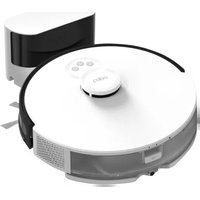
Frequently Asked Questions - Tapo RV30 Max TP-LINK
How to set up the Tapo RV30 Max for the first time?
Download the Tapo app, create an account, press the Wi-Fi button on the robot and follow the instructions in the app to connect the vacuum to your 2.4 GHz Wi-Fi network.
What to do if the robot does not connect to Wi-Fi?
Make sure the network is 2.4 GHz, the password is correct, and the robot is close to the router. Reset the Wi-Fi by holding the reset button for 5 seconds.
How to schedule automatic cleaning?
In the Tapo app, go to the 'Schedule' tab, set the desired days and times, then choose the cleaning mode (vacuum only, mopping, or both).
How often should the station bin be emptied?
The self-emptying station empties itself after each cleaning, but the dust bag should be replaced every 1 to 2 months depending on usage.
How to clean the HEPA filter?
Remove the HEPA filter from the robot, tap it gently to remove dust, then rinse it with cold water. Let it dry completely for at least 24 hours before reinstalling.
Can the robot mop floors?
Yes, the Tapo RV30 Max is equipped with a water tank and a removable mop for mopping. Fill the tank with clean water and attach the mop before starting a mopping cycle.
How to manage multiple floors with the robot?
The Tapo app allows you to create maps for each floor. Move the robot to the desired floor, run a mapping cleaning, then save the map. You can then select the map before each cleaning.
What to do if the robot gets stuck or cannot find the station?
Check that the station is free of obstacles and the robot has a clear view. Clean the sensors on the station and robot with a dry cloth. If the problem persists, restart the robot and station.
Does the robot work with Alexa or Google Home?
Yes, enable the Tapo skill in the Alexa or Google Home app, then link your Tapo account. You can then start, stop, or schedule cleaning by voice command.
How to replace the robot's battery?
The battery is built-in and replaceable by a technician. Contact TP-Link support to get a replacement battery and instructions. It is not recommended to open the robot yourself.
USER MANUAL Tapo RV30 Max TP-LINK