PMP480 - Mixer Power Dynamics - Free user manual and instructions
Find the device manual for free PMP480 Power Dynamics in PDF.


Pick your language and provide your email: we'll send you a specifically translated version.
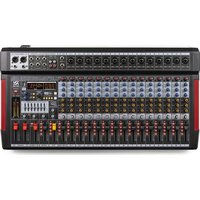
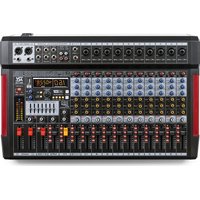
| Product type | Powered mixing desk |
| Brand | Power Dynamics |
| Model | PMP480 |
| Output power | 480 W RMS |
| Number of input channels | 6 channels (4 mic/line + 2 stereo) |
| Microphone inputs | 4 x XLR with phantom power +48 V |
| Line inputs | 4 x 6.35 mm TRS jack, 2 x stereo RCA |
| Outputs | 2 x SpeakON (speakers), 1 x RCA (recording), 1 x headphone |
| Equalizer | 3-band per channel (Low, Mid, High) |
| Built-in effects | Digital reverb (16 programs) |
| Power supply | 230 V ~ 50 Hz |
| Power consumption | 600 W max |
| Dimensions (W x D x H) | 480 x 300 x 100 mm |
| Weight | 12.5 kg |
| Chassis material | Steel with powder coating |
| Ventilation | Internal fan for cooling |
| Maintenance and cleaning | Unplug the device, clean with a dry soft cloth |
| Safety | Mandatory grounding, do not expose to humidity |
| Spare parts and repairability | Contact authorized Power Dynamics after-sales service |
| Included accessories | Power cable, user manual |
Frequently Asked Questions - PMP480 Power Dynamics
How to connect a microphone to the PMP480 mixing desk?
Connect the microphone to an XLR input (channels 1 to 4). Activate phantom power (+48 V) if the mic is condenser, via the dedicated switch on the rear panel.
How to use the reverb effects?
Press the EFFECTS button to activate the processor. Turn the PROGRAM potentiometer to select one of the 16 reverb effects. Adjust the level with EFFECT LEVEL on each channel or the master.
What to do if the mixing desk does not turn on?
Check that the power cable is properly connected and that the mains socket works. Make sure the power switch is in the ON position. If the problem persists, contact customer service.
How to connect passive speakers?
Use SpeakON cables. Connect the left speaker to the SPEAKON LEFT output and the right speaker to SPEAKON RIGHT. Respect the minimum impedance of 4 ohms per output.
Can I use the mixing desk without speakers?
Yes, you can use the headphone output (6.35 mm jack) for monitoring or the RCA output to send the signal to a recording system or another console.
How to adjust the equalizer for a clear sound?
For a balanced sound, start by setting the equalization potentiometers (LOW, MID, HIGH) to 12 o'clock (neutral position). Then adjust as needed: increase lows for more warmth, highs for more brightness.
What type of microphone can I use?
All dynamic or condenser microphones with XLR connector. For condenser mics, activate phantom power (+48 V). Avoid connecting phantom microphones to the jack inputs.
How to avoid feedback?
Keep microphones away from speakers. Reduce the gain of microphone channels. Use the equalizer to cut frequencies that whistle. Optionally activate a low-cut filter (if available on your model).
Can I connect a musical instrument directly?
Yes, plug an instrument (guitar, keyboard) into a 6.35 mm jack input (channels 1 to 4 in line mode). For an electric guitar, use a DI box to match impedance.
How to clean the mixing desk?
Unplug the device. Use a soft dry cloth to dust. Never use liquid or abrasive cleaning products. Avoid blowing compressed air into the potentiometers.
User questions about PMP480 Power Dynamics
0 question about this device. Answer the ones you know or ask your own.
Ask a new question about this device
No questions yet. Be the first to ask one.
Download the instructions for your Mixer in PDF format for free! Find your manual PMP480 - Power Dynamics and take your electronic device back in hand. On this page are published all the documents necessary for the use of your device. PMP480 by Power Dynamics.
USER MANUAL PMP480 Power Dynamics
Manual assistant
Powered by Anthropic
Waiting for your message
Product information
Brand : Power Dynamics
Model : PMP480
Category : Mixer