
SBS963N - Combined refrigerator SMEG - Free user manual and instructions
Find the device manual for free SBS963N SMEG in PDF.


| Product type | Combined refrigerator |
| Brand | SMEG |
| Model | SBS963N |
| Dimensions (H x W x D) | Approximately 180 x 90 x 70 cm |
| Weight | Approximately 100 kg |
| Power supply | 220-240 V / 50 Hz |
| Energy class | Not specified (estimated: A++ or higher) |
| Total net capacity | Approximately 500 L |
| Freezer capacity | Approximately 200 L |
| Refrigerator capacity | Approximately 300 L |
| Freezing power | 4.5 kg/24h per 100 L of freezer volume |
| Defrost type | Automatic (No Frost) |
| Display | Electronic control panel with LED screen |
| Main functions | Refrigeration, freezing, water and ice dispenser, zero-degree compartment, ionizer, odor filter, minibar, blue LED lighting, open door alarm, holiday mode, fast freezing, fast cooling |
| Water and ice dispenser | Yes, with selection of water, ice cubes, crushed ice |
| Water connection | Possible on cold water network or bottle, with optional filter |
| Interior lighting | LED |
| Maintenance and cleaning | Clean with a sponge and carbonated water, avoid abrasive products |
| Safety | Key lock, automatic stop in case of anomaly, child safety |
| Spare parts and repairability | Parts available for 10 years, intervention by approved service |
| General information | SMEG SBS963N combined refrigerator, user manual in French available in PDF |
Frequently Asked Questions - SBS963N SMEG
User questions about SBS963N SMEG
0 question about this device. Answer the ones you know or ask your own.
Ask a new question about this device
Download the instructions for your Combined refrigerator in PDF format for free! Find your manual SBS963N - SMEG and take your electronic device back in hand. On this page are published all the documents necessary for the use of your device. SBS963N by SMEG.
USER MANUAL SBS963N SMEG
We'd like you to achieve the optimal efficiency from our product, which has been manufactured in modern facilities with meticulous quality controls.
For this purpose, please fully read the user guide before using the product and keep the guide as a reference source. If you turn the product over to another person, provide this guide along with the product.
User guide ensure the quick and safe use of the product.
- Please read the user guide before installing and operating the product.
Always observe the applicable safety instructions. - Keep the user guide within easy reach for future use.
- Please read any other documents provided with the product.
Keep in mind that this user guide may apply to several product models. The guide clearly indicates any variations of different models.
Symbols and Remarks
The following symbols are used in the user guide:

Important information and useful tips.

Risk of life and property.

Risk of electric shock.

The product's packaging is made of recyclable materials, in accordance with the National Environment Legislation.
Table of Contents
1 Safety and environment instructions3
1.1. General safety. 3
1.1.1 HC warning 4
1.1.2 For models with water fountain 4
1.2.Intended use. 4
1.3.Child safety. 4
1.4. Compliance with WEEE Directive and Disposing of the Waste Product 4
1.5. Compliance with RoHS Directive 4
1.6. Package information 4
2 Refrigerator 5
3 Installation 6
3.1. Right place for installation 6
3.2. Attaching the plastic wedges 6
3.3. Adjusting the stands 7
3.4. Power connection 7
3.5. Water connection 7
3.6. Connecting water hose to the product . . . . . 8
3.7. Connecting to water mains 8
3.8.For products using water carboy 9
3.9 Water filter 9
3.9.1.Fixing external filter on the wall (Optional) 10
3.9.2 Internal filter 11
4 Preparation 13
4.1.What to do for energy saving. 13
4.2. First Use 13
5 Using the product 14
5.1. Indicator panel 14
5.2. Activating the water filter replacing alert... 21
5.3. Using the water fountain 22
5.4. Filling the fountain water tank 22
5.5. Cleaning the water tank. 23
5.6. Taking ice / water 24
5.7.Drip tray 24
5.8. Zero degree compartment. 25
5.9.Vegetable bin 25
5.10. Blue light 25
5.11.lonizer 25
5.12.Minibar 25
5.13.Odour filter 25
5.14. Icematic and ice storage box 26
5.15. Ice-maker 26
5.16.Freezing fresh food 27
5.17. Recommendations for storing frozen foods 27
5.18.Deep freezer details 27
5.19. Placing the food 28
5.20. Door open alert 28
5.21.Interior light 28
6 Maintenance and cleaning 29
6.1. Preventing malodour 29
6.2. Protecting plastic surfaces 29
7 Troubleshooting 30
1 Safety and environment instructions
This section provides the safety instructions necessary to prevent the risk of injury and material damage. Failure to observe these instructions will invalidate all types of product warranty.
1.1. General safety
- This product should not be used by persons with physical, sensory and mental disabilities, without sufficient knowledge and experience or by children. The device can only be used by such persons under supervision and instruction of a person responsible for their safety. Children should not be allowed to play with this device.
In case of malfunction, unplug the device. - After unplugging, wait at least 5 minutes before plugging in again. Unplug the product when not in use. Do not touch the plug with wet hands! Do not pull the cable to plug off, always hold the plug.
- Wipe the power plug's tip with a dry cloth before plugging in.
- Do not plug in the refrigerator if the socket is loose.
- Unplug the product during installation, maintenance, cleaning and repair.
- If the product will not be used for a while, unplug the product and remove any food inside.
- Do not use steam or steamed cleaning materials for cleaning the refrigerator and melting the ice inside. Steam may contact the electrified areas and cause short circuit or electric shock!
- Do not wash the product by spraying or pouring water on it! Danger of electric shock!
- In case of malfunction, do not use the product, as it may cause electric shock. Contact the authorized service before doing anything.
- Plug the product into an earthed socket. Earthing must be done by a qualified electrician.
- If the product has LED type lighting, contact the authorized service for replacing or in case of any problem.
-
Do not touch frozen food with wet hands! It may adhere to your hands!
-
Do not place liquids in bottles and cans into the freezer compartment. They may burst out!
- Place liquids in upright position after tightly closing the lid.
- Do not spray flammable substances near the product, as it may burn or explode.
- Do not keep flammable materials and products with flammable gas (sprays, etc.) in the refrigerator.
- Do not place containers holding liquids on top of the product. Splashing water on an electrified part may cause electric shock and risk of fire.
- Exposing the product to rain, snow, sunlight and wind will cause electrical danger. When relocating the product, do not pull by holding the door handle. The handle may come off.
Take care to avoid trapping any part of your hands or body in any of the moving parts inside the product. - Do not step or lean on the door, drawers and similar parts of the refrigerator. This will cause the product to fall down and cause damage to the parts.
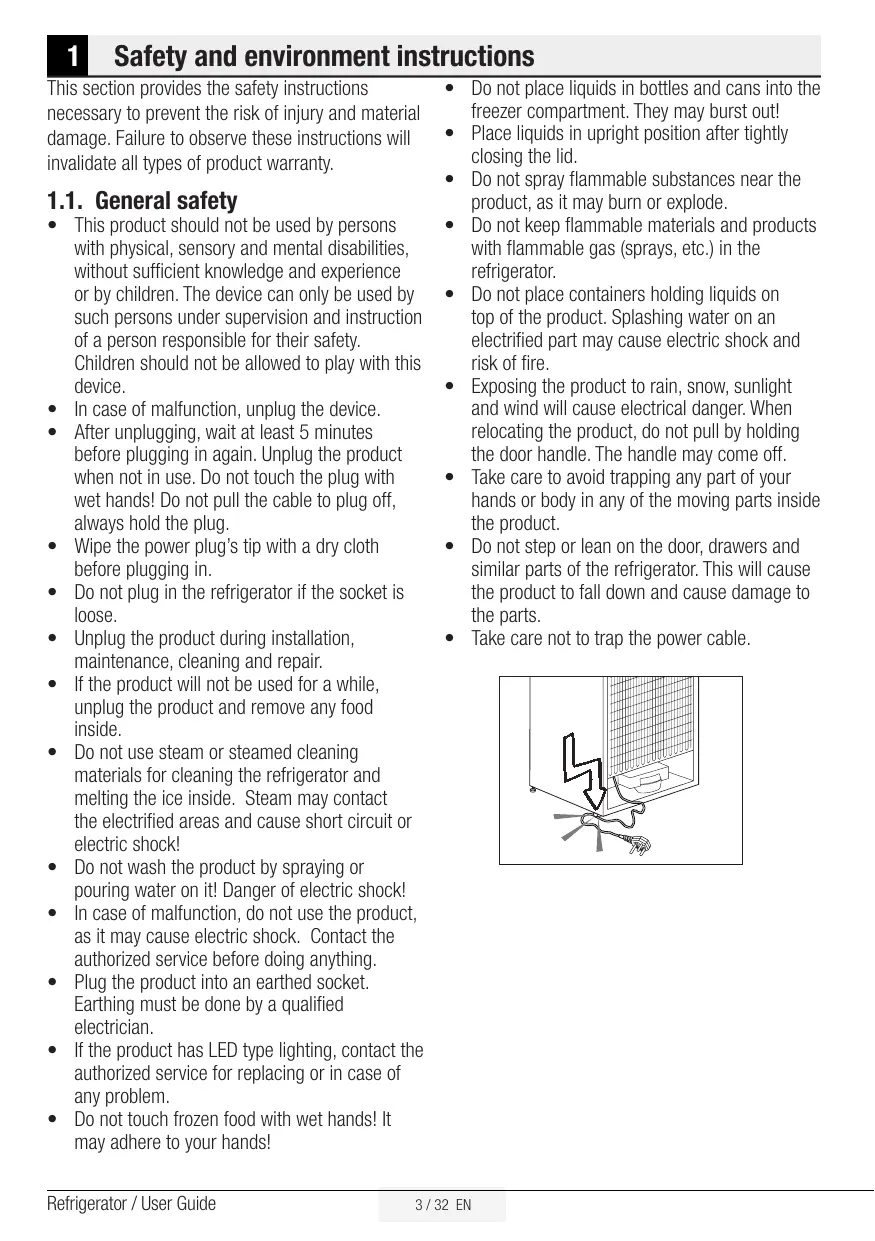
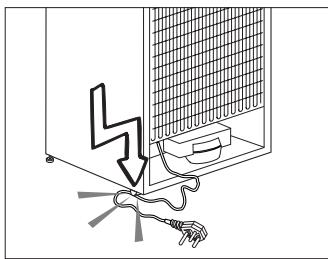
Take care not to trap the power cable.
Safety and environment instructions
1.1.1 HC warning
If the product comprises a cooling system using R600a gas, take care to avoid damaging the cooling system and its pipe while using and moving the product. This gas is flammable. If the cooling system is damaged, keep the product away from sources of fire and ventilate the room immediately.

The label on the inner left side indicates the type of gas used in the product.
1.1.2 For models with water fountain
Water supply pressure must be minimum 1 bar and maximum 8 bars.
- Use drinking water only.
1.2. Intended use
This product is designed for home use. It is not intended for commercial use.
- The product should be used to store food and beverages only.
- Do not keep sensitive products requiring controlled temperatures (vaccines, heat sensitive medication, medical supplies, etc.) in the refrigerator.
- The manufacturer assumes no responsibility for any damage due to misuse or mishandling.
- The product's bench life is 10 years. The spare parts necessary for the product to function will be available for this period.
1.3. Child safety
- Keep packaging materials out of children's reach.
- Do not allow the children to play with the product.
If the product's door comprises a lock, keep the key out of children's reach.
1.4. Compliance with WEEE Directive and Disposing of the Waste Product
This product complies with EU WEEE Directive (2012/19/EU). This product bears a classification symbol for waste electrical and electronic equipment (WEEE).
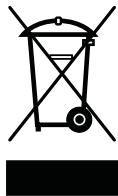
This product has been manufactured with high quality parts and materials which can be reused and are suitable for recycling. Do not dispose of the waste product with normal domestic and other wastes at the end of its service life. Take it to the collection
center for the recycling of electrical and electronic equipment. Please consult your local authorities to learn about these collection centers.
1.5. Compliance with RoHS Directive
- This product complies with EU WEEE Directive (2011/65/EU). It does not contain harmful and prohibited materials specified in the Directive.
1.6. Package information
- Packaging materials of the product are manufactured from recyclable materials in accordance with our National Environment Regulations. Do not dispose of the packaging materials together with the domestic or other wastes. Take them to the packaging material collection points designated by the local authorities.
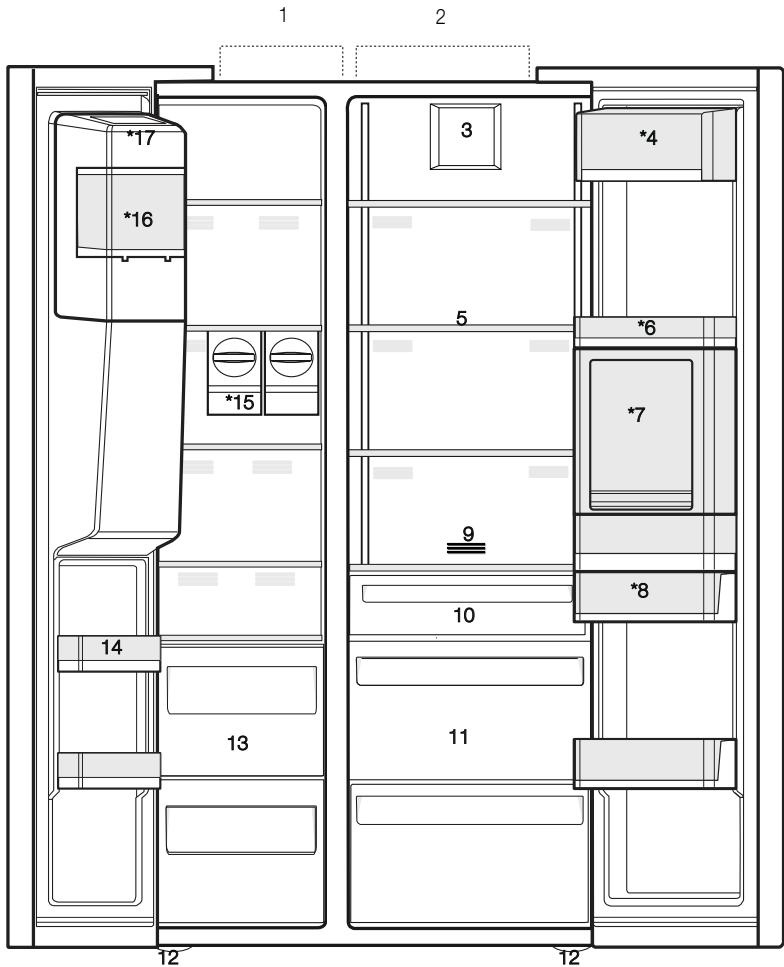
1- Freezer compartment
2-Cooler compartment
3- Fan
4-Butter-cheese compartment
5- Glass shelves
6-Cooler compartment door shelves
7- Minibar accessory
8- Water tank
9- Odour filter
10-Zero degree compartment
11- Vegetable bins
12- Adjustable stands
13- Frozen food storing compartments
14-Freezer compartment door shelves
15-Icematics
16- Ice storage box
17- Ice-maker decorative lid
*Optional

*Optional: Figures in this user guide are schematic and may not be exactly match your product. If your product does not comprise the relevant parts, the information pertains to other models.
3 Installation
3.1. Right place for installation
Contact the Authorized Service for the product's installation. To ready the product for installation, see the information in the user guide and make sure the electric and water utilities are as required. If not, call an electrician and plumber to arrange the utilities as necessary.
| 4 | WARNING: The manufacturer assumes no responsibility for any damage caused by the work carried out by unauthorized persons. |
| 3 | WARNING: The product's power cable must be unplugged during installation. Failure to do so may result in death or serious injuries! |
| ! | WARNING: : If the door span is too narrow for the product to pass, remove the door and turn the product sideways; if this does not work, contact the authorized service. |
- SPlace the product on a flat surface to avoid vibration.
- Place the product at least 30~cm away from the heater, stove and similar sources of heat and at least 5~cm away from electric ovens.
- Do not expose the product to direct sunlight or keep in damp environments.
- The product requires adequate air circulation to function efficiently. If the product will be placed in an alcove, remember to leave at least 5 cm distance between the product and the ceiling and the walls.
- Do not install the product in environments with temperatures below -5^ .
3.2. Attaching the plastic wedges
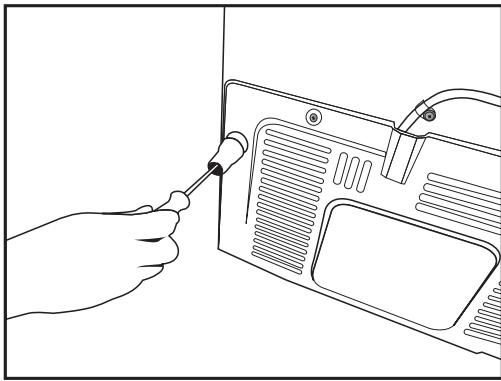
Use the plastic wedges in the provided with the product to provide sufficient space for air circulation between the product and the wall.
- To attach the wedges, remove the screws on the product and use the screws provided with the wedges.
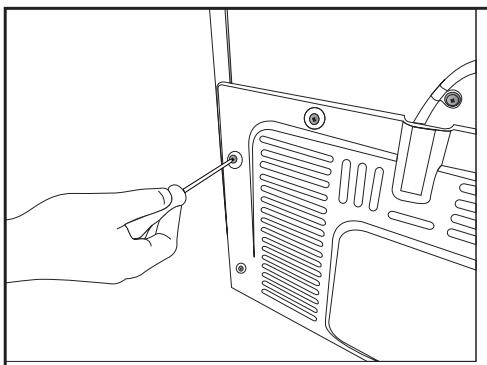
- Attach 2 plastic wedges on the ventilation cover shown as j in the figure.
3.3. Adjusting the stands
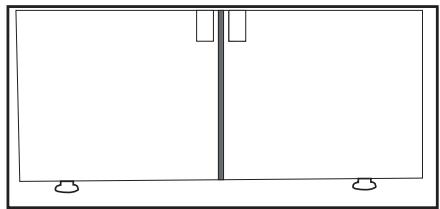
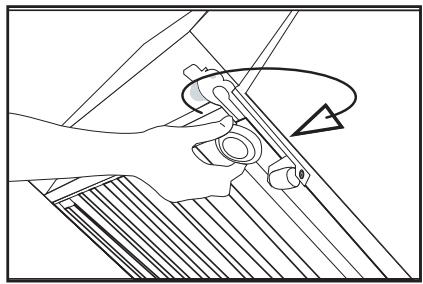
If the product is not in balanced position, adjust the front adjustable stands by rotating right or left.
3.4. Power connection

WARNING: Do not use extension or multi sockets in power connection.

WARNING: Damaged power cable must be replaced by Authorized Service.

When placing two coolers in adjacent position, leave at least 4cm distance between the two units.
- Our firm will not assume responsibility for any damages due to usage without earthing and power connection in compliance with national regulations.
- The power cable plug must be easily accessible after installation.
- Connect the refrigerator to an earthed socket with 220-240V/50 Hz voltage. The plug must comprise a 10-16A fuse.
- Do not use multi-group plug with or without extension cable between the wall socket and the refrigerator.
3.5. Water connection (Optional)

WARNING: Unplug the product and the water pump (if available) during connection.
The product's water mains, filter and carboy connections must be rendered by有权izer service. The product can be connected to a carboy or directly to the water mains, depending on the model. To establish the connection, the water hose must first be connected to the product.
Check to see the following parts are supplied with your product's model:
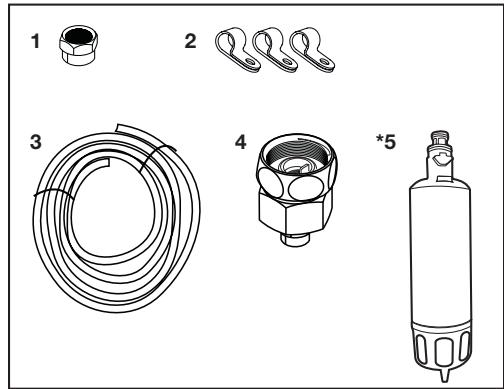
- Connector (1 piece): Used to attach the water hose to the rear of the product.
- Hose clip (3 pieces): Used to fix the water hose on the wall.
- Water hose (1 piece, 5 meter diameter 1/4 inches): Used for the water connection.
- Faucet adapter (1 piece): Comprises a porous filter, used for connection to the cold water mains.
- Water filter (1 piece *Optional): Used to connect the mains water to the product. Water filter is not required if carboy connection is available.
3.6. Connecting water hose to the product
To connect the water hose to the product, follow the instructions below.
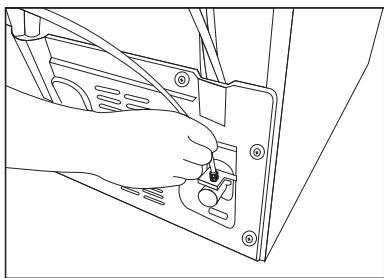
- Remove the connector on the hose nozzle adaptor in the back of the product and run the hose through the connector.
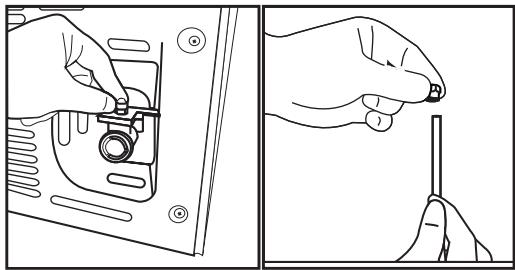
- Push the water hose down tightly and connect to the hose nozzle adaptor.
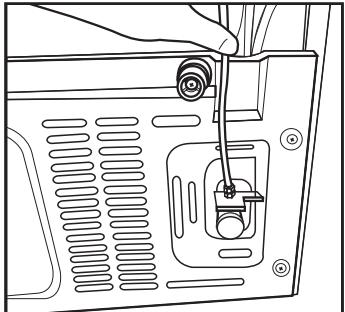
- Tighten the connector manually to fix on the hose nozzle adaptor. You may also tighten the connector using a pipe wrench or pliers.
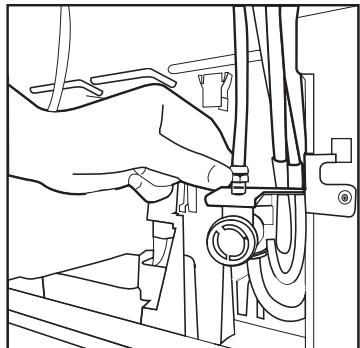
- Connect the other end of the hose to the water mains (See Section 3.7) or, to use carboy, to the water pump (See Section 3.8).
3.7. Connecting to water mains (Optional)
To use the product by connecting to the cold water mains, a standard 1/2 valve connector must be installed to the cold water mains in your home. If the connector is not available or if you are unsure, consult a qualified plumber.
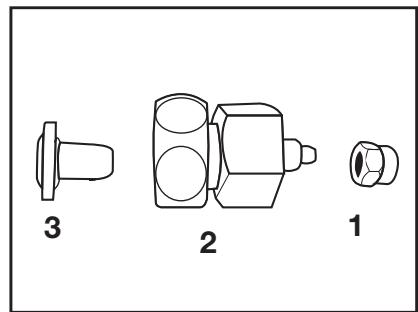
- Detach the connector (1) from the faucet adaptor (2).
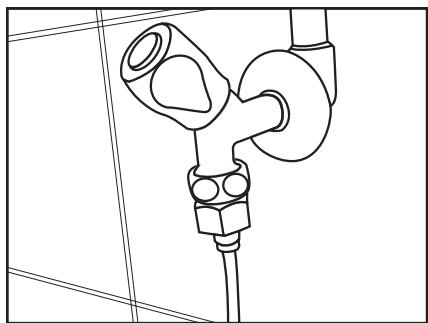
- Connect the faucet adaptor to the water mains valve.
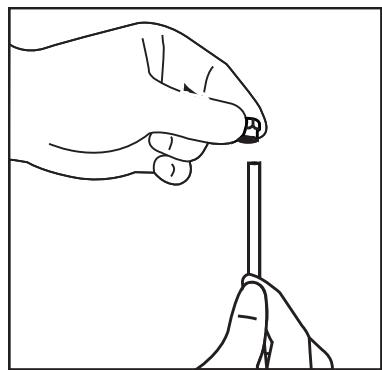
- Attach the connector around the water hose.
- Attach the connector into the faucet adaptor and tighten by hand / tool.
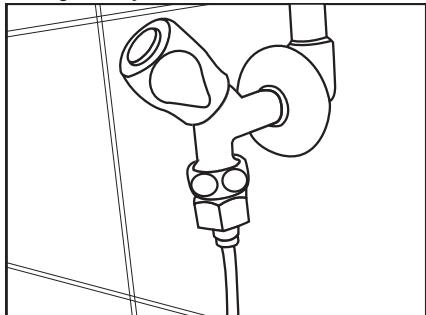
- To avoid damaging, shifting or accidentally disconnecting the hose, use the clips provided to fix the water hose appropriately.
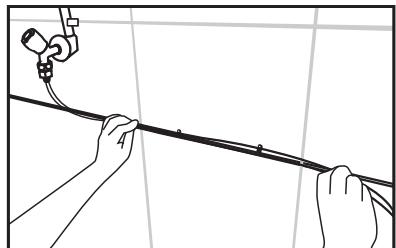

WARNING: After turning the faucet on, make sure there is no water leak on either end of the water hose. In case of leakage, turn the valve off and tighten all connections using a pipe wrench or pliers.
3.8. For products using water carboy (Optional)
To use a carboy for the product's water connection, the water pump recommended by the authorized service must be used.
- Connect one end of the water hose provided with the pump to the product (see 3.6) and follow the instructions below.
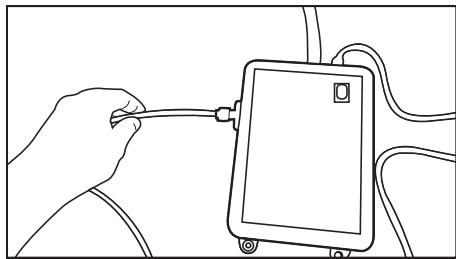
- Connect the other end of the water hose to the water pump by pushing the hose into the pump's hose inlet.
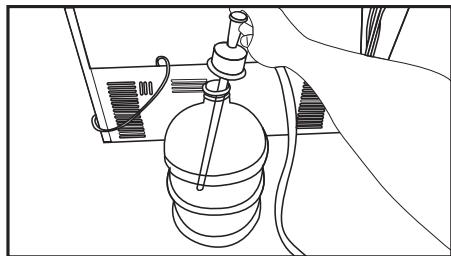
- Place and fasten the pump hose inside the carboy.
- Once the connection is established, plug in and start the water pump.
| i | Please wait 2-3 minutes after starting the pump to achieve the desired efficiency. |
| i | See also the pump's user guide for water connection. |
| i | When using carboy, water filter is not required. |
3.9 Water filter
(Optional)
The product may have internal or external filter, depending on the model. To attach the water filter, follow the instructions below.
3.9.1.Fixing external filter on the wall (Optional)

WARNING: Do not fix the filter on the product.
Check to see the following parts are supplied with your product's model:
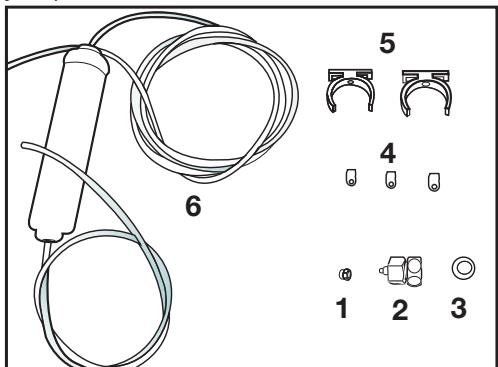
- Connector (1 piece): Used to attach the water hose to the rear of the product.
- Faucet adapter (1 piece): Used for connection to the cold water mains.
- Porous filter (1 piece)
- Hose clip (3 pieces): Used to fix the water hose on the wall.
- Filter connecting apparatus (2 pieces): Used to fix the filter on the wall.
- Water filter (1 piece): Used to connect the product to the water mains. Water filter is not necessary when using carboy connection.
- Connect the faucet adaptor to the water mains valve.
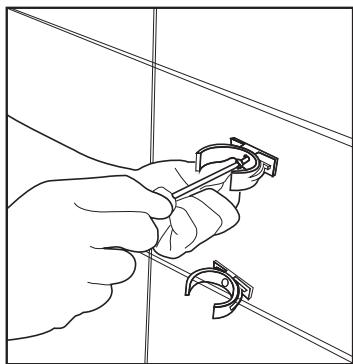
- Determine the location to fix the external filter. Fix the filter's connecting apparatus (5) on the wall.
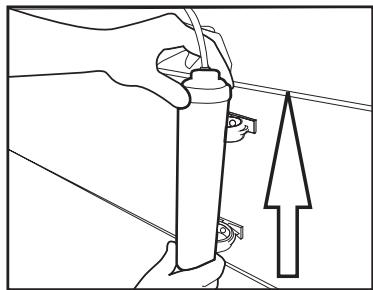
- Attach the filter in upright position on the filter connecting apparatus, as indicated on the label. (6)
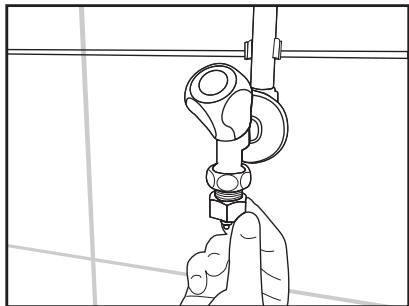
- Attach the water hose extending from the top of the filter to the product's water connection adaptor, (see 3.6.)
After the connection is established, it should look like the figure below.
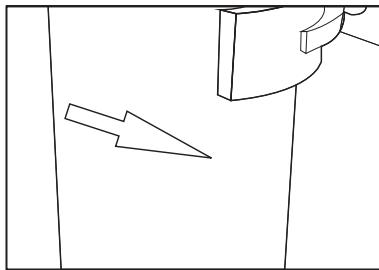
3.9.2. Internal filter
The internal filter provided with the product is not installed upon delivery; please follow the instructions below to install the filter.
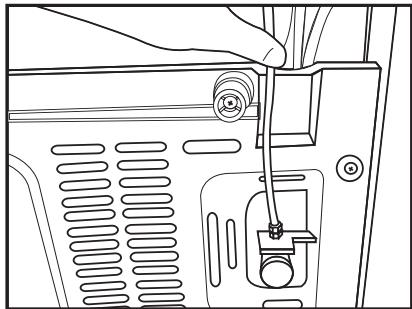
Water line:
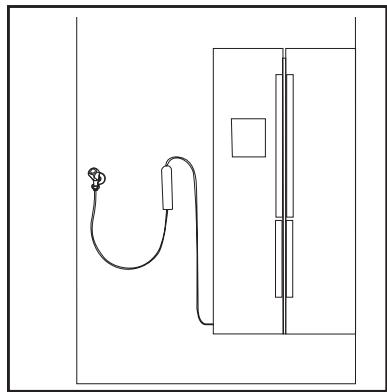
Carboy line:
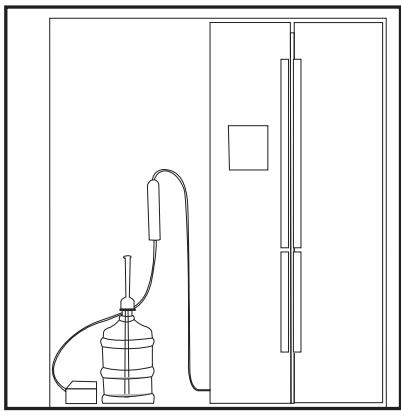

Do not use the first 10 glasses of water after connecting the filter.
- "Ice Off" indicator must be active while installing the filter. Switch the ON-OFF indicator using the "Ice" button on the screen.
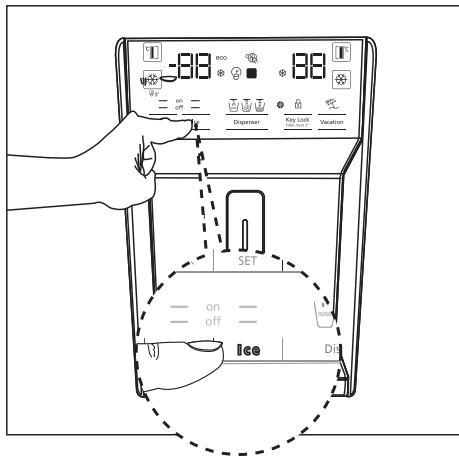
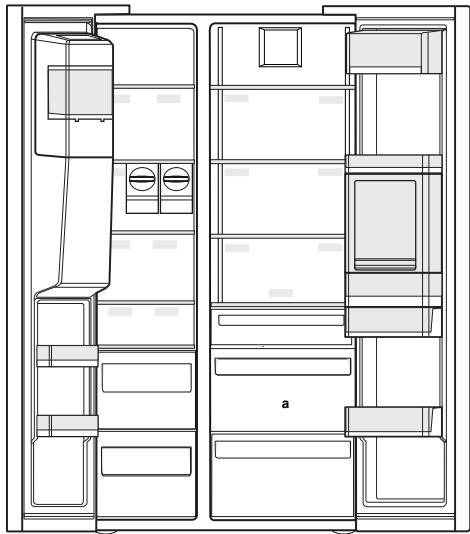
- Remove the vegetable bin (a) to access the water filter.
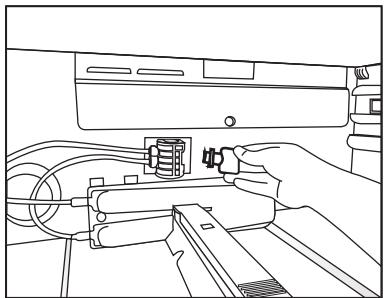
- Remove the water filter by-pass cover by pulling.

A few drops of water may flow out after removing the cover; this is normal.
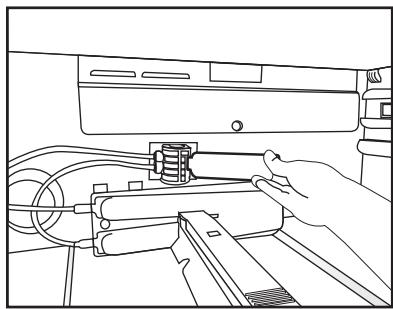
- Place the water filter cover into the mechanism and push to lock in place.
- Push the "Ice" button on the screen again to cancel the "Ice Off" mode.

The water filter will clear certain foreign particles in the water. It will not clear the microorganisms in the water.

See section 5.2 for activating the filter replacing period.
4.1. What to do for energy saving
Connecting the product to electronic energy-saving systems is harmful, as it may damage the product.
- Do not keep the refrigerator doors open for long periods.
- Do not place hot food or beverages into the refrigerator.
- Do not overfill the refrigerator; blocking the internal air flow will reduce cooling capacity.
- The energy consumption value specified for the refrigerator was measured with the freezer compartment's upper shelf removed, other shelves and the lowest drawers in place and under maximum load. The top glass shelf can be used, depending on the shape and size of food to be frozen.
- Depending on the product's features; defrosting frozen foods in the cooler compartment will ensure energy saving and preserve food quality.
- Make sure the foods are not in contact with the cooler compartment temperature sensor described below.
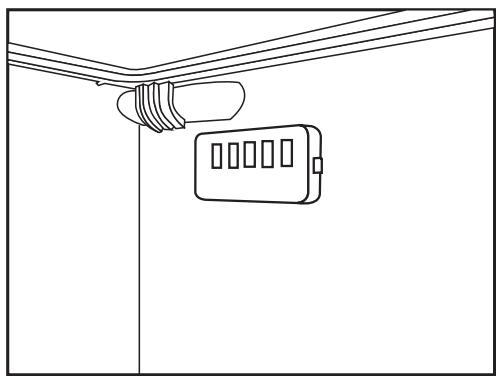
4.2. First Use
Before using your refrigerator, make sure the necessary preparations are made in line with the instructions in "Safety and environment instructions" and "Installation" sections.
- Keep the product running with no food inside for 6 and do not open the door, unless absolutely necessary.

A sound will be heard when the compressor is engaged. It is normal to hear sound even when the compressor is inactive, due to the compressed liquids and gasses in the cooling system.

It is normal for the front edges of the refrigerator to be warm. These areas are designed to warm up in order to prevent condensation.
5.1. Indicator panel
Indicator panels may vary depending on the model of your product.
Audial and visual functions of the indicator panel will assist in using the refrigerator.
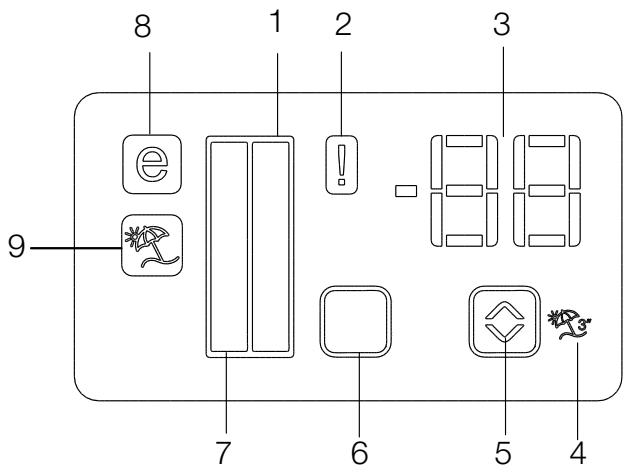
- Cooler compartment indicator
- Error status indicator
- Temperature indicator
- Vacation function button
- Temperature adjustment button
- Compartment selection button
- Cooler compartment indicator
- Economy mode indicator
- Vacation function indicator
*optional

*Optional: The figures in this user guide are intended as drafts and may not perfectly match your product. If your product does not comprise the relevant parts, the information pertains to other models.
1. Cooler compartment indicator
The cooler compartment light will turn on when adjusting the cooler compartment temperature.
2. Error status indicator
This sensor will activate if the refrigerator is not cooling adequately or in case of sensor fault. When this indicator is active, the freezer compartment temperature indicator will display "E" and the cooler compartment temperature indicator will display "1, 2, 3..." etc. numbers. The numbers on the indicator serve to inform the service personnel about the fault.
3. Temperature indicator
Indicates the temperature of the freezer and cooler compartments.
4.Vacation function button
To activate this function, press and hold the Vacation button for 3 seconds. When the Vacation function is active, the cooler compartment temperature indicator displays the inscription "- - " and no cooling process will be active in the cooling compartment. This function is not suitable to keep food in the cooler compartment. Other compartments will remain cooled with the respective temperature set for each compartment.
Push the Vacation button (3) again to cancel this function.
5. Temperature adjustment button
Respective compartment's temperature varies in -24^ ....- 18^ and 8^ .. 1^ ranges.
6. Compartment selection button
Use the refrigerator compartment selection button to toggle between the cooler and freezer compartments.
7. Cooler compartment indicator
The freezer compartment light will turn on when adjusting the cooler compartment temperature.
8. Economy mode indicator
Indicates the refrigerator is running on energy-saving mode. This indicator will be active when the temperature in the freezer compartment is set to -18^ .
9.Vacation function indicator
Indicates the vacation function is active.
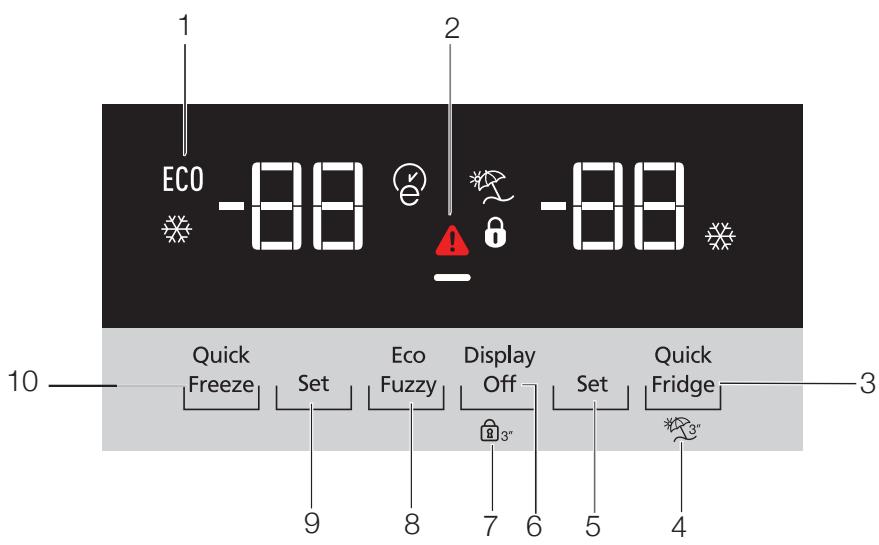
1-Economic use
2- High temperature / fault alert
3- Rapid cooling
4- Vacation function
5-Cooler compartment temperature setting
6- Energy saving (display off)
7- Keypad lock
8-Eco-fuzzy
9-Cooler compartment temperature setting
10-Rapid freezing

*Optional: The figures in this user guide are intended as drafts and may not perfectly match your product. If your product does not comprise the relevant parts, the information pertains to other models.
1. Economic use
This sign will light up when the freezer compartment is set to -18^' , the most economical setting. (EC0) Economic use indicator will turn off when rapid cooling or rapid freezing function is selected.
2. High temperature / fault alert
This indicator (A) will light up in case of temperature faults or fault alerts. If you see this indicator is lit up, please see the "recommended solutions for problems" section in this guide.
3. Rapid cooling
When the rapid cooling function is turned on, the rapid cool indicator will light up (冷热) and the cooler compartment temperature indicator will display the value 1. Push the Rapid cool button again to cancel this function. The Rapid cool indicator will turn off and return to normal setting. The rapid cooling function will be automatically cancelled after 1 hour, unless cancelled by the user. Too cool a large amount of fresh food, press the rapid cool button before placing the food in the cooler compartment.
4. Vacation function
To activate the Vacation function, press the button number (4) for 3 seconds; this will activate the vacation mode indicator. When the Vacation function is active, the cooler compartment temperature indicator displays the inscription "- - " and no cooling process will be active in the cooling compartment. This function is not suitable to keep food in the cooler compartment. Other compartments will remain cooled with the respective temperature set for each compartment. Push the vacation function button again to cancel this function.
5. Cooler compartment temperature setting
After pressing the button number (5), the cooler compartment temperature can be set to 8,7,6,5,4,3,2 and 1 respectively.
6. Energy saving (display off)
Pressing this button (—) will light up the energy-saving sign (—) and the Energy-saving function will activate. Activating the energy-saving function will turn off all other signs on the display. When the energy-saving function is active, pressing any button or opening the door will deactivate the energy-saving function and the display signals will return to normal. Pressing this button (—) again will turn off the energy-saving sign and deactivate the energy-saving function.
7.Keypad lock
Press the keypad lock button (3^ ) simultaneously for 3 seconds. The keypad lock sign (0) will light up and the keypad lock will be activated; the buttons will be inactive when the Keypad lock is activated. Press the Keypad lock button again simultaneously for 3 seconds. The keypad lock sign will turn off and the keypad lock mode will be disengaged. Press the keypad lock button (3^ ) to prevent changing the refrigerator's temperature settings.
8. Eco-fuzzy
To activate the eco-fuzzy function, press and hold the eco-fuzzy button for 1 second. When this function is active, the freezer will switch to the economic mode after at least 6 hours and the economic use indicator will light up. To deactivate the (E) eco-fuzzy function, press and hold the eco-fuzzy function button for 3 seconds. The indicator will light up after 6 hours when the eco-fuzzy function is active.
9. Cooler compartment temperature setting
The temperature in the freezer compartment is adjustable. Pressing the button number (9) will enable the freezer compartment temperature to be set at -18, -19, -20, -21, -22, -23 and -24.
10. Rapid freezing
For rapid freezing, press the button number (10); this will activate the rapid freezing indicator (2). When the rapid freezing function is turned on, the rapid freeze indicator will light up and the freezer compartment temperature indicator will display the value -27. Press the Rapid freeze button (3) again to cancel this function. The Rapid freeze indicator will turn off and return to normal setting. The rapid freezing function will be automatically cancelled after 24 hours, unless cancelled by the user. To freeze a large amount of fresh food, press the rapid freeze button before placing the food in the freezer compartment.
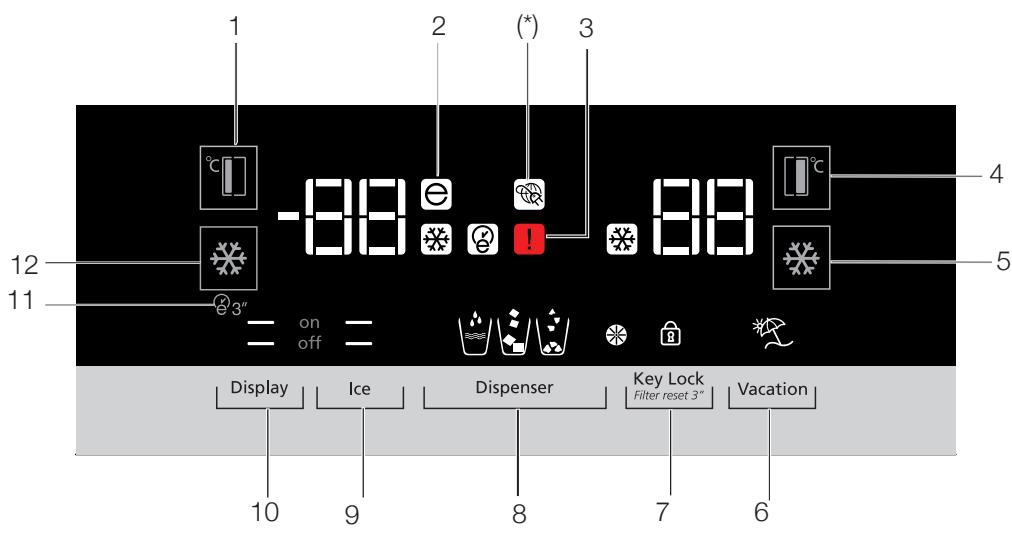
- Freezer compartment temperature setting
- Economy mode
- Error status
- Cooler compartment temperature setting
- Rapid cooling
- Vacation function
- Keypad lock / filter replacing alert cancellation
- Water, fragmented ice, ice cubes selection
- Ice making on/off
- Display on/off
- Autoeco
- Rapid freezing

*Optional: The figures in this user guide are intended as drafts and may not perfectly match your product. If your product does not comprise the relevant parts, the information pertains to other models.
1. Freezer compartment temperature setting
Pressing the button (^t) number (1) will enable the freezer compartment temperature to be set at -18,-19,-20,-21,-22,-23,-24,-18...
2. Economy mode
Indicates the refrigerator is running on energy-saving mode. This indicator will be active when the freezer compartment temperature is set at -18 or the energy-saving cooling is engaged by eco-extra function. (EC0)
3. Error status
This sensor will activate if the refrigerator is not cooling adequately or in case of sensor fault. (A)
When this indicator is activated, the freezer compartment temperature indicator will display "E" and the cooler compartment temperature indicator will display "1, 2, 3..." etc. numbers. The numbers on the indicator serve to inform the service personnel about the fault.
4. Cooler compartment temperature setting
After pressing the button [^ct] number (4), the cooler compartment temperature can be set to 8,7,6,5,4,3,2.. respectively.
5. Rapid cooling
For rapid cooling, press the button number (5); this will activate the rapid cooling indicator (X). Press this button again to deactivate this function. Use this function when placing fresh foods into the cooler compartment or to rapidly cool the food items. When this function is activated, the refrigerator will be engaged for 1 hour.
6. Vacation function
When the Vacation function (^*) is active, the cooler compartment temperature indicator displays the inscription "- - " and no cooling process will be active in the cooling compartment. This function is not suitable to keep food in the cooler compartment. Other compartments will remain cooled with the respective temperature set for each compartment.
Press the vacation function button again to cancel this function. (2)
7. Keypad lock / Keypad lock / filter replacing alert cancellation
Press keypad lock button (O) to activate the keypad lock. You may also use this function to prevent changing the refrigerator's temperature settings. The refrigerator's filter must be replaced every 6 months. If you follow the instructions in the section 5.2, the refrigerator will automatically calculate the remaining period and the filter replacing alert indicator (W) will light up when filter expires.
Press and hold the button 念 for 3 seconds to turn off the filter alert light.
8. Water, fragmented ice, ice cubes selection
Navigate the water (w), ice cube (z) and fragmented ice (z) selections using the button number 8. The active indicator will remain lit.
9. Ice making on/off
Press the button (number (9) to cancel (off —) or activate (on —) ice-making.
10. Display on/off
Press the button (off) number (10) to cancel (XX) or activate (on) display on/off.
11. Autoeco
Press the auto eco button (3), number (11), for 3 seconds to activate this function. If the door remains closed for a long time when this function is activated, the cooler section will switch to economic mode. Press the button again to deactivate this function.
The indicator will light up after 6 hours when the auto eco function is active. ()
12. Rapid freezing
Press the button ( 喜 ) number (12) for rapid freezing. Press the button again to deactivate the function.
5.2. Activating the water filter replacing alert
(For products connected to water mains and comprising filter)
The water filter replacing alert is adjusted as described below.
- Press the A (Keypad lock) button while the refrigerator is operational.
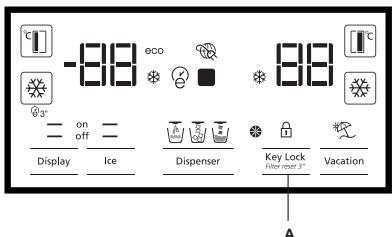
- Then press the following buttons respectively
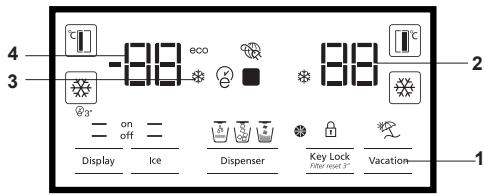
- Vacation button
- Cooler temperature adjustment button
- Rapid cool adjustment button
- Freezer temperature adjustment button If the buttons are not pressed in the respective order, the button I indicator will turn off, a short audible alert will be heard and the Filter Replacement Alert indicator will light up. The filter service life automatic calculation function is inactive by default. This function must be activated for products comprising a filter. Your refrigerator will automatically indicate the filter replacement period after 6 months. Repeating this process when the filter service life automatic calculation is active will cancel this function.
5.3. Using the water fountain (for certain models)

The first few glasses of water taken from the fountain will normally be warm.

If the water fountain is not used for a long time, dispose of the first few glasses of water to get clean water.
You must wait approximately 12 hours to get cold water after first operating.
Use the display to select the water option, then pull the trigger to get water. Remove the glass shortly after pulling the trigger.
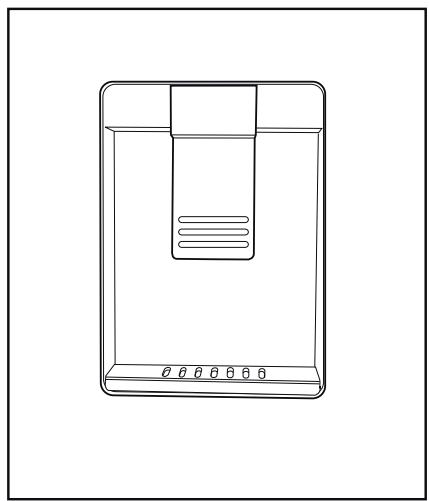
5.4. Filling the fountain water tank
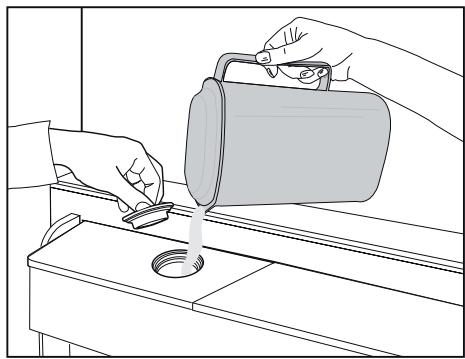
Open the water tank's lid, as shown in the figure. Fill in pure and clean drinking water. Close the lid.
5.5. Cleaning the water tank
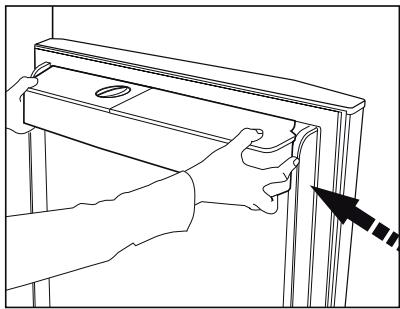
Remove the water filling reservoir inside the door shelf.
Detach by holding both sides of the door shelf.
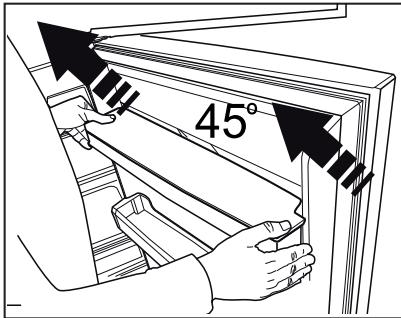
Hold both sides of the water tank and remove at 45^ angle.
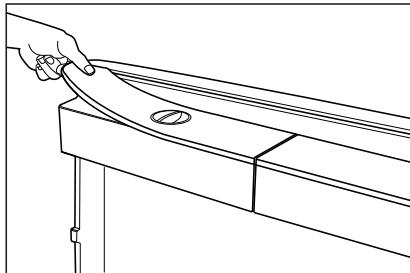
Remove and clean the water tank lid.

Do not fill the water tank with fruit juice, fizzy beverages, alcoholic beverages or any other liquids incompatible for use in the water fountain. Using such liquids will cause malfunction and irreparable damage in the water fountain. Using the fountain in this way is not within the scope of warranty. Such certain chemicals and additives in the beverages / liquids may cause material damage to the water tank.

The water tank and water fountain components cannot be washed with dishwashers.
5.6. Taking ice / water
(Optional)
To take water ( ) / ice cube ( ) / fragmented ice ( ) , use the display to select the respective option. Take water/ice by pushing the trigger on the water fountain forward. When switching between ice cube ( ) / fragmented ice ( ) options, the previous ice type may be discharged a few more times.
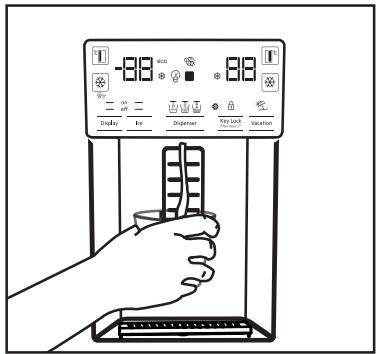
- You must wait approximately 12 hours before taking ice from the ice / water fountain for the first time. The fountain may not discharge ice if there is insufficient ice in the ice box.
- The 30 pieces of ice cubes (3-4 Litres) taken after first operating should not be used.
- In case of power blackout or temporary malfunction, the ice may partly melt and refreeze. This will cause the ice pieces to merge with each other. In case of extended power blackouts or malfunction, the ice may melt and leak out. If you experience this problem, remove the ice in the ice box and clean the box.

WARNING: The product's water system should be connected to cold water line only. Do not connect to hot water line.
-
The product may not discharge water during first operation. This is caused by the air in the system. The air in the system must be discharged. To do this, push the water fountain trigger for 1-2 minutes until the fountain discharges water. The initial water flow may be irregular. The water will flow normally once the air in the system is discharged.
-
The water may be cloudy during first use of the filter; do not consume the first 10 glasses of water.
- You must wait approximately 12 hours to get cold water after first installation.
- The product's water system is designed for clean water only. Do not use any other beverages.
- It is recommended to disconnect the water supply if the product will not be used for long periods during vacation etc.
- If the water fountain is not used for a long time, the first 1-2 glasses of water received may be warm.
5.7. Drip tray
(optional)
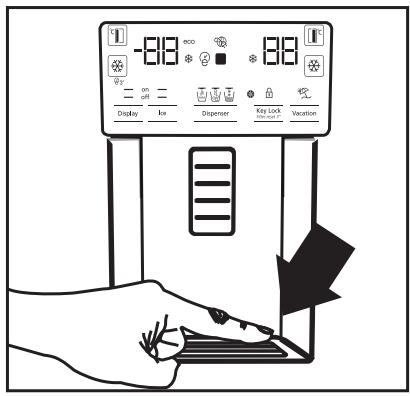
The water dripping from the water fountain accumulates on the drip tray; no water drainage is available. Pull the drip tray out or push on the edges to remove the tray. You may then discharge the water inside the drip tray.
5.8. Zero degree compartment (Optional)
Use this compartment to keep delicatessen at lower temperatures or meat products for immediate consumption. Do not place fruits and vegetables in this compartment. You can expand the product's internal volume by removing any of the zero degree compartments. To remove the compartment, simply pull forth, lift up and pull out.
5.9. Vegetable bin
The refrigerator's vegetable bin is designed to keep vegetables fresh by preserving humidity. For this purpose, the overall cold air circulation is intensified in the vegetable bin. Keep fruits and vegetables in this compartment. Keep the green-leaved vegetables and fruits separately to prolong their life.
5.10. Blue light (Optional)
The product's vegetable bins comprise blue light. The vegetables in the bin will continue photosynthesize under the blue light's wavelength effect and remain live and fresh.
5.11.lonizer
(Optional)
The ionizer system in the cooler compartment's air duct serves to ionize the air. The negative ion emissions will eliminate bacteria and other molecules causing odour in the air.
5.12.Minbar
(Optional)
The refrigerator's minibar door shelf can be accessed without opening the door. This will allow you to easily take frequently consumed food and beverages from the refrigerator. To open the minibar cover, push with your hand and pull towards yourself.

WARNING: Do not sit, hang or place heavy objects on the minibar cover. This may damage the product or cause you to be injured.
To close this compartment, simply push forward from the upper section of the cover.
5.13. Odour filter
(optional)
The odour filter in the cooler compartment's air duct will prevent undesirable odour formation.
Using the product
5.14.Icomatic and ice storage box (Optional)
Fill the icematic with water and put in place. The ice will be ready after approximately two hours. Do not remove the icematic to take the ice.
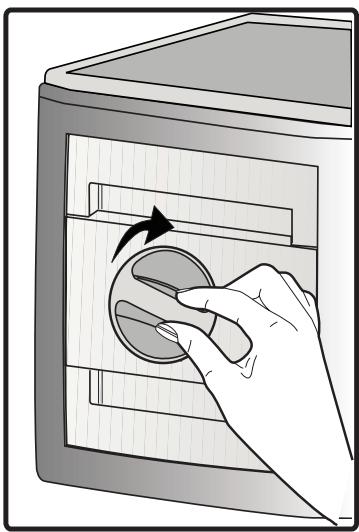
Turn the buttons on the ice chambers right-hand side by 90^ ; the ice will fall to the ice storage box below. You may then remove the ice storage box and serve the ice.

The ice storage box is intended for storing ice only. Do not fill with water. Doing so will cause it to break.
5.15.lce-maker
(Optional)
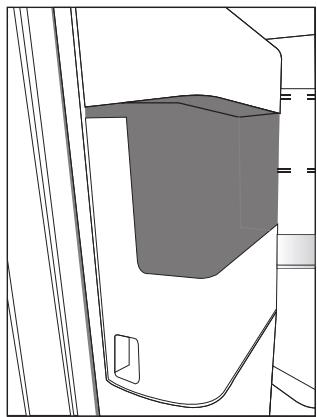
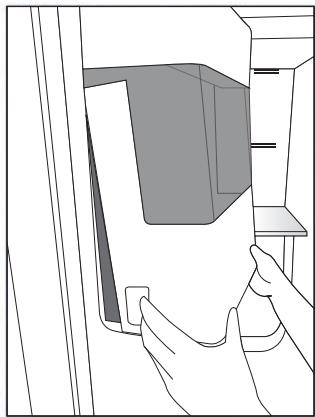
Ice maker is located on the upper section of the freezer cover.
Hold the handles on the sides of the ice stock reservoir and move up to remove.
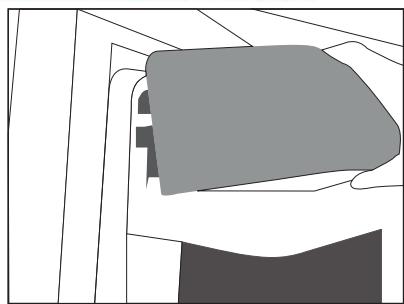
Remove the ice-maker decorative lid by moving up.
5.16.Freezing fresh food
- To preserve food quality, the food items placed in the freezer compartment must be frozen as quickly as possible, use the rapid freezing for this.
- Freezing the food items when fresh will extend the storage time in the freezer compartment.
- Pack the food items in air-tight packs and seal tightly.
- Make sure the food items are packed before putting in the freezer. Use freezer holders, tinfoil and damp-proof paper, plastic bag or similar packaging materials instead of traditional packaging paper.
- Mark each food pack by writing the date on the package before freezing. This will allow you to determine the freshness of each pack every time the freezer is opened. Keep the earlier food items in the front to ensure they are used first.
- Frozen food items must be used immediately after defrosting and should not be frozen again.
- Do not free large quantities of food at once.
5.17.Recommendations for storing frozen foods
The compartment must be set to at least -18^ .
- Place the food items in the freezer as quickly as possible to avoid defrosting.
- Before freezing, check the "Expiry Date" on the package to make sure it is not expired.
- Make sure the food's packaging is not damaged.
5.18.Deep freezer details
As per the IEC 62552 standards, the freezer must have the capacity to freeze 4,5kg of food items at -18^ or lower temperatures in 24 hours for each 100 litres of freezer compartment volume. Food items can only be preserved for extended periods at or below temperature of -18^ . You can keep the foods fresh for months (in deep freezer at or below temperatures of 18^ ).
The food items to be frozen must not contact the already-frozen food inside to avoid partial defrosting.
Boil the vegetables and filter the water to extend the frozen storage time. Place the food in air-tight packages after filtering and place in the freezer. Bananas, tomatoes, lettuce, celery, boiled eggs, potatoes and similar food items should not be frozen. Freezing these food items will simply reduce the nutritional value and food quality, as well as possible spoiling which is harmful to health.
| Freezer Compartment Setting | Cooler Compartment Setting | Descriptions |
| -18°C | 4°C | This is the default, recommended setting. |
| -20,-22 veya -24°C | 4°C | These settings are recommended for ambient temperatures exceeding 30°C. |
| Rapid Freeze | 4°C | Use this to freeze food items in a short time, the product will reset to previous settings when the process is completed. |
| -18°C or colder | 2°C | Use these settings if you believe the cooler compartment is not cold enough due to ambient temperature or frequently opening the door. |
5.19.Placing the food
| Freezer compartment shelves | Various frozen goods including meat, fish, ice cream, vegetables etc. |
| Cooler compartment shelves | Food items inside pots, capped plate and capped cases, eggs (in capped case) |
| Cooler compartment door shelves | Small and packed food or beverages |
| Vegetable bin | Fruits and vegetables |
| Fresh food compartment | Delicatessen (breakfast food, meat products to be consumed in short notice) |
5.20.Door open alert
(Optional)
An audible alert will be heard if the product's door remains open for 1 minute. The audible alert will stop when the door is closed or any button on the display (if available) is pressed.
5.21.Interior light
Interior light uses a LED type lamp. Contact the authorized service for any problems with this lamp.
Cleaning the product regularly will prolong its service life.

WARNING: Disconnect the power before cleaning the refrigerator.
- Do not use sharp and abrasive tools, soap, house cleaning materials, detergents, gas, gasoline, varnish and similar substances for cleaning.
- Melt a teaspoonful of carbonate in the water. Moisten a piece of cloth in the water and wring out. Wipe the device with this cloth and dry off thoroughly.
Take care to keep water away from the lamp's cover and other electrical parts. - Clean the door using a wet cloth. Remove all items inside to detach the door and chassis shelves. Lift the door shelves up to detach. Clean and dry the shelves, then attach back in place by sliding from above.
- Do not use chloric water or cleaning products on the exterior surface and chrome-coated parts of the product. Chlorine will cause rust on such metallic surfaces.
6.1. Preventing malodour
The product is manufactured free of any odorous materials. However, keeping the food in inappropriate sections and improper cleaning of internal surfaces may lead to malodour.
To avoid this, clean the inside with carbonated water every 15 days.
- Keep the foods in sealed holders. Microorganisms may spread out of unsealed food items and cause malodour.
- Do not keep expired and spoilt foods in the refrigerator.
6.2. Protecting plastic surfaces
Oil spilled on plastic surfaces may damage the surface and must be cleaned immediately with warm water.
7
Troubleshooting
Check this list before contacting the service. Doing so will save you time and money. This list includes frequent complaints that are not related to faulty workmanship or materials. Certain features mentioned herein may not apply to your product.
The refrigerator is not working.
- The power plug is not fully settled. >>> Plug it in to settle completely into the socket.
- The fuse connected to the socket powering the product or the main fuse is blown. >>> Check the fuses.
Condensation on the side wall of the cooler compartment (MULTI ZONE, COOL, CONTROL and FLEXI ZONE).
- The environment is too cold. >> Do not install the product in environments with temperatures below -5^ .
- The door is opened too frequently >> Take care not to open the product's door too frequently.
- The environment is too humid. >>> Do not install the product in humid environments.
- Foods containing liquids are kept in unsealed holders. Keep the foods containing liquids in sealed holders.
- The product's door is left open. >>> Do not keep the product's door open for long periods.
- The thermostat is set to too low temperature. >> Set the thermostat to appropriate temperature.
Compressor is not working
- In case of sudden power failure or pulling the power plug off and putting back on, the gas pressure in the product's cooling system is not balanced, which triggers the compressor thermic safeguard. The product will restart after approximately 6 minutes. If the product does not restart after this period, contact the service.
- Defrosting is active. >> >> This is normal for a fully-automatic defrosting product. The defrosting is carried out periodically.
- The product is not plugged in. >>>> Make sure the power cord is plugged in.
- The temperature setting is incorrect. >> Select the appropriate temperature setting.
- The power is out. >> The product will continue to operate normally once the power is restored.
The refrigerator's operating noise is increasing while in use.
- The product's operating performance may vary depending on the ambient temperature variations. This is normal and not a malfunction.
The refrigerator runs too often or for too long.
- The new product may be larger than the previous one. Larger products will run for longer periods.
- The room temperature may be high. >>>> The product will normally run for long periods in higher room temperature.
- The product may have been recently plugged in or a new food item is placed inside. >>>> The product will take longer to reach the set temperature when recently plugged in or a new food item is placed inside. This is normal.
Large quantities of hot food may have been recently placed into the product. Do not place hot food into the product. - The doors were opened frequently or kept open for long periods. The warm air moving inside will cause the product to run longer. Do not open the doors too frequently.
- The freezer or cooler door may be ajar. >>> Check that the doors are fully closed.
- The product may be set to temperature too low. >> Set the temperature to a higher degree and wait for the product to reach the adjusted temperature.
- The cooler or freezer door washer may be dirty, worn out, broken or not properly settled. >>> Clean or replace the washer. Damaged / torn door washer will cause the product to run for longer periods to preserve the current temperature.
The freezer temperature is very low, but the cooler temperature is adequate.
- The freezer compartment temperature is set to a very low degree. >> Set the freezer compartment temperature to a higher degree and check again.
The cooler temperature is very low, but the freezer temperature is adequate. - The cooler compartment temperature is set to a very low degree. >> Set the cooler compartment temperature to a higher degree and check again.
The food items kept in cooler compartment drawers are frozen. - The cooler compartment temperature is set to a very low degree. >> Set the freezer compartment temperature to a higher degree and check again.
The temperature in the cooler or the freezer is too high.
- The cooler compartment temperature is set to a very high degree. >> The cooler compartment temperature setting influences the freezer compartment temperature. Change the cooler or freezer compartment's temperature and wait until the relevant compartments reach the adjusted temperature level.
- The doors were opened frequently or kept open for long periods. Do not open the doors too frequently.
- The door may be ajar. >>> Fully close the door.
- The product may have been recently plugged in or a new food item is placed inside. This is normal. The product will take longer to reach the set temperature when recently plugged in or a new food item is placed inside.
Large quantities of hot food may have been recently placed into the product. Do not place hot foods into the product.
Shaking or noise.
- The ground is not level or durable. If the product is shaking when moved slowly, adjust the stands to balance the product. Also make sure the ground is sufficiently durable to bear the product.
- Any items placed on the product may cause noise. >>> Remove any items placed on the product.
The product is making noise of liquid flowing, spraying etc.
- The product's operating principles involve liquid and gas flows. This is normal and not a malfunction.
There is sound of wind blowing coming from the product.
- The product uses a fan for the cooling process. This is normal and not a malfunction.
There is condensation on the product's internal walls.
- Hot or humid weather will increase icing and condensation. This is normal and not a malfunction.
- The doors were opened frequently or kept open for long periods. >>> Do not open the doors too frequently; if open, close the door.
- The door may be ajar. >>>> Fully close the door.
There is condensation on the product's exterior or between the doors.
- The ambient weather may be humid, this is quite normal in humid weather. >>>> The condensation will dissipate when the humidity is reduced.
The interior smells bad.
- The product is not cleaned regularly. >>> Clean the interior regularly using sponge, warm water and carbonated water.
- Certain holders and packaging materials may cause odour. >> Use holders and packaging materials without free of odour.
- The foods were placed in unsealed holders. Keep the foods in sealed holders. Microorganisms may spread out of unsealed food items and cause malodour.
- Remove any expired or spoilt foods from the product.
The door is not closing.
- Food packages may be blocking the door. Relocate any items blocking the doors.
- The product is not standing in full upright position on the ground. >>> Adjust the stands to balance the product.
- The ground is not level or durable. >>Make sure the ground is level and sufficiently durable to bear the product.
The vegetable bin is jammed.
- The food items may be in contact with the upper section of the drawer. >> Reorganize the food items in the drawer.

WARNING: If the problem persists after following the instructions in this section, contact your vendor or an Authorized Service. Do not try to repair the product.
- User guide ensure the quick and safe use of the product.
- Symbols and Remarks
- The following symbols are used in the user guide:
- Table of Contents
- Safety and environment instructions3
- Refrigerator 5
- Installation 6
- Preparation 13
- Using the product 14
- Maintenance and cleaning 29
- Troubleshooting 30
- Safety and environment instructions
- General safety
- Safety and environment instructions
- HC warning
- For models with water fountain
- Intended use
- Child safety
- Compliance with WEEE Directive and Disposing of the Waste Product
- Compliance with RoHS Directive
- Package information
- Installation
- Right place for installation
- Attaching the plastic wedges
- Adjusting the stands
- Power connection
- Water connection (Optional)
- Connecting water hose to the product
- To connect the water hose to the product, follow the instructions below.
- Connecting to water mains (Optional)
- For products using water carboy (Optional)
- Water filter
- (Optional)
- 3.9.1.Fixing external filter on the wall (Optional)
- Internal filter
- What to do for energy saving
- First Use
- Indicator panel
- Cooler compartment indicator
- Error status indicator
- Temperature indicator
- 4.Vacation function button
- Temperature adjustment button
- Compartment selection button
- Cooler compartment indicator
- Economy mode indicator
- 9.Vacation function indicator
- Economic use
- High temperature / fault alert
- Rapid cooling
- Vacation function
- Cooler compartment temperature setting
- Energy saving (display off)
- 7.Keypad lock
- Eco-fuzzy
- Cooler compartment temperature setting
- Rapid freezing
- Freezer compartment temperature setting
- Economy mode
- Error status
- Cooler compartment temperature setting
- Rapid cooling
- Vacation function
- Keypad lock / Keypad lock / filter replacing alert cancellation
- Water, fragmented ice, ice cubes selection
- Ice making on/off
- Display on/off
- Autoeco
- Rapid freezing
- Activating the water filter replacing alert
- (For products connected to water mains and comprising filter)
- Using the water fountain (for certain models)
- Filling the fountain water tank
- Cleaning the water tank
- Taking ice / water
- Drip tray
- Zero degree compartment (Optional)
- Vegetable bin
- Blue light (Optional)
- 5.11.lonizer
- 5.12.Minbar
- Odour filter
- Using the product
- 5.14.Icomatic and ice storage box (Optional)
- 5.15.lce-maker
- 5.16.Freezing fresh food
- 5.17.Recommendations for storing frozen foods
- 5.18.Deep freezer details
- 5.19.Placing the food
- 5.20.Door open alert
- 5.21.Interior light
- Preventing malodour
- Protecting plastic surfaces
- 7
- Troubleshooting
- The refrigerator is not working.
- Condensation on the side wall of the cooler compartment (MULTI ZONE, COOL, CONTROL and FLEXI ZONE).
- Compressor is not working
- The refrigerator's operating noise is increasing while in use.
- The refrigerator runs too often or for too long.
- Shaking or noise.
- There is condensation on the product's internal walls.
- There is condensation on the product's exterior or between the doors.
- The interior smells bad.
- The door is not closing.
- The vegetable bin is jammed.
Brand : SMEG
Model : SBS963N
Category : Combined refrigerator