
FRP 100 - Wi-Fi repeater KATHREIN - Free user manual and instructions
Find the device manual for free FRP 100 KATHREIN in PDF.


| Product type | Satellite receiver |
| Brand | Kathrein |
| Model | FRP 100 |
| Dimensions (W x H x D) | Approx. 260 x 45 x 160 mm |
| Weight | Approx. 0.65 kg |
| Power supply | 12 V DC, 1 A (external power adapter) |
| Power consumption | Max. 10 W |
| Supported satellite standards | DVB-S/S2, MPEG-2/4 |
| Input frequency range | 950–2150 MHz |
| Input impedance | 75 Ω |
| LNB supply | 13/18 V, 22 kHz, DiSEqC 1.0/1.2 |
| Video outputs | HDMI, SCART (CVBS/RGB) |
| Audio outputs | HDMI, RCA (stereo) |
| USB port | USB 2.0 for multimedia playback |
| Supported file systems | FAT32, NTFS |
| Multimedia formats | MPEG, AVI, MKV, MP3, JPEG |
| Channel memory | Up to 2000 channels |
| Electronic Program Guide (EPG) | Yes, 7-day EPG |
| Parental control | Yes, password protected |
| Operating temperature | 0 to 45 °C |
| Cleaning | Wipe with a soft dry cloth; do not use liquids |
| Safety | Do not expose to moisture; use only supplied power adapter |
| Spare parts / repairability | Contact Kathrein support for spare parts; device is not user-serviceable |
Frequently Asked Questions - FRP 100 KATHREIN
User questions about FRP 100 KATHREIN
0 question about this device. Answer the ones you know or ask your own.
Ask a new question about this device
Download the instructions for your Wi-Fi repeater in PDF format for free! Find your manual FRP 100 - KATHREIN and take your electronic device back in hand. On this page are published all the documents necessary for the use of your device. FRP 100 by KATHREIN.
USER MANUAL FRP 100 KATHREIN
natural_image
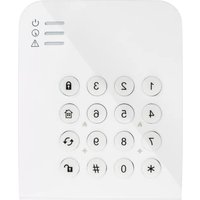
Front view of a white electronic device panel with four colored indicator lights (yellow, orange, blue, red) on its sides (no text or symbols visible)Introduction
Thank you for purchasing the KATHREIN Digital Systems GmbH wireless repeater. Please take the time to read the following safety and installation information carefully and attentively before using the wireless repeater. It is imperative to comply with these instructions in order to ensure the safe operation of the device. If you have any further questions, please contact your local retailer or KATHREIN Digital Systems GmbH directly. Your wireless repeater was developed and built with state-of-the-art technology and complies with European and German standards.
Please keep this manual safe to be able to answer possible questions in the future. The manual is an integral part of the product even in case it is resold to a third party.
Disclaimer
All technical details and descriptions in this manual were compiled with the greatest care. However, KATHREIN Digital Systems GmbH cannot entirely exclude mistakes in this manual. Therefore, we do not assume any legal responsibility or liability resulting from wrong information in this manual. Descriptions, technical illustrations and technical data are subject to change without notice according to technical progress. In addition, KATHREIN Digital Systems GmbH reserves the right to change the product and the manual without prior notice. We do not assume any guarantee with regard to the content of this document. We appreciate any comments on mistakes or inaccuracies which may help us to improve this product and this manual.


This symbol is intended to attract the user's attention to the potential risk of dangerous unprotected voltage inside the housing. This may lead to electric shock.

This symbol is intended to attract the user's attention to user and maintenance instructions in the manual and documents enclosed with the product.
WARNING:
TO MINIMISE THE RISK OF ELECTRIC SHOCK, YOU MUST NOT EXPOSE THIS PRODUCT TO WET AND MOIST CONDITIONS AT ANY TIME.
RoHS
All KATHREIN Digital Systems GmbH products are lead-free and meet the requirements stated under the European Directive on the Restriction of Hazardous Substances (RoHS). This guarantees that the entire production process and the product itself are free of lead and of all listed hazardous substances.
FC
This product was tested and complies with the regularities for a class of digital devices stated under FCC part 15. These limits were specified to provide reasonable protection against harmful exposure when operating the device in a commercial environment. This product generates, uses and may emit radio energy. It may in addition interfere with other radio communication systems if not installed or used according to this manual. Using the device in residential areas may cause disturbances to be possibly remedied at the user's expense.
CE
Hereby KATHREIN Digital Systems GmbH declares that the Wireless repeater FRP 100 (order number 2220000011, EAN 4021121548888) is in conformity with the relevant provisions of Directive 1999/5/EG.
Conformity:
The declaration of conformity is available at http://www.kathrein-ds.com in the download section of the respective product. Alternatively, you can request the declaration of conformity directly from us:
KATHREIN Digital Systems GmbH
Anton-Kathrein-Str. 1–3
83022 Rosenheim, Germany

WARNING
The warranty claim will expire in case of damages resulting from the non-observance of this manual.
We do not assume any liability for consequential damages.
We do not assume any liability for damages to persons and/or material whatsoever which result from improper handling or noncompliance with the safety instructions. The warranty claim will expire in such cases!
The wireless repeater FRP 100 is equipped with a high-quality housing. However, please observe the following safety instructions:
- Connect the wireless repeater only to the approved voltage according to this manual. Operate the wireless repeater only with the provided mains adapter.
- Make sure that the socket can be reached easily, is protected against moisture, and is located indoors.
- Handle the wireless repeater with care, heavy vibrations or bumps may damage the wireless repeater.
- Do not use the wireless repeater close to strong electric power lines or magnetic fields, as this may impair the transmission quality significantly.
- Do not install the wireless repeater directly on iron or aluminium surfaces, as this may impair the wireless transmission significantly. Use a non-conducting material to insulate the device from the installation surface.
- Do not expose the wireless repeater to direct sunlight or strong sources of heat (e.g. heaters).
- Do not expose the wireless repeater to moist, very cold, or very hot environments. Please observe the maximum humidity and temperature limits.
- The wireless repeater is designed for indoor use.
- Persons (including children) with limited physical, sensory, or mental abilities and/or lacking experience and/or knowledge must not use this product.
- Keep children away from the wireless repeater and other connected electrical appliances at all times. The wireless repeater includes cables, which may strangle children, and small parts they can swallow. Assemble the wireless repeater out of children's reach. Do not leave packaging materials unattended, as they may be dangerous for playing children.
- Use a damp cloth to clean the wireless repeater's surface. Afterwards, dry the surface. Cleaning agents will damage the surface.
Malfunctions and Defects
If you notice any kind of defect, disconnect the wireless repeater FRP 100 from the power supply and contact your retailer or KATHREIN Digital Systems GmbH directly. Any further usage of the wireless repeater may lead to fire or electric shock!
Intended Use
The wireless repeater FRP 100 enhances the signal of connected KATHREIN Digital Systems GmbH sensors which are using the 868 MHz radio frequency. The wireless repeater may only be installed indoors! Any other use than that described in this manual is not permitted and will lead to the expiry of any warranty or guarantee as well as to the exclusion of liability. The same applies to modifications and retrofitting.
Disposal

Do not dispose of the device with domestic waste!
This product complies with the EU Directive on waste electrical and electronic equipment (WEEE) and therefore must not be disposed of with domestic waste. Dispose of the device via your local collection point for waste electronic equipment!
This product contains software programs subject to the GPL free software license.
This product contains software that was developed by third parties and/or software subject to the GNU General Public License (GPL) and/or the GNU Lesser General Public License (LGPL). We will send you the source code of these programs on request. The GPL and/or LGPL code used and offered in this product is EXCLUSIVE OF ANY GUARANTEE WHATSOEVER and is subject to the copyright of one or several authors. For further details, please refer to the GPL and/or LGPL code of this product and to the terms of use of GPL and LGPL.
You can read the complete license text at http://www.gnu.org/licenses/gpl-2.0.html. For an unofficial German translation, please go to
http://www.gnu.de/documents/gpl.de.html.
You can connect only a limited number of sensors to the FAZ 100 alarm panel. If the range of one or more sensors is insufficient, you can increase the range using the wireless repeater. The wireless repeater allows you to nearly double the transmission range, because the sensors are sending their signals first to the repeater and then the repeater relays these signals to the alarm panel.
The repeater works on the 868.6625 MHz frequency and can amplify only sensors within this frequency range. The repeater does not support ZigBee devices.
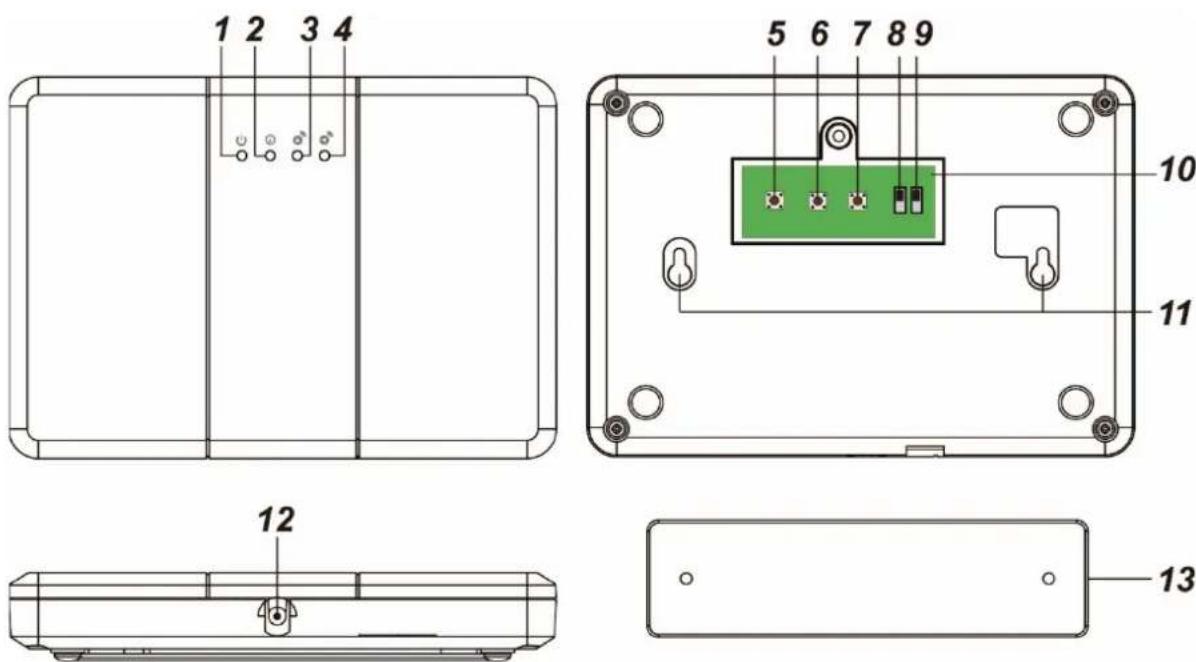
1. Power LED (green)
- On = operating
- Off = off
- Flashing = low battery
2. Mode LED (yellow)
- On = the repeater is in learn mode
- Flashing = the wireless repeater is in range test mode
3. Receiver LED
This LED flashes when the wireless repeater receives a signal from the alarm panel.
4. Transmission LED
This LED flashes when the wireless repeater transmits a signal to the alarm panel.
5. Learn button (alarm panel)
6. Connection-test button
7. Learn button (sensor)
8. Tamper contact on / off
The tamper contact presses against the mount that allows you to install the wireless repeater on a wall. As long as the wireless repeater is connected to the mount, the tamper contact is closed. If the wireless repeater is removed from the mount, a tamper alarm is sent to the alarm panel. If you do not want to use the tamper protection, you can deactivate it by setting it to off.
9. Battery on / off
The repeater is equipped with a rechargeable battery which lasts for approx. 30 hours. The battery takes approx. 72 hours to fully charge. During the charging process, the power LED flashes.
10. Removable cover (backside)
11. Mounting notches
These notches are for mounting the housing to the mounting plate.
12. Power input
The wireless repeater is powered by a 12 V/1 A mains adapter.
13. Mounting plate
To install the mounting plate, use the supplied screws and drill them through the drill holes of the mounting plate.
Connecting the wireless repeater FRP 100 and putting it into operation
-
Connect the supplied mains adapter. The green LED lights up and the repeater emits a long beep.
-
Open the main menu of the alarm panel.
-
Open the menu "Sensors" → "Add".
-
Click "Start".
-
Open the housing of the wireless repeater and press the "learn button (alarm panel)". The mode LED lights up yellow.
-
If the connection request is received by the alarm panel, the repeater is displayed in the menu and the alarm panel confirms this with a notification tone. If the repeater was not connected, the yellow LED flashes three times. In this case, press the "learn button (alarm panel)" again.
-
Press "add" in the alarm panel to add the wireless repeater to the alarm panel. The wireless repeater emits a long tone and the mode LED is switched off. If the wireless repeater was already connected to the alarm panel, the repeater emits a brief tone followed by another two brief tones.
Connect sensors to the repeater:
-
The wireless repeater needs to be active (green LED is on).
-
Press the "learn button (sensor)". The yellow LED lights up.
-
Activate the learn mode of the sensor you want to add. Press the learn button of the sensor as it is explained in the manual of the respective sensor.
-
The repeater emits a long tone and the receiver LED briefly flashes blue. Repeat this for all the sensors you want to add to the wireless repeater.
-
If a sensor has already been added to the wireless repeater, the repeater emits two brief tones.
-
Switch off the learn mode of the wireless repeater by pressing the "Learn button (sensor)" again. The mode LED is switched off.
Connecting sensors to the alarm panel:
If the sensor (with the weak signal strength) was already added to the alarm panel, you do not have to repeat this process. The repeater already amplifies the sensor signal.
- Otherwise, after having connected the sensor to the repeater, proceed as usual via the menu "Sensors" → "Add" to add a sensor to the alarm panel. For detailed instructions, please refer to the respective sensor's manual.
Manual connection test between sensor and repeater:
- Use this function to test whether a sensor was already added to the repeater or if the sensor is still connected to the repeater.
- Press the "connection test button" of the wireless repeater. The mode LED flashes continuously.
- Press the Learn button of the sensor, which was already added to the repeater. If the sensor was already connected, the repeater will sound a long signal and the LED lights up for one second.
- After having tested the connection of all required sensors to the repeater, press the "connection test button" again to end the test mode.
Factory settings:
- Make sure that neither learn mode nor connection test mode are running (mode LED off).
- Press the two middle buttons of the wireless repeater ("connection test" and "learn button (sensor)").
- After five seconds, you will hear a long signal tone. The wireless repeater has reset. If you hear five brief tones, the connection test or learn mode is activated. In this case, begin the reset again from step 1.
- The wireless repeater is no longer connected to any sensors.
Note:
- The wireless repeater can be connected to one alarm panel (area) and supports a maximum of 80 sensors. If you try to add more than 80, the alarm panel will sound six short beeps.
- You cannot connect ZigBee (2.4 GHz) devices to the wireless repeater.
- Attention: As long as a sensor connected to the repeater is able to transmit its signal strength directly to the alarm panel, this (weaker) signal is shown in the web interface. You can test the proper function of the sensor by increasing the sensor's distance to the alarm panel and performing a range test. If the signal strength now increases, the sensor transmits via the repeater. In case of an alarm, the sensor will reach the alarm panel one way or the other.
General settings:
The minimal distance between alarm panel and wireless repeater or wireless repeater and another wireless repeater should be approx. 10 meters (10.9 yards).
If a sensor has a good signal strength (above 4) we advise you not to connect the sensor to the wireless repeater.
Additional repeaters:
If you use more than one wireless repeater, please observe the following instructions:
Repeater chain:
Example:

other
| Category | RF Coverage | | -------------------- | ----------- | | Control Panel | 1 | | Repeater A | 0 | | Repeater B | 0 | | Repeater C | 0 | | Device | 0 |- If you connect more than one repeater in a chain (C → B → A → alarm panel), you should add the most distant wireless repeater to the one closest to it (C added to B). Please note:
- Add repeater C to B. Do not add repeater B to C.
- Add repeater B to A. Do not add repeater A to B.
-
Add repeater A to the alarm panel.
-
All wireless repeaters are connected to the alarm panel.
- Connect a sensor always to the closest wireless repeater. Sensors that are not installed at a fixed location (e.g. remote control) can be added to more than one repeater.
- All sensors also need to be added to the alarm panel.
Repeater mesh:
Example 1:

other
| Category | Count | |----------------------|-------| | Device | 1 | | Repeater A | 1 | | Repeater B | 1 | | Repeater C | 1 | | Control Panel | 1 |- If a sensor is in the range of more than one wireless repeater, we advise you to connect the sensor to the repeater which is closer to the alarm panel. In the example above, you would add the sensor to repeater B.
- The wireless repeater C can be added to B, A or both.
- Wireless repeater B should be added directly to the alarm panel.
Example 2:

other
| Category | RF Coverage | |----------------------|-------------| | Repeater A | RF coverage | | Repeater B | RF coverage | | Repeater C | RF coverage | | Device | Reference |- In example 2, the sensor could be added to wireless repeater A, B, or C. Since repeater A and B are closer to the alarm panel, the sensor should be added to either repeater A or B.
Connect a repeater to a second repeater:
- To connect repeater C to repeater B press the "Learn button" (learn device) to start the learning mode.
- Press the "Learn button" on the repeater C subsequently.
- If the connection has worked you hear a long signal tone from both repeaters.
For your notes
For your notes
- Introduction
- Disclaimer
- WARNING:
- RoHS
- FC
- CE
- Conformity:
- WARNING
- Malfunctions and Defects
- Intended Use
- Disposal
- Power LED (green)
- Mode LED (yellow)
- Receiver LED
- Transmission LED
- Learn button (alarm panel)
- Connection-test button
- Learn button (sensor)
- Tamper contact on / off
- Battery on / off
- Removable cover (backside)
- Mounting notches
- Power input
- Mounting plate
- Connecting the wireless repeater FRP 100 and putting it into operation
- Connect sensors to the repeater:
- Connecting sensors to the alarm panel:
- Manual connection test between sensor and repeater:
- Factory settings:
- Note:
- General settings:
- Additional repeaters:
- Repeater chain:
- Repeater mesh:
- Connect a repeater to a second repeater:
- For your notes
Brand : KATHREIN
Model : FRP 100
Category : Wi-Fi repeater