
PC68 - Mini oven SMEG - Free user manual and instructions
Find the device manual for free PC68 SMEG in PDF.


| Product Type | Mini oven |
| Brand | SMEG |
| Model | PC68 |
| Capacity | 28 L |
| Dimensions (W x H x D) | 50 x 35 x 40 cm |
| Net weight | 15 kg |
| Power supply | 220-240 V, 50/60 Hz |
| Power | 1800 W |
| Oven type | Natural convection + forced air (fan-assisted) |
| Functions | Fan-assisted cooking, grill, regeneration of self-cleaning panels |
| Interior coating | Self-cleaning enamel on self-cleaning panels |
| Cleaning | Self-cleaning panels + catalytic regeneration cycle |
| Vapor Clean function | Yes (depending on version) |
| Door | Insulated glass |
| Included accessories | Grid, drip tray, 2 self-cleaning panels (left/right), self-cleaning deflector |
| Energy class | A |
| Noise level | < 60 dB |
| Material | Stainless steel, plastic |
| Repairability | Spare parts available (self-cleaning panels, etc.) |
| Recommended cleaning | Soft sponge, neutral dish soap; avoid abrasive products |
Frequently Asked Questions - PC68 SMEG
User questions about PC68 SMEG
0 question about this device. Answer the ones you know or ask your own.
Ask a new question about this device
Download the instructions for your Mini oven in PDF format for free! Find your manual PC68 - SMEG and take your electronic device back in hand. On this page are published all the documents necessary for the use of your device. PC68 by SMEG.
USER MANUAL PC68 SMEG
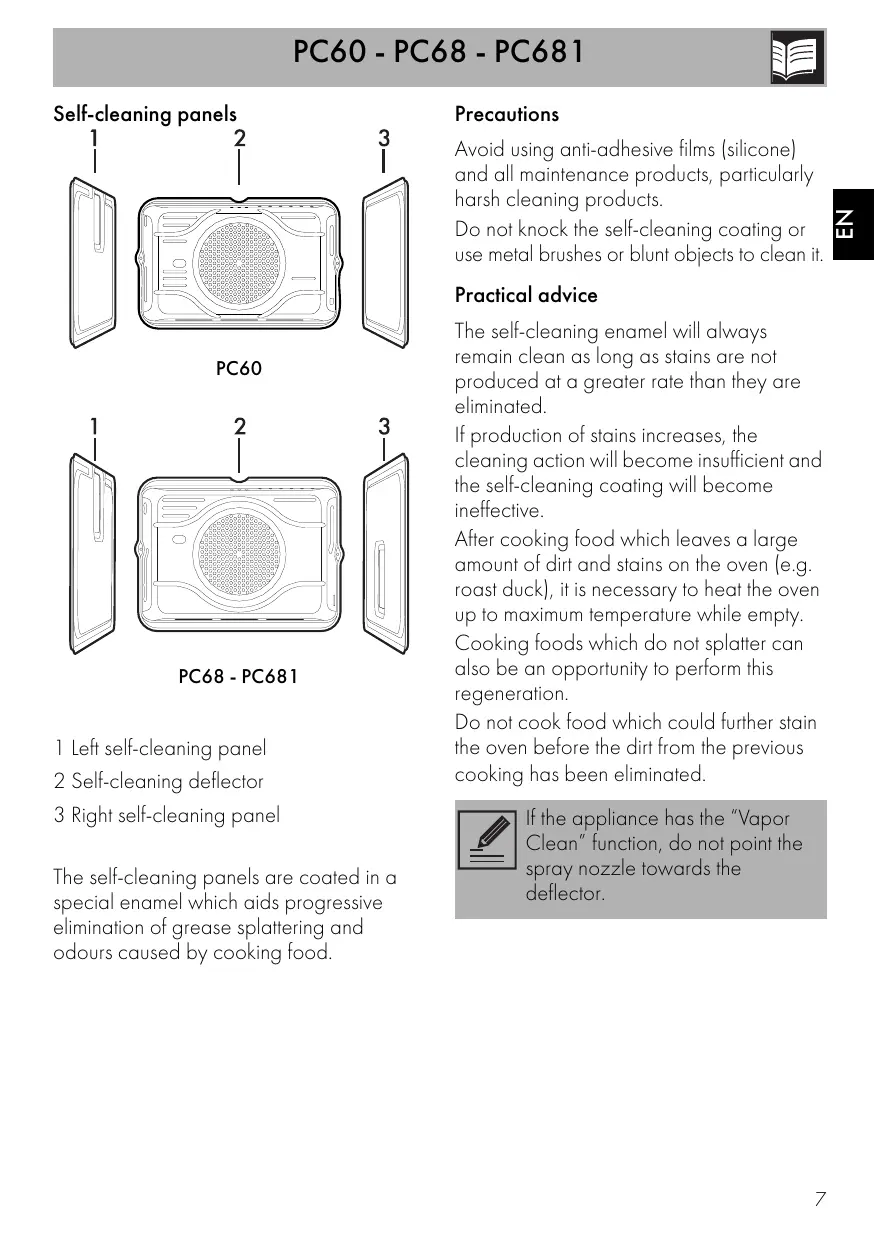
Self-cleaning panels
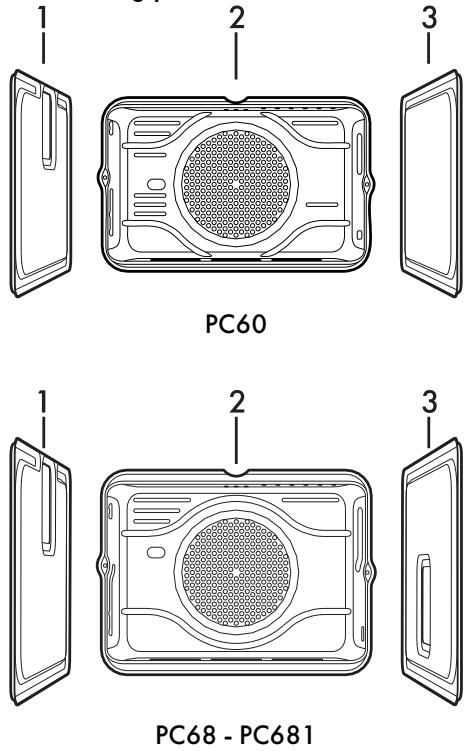
1 Left self-cleaning panel
2 Self-cleaning deflector
3 Right self-cleaning panel
The self-cleaning panels are coated in a special enamel which aids progressive elimination of grease splattering and odours caused by cooking food.
Precautions
Avoid using anti-adhesive films (silicone) and all maintenance products, particularly harsh cleaning products.
Do not knock the self-cleaning coating or use metal brushes or blunt objects to clean it.
Practical advice
The self-cleaning enamel will always remain clean as long as stains are not produced at a greater rate than they are eliminated.
If production of stains increases, the cleaning action will become insufficient and the self-cleaning coating will become ineffective.
After cooking food which leaves a large amount of dirt and stains on the oven (e.g. roast duck), it is necessary to heat the oven up to maximum temperature while empty.
Cooking foods which do not splatter can also be an opportunity to perform this regeneration.
Do not cook food which could further stain the oven before the dirt from the previous cooking has been eliminated.

If the appliance has the "Vapor Clean" function, do not point the spray nozzle towards the deflector.
Installation of the self-cleaning panels
- Remove all accessories from inside the oven (trays and drip trays).
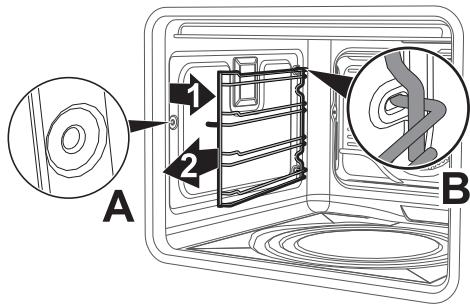
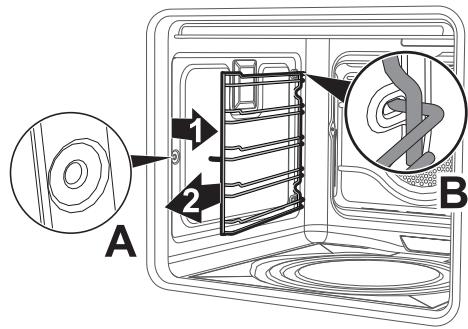
- Remove the frames: pull the frame towards the inside of the oven to unhook it from its groove A, then slide it out of the seats at the back B.
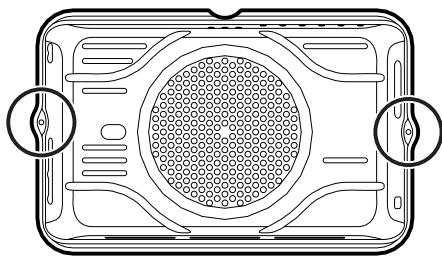
- Remove the deflector: unscrew the two side screws holding the deflector to the rear wall of the oven.
natural_image
Top-down schematic of a device casing with circular vent and two circular features (no text or symbols)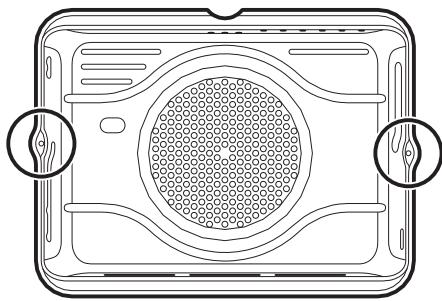
natural_image
Diagram of a device casing with internal grid pattern and two circular features, no text or symbols present-
Replace the deflector with the new self-cleaning deflector (2): fasten it to the rear wall of the oven using the screws removed from the previous deflector.
-
Place the left-hand self-cleaning panel (1) on the corresponding oven wall.
- Hold the self-cleaning panel in position on the wall and insert the frame first into the seats at the back B, then hook it into its groove A.
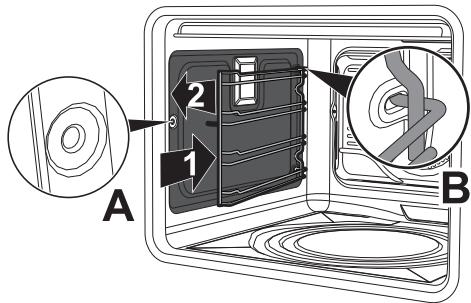
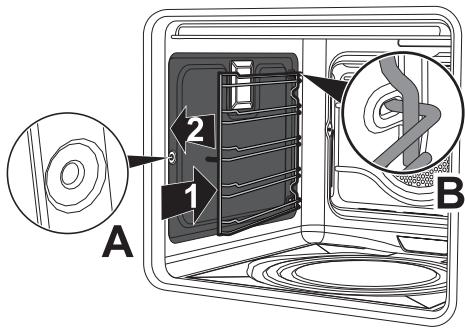
- Repeat the operation with the right-hand self-cleaning panel (3).
Regeneration of self-cleaning panels (catalytic cycle)
The regeneration cycle of the self-cleaning panels is a cleaning method through heating suitable for removing small grease residues, not sugar-based ones.
- Clean the base and the upper guard first with a microfibre cloth soaked in water and neutral washing up liquid. Rinse thoroughly.
- Set a regeneration cycle by selecting a fan assisted function at the maximum temperature for one hour.
- If the panels are particularly dirty after the regeneration cycle, remove them and wash them with neutral washing up liquid. Rinse and dry them.
Put the panels back in the oven and set a fan assisted function at a temperature of 180^ C for one hour, in order to ensure that they are thoroughly dry.

We recommend carrying out the self-cleaning panel regeneration cycle every 15 days.
Preliminary operations (only for appliances with "Vapor Clean")
Before starting the Vapor Clean function:
- Completely remove all accessories from inside the oven. The upper guard can be left inside the oven.
- Remove the self-cleaning panels and racks/trays support frames.
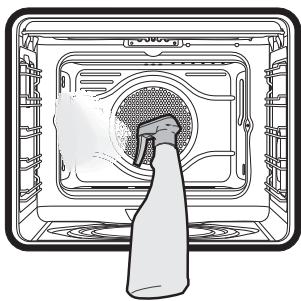
- Spray a water and washing up liquid solution inside the oven using a spray nozzle. Direct the spray against the side walls, upwards and downwards.
natural_image
Diagram of a washing machine with a hand inserting a tool into the air gap (no text or symbols)
Do not spray towards the deflector.
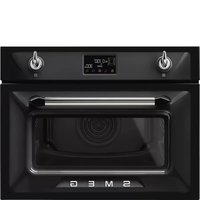
Brand : SMEG
Model : PC68
Category : Mini oven