
RP3710 - Alarm clock radio RCA - Free user manual and instructions
Find the device manual for free RP3710 RCA in PDF.


Pick your language and provide your email: we'll send you a specifically translated version.
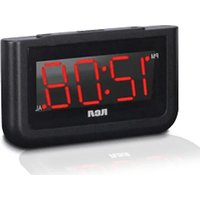
| Product Type | Alarm Clock Radio |
| Brand | RCA |
| Model | RP3710 |
| Dimensions (approx.) | 5.5 x 4.5 x 2.5 inches |
| Weight (approx.) | 0.6 lbs |
| Power Source | AC 120V 60Hz or 2 AAA batteries (backup) |
| Display Type | LED with adjustable brightness |
| Radio Band | AM / FM |
| Alarm Features | Dual alarm with radio or buzzer, snooze (9 min) |
| Additional Functions | Sleep timer, dimmer switch, programmable snooze |
| Maintenance | Wipe with a soft, dry cloth. Do not use liquid cleaners. |
| Safety Precautions | Keep away from water, heat sources, and direct sunlight. |
| Repairability | No user-serviceable parts. Contact qualified service for repairs. |
| Battery Backup | Preserves time and alarm settings during power outage |
| Warranty | Limited 90-day warranty |
Frequently Asked Questions - RP3710 RCA
How do I set the time on my RCA RP3710 alarm clock?
Press and hold the TIME button until the hour flashes, then adjust using the HOUR and MIN buttons. Press TIME again to confirm.
How do I set the alarm?
Press and hold the ALARM 1 or ALARM 2 button until the time flashes. Use HOUR and MIN to set, then press the alarm button again. Toggle the alarm switch to ON.
How do I set the snooze function?
When the alarm sounds, press the SNOOZE bar (top button) to silence it for 9 minutes. The alarm will re-sound after the snooze interval.
Can I use batteries for backup?
Yes, insert 2 AAA batteries (not included) into the battery compartment. They preserve time and alarm settings during a power outage but do not power the radio.
How do I tune the radio?
Press the MODE button to select radio. Turn the TUNING dial to your desired station. Use the VOLUME dial to adjust loudness.
How do I adjust the display brightness?
Slide the DIMMER switch on the bottom or side of the unit to choose between high, medium, and low brightness levels.
What should I do if the alarm clock doesn't turn on?
Check that the AC power cord is securely plugged into a working outlet. If using battery backup, ensure batteries are fresh and correctly oriented. Try a different outlet.
How do I clean the alarm clock?
Unplug the unit. Wipe the exterior with a soft, dry cloth. Do not use abrasive cleaners or liquids. Avoid getting moisture into any openings.
Is there a sleep timer?
Yes, press the SLEEP button to set the radio to turn off after 60, 90, or 120 minutes. The display will show the sleep time countdown.
Why does the alarm not sound?
Ensure the alarm switch is set to ON (not OFF or AUTO). Check that the alarm time is correctly set and that the volume is turned up if alarm mode is radio. For buzzer mode, the volume setting may not affect the buzzer.
User questions about RP3710 RCA
0 question about this device. Answer the ones you know or ask your own.
Ask a new question about this device
No questions yet. Be the first to ask one.
Download the instructions for your Alarm clock radio in PDF format for free! Find your manual RP3710 - RCA and take your electronic device back in hand. On this page are published all the documents necessary for the use of your device. RP3710 by RCA.
USER MANUAL RP3710 RCA
Manual assistant
Powered by Anthropic
Waiting for your message
Product information
Brand : RCA
Model : RP3710
Category : Alarm clock radio