
Pad 6 Pro - Tablet Xiaomi - Free user manual and instructions
Find the device manual for free Pad 6 Pro Xiaomi in PDF.


| Product Type | Tablet |
| Brand | Xiaomi |
| Model | Pad 6 Pro |
| Display Size | 11 inches (27.9 cm), 2880 x 1800 pixels, 144Hz refresh rate |
| Processor | Qualcomm Snapdragon 8+ Gen1 |
| RAM | 6 GB / 8 GB LPDDR5 |
| Storage | 128 GB / 256 GB UFS 3.1 |
| Operating System | Android 13 with MIUI 14 |
| Battery Capacity | 8600 mAh, supports 67W fast charging |
| Camera (Rear) | 50 MP + 2 MP depth |
| Camera (Front) | 8 MP |
| Connectivity | Wi-Fi 6E, Bluetooth 5.3, USB-C |
| Audio | Quad speakers, Dolby Atmos support |
| Dimensions | 253.1 x 164.7 x 6.5 mm |
| Weight | 490 grams |
| Power Supply | USB-C charging, 67W adapter included |
| Main Functions | Media consumption, note-taking, gaming, productivity with optional keyboard case |
| Cleaning and Maintenance | Wipe with soft, lint-free cloth; avoid liquids directly on screen |
| Safety | Use only certified chargers; do not expose to extreme temperatures |
| Spare Parts and Repairability | Battery and screen replaceable by authorized service centers |
| General Information | Available in black, blue, and gold colors |
Frequently Asked Questions - Pad 6 Pro Xiaomi
User questions about Pad 6 Pro Xiaomi
0 question about this device. Answer the ones you know or ask your own.
Ask a new question about this device
Download the instructions for your Tablet in PDF format for free! Find your manual Pad 6 Pro - Xiaomi and take your electronic device back in hand. On this page are published all the documents necessary for the use of your device. Pad 6 Pro by Xiaomi.
USER MANUAL Pad 6 Pro Xiaomi
Turning phone on and off....4
SIM cards....4
Charging 4
2-Telecommunications....5
1-Phone 5
Making calls....5
Incoming calls....5
In-call features....6
Caller ID....6
Call settings 7
2-Messaging 7
Sending and replying to messages....7
Search....8
Settings....8
3-Contacts 9
2-Pictures 10
1-Pictures 10
1-Camera....10
How to quickly open Camera .... 10
Camera modes .... 10
Tilt-shift 11
Timer 11
Keeping photos straight while shooting....11
Group selfies 12
Beautify 12
Zoom 12
Time stamps and watermarks....14
HDR 14
2-Gallery....15
Editor 15
Free up storage space 15
Collage....15
Favorites....16
Hidden album....16
Baby album....16
Automatic backups....16
3-Home....17
1-Home....17
1-Lock Screen....17
Basic features....17
Additional features....17
Wallpaper Carousel 17
2-Home Screen....18
Basic features....18
Editing mode 18
3-Notifications Status Bar....19
Basic features....19
App notifications....19
Notifications folder....20
Other features....20
4-Global App vault....20
5-Split screen....21
6-Quick ball 21
4-Tools 23
1-Content Services 23
Browser 23
Mi Apps 24
Mi Music....32
Themes....33
2-File Manager 38
File Manager 38
Local backups 39
3-Other....39
Feedback 39
4-Tools 40
Calendar 40
Clock....40
Weather 41
Security....42
Cleaner 42
Basic scan 42
Security scan 43
Manage apps....43
Permissions 44
Game speed booster 45
Deep clean....45
Battery usage 46
Test network....46
Blocklist 46
App lock....47
Dual apps....49
Notes 49
Recorder 50
Screen Recorder 51
Calculator 51
Compass 52
Mi Mover....52
Scanner....52
1-Basic
1-Basic Features
Turning phone on and off
1. Turning on
Press and hold the Power button to turn your phone on.
2. Turning off
Press and hold the Power button until the menu appears. Tap "Power off".
If your device doesn't respond, press and hold the Power button for 15 seconds to force reboot.
3. Rebooting
Press and hold the Power button until the menu appears. Tap "Reboot".
SIM cards
1. Inserting SIM, USIM, and UIM cards
Use the provided SIM tray extraction tool to take the SIM tray out of the side of your phone. Place your SIM card inside the tray and insert it into your device.
2. Removing SIM, USIM, and UIM cards
Use the provided SIM tray extraction tool to take the SIM tray out of the side of your phone. Remove your SIM card from the tray and insert the tray back into your device.
3. SIM, USIM, and UIM card settings
You can only use the services of one mobile carrier on a single SIM device. Dual SIM phones provide more options depending on the number of SIM cards installed.
On a dual SIM device, you can set default SIM cards for making calls and using mobile data in Settings > SIM cards & mobile networks.
You can edit SIM card names which are displayed on the dial pad. To do this, go to Settings > SIM cards & mobile networks and tap your SIM card.
Options for changing preferred network types are available in Settings > SIM cards & mobile networks > Preferred network type.
Charging
When your phone's battery is running low, connect the USB cable to the phone and plug it into the adapter connected to a power outlet. Disconnect the charger when your phone is fully charged.
Use only authorized USB cables and power adapters. Using unauthorized devices to charge your phone may severely damage the battery and lead to explosions.
2-Telecommunications
1-Phone
Making calls
There are multiple ways to make calls in MIUI.
- Using dial pad
Enter a phone number on the dial pad and tap the green button to dial. If you tap the green button directly, the last number you dialed will appear. Tap the button again to make a call.
- Press and hold a phone number
Press and hold a phone number to make the dialing button appear. Tap the button to make a call.
- Call numbers from call history
Tap any number in your call history to return a call.
- Quick dial
Press and hold a digit on the dial pad to assign a phone number to it.
Incoming calls
You might be notified about incoming calls either by a full-screen dialog or a floating notification.
- Answering calls
Slide the green button in the full-screen dialog to answer a call, or simply tap the button if you see a floating notification.
- Rejecting calls
Slide the red button in the full-screen dialog to reject a call, or simply tap the button if you see a floating notification.
- Reply with SMS
Slide the SMS button in the full-screen dialog to reply with a text message. You can choose one of the quick replies or write a custom message.
- Silencing the ringtone
Press any physical button on your phone to silence the ringtone.
- Flip to silence ringer
When your phone is on a horizontal surface with the screen facing up, flip it over to silence the ringer. You can turn this feature on in Call settings > Incoming call settings.
6. Quiet ringer when lifted
Reduce ringer volume for incoming calls when the phone is raised. You can turn this feature on in Call settings > Incoming call settings.
7. Increasing ringtone volume
Ringtone volume can gradually grow to the level you set. You can turn this feature on in Call settings > Incoming call settings.
8. Flash when ringing
You can make flash notify you about incoming calls. This feature is available in Call settings > Incoming call settings.
In-call features
There are multiple options available to you during calls.
- Recorder: You can record calls and save audio to Recorder.
- Notes: Make notes which will be saved to the Notes app after the call is ended.
Caller ID
Caller ID allows you to identify the phone numbers which aren't saved to your contacts.
The data comes from two sources: Yellow pages database and user reports.
1. Phone numbers from Yellow pages
Yellow pages contain phone numbers of companies and services. They are provided by our partners or businesses themselves. The info you'll see will include company/service names and logos. Phone numbers from Yellow pages will always be identified if you receive calls from them.
2. Marked phone numbers
MIUI users can mark unknown numbers as fraud, telemarketing, taxi companies, etc., and report this info to MIUI. If a substantial number of users provide consistent feedback for a single number, you'll see this phone number along with a comment when you receive a call.
- Marking a phone number
In some cases an automatic dialog suggesting you to report the phone number will appear after a call is ended. You can also report phone numbers proactively on the "Details" page of a number.
- Correcting reported phone numbers
If you find that incorrect info is attributed to a phone number, you can correct it on the phone number's "Details" page.
Call settings
The settings include options for calls, mobile networks, and SIM cards. Tap the Menu button on the dial pad to open settings.
1. Call recording
You can record all your calls automatically.
You can record calls from all numbers, or limit the recordings to custom numbers, unknown numbers, and/or numbers from the directory.
2. Identify unknown numbers
Use this feature to make MIUI check whether unknown numbers are marked as companies or services. Press and hold a phone number to make a call.
3. Location & country codes
This feature makes MIUI display the location of the phone numbers from which incoming calls are made. Options for setting a default country code and adding country codes automatically are also available.
4. Advanced settings
You can find dial pad touch tone settings and other personalization options here.
2-Messaging
Sending and replying to messages
1. Sending a message
Open the messaging app and tap the plus to create a blank message. You can select the receiver from your contacts or add the phone number manually. Enter your message and tap "Send".
2. Replying to a message
Tap a message you received and enter your reply in the field below. Tap "Send" after you're done.
3. Attachments and timed messages
Tap the plus button while you're composing a message to attach a contact, image, item from favorites, audio, video, or slideshow.
Swipe right to see the list of quick replies.
You can also find an option for sending timed messages among the attachment options.
4. Selecting a SIM card for outgoing messages
If you have two SIM cards in your device, you'll be asked which SIM card to use before sending a message.
Search
Use the search bar at the top of the start page to search for phone numbers from Yellow Pages, messages, and conversations.
Settings
1. Mi Message
Send messages to other MIUI devices without incurring charges.
2. Display
Smart Messaging
Smart messaging allows MIUI to check incoming messages for one-time passwords and create smart menus for messages from businesses.
Notifications group
Use this feature to group SMS notifications automatically.
Show profile photos
When this feature is on, MIUI will display profile photos for people and assign photos to businesses automatically.
Assign contact photos
Profile photos containing the person's initials will be assigned to contacts without profile photos.
Show blocked SMS
When this feature is on, blocked text messages will be shown in the conversations list.
3. Notifications
Show messages on Lock screen
Turn this feature on to show message previews on the Lock screen and in the Notification shade.
Delivery status
Use this feature to be notified when your messages are delivered.
Delivery sound
Play delivery sound when your messages are delivered.
4. Additional settings
Deleted messages
Viewing the deleted messages stored in Mi Cloud is available to all Mi Cloud members.
Sync messages from Mi Cloud
Turn on Sync with Mi Cloud to back up your SMS messages. Options for dual SIM devices are also available.
Additional settings
Settings for advanced users can be found at the bottom of the settings page.
3-Contacts
- Adding contacts
Open the Contacts app and tap the plus to add a contact.
- Importing contacts
Importing contacts from accounts
Options for importing contacts from your accounts will appear when you open the app for the first time. They are also available in the settings.
2-Pictures
1-Pictures
1-Camera
How to quickly open Camera
1. Home screen shortcut
Tap the Home screen shortcut to open Camera.

2. Lock screen
Swipe left on the Lock screen to open Camera
3. Double press the Volume down button
Toggle the switch in Settings > Lock screen & password to be able to launch Camera by pressing the Volume down button twice.
(Note: You won't be able to see your Gallery items if you launched Camera on the Lock screen without verifying your password.)
Camera modes
1. Photo
"Photo" is the default mode. You can swipe left and right to switch between different Camera modes. You'll find the button for switching between the front and rear camera on the start page as well.
2. Portrait
Switch to Portrait mode and follow the on-screen instructions to make photos with blurred background.
- Rear camera: Dual camera devices use both cameras to keep the subject sharp and blur the background.
- Front camera: Get beautiful portrait shots using software. You can make portrait shots using the front camera by pressing the special button in the Photo mode on some devices.
3. Square
Switch to Square mode to compose your shots while you're making them if you aren't sure cropping will work.
4. Panorama
Your phone takes multiple photos in Panorama mode and then combines them into a seamless shot. Tap the shutter button to start, then follow instructions. Tap again or move your phone till the end of the viewfinder area to finish.
(Note: Moving your phone too fast may interrupt the process. Stable speed and fixed angles give best results.)
5. Manual
Use this mode to set white balance, focus, shutter speed, and ISO manually.
6. Video
Switch to Video mode to shoot videos. Tap the "More" button at the top of the screen to select time-lapse and slow motion options.
7. Short video
Use this mode to shoot videos up to 10 seconds long. A special set of filters will make shooting and editing your videos before sharing them on various social media platforms much more convenient.
Tilt-shift
1. Taking tilt-shift photos
Tap the "More" button in Photo mode and select "Tilt-shift". Focused circle is available by default. Tap the button again to switch to horizontal lines.
2. Playing with the blur
You'll see a whitened area on your screen while you're shooting tilt-shift photos. This area will be blurred when you take a photo.
- Drag the focused area to move it around.
- Drag the whitened area to resize.
- Double tap the screen to make the focused and blurred areas switch places.
Timer
Tap the "More" button in Photo mode and select "Timer" to make photos with a 3-second delay after you tap the shutter button. Tap the Timer button again to set it to 5 seconds. You'll see the countdown after you press the shutter button. Adjust shooting angle and composition during the countdown.
Keeping photos straight while shooting
1. Straightening the viewfinder
Tap the "More" button in Photo mode and select "Straighten".
2. About this feature
This feature allows you to always keep your shots leveled no matter how you tilt your phone. Only the image from inside the frame will be saved to your Gallery, margins will be cropped.

Group selfies
1. Turning this feature on
Tap the "More" button in Photo mode and select "Group selfie".
(Note: This feature isn't supported on some models. You can check if it's available on your device by tapping the "More" button in Photo mode.)
2. About this feature
When this feature is on, multiple shots are made while you're taking a photo. Best facial expressions of every person are then combined into a single shot.
Beautify
1. About this feature
Beautify provides multiple options for evening out skin tones and enhancing facial features in real time.
2. Using different cameras
Beautify is available both for the front and rear cameras.
Zoom
You can zoom in and out to achieve the best effect.
(Note: This feature is supported only for the rear camera.)
1. Gesture zoom
Slide two fingers away from each other to zoom in, and bring them together to zoom out. (Note: These gestures will stop working once you've brought zoom to its highest or lowest values.)

2. 2X zoom
Tap the 2X shortcut to zoom in. Tap again to zoom out.
(Note: This feature is only supported on dual camera devices.)

3. Precise zoom values
Press and hold the 2X shortcut to make the zoom scale appear.
(Note: This feature is only supported on dual camera devices.)

Time stamps and watermarks
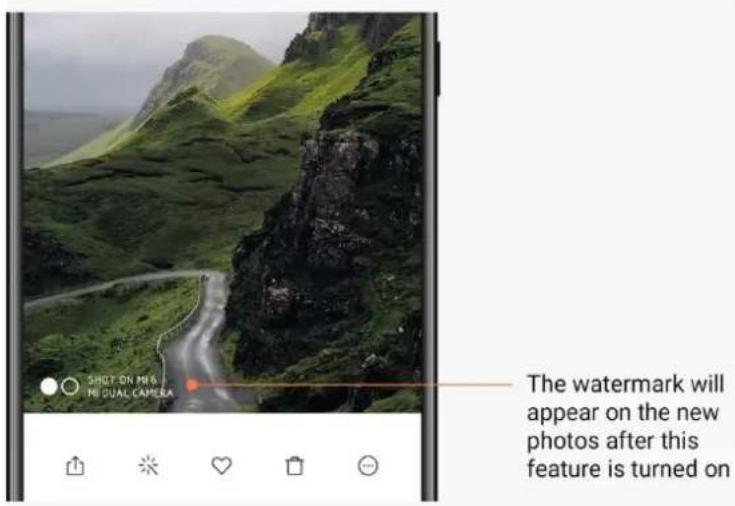
You can add time stamps and dual camera watermarks on your photos by toggling the corresponding switches in the Camera settings. Dual camera watermarks vary for different phone models.
(Note: Dual camera watermarks aren't supported on some devices.)

HDR
HDR is short for high dynamic range. This feature takes multiple shots to underexpose bright areas and overexpose dark spots, then combines them so that every item in your photo is clearly visible.
You'll see the HDR icon on your screen when this feature is on. Taking photos in HDR takes slightly longer than taking regular photos.
(Note: Auto HDR isn't supported on some devices.)

2-Gallery
Editor
See how you can change your photos and videos
- Erase lines and objects
Use this feature to remove visual clutter from your photos.
This feature also helps you remove unnecessary lines by simply swiping over them.
- Stickers
Make your selfies cooler with lots of funny stickers!
- Doodle
You can make doodles or add different shapes to your photos.
- Mosaic
Add different mosaic patterns to your photos if you want to hide any objects.
Free up storage space
Learn how to make your photos take less space
- Optimize photos
Sign in to your Mi Account and turn on sync with Mi Cloud. Keeping optimized photos on your device and storing original files in Mi Cloud will free up a lot of storage space.
- Delete screenshots
Very often you need screenshots just for a short period of time. Delete the unnecessary ones to save space for useful items.
Collage
Select 1 - 4 photos to create a collage. Multiple styles and layouts are available.
Favorites
Tap the heart icon while you're viewing a photo to add it to favorites. You'll be able to find favorites on the "Albums" tab.
Hidden album
How to use your hidden album
Swipe down on the Albums tab. You'll be asked to add a password. After this, you'll see your hidden album where all the photos you hide will be saved.
Baby album
How to use Baby album
Find a toddler on your photo and mark them as a baby. After this, you'll see your Baby album in the Albums tab.
You'll be able to share it with other family members.
Automatic backups
How to sync Gallery with Mi Cloud
Turn on automatic backups in the Gallery settings to never lose important photos and videos. You'll be able to sign in to Mi Cloud with your Mi Account on other devices (e.g. compatible TVs and computers) to browse your photos.
3-Home
1-Home
1-Lock Screen
Basic features
- How to change Lock screen wallpaper Go to Settings > Wallpaper, select an image, and tap "Apply".
- How to set/change your screen lock Go to Settings > Lock screen & password > Set screen lock, select your preferred screen lock type, and follow instructions. Note: Remember your password. You won't be able to restore it in case you forget it. You'll have to perform a factory reset which will erase all data (including photos, contacts, and apps) on your device.
- How to add fingerprints Go to Settings > Lock screen & password > Manage fingerprints, and select "Add fingerprint".
Additional features
- Adjust the time when device goes to sleep You can set the time after which your device goes to sleep in Settings > Lock screen & password > Sleep. The default time is set to 1 minute. The longer this time is, the more power your device will consume.
- Don't wake Lock screen for notifications You can choose not to wake your Lock screen for notifications. The corresponding switch can be found in Settings > Lock screen & password.
Wallpaper Carousel
- How to turn on Wallpaper Carousel Open Settings > Lock screen & password > Wallpaper Carousel and toggle the switch. You'll get new wallpapers delivered to your Lock screen regularly. If the default theme is applied on your device, swipe right on the Lock screen, tap "Wallpaper Carousel", and follow instructions.
- How to create a Home screen shortcut Wallpaper Carousel doesn't create a Home screen shortcut by default. To do that, swipe right on the Lock screen, select "Wallpaper Carousel", and tap the "More button" to see the options available to you.
- How to use Wallpaper Carousel with themes
Wallpaper Carousel only works with the default Lock screen type. If you are using a custom theme, you can still change your Lock screen type to default in the Themes app.
2-Home Screen
Basic features
All apps you install on your device appear on your Home screen. However, it's not the only feature it provides.
- Uninstalling apps
To uninstall an app, press and hold its icon, then drag it over the trash bin that appears at the top of the screen.
- Changing wallpaper
Follow these steps:
- Go to Settings > Wallpaper.
- Select one of the albums.
- Select a wallpaper.
- Tap "Apply" and select "Set as Home screen".
- Installing apps
App market of your choice will also appear on the Home screen. You can search for the apps you need there.
- Moving app icons
Press and hold an app to pick it up, then drag it to the new location.
- Creating new folders
Drag an app over another app to create a folder. You'll be able to edit the folder's name after this.
Editing mode
You can rearrange items more effectively when you're in the editing mode.
- How to enter the Home screen editing mode
There are three methods to enter this mode:
- Press and hold an empty spot on the Home screen
- Pinch the screen with two fingers
- Press and hold the Menu button
- Things you can do in the editing mode
Three buttons will appear after you enter the editing mode.
- Wallpaper: This button allows you to change wallpapers faster.
- Widgets: This button allows you to add widgets.
- Settings: Default screen, layout, and transition effect options. In the editing mode, tap works for selecting items:
- Moving: Select multiple items and tap a screen preview below to move the items there.
- Uninstalling: Select multiple items and tap "Uninstall" to uninstall all of them.
- Creating folders: Select multiple items and tap "Group" to create a folder.
3-Notifications Status Bar
Basic features
1. Opening Notification shade
Swipe down from the top of the screen to open the Notification shade.
2. Rearranging toggles
Toggles for mobile data, Wi-Fi, flashlight, and other items are available in the Notification shade by default. Tap the "More" toggle to rearrange items.
Here are the features available in the editing mode:
- Rearranging toggles:
Press and hold any item to rearrange.
- Using toggles:
Tap any toggle to turn the corresponding feature on or off.
3. Wi-Fi settings
Tap the name of the Wi-Fi toggle to quickly switch between Wi-Fi networks.
4. Bluetooth settings
Tap the name of the Bluetooth toggle to manage connected devices.
App notifications
1. How to manage app notifications
Go to Settings > Notifications & status bar > App notifications, and tap any app to see what notifications it's allowed to send.
2. Notification permissions
- Show notifications: On by default. Turn off to restrict all notifications from this app.
- Rules for grouped notifications: Smart notification filter. Use "Recommended" mode if you aren't sure which one suits a particular app best.
- App icon badge: Turn on to allow badges with the notification count on app icons.
- Floating notifications: Turn on to allow important notifications on top of everything else.
- Lock screen notifications: Turn on to allow important notifications on the Lock screen.
- Sound: Turn on to play notification sounds.
- Vibration: Turn on to allow vibration for notifications.
- Notification light: Turn on to use LED light for notifications
Notifications folder
- How are notifications filtered?
MIUI learns what you do with the notifications from individual apps and decides whether the notifications you receive are important or unimportant. Unimportant notifications are placed in a separate folder.
- How to stop filtering notifications
Just toggle the switch in Settings > Notifications & status bar.
- How to make particular notifications that were marked as unimportant appear again
Go to Settings > Notifications & status bar > App notifications, tap the app, select "Rules for grouped notifications", then tap "Important".
Other features
- Battery indicator
Select which indicator to show in Settings > Notifications & status bar > Battery indicator.
- Show connection speed
Toggle the switch in Settings > Notifications & status bar to show connection speed in the status bar.
- Edit carrier name
You can customize your carrier's name in Settings > Notifications & status bar > Edit carrier name.
4-Global App vault
- About App vault
App vault brings all the important notifications and app features together. Just swipe right on the Home screen to access the features you need most.
- Features
App vault is a set of cards with the most popular features of MIUI.
- Shortcuts
Shortcuts allow you to use the features of your favorite apps without wasting time on launching them and looking for the feature you need in the UI.
- A brief note
Taking notes is way more convenient when all you have to do is just fill in a blank card that's right in front of you.
- Stocks
Use the Stock card in App vault to get instant updates on the companies you follow.
6. Messaging
App vault brings messages from several messaging platforms to a single card.
7. Calendar events
On this card you'll find all your meeting dates, appointments you made, and your friends' birthdays.
8. Recommended apps
Here you can find fresh apps that are becoming popular right now.
5-Split screen
1. How to open apps in Split screen
Open the apps you'd like to use and follow the steps below:
- Tap the Menu button to open Recents.
- Tap "Split screen".
- Press and hold the first app and drag it to the highlighted area. Tap the second app.
2. How to exit Split screen
- Method 1: Open Recents and tap "Exit" at the top of the screen.
- Method 2: Drag the separator all the way up or down.
3. How to make apps switch places
When apps are opened in Split screen, double tap the separator to make the apps switch places.
6-Quick ball
1. Turning on Quick ball
You can turn on Quick ball in Settings > Additional settings > Quick ball.
2. Selecting shortcuts
Quick ball has 5 customizable shortcuts. You can select yours in Settings > Additional settings > Quick ball > Select shortcuts.
3. Selecting preferred gesture
You can choose between two gestures to operate Quick ball. Tap and swipe are available.
4. Hiding Quick ball
Select apps for which Quick ball will be hidden automatically.
5. Full-screen mode
You can choose to move Quick ball aside when your device enters full-screen mode.
6. Inactivity
Quick ball can stick to the edge of your screen if you aren't using it for 3 seconds.
7. Lock screen
Besides the Home screen, Quick ball can be also shown on your Lock screen.
4-Tools
1-Content Services
Browser
1. Tools
Tap "More" > "Tools" to see the options available to you.
- Save page: This feature allows you to save web pages as screenshots or HTML files and come back to them when you're offline.
- Find on page: Use search to quickly locate keywords on the page you're browsing.
- Reduce data usage: Turn on this feature to restrict loading images automatically when you aren't connected to Wi-Fi.
2. Tabs
Tap the icon below to view all open tabs. You can preview, close, or open new tabs in this mode.
3. Incognito mode
You can switch to incognito mode while previewing all the opened tabs. Your browsing and search history won't be saved in incognito mode. However, the files you download and bookmarks you add will still be saved.
4. Bookmarks
You can add the page you're currently browsing to bookmarks. It can be saved to the start page or your Home screen.
5. Bookmarks on the start page
While on the start page, you can add recently viewed pages or custom URLs to bookmarks.
6. News feed
Swipe left and right to switch between channels in your News feed. Tap the globe icon to change the preferred language of your News feed. English, Hindi, and Tamil are available.
7. Sharing webpages
You can share webpages from Browser to multiple platforms, including Facebook and WhatsApp.
Mi Apps
1. Installing apps
Mi Apps is a platform where you can find lots of cool Android apps for your device.
You don't need to sign in, all apps are free to download and 100% secure. All you need to do is open "Apps" and tap "Install" next to the app you like.

2. Searching for apps
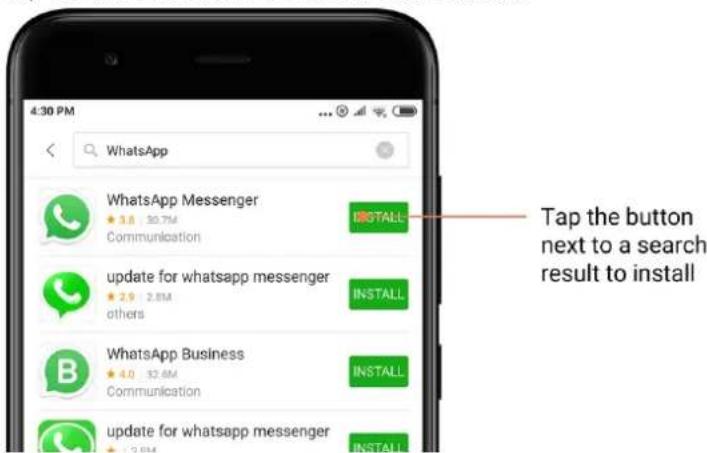
Use search to quickly find the apps and games you're looking for. Enter the name of the item into the search bar and get instant results. You can install apps directly from the list of search results.

Enter the name of the item you're searching for.

Tap the button next to a search result to install.
3. Must-have apps
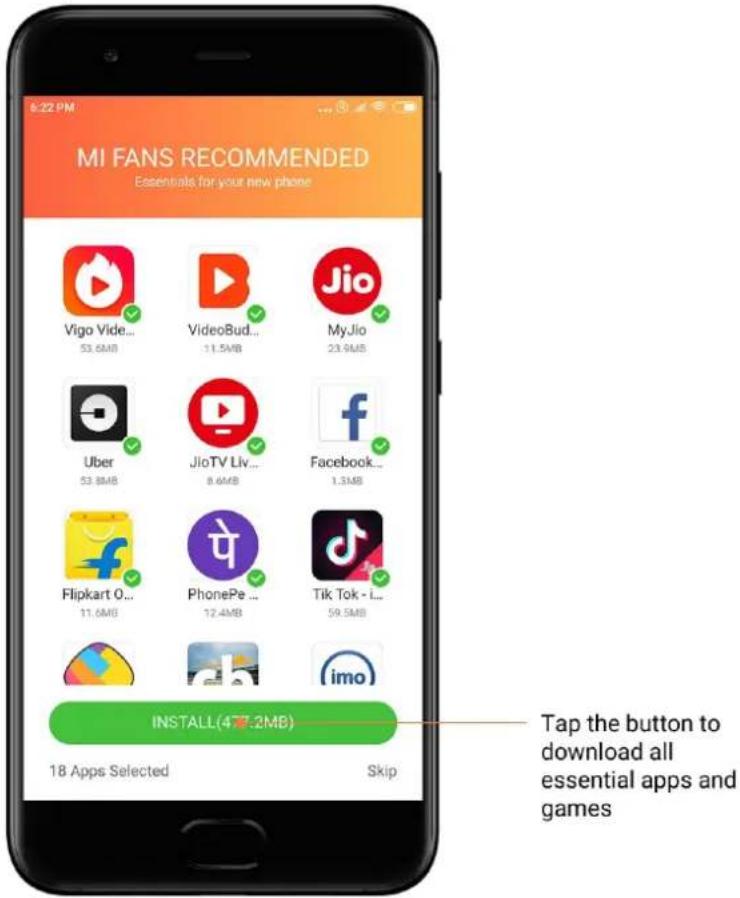
When you open Mi Apps for the first time, you'll see the list of must-have apps we recommend. You can install them all in one tap without searching for individual items multiple times.
4. Recommendations
In Mi Apps, you'll be able to find lots of apps, games, collections, articles, and videos recommended to you.

Scroll up and down to browse the cards.

5. Rankings
Tap "Rank" to see all apps and games ranked from most to least popular.

6. Categories
Categories will help you decide which app or game among multiple similar ones works best for you. You'll find all you need in the 17 games and 33 app categories.

7. Promotions
This part of Mi Apps has all the latest offers, promotions, and discounts.
Here you can complete tasks to get coupons for your purchases.


Mi Music
1. My music
You can find recently played songs, favorites, and playlists in "My music".
2. Local player
You can see all the songs saved on your device on the "My music" page. Just tap any song to play it.
There are multiple ways to display your local music: by song title, artist, album, or folder. You can also sort items by song title, adding time, and the number of times played.
3. Player
Tap the button on the start page to open the player.
Player controls include the following options: play, pause, next/previous song, loop, shuffle, download, add to favorites, queue, and lyrics.
The "More" menu has additional options: share, headphones & audio effects, sleep timer, set as ringtone, and more.
4. Search
Tap the search bar and enter keywords to search for songs, artists, albums, and playlists.
5. Settings
You can access settings using the side menu. Here you can find account settings, file filter, and update settings.
Themes
Themes will give your phone a new look.
Themes is the official personalization platform of MIUI with thousands of high-quality themes created by skilled designers. Besides the familiar themes, wallpapers, ringtones, and fonts, you'll be able to find lots of other personalization options for your Lock screen and Home screen.
1. Themes
· Open the app to view the available themes. Tap any theme to view details. - On the details page, swipe left and right to see previews. Tap "Download" below to download the theme. · After the download is complete, tap "Apply" to apply the theme.


2. Wallpaper
- Open the app and tap the button below to view available wallpapers. Tap any wallpaper to view its preview.

- Swipe left or right to switch between previews. Tap "Apply" to apply the wallpaper.
- Select where you'd like to apply the wallpaper.

4. Ringtones
- Open the app and tap the button below to view available ringtones. Tap any ringtone to listen.
- Tap the "More" button next to a ringtone to view available options.
- Select where you'd like to apply the ringtone.
![11:27 AM Festive RING TONES Top Charts Collections New Sanu Ek Pal Chain Last Next Options 1210 [60:50] Ek Do Teen Ringtone Notification Alarm Cancel](/content/2026/06/1364783/images/166e50e6fc7fb90c00e13723bcc38ae7d7651afed197f499a8d4476906c0753a.jpg)

5. Fonts
- Open the app and tap the button below to view available fonts. Tap any font to view details.
- Swipe left or right to see previews. Tap "Download" below to download the font.


2-File Manager
File Manager
1. Quick search
Recent files on the start screen are arranged according to the creation date. They are also sorted by file type and can be edited by default.
2. Storage stats
Learn what files occupy the internal storage of your device at a glance and see all the items in the root folder.
3. Cleaner
Delete unnecessary files and free up storage space in two taps.
4. Transferring files
Built-in Mi Drop functionality allows you to share files with nearby devices without connecting to the internet.
Local backups
1. Creating a backup
Go to Settings > Additional settings > Backup & reset > Local backups, tap "Back up", select system settings and apps you'd like to back up, and tap "Back up" again. Creating backups might take several minutes.
2. Restoring items
Go to Settings > Additional settings > Backup & reset > Local backups, select system settings and apps you'd like to restore, and tap "Restore".
3. Encrypting backups
If you want to create an encrypted backup, tap the lock next to the "Back up" button. You'll have to sign in to your Mi Account to access encrypted items.
4. Auto backups
Go to Settings > Additional settings > Backup & reset > Auto backups, set your backup schedule, and select the items you'd like to back up. Auto backups will appear in the list of your local backups.
3-Other
Feedback
You can report the issues you encounter while using your device to our developers. Your suggestions on how to improve MIUI are welcome, too. We always do our best to fix the issues you report in the upcoming updates.
1. How to open Feedback
You can access the Feedback app using one of the two following methods: Tap the Feedback app icon on your Home screen. Go to Settings, scroll down, and tap "Feedback" at the very bottom.
2. Submitting feedback
Check one of the boxes before describing your issue. Use "Issues" for bugs and "Suggestions" for improvements.
Describe the issue you've encountered. You can add images, screen recordings, and logs to your report.
Select the item your feedback is referring to so we can locate the issue.
If you're reporting a bug, tell us its reproductivity percentage.
Tap "Submit" to submit your feedback.
3. Viewing progress
Tap "My feedback" in the upper corner of the start page to view the issues you reported.
Tap any issue to view progress.
If our developers comment on your feedback, you can reply to them from the details page of the issue.
4. Tools
Calendar
The traditional Indian calendar is very popular. It is used along with the Gregorian calendar today. The information from the traditional calendar is shown on a separate card each day.
Daily Panchang info, including Tithi, Samvat, and Muhurt is available.
1. Important dates
You can view the info on all the important dates in Calendar directly. You'll be notified about holidays and important events.
A separate card with detailed information is created for all festivals. You can open it by tapping the notification or the App vault card.
2. Daily greetings
A card with daily greetings can be shared to WhatsApp, Facebook, ShareChat, and other platforms.
3. Horoscope
Horoscopes for all zodiac signs are available in English.
4. Cricket card
Cricket is extremely popular in India. You can stay up-to-date with the match schedule and game scores using our special card.
5. Health & fitness, Today in history, and Football cards
Get latest news and recommendations on a wide range of topics using our cards.
Clock
1. Adding alarms
Open the Clock app and tap the plus on the start page to add an alarm. Choose whether you're adding a repeating alarm, select your ringtone, and tap "Done".
2. World clock
Adding custom clocks
In the Clock app, open the "Clock" tab and tap the plus to add a clock for a specific location to your list.
3. Checking geographic location
Tap any city from your list to see where it's located on the map.
4. Stopwatch
Open the Stopwatch tab and simply tap the start button to use the stopwatch. Tap the flag button to record time. You can pause and resume your stopwatch as well. Press "Stop" to reset your stopwatch.
5. Timer
Setting a timer
You can set times with duration from 1 second to 99 hours 59 minutes and 59 seconds. Tap the button below to start your timer.
Ambient noises
You can listen to one of the ambient noises for a set period of time. You can also choose to silence the alarm at the end of an ambient noise timer.
Weather
1. Viewing weather info
Open Weather app to view the current weather info and the 5-day forecast.
24-hour forecast, wind speed and direction, real feel, UV index and pressure are also displayed on the start page.
2. Managing locations
Tap the plus at the bottom of the start page to search for cities.
Tap the plus again and use the "Edit" button to delete cities.
3. Weather settings
Tap the "More" button at the bottom of the start page to open settings. You can set your preferred temperature and wind speed units, as well as allow or restrict the app to update weather info at night.
4. Sharing weather info
Tap the "More" button at the bottom of the start page, then tap "Share" to send the weather info to your friends.
Security
Cleaner
1. Clearing trash
Cleaner is one of the features that Security uses to remove trash from your device. You can delete useless items that are stored on your phone to make sure your device works fast and productively.
· How to clear trash
Open the Security app and tap "Cleaner". This will launch an automatic scan for trash, including these 5 major categories: cache files, obsolete files, installation packages, residuals, and memory cache. Once the scan is complete, you can choose which items to clean up.
After the cleanup is done, you'll be able to see the report which gives you the details of your storage usage and suggests other options which may help you free up more storage space.
- Adding items to exceptions
You can add the items you don't want to be deleted to exceptions. When the scan is complete, press and hold an item and select "Add to exceptions". This item will be ignored during future scans.
· Different ways to use Cleaner
Besides using Cleaner proactively, you can also receive notifications when trash on your device reaches the set limit. Tapping the notification will launch Cleaner automatically.
2. Cleaner settings
You can set reminders and switch between scan definitions in the settings.
- Choosing scan definitions
Scan definitions from the two service providers are available to you. You can choose between Tencent and Clean Master.
- Reminders
Turn on the "Remind to clean" switch to set trash size limit and schedule alerts. Once the amount of trash on your phone reaches the limit, you'll receive a notification alerting you to use Cleaner. You can also customize the alert frequency.
- Update Cleaner's database automatically
We may update the scope of the Cleaner's engine at irregular intervals. Turn on automatic updates to make sure that you're using the most recent definitions and clean up your device more effectively.
Basic scan
1. Basic scan
Basic scan is a functional module that can promptly detect security risks on your device. It checks for 3 basic threats: system security risks, unnecessary processes, and malware. It can also help you promptly discover if your phone has any items that can be optimized, and helps you detect your phone's problems quicker.
- Checked items
System security sub-scan checks for permission-related issues, Trojan horses, installation problems, and system updates. It can help you understand whether your phone has any risks, and handle them promptly.
The second sub-scan stops unnecessary chained launches and cleans no longer useful cache.
The third sub-scan can filter spam and check payment environment.
- Scan results
After the scan, you'll see the score which indicates your phone's security level. Scan results will also reveal unsafe items, and you'll be able to choose whether to optimize your device.
- Security scan settings
You can choose to create a Home screen shortcut, or select items to optimize from the list of recommendations.
Security scan
- Security scan
Security scan is an app that scans your phone to see if it has any hidden viruses or malicious apps.
It combines a virus scan and payment security scan, comprehensively ensuring your phone's security.
- Scanned items
Security scan solves the issues related to Wi-Fi, payments, privacy, and viruses. It ensures that dangerous apps and viruses in your phone's memory are discovered as soon as possible.
- Payment security
When apps with a payment function are launched, payment security features are enabled by default. You can add payment apps that you want to manage on the results screen.
- Security scan settings
Various virus definition and update options are available in the settings.
- Antivirus definitions
Antivirus definitions provided by Avast, Tencent, and AVL are available.
- Installation monitor
Turn on the switch "Scan before installing" to check the apps that are being installed for viruses and malware.
Manage apps
- Uninstalling apps
You can uninstall multiple apps using this feature.
Select the apps and tap the button below to uninstall them.
2. Checking app status
You can sort your apps using different parameters.
Here are the parameters available now:
- Status
- App name
- Usage frequency
- Used storage
- Installation time
Default apps
Tap the "More" button at the top corner of the screen and select "Default apps" to assign custom apps to various system features.
2. Permissions
Autostart
You can manage an app's autostart behavior preventing abnormal power consumption.
Set the app's control switch to "off" to restrict autostart.
Tap the "More" button at the top of the screen to manage autostart permissions for system apps.
App permissions
Here you can manage the permissions of all apps installed on your device.
Managing permissions for individual apps
You can check all of the permissions an app has by tapping the app. The switches located next to every permission allow you to quickly give or restrict access.
You can also sort permissions by type to check all apps having a specific permission.
Permissions
1. Autostart
You can manage an app's autostart behavior preventing abnormal power consumption.
Set the app's control switch to "off" to restrict autostart.
Tap the "More" button at the top of the screen to manage autostart permissions for system apps.
2. App permissions
Here you can manage the permissions of all apps installed on your device.
3. Managing permissions for individual apps
You can check all of the permissions an app has by tapping the app. The switches located next to every permission allow you to quickly give or restrict access.
You can also sort permissions by type to check all apps having a specific permission.
Game speed booster
- How Game speed booster works
- Optimization: This feature clears memory reserved for the background processes to give more space for the game.
- Network: Game speed booster increases the game's connection speed by limiting the bandwidth of background downloads, reducing network delay.
- Concentration: Notifications will be hidden, buttons will be turned off. Nothing will distract you!
You can also create a Home screen shortcut so Games speed booster always stays just a tap away.
- Adding games
You can add the games that will work with Game speed booster on the start page.
- Booster settings
Launch a previously added gaming app on the start page to turn on Game speed booster automatically.
You can also limit the speed of background downloads, restrict sync, and make sure your device doesn't switch between networks while you're playing.
Deep clean
- How to use Deep clean
Open Security and scroll down until you see "Deep clean". This feature gives you a clear image of how your phone's memory is being allocated and how trash is being distributed.
- Photos
Deep clean can detect duplicate photos and poor-quality images in your Gallery. You can choose to delete redundant items.
- Apps
Learn what apps haven't been used in a long time, and uninstall them.
- App data
Understand how each app on your phone uses storage. You can free up storage space using this feature.
- Big files
Big files you aren't aware of start to pile up after you use your phone for some time. This feature ranks them by size. You can also see what apps generated these files here.
- Videos
Here you can see all videos that are saved on your phone. You can delete the unnecessary ones to free up storage space.
- Deep clean settings
Scan definitions from Tencent and Clean Master are available. You can also add items to exceptions in the settings.
Battery usage
Test the phone's power consumption and optimize battery-related items with a single tap to increase your phone's battery life.
- Open Security and tap "Battery usage" to see how your device consumes power.
- After the scan, you'll be able to check the battery level, temperature, and capacity. Any issues you find can be solved by simply tapping the button at the bottom of the results page.
- Check optimized items and choose the power consumption problems that need manual optimization.
- Optimization is complete.
- Turn on Battery saver to reduce apps' background activity, stop sync, and minimize system animations. You can also schedule Battery saver to turn on and off.
- Battery use allows you to check the power consumption status of different apps and hardware elements.
Test network
- Find and solve network-related issues
Whenever you encounter problems with the network, you can run a test of the current network conditions.
- It tests the following items:
- Wi-Fi connection
- Network protocols
- Network connection
- Restricted connections
- Background connections
- DNS settings
- Router
After you see the results, you'll be able to resolve the current network problems step by step.
- Quick Wi-Fi speed test
Tap the "More" button at the top of the screen to conduct a Wi-Fi speed test. The download speed of your current Wi-Fi access point will be checked.
- Close connected apps
All apps currently connected to the internet are shown in the test results. Just tap an app to close it.
Blocklist
- Blocked messages and calls
Blocklist automatically filters all types of spam, phishing, and marketing calls and messages for you. This screen displays the history of your filtered SMS messages and incoming calls.
- SMS
Highlighted phone numbers indicate unread messages. Phone numbers will go from red to black after you read corresponding messages.
Tap a message to read it. You can unblock and restore all messages sent from a particular number, or reply to messages directly.
Tap the "Edit" button or press and hold any SMS message to unblock or delete multiple messages.
Tap "Read all" to mark all messages as read.
- Incoming calls
Tap a call history record to view the complete history for a particular phone number. You can choose to unblock this number, return the call, or send an SMS message.
Tap the "Edit" button or press and hold any record to unblock or delete multiple items.
2. Blocklist settings
- Blocklist switch
Toggle this switch to turn Blocklist on and off. Once it's turned off, it will no longer automatically filter spam phone calls and messages.
- Blocked numbers and exceptions
You can use phone numbers, prefixes, and locations to establish which incoming calls and messages you want to block/allow.
Tap "Blocked numbers"/"Exceptions" to add or edit items.
- Blocklist notifications
You can choose whether the Notification shade should display the content from a blocked call or message.
• Automatically update SMS filter
You can also tap "Update" to sync manually.
- SMS blocklist settings
You can choose to block, filter, or allow messages from strangers and services. Options for contacts are also available.
Add keywords to blocklist and exceptions to block or allow messages containing specific words.
- Call blocklist settings
You can choose to block or allow calls from strangers, forwarded calls, calls from abroad, and calls from reported numbers. Options for contacts are also available.
- SIM 2 settings
You can establish whether the same rules should be applied to SIM card 2, or set up different rules.
App lock
1. Setting password
Use App lock to protect the data of individual apps and your privacy.
Open Security and tap "App lock" to set your password. Password type is set to pattern by default.
Changing password type
When you set your password, tap "Change password" to switch between different password types. Pattern, PIN, and combined password are available now.
Adding your Mi Account
After setting your password, you can choose to add your Mi Account. If you forget your App lock password, you'll be able to reset it using Mi Account.
We strongly recommend adding your Mi Account if you use App lock. Unless you add your account, you'll be able to reset your App lock password only by performing a factory reset.
Using fingerprints
You can use the fingerprints recorded on your device for App lock verification. You'll have to confirm your password once again if you add a new fingerprint.
You won't be able to use fingerprints for App lock verification.
2. Protecting apps with App lock
When you use App lock for the first time, the feature will check what apps are installed on your device and recommend the ones that might require protection.
Just toggle the switch next to an app's name to add or remove App lock protection.
Tap the Search box at the top of the screen to search for apps.
3. App lock settings
App lock switch
Toggle the switch to add or remove App lock protection. When you toggle the switch off, protection will be removed from all apps along with the App lock password.
When App lock is applied
You can choose when exactly App lock is applied. 3 options are available now.
- When device is locked: Once verified, App lock won't be applied until you lock your device and open a protected app after unlocking.
- When device is locked or after exiting the app: You'll have to verify your App lock password after you unlock your device or exit a protected app.
- When device is locked or in 1 minute after exiting app: You'll have to verify your App lock password after you unlock your device or fail to reopen a protected app within 1 minute after you left it.
Changing password
You can change the App lock password type and the password itself.
Unlock with fingerprint
If you don't want to use your fingerprint with App lock, you can toggle the corresponding switch. You'll have to verify your fingerprint if you decide to turn on this feature again.
Hide content
App lock allows you to hide notification content on the Lock screen and in the Notification shade for individual apps. You'll see all compatible apps after you tap "Hide content" in the settings.
You'll see "You have a new message" instead of the actual content when this feature is on.
Unlock all apps at once
This feature allows you to unlock all protected apps by entering the password only once.
Add Mi Account
You can add your Mi Account to be able to reset your App lock password.
4. Verifying your App lock password
When App lock is on, a dialog which requires entering the password will appear after you open a protected app.
You can enter the password or use your fingerprint to unlock the app.
Tap "Forgot password" to reset your App lock password. The options available to you may vary depending on whether you added your Mi Account before trying to reset the password.
If you don't want to open the app, tap the "Back" button in the upper corner of the screen to close the verification dialog.
Dual apps
- Dual apps allow you to clone an existing app on your device and use it independently with a different account.
- You can create dual apps in Manage apps > Dual apps. There you'll see a list of compatible apps installed on your device.
- Besides the installed apps which are compatible with this feature, you'll also be able to see the apps we recommend. Use the switch next to an app's name to create a dual app.
- Use the search bar at the top of the screen to search for the apps installed on your device.
- All dual apps have their own Home screen shortcuts. There's a dual app icon in the corner of the shortcut which might help you tell one app from another.
- Whenever the system requires an action from an app that has a dual app, you'll be asked which app will be used.
Uninstalling dual apps
You can uninstall dual apps just like you uninstall the regular ones. Additionally, you can also toggle the switch of the corresponding app in Security to uninstall.
All app data of the dual app you uninstall will be deleted.
Dual app accounts
If a dual app complies with Google's multiple account interface standards, you can add and sync dual app accounts on this page, as well as customize their settings. The settings for third party apps may vary.
Notes
1. Creating a note
Open the app and tap the plus to add a new note. Notes support adding text, images, and audio.
2. Voice memos
Tap the sound wave icon to make an audio recording and save it in your note.
3. Features
You can use templates, add images, checklists, and voice memos, as well as format text in Notes.
You can also share your notes as text or images on various platforms.
Press and hold any note to set a reminder, hide it, or add it to a folder.
4. Deleting notes
Open a note and tap the "More" button to delete it. You can also swipe up with two fingers to perform this action. Press and hold a note to be able to delete multiple notes.
5. Restoring deleted notes
To view deleted notes, tap "Notes" on the start page and select "Trash". Tap the note you'd like to restore.
If you can't find the note you need, try looking for it on i.mi.com.
6. Folders
Tap "Notes" on the start page for the dropdown menu to appear. You can create folders here.
You can also move notes to new folders.
7. Search
Enter keywords into the search bar on the start page to find specific notes.
8. Hidden notes
Swipe down starting from the upper part of the screen and stopping in the middle to view hidden notes.
9. View
Tap the "More" button on the start page to switch between list and grid view.
Recorder
1. Recording audio
Open the app and just tap "Record" to start recording audio. You can pause and resume the process, as well as mark specific segments while you're recording.
2. Viewing your recordings
Tap "Recordings" to see all the recordings you've made.
3. Settings (may vary on different devices)
Tap the Settings icon in the upper corner to view available options. Here you can set recording quality, allow using receiver to play audio, and more.
Screen Recorder
1. Screen Recorder
You can find Screen Recorder in the "Tools" folder on your Home screen. Open the app and tap the red button to activate Recorder. "Start" button will appear in the corner of your screen. Get ready and tap this button to start recording.
2. Finish recording
Tap the "Stop" button on your screen to finish recording.
3. Cancel recording
Tap "×" on the "Start" button if you want to cancel recording and quit Screen Recorder.
4. Managing videos
The videos you record will appear on the start page of Screen Recorder. Here you can view and edit them.
5. Settings
- Resolution: You can record videos with different resolution. Videos with higher resolution look sharper.
- Video quality: Better video quality means crisper picture and bigger file size.
- Frame rate: Higher frame rates reduce motion blur in your videos, but require more system resources. Your device may overheat when you record long videos with high frame rates.
- Orientation: Set orientation to portrait or landscape, or choose the "Auto" mode.
- Sound source: Record silent videos or add microphone/system sounds.
- Lock screen to end: Lock your device to finish and save the ongoing recording.
- Show touch gestures: White dots will appear throughout the recording to show the places that you touched on the screen.
- Visualize navigation buttons: Show prompts when pressing Home, Menu, and Back buttons.
Calculator
1. Basic calculator
Basic calculator is the first thing you see when you open the app.
2. Scientific calculator
Open Calculator and tap the toggle to switch to the scientific calculator, which can perform operations with trigonometric functions, angular radians, and roots.
3. Converter
This feature allows you to convert currencies as well as multiple units of measurement.
4. Mortgage calculator
With adjustable repayment methods and interest rates, mortgage calculator makes planning your finances much simpler.
Compass
- How to calibrate your device Compass will suggest that you calibrate your device after it detects significant interference. Just follow the instructions on your screen in such cases.
- Compass Place your device on a horizontal surface to see the compass face. Hold your phone vertically to see the picture provided by your camera.
- Level Swipe left from the start page to use your phone as a level.
Mi Mover
- Opening the app Go to Settings > Additional settings >Mi Mover to open the app.
- Switching from an iPhone to a Mi Phone
You can transfer contacts, photos and videos, calendar events, and notes. Connect both devices to Wi-Fi, open Mi Mover, and tap "I'm a recipient". Select "Import from an iPhone", enter your Apple ID and password, and tap "Sign in" to start the transfer.
(Note: Two-step authentication is required for the device that runs iOS 10.3 or later).
Switching from an old Mi Phone to a new Mi Phone
- New device Open Mi Mover, tap "I'm a recipient", select "Import from an Android phone", and generate QR code.
- Old device Open Mi Mover, tap "I'm a sender", scan the QR code on the new device, select the items you'd like to transfer, and tap "Send". You won't be able to connect to the internet during the transfer, as Mi Mover uses Wi-Fi to send items.
- Switching from an Android phone to a Mi Phone
- New Mi Phone Open Mi Mover, tap "I'm a recipient", select "Import from an Android phone", and generate QR code.
- Old Android phone Install Mi Mover and open the app. Tap "Start", scan the QR code on the new device, select the items you'd like to transfer, and tap "Send".
Scanner
- Opening the app You can open Scanner by tapping the Home screen icon or using shortcuts in Browser, global search, and Mi Wallet.
2. Scanning codes
Besides scanning barcodes and QR codes, you can also recognize codes on the images saved in your Gallery by tapping the icon in the upper right corner of the start page.
3. Shopping
Scan the product you'd like to purchase to search for it in the online e-commerce platforms.
4. Scanning documents
This feature allows you to save scanned documents as images or recognize text and save it as a note. You can also copy the recognized text to clipboard.
Mi Drop user manual
Mi Drop is a file sharing app developed by Xiaomi. This app allows you to share files, music, images, apps, and other items to all Android devices. File transfers in Mi Drop are 200 times faster than Bluetooth transfers. Transfer speeds go up to 50Mbps.
1. How to send a file in Mi Drop?
Open Mi Drop and tap "Send".
Choose files and tap on the send button and wait for the receiver.
Tap on the other person's profile picture and start the transfer.
2. How to receive a file in Mi Drop?
Open Mi Drop App and tap on receive option and wait for the other device to connect.
3. How to establish a connection between the device via QR Code?
Sender device tap on Scan QR code to connect to scan QR code of receiver device. Receiver device tap on Connecting using QR code to show QR code.
4. How to share Mi Drop with Friends?
Open Mi Drop app and tap on share Mi Drop which will show you Portable hotspot and Bluetooth option.

- BASIC
- BASIC FEATURES
- TURNING PHONE ON AND OFF
- TURNING ON
- TURNING OFF
- REBOOTING
- SIM CARDS
- INSERTING SIM, USIM, AND UIM CARDS
- REMOVING SIM, USIM, AND UIM CARDS
- SIM, USIM, AND UIM CARD SETTINGS
- CHARGING
- TELECOMMUNICATIONS
- PHONE
- MAKING CALLS
- INCOMING CALLS
- QUIET RINGER WHEN LIFTED
- INCREASING RINGTONE VOLUME
- FLASH WHEN RINGING
- IN-CALL FEATURES
- CALLER ID
- PHONE NUMBERS FROM YELLOW PAGES
- MARKED PHONE NUMBERS
- MARKING A PHONE NUMBER
- CORRECTING REPORTED PHONE NUMBERS
- CALL SETTINGS
- CALL RECORDING
- IDENTIFY UNKNOWN NUMBERS
- LOCATION & COUNTRY CODES
- ADVANCED SETTINGS
- MESSAGING
- SENDING AND REPLYING TO MESSAGES
- SENDING A MESSAGE
- REPLYING TO A MESSAGE
- ATTACHMENTS AND TIMED MESSAGES
- SELECTING A SIM CARD FOR OUTGOING MESSAGES
- SEARCH
- SETTINGS
- MI MESSAGE
- DISPLAY
- NOTIFICATIONS GROUP
- SHOW PROFILE PHOTOS
- ASSIGN CONTACT PHOTOS
- SHOW BLOCKED SMS
- NOTIFICATIONS
- DELIVERY STATUS
- DELIVERY SOUND
- ADDITIONAL SETTINGS
- CONTACTS
- PICTURES
- CAMERA
- HOW TO QUICKLY OPEN CAMERA
- HOME SCREEN SHORTCUT
- LOCK SCREEN
- DOUBLE PRESS THE VOLUME DOWN BUTTON
- CAMERA MODES
- PHOTO
- PORTRAIT
- SQUARE
- PANORAMA
- MANUAL
- VIDEO
- SHORT VIDEO
- TILT-SHIFT
- TAKING TILT-SHIFT PHOTOS
- PLAYING WITH THE BLUR
- TIMER
- KEEPING PHOTOS STRAIGHT WHILE SHOOTING
- STRAIGHTENING THE VIEWFINDER
- ABOUT THIS FEATURE
- GROUP SELFIES
- TURNING THIS FEATURE ON
- BEAUTIFY
- USING DIFFERENT CAMERAS
- ZOOM
- GESTURE ZOOM
- X ZOOM
- PRECISE ZOOM VALUES
- TIME STAMPS AND WATERMARKS
- HDR
- GALLERY
- EDITOR
- FREE UP STORAGE SPACE
- COLLAGE
- FAVORITES
- HIDDEN ALBUM
- BABY ALBUM
- AUTOMATIC BACKUPS
- HOME
- ADDITIONAL FEATURES
- WALLPAPER CAROUSEL
- HOME SCREEN
- EDITING MODE
- NOTIFICATIONS STATUS BAR
- OPENING NOTIFICATION SHADE
- REARRANGING TOGGLES
- WI-FI SETTINGS
- BLUETOOTH SETTINGS
- APP NOTIFICATIONS
- HOW TO MANAGE APP NOTIFICATIONS
- NOTIFICATION PERMISSIONS
- NOTIFICATIONS FOLDER
- OTHER FEATURES
- GLOBAL APP VAULT
- CALENDAR EVENTS
- RECOMMENDED APPS
- SPLIT SCREEN
- HOW TO OPEN APPS IN SPLIT SCREEN
- HOW TO EXIT SPLIT SCREEN
- HOW TO MAKE APPS SWITCH PLACES
- QUICK BALL
- TURNING ON QUICK BALL
- SELECTING SHORTCUTS
- SELECTING PREFERRED GESTURE
- HIDING QUICK BALL
- FULL-SCREEN MODE
- INACTIVITY
- TOOLS
- CONTENT SERVICES
- BROWSER
- TABS
- INCOGNITO MODE
- BOOKMARKS
- BOOKMARKS ON THE START PAGE
- NEWS FEED
- SHARING WEBPAGES
- MI APPS
- INSTALLING APPS
- SEARCHING FOR APPS
- MUST-HAVE APPS
- RECOMMENDATIONS
- RANKINGS
- CATEGORIES
- PROMOTIONS
- MI MUSIC
- MY MUSIC
- LOCAL PLAYER
- PLAYER
- THEMES
- WALLPAPER
- RINGTONES
- FONTS
- FILE MANAGER
- QUICK SEARCH
- STORAGE STATS
- CLEANER
- TRANSFERRING FILES
- LOCAL BACKUPS
- CREATING A BACKUP
- RESTORING ITEMS
- ENCRYPTING BACKUPS
- AUTO BACKUPS
- OTHER
- FEEDBACK
- HOW TO OPEN FEEDBACK
- SUBMITTING FEEDBACK
- VIEWING PROGRESS
- CALENDAR
- IMPORTANT DATES
- DAILY GREETINGS
- HOROSCOPE
- CRICKET CARD
- HEALTH & FITNESS, TODAY IN HISTORY, AND FOOTBALL CARDS
- CLOCK
- ADDING ALARMS
- WORLD CLOCK
- CHECKING GEOGRAPHIC LOCATION
- STOPWATCH
- WEATHER
- VIEWING WEATHER INFO
- MANAGING LOCATIONS
- WEATHER SETTINGS
- SHARING WEATHER INFO
- SECURITY
- CLEARING TRASH
- HOW TO CLEAR TRASH
- ADDING ITEMS TO EXCEPTIONS
- DIFFERENT WAYS TO USE CLEANER
- CLEANER SETTINGS
- CHOOSING SCAN DEFINITIONS
- REMINDERS
- UPDATE CLEANER'S DATABASE AUTOMATICALLY
- BASIC SCAN
- SECURITY SCAN
- MANAGE APPS
- CHECKING APP STATUS
- DEFAULT APPS
- PERMISSIONS
- AUTOSTART
- APP PERMISSIONS
- MANAGING PERMISSIONS FOR INDIVIDUAL APPS
- GAME SPEED BOOSTER
- DEEP CLEAN
- BATTERY USAGE
- TEST NETWORK
- BLOCKLIST
- BLOCKLIST SETTINGS
- APP LOCK
- SETTING PASSWORD
- CHANGING PASSWORD TYPE
- ADDING YOUR MI ACCOUNT
- USING FINGERPRINTS
- PROTECTING APPS WITH APP LOCK
- APP LOCK SETTINGS
- APP LOCK SWITCH
- WHEN APP LOCK IS APPLIED
- CHANGING PASSWORD
- UNLOCK WITH FINGERPRINT
- HIDE CONTENT
- UNLOCK ALL APPS AT ONCE
- ADD MI ACCOUNT
- VERIFYING YOUR APP LOCK PASSWORD
- DUAL APPS
- UNINSTALLING DUAL APPS
- DUAL APP ACCOUNTS
- NOTES
- CREATING A NOTE
- VOICE MEMOS
- FEATURES
- DELETING NOTES
- RESTORING DELETED NOTES
- FOLDERS
- HIDDEN NOTES
- VIEW
- RECORDER
- RECORDING AUDIO
- VIEWING YOUR RECORDINGS
- SETTINGS (MAY VARY ON DIFFERENT DEVICES)
- SCREEN RECORDER
- FINISH RECORDING
- CANCEL RECORDING
- MANAGING VIDEOS
- CALCULATOR
- BASIC CALCULATOR
- SCIENTIFIC CALCULATOR
- CONVERTER
- MORTGAGE CALCULATOR
- COMPASS
- MI MOVER
- SCANNER
- SCANNING CODES
- SHOPPING
- SCANNING DOCUMENTS
- HOW TO SEND A FILE IN MI DROP
- HOW TO RECEIVE A FILE IN MI DROP
- HOW TO ESTABLISH A CONNECTION BETWEEN THE DEVICE VIA QR CODE
- HOW TO SHARE MI DROP WITH FRIENDS
Brand : Xiaomi
Model : Pad 6 Pro
Category : Tablet