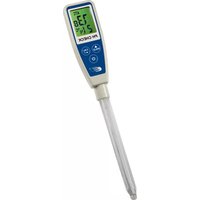
PH Check G 31.3002 - Measuring instrument TFA - Free user manual and instructions
Find the device manual for free PH Check G 31.3002 TFA in PDF.


| Product Type | pH Meter |
| Brand | TFA |
| Model | PH Check G 31.3002 |
| Measuring Range | 0.00 to 14.00 pH |
| Resolution | 0.01 pH |
| Accuracy | ±0.02 pH |
| Calibration | Automatic, up to 3 points (pH 4.01, 7.00, 10.01) |
| Display | LCD with backlight |
| Power Supply | 2 x 1.5V AAA batteries |
| Battery Life | Approx. 200 hours of continuous use |
| Auto Power Off | After 10 minutes of inactivity |
| Dimensions | 150 x 30 x 20 mm |
| Weight | 100 g (including batteries) |
| Operating Temperature | 0 °C to 50 °C |
| Storage Temperature | -10 °C to 60 °C |
| Water Resistance | IP67 (floats) |
| Electrode | Replaceable, glass bulb |
| Functions | pH measurement, temperature compensation, hold function |
| Accessories Included | pH meter, electrode, calibration powders (pH 4.01, 7.00, 10.01), screwdriver, manual |
| Maintenance | Rinse electrode with distilled water after use; store in storage solution |
| Safety | Do not immerse beyond max level; handle electrode carefully |
Frequently Asked Questions - PH Check G 31.3002 TFA
User questions about PH Check G 31.3002 TFA
0 question about this device. Answer the ones you know or ask your own.
Ask a new question about this device
Download the instructions for your Measuring instrument in PDF format for free! Find your manual PH Check G 31.3002 - TFA and take your electronic device back in hand. On this page are published all the documents necessary for the use of your device. PH Check G 31.3002 by TFA.
USER MANUAL PH Check G 31.3002 TFA
pH Instrument with ATC
5040-0301 / 5040-0302 / 5040-0303 / 5040-0304
PH CHECK
SERIE
Operating Instruction 13
Einleitung
LCD Display
Tasten

Congratulations on your purchase of this pen type long probe pH meter. Please read the manual completely before using this meter. Filing and keeping the manual for future reference. Recommended to soak the electrode for at least 30 minutes before using to clear up the lazy effect or to make the electrode wet if the pH electrode dries out.
Features:
· IP65 Waterproof housing.
· Dual display with ATC.
- Data hold to freeze readings.
- Compact size, easy to fit in pocket.
- Low battery indicator.
- Auto power off.
· °C/°F unit switchable.
- Power by 2pcs CR2032 batteries.
- Multi points calibration.
· One touch only for calibration.
Kindly note / Safety Instructions
- Check if the contents of the package are undamaged and complete.
- Remove the protection foil above the display.
- For cleaning the instrument please do not use an abrasive cleaner only a dry or moist piece of soft cloth. Do not allow any liquid into the interior of the device.
- Please store the measuring instrument in a dry and clean place.
- Avoid any force like shocks or pressure to the instrument.
- No responsibility is taken for irregular or incomplete measuring values and their results, the liability for subsequent damages is excluded!
- Do not use the device in explosive areas. Danger of death!
-
Do not use the device in an environment hotter than 85°C! The lithium battery may explode!
-
Do not expose the units to microwave radiation. The lithium battery may explode!
- Keep these devices and the batteries out of reach of children.
- Batteries contain harmful acids and may be hazardous if swallowed. If a battery is swallowed, this can lead to serious internal burns and death within two hours.
If you suspect a battery could have been swallowed or otherwise caught in the body, seek medical help immediately.
- Batteries must not be thrown into a fire, short-circuited, taken apart or recharged. Risk of explosion!
- Low batteries should be changed as soon as possible to prevent damage caused by leaking. Never use a combination of old and new batteries together, nor batteries of different types.
- Wear chemical-resistant protective gloves and safety glasses when handling leaking batteries.
MATERIAL SUPPLIED
This package contains:
1 x PH CHECK, 2 X CR2032 button battery,
1 x Operation manual and
1 x Container with storage solution
POWER SUPPLY
Loose the battery cover in clockwise direction by coin, remove the battery stripe (DON'T discard the washer!)
Put back the battery cover and turn it in counter-clockwise direction to lock.
Themeteris powered by 2 pcs CR2032 batteries.
To check the battery when:
- The battery symbol appears on LCD
- The meter can not power on
To install the batteries:
- Turn off the meter.
- Loose the battery cover in clockwise
direction by coin (DON'T discard the washer!)
- Replace the old batteries with two new button cells CR2032.
- Make sure the batteries are in place and the polarity is correct.
- Put back the battery cover and turn it in counter-clockwise direction to lock
NOTE:
- Please re-calibrate the meters after changing batteries.
- Remove battery from instruments that you do not plan to use for a month or more. Do not leave battery in instrument.

LCD DISPLAY
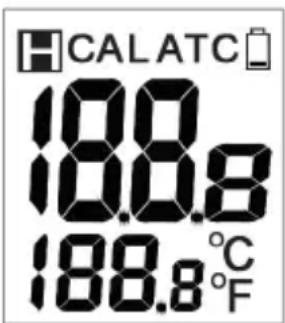
- The 1st display shows the measured pH reading.
- The 2nd display shows the temp.
- Cal = Calibration mode
- ATC = Auto Temp. Compensation
- H=Data hold
KEYPAD

OPERATION
- Remove the probe storage bottle from meter to expose the electrode out. It is normal if you find white crystals are present on the cap or electrode assembly.
WARNING: For pH meters, please always make the bottle is filled with storage buffer to keep the electrode wet and in a good storage condition.

Rotate the storage bottle in counter-clockwise direction and then pull out the bottle completely to expose the electrode.
-
Dip the electrode into the test solution. Press, to power on the meter and tir it to get a stable reading.
-
A small dot „ . „ is flashing while the meter is in measurement mode. The LCD not only shows the measured pH value but also displays the temperature.
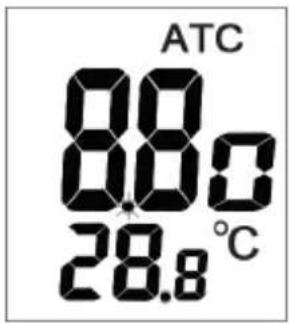
- Press "HOLD" to freeze current readings. The "H" icon will appear on the LCD and the small dot will not flash. Press again to release the hold mode.

- Turn off the meter by pressing „⊕”, button.
- Once finishing the measurement, clean the electrode, put back the bottle, store the meter under the 0\~50°C.
- Please see page 18 for the calibration procedures.
AUTO POWER OFF (SLEEP FUNCTION)
This meter will shut off automatically 20 min. of inactivity. For operating longer time, you can disable the sleep mode.
To disable the auto power off: Before power on, pressing
„ ” + ” WOLD ” keys simultaneously until a „n“ appeared on the screen and then release keys to return to normal mode.

Note:
The disable sleep mode will be invalid after every power off.
AUTOMATIC TEMPERATURE
COMPENSATION (ATC) & TEMP. UNIT SETTING
pH CHECK is capable of measuring with Automatic Temperature Compensation. ATC will show in the middle top of the LCD.
Temp. Unit Setting
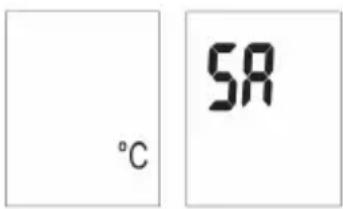
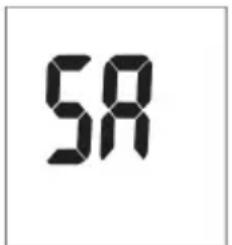
To select the temp. unit (°C or °F), turn off the meter first. When the meter is off, press „” and „” at the same time until the °C or °F appears on the LCD. Press „” to select the preferred unit and then press „” to save. „SA „ will appear on the LCD for one sec. and then go back to normal.
CALIBRATION MODE (CAL)
Calibration is necessary and should be done regularly, recommended everyday if the meter is used often. The unique calibration design of the meter features automatic buffer recognition to avoid errors.
Calibration
- Power on the meter.
- Place the electrode into a buffer solution (4,7 or 10), pH7 should be calibrated first and then 4 or 10 pH for better accuracy
- Press, CAL, to enter pH calibration mode. The icon „CAL” will appear on the LCD for
one second and then pH value (4,7 or 10) will be displayed on the LCD.

- If probe or buffer is in error:
If the buffer is incorrectly inserted or the probe is damaged or the probe can not detect buffer in below voltage range, the meter will escape calibration mode automatically after 10 seconds. Text „End“ will appear on the LCD in one second and then will go back to normal status.

Acceptable voltage range of each point:
PH 4.00 : 97mV..... 250mV
PH 7.00 : - 60mV..... 60mV
PH10.00 : - 250mV..... -97mV
- If the probe recognizes the buffer:
If the probe successfully recognizes the buffer, the buffer pH value (4 or 7 or 10) will appear on the display in 2 seconds.
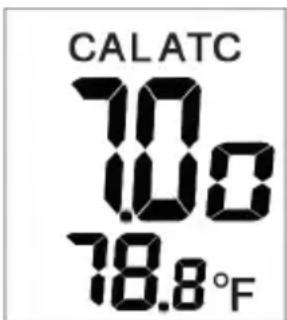
If the calibration buffer is not 4,7,10 but another value, such as 7.01, just press "HOLD", to change the value.
-
The adjustable cal. point range for 4.0 pH is from 3.50 to 4.50. For 7.0 pH is from 6.50 to 7.50. For 10.0 pH is from 9.50 to 10.50
-
To save the calibration value: When the electrode reads a stable value and user stops pressing any keys, the meter will automatically save the value and then escape the calibration mode.

- Rinse the probe with de-ionized water or a rinse solution (tap water...) after each measurement to last the meter's life.
- Repeat above steps until the 3 point calibration are finished.
MAINTENANCE
Please always keep the pH glass bulb wet by using the storage bottle to protect and store the electrode.
Always rinse the pH electrode in de-ionized water or rinse solution (tap water.....) before next use.
Never touch or rub glass bulb in order to last pH electrode life.
Make sure the electrode is clean. Between measurements, rinse the electrode with deionised water. If the electrode has been exposed to a solvent immiscible with water, clean it with a solvent miscible with water e.g. ethanol or acetone and rinse carefully with water.
Store the electrode carefully.
TROUBLESHOOTING
Power on but no display
1) Make sure the time of pressing power key is more than 100 mS.
2) Check the battery are in place and make good contact and correct polarity.
3) Replace with new batteries and try again.
4) Move away the batteries for one minute and then put back again.
Slow response
Clean probe by immersing the electrode in tap water for 10-15 minutes, then rinse thoroughly with distilled water or use a general purpose electrode cleaner.
LCD display "---"
Out of pH range, too acidic/or too alkaline.

„H.“ or „L.“
Out of temp. range, too cold/or too hot.

pH value fluctuate quickly
It is normal when the electrode is not immersed in the water but exposed in air.
Operating Temp.:
0° 50° C (32\~122°F)
Operating Humidity: 0\~80% RH
pH calibration buffer suggested:
— Standard USA buffers
— Standard NIST buffers
— Standard DIN buffers
Explanation of symbols
CE This sign certifies that the product meets the requirements of the EEC directive and has been tested according to the specified test methods.
8. Waste disposal
This product and its packaging have been manufactured using high-grade materials and components which can be recycled and reused. This reduces waste and protects the environment. Dispose of the packaging in an environmentally friendly manner using the collection systems that have been set up.

Disposal of the electrical device:
Remove non-permanently installed batteries and rechargeable batteries from the device and dispose of them separately.
This product is labelled in accordance with the EU Waste Electrical and Electronic Equipment Directive (WEEE). This product must not be disposed of in ordinary household waste. As a consumer, you are required to take end-of-life devices to a designated collection point for the disposal of electrical and electronic equipment, in order to ensure environmentally-compatible disposal. The return service is free of charge. Observe the current regulations in place!
Disposal of the batteries: Batteries and rechargeable batteries must never be disposed of with household waste. They contain pollutants such as heavy metals, which can be harmful to the environment and human health if disposed of improperly, and valuable raw materials such as iron, zinc, manganese or nickel that can be recovered from waste. As a consumer, you are legally obliged to hand in used batteries and rechargeable batteries for environmentally friendly disposal at retailers or appropriate collection points in accordance with national or local regulations. The return service is free of charge. You can obtain
addresses of suitable collection points from your city council or local authority. The names for the heavy metals contained are: Cd = cadmium, Hg = mercury, Pb = lead. Reduce the generation of waste from batteries by using batteries with a longer lifespan or suitable rechargeable batteries. Avoid littering the environment and do not leave batteries or battery-containing electrical and electronic devices lying around carelessly. The separate collection and recycling of batteries and rechargeable batteries make an important contribution to relieving the impact on the environment and avoiding health risks.
WARNING! Damage to the environment and health through incorrect disposal of the batteries!
WARNING! Batteries containing lithium can explode Batteries and rechargeable batteries containing lithium (Li=lithium) present a high risk of fire and explosion due to heat or mechanical damage with potentially serious consequences for people and the environment. Pay particular attention to correct disposal.
DOSTMANN electronic GmbH
Technical changes, any errors and misprints reserved
Reproduction is prohibited in whole or part
Stand06 2206CHB • © DOSTMANN electronic GmbH
- PH CHECK
- EINLEITUNG
- LCD DISPLAY
- TASTEN
- FEATURES
- KINDLY NOTE / SAFETY INSTRUCTIONS
- MATERIAL SUPPLIED
- POWER SUPPLY
- TO INSTALL THE BATTERIES
- NOTE
- KEYPAD
- OPERATION
- AUTO POWER OFF (SLEEP FUNCTION)
- AUTOMATIC TEMPERATURE
- COMPENSATION (ATC) & TEMP. UNIT SETTING
- TEMP. UNIT SETTING
- CALIBRATION MODE (CAL)
- CALIBRATION
- MAINTENANCE
- TROUBLESHOOTING
- POWER ON BUT NO DISPLAY
- EXPLANATION OF SYMBOLS
- WASTE DISPOSAL
- DOSTMANN ELECTRONIC GMBH
Brand : TFA
Model : PH Check G 31.3002
Category : Measuring instrument