USER MANUAL ZOB462X ZANUSSI
Thank you for selecting our appliance
We wish you lots of enjoyment with your new appliance and we hope that you will consider our brand again when purchasing household appliances.
Please read this user manual carefully and keep it throughout the product life cycle as a reference document. The user manual should be passed on to any future owner of the appliance.
Contents
Warnings and Important Safety Information 4 Description of the appliance 6 Controls 7 Before using the oven for the first time 8 Electronic programmer 9 Using the Oven 14 Baking and Roasting Tables 18 Cleaning and Maintenance 20 What happens if something goes wrong 24 Technical Data 25 Instructions for the Installer 26 Instructions to Building In 27 Declaration of guarantee terms 28 Service and spare parts 30 European Guarantee 30
Guide to using the user instructions

Safety instructions

Step by step instructions

Hints and Tips

This appliance conforms with the following ECC Directives:
- 2006/95 (Low Voltage Directive); -89/336 (EMC Directive);
- 93/68 (General Directive); and subsequent modifications.
MANUFACTURER:
ELECTROLUX HOME PRODUCTS ITALY S.p.A.
Viale Bologna 298
47100 FORLI' (Italy)
English

Always keep these user instructions with the appliance. Should the appliance be passed on to third persons or sold, or if you leave this appliance behind when you move house, it is very important that the new user has access to these user instructions and the accompanying information.
These warnings are provided for the safety of the users and those living with them. So read them carefully before connecting and/or using the appliance.
Installation
- The installation must be performed by a qualified person in accordance with the rules and regulations in force. The individual operations for installing the appliance are described under the instructions for the installer.
- Have the appliance installed and connected by a qualified person with specialist knowledge, who will carry it out in accordance with the directives.
- If any modifications to the power supply are required because of the installation, these should also be carried out by a qualified electrician.
Operation
- This oven is designed for cooking foodstuffs; never use it for other purposes.
- When opening the oven door during or at the end of cooking be careful of the stream of hot air, which comes out of the oven.
- Be very careful when using the cooker. The extreme heat of the heating elements makes the shelves and other parts very hot.
- If you should for whatever reason use aluminium foil to cook food in the oven, never allow it to come into direct contact with the floor of the oven.
- When cleaning the oven, proceed with care: never spray anything onto the grease filter (if fitted), the heating elements and the thermostat sensor.
- It is dangerous to make modifications of any kind to this appliance or to its specifications.
- During the baking, roasting and grilling process, the oven window and the other parts of the appliance get hot, so children should be kept away from the appliance. Take care, if connecting electrical appliances to sockets near the oven, that cables do not come into contact with hot rings or get caught in the oven door. Always use oven gloves to take hot ovenproof dishes or pots out of the oven.
- Regular cleaning prevents the surface material from deteriorating.
- Before cleaning the oven, either turn the power off or pull the mains plug out.
- Make sure that the oven is in the "OFF" position, when the oven is no longer being used.
- This oven was made as a single appliance or as a combination appliance with electrical hotplate, depending on the model, for single-phase connection to 230 V.
- The appliance must not be cleaned with a superheated steam cleaner or a steam jet cleaner.
- Do not use abrasive cleaners or sharp metal scrapers. These can scratch the glass in the oven door, which may result in the shattering of the glass.
Child Safety
- This appliance is intended for use by adults. It is dangerous to allow children to use it or play with it. Children should be kept away while the oven is working. Also, after you have switched the oven off, it remains hot for a long time.
- This appliance is not intended for use by children or other persons whose physical, sensory or mental capabilities or lack of experience and knowledge prevents them from using the appliance safely without supervision or instruction by a responsible person to ensure that they can use the appliance safely.
Customer Service
- Have checks and/or repairs carried out by the manufacturer's service department or by a service department authorised by the manufacturer and use only original spare parts.
- Do not attempt to repair the appliance yourself in the event of malfunctions or damage. Repairs carried out by untrained persons may cause damage or injury.
The symbol

on the product or its
packaging indicates that this product is not to be treated as normal household waste. Instead it must be handed over to a collection point for the recycling of electrical and electronic equipment. The correct disposal of this product will help to protect the environment and human health. Environment and health are endangered by incorrect disposal. For more detailed information about recycling of this product, please contact your local town hall, your household waste disposal service or the shop where you purchased the product.
Description of the appliance
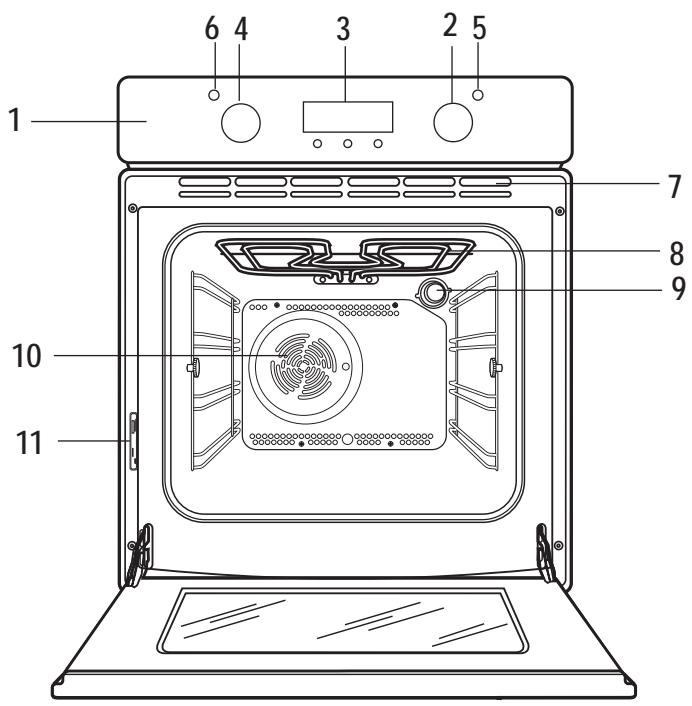
- Control Panel
- Oven Function Control Knob
- Electronic programmer
- Thermostat Control Knob
- Mains On Indicator
- Thermostat Control Indicator
- Air Vents for Cooling Fan
- Grill
- Oven light
- Oven fan
- Rating plate
Oven accessories
Cake tray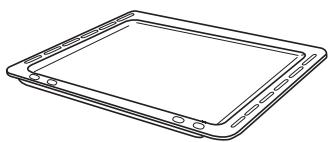
Dripping pan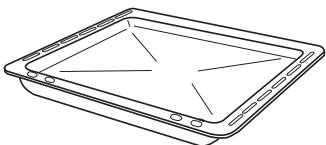
Shelf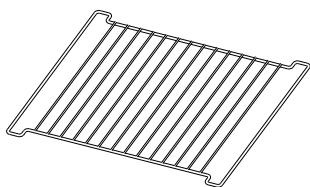
Controls
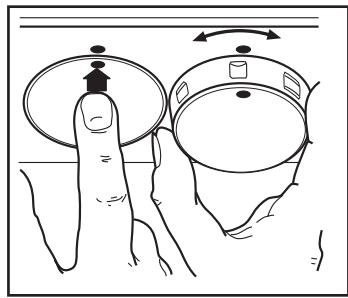
Push-pull control knobs
This model is provided with push-pull control knobs. These knobs can be completely sunken inside the control panel when the oven is not working.
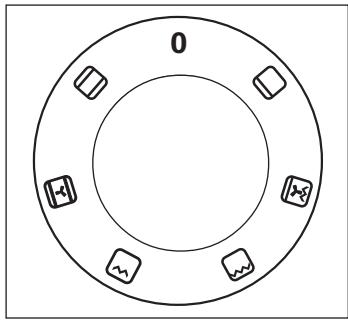
Oven function control knob
0 The oven is off

Conventional cooking - The heat comes from both the top and bottom element, ensuring even heating inside the oven.

Fan cooking - This allows you to roast or roast and bake simultaneously using any shelf, without flavour transference.

Inner grill element only - It can be used for grilling small quantities.

Full Grill - The full grill element will be on.

Pizza - The bottom heating element and the inner grill are on, and the fan ensures air is circulated to cook the pizza toppings or pie fillings.

Bottom heating element - The heat comes from the bottom of the oven only.
Mains on Indicator
The mains on light will come on when the oven function control knob is set.
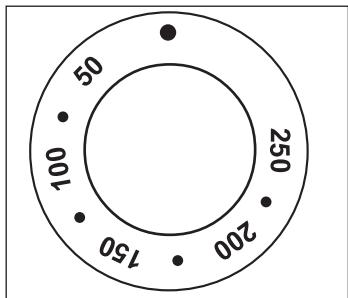
Thermostat Control Knob
Turn the thermostat control knob anti-clockwise to select temperatures between 50°C and 250°C.
Thermostat Control Indicator
The thermostat control indicator will come on when the thermostat control knob is turned. The indicator will remain on until the correct temperature is reached. It will then cycle on and off to show the temperature is being maintained.
Safety Thermostat
To prevent dangerous overheating (through incorrect use of the appliance or defective components), the oven is fitted with a safety thermostat, which interrupts the power supply. The oven switches back on again automatically when the temperature drops.
Should the safety thermostat trigger due to incorrect use of the appliance, it is enough to remedy the error after the oven has cooled down; if, on the other hand, the thermostat triggers because of a defective component, please contact Customer Service.
The cooling fan
The cooling fan is designed to cool the oven and the control panel. The fan switches on automatically after a few minutes of cooking. Warm air is blown out through the aperture near the oven door handle. When the oven is switched off, the fan may run on after the oven is switched off to keep the controls cool. This is quite normal.

The action of the cooling fan will depend on how long the oven has been used and at what temperature. It may not switch in at all at lower temperature settings nor run on where the oven has only been used for a short time.
Before using the oven for the first time

Remove all packaging, both inside and outside the oven, before using the oven.

The oven will work only if the time of day has been set (please read the relevant instructions).
Before using for the first time, the oven should be heated up without food.
During this time, an unpleasant odour may be emitted. This is absolutely normal. It is caused by manufacturing residues.
Ensure the room is well ventilated.

- Switch the oven function control knob to fan cooking
- Set the thermostat control knob to 250.
- Open a window for ventilation.
- Allow the oven to run empty for approximately 45 minutes.
This procedure should be repeated with the full grill for approximately 5-10 minutes.

Then let the oven cool down. Then dampen a soft cloth with warm water and a little mild washing-up liquid and use this to clean the oven cavity.

Before using for the first time, carefully wash the oven accessories as well.
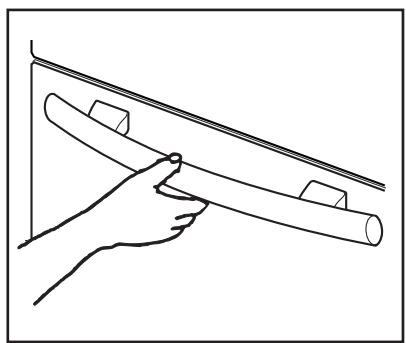

To open the oven door, always hold the handle in the centre.
Electronic programmer
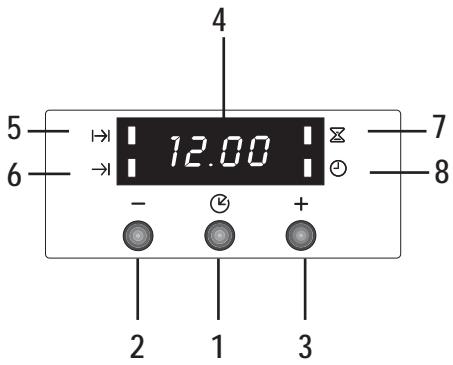
- Push button for selecting a function (L)
- Decreasing control button
- Increasing control button “+”
- Display
- "Cooking Duration" pilot lamp
- "End of cooking" pilot lamp
- "Minute minder" pilot lamp
- "Time of day" pilot lamp

The oven will only work if the time of day has been set.
However, the oven can also be operated without any programme.

In the event of a power failure, all the settings (time of day, programme setting or programme in operation) will be cancelled. When the power is restored, the numbers in the display will flash, and the clock/timer has to be reset.
Setting the time of day
When the power supply is switched on, or after a power failure, the "Time of day" pilot lamp will flash on the display.
To set the correct time of day:
- Press button "+" or "-".
- After the setting is carried out, wait for 5 seconds: the "Time of day" pilot lamp will go out and the display will show the set time. The appliance is ready for use.
To reset the correct time of day:
- Press button repeatedly to select the "Time of day" function. The relevant pilot lamp will start flashing. Then proceed as described above.
The time of day can only be reset if no automatic function (cooking duration or end of cooking) has been set.
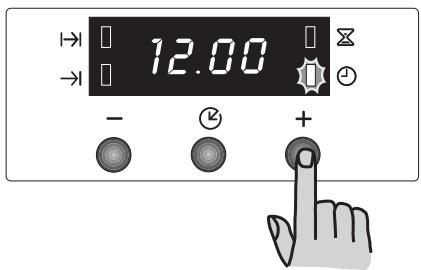
"Cooking Duration" function
This function allows the oven to automatically switch off at the end of a programmed cooking duration time. Place food in the oven, select a cooking function and adjust the cooking temperature. Press button repeatedly to select the "Cooking Duration" function. The relevant pilot lamp will start flashing. Then, proceed as follows:
To set the duration time:
- Press button "+" or "-"
- After the setting is carried out, wait for 5 seconds: the "Cooking Duration" pilot lamp will come on and the display will revert to the time of day.
- When cooking time is over, the oven will be switched off automatically and an acoustic alarm will be heard, while the pilot lamp will start flashing. Turn the oven function and the thermostat control knob to zero.
To switch off the acoustic alarm, press any button.
NOTE: turning the acoustic alarm off will reset the oven to manual, and if the oven function and the thermostat knobs are not set to zero the oven will start to heat again.
To cancel the duration time:
- Press button repeatedly to select the "Cooking Duration" function. The relevant pilot lamp will flash and the display will show the remaining cooking time.
- Press button "-" until the display shows "0:00". After 5 seconds the pilot lamp will go out and the display will revert to the time of day.
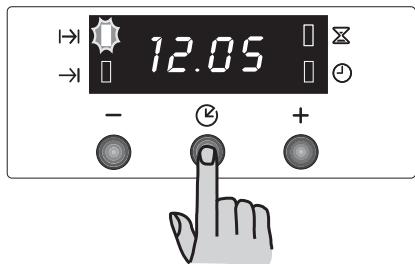
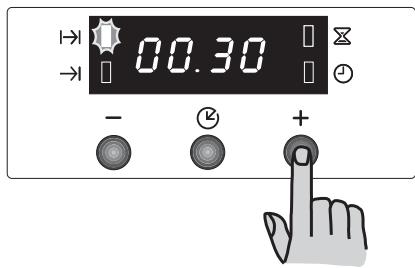
"End of cooking" function
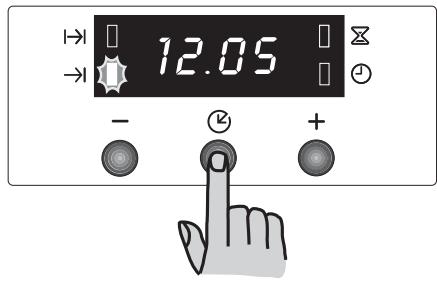
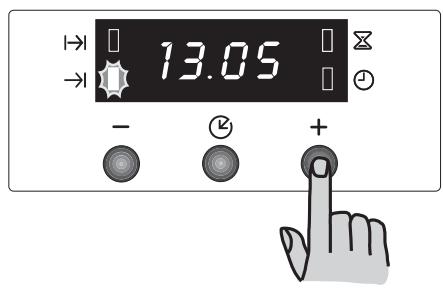
With this function, you can set the oven to switch off automatically when a programmed end of cooking time is over. Place food in the oven, select a cooking function and adjust the cooking temperature. Press the button repeatedly to select the "End of cooking" function. The relevant pilot lamp will start flashing. Then, proceed as follows:
To set the End of cooking time:
- Press the "+" or "-" button.
- After the setting is carried out, wait for 5 seconds: the "End of cooking" pilot lamp will come on and the display will revert to the time of day.
- When cooking time is over, the oven will be switched off automatically and an acoustic alarm will be heard, and the pilot lamp will start flashing. Turn the oven function and the thermostat control knob to zero.
To switch off the acoustic alarm, press any button. NOTE: turning the acoustic alarm off will reset the oven to manual, and if the oven function and the thermostat knobs are not set to zero the oven will start to heat again.
To cancel the End of cooking time:
- Press the button repeatedly to select the "End of cooking" function. The relevant pilot lamp will flash and the display will show the programmed End of cooking time.
- Press the "-" button until the display shows the current time of day. The programmer will beep and the pilot lamp will go out.
"Cooking duration" and "End of cooking time" combined
The functions "Cooking duration" and "End of cooking time" can be used simultaneously to set the oven to switch on and off automatically at a later time.
- With the "Cooking duration" function (carry out the cooking duration setting as described in the relevant chapter) set the duration time. Then, press button B: the display will show the programmed setting.
- With the "End of cooking time" function (carry out the End of cooking setting as described in the relevant chapter) set the end of cooking time.
The relevant pilot lamps will come on and the display will show the time of day. The oven will switch on and off according to the set programmes.
"Minute minder" function
The minute minder alarm will sound at the end of a timed period, but the oven will remain on, if it is in use.
To set the minute minder:
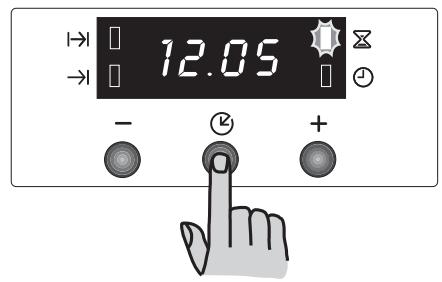
- Press button repeatedly to select the "Minute minder" function. The relevant pilot lamp will start flashing.
- Then, press button " ^+ " or " " (maximum: 2 hours, 30 minutes).
- After the setting is carried out, wait for 5 seconds: the "Minute minder" pilot lamp will come on.
- At the end of the timed period, the pilot lamp will start flashing and an acoustic alarm will be heard. To switch off the acoustic alarm, press any button.
To cancel the minute minder:
- Press button repeatedly to select the "Minute minder" function. The relevant pilot lamp will flash and the display will show the remaining time.
- Press button "—" until the display shows "0:00". After 5 seconds the pilot lamp will go out and the display will revert to the time of day.

How to switch off the display
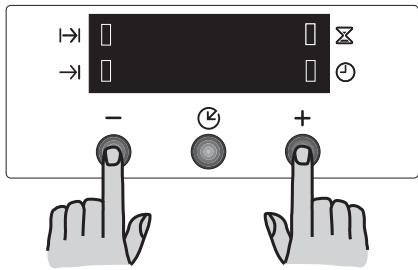
- Press two programmer push buttons simultaneously and keep them pressed for about 5 seconds. The display will switch off.
- To switch on the display, press any button. The display can be switched off only if no other functions have been set.
Using the oven
The oven is supplied with an exclusive system which produces a natural circulation of air and the constant recycling of steam.
This system makes it possible to cook in a steamy environment and keep the dishes soft inside and crusty outside. Moreover, the cooking time and energy consumption are reduced to a minimum. During cooking steam may be produced which can be released when opening the oven door. This is absolutely normal.

However, always stand back from the oven when opening the oven door during cooking or at the end of it to allow any build up of steam or heat to release.

Attention! - Do not place objects on the oven base and do not cover any part of the oven with aluminium foil while cooking, as this could cause a heat build-up which would affect the baking results and damage the oven enamel. Always place pans, heat-resistant pans and aluminium trays on the shelf which has been inserted in the shelf runners. When food is heated, steam is created, like in a kettle. When the steam comes into contact with the glass in the oven door, it condenses and creates water droplets.
To reduce condensation, always preheat the empty oven for 10 minutes.
We recommend you wipe the water droplets away after every cooking process.

Always cook with the oven door closed.
Stand clear when opening the drop down oven door. Do not allow it to fall open - support the door using the door handle, until it is fully open.
The oven has four shelf levels.
The shelf positions are counted from the bottom of the oven as shown in the diagram.
It is important that these shelves are correctly positioned as shown in the diagram.
Do not place cookware directly on the oven base.
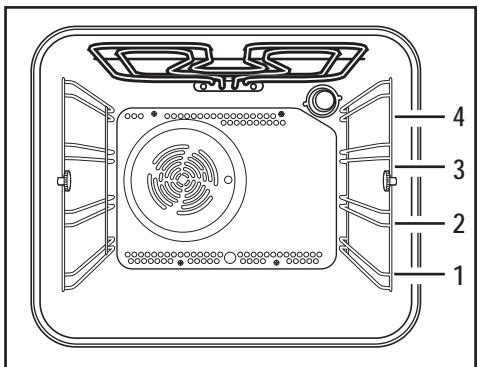
Fan cooking
The food is cooked by means of preheated air force blown evenly round the inside of the oven by a fan set on the rear wall of the oven itself. Heat thus reaches all parts of the oven evenly and fast and this means that you can simultaneously cook different types of foods positioned on the various oven shelves. Fan cooking ensures rapid elimination of moisture and the dryer oven environment stops the different aromas and flavours from being transmitted from one food to another. - The possibility of cooking on several shelf heights means that you can cook several different dishes at the same time and up to three tins of biscuits and mini pizzas to be eaten immediately or subsequently deep frozen. - Naturally the oven can also be used for cooking on just one shelf. In this case you should use the lowest set of runners so that you can keep an eye on progress more easily. - In addition, the oven is particularly recommended for sterilizing preserves, cooking home-made fruit in syrup, and for drying mushrooms or fruit.
Grilling -
Most foods should be placed on the grid in the grill pan to allow maximum circulation of air and to lift the food out of the fats and juices. Food such as fish, liver and kidneys may be placed directly on the grill pan, if preferred. Food should be thoroughly dried before grilling to minimise splashing. Brush lean meats and fish lightly with a little oil or melted butter to keep them moist during cooking. Accompaniments such as tomatoes and mushrooms may be placed underneath the grid when grilling meats. When toasting bread, we suggest that the top runner position is used. The food should be turned over during cooking, as required.
How to use the Full Grill
- Turn the oven control function knob on.
- Turn the thermostat control knob on the required temperature.
- Adjust the grid and grill pan runner position to allow for different thicknesses of food. Position the food close to the element for faster cooking and further away for more gentle cooking.
Preheat the grill on a full setting for a few minutes before sealing steaks or toasting. Adjust the heat setting and the shelf as necessary, during cooking.
During cooking, the cooling fan and the thermostat control light will operate in the same way as described for the fan oven function.
How to use the Inner Grill
The inner grill provides quick direct heat to the central area of the grill pan. By using the inner grill element for cooking small quantities, it can help to save energy.
- Turn the oven control function knob on.
- Turn the thermostat control knob on the required temperature.
- Adjust the grid and grill pan runner position to allow for different thicknesses of food and follow the instructions for grilling.
The grill element is controlled by the thermostat. During cooking, the grill cycles on and off to prevent overheating.
Bottom oven element only
This function is particularly useful when blind baking pastry. It may also be used to finish off quiches or flans to ensure the base pastry is cooked through.
The thermostat control light will remain on until the correct temperature is reached. It will then cycle on and off to show the temperature is being maintained.
Conventional Cooking
- The middle shelf position allows for the best heat distribution. To increase base browning simply lower the shelf position. To increase top browning, raise the shelf position.
- The material and finish of the baking trays and dishes used will affect base browning. Enamelware, dark, heavy or non-stick utensils increase base browning, while oven glassware, shiny aluminium or polished steel trays reflect the heat away and give less base browning.
Always place dishes centrally on the shelf to ensure even browning. - Stand dishes on suitably sized baking trays to prevent spillage onto the base of the oven and make cleaning easier. - Do not place dishes, tins or baking trays directly on the oven base as it becomes very hot and damage will occur. When using this setting, heat comes from both the top and bottom elements. This allows you to cook on a single level and is particularly suitable for dishes which require extra base browning such as quiches and flans.
Gratins, lasagnes and hotpots which require extra top browning also cook well in the conventional oven.
How to use the conventional oven
- Turn the oven function control knob to the required cooking function.
- Turn the thermostat control knob to the required temperature.
Pizza
- Turn the oven function control knob to the required cooking function.
- Turn the thermostat control knob to the required temperature.
The bottom element provides direct heat to the base of pizzas, quiches or pies, while the fan ensures air is circulated to cook the pizza toppings or pie fillings.
Hints and Tips
On baking:
Cakes and pastries usually require a medium temperature (150°C - 200°C) and therefore it is necessary to preheat the oven for about 10 minutes.
Do not open the oven door before 3/4 of the baking time has elapsed.
Shortcrust pastry is baked in a springform tin or on a tray for up to 2/3 of the baking time and then garnished before being fully baked. This further baking time depends on the type and amount of topping or filling. Sponge mixtures must separate with difficulty from the spoon. The baking time would be unnecessarily extended by too much liquid.
If two baking trays with pastries or biscuits are inserted into the oven at the same time, a shelf level must be left free between the trays.
If two baking trays with pastries or biscuits are inserted into the oven at the same time, the trays must be swapped and turned around after about 2/3 of the baking time.
On Roasting:
Do not roast joints smaller than 1kg. Smaller pieces could dry out when roasting. Dark meat, which is to be well done on the outside but remain medium or rare inside, must be roasted at a higher temperature (200°C - 250°C).
White meat, poultry and fish, on the other hand, require a lower temperature (150°C - 175°C). The ingredients for a sauce or gravy should only be added to the roasting pan right at the beginning if the cooking time is short. Otherwise add them in the last half hour.
You can use a spoon to test whether the meat is cooked: if it cannot be depressed, it is cooked through. Roast beef and fillet, which is to remain pink inside, must be roasted at a higher temperature in a shorter time.
If cooking meat directly on the oven shelf, insert the roasting pan in the shelf level below to catch the juices.
Leave the joint to stand for at least 15 minutes, so that the meat juices do not run out.
To reduce the build up of smoke in the oven, it is recommended to pour a little water in the roasting pan. To prevent condensation forming, add water several times. The plates can be kept warm in the oven at minimum temperature until serving.

Caution!
Do not line the oven with aluminium foil and do not place a roasting pan or baking tray on the floor, as otherwise the oven enamel will be damaged by the heat build-up.
Cooking times
Cooking times can vary according to the different composition, ingredients and amounts of liquid in the individual dishes.
Note the settings of your first cooking or roasting experiments to gain experience for later preparation of the same dishes.
Based upon your own experiences you will be able to alter the values given in the tables.
Baking and Roasting Tables
Conventional Cooking -
Timings do not include pre-heating. The empty oven should always be pre-heated for 10 minutes.
| TYPE OF DISH | Conventional Cooking | Fan Cooking | Cooking times in minutes | NOTES |
| 321 | temp °C | 321 | temp °C |
| CAKES | | | | | | |
| Whisked recipes | 2 | 170 | 2 (1and3)* | 160 | 45-60 | In cake mould |
| Shortbread dough | 2 | 170 | 2 (1and3)* | 160 | 20-30 | In cake mould |
| Butter-milk cheese cake | 1 | 175 | 2 | 165 | 60-80 | In cake mould |
| Apple cake (Apple pie) | 1 | 170 | 2lef+righ. | 160 | 90-120 | In cake mould |
| Strudel | 2 | 180 | 2 | 160 | 60-80 | In baking tray |
| Jam- tart | 2 | 190 | 2(1and3)* | 180 | 40-45 | In cake mould |
| Fruit cake | 2 | 170 | 2 | 150 | 60-70 | In cake mould |
| Sponge cake | 1 | 170 | 2(1and3)* | 165 | 30-40 | In cake mould |
| Christmas cake | 1 | 150 | 2 | 150 | 120-150 | In cake mould |
| Plum cake | 1 | 175 | 2 | 160 | 50-60 | In bread tin |
| Small cake | 3 | 170 | 2 | 160 | 20-35 | In baking tray |
| Biscuits | 2 | 160 | 2(1and3)* | 150 | 20-30 | In baking tray |
| Meringues | 2 | 135 | 2(1and3)* | 150 | 60-90 | In baking tray |
| Buns | 2 | 200 | 2 | 190 | 12-20 | In baking tray |
| Pastry: Choux | 2or 3 | 210 | 2(1and3)* | 170 | 25-35 | In braking tray |
| Plate tarts | 2 | 180 | 2 | 170 | 45-70 | In cake mould |
| BREAD AND PIZZA | | | | | | |
| White bread | 1 | 195 | 2 | 185 | 60-70 | |
| Rye bread | 1 | 190 | 1 | 180 | 30-45 | In bread tin |
| Bread rolls | 2 | 200 | 2(1and3)* | 175 | 25-40 | In baking tray |
| Pizza | 2 | 200 | 2 | 200 | 20-30 | In baking tray |
| FLANS | | | | | | |
| Pasta flan | 2 | 200 | 2(1and3)* | 175 | 40-50 | In mould |
| Vegetable flan | 2 | 200 | 2(1and3)* | 175 | 45-60 | In mould |
| Quiches | 1 | 210 | 1 | 190 | 30-40 | In mould |
| Lasagne | 2 | 200 | 2 | 200 | 25-35 | In mould |
| Cannelloni | 2 | 200 | 2 | 200 | 25-35 | In mould |
| MEAT | | | | | | |
| Beef | 2 | 190 | 2 | 175 | 50-70 | On grid |
| Pork | 2 | 180 | 2 | 175 | 100-130 | On grid |
| Veal | 2 | 190 | 2 | 175 | 90-120 | On grid |
| English roast beef rare | 2 | 210 | 2 | 200 | 50-60 | On grid |
| medium | 2 | 210 | 2 | 200 | 60-70 | On grid |
| well done | 2 | 210 | 2 | 200 | 70-80 | On grid |
| Shoulder of pork | 2 | 180 | 2 | 170 | 120-150 | With rind |
| Shin of pork | 2 | 180 | 2 | 160 | 100-120 | 2 pieces |
| Lamb | 2 | 190 | 2 | 175 | 110-130 | Leg |
| Chicken | 2 | 190 | 2 | 200 | 70-85 | Whole |
| Turkey | 2 | 180 | 2 | 160 | 210-240 | Whole |
| Duck | 2 | 175 | 2 | 220 | 120-150 | Whole |
| Goose | 2 | 175 | 1 | 160 | 150-200 | Whole |
| Rabbit | 2 | 190 | 2 | 175 | 60-80 | Cut in pieces |
| Hare | 2 | 190 | 2 | 175 | 150-200 | Cut in pieces |
| Pheasant | 2 | 190 | 2 | 175 | 90-120 | Whole |
| Meat loaf | 2 | 180 | 2 | 170 | tot.150 | in bread pan |
| FISH | | | | | | |
| Trout/Sea bream | 2 | 190 | 2(1and3)* | 175 | 40-55 | 3-4 fishes |
| Tuna fish/Salmon | 2 | 190 | 2(1and3)* | 175 | 35-60 | 4-6 fillets |
(*) If you cook more than one dish at the same time, we recommend you place them on the levels quoted between brackets.
Grilling -
Timings do not include pre-heating.
The empty oven should always be pre-heated for 10 minutes.
| TYPE OF DISH | Quantity | Grilling | Cooking time in minutes |
| Pieces | g. | 3 | temp. °C | 1st side | 2nd side |
| Fillet steaks | 4 | 800 | 3 | 250 | 12~15 | 12~14 |
| Beef-steaks | 4 | 600 | 3 | 250 | 10~12 | 6~8 |
| Sausages | 8 | / | 3 | 250 | 12~15 | 10~12 |
| Pork chops | 4 | 600 | 3 | 250 | 12~16 | 12~14 |
| Chicken (cut in two) | 2 | 1000 | 3 | 250 | 30~35 | 25~30 |
| Kebabs | 4 | / | 3 | 250 | 10~15 | 10~12 |
| Chicken (breast) | 4 | 400 | 3 | 250 | 12~15 | 12~14 |
| Hamburger* | 6 | 600 | 2 | 250 | 20-30 | |
| *Preheat 5'00" | | | | | | |
| Fish (fillets) | 4 | 400 | 3 | 250 | 12~14 | 10~12 |
| Sandwiches | 4~6 | / | 3 | 250 | 5~7 | / |
| Toast | 4~6 | / | 3 | 250 | 2~4 | 2~3 |

The temperatures quoted are guidelines. The temperatures may have to be adapted to personal requirements.
Pizza Function
| Pizza Function | Cooking time in minutes | NOTES |
| 3 | temp.°C |
| Pizza, large | 1 | 200 | 15~25 | on baking tray |
| Pizza, small | 1 | 200 | 10~20 | on baking tray or on grid |
| Bread rolls | 1 | 200 | 15~25 | on baking tray |

The temperatures quoted are guidelines. The temperatures may have to be adapted to personal requirements.
Cleaning and Maintenance

Before cleaning, switch the oven off and let it cool down.
The appliance must not be cleaned with a superheated steam cleaner or a steam jet cleaner.
Important: Before carrying out any cleaning operation, the appliance must be disconnected from the power supply.
To ensure a long life for your appliance, it is necessary to perform the following cleaning operations regularly:
Only perform when the oven has cooled down. Clean the enamelled parts with soapy water. - Do not use abrasive cleaners. - Dry the stainless steel parts and glass with a soft cloth. If there are stubborn stains, use commercially available cleaners for stainless steel or warm vinegar.
The oven's enamel is extremely durable and highly impermeable. The action of hot fruit acids (from lemons, plums or similar) can however leave permanent, dull, rough marks on the surface of the enamel. However such marks in the brightly polished surface of the enamel do not affect the operation of the oven. Clean the oven thoroughly after every use. This is the easiest way to clean dirt off. It prevents dirt being burnt on.
Cleaning materials
Before using any cleaning materials on your oven, check that they are suitable and that their use is recommended by the manufacturer.
Cleaners that contain bleach should NOT be used as they may dull the surface finishes. Harsh abrasives should also be avoided.
External cleaning
Regularly wipe over the control panel, oven door and door seal using a soft cloth well wrung out in warm water to which a little liquid detergent has been added.
To prevent damaging or weakening the door glass panels avoid the use of the following:
Household detergent and bleaches, impregnated pads unsuitable for non-stick saucepans, Brillo/Ajax pads or steel wool pads, chemical oven pads or aerosols, rust removers, bath/sink stain removers.
Clean the outer and inner door glass using warm soapy water. Should the inner door glass become heavily soiled it is recommended that a cleaning product such as Hob Brite is used. Do not use paint scrapers to remove soilage.

DO NOT clean the oven door while the glass panels are warm. If this precaution is not observed the glass panel may shatter.

If the door glass panel becomes chipped or has deep scratches, the glass will be weakened and must be replaced to prevent the possibility of the panel shattering. Contact your local Service Force Centre who will be pleased to advise further.
Oven Cavity
The enamelled base of the oven cavity is best cleaned whilst the oven is still warm.
Wipe the oven over with a soft cloth soaked in warm soapy water after each use. From time to time it will be necessary to do a more thorough cleaning, using a proprietary oven cleaner.
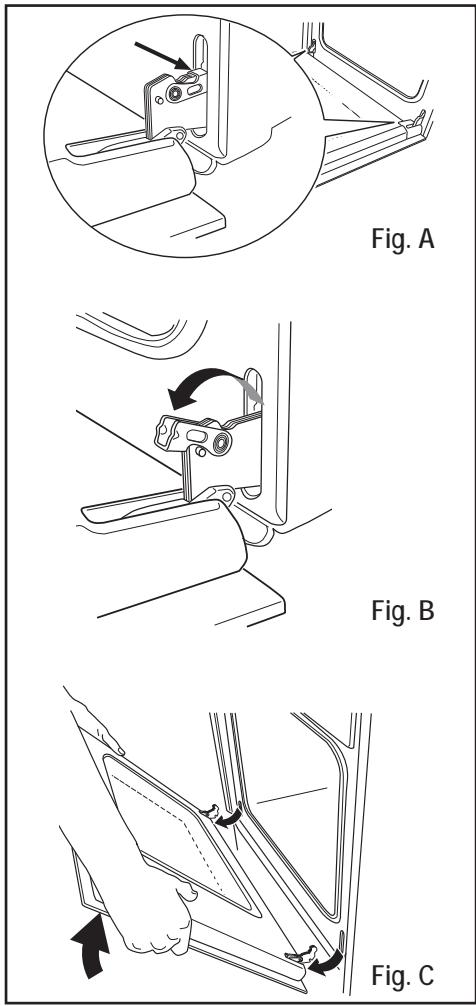
Cleaning the Oven Door
Before cleaning the oven door, we recommend you to remove it from the oven.
Proceed as follows:
- open the oven door completely;
- find the hinges linking the door to the oven (Fig. A);
- unlock and turn the small levers located on the two hinges (Fig. B);
- handle the door by its left- and right-hand sides, then slowly turn it towards the oven until it is half-closed (Fig. C);
- gently pull the oven door off its site (Fig. C);
- place it on a steady plan;
Clean the oven door glass with warm soapy water and a soft cloth only. Never use harsh abrasives. Once the cleaning is carried out, refit the oven door, following the procedure in reverse.
Stainless steel or aluminium appliances:
We recommend that the oven door is only cleaned using a wet sponge and dried after cleaning with a soft cloth.
Never use steel wool, acids or abrasive products as they can damage the oven surface. Clean the oven control panel following the same precautions.

DO NOT clean the oven door while the glass panels are warm. If this precaution is not observed the glass panel may shatter.
If the door glass panel becomes chipped or has deep scratches, the glass will be weakened and must be replaced to prevent the possibility of the panel shattering. Contact your local Service Centre who will be pleased to advise further.
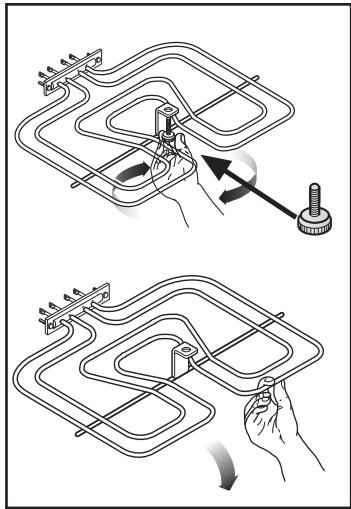
Grill heating element
This model has been fitted with a hinged grill element to make the roof of the oven especially easy to clean.

Before proceeding ensure the oven is cool and disconnected from the electricity supply.
1) Undo the screw fastening the grill element (see Fig). When carrying out this operation for the first time, we recommend using a screwdriver. 2) Then gently pull the grill downwards to allow access to the oven roof (see Fig). 3) Clean the oven roof with a suitable cleaner and wipe dry before returning the hinged grill element to its original position. 4) Carefully push the grill element up into its original position and re-tighten the retaining nut.

Ensure the retaining nut on the grill element is properly tightened so that it does not fall down when in use.
Oven Shelves and Shelf Supports
To clean the oven shelves, soak in warm soapy water and remove stubborn marks with a well wetted soap impregnated pad.
Rinse well and dry with a soft cloth.
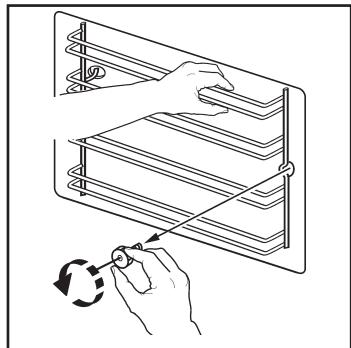
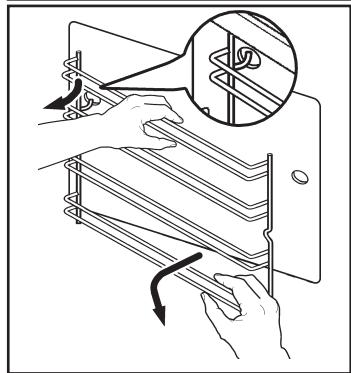
The shelf supports can be removed for easy cleaning.
Proceed as follows:

- remove the front screw while keeping the shelf support in position with the other hand;
- disengage the rear hook and take off the shelf support;
- once the cleaning is carried out, refit the shelf supports following the procedure in reverse.
Please, ensure the retaining nuts are secure when refitting the shelf support.
Replacing The Oven Light
Disconnect the appliance
If the oven bulb needs replacing, it must comply
with the following specifications:
Electric power: 15 W/25 W, Electric rate: 230V (50 Hz), - Resistant to temperatures of 300° C , - Connection type: E14.
These bulbs are available from your local Service Force Centre.
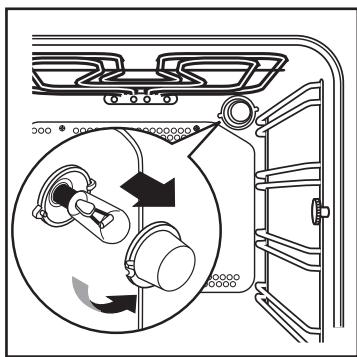
To replace the faulty bulb:
- Ensure the oven is isolated from the electrical supply.
- Push in and turn the glass cover anticlockwise.
- Remove the faulty bulb and replace with the new one.
- Refit the glass cover and restore the electrical supply.
Special Grease Filter

Make sure that the power supply is switched off before this action is performed.
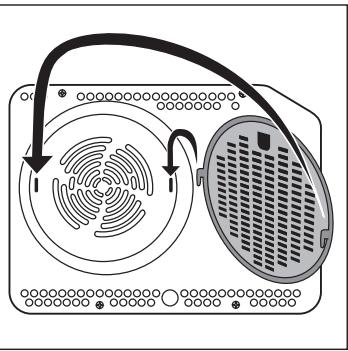
When roasting, the special grease filter must be inserted to minimise the contamination of the fan wheel in the back wall of the oven. When the roasting process is completed, the grease filter is to be removed as follows and thoroughly cleaned.
Press the filter spring upwards and remove the filter.
Important! The filter must be taken out when baking.
What happens if something goes wrong
If the appliance is not working correctly, please check the following before contacting the Electrolux Service Centre:
| PROBLEM | SOLUTION |
| ■ The oven is not switching on. | ◆ Check that both a cooking function and temperature have been selected.
or
◆ Check whether the appliance is correctly connected and the socket switch or the mains supply to the oven is ON. |
| ■ The oven temperature light does not come on. | ◆ Select a temperature with the thermostat control knob.
or
◆ Select a function with the oven function control knob. |
| ■ The oven light does not come on. | ◆ Select a cooking function with the oven function control knob.
or
◆ Check the light bulb, and replace it if necessary (see "Cleaning the Oven"). |
| ■ It takes too long to cook the dishes or they cook too quickly. | ◆ The temperature may need adjusting.
or
◆ Following the advice contained in these instructions, especially the section "Using the oven". |
| ■ Steam and condensation settle on the food and in the oven cavity. | ◆ When the cooking process is completed, do not leave the dishes standing in the oven for longer than 15-20 minutes. |
| ■ The oven fan is noisy. | ◆ Check that shelves and bakeware are not vibrating in contact with the oven back panel. |
| ■ The electronic programmer does not work. | ◆ Check the instructions for the timer. |
| ■ The display shows "12.00". | ◆ Set the time of day (see chapter "Setting the time of day"). |
Technical Data
Heating element ratings
Bottom heating element 1000 W
Full oven (Top+Bottom) 1800 W
Inner Grill 1650W
Full Grill 2450W
Fan cooking 1825W
Pizza 2650W
Oven light 25W
Hot air fan 25 W
Cooling Fan 25W
Total rating 2725W
Operating voltage (50 Hz) 230 V
Dimensions of the recess
Height under top mm 593
in column mm 580
Width mm 560
Depth mm 550
Oven
Height mm 335
Width mm 395
Depth mm 400
Oven capacity 531
Instructions for the Installer

Installation and connection must be done in compliance with the regulations in force. Any interventions must be carried out when the appliance is switched off. Only accredited engineers may work on the appliance.
The manufacturer disclaims any liability if the safety measures are not observed.
Connecting to the electrical supply
Before connecting to the electrical supply, please make sure:
- The fuse and the domestic electrical installation must be designed for the max. load of the appliance (see rating plate).
- The domestic electrical installation must be equipped with a proper earth connection in accordance with the regulations in force.
- The socket or the multi-pole off switch must be easy to access after the appliance has been installed.
This appliance is delivered with an electric supply cable.
A proper plug, according to the electric load specified on the rating plate, must be fitted to the cable. The plug is to be inserted into a suitable wall socket. If you require a direct connection to the electric network (mains), it will be necessary to fit between the appliance and the mains an omnipole switch, with a minimum gap between contacts of 3 mm, suitable for the required load and in compliance with rules in force. The green & yellow ground wire must not be interrupted by the switch and it should be 2-3 cm longer than the other cables.
The mains cable and plug as supplied are to be connected to a shockproof socket (230 V ~, 50 Hz). The shockproof socket must be installed in accordance with the regulations.
The following types of mains cable are suitable, taking the necessary rated cross section into account: H07 RN-F, H05 RN-F, H05 RR-F, H05 VV-F, H05 V2V2-F (T90), H05 BB-F.
The connection cable must in any case be laid out so that at no point does it reach 50°C (over room temperature).
After the connection has been carried out, the heating elements must be tested by being operated for about 3 minutes.
Terminal block
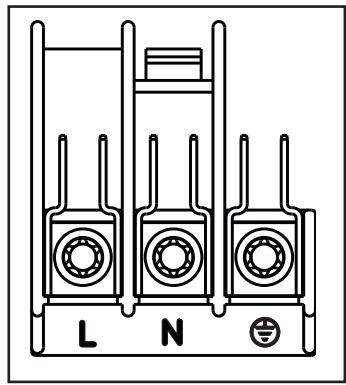
The oven is fitted with an easily accessible terminal block which is designed to operate with a single-phase power supply of 230V.
Letter L - Live terminal
Letter N - Neutral terminal

or E

.

F

h

on

n

Instructions for Building In
For problem-free functioning of the built-in appliance, the kitchen unit or the recess into which the appliance is built must have suitable dimensions.
In accordance with the regulations in force, all parts which ensure the shock protection of live and insulated parts must be fastened in such a way that they cannot be undone without tools.
These also include the fixing of any end walls at the beginning or end of a line of built-in units.
The shock protection must in any case be ensured by the building in of the appliance.
The appliance can be placed with its back or a side wall against higher kitchen units, appliances or walls. However, only other appliances or units of the same height as the appliance can be placed against the other side wall.
Oven dimensions (Fig. A)
Instructions for Building In
For problem-free functioning of the built-in appliance, the kitchen unit or the recess into which the appliance is built must have suitable dimensions (Fig. B-C).
Securing the Appliance to the Cabinet
- Open the oven door;
- Fasten the oven to the cabinet placing the four distance holders provided (Fig.D - A) which fit exactly into the holes in the frame and then fit four wood screws (Fig. D - B).
Fig. A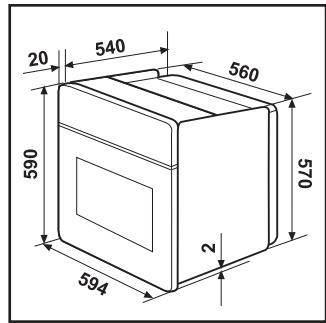
Fig. B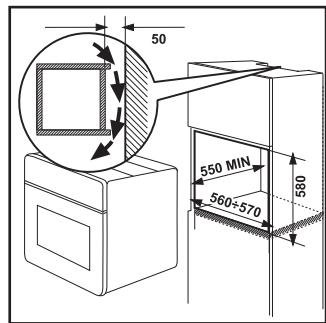
Fig. C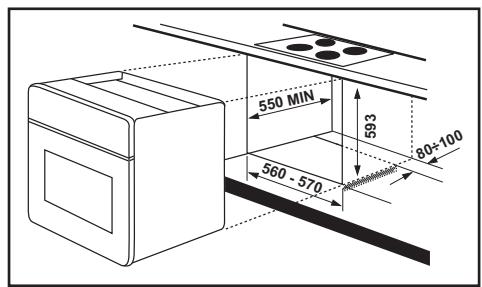
Fig. D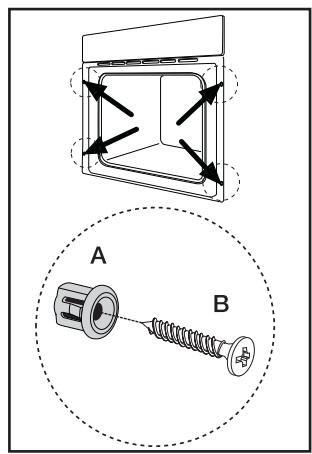
Declaration of guarantee terms
Belgium
Our appliances are produced with the greatest of care. However, a defect may still occur. Our consumer services department will repair this upon request, either during or after the guarantee period. The service life of the appliance will not, however, be reduced as a result.
This declaration of guarantee terms is based on European Union Directive 99/44/EC and the provisions of the Civil Code. The statutory rights that the consumer has under this legislation are not affected by this declaration of guarantee terms.
This declaration does not affect the vendor's statutory warranty to the end user. The appliance is guaranteed within the context of and in adherence with the following terms:
In accordance with the provisions laid down in paragraphs 2 to 15, we will remedy free of charge any defect that occurs within 24 months from the date the appliance is delivered to the first end user. These guarantee terms do not apply in the event of use for professional or equivalent purposes. 2. Performing the guarantee means that the appliance is returned to the condition it was in before the defect occurred. Defective parts are replaced or repaired. Parts replaced free of charge become our property. 3. So as to avoid more severe damage, the defect must be brought to our attention immediately. 4. Applying the guarantee is subject to the consumer providing proof of purchase showing the purchase and/or delivery date. 5. The guarantee will not apply if damage caused to delicate parts, such as glass (vitreous ceramic), synthetic materials and rubber, is the result of inappropriate use. 6. The guarantee cannot be called on for minor faults that do not affect the value or the overall reliability of the appliance. 7. The statutory warranty does not apply when defects are caused by:
- a chemical or electrochemical reaction caused by water,
- abnormal environmental conditions in general,
- unsuitable operating conditions,
- contact with harsh substances.
- The guarantee does not apply to defects due to transport which have occurred outside of our responsibility. Nor will the guarantee cover those caused by inadequate installation or assembly, lack of maintenance or failure to respect the assembly instructions or directions for use.
- Defects that result from repairs or measures carried out by people who are not qualified or expert or defects that result from the addition of non-original accessories or spare parts are not covered by the guarantee.
- Appliances that are easy to transport may be delivered or sent to the consumer services department. Home repairs are only anticipated for bulky appliances or built-in appliances.
- If the appliances are built-in, built-under, fixed or suspended in such a way that removing and replacing them in the place where they are fitted takes more than half an hour, the costs that result therefrom will be charged for. Connected damage caused by these removal and replacement operations will be the responsibility of the user.
- If, during the guarantee period, repairing the same defect repeatedly is not conclusive, or if the repair costs are considered disproportionate, in agreement with the consumer, the defective appliance may be replaced with another appliance of the same value.
In this event, we reserve the right to ask for a financial contribution calculated according to the length of time it has been used.
- A repair under guarantee does not mean that the normal guarantee period will be extended nor that a new guarantee period begins.
- We give a twelve month guarantee for repairs, limited to the same defect.
- Except in the event where liability is legally imposed, this declaration of guarantee terms excludes any compensation for damage outside the appliance for which the consumer wishes to assert his rights. In the event of legally admitted liability, compensation will not exceed the purchase price paid for the appliance.
These guarantee terms are only valid for appliances purchased and used in Belgium. For exported appliances, the user must first make sure that they satisfy the technical conditions (e.g.: voltage, frequency, installation instructions, etc.) for the country concerned and that they can withstand the local climatic and environmental conditions. For appliances purchased abroad, the user must first ensure that they meet the qualifications required in Belgium. Non-essential or requested adjustments are not covered by the guarantee and are not possible in all cases.
Our consumer services department is always at your disposal, even after the guarantee period has expired.
Address for our consumer services department: BELGIUM
| | Tel: | Fax: |
| Electrolux Home Products Belgium | Consumer services | 02/363.04.44 | 02/363.04.00 |
| ELECTROLUX SERVICE | | | 02/363.04.60 |
| Bergensesteuenweg 719 | | | |
| 1502 Lembeek | | | |
| E-mail: consumer.service@electrolux.be | | | |
GRAND-DUCHÉ DE LUXEMBOURG
ELECTROLUX HOME PRODUCTS Consumer services 0035242431-1 0035242 431-360
Rue de Bitbourg. 7
L-1273 Luxembourg-Hamm
E-mail: consumer-service.luxembourg@electrolux.lu
Service and spare parts
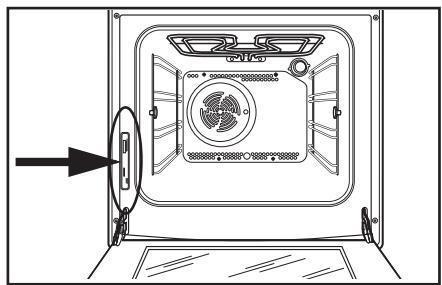
If after the checks listed in the chapter "What happens if something goes wrong", the appliance still does not work correctly, contact your local Service Centre, specifying the type of malfunctioning, the appliance model (Mod.), the product number (Prod. No.) and the serial number (Ser. No.) marked on the identification plate. This plate is placed on the front external edge of the oven cavity.
Original spare parts, certified by the product manufacturer and carrying this symbol, are only available at our Service Centre and authorized spare parts shops.
European Guarantee
This appliance is guaranteed by Electrolux in each of the countries listed at the back of this user manual, for the period specified in the appliance guarantee or otherwise by law. If you move from one of these countries to another of the countries listed below the appliance guarantee will move with you subject to the following qualifications:
- The appliance guarantee starts from the date you first purchased the appliance which will be evidenced by production of a valid purchase document issued by the seller of the appliance.
- The appliance guarantee is for the same period and to the same extent for labour and parts as exists in your new country of residence for this particular model or range of appliances. The appliance guarantee is personal to the original purchaser of the appliance and cannot be transferred to another user.
- The appliance is installed and used in accordance with instructions issued by Electrolux and is only used within the home, i.e., is not used for commercial purposes.
- The appliance is installed in accordance with all relevant regulations in force within your new country of residence.
The provisions of this European Guarantee do not affect any of the rights granted to you by law.
www.electrolux.com
| Albania | +35 5 4 261 450 | Rr. Pjeter Bogdani Nr. 7 Tirane |
| Belgique/België/Belgien | +32 2 363 04 44 | Bergensestenweg 719, 1502 Lembeek |
| Česká republika | +420 2 61 12 61 12 | Budějovická 3, Praha 4, 140 21 |
| Danmark | +45 70 11 74 00 | Sjaellandsgade 2, 7000 Fredericia |
| Deutschland | +49 180 32 26 622 | Muggenhofer Str. 135, 90429 Nürnberg |
| Eesti | +37 2 66 50 030 | Pämu mnt. 153, 11624 Tallinn |
| España | +34 902 11 63 88 | Carretera M-300, Km, 29,900 Alcalá de Henares Madrid |
| France | www.electrolux.fr | |
| Great Britain | +44 8705 929 929 | Addington Way, Luton, Bedfordshire LU4 9QQ |
| Helias | +30 23 10 56 19 70 | 4, Limnou Str., 54627 Thessaloniki |
| Hrvatska | +385 1 63 23 338 | Slavonska avenija 3, 10000 Zagreb |
| Ireland | +353 1 40 90 753 | Long Mile Road Dublin 12 |
| Italia | +39 (0) 434 558500 | C,so Lino Zanussi, 26 - 33080 Porcia (PN) |
| Latvija | +37 17 84 59 34 | Kr. Barona iela 130/2, LV-1012, Riga |
| Lithuania | +370 5 27 80 609 | Ozo 10A, LT 08200 Vilnius |
| Luxembourg | +35 2 42 43 13 01 | Rue de Bitbourg, 7, L-1273 Hamm |
| Magyarország | +36 1 252 1773 | H-1142 Budapest XIV, Erzsébet királyné útja 87 |
| Nederland | +31 17 24 68 300 | Vennootsweg 1, 2404 CG - Alphen aan den Rijn |
| Norge | +47 81 5 30 222 | Rislokkvn. 2, 0508 Oslo |
| Österreich | +43 18 66 400 | Herziggasse 9, 1230 Wien |
| Polska | +48 22 43 47 300 | Electrolux Poland sp. z o.o., ul. Kolejowa 5/7, 01-217 Warszawa |
| Portugal | +35 12 14 40 39 39 | Quinta da Fonte - Edificio Gonçalves Zarco - Q 35 -2774-518 Paço de Arcos |
| Romania | +40 21 451 20 30 | Str. Garii Progresului 2, S4, 040671 RO |
| Schweiz - Suisse - Svizzera | +41 62 88 99 111 | Industriestrasse 10, CH-5506 Mögenwil |
| Slovenija | +38 61 24 25 731 | Gerbičeva ulica 98, 1000 Ljubljana |
| Slovensko | +421 2 43 33 43 22 | Electrolux Slovakia s.r.o., Electrolux Domáce spotrebíče SK, Seberínho 1, 821 03 Bratislava |
| Suomi | www.electrolux.fi | |
| Sverige | +46 (0)771 76 76 76 | Electrolux Service, S:t Göransgatan 143, S-105 45 Stockholm |
| Türkije | +90 21 22 93 10 25 | Tarlabası caddesi no : 35 Taksim İstanbul |
| Russiya | +7 095 937 7837 | 129090 Moskva, Олипайский посмент, 16, БИ "Олимник" |
Unplug the appliance