
ASD-11R - Media player DENON - Free user manual and instructions
Find the device manual for free ASD-11R DENON in PDF.


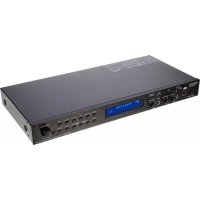
| Product Type | Media Player |
| Brand | Denon |
| Model | ASD-11R |
| Dimensions (W x D x H) | 430 x 250 x 60 mm |
| Weight | 2.5 kg |
| Power Supply | 100-240 V AC, 50/60 Hz |
| Power Consumption | 20 W (standby < 1 W) |
| Supported Disc Formats | DVD, DVD-R/RW, CD, CD-R/RW, MP3, JPEG |
| Video Outputs | HDMI, composite (RCA), component (YUV) |
| Audio Outputs | Stereo RCA, digital optical |
| Audio Signal-to-Noise Ratio | 110 dB |
| Main Functions | Disc playback, USB navigation, media file playback |
| Maintenance and Cleaning | Unplug before cleaning. Use a soft, dry cloth. Do not use chemicals. |
| Safety | Do not expose to moisture, liquids, or excessive heat. Unplug if not used for a long time. Do not block ventilation openings. |
| Spare Parts and Repairability | Contact Denon after-sales service. Recycle used batteries according to legislation. |
| General Information | Certifications: CE, EN60950, EN55022, EN55024, EN61000-3-2, EN61000-3-3. Conforms to directives 2006/95/EC and 2004/108/EC. |
Frequently Asked Questions - ASD-11R DENON
User questions about ASD-11R DENON
0 question about this device. Answer the ones you know or ask your own.
Ask a new question about this device
Download the instructions for your Media player in PDF format for free! Find your manual ASD-11R - DENON and take your electronic device back in hand. On this page are published all the documents necessary for the use of your device. ASD-11R by DENON.
USER MANUAL ASD-11R DENON
Control Dock for iPod
ASD-11R
Owner's Manual
Bedienungsanleitung
The lightning flash with arrowhead symbol, within an equilateral triangle, is intended to alert the user to the presence of uninsulated "dangerous voltage" within the product's enclosure that may be of sufficient magnitude to constitute a risk of electric shock to persons.

The exclamation point within an equilateral triangle is intended to alert the user to the presence of important operating and maintenance (servicing) instructions in the literature accompanying the appliance.
WARNING:
TO REDUCE THE RISK OF FIRE OR ELECTRIC SHOCK, DO NOT EXPOSE THIS APPLIANCE TO RAIN OR MOISTURE.
- DECLARATION OF CONFORMITY
We declare under our sole responsibility that this product, to which this declaration relates, is in conformity with the following standards: EN60950, EN55022, EN55024, EN61000-3-2 and EN61000-3-3. Following the provisions of 2006/95/EC and 2004/108/EC Directive.
Division of D&M Germany GmbH An der Landwehr 19, Nettetal, D-41334 Germany
CAUTION:
To completely disconnect this product from the mains, disconnect the plug from the wall socket outlet. The mains plug is used to completely interrupt the power supply to the unit and must be within easy access by the user.
VORSICHT:
- Avoid high temperatures.
Allow for sufficient heat dispersion when installed in a rack. - Handle the AC adapter carefully.
Hold the plug when unplugging the cord. - Keep the unit free from moisture, water, and dust.
- Unplug the AC adapter when not using the unit for long periods of time.
- Do not obstruct the ventilation holes.
- Do not let foreign objects into the unit.
- Do not let insecticides, benzene, and thinner come in contact with the unit.
- Never disassemble or modify the unit in any way.
- The ventilation should not be impeded by covering the ventilation openings with items, such as newspapers, tablecloths, curtains, etc.
- No naked flame sources, such as lighted candles, should be placed on the unit.
- Observe and follow local regulations regarding battery disposal.
- Do not expose the unit to dripping or splashing fluids.
- Do not place objects filled with liquids, such as vases, on the unit.
ACHTUNG:
A NOTE ABOUT RECYCLING:
This product's packaging materials are recyclable and can be reused. Please dispose of any materials in accordance with the local recycling regulations.
When discarding the unit, comply with local rules or regulations. Batteries should never be thrown away or incinerated but disposed of in accordance with the local regulations concerning battery disposal.
This product and the supplied accessories, excluding the batteries, constitute the applicable product according to the WEEE directive.

HINWEIS ZUM RECYCLING:
Cautions on Handling 2
Part Names and Functions 2
Top Panel / Rear Panel 2
Bottom Panel 2
Connections
iPod Connections 3
Connecting the AV Device 4
Connecting the AC Adapter 4
Playback
iPod Playback 5
Preparations 5
Playing Music or Video 6
Troubleshooting 7
Specifications 8
Getting Started
Thank you for purchasing this DENON product. To ensure proper operation, please read these owner's manual carefully before using the product.
After reading them, be sure to keep them for future reference.
Accessories
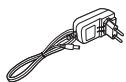
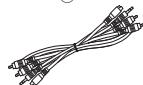
Check that the following parts are supplied with the product.
① Owner's manual. 1
② Service station list 1
③ AC adapter (KSAFC0600150W1UV-1)
④ Universal adapter (3 types) 1 each
⑤ AV/Control cable (Cable length: approx. 2m 1
③
④

5

Note that the illustrations in these instructions may differ from the actual unit for explanation purposes.

Made for
iPods
iPod is a trademark of Apple Inc., registered in the U.S.
※ The iPod may only be used to copy or play content ts that are not copyrighted or contents for which copying or playback is legally permitted for your private use as an individual. Be sure to comply with applicable copyright legislation.
NOTE
- Do not use any AC adapter other than the specified one. Doing so could result in fires or electric shock.
- The included AC adapter is exclusively for use with this unit. Never use it with other device.
Cautions on Handling
Pay attention to the following before using this unit:
- Moving the unit
To prevent short-circuits or damaged wires in the connection cables, always unplug the power supply cord and disconnect the connection cables between all other audio components when moving the unit.
- Cautions on using mobile phones
Using a mobile phone near this unit may result in noise. If so, move the mobile phone away from this unit when using it.
Part Names and Functions
For buttons not explained here, see the page indicated in parentheses ( ).
Top Panel / Rear Panel
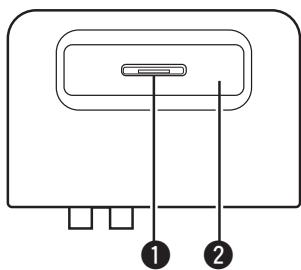
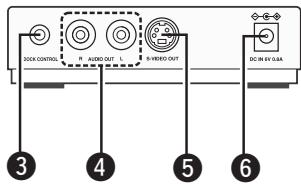
1 Dock connector (3)
Universal adapter slot (3)
3 DOCK CONTROL terminal (4)
4 AUDIO OUT terminals (4)
S-VIDEO OUT terminal (4)
DC IN terminal (6V / 0.8A) (4)
NOTE
- Do not use any AC adapter other than the specified one.
- Do not touch the inner pins of the jacks. Electrostatic discharge may cause permanent damage to the unit.
Bottom Panel
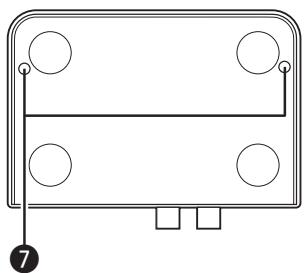
Fixing screw holes

Use the fixing screw holes (two) to fix the control dock by screw.
(Usable screws: M3, max. 4 mm in length)
Connections
When the ASD-11R is connected to a DENON AV device equipped with a dock control terminal, various iPod playback operations can be performed from the connected AV device.
NOTE
- Do not plug the AC adapter into a power outlet until all connections are completed.
- Also be sure to read the operating instructions of the AV device being connected.
iPod Connections
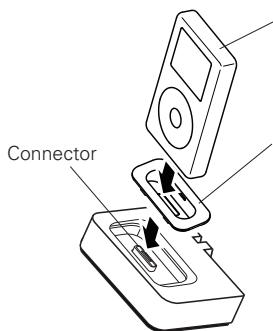
Adapter
Please make sure to fit adaptor (ASD-11R or attach to iPod) to connector part for use with your iPod.
NOTE
When plugging in or unplugging the iPod, please proceed carefully, adjusting the inclination of the connector so as not to place a burden upon the connector.
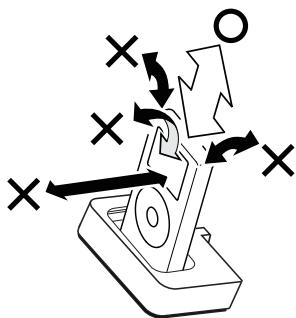
□About the adapter
Use the adapter included with the iPod.
No adapter is included with the iPods listed below. When using one of these iPods, use the adapter included with the ASD-11R.
| iPod | Stamp on back of adapter |
| iPod mini | mini |
| iPod Photo 30GB / iPod 20GB with color display | Photo 20GB, 30GB |
| iPod Photo 60GB / iPod 40GB with color display | Photo 60GB |

It is also possible to use a commercially available Apple Inc. adapter.
NOTE
- The ASD-11R does not support iPod shuffle.
- Be sure to remove the case when mounting an iPod. Failure to do so can result in faulty connection, in which case the iPod cannot be operated or played.
- Use an adapter suited for your iPod. Using the wrong adapter could damage the connectors on both sides.
□Removing the iPod
Set the power of the connected AV device to off or standby before removing the iPod.
Connecting the AV Device
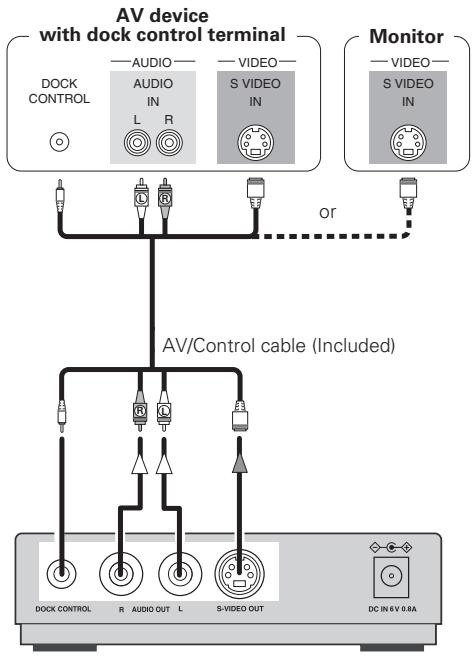
Signal direction
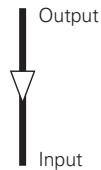
Audio signal

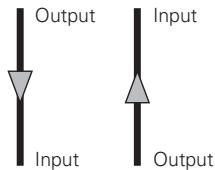
Video signal
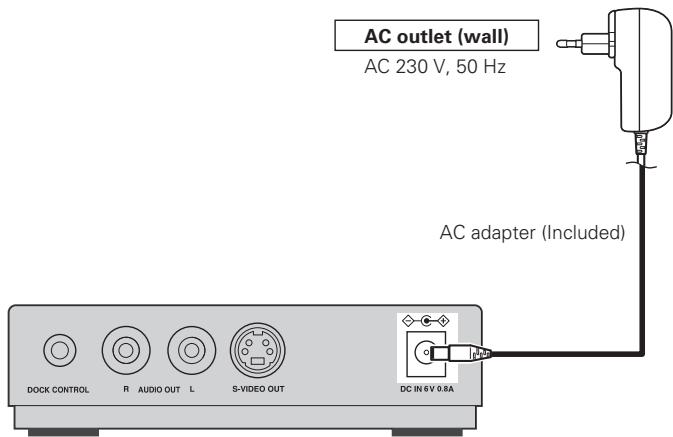
Connecting the AC Adapter
NOTE
- Connect the AC adaptor to a readily accessible power outlet. If a problem should arise, unplug the AC adaptor immediately.
- Do not use any AC adapter other than the included one.
- Be sure to unplug the AC adaptor from the power outlet when connecting and disconnecting to the plug to the power input terminal.
□About the ASD-11R's power operation
There is no power switch on the ASD-11R.
The power turns on when the AC adapter is connected to the ASD-11R and power outlet.
- When playing an iPod, power is supplied to the iPod.
- Power for charging is supplied when the iPod is stopped.
- A standby power (1W) is consumed when no iPod is connected.
Unplug the AC adapter from the power outlet when leaving home or not using for an extended period of time.
Playback
iPod Playback
Connect the ASD-11R to the AV device before connecting the iPod to the ASD-11R.
- iPod connections (14 page 3)
- Connecting the AV device (10 page 4)
Perform all the operations on the AV device or iPod connected to the ASD-11R.
NOTE
The method of operation differs according to the connected AV device. For details, refer to the section on playing iPods in the AV device's operating instructions.
Preparations
1 Switch the function of the AV device to which the ASD-11R is connected to "iPod".
Operate the AV device to switch the iPod's operating mode. Browse mode Remote mode
□About the browse and remote modes
| Browse mode | Remote mode | ||
| Where the iPod information is displayed | AV device's display | ○ | |
| Monitor screen | ○ | ||
| iPod's display | ○ | ||
| Usable control buttons | AV device | ○ | ○ |
| iPod | ○ | ||
Playing Music or Video
In the browse mode
Operate the connected AV device.
1 Select the file you want to play from the menu screen.
2 Press ENTER or Playback starts.
In the remote mode
Operation is possible from either the iPod or the connected AV device.
1 Select the file you want to play from the menu screen.
2 Press ENTER. Playback starts.
□Other playback functions
- Pause
- Manual search (fast-reverse / fast-forward)
- Auto search (cue)
Repeat
Shuffle
For details, refer to the section on playing iPods in the AV device's operating instructions.
NOTE
- Note that DENON will accept no responsibility whatsoever for loss of or damage to iPod data when using an iPod connected to the ASD-11R.
Depending on the iPod's software version, it may not be possible to operate the iPod with the ASD-11R. - See "www.denon.com/asd-11r/" for details on supported models and connection procedures.
Troubleshooting
If a problem should arise, first check the following:
- Are the connections correct?
- Is the set being operated as described in the owner's manual?
- Are the other components operating properly?
If this unit does not operate properly, check the items listed in the table below. Should the problem persist, there may be a malfunction. In this case, disconnect the power immediately and contact your store of purchase.
| Symptom | Cause | Countermeasure | Page |
| No sound is produced. No image appears on the monitor. | ·The iPod is not playing. ·The iPod is not properly connected to the ASD-11R. ·The AC adapter is not connected to the ASD-11R or a power outlet. ·The AV/Control cable is not properly connected. ·The monitor's input selection is not properly set. | ·Check that the iPod is playing. ·Check that the iPod is properly connected to the ASD-11R's dock connector. ·Check the connections. ·Check the connections. ·Set the monitor's input selector to the proper position for the connected video input terminal. | -3444 |
Specifications
Control Dock for iPod (ASD-11R)
Power supply: DC 6V
Power consumption: 1 W (When iPod is disconnected)
Maximum external dimensions: 104 (W) x 28.5 (H) x 76.5 (D) mm
Weight: 220 g
Terminal: Analog audio output terminals x 1,
S-Video output terminal x 1,
Control terminal x 1
AC adapter (KSAFC0600150W1UV-1)
Rated voltage: 100 - 240 V, 50/60 Hz
Rated current: 0.3 A
※ For purposes of improvement, specifications and design are subject to change without notice.

- ASD-11R
- WARNING:
- - DECLARATION OF CONFORMITY
- CAUTION:
- VORSICHT:
- ACHTUNG:
- A NOTE ABOUT RECYCLING:
- HINWEIS ZUM RECYCLING:
- Connections
- Playback
- Getting Started
- Accessories
- NOTE
- Cautions on Handling
- - Moving the unit
- - Cautions on using mobile phones
- Part Names and Functions
- Top Panel / Rear Panel
- Bottom Panel
- Fixing screw holes
- iPod Connections
- □About the adapter
- □Removing the iPod
- Connecting the AV Device
- Signal direction
- Connecting the AC Adapter
- □About the ASD-11R's power operation
- iPod Playback
- Preparations
- Playing Music or Video
- In the browse mode
- In the remote mode
- □Other playback functions
- Troubleshooting
- Specifications
- Control Dock for iPod (ASD-11R)
- AC adapter (KSAFC0600150W1UV-1)
Brand : DENON
Model : ASD-11R
Category : Media player