
4K Pro Webcam - Webcam LOGITECH - Free user manual and instructions
Find the device manual for free 4K Pro Webcam LOGITECH in PDF.


| Type of Product | Webcam |
| Brand | Logitech |
| Model | 4K Pro Webcam |
| Video Resolution | 4K Ultra HD (3840x2160) at 30fps |
| Field of View | 90° diagonal |
| Autofocus | Yes, with 5x digital zoom |
| Microphone | Dual omnidirectional microphones |
| Light Correction | RightLight2 technology |
| Privacy Shutter | Integrated, manual |
| Mounting | Clip with tripod mount |
| Connection | USB-C (cable included) |
| Dimensions (HxWxD) | 1.9 x 4.7 x 1.7 in (48 x 120 x 43 mm) |
| Weight | 0.5 lb (227 g) |
| Power Source | USB bus powered |
| System Requirements | Windows 8.1, 10, macOS 10.10+, Chrome OS |
| Compatible Software | Logitech Capture, Zoom, Microsoft Teams, etc. |
| Cleaning Instructions | Wipe with a soft, dry cloth |
| Safety Precautions | Avoid liquids, do not disassemble |
| Replaceable Parts | None, non-user-serviceable |
| Warranty | 1-year limited hardware warranty |
Frequently Asked Questions - 4K Pro Webcam LOGITECH
User questions about 4K Pro Webcam LOGITECH
0 question about this device. Answer the ones you know or ask your own.
Ask a new question about this device
Download the instructions for your Webcam in PDF format for free! Find your manual 4K Pro Webcam - LOGITECH and take your electronic device back in hand. On this page are published all the documents necessary for the use of your device. 4K Pro Webcam by LOGITECH.
USER MANUAL 4K Pro Webcam LOGITECH
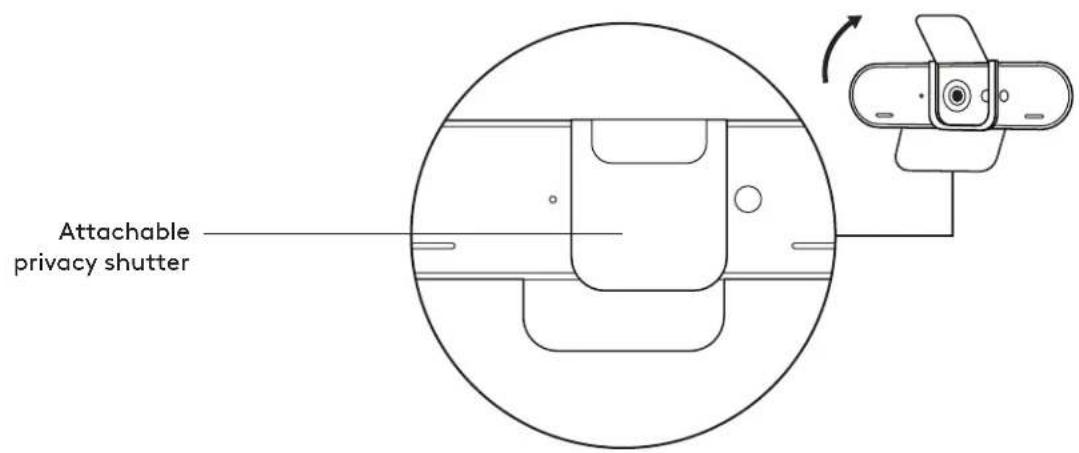


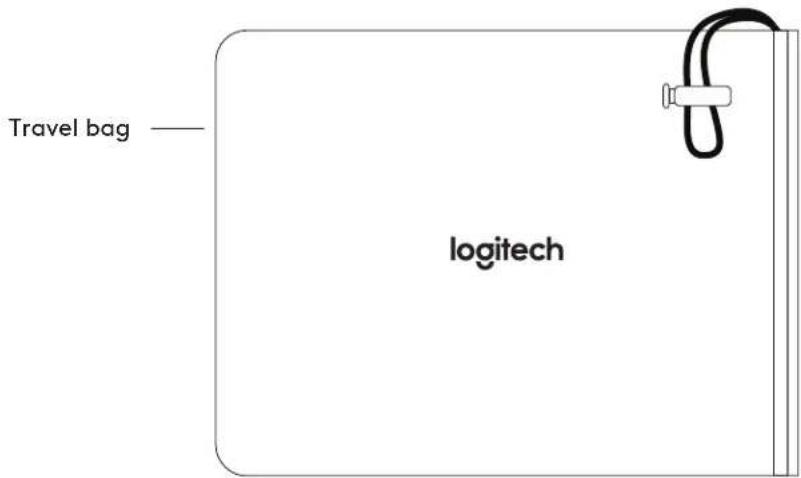
WHAT'S IN THE BOX
1 Webcam 2 External privacy shutter 3 Travel bag 4 Detachable universal mounting clip (on webcam) 5 7.2 ft (2.2m) USB-A to USB-C cable (USB 2.0 or 3.0) 6 User documentation

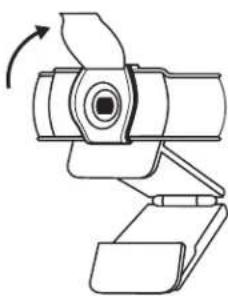
ATTACH THE PRIVACY SHUTTER
1 Attach the privacy shutter over the lens on the webcam as shown.

2 Snap it onto the front of the webcam, directly over the center.

3 Manually adjust the privacy shutter to open or close as desired.
SETTING UP THE WEBCAM
For placement on a monitor
1 Place your webcam on a computer, laptop or monitor at a position or angle you desire.

2 Adjust the webcam to make sure the foot on the universal mounting clip is flush with the back of your device.

3 Manually adjust the webcam up/down to the best position to frame yourself.

For placement on a tripod*
1 Remove the detachable universal mounting clip from the webcam.

2 Locate the 1/4 inch tripod thread on the bottom of the webcam.

3 Secure the webcam on your tripod by twisting it into the 1/4 inch thread.

4 Place your webcam with the tripod anywhere you desire to the best position to frame yourself.
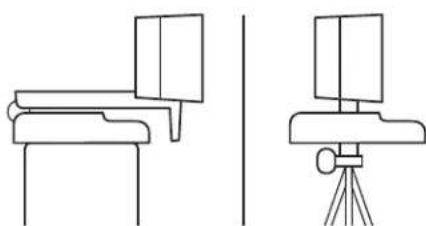
* Tripod not included
CONNECTING THE WEBCAM VIA USB-A
Plug the USB-C end into the webcam and the USB-A connector into the USB-A port on your computer.
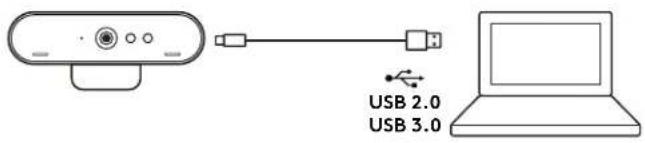
SUCCESSFUL CONNECTION
LED activity light will light up when the webcam is in use by an application.
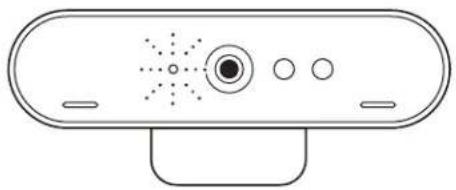
DIMENSIONS
WEBCAM:
Height x Width x Depth:
1.06 in (27 mm) x 4.02 in (102 mm) x 1.04 in (27 mm)
Cable Length: 7.2 ft (2.2 m)
Weight: 2.22 oz (63 g)
ATTACHABLE MOUNTING CLIP:
Height x Width x Depth:
0.75 in (19 mm) x 1.42 in (36 mm) x 2.48 in (63 mm)
Weight: 1.55 oz (44 g)
www.logitech.com/support/4kprowebcam
CONNECTING WEBCAM VIA USB-A
DIMENSIONS
WEBCAM:
Height x width x depth: 27 mm (1.06 in) x 102 mm (4.02 in) x 27 mm (1.04 in) Cable length: 2.2 m (7.2 ft) Weight: 63 g (2.22 oz)
REMOVABLE MOUNTING CLIP:
Height x width x depth: 19 mm (0.75 in) x 36 mm (1.42 in) x 63 mm (2.48 in) Weight: 44 g (1.55 oz)
www.logitech.com/support/briostream
BRIO 4K Pro Webcam
Setup Guide | Guide d'installation
1
2


Important Safety, Compliance and Warranty Information
Read Manual Before Product Use.
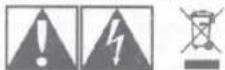
POWER SUPPLY WARNING! The power supply is for indoor use only. Only use the power supply included with your product. Do not attempt to repair or use a damaged power supply. Do not immerse the power supply in water or subject it to physical abuse. Inspect the power supply regularly for cable, plug, and casing damage.
BATTERY WARNING: Improperly replaced batteries may present a risk of leak or explosion and personal injury. Mistreated rechargeable batteries may present a risk of fire or chemical burn. Do not disassemble or expose to conducting materials, moisture, liquid, or heat above 54°C (130°F). Do not use or charge the battery if it appears to be leaking, discolored, deformed, or in any way abnormal. Do not leave your battery discharged or unused for extended periods. Do not short circuit. Your device may contain an internal, rechargeable battery that is not replaceable. Battery life varies with usage. Non-operational batteries should be discarded according to local laws. If no laws or regulations govern, dispose of your device in a waste bin for electronics. Keep batteries away from children.
Safe Usage Guidelines for Products
- Do not open or modify the product except for battery removal and replacement. • Do not disassemble or attempt to service this product. • This product is safe under normal and reasonably foreseeable misuse operating conditions. • If product is operating improperly, call Logitech support. • Product must be returned to the manufacturer for any service or repair.
- This is not a Children's Product and is not intended for use by children under 14 years old.
Logitech Compliance. For Product Safety, EMC, and RF information, go to www.logitech.com/compliance. Maintenance is not required for product compliance.
FCC statement
This device complies with Part 15 of the FCC Rules. Operation is subject to the following two conditions: 1) this device may not cause harmful interference, and 2) this device must accept any interference received, including interference that may cause undesired operation. This equipment has been tested and found to comply with the limits for a Class B digital device, pursuant to part 15 of the FCC Rules. These limits are designed to provide reasonable protection against harmful interference in a residential installation. This equipment generates, uses and can radiate radio frequency energy. And, if not installed and used in accordance with the instructions, may cause harmful interference to radio communications. However, there is no guarantee that interference will not occur in a particular installation. If this equipment does cause harmful interference to radio or television reception, which can be determined by turning the equipment off and on, the user is encouraged to try to correct the interference by one or more of the following measures:
• Reorient or relocate the receiving antenna. - Increase the separation between the equipment and receiver. - Connect the equipment into an outlet on a circuit different from that to which the receiver is connected. - Consult the dealer or an experienced radio/TV technician for help. Warning: Where shielded interface cables or accessories have been provided with the product or specified additional components or accessories elsewhere defined to be used with the installation of the product, they must be used in order to ensure compliance with FCC. Changes or modifications to product not expressly approved by Logitech, Inc could void your right to use or operate your product by the FCC.
Radiation Exposure Statement
This equipment complies with FCC and IC radiation exposure limits set forth for an uncontrolled environment. This equipment should be installed and operated with minimum distance 20cm between the radiator & your body. Caution: (i) the device for operation in the band 5150-5250 MHz is only for indoor use to reduce the potential for harmful interference to cochannel mobile satellite systems; (ii) high-power radars are allocated as primary users (i.e. priority users) of the bands 5250-5350 MHz and 5650-5850 MHz and that these radars could cause interference and/or damage to LELAN devices.
IC statement: CAN ICES-003 (B) / NMB-003 Class (B)
This device complies with Industry Canada licence-exempt RSS standard(s). Operation is subject to the following two conditions: (1) this device may not cause interference, and (2) this device must accept any interference, including interference that may cause undesired operation of the device. Cordless (Radio Transmitter) products: Section A. RSS-310 (27 MHz transmitters and receivers); This Category II radio communication device complies with Industry Canada Standard RSS-310. Section B. RSS-210 (2.4 GHz transmitters or transceivers); This Category I radio communication device complies with RSS-210 of Industry Canada.
Logitech Limited Hardware Product Warranty - A Summary
Logitech warrants that its hardware product shall be free from defects in materials and workmanship for the length of time identified on your product package beginning from the date of the original retail purchase. See support.logitech.com for specific warranty information about your product and procedures to act on a warranty claim. Logitech's entire liability and your exclusive remedy for any breach of warranty shall be, at Logitech's option, to repair or replace a functional equivalent of the product, or to refund the price paid, if the hardware is returned to the point of purchase or such other place as Logitech may direct along with a receipt. Warranty protections are in addition to rights provided under local consumer laws and may vary among countries. See full warranty information to know your consumer rights and the additional protections provided by this product warranty.
Logitech Address: Logitech, Inc., 7700 Gateway Blvd. Newark, California 94560.
Read Manual Before Product Use.
Use Guidelines: Safe & Proper Use of Your Product:
- Use the product with listed/certified ITE computers and accessories.
- Connect power supply or power cord to a properly wired and grounded electrical outlet.
Warning. Risk of fire or explosion if the battery is replaced by an incorrect type. Ensure batteries are installed correctly by following the instructions provided. A battery subjected to extremely low air pressure may result in an explosion or the leakage of flammable liquid or gas.

Infrared light. Possible skin or eye damage. Disconnect power before servicing.

Caution. Connect all power cords to a properly wired and grounded electrical outlet.

Do not ingest battery, Chemical Burn Hazard. This product contains a coin/button cell battery. If the coin/button cell battery is swallowed, it can cause severe internal burns in just 2 hours and can lead to death. Keep new and used batteries away from children. If the battery compartment does not close securely, stop using the product and keep it away from children. If you think batteries might have been swallowed or placed inside any part of the body, seek immediate medical attention.


- WHAT'S IN THE BOX
- ATTACH THE PRIVACY SHUTTER
- SETTING UP THE WEBCAM
- CONNECTING THE WEBCAM VIA USB-A
- SUCCESSFUL CONNECTION
- DIMENSIONS
- WEBCAM
- ATTACHABLE MOUNTING CLIP
- CONNECTING WEBCAM VIA USB-A
- REMOVABLE MOUNTING CLIP
- BRIO 4K PRO WEBCAM
- SAFE USAGE GUIDELINES FOR PRODUCTS
- FCC STATEMENT
- RADIATION EXPOSURE STATEMENT
- IC STATEMENT: CAN ICES-003 (B) / NMB-003 CLASS (B)
- LOGITECH LIMITED HARDWARE PRODUCT WARRANTY - A SUMMARY
Brand : LOGITECH
Model : 4K Pro Webcam
Category : Webcam