
IAN 339565 - Clock AURIOL - Free user manual and instructions
Find the device manual for free IAN 339565 AURIOL in PDF.


| Product Type | Household Electronic Device |
| Brand | Auriol |
| Model | IAN 339565 |
| Dimensions (approx.) | 20 x 15 x 2 cm |
| Weight (approx.) | 300 g |
| Power Supply | 2 x AAA batteries (1.5 V) |
| Material | Stainless steel and ABS plastic |
| Display | LCD digital display |
| Functions | Tare, auto-off, overload indication |
| Measurement Range | Up to 5 kg |
| Accuracy | ±1 g |
| Cleaning | Wipe with a damp cloth, avoid immersion |
| Safety | Use on a flat, stable surface |
| Spare Parts Availability | Not available separately |
| Reparability | Not user-serviceable; contact support |
| Battery Replacement | Required when display dims |
| Auto-Off Time | Approximately 2 minutes |
| Intended Use | Household kitchen use |
Frequently Asked Questions - IAN 339565 AURIOL
User questions about IAN 339565 AURIOL
0 question about this device. Answer the ones you know or ask your own.
Ask a new question about this device
Download the instructions for your Clock in PDF format for free! Find your manual IAN 339565 - AURIOL and take your electronic device back in hand. On this page are published all the documents necessary for the use of your device. IAN 339565 by AURIOL.
USER MANUAL IAN 339565 AURIOL


RADIO-CONTROLLED BATHROOM CLOCK
RADIO-CONTROLLED BATHROOM CLOCK
Operation and safety notes
RADIO-CONTROLLED BATHROOM CLOCK
GB Operation and safety notes Page 5
![graph TD A[" "] --> B[" "] B --> C[" "] C --> D[" "] D --> E[" "] E --> F[" "] F --> G[" "] G --> H[" "] H --> I[" "] I --> J[" "] J --> K[" "] K --> L[" "] L --> M[" "] M --> N[" "] N --> O[" "] O --> P[" "] P --> Q[" "] Q --> R[" "] R --> S[" "] S --> T[" "] T --> U[" "] U --> V[" "] V --> W[" "]…](/content/2026/06/1346213/images/41de3b7bbee3108e6fd7853f2a0e55be5c80cad5cace7027d4b8b853a2df2216.jpg)
![graph TD A["OPEN"] --> B["Process"] B --> C["Close"] C --> D["End"]](/content/2026/06/1346213/images/b468ff672d1dc4582b8190c7d9842b06e07c978f6646c38474336437edef672f.jpg)


List of pictograms used ...... Page 6
Introduction Page 6
Intended use....Page 6
Description of parts ...... Page 7
Technical data Page 7
Scope of delivery....Page 7
Safety instructions....Page 8
General safety information ...... Page 8
Thermometer / Hygrometer....Page 10
Before initial use....Page 10
Using the mounting hold, the bracket stand or the suction cups ..... Page 11
Operation......Page 12
Receiving the DCF radio time signal .... Page 12
Setting the time manually....Page 13
Resetting the settings ...... Page 13
Cleaning and care Page 13
Disposal Page 14
Simplified EU declaration of conformity....Page 15
Warranty Page 15
| List of pictograms used | |||
 | Direct current Temperature display |  | |
 | Fragile Humidity display |  | |
 | Radio control |  | Splashproof |
RADIO-CONTROLLED BATHROOM CLOCK
● Introduction
We congratulate you on the purchase of your new product. You have chosen a high quality product. The instructions for use are part of the product. They contain important information concerning safety, use and disposal. Before using the product, please familiarise yourself with all of the safety information and instructions for use. Only use the product as described and for the specified applications. If you pass the product on to anyone else, please ensure that you also pass on all the documentation with it.
Intended use
The product is intended for use indoors at normal room temperatures only. The product is not intended for commercial use. The product shows time and indoor temperature and humidity.
• Description of parts
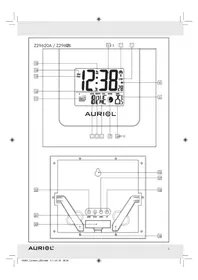
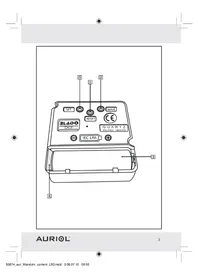
1 Mounting hold 2 RESET button 3 REC button 4 SET button 5 Battery compartment 6 Bracket stand
Technical data
Temperature display: -40 to +60 °C
Humidity display: 0 to 100 %
Battery type: 1 x 1.5 V --- AA, LR6
Quartz movement: DCF RC movement
Radio signal: DCF77
Frequency band: 77.5 kHz
Degree of protection: IPX4 (splash-proof)
- Scope of delivery
Immediately after unpacking, please check the package contents for completeness and if the product and all parts are in good condition.
1 Radio-controlled bathroom clock 1 Battery 1 x 1.5 V — AA, LR6 (included) 1 Operating instructions 1 Bracket stand (placed inside the back case) for placing the product on a flat surface

Safety instructions
WARNING! Please read all safety information and instructions. Failure to comply with the safety information and instructions may result in fire and/or severe injuries.

General safety information


WARNING! DANGER TO LIFE AND ACCIDENT HAZARD
FOR TODDLERS AND SMALL CHILDREN! Never allow children to
play unsupervised with the packaging material. There is a danger of suffocation from the packaging material. Children frequently underestimate the dangers.
This product can be used by children aged from 8 years and above and persons with reduced physical, sensory or mental capabilities or lack of experience and knowledge if they have been given supervision or instruction concerning use of the product in a safe way and understand the hazards involved. Children shall not play with the product. Cleaning and user maintenance shall not be made by children without supervision.
- Do not use the product if it is damaged. Repairs should only be carried out by specialist personnel.

Safety instructions for batteries / rechargeable batteries
DANGER TO LIFE! Keep batteries / rechargeable batteries out of reach of children. If accidentally swallowed seek immediate medical attention.
Swallowing may lead to burns, perforation of soft tissue, and death. Severe burns can occur within 2 hours of ingestion.

DANGER OF EXPLOSION! Never recharge non-rechargeable batteries. Do not short-circuit batteries / rechargeable batteries and / or open them. Overheating, fire or bursting can be the result.
- Never throw batteries / rechargeable batteries into fire or water.
- Do not exert mechanical loads to batteries / rechargeable batteries.
Risk of leakage of batteries / rechargeable batteries
- Avoid extreme environmental conditions and temperatures, which could affect batteries / rechargeable batteries, e.g. radiators / direct sunlight. If batteries / rechargeable batteries have leaked, avoid contact with skin, eyes and mucous membranes with the chemicals! Flush immediately the affected areas with fresh water and seek medical attention!

WEAR PROTECTIVE GLOVES! Leaked or damaged batteries / rechargeable batteries can cause burns on contact with the skin. Wear suitable protective gloves at all times if such an event occurs.
In the event of a leakage of batteries / rechargeable batteries, immediately remove them from the product to prevent damage. ■ Remove batteries / rechargeable batteries if the product will not be used for a longer period.
Risk of damage of the product
■ Only use the specified type of battery / rechargeable battery!
- Insert batteries / rechargeable batteries according to polarity marks (+) and (−) on the battery / rechargeable battery and the product.
- Clean the contacts on the battery / rechargeable battery and in the battery compartment before inserting! ■ Remove exhausted batteries / rechargeable batteries from the product immediately.
● Thermometer / Hygrometer
The product features has a digital display at the 6 o'clock position, which shows the temperature and humidity alternatingly in 20-second intervals. ■ After unpacking the product and inserting the battery: It may take some time before the temperature and humidity sensors have adjusted to their new surroundings and correct values are displayed.
Before initial use
■ Turn the product over. Place the product on a soft underlay to avoid scratching the surface. - Hold the front case of the product in one hand and the back case with the other hand. Turn the back case in a counter-clockwise direction until the arrow is facing the 11 o'clock position (as seen at the back) and matching the arrow on the front case (fig. C). - Remove the back case. Insert the battery into the battery compartment, placing first the - contact and then pushing down at the + contact. Place back the back case with the arrow of the front case matching the one on the back case. ■ Turn the back case in a clockwise direction until it matches the mark at the top.
The product is now ready for use.
Radio signal:
HG06169A-B:
The DCF signal (time signal transmitter) consists of time pulses emitted by one of the most accurate clocks in the world. This clock is located close to Frankfurt / Main, Germany and it can usually achieve an accuracy within a hundredth of a second relative to the time standard.
Your radio-controlled wall clock receives these signals under ideal conditions up to a distance of approx. 1,500 km around Frankfurt / Main. Reception of the radio signal generally takes approx. 3 to 12 minutes.
Note: Reception may be considerably reduced by obstructions (e.g. concrete walls) or sources of interference (e.g. other electrical products). In the event of reception problems, change the position of the wall clock (e.g. to somewhere near a window).
- Using the mounting hold, the bracket stand or the suction cups
- You can hang the product on a wall using the mounting hold at the back.
- You can place the product on a flat surface using the bracket stand 6 placed inside the back case. Remove the bracket stand from the opened back case. Place the semi-round part in the slot at the bottom of the front case. Close the back case (see "Before initial use").
The product can also be attached to a smooth, dry and flat surface (for example: Mirror, glass, glazed tiles).
- Porous, matte or uneven surfaces are not suitable (for example: Tiles with a relief pattern or terracotta). To achieve a stronger connection, wet the suction cups before attaching the product and clean the surface on which you intend to attach the product. To remove the product, release all suction cups first (for example, by inserting a fingernail under the rim of each suction cup).
Operation
- Receiving the DCF radio time signal
- Insert a 1.5 V AA / LR6 battery with the correct polarity into the battery compartment on the back of the product. The wall clock automatically starts to search for the DCF radio time signal. This process takes about 3 to 12 minutes to complete.
Within 4 minutes, the hands will move to 12 o'clock. The radio signal reception is initiated once all the hands have moved to the 12 o'clock position. After 3 to 10 minutes, the clock will receive the signal and set itself to the exact time.
The reception of the DCF radio time signal by the wall clock can also be started manually.
Press and hold the REC button at least 5 seconds. The wall clock attempts to receive the DCF radio time signal. This process takes a few minutes to complete.
Note: If the wall clock was not able to receive the DCF radio time signal because of errors, e.g. due to your location being at too great a distance from the transmitter or for other reasons, you can set the time manually. The manually set value is overwritten as soon as reception of the DCF radio time signal is successful.
Note: For products intended for Latvia, the display stops at "01:00".
- Setting the time manually
Press and hold the SET button for at least 3 seconds. The wall clock switches into manual mode. Press and hold the SET button again until the hands reach the correct position for you to set the time. Briefly pressing the SET button moves the hands forward in one-minute steps to enable you to set the current time manually.
Note: After 8 seconds without pressing the SET button 4, the wall clock switches out of manual mode and keeps the time as normal. The manually set value is overwritten as soon as the reception of the DCF radio time signal is successful.
- Resetting the settings
Press the RESET button to reset the radio clock settings. Alternatively, remove the battery from the product and insert it again. The product now automatically starts to search for the DCF radio time signal.
Note: Press RESET button 2 with a pointed object (e.g., pencil).
● Cleaning and care
The product should only be cleaned on the outside with a soft dry cloth. If the wall clock is not going to be used, remove the battery.
Note: When the battery voltage is depleted after about 9 months (depending on reception quality), the second hand will stop moving. However, the hour and minute will keep on showing the right time until the battery voltage is too low, after which the clock will stop completely.
It is advised to change a new battery as soon as this occurs.
● Disposal
The packaging is made entirely of recyclable materials, which you may dispose of at local recycling facilities.

Observe the marking of the packaging materials for waste separation, which are marked with abbreviations (a) and numbers (b) with following meaning: 1 - 7: plastics / 20 - 22: paper and fibreboard / 80 - 98: composite materials.

The product and packaging materials are recyclable, dispose of it separately for better waste treatment. The Triman logo is valid in France only.

Contact your local refuse disposal authority for more details of how to dispose of your worn-out product.

To help protect the environment, please dispose of the product properly when it has reached the end of its useful life and not in the household waste. Information on collection points and their opening hours can be obtained from your local authority.
Faulty or used batteries / rechargeable batteries must be recycled in accordance with Directive 2006/66/EC and its amendments. Please return the batteries / rechargeable batteries and / or the product to the available collection points.

Environmental damage through incorrect disposal of the batteries / rechargeable batteries!
Batteries / rechargeable batteries may not be disposed of with the usual domestic waste. They may contain toxic heavy metals and are subject to hazardous waste treatment rules and regulations. The chemical symbols for heavy metals are as follows: Cd = cadmium, Hg = mercury, Pb = lead. That is why you should dispose of used batteries / rechargeable batteries at a local collection point.
● Simplified EU declaration of conformity
Hereby, OWIM GmbH & Co. KG, Stiftsbergstraße 1, 74167 Neckarsulm, GERMANY, declares that the product RADIO-CONTROLLED BATHROOM CLOCK, HG06169A / HG06169B, is in compliance with Directives 2014/53/EU and 2011/65/EU.
The full text of the EU declaration of conformity is available at the following internet address: www.owim.com
Warranty
The product has been manufactured to strict quality guidelines and meticulously examined before delivery. In the event of product defects you have legal rights against the retailer of this product. Your legal rights are not limited in any way by our warranty detailed below.
The warranty for this product is 3 years from the date of purchase. Should this product show any fault in materials or manufacture within 3 years from the date of purchase, we will repair or replace it – at our choice – free of charge to you.
The warranty period begins on the date of purchase. Please keep the original sales receipt in a safe location. This document is required as your proof of purchase. This warranty becomes void if the product has been damaged, or used or maintained improperly.
The warranty applies to defects in material or manufacture. This warranty does not cover product parts subject to normal wear, thus possibly considered consumables (e.g. batteries) or for damage to fragile parts, e.g. switches, rechargeable batteries or glass parts.
Warranty claim procedure
To ensure quick processing of your case, please observe the following instructions:
Please have the till receipt and the item number (e.g. IAN 123456_7890) available as proof of purchase.
You will find the item number on the type plate, an engraving on the front page of the instructions (bottom left), or as a sticker on the rear or bottom of the appliance.
If functional or other defects occur, please contact the service department listed either by telephone or by e-mail.
You can return a defective product to us free of charge to the service address that will be provided to you. Ensure that you enclose the proof of purchase (till receipt) and information about what the defect is and when it occurred.
Service

Service Great Britain
Tel.: 0800 404 7657
E-Mail: owim@lidl.co.uk
CE
IPX4
Authorized service center:
OWIM GmbH & Co. KG
Stiftsbergstraße 1
74167 Neckarsulm
GERMANY



- RADIO-CONTROLLED BATHROOM CLOCK
- LIST OF PICTOGRAMS USED ...... PAGE
- INTRODUCTION PAGE
- SAFETY INSTRUCTIONS....PAGE
- THERMOMETER / HYGROMETER....PAGE
- BEFORE INITIAL USE....PAGE
- OPERATION......PAGE
- CLEANING AND CARE PAGE
- DISPOSAL PAGE
- SIMPLIFIED EU DECLARATION OF CONFORMITY....PAGE
- WARRANTY PAGE
- ● INTRODUCTION
- INTENDED USE
- DESCRIPTION OF PARTS
- TECHNICAL DATA
- SCOPE OF DELIVERY
- SAFETY INSTRUCTIONS
- GENERAL SAFETY INFORMATION
- WARNING! DANGER TO LIFE AND ACCIDENT HAZARD
- FOR TODDLERS AND SMALL CHILDREN! NEVER ALLOW CHILDREN TO
- SAFETY INSTRUCTIONS FOR BATTERIES / RECHARGEABLE BATTERIES
- RISK OF LEAKAGE OF BATTERIES / RECHARGEABLE BATTERIES
- RISK OF DAMAGE OF THE PRODUCT
- ● THERMOMETER / HYGROMETER
- BEFORE INITIAL USE
- RADIO SIGNAL
- HG06169A-B
- USING THE MOUNTING HOLD, THE BRACKET STAND OR THE SUCTION CUPS
- OPERATION
- RECEIVING THE DCF RADIO TIME SIGNAL
- SETTING THE TIME MANUALLY
- RESETTING THE SETTINGS
- ● CLEANING AND CARE
- ● DISPOSAL
- ENVIRONMENTAL DAMAGE THROUGH INCORRECT DISPOSAL OF THE BATTERIES / RECHARGEABLE BATTERIES
- ● SIMPLIFIED EU DECLARATION OF CONFORMITY
- WARRANTY
- WARRANTY CLAIM PROCEDURE
- SERVICE
- SERVICE GREAT BRITAIN
- CE
- IPX
- AUTHORIZED SERVICE CENTER
Brand : AURIOL
Model : IAN 339565
Category : Clock