
G300, G500, G600, G600S, G700, G700S, G9X, G300S, G500S - Mouse LOGITECH - Free user manual and instructions
Find the device manual for free G300, G500, G600, G600S, G700, G700S, G9X, G300S, G500S LOGITECH in PDF.



| Product type | Laser gaming mouse |
| Brand | Logitech |
| Compatible models | G9X, G300, G500, G600, G600S, G700, G700S, G300S, G500S |
| Dimensions (approx.) | 120 x 70 x 40 mm |
| Weight (without added weights) | Approximately 100 g |
| Maximum weight with weights | Up to 128 g (adding 28 g max) |
| Power supply | USB (5 V, 500 mA) |
| Sensor resolution | 200 to 5,000 dpi (adjustable) |
| USB report rate | 125 to 1,000 reports/s |
| Scroll wheel | MicroGear™ dual-mode (notched and ultra-fast) |
| Programmable buttons | 8 buttons (including multidirectional wheel) |
| Onboard memory | 5 mouse profiles |
| Interchangeable shells | Wide grip (satin touch) and precision grip (DryGrip) |
| Weight system | Spring-loaded cartridge with 8 weights (7 g and 4 g) |
| Customizable lighting | RGB LED indicators for resolution and profile |
| Cable length | 2.1 m (braided) |
| Maintenance and cleaning | Clean with a dry cloth, avoid liquids |
| Safety | Class 1 laser, do not stare into beam, temperature 0-40°C |
| Spare parts and repairability | Shells and weights sold separately at logitech.com |
| Warranty | 3 years (limited hardware warranty) |
| Configuration software | Logitech SetPoint (free download) |
Frequently Asked Questions - G300, G500, G600, G600S, G700, G700S, G9X, G300S, G500S LOGITECH
User questions about G300, G500, G600, G600S, G700, G700S, G9X, G300S, G500S LOGITECH
0 question about this device. Answer the ones you know or ask your own.
Ask a new question about this device
Download the instructions for your Mouse in PDF format for free! Find your manual G300, G500, G600, G600S, G700, G700S, G9X, G300S, G500S - LOGITECH and take your electronic device back in hand. On this page are published all the documents necessary for the use of your device. G300, G500, G600, G600S, G700, G700S, G9X, G300S, G500S by LOGITECH.
USER MANUAL G300, G500, G600, G600S, G700, G700S, G9X, G300S, G500S LOGITECH
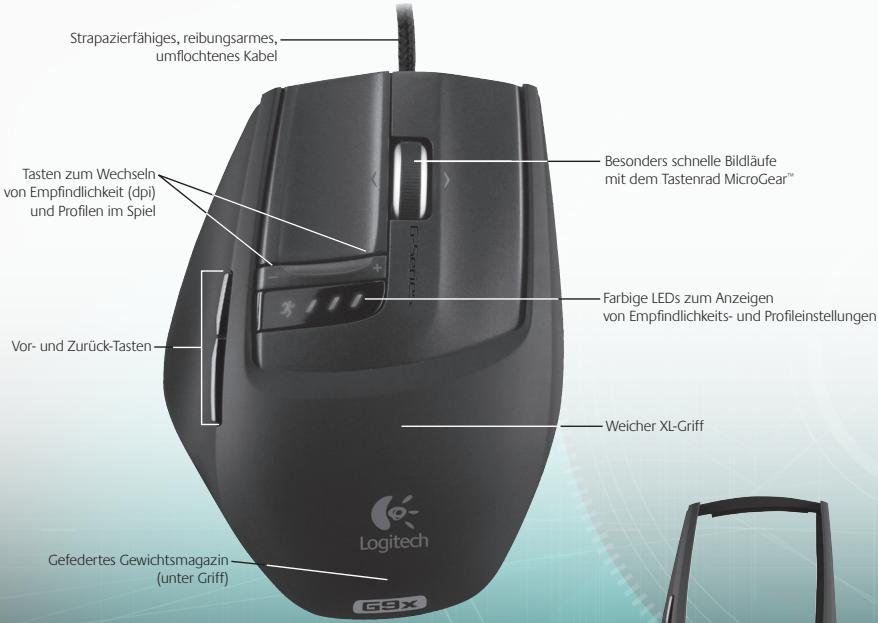
G9x Laser Mouse Features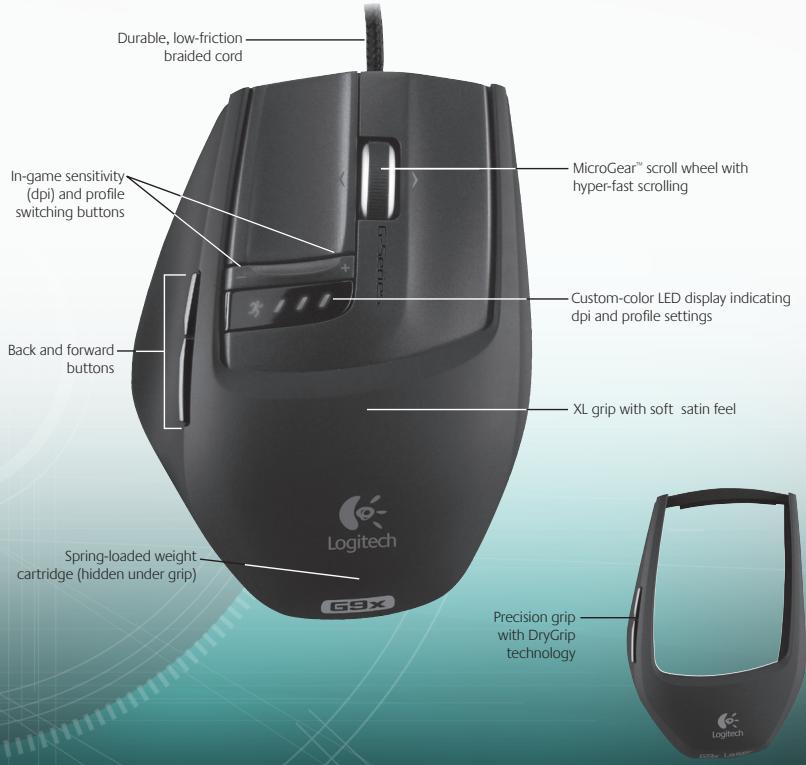
G9x Laser Mouse Features (continued)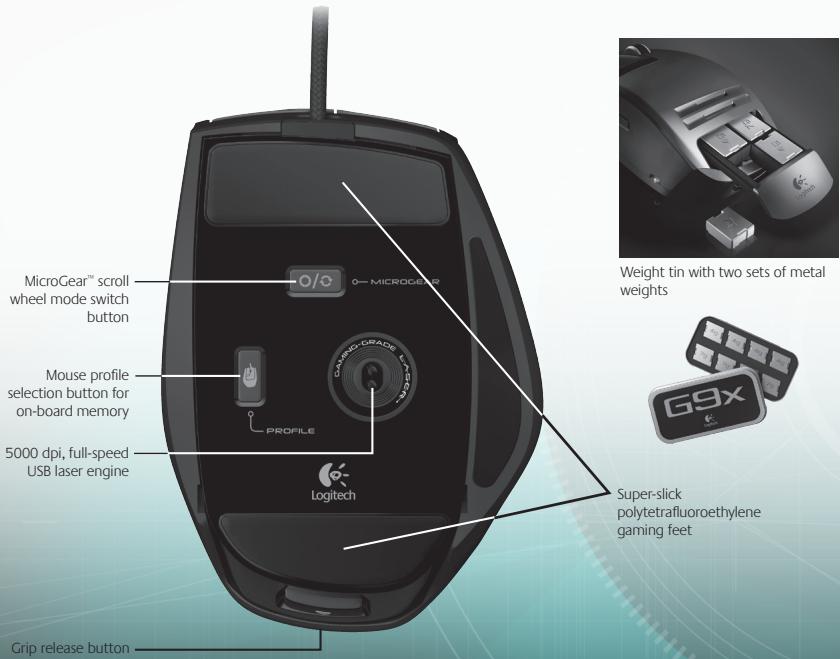
Setup and Installation
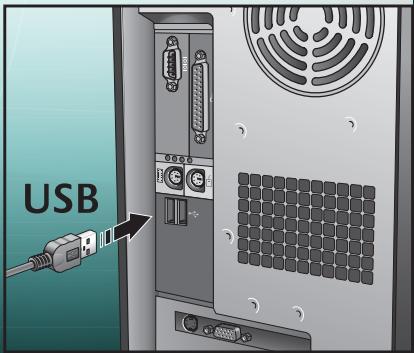
The Logitech® G9x Laser Mouse is a full-speed, USB device. To use, plug your mouse USB cable into your computer's USB port. Your G9x is ready to go with full functionality already optimized for game play.


http://www.logitech.com/downloads
To unlock full customization, download Logitech® SetPoint® configuration panel (for updates, visit www.logitech.com). Your G9x comes with special SetPoint® features that allow you to configure personalized mouse settings and save these settings directly in your mouse for TRUE PLUG-AND-PLAY PERFORMANCE.
Interchangeable Grips
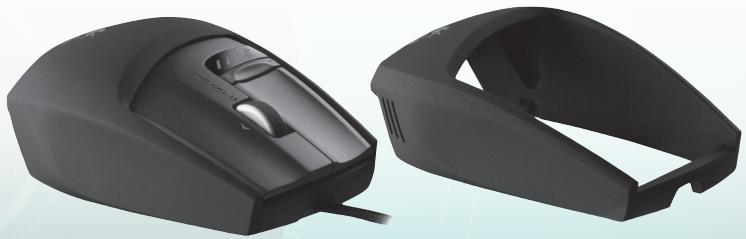
Your G9x Laser Mouse lets you adjust the comfort and design of your mouse with interchangeable grips.
Choose the XL Grip if you want a fuller shape and wider thumb rest. XL Grip comes in a soft, satin finish for the ultimate in comfort.
Choose the Precision Grip if you like a compact shape, optimal for smaller hands and fingertip control. The Precision Grip is coated with DryGrip technology to wick away sweat during long gaming sessions.
Remove Grips by pressing the release button on the back of the mouse. Swap between XL and Precision, or choose from additional styles of grips sold separately online.
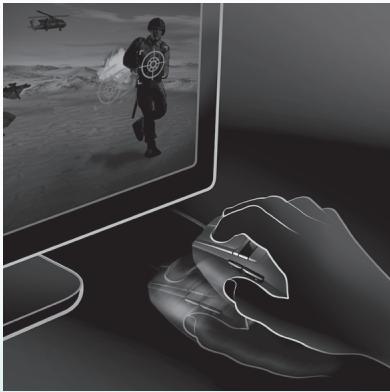
Ultra Gaming-Grade Precision
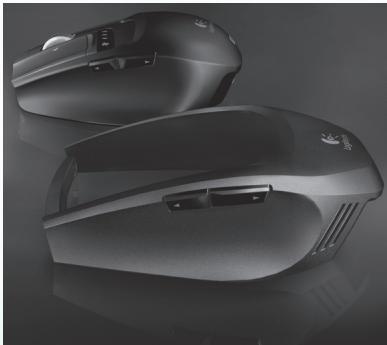
Your G9x delivers the most advanced technology for superior tracking precision and speed. When it comes to your game, you'll feel the difference in cursor responsiveness and control.
The gaming-grade 5000 dpi Laser Engine gives you pixel-precise tracking at any speed. The dpi resolution affects cursor speed across the screen. You can adjust the dpi resolution setting from 200 to 5000 dpi. Your preferred dpi settings can be determined in the SetPoint® software and saved to your G9x's on-board memory for access without software. You can then use the G9x's dpi adjust buttons to change dpi on-the-fly to vary cursor speed in different situations. Lower dpi settings enable you to snipe with pinpoint accuracy, while higher dpi settings are great for situations where you need speed (e.g., in a tank). This feature is also valuable to adjust for your screen resolution.
Full-Speed USB gives instant response and no lag. Most conventional mice only report 125 reports/second. With Full-Speed USB, the G9x reports up to 1000 reports/second. SetPoint® software allows you to adjust your report rate (polling speed) in your mouse. As report rate increases, more PC resources are used.
Weight Tuning System
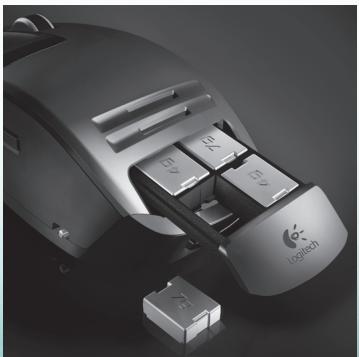
Many gamers have a preference for the weight of their mouse. Some like a mouse with more heft, something that feels substantial and easy to control. Others prefer a lightweight mouse, especially gamers who skate and lift their mouse often. A lighter mouse can offer speed and cause less fatigue for these gamers. The G9x's weight tuning system accommodates your needs as a gamer so you get the feel best suited to the way you play.
A complete weight tuning system comes with your G9x Laser Mouse, including a weight tin containing eight mix-and-match metal weights of 7g and 4g. You can add up to 28g of additional weight. Just pop the Grip off, and you'll reveal the spring-loaded inset weight cartridge. Push in the cartridge (see the Logitech® logo), and the cartridge will pop out. Insert the weights to your liking for a customized mouse weight. Feel the difference a few grams make.
MicroGear™ Precision Scroll Wheel with Hyper-Fast Scrolling
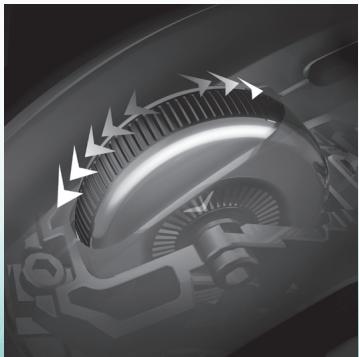
Once you experience the MicroGear™ Precision Scroll Wheel, it'll be hard to go back. This exclusive advanced scroll wheel technology offers dual modes. In Ratchet mode, you get distinct click-to-click ratcheted scrolling, which is perfect for precise weapon selection and is preferred in games. However, gamers inevitably use their gaming mouse to do other things on their PC, and by switching into Hyper-Fast mode, the wheel instantly delivers frictionless inertia scrolling through long documents. Flip through hundreds of pages in seconds.
In order to switch between Ratchet and HyperFast scrolling modes, simply push the wheel toggle button on the bottom of your mouse. Your scroll wheel also has a programmable middle button, as well as a programmable tilt wheel for extra button functionality.
Plug and Play Performance with On-Board Memory
Many gamers hate drivers and software when it comes to their mouse. Anything that could potentially slow down the game is not good. And when travelling to LAN parties, tournaments or any other PC, you want a consistent experience on your mouse.
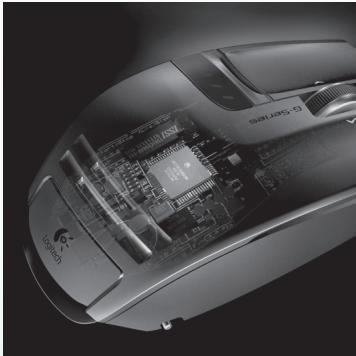
Now, with on-board memory and an enhanced SetPoint® configuration panel, you can configure your mouse to your liking – and keep these settings working on your mouse without software for the fastest performance. No matter which PC you're on, your mouse will work the way you want it to.
To get true plug-and-play performance, you can save mouse settings in up to 5 profiles in on-board memory.
Profiles
Go to www.logitech.com for more detailed information on configuring and using your mouse setting profiles. Help is also available as you navigate through the configuration panel in SetPoint's advanced software for the G9x.
Your G9x can store up to 5 profiles of mouse settings in on-board memory on your mouse hardware, but when using the SetPoint® software, you can save many more profiles on your hard drive. Out of the box, your G9x comes with 3 pre-configured profiles in on-board memory. You can store up to 2 more on your mouse (choose from the profiles you create in software), or reduce down to a single profile on your mouse.
There are many mouse settings that can be configured in a profile. These include:
- Button assignments
- Keyboard macros assignable to mouse buttons • DPI settings (dpi levels, number of dpi levels)
- LED display color (choose from broad color spectrum) • Report rate (125-1000 reports/second)
You need to have SetPoint® installed in order to configure your profiles. However, once you set up and save a profile, you can designate up to five of your profiles to be “burned” into your G9x’s onboard memory. If you use your mouse on another PC or un-install SetPoint®, your mouse settings for those profiles will still work on your G9x. (Note: There are a few special settings that can only work while SetPoint® is running on your PC; in the case you choose a setting where this is true, SetPoint® will notify you.)
With SetPoint® running, you can also enable Application Detection if you choose. When Application Detection is running, the profiles in on-board memory are not necessarily active (unless you specify application-specific behavior for them). You will not be able to toggle between profiles using your mouse switching buttons.
There will be a main profile on your mouse (Profile 1 shipped out-of-box) that will be enabled for all applications when Application Detection is running. This main profile can be edited. You can then designate additional profiles in your Profile Library to run when your PC detects a specific application or game running. Your mouse will automatically employ the designated profile settings once it detects the corresponding application. In all other applications where a specific profile is not specified, the mouse will employ the main profile behavior.
Custom-Color LED Display
Underneath the dpi adjust buttons, your G9x has an LED display. The LEDs indicate both dpi and on-board memory profile settings.
The G9x allows you to change the color of the LEDs to your preference using SetPoint® software. Choose your favorite colors from a broad color spectrum. You can assign a different color to each profile so you can always tell which profile is enabled by the color of the LEDs.
LED Display Settings
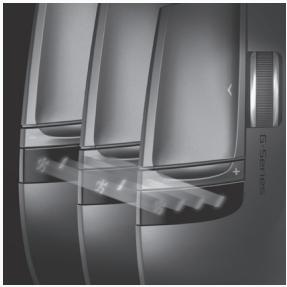
LED settings will always be indicated in ascending order from left to right. The lighting scheme will change depending on the number of dpi and profile settings you choose to have, but in all cases, the LEDs will light up to indicate lowest setting on the left to highest setting on the right.
This LED display by default will indicate what dpi setting is active (DPI Mode). When the Profile button (bottom of the mouse) is being pressed (Profile Mode), the LEDs will indicate which profile setting stored in on-board memory is enabled. In this Profile Mode, the running man LED will blink to show you are able to actively change the profile setting. When the mouse is in DPI mode, pressing the + and - buttons will change dpi setting. When in Profile Mode, these same buttons will change the Profile setting.
Note: When Application Detection is enabled in SetPoint®, the LEDs will only indicate dpi settings and not profile settings.
G9x Laser Mouse: Tune for the Way You Play
Your G9x Laser Mouse offers the ultimate in customization to enhance your gaming experience. Every detail of this mouse was scrutinized and optimized for game play. By listening to gamers like you, we believe we've created a mouse for the most discriminating gamer. For more information on the G9x's features and how they can help your game, visit www.logitech.com.
Compliance
Important Ergonomic Information: Long periods of repetitive motion using an improperly set-up workspace, incorrect body position, and poor work habits may be associated with physical discomfort and injury to nerves, tendons, and muscles. If you feel pain, numbness, weakness, swelling, burning, cramping, or stiffness in your hands, wrists, arms, shoulders, neck, or back, see a qualified health professional. For more information, please read the Comfort Guidelines located on the Logitech® web site at http://www.logitech.com/comfort, or on the Logitech® Software.
International Standards and Safety. This optical device complies with International Standard IEC 60825-1: 2001-08, Class 1 Laser Product Invisible and also complies with 21 CFR 1040.10 and 1040.11, except for deviations pursuant to Laser Notice Nr. 50, dated July 26, 2001: Emission of a parallel beam of infrared user-invisible light Maximum power 716 microwatts CW, wavelength range 832 - 865 nanometers Operating temperature between 0°C (32°F) to 40°C (104°F). CAUTION: This optical device has no serviceable parts. Use of controls or adjustments or performance of procedures other than those specified herein may result in hazardous radiation exposure. Guidelines for safe and efficient Use. A Class 1 Laser Product is safe under reasonably foreseeable conditions of operation, including the use of optical instruments for intrabeam viewing. It is recommended to observe the following precautions: 1. Do not direct the infrared beam at anyone's eye. 2. In the absence of proper operation and if troubleshooting is unsuccessful, switch off the device and call Logitech technical support. 3. Do not attempt to disassemble your product unless it is for end-of-life disposal. 4. Do not expose your product to liquid, humidity, or moisture. 5. Do not operate your product when the temperature is outside the specified operating range of 0°C (32°F) to 40°C (104°F). 6. In case of exposure to out-of-range temperature environment, switch off the device, and allow temperature to stabilize within the specified operating temperature range before operating.
Compliance. Your product is FCC and CE compliant; it is also UL tested and should only be used with other UL listed devices. For compliance information, go to http://www.logitech.com/compliance.

A message about the environment and disposal of this product.
To help conserve resources and protect our health and the environment, we—and your government—use this symbol to remind you that you are obliged to treat electronic equipment, including batteries, separately from regular household waste. For more information on designated disposal/recycling centers, please contact your local authority.
Logitech® Hardware Product Limited Warranty
Logitech™ warrants that your Logitech hardware product shall be free from defects in material and workmanship for three (3) years, beginning from the date of purchase. Except where prohibited by applicable law, this warranty is nontransferable and is limited to the original purchaser. This warranty gives you specific legal rights, and you may also have other rights that vary under local laws.
Remedies
Logitech's entire liability and your exclusive remedy for any breach of warranty shall be, at Logitech's option, (1) to repair or replace the hardware, or (2) to refund the price paid, provided that the hardware is returned to the point of purchase, or such other place as Logitech may direct, with a copy of the sales receipt or dated itemized receipt. Shipping and handling charges may apply except where prohibited by applicable law. Logitech may, at its option, use new or refurbished or used parts in good working condition to repair or replace any hardware product. Any replacement hardware product will be warranted for the remainder of the original warranty period, or thirty (30) days, whichever is longer, or for any additional period of time that may be applicable in your jurisdiction.
Limits of Warranty
This warranty does not cover problems or damage resulting from (1) accident, abuse, misapplication, or any unauthorized repair, modification, or disassembly; (2) improper operation or maintenance, usage not in accordance with product instructions, or connection to improper voltage supply; or (3) use of consumables, such as replacement batteries, not supplied by Logitech, except where such restriction is prohibited by applicable law.
How to Obtain Warranty Support
Before submitting a warranty claim, we recommend you visit the support section at www.logitech.com for technical assistance. Valid warranty claims are generally processed through the point of purchase during the first thirty (30) days after purchase; however, this period of time may vary depending on where you purchased your product. Please check with Logitech or the retailer where you purchased your product for details. Warranty claims that cannot be processed through the point of purchase and any other product related questions should be addressed directly to Logitech. The addresses and customer service contact information for Logitech can be found in the documentation accompanying your product and on the web at www.logitech.com/contactus.
Limitation of Liability
LOGITECH SHALL NOT BE LIABLE FOR ANY SPECIAL, INDIRECT, INCIDENTAL, OR CONSEQUENTIAL DAMAGES WHATSOEVER, INCLUDING BUT NOT LIMITED TO LOSS OF PROFITS, REVENUE OR DATA (WHETHER DIRECT OR INDIRECT) OR COMMERCIAL LOSS FOR BREACH OF ANY EXPRESS OR IMPLIED WARRANTY ON YOUR PRODUCT, EVEN IF LOGITECH HAS BEEN ADVISED OF THE POSSIBILITY OF SUCH DAMAGES. Some jurisdictions do not allow the exclusion or limitation of special, indirect, incidental, or consequential damages, so the above limitation or exclusion may not apply to you.
Duration of Implied Warranties
EXCEPT TO THE EXTENT PROHIBITED BY APPLICABLE LAW, ANY IMPLIED WARRANTY OR CONDITION OF MERCHANTABILITY OR FITNESS FOR A PARTICULAR PURPOSE ON THIS HARDWARE PRODUCT IS LIMITED IN DURATION TO THE DURATION OF THE APPLICABLE LIMITED WARRANTY PERIOD FOR YOUR PRODUCT. Some jurisdictions do not allow limitations on how long an implied warranty lasts, so the above limitation may not apply to you.
National Statutory Rights
Consumers have legal rights under applicable national legislation governing the sale of consumer goods. Such rights are not affected by the warranties in this Limited Warranty.
No Other Warranties
No Logitech dealer, agent, or employee is authorized to make any modification, extension, or addition to this warranty.
Logitech® Address.
Logitech, Inc., 6505 Kaiser Drive, Fremont, California 94555, U.S.A.
G9x Laser Mouse - Features

http://www.logitech.com/downloads
Weight Tuning
Profiles
LED Settings
http://www.logitech.com/compliance.

Profiles
Compliance

http://www.logitech.com/downloads
Profiles
Compliance
Absolute Gaming-Grade Precision
Plug and Play with Built-in Memory
Profiles
Compliance

http://www.logitech.com/downloads
Unheard-of Precision in Gaming
Adjustable Weights
Plug-and-Play with Built-in Memory
Profiles
Type Approval
Profiles
Approval

http://www.logitech.com/downloads
Fine adjustment of weight
Profiles
Profile



- SETUP AND INSTALLATION
- INTERCHANGEABLE GRIPS
- ULTRA GAMING-GRADE PRECISION
- WEIGHT TUNING SYSTEM
- MICROGEAR™ PRECISION SCROLL WHEEL WITH HYPER-FAST SCROLLING
- PLUG AND PLAY PERFORMANCE WITH ON-BOARD MEMORY
- PROFILES
- CUSTOM-COLOR LED DISPLAY
- LED DISPLAY SETTINGS
- G9X LASER MOUSE: TUNE FOR THE WAY YOU PLAY
- COMPLIANCE
- A MESSAGE ABOUT THE ENVIRONMENT AND DISPOSAL OF THIS PRODUCT
- LOGITECH® HARDWARE PRODUCT LIMITED WARRANTY
- REMEDIES
- LIMITS OF WARRANTY
- HOW TO OBTAIN WARRANTY SUPPORT
- LIMITATION OF LIABILITY
- DURATION OF IMPLIED WARRANTIES
- NATIONAL STATUTORY RIGHTS
- NO OTHER WARRANTIES
- LOGITECH® ADDRESS
- G9X LASER MOUSE - FEATURES
- WEIGHT TUNING
- LED SETTINGS
- ABSOLUTE GAMING-GRADE PRECISION
- PLUG AND PLAY WITH BUILT-IN MEMORY
- UNHEARD-OF PRECISION IN GAMING
- ADJUSTABLE WEIGHTS
- PLUG-AND-PLAY WITH BUILT-IN MEMORY
- TYPE APPROVAL
- APPROVAL
- FINE ADJUSTMENT OF WEIGHT
- PROFILE
Brand : LOGITECH
Model : G300, G500, G600, G600S, G700, G700S, G9X, G300S, G500S
Category : Mouse