
SBKN 4.0 B1 - Earphones SILVERCREST - Free user manual and instructions
Find the device manual for free SBKN 4.0 B1 SILVERCREST in PDF.


| Product Type | In-Ear Bluetooth Earphones |
| Model | SBKN 4.0 B1 |
| Brand | SilverCrest |
| Bluetooth Version | 4.0 |
| Driver Diameter | 10 mm |
| Frequency Response | 20 Hz - 20 kHz |
| Impedance | 16 Ω |
| Sensitivity | 98 dB |
| Battery Type | Lithium-ion rechargeable |
| Battery Capacity (Earbuds) | 50 mAh each |
| Battery Capacity (Charging Case) | 300 mAh |
| Music Playback Time | Up to 4 hours |
| Charging Time | Approx. 2 hours |
| Dimensions (Earbud) | Approx. 2.5 x 1.8 x 1.5 cm |
| Weight (Total with Case) | Approx. 35 g |
| Microphone | Built-in with hands-free support |
| Controls | Multifunction button on earbuds |
| Water Resistance | IPX4 (splash-proof) |
| Supported Profiles | A2DP, AVRCP, HSP, HFP |
| Included Accessories | Charging cable, 3 sizes ear tips, carrying case |
| Cleaning | Wipe with dry cloth; do not use liquids |
| Safety | Avoid prolonged high volume to prevent hearing damage |
| Spare Parts Availability | Ear tips and charging cables available from manufacturer |
Frequently Asked Questions - SBKN 4.0 B1 SILVERCREST
User questions about SBKN 4.0 B1 SILVERCREST
0 question about this device. Answer the ones you know or ask your own.
Ask a new question about this device
Download the instructions for your Earphones in PDF format for free! Find your manual SBKN 4.0 B1 - SILVERCREST and take your electronic device back in hand. On this page are published all the documents necessary for the use of your device. SBKN 4.0 B1 by SILVERCREST.
USER MANUAL SBKN 4.0 B1 SILVERCREST
Bluetooth® Headphones SBKN 4.0 B1
GB
Operating instructions and safety instructions
SK
Last Information Update
Safety instructions....7
Copyright 11
Overview of the controls and button functions 12
Prior to use.... 13
Charging the battery 13
First use 13
Switching the headphones on/off....13
Connecting headphones....14
Putting on the headphones....15
Replacing ear pads 15
Music playback....16
Making calls....17
Troubleshooting 18
Information on non-use 18
Environmental and disposal information 19
Conformity information.... 19
Warranty and servicing advice.... 20
Congratulations!
By purchasing the SilverCrest SBKN 4.0 B1 Bluetooth ® headphones, hereinafter referred to as headphones, you have opted for a high-quality product.
Familiarise yourself with the headphones before using them for the first time, and read these operating instructions carefully. Pay particular attention to the safety instructions and use the headphones only as described in these operating instructions and for the specified range of applications.
Keep these operating instructions in a safe place. Include all documents when passing on the headphones to someone else.
Trademarks
The Bluetooth ® word mark and logos are registered trademarks of Bluetooth SIG, Inc. (Special Interest Group). Any use of these marks by TARGA GmbH is under licence. The SilverCrest trademark and the SilverCrest brand are the property of their respective owners.
USB is a registered trademark.
Other names and products may be the trademarks or registered trademarks of their respective owners.
Intended use
These headphones are an information technology device which is used to listen to music at a reasonable volume. The headphones can also be used as a headset. The headphones may only be used privately and not for industrial or commercial purposes. Furthermore, the headphones may not be used in tropical climates. The manufacturer does not accept any liability for any resulting damage or faults in the event of unauthorised modifications to the headphones. Only use accessories specified by the manufacturer. Please observe the regulations and laws in the country of use.
Supplied items

A SilverCrest SBKN 4.0 B1 Bluetooth ® headphones
B Ear pad - medium (mounted)
C USB charging cable
D Ear pad - large
E Ear pad - small
F These instructions (symbolic representation)
Technical data
| Operating voltage 5V | ### |
| Battery capacity 110mAh | |
| Bluetooth®specification v4.0 + EDR | |
| Profile support A2DP, AVRCP, HSP, HFP | |
| Frequency range of headphones (for music playback) | 20Hz - 20,000Hz |
| Range of Bluetooth®operation up to 10 metres (class II) | |
| Charging time approx. 2.5 hours | |
| Standby time approx. 300 hours | |
| Music playback time approx. 6.5 hours * | |
| Talk time approx. 7 hours * | |
| Dimensions (W x H x D) approx. 154 x 145 x 10mm | |
| Weight approx. 29g | |
| Operating temperature 0°C to +40°C | |
| Storage temperature -10°C to +20°C | |
| Air humidity max. 85% rel. humidity | (non-condensing) |
* at medium volume
The technical data and design may be changed without notification.
Safety instructions
Before using these headphones for the first time, please read the following instructions carefully and take note of the safety warnings, even if you are familiar with the use of electronic devices. Store these instructions in a safe place for future reference. If you sell or pass on the headphones to someone else, be sure to always include these operating instructions as they are an integral part of the product.
Explanation of the hazard symbols used in these instructions

DANGER! This symbol in conjunction with the "danger" note indicates an imminent dangerous situation which, if not prevented, could result in serious injury or even death.

WARNING! This symbol in conjunction with the "warning" note indicates important information for safe operation of the device and the safety of the user.

Take care when using headphones. Listening at high volume for prolonged periods of time can damage your hearing. Before using the headphones, set the volume to the lowest level.

This symbol indicates other important information on the topic.

DANGER! Radio interface
Switch off the headphones in aircraft, hospitals, operating rooms or in the vicinity of medical electronic systems. The transmitted radio waves can impair the functionality of sensitive devices. Keep the headphones at least 20cm away from any pacemakers or implantable cardioverter defibrillators because the proper functioning of the pacemaker or implantable cardioverter defibrillator can be impaired by radio waves. The transmitted radio waves can cause interference in hearing aids. Do not place the device in the vicinity of flammable gases or in a potentially explosive environment (e.g. paint shop) when the radio components are switched on because the transmitted radio waves can cause an explosion or a fire. The range of the radio waves is dependent on conditions in the surrounding environment. In the event of data traffic via a wireless connection, it is also possible for unauthorised third parties to receive data. Targa GmbH is not responsible for radio or television interference caused by unauthorised changes to this device. In addition, Targa assumes no responsibility for the replacement or exchange of connecting lines and devices not indicated by Targa GmbH. The user is solely responsible for the elimination of interference caused by such unauthorised changes and for the replacement or exchange of the devices.

DANGER! Risk of explosion!
The headphones must not be thrown into a fire because the built-in battery may explode.

DANGER! Children and persons with disabilities
These headphones can be used by children aged 8 and older and by persons with reduced physical, sensory or mental abilities or lack of experience and knowledge if they are supervised or have been instructed on the safe use of the headphones and understand the resulting risks. Children must not play with the headphones. Cleaning and user maintenance must not be carried out by children without supervision. Small parts can be fatal if swallowed.
Always keep plastic packaging away from children.

DANGER! It poses a suffocation risk!

WARNING! Ensure that
- no direct heat sources (e.g. heating) can affect the headphones
- the headphones are not exposed to bright artificial light
- any contact with splashed and dripping water and corrosive liquids is avoided and the headphones are not operated in the vicinity of water. In particular, the headphones should never be submerged in liquid; do not place any vessels filled with liquid, for example, vases or drinks, on or near the headphones
- the headphones are not used in the immediate vicinity of magnetic fields (e.g. speakers)
- no fire sources (e.g. burning candles) are placed on or near the headphones
- no foreign objects penetrate the device
- the headphones are never subjected to extreme temperature fluctuations as this could result in condensation and electrical short circuits. If the headphones were subjected to extreme temperature fluctuations, however, wait (approx. 2 hours) until the headphones have reached ambient temperature before use
- the headphones are never subjected to excessive shocks and vibrations
- when using an optional USB power supply, its operating instructions are observed
- connected cables are always laid in such a manner that nobody can step on them or trip over them. There is a risk of injury
- no objects are placed on a connected cable and cables are not connected over sharp edges because they could be damaged otherwise.

WARNING! Maintenance / cleaning
It is necessary to repair the headphones if they have been damaged in any way, for example, if the housing is damaged, if liquid or object penetrated the device or if the product has been exposed to rain or moisture. Repair work is also required if the device is not working properly or has been dropped. If smoke is produced, or there are any unusual sounds or smells, turn the headphones off immediately. In such cases, the headphones should not be used until they have been inspected by authorised service personnel. Only have the device repaired by qualified personnel. Never open the housing of the headphones.
Only use a clean, dry cloth for cleaning the headphones and never use any corrosive liquids. Use a slightly damp cloth and a mild cleaning agent to remove stubborn dirt.
Remove the ear pads in order to clean them. Clean the ear pads under running water. Dry the ear pads well. Put the ear pads on again only when they are completely dry. For further details, please read the section "Replacing ear pads".
Never try to open the housing of the headphones. This would void your warranty.
Operating environment
The headphones are not designed for use in environments with a high temperature or humidity (e.g. bathrooms), and must be kept free from dust. Operating temperatures and operating air humidity: 0° C to 40° C, max. 85% rel. humidity.
Copyright
All information contained in these instructions is subject to copyright and is provided for information purposes only. It is only permitted to copy or duplicate data and information with the express and written consent of the author. This also includes commercial use of the content and data. The text and illustrations are based on the state of the art at the time of printing.
Overview of the controls and button functions
An illustration of the controls with the relevant reference numbers can be found on the fold-out inside cover of these instructions. You can leave this cover page folded out while reading further sections of these instructions. Thus you always keep a reference to the relevant control in sight.
1 Neckband
2 + button
3 Multifunction button
4 LED
5 - button
6 Earphones (including ear pads)
7 Charging socket
8 Microphone
Prior to use
Take the headphones and the accessories out of the packaging and remove all packaging material completely.
Charging the battery
Before the first use or when the built-in battery is empty, you charge it as follows:
- Carefully remove the cover from the charging socket (7) and rotate it sideways.
- Connect the supplied USB charging cable (C) to the charging socket (7) and a free USB socket of your computer when it is switched on or a USB power supply (not supplied).
- When charging, the LED (4) indicates the following statuses of the device:
| Headphones | Battery is charging | Battery is charged |
| not connected | LED lights up orange | LED lights up blue |
| connected | LED lights up orange and flashes blue periodically | LED lights up blue and flashes periodically |
- After charging, disconnect the USB charging cable (C) and put the cover back on the charging socket (7).
Never cover the headphones while they are charging as they can become heated.
The orange LED (4) flashes when the battery is low.
First use
Switching the headphones on/off
Switch on the headphones by pressing the multifunction button (3) for at least 2 seconds. You hear an ascending tone sequence in the headphones. The device
also vibrates briefly. The LED (4) flashes orange and thus indicates standby mode. If the headphones were switched on for the first time and had never been connected to a device, pairing mode is started automatically. The LED (4) alternates between flashing blue and orange in pairing mode. Read the next section when connecting your device.
Press the multifunction button (3) for at least 3 seconds to switch off the headphones. You hear a descending tone sequence in the headphones. The device also vibrates briefly.
Connecting headphones
Proceed as follows to connect the headphones to your device:
- Switch off the headphones.
- To start pairing mode, press the multifunction button (3) for at least 6 seconds until the LED (4) alternates between flashing blue and orange.
- The headphones are now in search mode. In search mode, you can connect a compatible device to the headphones via the Bluetooth® function.
- Then connect your smartphone or audio / media player to the headphones via Bluetooth®. For further details, please read the instructions of your smartphone or media player. Select the device "SBKN 4.0 B1" from the list of devices which are found and establish the connection. If you are asked for a PIN, enter "0000".
After the connection has been established, the process is confirmed with a vibration and an acknowledgement tone. The LED (4) also flashes blue once briefly about every 10 seconds. As soon as the device is switched off or is out of range, the headphones switch to standby mode (not connected) and the LED (4) flashes orange twice briefly every 3 seconds.
If you want to connect another device (smartphone or media player) to the headphones, you must repeat the pairing process as described previously.
As soon as the previously connected device comes within range of the headphones, the connection is established automatically. You may need to confirm the connection on your device.
Putting on the headphones
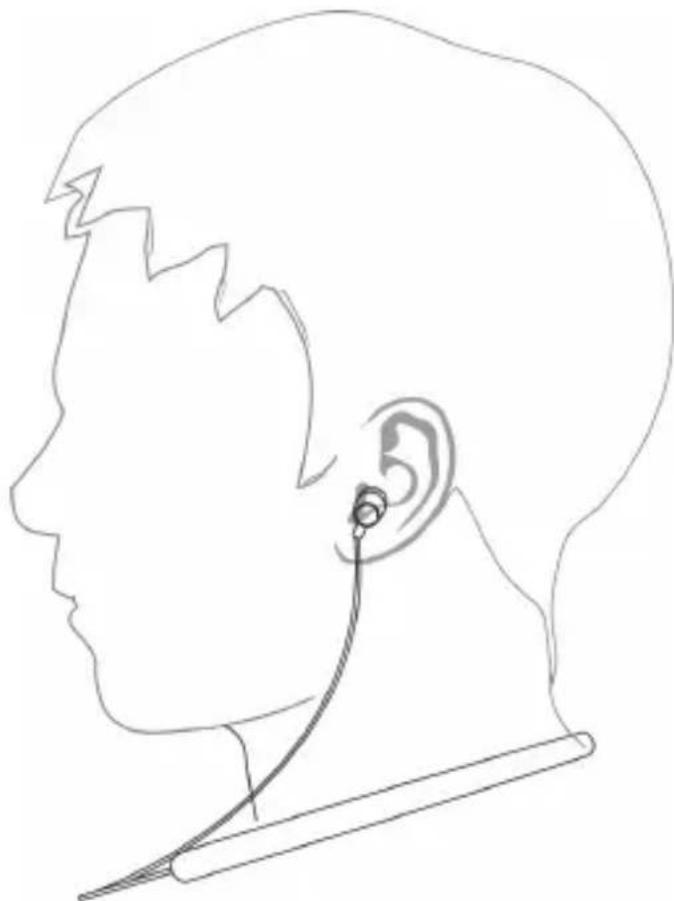
Note the markings on the inside of the neckband (1) to put on the headphones correctly: R = right, L = left. The controls and the LED (4) are located on the right side of the headphones. Place the neckband (1) around your neck. Then carefully slide one of the earphones (6) into your ear canal. To make it easier to insert, you can straighten your ear canal a little by slightly pulling your ear back and up. Repeat this process with the second earphone (6).
natural_image
Line drawing of a human head profile with ear and ear connector (no text or symbols)Replacing ear pads
The ear pads - medium (B) are attached to the headphones in their original condition. Replace the ear pads if they do not fit your ear correctly. To do so, proceed as follows:
- Carefully remove the ear pads from the earphones (6) using your fingers.
- Select the appropriate ear pads, large (D) or small (E), and push them onto the earphones (6) until they slide into the groove.

natural_image
Technical line drawings of a mechanical component with directional arrows indicating assembly or movement (no text or symbols present)Music playback

All of the following functions depend on the functionality of the smartphone or media player which is used. It is possible that some functions may not be supported.
If you have connected the headphones to a smartphone or a music playback device, you can listen to music via the headphones. The following functions are available:
| Function | Action |
| Playback Press the multifunction | button (3) briefly |
| Pause Press the multifunction button | button (3) briefly |
| Next track Press the + button (2) | briefly |
| Previous track Press the - button | (5) twice with a brief pause |
| Start of track Press the - button | (5) briefly |
| Increasing volume* Keep the + button | button (2) pressed |
| Reducing volume* Keep the - button | button (5) pressed |
* A high or low beep can be heard when the maximum or minimum volume is reached.
Making calls
If you have connected the headphones to a smartphone, you can make calls via the headphones. You can perform the following functions:
| Function | Action |
| Answering call Press the multifunction | button (3) briefly |
| Ending call Press the multifunction | button (3) briefly |
| Rejecting call Press the multifunction | button (3) for at least 2 seconds until a beep sounds |
| Redialling Press the multifunction | button (3) twice briefly |
| Voice control Press the + button | (2) and - button (5) at the same time |
| Increasing volume* Keep the + button | (2) pressed |
| Reducing volume* Keep the - button | (5) pressed |
| Answering a new call and putting the current call on hold | Press the multifunction button (3) briefly |
| Switching between two calls (toggling) | Press the multifunction button (3) for approx. 2 seconds until a beep sounds |
| Ending current call and retrieving call on hold | Press the multifunction button (3) briefly |
* A high or low beep can be heard when the maximum or minimum volume is reached.
Troubleshooting
The headphones cannot be switched on.
- Charge the battery.
No audio signal for Bluetooth ® connection
- Switch on the headphones.
• Try to connect the headphones to the device again.
The Bluetooth ® connection is not established.
- Check whether the Bluetooth function of your device is switched on.
- The distance between the headphones and the device is too large, reduce it.
- Re-establish the Bluetooth connection if necessary.
Not all aforementioned functions are working
- All aforementioned functions depend on the functionality of the device which is used.
- It is possible that not all functions are available due to the operating system you are using and / or the software version of your device.
Information on non-use
If you do not use the headphones for an extended period, you should recharge the battery at regular intervals. This will maintain the performance of the battery. Store the headphones and accessories in a cool, clean dry place.
Environmental and disposal information
natural_image
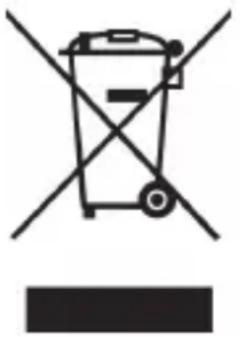
Symbol of a trash bin crossed with no text or numbers, representing waste sorting or disposal (no text present)When this symbol appears on a product, this indicates that the product is subject to the European Directive 2012/19/EU. All old electrical and electronic devices must be separated from normal household waste and disposed of at designated state facilities. The correct disposal of old devices in this manner will prevent environmental pollution and human health hazards. For further information about proper disposal, contact your local authorities, waste disposal office or the shop where you bought the device.
The built-in battery cannot be removed for disposal.
Dispose of the packaging in an environmentally compatible manner. Cardboard can be put out for municipal paper collections or brought to public collection points for recycling. Films and plastic used for packaging the device are collected by your local disposal services and disposed of in an environmentally compatible manner.
Conformity information
CE
This device meets the basic requirements and other relevant regulations of the EMC Directive 2014/30/EU, the Low Voltage Directive 2014/35/EU, the R&TTE Directive 1999/5/EC and the RoHS Directive 2011/65/EU.
To obtain a complete EU Declaration of Conformity, send ar following e-mail address: ce@targa.de
Warranty and servicing advice
Warranty of TARGA GmbH
This device is sold with three years warranty from the date of purchase. Please keep the original receipt in a safe place as proof of purchase. Before using your product for the first time, please read the enclosed documentation. Should any problems arise which cannot be solved in this way, please call our hotline. Please have the article number and, if available, the serial number to hand for all enquiries. If it is not possible to solve the problem on the phone, our hotline support staff will initiate further servicing procedures depending on the fault. Within the warranty period the product will be repaired or replaced free of charge as we deem appropriate. No new warranty period commences if the product is repaired or replaced. Consumables such as batteries, rechargeable batteries and lamps are not covered by the warranty.
Your statutory rights towards the seller are not affected or restricted by this warranty.

Service

Phone: 020 - 70 49 04 03
E-Mail: service.GB@targa-online.com

Phone: 01-4370121
E-Mail: service.IE@targa-online.com

Phone: 027 78 11 03
E-Mail: service.MT@targa-online.com

Phone: 02 - 20 09 025
E-Mail: service.CY@targa-online.com
IAN: 281912

Manufacturer
TARGA
GmbH
Coesterweg 45
59494 SOEST
GERMANY
Obsah
Ochranné známky 23
Používanie primerané účelu 24
Obsah dodávky 25
Technické údaje 26
natural_image
Line drawing of a human head profile with ear and ear connector (no text or symbols)Výmena náušníkov
natural_image
Technical line drawings of a mechanical component with directional arrows indicating assembly or movement (no text or symbols present)Prehrávanie hudby

natural_image
Symbol of a trash bin crossed with no visible text or labelsnatural_image
Line drawing of a human head profile with ear and ear connector (no text or symbols)natural_image
Technical line drawings of a mechanical component with directional arrows indicating assembly or movement (no text or symbols present)Musikwiedergabe

natural_image
Symbol of a trash bin crossed with no text or numbers, representing waste sorting or disposal (no text present)


- Bluetooth® Headphones SBKN 4.0 B1
- Congratulations!
- Trademarks
- Intended use
- Supplied items
- Safety instructions
- Explanation of the hazard symbols used in these instructions
- DANGER! Radio interface
- DANGER! Risk of explosion!
- DANGER! Children and persons with disabilities
- DANGER! It poses a suffocation risk!
- WARNING! Ensure that
- WARNING! Maintenance / cleaning
- Operating environment
- Copyright
- Overview of the controls and button functions
- Prior to use
- Charging the battery
- First use
- Switching the headphones on/off
- Connecting headphones
- Putting on the headphones
- Replacing ear pads
- Music playback
- Making calls
- Troubleshooting
- The headphones cannot be switched on.
- No audio signal for Bluetooth ® connection
- The Bluetooth ® connection is not established.
- Not all aforementioned functions are working
- Information on non-use
- Environmental and disposal information
- The built-in battery cannot be removed for disposal.
- Conformity information
- Warranty and servicing advice
- Warranty of TARGA GmbH
- Service
- Manufacturer
- Obsah
- Výmena náušníkov
- Prehrávanie hudby
- Musikwiedergabe
Brand : SILVERCREST
Model : SBKN 4.0 B1
Category : Earphones