
SKM 10 C1 - Earphones SILVERCREST - Free user manual and instructions
Find the device manual for free SKM 10 C1 SILVERCREST in PDF.


| Product Type | Wired In-Ear Earphones |
| Model | SKM 10 C1 |
| Brand | SilverCrest |
| Color | Black / White (typical) |
| Driver Unit | 10 mm dynamic driver |
| Frequency Response | 20 Hz - 20 kHz |
| Impedance | 32 Ω |
| Sensitivity | 98 dB ± 3 dB |
| Cable Length | 1.2 m (approx.) |
| Connector | 3.5 mm stereo jack (gold-plated) |
| Microphone | Yes, omnidirectional, in-line |
| Controls | In-line volume and play/pause button |
| Weight | 12 g (without cable) |
| Ear Tips Included | S, M, L silicone tips |
| Power Source | Not required (passive) |
| Compatibility | Devices with 3.5 mm audio jack (smartphones, tablets, PCs) |
| Cleaning Instructions | Wipe with a soft, dry cloth. Do not use liquids. |
| Safety Warnings | Avoid high volume for long periods to prevent hearing damage. |
| Spare Parts | Ear tips (available separately) |
| Repairability | Not designed for user repair. Contact customer service. |
| Environmental | Dispose according to local e-waste regulations. |
Frequently Asked Questions - SKM 10 C1 SILVERCREST
User questions about SKM 10 C1 SILVERCREST
0 question about this device. Answer the ones you know or ask your own.
Ask a new question about this device
Download the instructions for your Earphones in PDF format for free! Find your manual SKM 10 C1 - SILVERCREST and take your electronic device back in hand. On this page are published all the documents necessary for the use of your device. SKM 10 C1 by SILVERCREST.
USER MANUAL SKM 10 C1 SILVERCREST
natural_image
Collection of grayscale icons including speech bubble, basketball, soccer ball, penguin, and cloud (no text or symbols)IN-EAR HEADPHONES SKM 10 C1

TARGA GMBH
Coesterweg 45
59494 SOEST
GERMANY
Last Information Update - Datum nieuwste versie Stand der Informationen:
06/2016-Ident-No.: SKM 10 C1 062016-1
GB IE NI
Operating instructions and safety instructions
NL

natural_image
Illustration of six stick figures with different shapes and colors, no text or symbols presentEnglish 2
Nederlands.... 18
Deutsch 34
Contents
Introduction...... 3
Intended use 3
Package contents 4
Technical specifications.... 5
Safety instructions...... 6
Getting started 11
Using the headphones 11
Replacing the ear pads 12
Troubleshooting 12
Servicing 13
Cleaning 13
Storage when not in use 14
Environmental information...... 14
Conformity notes...... 15
Warranty 16
Introduction
Congratulations on purchasing this new device. You have opted for a quality product.
The User's Manual forms part of contains important information on safety, usage and disposal. Before using the product, please familiarise yourself with the operating and safety instructions. Only use the product as described and for the applications given. If you pass the product on to someone else, make sure to give them all the relevant documents with it.
Intended use
These headphones are a consumer electronics device. They have been designed to play music. The device must only be connected to devices with an appropriate headphone socket for a 3.5 mm jack-type connector. It is suitable only for private use, not for industrial or commercial purposes. The device is
also not suitable for use in tropical climates. The manufacturer is not liable for any damage or problems caused by unauthorised modifications. Please observe the regulations and laws in the country of use.
Package contents
• SilverCrest SKM 10 C1 headphones
• 2 Ear pads (medium), fitted
- 2 Ear pads (large)
- 2 Ear pads (small)
• These operating instructions
Remove the headphones and all the accessories from the packaging. Remove the packaging material and check whether all the components are complete and undamaged. If you find anything missing or damaged, please contact the manufacturer.
These operating instructions have a fold-out cover. On the inside of the cover is a diagram of the
headphones with the components numbered. The meanings of the numbers are as follows:
1 Ear pad (medium)
2 3.5 mm jack
3 Ear pad (large)
4 Ear pad (small)
The SilverCrest SKM 10 C1 headphones are available in 7 different designs. The only difference is the styling of the earphones. Setup, operation, etc. is identical for all of them. Figure A shows the different designs available.
Technical specifications
| Impedance 32 Ohm +/- 4 Ohm | |
| Sensitivity 105 dB (A) +/- 10% | |
| at 1 kHz | |
| Frequency range 20 Hz - 20 kHz | |
| Broadband characteristics voltage | approx. 100 mV +/- 20% |
| Connector 3.5 mm jack | |
| Cable length approx. 120 cm | |
| Operating temperature | 5°C to 35°C |
| Storage temperature | -10°C to 50°C |
| Humidity max. 85% rel. humidit y | |
The technical specifications and design can be changed without prior notice.
Safety instructions
Before you use these headphones for the first time, please read the following notes and heed all warnings, even if you are familiar with handling electronic devices. Keep this manual in a safe place for future reference. If you sell the headphones or pass them on, it is essential that you also hand over this manual, as it is part of the product.

natural_image
Warning symbol with exclamation mark inside a triangle (no text or numbers)DANGER! This symbol and the
word "Danger" alert you to a
potentially dangerous situation.
Ignoring it can lead to severe injury
or even death.

natural_image
Warning symbol with exclamation mark inside a triangle (no text or numbers)WARNING! This symbol and the word "Warning" denote important information required for the safe operation of the product and for the safety of its users.
natural_image
Warning symbol with exclamation mark inside a triangle (no text or numbers)WARNING! Make sure that:
- the device is not exposed to direct heat sources (e.g. radiators)
- the device is not exposed to direct sunlight or bright artificial light
- contact with spraying or dripping water or aggressive fluids is avoided and the device is never operated near water, the device is never submerged (do not place any items containing liquids, such as drinks, vases, etc. on or near the device).
-
the device is never placed near magnetic fields (e.g. speakers)
-
no naked flames (e.g. burning candles) are placed on or near the device
- no foreign bodies can penetrate into the device
- the device is not subjected to excessive shocks or vibrations
- you always hold cables by the plug and never pull on the cable itself. Never put heavy objects or furniture on the cable and make sure the cable does not get trapped, especially at the plug. To avoid damaging it, never lead the cable around hot or sharp objects or edges. Never tie knots in the cable and do not tie it to other cables. The cable must be laid so that nobody can trip over it or be obstructed by it.
natural_image
Warning symbol with exclamation mark inside a triangle (no text or numbers)DANGER! Children and people with disabilities
Electrical devices are not suitable for children. Children may not understand that they can be dangerous. Persons with reduced physical, sensory
or mental capabilities should also only use electrical devices in appropriate circumstances. Never allow children use electrical devices unsupervised, unless they are instructed accordingly or supervised by a competent person responsible for their safety. Children should always be supervised to ensure that they do not play with the product. Small parts can represent choking hazards. Keep the packaging away from children and people with disabilities.

DANGER! Danger of suffocation!
Caution! The headphones and packaging material are no toys!
Risks associated with excessive volume levels

Be careful when using headphones. Listening to high volume audio can damage the hearing.
Do not use the headphones at high volume levels, this could damage your hearing and possibly disturb other people. Although the device is designed to enable you to hear external noise, never turn the volume up so high that you cannot he going on around you. Please note that ambient noise can be perceived in a different and unfamiliar way.
Do not use the device in hazardous situations, e.g. when driving or riding a bike, working with machines or other situations which require your full attention. The sound may distract your attention or prevent you from being aware of what is happening around you.
Getting started
Using the headphones

natural_image
Warning symbol with exclamation mark inside a triangle (no text or numbers)WARNING! Set the volume of the playback device to the lowest level before connecting the headphones in order to avoid damaging your hearing. You can then set the volume to the level you want.
You can use the headphones with playback devices that have a 3.5 mm jack. Plug the 3.5 mm jack-type connector [2] into the corresponding jack on your playback device. Set the volume you want on the playback device.
Use the earpiece labelled "L" in your left ear and the earpiece labelled "R" in your right one.
Carefully place one of the earpieces into your ear. To make insertion easier, you can straighten your ear slightly by pulling the outer ear gently back and up. Proceed with the second earpiece in the same way.
Replacing the ear pads
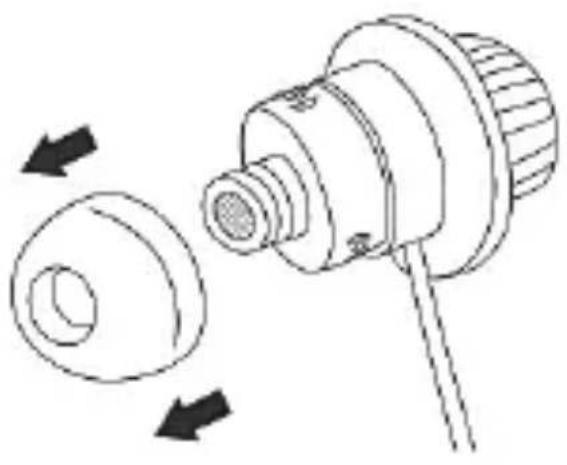
The medium ear pads [1] are fitted by default. If the ear pads do not fit correctly, you can replace them. Proceed as follows:
- Carefully pull the ear pads off the earpiece by using your fingers.
- Select either the (large) [3] or (small) [4] ear pads and push them over the earpiece until they slide into the recess.
natural_image
Technical line drawing of a mechanical component with two circular parts and directional arrows indicating rotation (no text or symbols)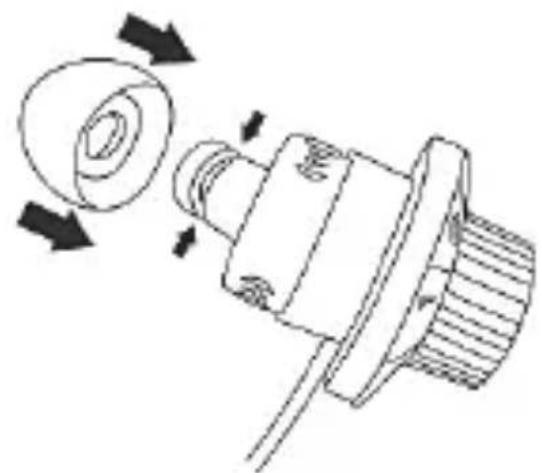
natural_image
Technical line drawing of a mechanical component with directional arrows indicating motion (no text or symbols)Troubleshooting
No sound
- Check the volume set on the playback device. Increase the volume and/or start playback.
12 - English
- Make sure that the 3.5 mm jack-type connector [2] is properly inserted into the audio jack.
Sound output on one side only
- Check the stereo balance setting on the playback device.
- Make sure that the 3.5 mm jack-type connector [2] is properly inserted into the audio jack.
Servicing
The device does not contain any parts that require maintenance. Do not attempt to open the housing of the device, this will void your warranty.
Cleaning
To clean the headphones use a slightly damp cloth. Never use any solvents or cleaners that may damage the plastic. Make sure that no liquid gets into the housing.
To clean the ear pads, remove them. Clean the ear pads under running water. Dry the ear pads
properly. Once the ear pads are completely dry, put them back on the earpieces.
Storage when not in use
If the headphones are not to be used for an extended period, store it in a clean, dry and cool place.
Environmental information

natural_image
Symbol of a trash bin with crossed lines indicating no waste or discharge (no text or labels)The product bears the symbol of a rubbish bin crossed out. This means it is subject to European Directive 2012/19/EU.
All electrical and electronic devices must be disposed of separately from household waste at official disposal centres. Proper disposal of the device prevents damage to the environment or your health. For further information about proper disposal, contact your local council, recycling centre or the shop where you bought the device. Dispose of all packaging in an environmentally-friendly manner. Cardboard packaging can be taken to paper
recycling centres or public collection points for recycling. Any film or plastic contained in the packaging should be taken to your public collection points for disposal.
Conformity notes
CE This device complies with the basic other relevant requirements of RoHS Directive 2011/65/EU. To obtain a complete EU Declaration of Conformity, send an e-mail to the following e-mail address: ce@targa.de
Warranty
Warranty of TARGA GmbH
This device is sold with three years warranty from the date of purchase. Please keep the original receipt in a safe place as proof of purchase. Before using your product for the first time, please read the enclosed documentation. Should any problems arise which cannot be solved in this way, please call our hotline. Please have the article number and, if available, the serial number to hand for all enquiries. If it is not possible to solve the problem on the phone, our hotline support staff will initiate further servicing procedures depending on the fault. Within the warranty period the product will be repaired or replaced free of charge as we deem appropriate. No new warranty period commences if the product is repaired or replaced. Consumables such as batteries, rechargeable batteries and lamps are not covered by the warranty.
Your statutory rights towards the seller are not affected or restricted by this warranty.

Service

Phone: 020 - 70 49 04 03
E-Mail: service.GB@targa-online.com

Phone: 01 - 4370121
E-Mail: service.IE@targa-online.com

Phone: 027 78 11 03
E-Mail: service.MT@targa-online.com

Phone: 02 - 20 09 025
E-Mail: service.CY@targa-online.com
IAN: 276756
Manufacturer
TARGA GmbH
Coesterweg 45
59494 SOEST
GERMANY
Inhoud
Inleiding 19
Beoogd gebruik 19
natural_image
Warning symbol with exclamation mark inside a triangle (no text or numbers)natural_image
Warning symbol with exclamation mark inside a triangle (no text or numbers)natural_image
Warning symbol with exclamation mark inside a triangle (no text or numbers)natural_image
Warning symbol with exclamation mark inside a triangle (no text or numbers)natural_image
Warning triangle with a sound wave symbol inside (no text or numbers)natural_image
Warning symbol with exclamation mark inside a triangle (no text or numbers)natural_image
Technical line drawing of a mechanical component with two views showing assembly and rotation (no text or symbols)Problemen oplossen
Geen geluid
natural_image
Symbol of a trash bin with crossed x and y lines, no text or numbers presentnatural_image
Warning symbol with exclamation mark inside a triangle (no text or numbers)GEFAHR! Dieses Symbol, in
natural_image
Warning symbol with exclamation mark inside a triangle (no text or numbers)natural_image
Warning symbol with exclamation mark inside a triangle (no text or numbers)WARNUNG!
natural_image
Warning symbol with exclamation mark inside a triangle (no text or numbers)natural_image
Warning symbol with a triangle containing a stylized ear and sound waves (no text or numbers)natural_image
Warning symbol with exclamation mark inside a triangle (no text or numbers)natural_image
Technical line drawing of a mechanical component with two arrows indicating rotation or assembly (no text or symbols)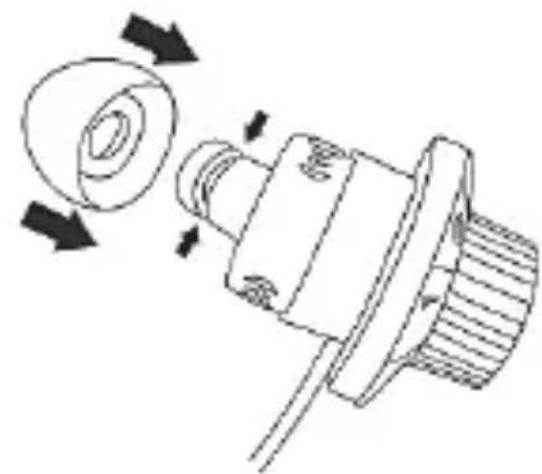
natural_image
Technical line drawing of a mechanical component with directional arrows indicating motion (no text or symbols)Fehlerbehebung
Kein Ton
natural_image
Simple line drawing of a trash bin with two crossed lines indicating no waste or prohibition (no text or symbols)


- English 2
- Nederlands.... 18
- Deutsch 34
- Contents
- Introduction
- Intended use
- Package contents
- Safety instructions
- DANGER! Children and people with disabilities
- Risks associated with excessive volume levels
- Getting started
- Using the headphones
- Replacing the ear pads
- Troubleshooting
- No sound
- - English
- Sound output on one side only
- Servicing
- Cleaning
- Storage when not in use
- Environmental information
- Conformity notes
- Warranty
- Warranty of TARGA GmbH
- Service
- Manufacturer
- Inhoud
- Problemen oplossen
- Geen geluid
- GEFAHR! Dieses Symbol, in
- WARNUNG!
- Fehlerbehebung
- Kein Ton
Brand : SILVERCREST
Model : SKM 10 C1
Category : Earphones