
TRANSACTIVE MOBILE - Portable Bluetooth Speaker ALESIS - Free user manual and instructions
Find the device manual for free TRANSACTIVE MOBILE ALESIS in PDF.



| Product Type | Portable Bluetooth Speaker with PA System |
| Brand | ALESIS |
| Model | TRANSACTIVE MOBILE |
| Power Supply | 100-120 V~/60 Hz or 220-240 V~/50 Hz, selectable |
| Power Consumption | 20 W (110/220 V), 36 W (220/240 V) |
| Maximum Output Power | 22 W |
| RMS Output Power | 15 W (1% THD) |
| Frequency Response | 70 Hz - 50 kHz +/-3 dB |
| Rechargeable Battery | Built-in Lithium-ion |
| Full Charge Time | Less than 4 hours |
| Battery Life | More than 6 hours at maximum volume |
| Audio Inputs | 1 balanced microphone input (XLR and 1/4" jack), 1 instrument/microphone input (1/4" jack), 1 stereo auxiliary input (RCA) |
| Audio Output | 1 stereo line output (Link Output) for daisy-chaining |
| Controls | Gain for each input, master volume, power switch, voltage selector |
| Indicators | 4 battery level indicators |
| iPod Compatibility | iPod (4th generation and later), iPod Nano, iPod Mini |
| Stand | Standard, compatible with professional speaker stands |
| Box Contents | Transactive Mobile speaker, microphone cable, microphone, power cable |
| Care and Cleaning | Clean with a dry, soft cloth. Do not use abrasive products. |
| Safety | Read the safety instructions booklet before use. Power off before connecting or disconnecting cables. |
| Spare Parts and Repairability | Contact ALESIS customer service for spare parts. |
| General Information | Designed for portable use as a PA system for instruments, microphones, and audio devices. |
Frequently Asked Questions - TRANSACTIVE MOBILE ALESIS
User questions about TRANSACTIVE MOBILE ALESIS
0 question about this device. Answer the ones you know or ask your own.
Ask a new question about this device
Download the instructions for your Portable Bluetooth Speaker in PDF format for free! Find your manual TRANSACTIVE MOBILE - ALESIS and take your electronic device back in hand. On this page are published all the documents necessary for the use of your device. TRANSACTIVE MOBILE by ALESIS.
USER MANUAL TRANSACTIVE MOBILE ALESIS
- Transactive Mobile
(1) Microphone Cable
(1) Microphone
(1) Power Cable (standard IEC)
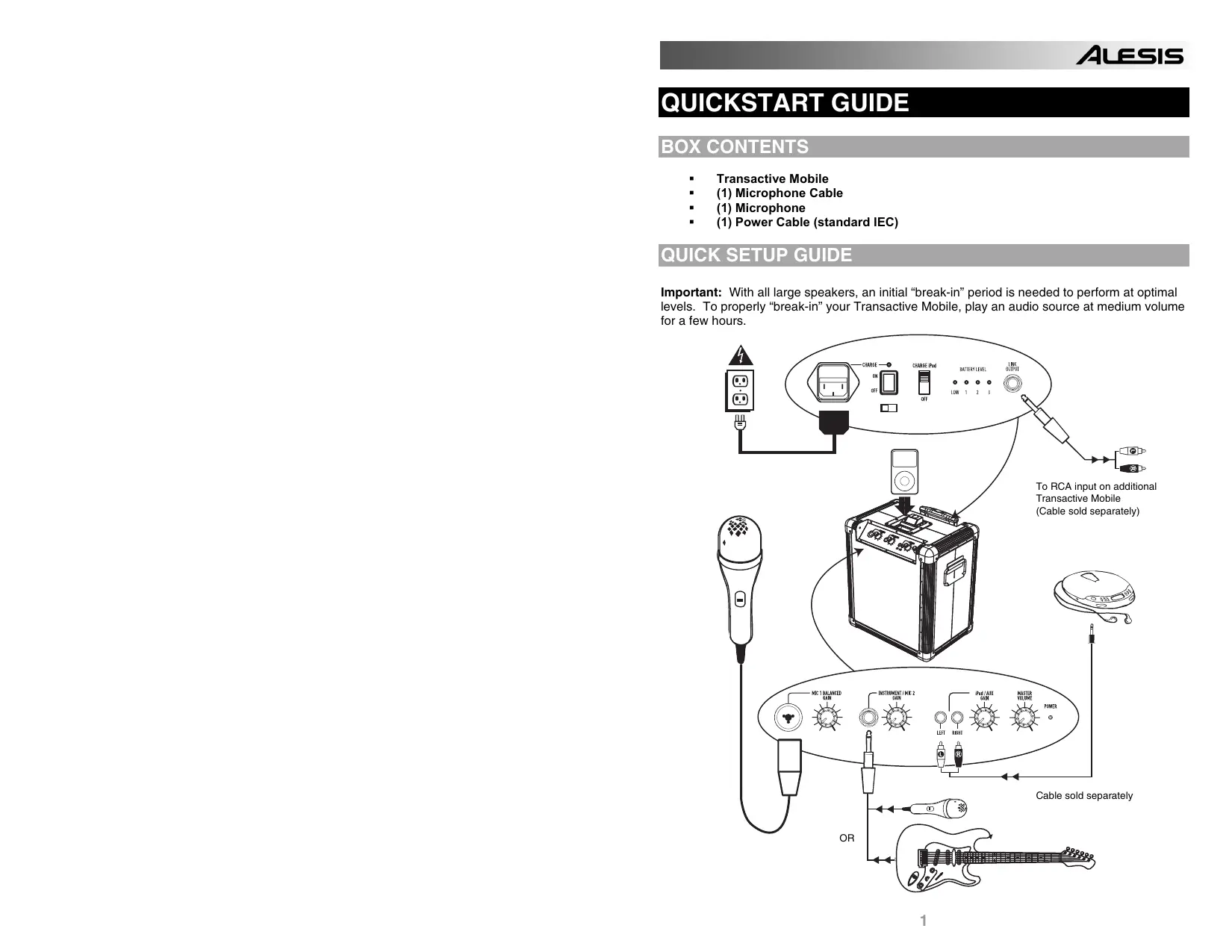
QUICK SETUP GUIDE
Important: With all large speakers, an initial "break-in" period is needed to perform at optimal levels. To properly "break-in" your Transactive Mobile, play an audio source at medium volume for a few hours.
FULLY CHARGE THE BATTERY BEFORE FIRST USE FOR MAXIMUM BATTERY LIFE!
- Make sure all items listed on the front of this guide are included in the box.
- READ SAFETY INSTRUCTION BOOKLET BEFORE USING THE PRODUCT.
- MAKE SURE THAT YOU HAVE COMPLETELY CHARGED THE BATTERY.
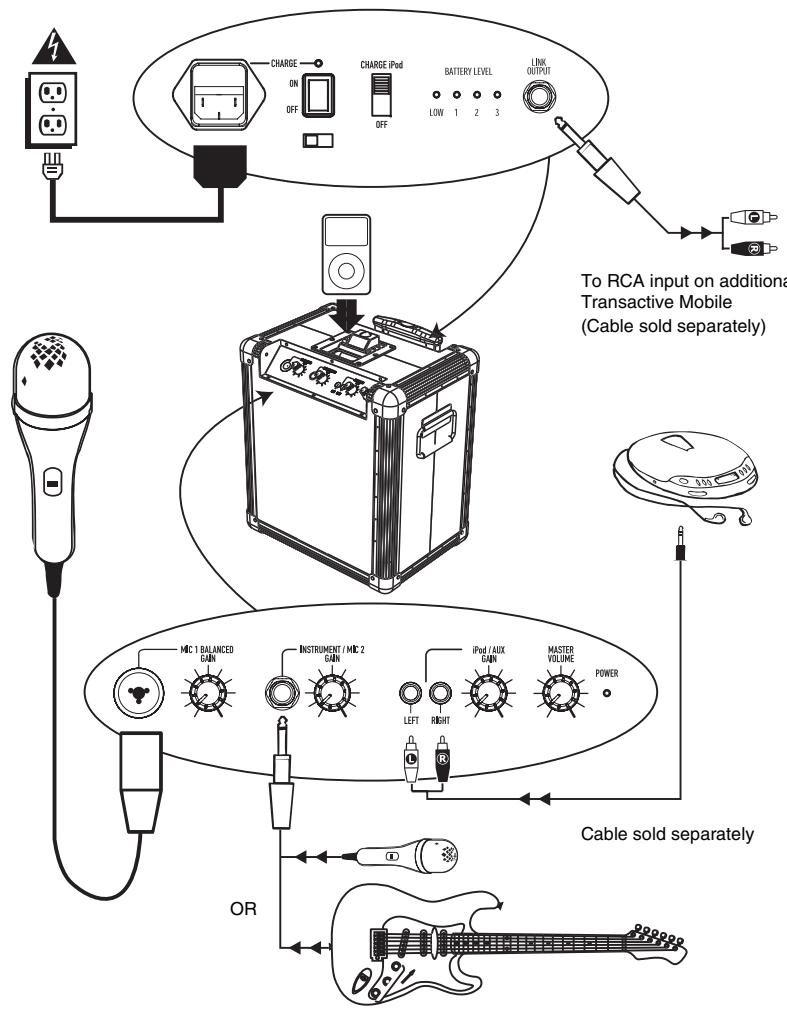
- Study this setup diagram.
- Place product in an appropriate position for operation.
- Make sure all input devices such as microphones, CD players, mp3 players, and linked amplifiers/PAs are turned off and volume settings are set at "zero"
- Connect all devices as shown above.
- Connect the stereo outputs to the power amplifier(s), tape decks, and/or audio sources.
- Switch everything on in the following order:
audio input sources (i.e. microphones, instruments, CD/MP3 Players)
Transactive Mobile
last, any amplifiers
- When turning off, always reverse this operation by:
turning off amplifiers
- Transactive Mobile
last, any input devices
Go to http://www.alesis.com for product registration.
DIAGRAM AND PARTS DESCRIPTION
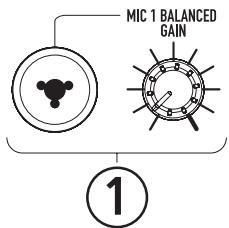
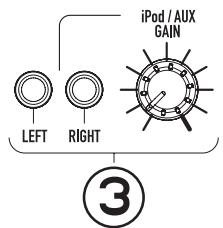
- Microphone 1 Balanced Input with Gain Control (1/4" and XLR): This jack can either take a 14 " balanced or a XLR balanced cable. An XLR Cable is included with the microphone.
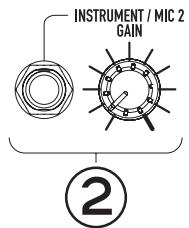
- Instrument/Microphone 2 Input with Gain Control (1/4"): This mono input accepts a 14 input such as a microphone, guitar, or other musical instrument.
- iPod/Auxiliary input with Gain Control (Stereo RCA): This knob controls the level of the iPod* and the RCA input. This stereo RCA input can be used to connect a CD, MP3, or other audio source. To connect to a portable device with a 1/8" headphone jack, you need a standard (1 / 8^ to RCA) adapter which is NOT included.
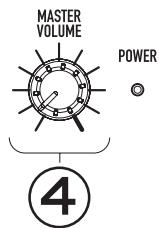
- Master Volume Control: This knob controls the master volume of the Transactive Mobile.
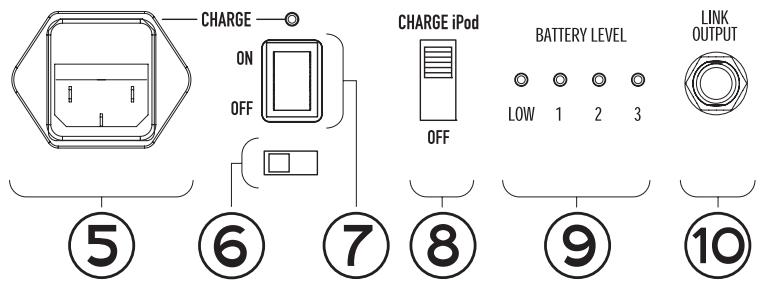
- Power Adapter (IEC): Insert the included power cable here to charge the unit. Note that the Transactive Mobile can run off the power adapter while it simultaneously charges the battery. The charge indicator illuminates when the battery is charging.
- Voltage Selector: Set this to the correct voltage for your location standard.
- Power ON/OFF Switch
- iPod Charging Switch
- Battery Level Indicator: While the unit is powered ON, these four lights indicate the power left in the battery. Battery life varies based on volume and usage.
- Link Output: This 14 jack is a stereo line level output that can be connected to the stereo input of an amplifier or amplified loudspeaker such as another Transactive Mobile.
TROUBLESHOOTING GUIDE
Use this troubleshooting guide if: The sound is distorted at high volumes.
- Input is clipping: Try lowering the input gain or the volume control on your sound source or music instrument.
Output is clipping: Lower the main volume level. - There is too much bass: Try adjusting the tone or EQ control on your sound source to lower the bass level. This will allow you to play the music louder before clipping (distortion) occurs.
- The link cable: is being plugged into the instrument or MIC input instead of the RCA line input.
SPECIFICATIONS
Input Voltage: AC 100-120V/60Hz 220-240V/50Hz
Power Consumption: 20W (110/220V), 36W (220/240V)
Output Wattage: (Peak) 22W
Output Wattage: (RMS) 15W, 1%THD
Frequency Response: 70Hz~50kHz +/-3dB
- Bottom pole mount specifications: Standard Pole Mount found at professional audio retailer
depth 80mm (3.15")
Diameter 35.5mm (1.40")
Time required to fully charge the Transactive Mobile: under 4 hours
Battery life: Over 6 hours* at full volume of the Transactive Mobile when fully charged.
- iPod compatibility: made for iPod (4G and later), iPod Nano and iPod Mini.
*Note: Battery life may vary based on temperature, age, and volume usage of product.