
PMR 15 - Walkie-talkie AUDIOLINE - Free user manual and instructions
Find the device manual for free PMR 15 AUDIOLINE in PDF.


| Product Type | PMR 446 two-way radio |
| Brand | Audioline |
| Model | PMR 15 |
| Dimensions (approx.) | 50 x 110 x 30 mm |
| Weight (approx.) | 80 g (without batteries) |
| Power Supply | 3 x AAA batteries (1.5V each) |
| Battery Life | Up to 20 hours (typical usage) |
| Frequency Band | 446.0 - 446.1 MHz (PMR 446) |
| Channels | 8 PMR channels |
| Range (max.) | Up to 5 km in open field |
| CTCSS Codes | 38 subcodes for privacy |
| Transmit Power | 0.5 W (ERP) |
| Key Functions | PTT, volume control, channel selector, scan, VOX (optional) |
| Additional Features | LCD display, backlight, keypad lock, monitor function, battery saver |
| Cleaning Instructions | Wipe with soft dry cloth; do not use solvents |
| Safety Notes | Keep away from water and heat; do not disassemble; use only specified batteries |
| Spare Parts/Accessories | Belt clip, earphone/microphone (optional) |
| Reparability | No user-serviceable parts; contact support for issues |
| General Information | PMR 446 license-free radio; suitable for outdoor activities, camping, hiking |
Frequently Asked Questions - PMR 15 AUDIOLINE
User questions about PMR 15 AUDIOLINE
0 question about this device. Answer the ones you know or ask your own.
Ask a new question about this device
Download the instructions for your Walkie-talkie in PDF format for free! Find your manual PMR 15 - AUDIOLINE and take your electronic device back in hand. On this page are published all the documents necessary for the use of your device. PMR 15 by AUDIOLINE.
USER MANUAL PMR 15 AUDIOLINE
D
D
Bedienelemente
3 Bedienelemente
Please read this operating instruction manual thoroughly.
Intended use
These walkie-talkies have been conceived for communication with other walkie-talkies complying to the same standards. Any other use is considered unintended use. Unauthorised modification or reconstruction is not permitted. Under no circumstances open the devices or complete any repair work yourself.
Ambient conditions
Prevent excessive exposure to smoke, dust, vibration, chemicals, moisture, heat and direct sunlight.
Do not use the walkie-talkies in potentially explosive areas.
Batteries
Attention: Never throw batteries into a fire. Only use

batteries of the same type. Pay attention to the correct polarity. Never charge batteries.
Medical equipment
Attention: Never use the walkie-talkies in the vicinity

of medical equipment. Effects on such equipment cannot be fully ruled out.
Walkie-talkies can cause an unpleasant humming sound in hearing aids.
Disposal
You are obliged to dispose of consumable goods according to legal requirements. The adjacent symbol indicates that electrical and electronic apparatus and batteries no longer required must be disposed of separate from domestic waste.
Electrical and electronic devices must be disposed of at suitable collection points provided by the public waste authorities.
Batteries must be disposed of at the point of sale or at the appropriate collection points provided by the public waste authorities.
Packaging materials must be disposed of according to local regulations.

GB
Preparing the Walkie-Talkies for Use
2 Preparing the Walkie-Talkies for Use
Safety information
Attention: It is essential to read the Safety Information in Chapter 1 before starting up.
Checking the package contents
The package contains:
- two walkie-talkies with belt clip
- an operating manual
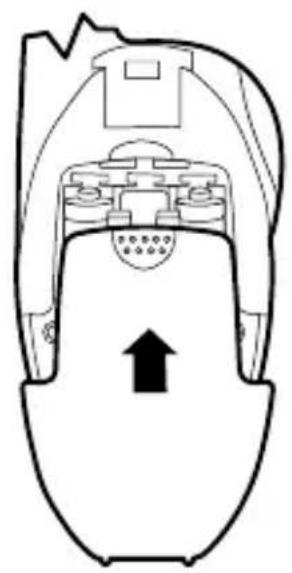
Inserting the batteries
Open the battery compartment. Insert the batteries. Only use AAA type Alkaline batteries. Pay attention to correct polarity. Close the battery compartment.


GB
Preparing the Walkie-Talkies for Use
Battery status

The batteries must be replaced as soon as the above icon starts to flash in the display.
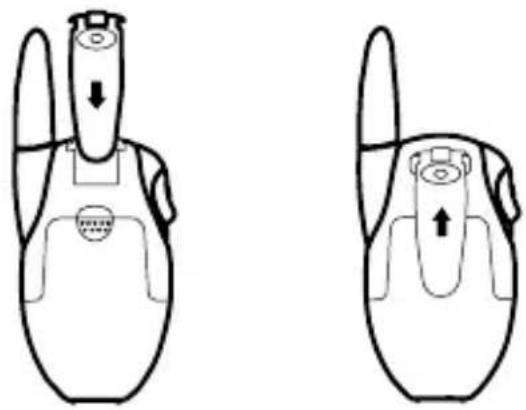
Attaching the belt clip
Slide the belt clip in the guide from the top until it audibly snaps into place. To detach the belt clip, prize the fastening tab up a little with your fingernail and slide the belt clip upwards.
GB
Operating Elements
3 Operating Elements
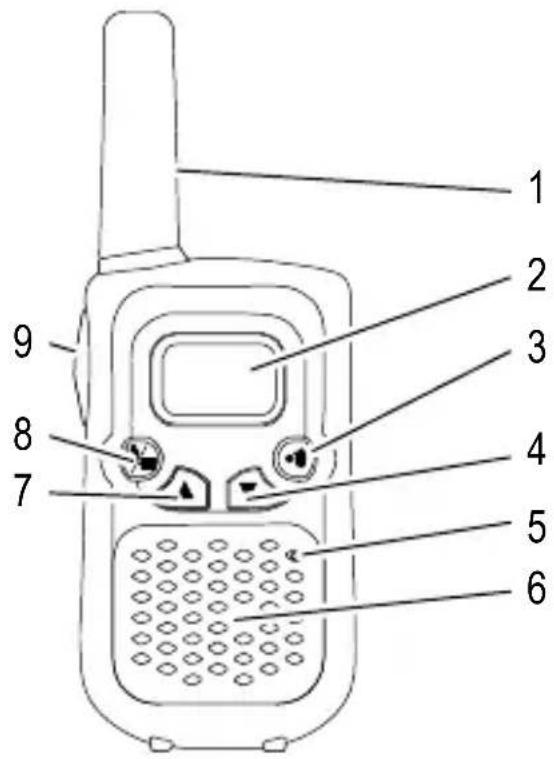
The buttons in this operating manual are subsequently depicted with a uniform contour. Therefore, slight deviations in the appearance of the symbols on the walkie-talkie buttons compared to those depicted here are possible.
Handset
1 Antenna
2 Display
3 Transmit ringing tones
4 Volume,
Channel, scroll down
5 Microphone
6 Loudspeaker
7 Volume,
Channel, scroll up
8 On / Off,
Channel setting
9 PTT - Talk button
Display
1 Transmitting
2 Channel / Volume
3 Receiving
4 CH = Channel
5 Weak battery
LE = Volume

4 Operating the Walkie-Talkies
Display and notation of operating sequences
PTT Press the button depicted
, PTT Press and hold the button depicted
W, PTT Release the button displayed
Speak into the microphone
Switching the walkie-talkie on/off
Switch the walkie-talkie on
An acoustic signal is issued. The current channel setting appears in the display.
Switch the walkie-talkie off
Volume control
or ▲Raise or lower the volume
Transmitting and receiving
Transmitting
PTT Transmit
Hold the walkie-talkie approx. 5 to 7 cm from your mouth and speak at a normal volume. In order to talk to other subscribers, the respective walkie-talkies must be set to the same channel.
Receiving
, PTT Receive
Radio signals cannot be received when the PTT button is being pressed.
GB
Operating the Walkie-Talkies
Confirmation signal (Roger beep)
The confirmation signal is issued on releasing the PTT button. This signals to the caller that you have ended transmission.
Selecting a channel
≡ Activate programming mode
or ▲, ≡ Select the channel and confirm it
| Channel Frequency (MHz) Channel Frequency (MHz) | |||
| 1 446.00625 5 446.05625 | |||
| 2 446.01875 6 446.06875 | |||
| 3 446.03125 7 446.08125 | |||
| 4 446.04375 8 446.09375 | |||
Transmitting a ringing tone
The ringing tones indicate to other subscribers that you want to talk to them. A condition for this is that the other subscribers are using the same channel.
●) Transmit the ringing tone
5 In Case of Problems
Service hotline
Should problems arise with the walkie-talkies, please refer to the following information first. In the case of technical problems, please contact our Service Hotline under Tel. 0180 5 001388 (costs via German landline at the time of going to print: 14 ct/Min.; different costs possible via mobile phone networks). In the case of claims under the terms of guarantee, please contact your sales outlet. There is a 2 year period of guarantee.
Problems and solutions
Problems Solutions
| Equipment does not function | - The batteries are not inserted correctly- The batteries are empty |
| Transmission not possible | - Press the PTT button in fully in order to transmit- The channel is being used by other subscribers |
| No reception | - Release the PTT button in order to receive- The volume is set too low- You are outside the range of reception, change your position- Obstructions such as trees and buildings impair the range |
GB
Technical Properties
6 Technical Properties
Technical data
| Feature Value | |
| Output power 0.5 W | |
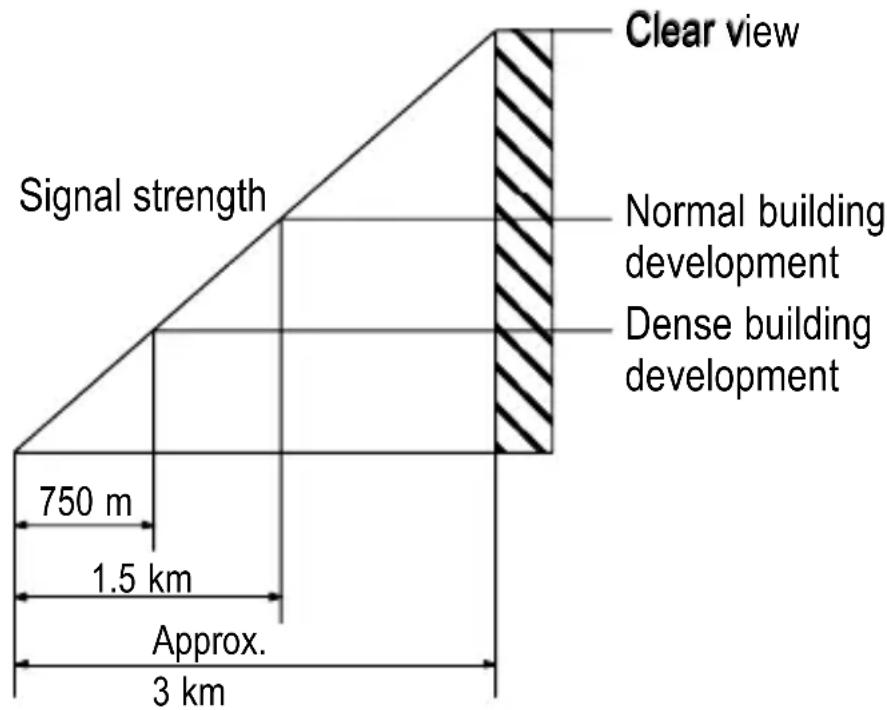
| Range Approx. 3 km | in open space |
Range
Obstructions such as trees and buildings impair the range. The following diagram indicates the range which can be expected under different conditions.
Declaration of Conformity
This device fulfils the requirements stipulated in the EU directive:
1999/5/EU directive on radio equipment and telecommunications terminal equipment and the mutual recognition of their conformity. Conformity with the above mentioned directive is confirmed by the CE symbol on the device.

To view the complete Declaration of Conformity, please refer to the free download available on our web site www.audioline.de.
7 Maintenance / Guarantee
Maintenance
- Clean the housing surfaces with a soft, fluff-free cloth.
- Never use cleaning agents or solvents.
Guarantee
AUDIOLINE equipment is produced and tested according to the latest production methods. The implementation of carefully chosen materials and highly developed technologies ensure trouble-free functioning and a long service life. The terms of guarantee do not apply to the batteries or power packs used in the products. The period of guarantee is 24 months from the date of purchase. All deficiencies related to material or manufacturing errors within the period of guarantee will be redressed free of charge. Rights to claims under the terms of guarantee are annulled following tampering by the purchaser or third parties. Damage caused as the result of improper handling or operation, normal wear and tear, incorrect positioning or storage, improper connection or installation or Acts of God and other external influences are excluded from the terms of guarantee. In the case of complaints, we reserve the right to repair defect parts, replace them or replace the entire device. Replaced parts or devices become our property. Rights to compensation in the case of damage are excluded where there is no evidence of intent or gross negligence by the manufacturer.
If your device shows signs of defect during the period of guarantee, please return it to the sales outlet in which you purchased the AUDIOLINE device together with the purchase receipt. All claims under the terms of guarantee in accordance with this agreement can only be asserted at the sales outlet. No claims under the terms of guarantee can be asserted after a period of two years from the date of purchase and hand-over of the product.
8 Index
B
Battery status, 19
Belt clip, 19
C
Confirmation signal, 22
D
Declaration of Conformity, 24
Display, 20
G
Guarantee, 25
|
Inserting the batteries, 18
M
Maintenance, 25
N
Notation, 21
0
Operating elements, 20
Operation, 21
P
Package contents, 18
Preparing the walkie-talkies, 18
Problems, 23
Problems and solutions, 23
R
Range, 24
Receiving, 21
Ringing tone, 22
Roger Beep, 22
s
Safety information, 16
Selecting a channel, 22
Service hotline, 23
Switching off, 21
Switching on, 21
T
Technical data, 24
Transmitting, 21
Troubleshooting, 23
V
Volume control, 21


- BEDIENELEMENTE
- 3 BEDIENELEMENTE
- INTENDED USE
- AMBIENT CONDITIONS
- BATTERIES
- MEDICAL EQUIPMENT
- DISPOSAL
- PREPARING THE WALKIE-TALKIES FOR USE
- 2 PREPARING THE WALKIE-TALKIES FOR USE
- SAFETY INFORMATION
- CHECKING THE PACKAGE CONTENTS
- INSERTING THE BATTERIES
- BATTERY STATUS
- ATTACHING THE BELT CLIP
- OPERATING ELEMENTS
- 3 OPERATING ELEMENTS
- HANDSET
- DISPLAY
- 4 OPERATING THE WALKIE-TALKIES
- DISPLAY AND NOTATION OF OPERATING SEQUENCES
- SWITCHING THE WALKIE-TALKIE ON/OFF
- VOLUME CONTROL
- TRANSMITTING AND RECEIVING
- OPERATING THE WALKIE-TALKIES
- CONFIRMATION SIGNAL (ROGER BEEP)
- SELECTING A CHANNEL
- TRANSMITTING A RINGING TONE
- 5 IN CASE OF PROBLEMS
- SERVICE HOTLINE
- PROBLEMS AND SOLUTIONS
- TECHNICAL PROPERTIES
- 6 TECHNICAL PROPERTIES
- TECHNICAL DATA
- RANGE
- DECLARATION OF CONFORMITY
- 7 MAINTENANCE / GUARANTEE
- MAINTENANCE
- GUARANTEE
- 8 INDEX
- B
- C
- D
- G
- M
- N
- 0
- P
- R
- S
- T
- V
Brand : AUDIOLINE
Model : PMR 15
Category : Walkie-talkie