
RE-20 - Guitar Multi-Effects ROLAND - Free user manual and instructions
Find the device manual for free RE-20 ROLAND in PDF.


User questions about RE-20 ROLAND
0 question about this device. Answer the ones you know or ask your own.
Ask a new question about this device
Download the instructions for your Guitar Multi-Effects in PDF format for free! Find your manual RE-20 - ROLAND and take your electronic device back in hand. On this page are published all the documents necessary for the use of your device. RE-20 by ROLAND.
USER MANUAL RE-20 ROLAND
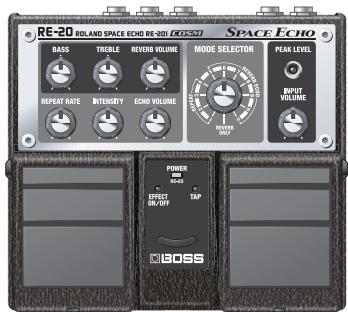
Thank you, and congratulations on your choice of the BOSS RE-20 Space Echo.
Before using this unit, carefully read the sections entitled: "USING THE UNIT SAFELY" and "IMPORTANT NOTES" (separate sheet).
These sections provide important information concerning the proper operation of the unit. Additionally, in order to feel assured that you have gained a good understanding of every feature provided by your new unit, this manual should be read in its entirety. The manual should be saved and kept on hand as a convenient reference.
Main Features
- The RE-20 uses COSM technology to faithfully simulate the characteristics of the famed Roland SPACE ECHO RE-201.
- Faithfully reproduces the characteristics of the RE-201, including the echo's distinctive wow-and flutter-induced wavering and the compressed sound obtained with magnetic saturation.
- The Mode Selector carries on the tradition of the RE-201, offering twelve different reverberation effects through various combinations of the three playback heads and reverb.
- You can set delay times with the TAP input pedal and use an expression pedal (sold separately) for controlling parameters.
- Equipped with a "Virtual Tape Display," which produces a visual image of a running tape.
About COSM (Composite Object Sound Modeling)
Composite Object Sound Modeling—or "COSM" for short—is BOSS/Roland's innovative and powerful technology that's used to digitally recreate the sound of classic musical instruments and effects. COSM analyzes the many factors that make up the original sound—including its electrical and physical characteristics—and creates a digital model that accurately reproduces the original.
Copyright © 2007 BOSS CORPORATION
All rights reserved. No part of this publication may be reproduced in any form without the written permission of BOSS CORPORATION.
Contents
Main Features 1
Panel Descriptions 3
Front Panel 3
Rear Panel. 5
Installing Batteries. 6
Making the Connections .7
Mono Output Connection. 8
Stereo Output Connection. 9
Connecting to SEND/RETURN. 10
WithGuitarAmps. 10
Connecting to an MTR or Mixer... 11
Operating the RE-20 12
Basic Operation 12
Adjusting the Input Volume..... 13
Switching the Echo and Reverb Variations. 13
Adjusting the Volume of the Echo Sound 13
Adjusting the Echo Interval 13
Adjusting the Volume of the Echo's Repeat 13
Adjusting the Tone of the Echo (BASS, TREBLE) 13
Adjusting the Volume of the Reverb
Sound 13
Setting the Delay Time with the TAP Pedal (Tap Delay Time) 14
Applying the Twist Effect with the TAP Pedal 14
Switching the Repeat Rate and Delay Time Mode 15
Control Using an Expression Pedal...16 Setting the Function of the Expression Pedal. 17
About the Variation Mode..... 18
About thePlayback Heads. 18
About the Roland SPACE ECHO RE-201 19
Troubleshooting 20
Sample Settings 21
Main Specifications 22
About the Roland SPACE ECHO RE-201
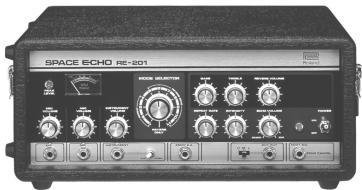
The Roland SPACE ECHO RE-201 tape echo debuted in 1974. Even today, with the machine no longer in production, it remains a world-famous device that is still widely acclaimed. The sound of the RE-201, especially the pleasing chorus effect created by the subtle wavering from the movement of the tape—and the characteristic compressed sound that results from magnetic saturation of the tape—continues to intrigue numerous musicians.
Front Panel
TREBLE Knob
Adjusts the echo's high-frequency range. The frequency response is flat when the knob is at the center position; turning the knob to the right (clockwise) boosts the high frequencies, while turning it to the left cuts the high frequencies.
REVERB VOLUME Knob
Adjusts the volume of the reverb.
Turning the knob to the right increases the volume of the reverb.
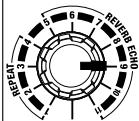
MODE SELECTOR Knob
Turn to select one of the twelve combinations of echo and reverb (p. 18).
BASS Knob
Adjusts the echo's low-frequency range. The frequency response is flat when the knob is at the center position; turning the knob to the right (clockwise) boosts the low frequencies, while turning it to the left cuts the low frequencies.
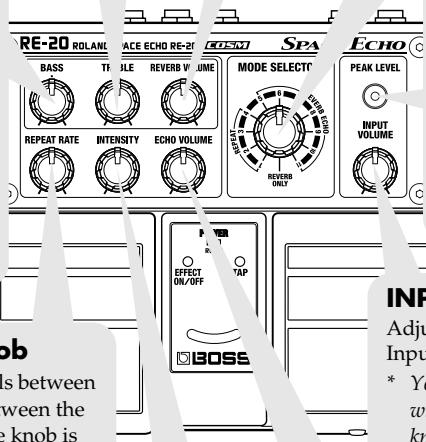
PEAK LEVEL Indicator
This lights when signal reaches the level at which the input sound starts to distort.
- This also lights when the intensity is increasing and when the echo sound oscillates while the twist effect is being applied.
INPUT VOLUME Knob
Adjusts the input levels for Inputs A and B.
- You can adjust the input level with the INPUT VOLUME knob regardless of whether the effect is switched on or off.
REPEAT RATE Knob
This adjusts the intervals between echoes. The spacing between the echoes is reduced as the knob is turned further to the right.
- The ranges for the speed rate setting differ in Normal mode and Long mode (p. 15).
ECHO VOLUME Knob
Adjusts the volume of the echo. The volume of the echo sounds increases as the knob is turned further to the right.
INTENSITY Knob
This adjusts the volume of the echo repeat sound (the feedback volume). The volume of the feedback increases as the knob is turned further to the right. With certain sounds and knob settings, you can also produce oscillation.
POWER Indicator
This indicator shows whether the power is on or off, and also functions as a battery-check indicator.
- When the indicator starts to dim or fails to light, the batteries are exhausted. When this occurs, install new batteries. For instructions on replacing the batteries, refer to "Installing Batteries" (p. 6).
EFFECT ON/OFF Indicator
This lights up when the effect is on.
TAP Indicator
This flashes in time with the delay time set by the tap input.
- The light is turned off when the twist effect is applied.
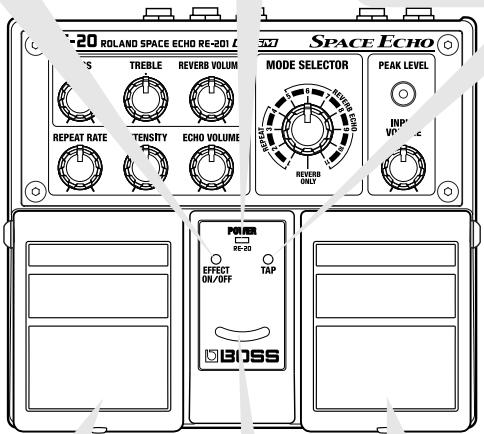
EFFECT ON/OFF Pedal
This alternately switches the effect on or off each time the pedal is pressed.
Even when the effect is switched off, the echo sounds still fade gradually.
- Turning up the INTENSITY knob causes the echo sounds to continue.
Virtual Tape Display
The movement of the light provides a visual image resembling a running tape.
The movement of the light is synchronized to the virtual tape speed.
TAP Pedal
You can set the delay time (tap delay time) by briefly depressing this pedal at the desired tempo (tap input). Also, you can obtain the "twist" effect by keeping the pedal depressed (p. 14).
- The maximum values that can be set for the tap delay time in Normal/ Long mode and Variation mode differ (p. 18).
Rear Panel
INPUT Jacks (INPUT A/MONO, B)
These input jacks are used for connecting electric guitars, keyboards, other instruments, and effects processors.
Connect mono instruments or effects to the A/MONO jack.
"Making the Connections" (p. 7)
- The A/MONO jack also doubles as the power switch. The power comes on when a plug is inserted into the A/MONO jack, and goes off when it is unplugged. Unplug any connected cords when the unit is not in use.
EXP Pedal Jack
Connect an optional expression pedal (such as the Roland EV-5) to this jack.
Once connected, the pedal can be used to control the repeat rate and intensity in real time.
"Control Using an Expression Pedal" (p. 16)
DIRECT Switch
This switches the direct sound on and off. If you want to turn off output of the direct sound, set the DIRECT switch to OFF.
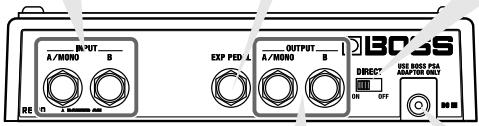
OUTPUT Jacks (OUTPUT A/MONO, OUTPUT B)
Use these jacks to connect the RE-20 to a guitar amp, a keyboard amp, or to an effects processor, mixer, multitrack recorder, or other such device.
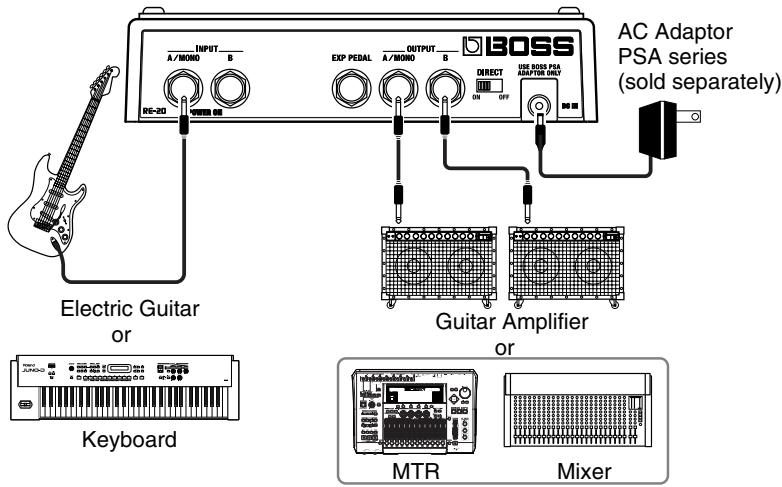
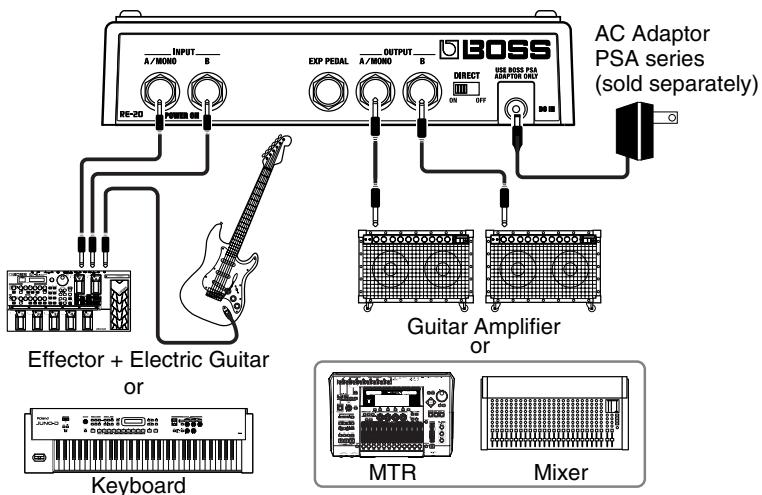
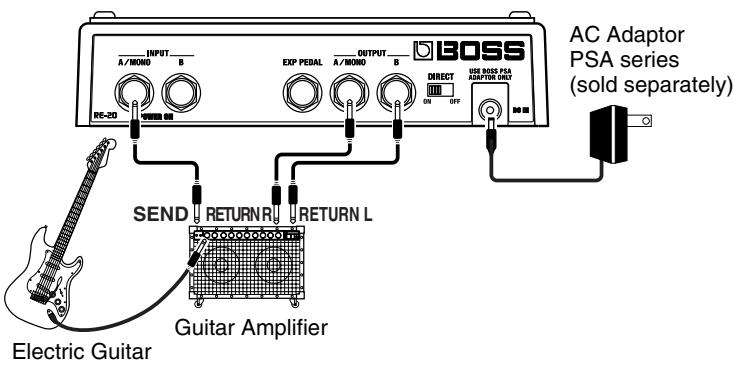
When connected to both A/MONO and B, a stereo effect can be obtained when reverb is applied. If you are using the RE-20 in mono, connect to the A/MONO jack only.
"Making the Connections" (p. 7)
DC IN (AC Adaptor) Jack
This jack is for connecting an AC adaptor (BOSS PSA series, sold separately).
Using an AC adaptor makes possible long performances without worrying about your batteries going dead.
- When you are using an AC adaptor, be sure to use only the specified type (PSA series). Using an adaptor other than the specified type may cause the unit to malfunction, or cause damage to the unit.
Installing Batteries
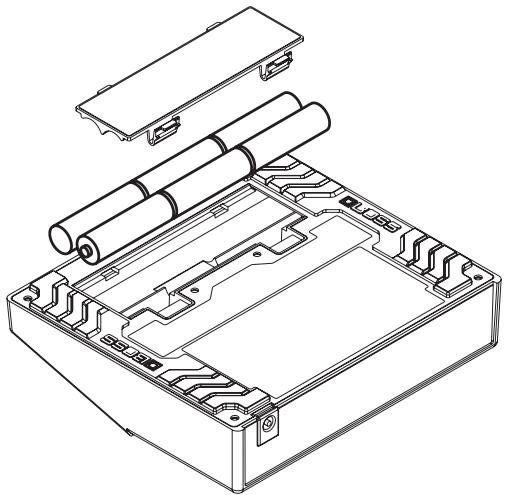
Insert the batteries as shown below, being careful to orient the batteries correctly.
NOTE
- When turning the unit upside-down, get a bunch of newspapers or magazines, and place them under the four corners or at both ends to prevent damage to the buttons and controls. Also, you should try to orient the unit so no buttons or controls get damaged.
- When turning the unit upside-down, handle it with care to avoid dropping it, or allowing it to fall or tip over.
- Make sure the "+" and "-" ends of the batteries are oriented correctly.
- Batteries are supplied with the unit. The life of these batteries may be limited, however, since their primary purpose is to enable testing.
- When the batteries run down, the POWER indicator grows dim. If this happens, install with new batteries.
- When replacing the batteries, use six AA type batteries.
- Avoid using new batteries together with used ones. In addition, avoid mixing different types of batteries. Doing so can result in fluid leakage.
- Battery life can vary depending on battery type.
MEMO
Continuous usage time under battery power is about 32 hours with alkaline batteries and about 9 hours with carbon batteries. (This may vary according to usage conditions.)
Making the Connections
NOTE
- When using an AC adaptor, be sure to use only the specified type (PSA series; sold separately).
Using an adaptor other than the specified type may cause the unit to malfunction, or cause damage to the unit.
- To prevent malfunction and/or damage to speakers or other devices, always turn down the volume and turn off the power to all devices before making any connections.
- Noise may be produced if wireless communications devices, such as cell phones, are operated in the vicinity of this unit. Such noise could occur when receiving or initiating a call, or while conversing. Should you experience such problems, you should relocate such wireless devices so they are at a greater distance from this unit, or switch them off.
- Some connection cables contain resistors. When connection cables with resistors are used, the sound level may be extremely low, or impossible to hear. For information on cable specifications, contact the manufacturer of the cable.
- The INPUT A/MONO jack doubles as a power switch. Inserting a plug in the INPUT A/MONO jack turns on the power; the power is switched off when the plug is disconnected. Be sure to unplug the cable from this jack when the RE-20 is not in use.
- If there are batteries in the unit while an AC adaptor is being used, normal operation will continue should the line voltage be interrupted (power blackout or power cord disconnection).
- Once the connections have been completed, turn on power to your various devices in the order specified. By turning on devices in the wrong order, you risk causing malfunction and/or damage to speakers and other devices.
When powering up: Turn on the power to your guitar amp last.
When powering down: Turn off the power to your guitar amp first.
- Always make sure to have the volume level turned down before switching on power. Even with the volume all the way down, you may still hear some sound when the power is switched on, but this is normal, and does not indicate a malfunction.
- When operating on battery power only, the POWER indicator will become dim when battery power gets too low. Replace the batteries as soon as possible.
- This unit is equipped with a protection circuit. A brief interval (a few seconds) after power-up is required before the unit will operate normally.
Mono Output Connection
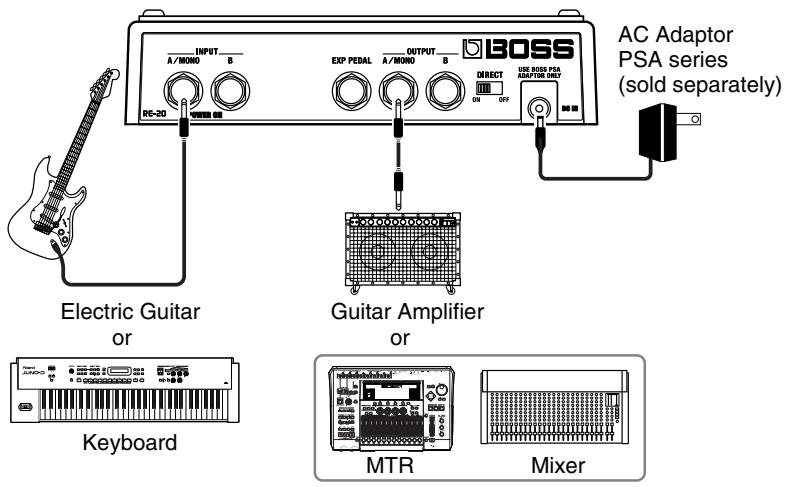
Stereo Output Connection
Mono Input
Stereo Input
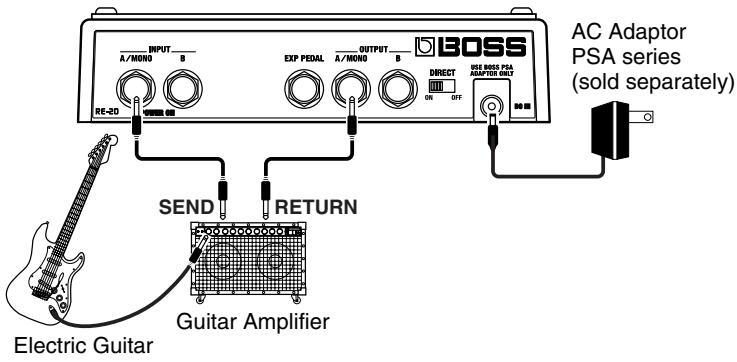
Connecting to SEND/RETURN
With Guitar Amps
Mono Send/Mono Return
Mono Send/Stereo Return
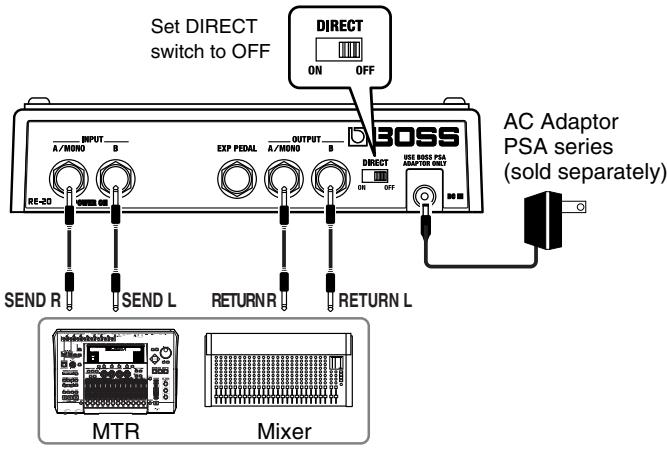
Connecting to an MTR or Mixer
If you want to turn off output of the direct sound—for example when connecting to a mixer's SEND/RETURN—set the DIRECT switch to OFF.
Mono Send/Mono Return
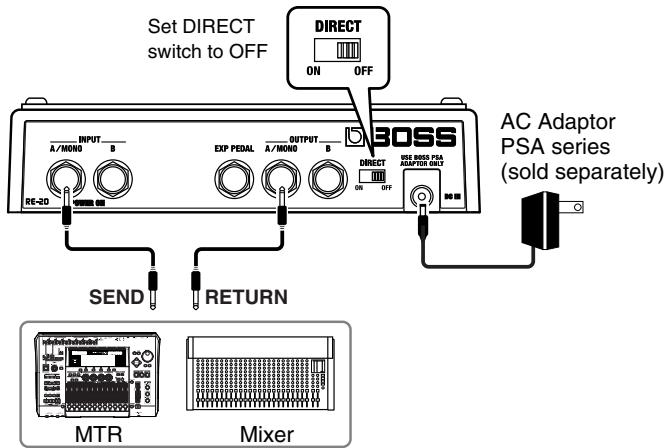
■ Stereo Send/Stereo Return
Basic Operation
For this demonstration of using the pedals, first press the EFFECT ON/OFF pedal to switch on the effect (ON/OFF indicator lit), and set the DIRECT switch to ON.
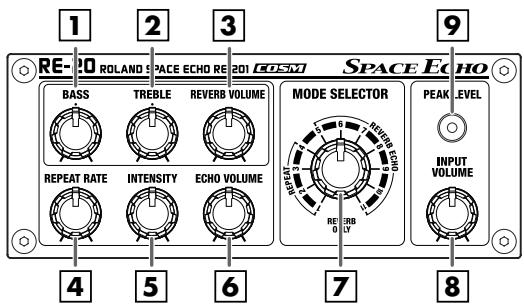
- Set the knobs as shown in the figure.
- Using the INPUT VOLUME knob 8 and the volume control on the connected device, adjust the input level so that the PEAK LEVEL indicator 9 lights momentarily when the instrument connected to the RE-20 is played forcefully.
- Set the MODE SELECTOR knob 7 to the 1 position.
- Turn the ECHO VOLUME knob 6 to adjust the volume of the echo.
- Turn the REPEAT RATE knob 4 to adjust the echo interval.
- Turn the INTENSITY knob 5 to adjust the volume of the echo's repeat.
- Turn the BASS knob to adjust the echo's low-frequency range.
- Turn the TREBLE knob 2 to adjust the echo's high-frequency range.
- Set the MODE SELECTOR knob 7 to the REVERB ONLY position.
- Turn the REVERB VOLUME knob 3 to adjust the volume of the reverb.
- Turn the MODE SELECTOR knob 7 to select the Variation mode.
Adjusting the Input Volume
The input level can be adjusted with the INPUT VOLUME knob 8.
- The input level can be adjusted with the INPUT VOLUME knob regardless of whether the effect is switched on or off.
Switching the Echo and Reverb Variations
You can use the MODESELECTOR knob [7] to switch among the twelve Variation modes, which offer different combinations of echo and reverb.
- For more detailed information on the Variation mode types, refer to the "About the Variation Mode" (p. 18).
Adjusting the Volume of the Echo Sound
You can adjust the volume of the echo sound with the ECHO VOLUME knob 6.
Adjusting the Echo Interval
You can adjust the amount of time between echoes with the REPEAT RATE knob 4.
Adjusting the Volume of the Echo's Repeat
You can adjust the volume of the repeating echo sound (amount of feedback) with the INTENSITY knob 5.
Adjusting the Tone of the Echo (BASS, TREBLE)
You can use the BASS 1 and TREBLE 2 knobs to adjust the low- and high-frequency ranges of the echo sound only.
Adjusting the Volume of the Reverb Sound
You can adjust the volume of the reverb sound with the REVERB VOLUME knob 3.
- Enabled only when the MODE SELECTOR knob is set to any position from 5 through 11 or to REVERB ONLY.
Setting the Delay Time with the TAP Pedal (Tap Delay Time)
- Using the MODE SELECTOR knob, select the Variation mode for which the tap delay time is to be set.
-
For more on the playback heads for which the tap delay time is set, and the maximum values of the settings, refer to "About the Variation Mode" (p. 18).
-
Press the TAP pedal two or more times at the tempo you want to set.
This sets the tap delay time. The TAP indicator flashes in sync with the tap delay time.
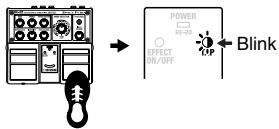
Press two or more times
- Enabled only when the MODE SELECTOR knob is set to any position from 1 through 11.
- When any of the following are carried out, the tap delay time setting changes
REPEAT RATE knob turned changes to the value set with the REPEAT RATE knob
MODE SELECTOR knob turned changes to the value set with the REPEAT RATE knob
Repeat rate or twist changed with changes to the value set with the expression pedal
an expression pedal
- You cannot save the tap delay time setting.
- When the twist effect is applied using the TAP pedal (from when the TAP indicator is off to when it goes on or starts flashing), you cannot set the tap delay time.
Applying the Twist Effect with the TAP Pedal
The twist effect simultaneously increases the repeat rate and the intensity, causing the echo sound to oscillate. In addition, the echo volume level is controlled.
- Enabled only when the MODE SELECTOR knob is set to any position from 1 through 11.
- Press and hold down the TAP pedal.
The TAP indicator goes out, and application of the twist effect begins.
The echo sound begins to oscillate, then the oscillation increases as the pitch rises as well.
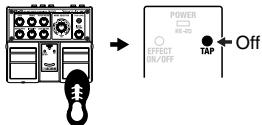
Press and hold down
- You cannot set the repeat rate and intensity while the TAP pedal is held down.
2. Release the TAP pedal.
The pitch of the oscillating sound starts to fall, and the original echo sound returns. The TAP indicator lights when the twist effect is finished.
- Once the TAP pedal is released, changing the repeat rate or intensity cancels the twist effect. The setting is then changed to the value set with the knob or expression pedal.
- Adjusting the MODE SELECTOR knob while the twist effect is being applied cancels the twist effect.
- You can apply the twist effect with an external expression pedal. For more detailed information, refer to "Control Using an Expression Pedal" (p. 16).
Switching the Repeat Rate and Delay Time Mode
The RE-20 features two modes to select from.
Normal mode:
The REPEAT RATE knob functions over the same range as the RE-201. Additionally, the maximum value that can be set for the tap delay time is three seconds (when the MODE SELECTOR knob is set to the 3 or 7 position).
Long mode:
The range for the REPEAT RATE knob setting is expanded to twice the normal setting. Additionally, the maximum value that can be set for the tap delay time is six seconds (when the MODE SELECTOR knob is set to the 3 or 7 position).
1. Turn off the RE-20.
2. While holding down the TAP pedal, turn on the power to the RE-20.
- Disconnecting the plug from the INPUT A/MONO jack switches off the power.
The virtual tape display flashes, and then remains lit.
- Connecting the plug to the INPUT A/MONO jack switches on the power.
3. Confirm that the virtual tape display is lit, then release the TAP pedal.
4. Turn the MODE SELECTOR knob to select the mode.
| MODE SELECTOR | Mode |
| 1 | Normal mode |
| 2 | Long mode |
5. Press the TAP pedal.
The TAP indicator flashes rapidly, and the setting is saved to the RE-20's memory. When the setting is saved, the TAP indicator remains lit, and the RE-20 returns to its normal operating status.
- Be sure not to turn off the power while the TAP indicator is flashing rapidly.
- This setting is saved even after the power is turned off.
- When the RE-20 is set to Long mode, the EFFECT ON/OFF indicator and TAP indicator flash rapidly immediately after the power is turned on.
- The default factory setting is Normal mode.
Control Using an Expression Pedal
You can control the following functions with an expression pedal (Roland EV-5; sold separately) connected to the EXP PEDAL jack on the rear panel.
REPEAT RATE: The echo interval becomes shorter as the toe of the expression pedal is pressed further.
In Long mode, the range for the Repeat Rate setting is twice that of Normal mode.
INTENSITY: The Intensity increases as the toe of the expression pedal is pressed
further, increasing the volume of the echo repeat sound (the feedback volume).
ECHO LEVEL: This controls the level input to the echo. The volume of the echo sounds increases as the toe of the expression pedal is pressed further.
- This function can be controlled only with an expression pedal.
- The input level to the reverb is not changed.
Twist: Repeat Rate and Intensity are controlled simultaneously.
In addition, this controls the ECHO VOLUME according to the echo level.
As you further press down on the toe of the expression pedal, the echo sound starts to oscillate, then the oscillation rate increases and the pitch of the oscillation sound rises.
The Repeat Rate and Intensity are set to the minimum value when the heel of the pedal is pressed down; when you press firmly on the toe of the pedal, the value changes to the value that's been set with the knob.
With the twist effect, the value that's been set with the knob is obtained when the heel of the pedal is pressed down; when you press firmly on the toe of the pedal, the value changes to the maximum value.
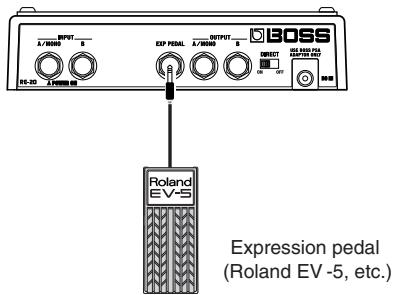
- Use only the specified expression pedal (Roland EV-5; sold separately). By connecting any other expression pedals, you risk causing the unit to malfunction and/or damage to the unit.
Setting the Function of the Expression Pedal
- Turn off the RE-20.
-
Disconnecting the plug from the INPUT A/MONO jack switches off the power.
-
While holding down the TAP pedal, turn on the power to the RE-20.
The virtual tape display flashes, and then remains lit.
- Connecting the plug to the INPUT A/MONO jack switches on the power.
- Turn the MODE SELECTOR knob to select a function for the expression pedal.
| MODE SELECTOR | Function |
| 3 | REPEAT RATE |
| 4 | INTENSITY |
| 5 | ECHO LEVEL *1 |
| 6 | TWIST |
*1 This function can be controlled only with an expression pedal.
- Press the TAP pedal to set that function.
The TAP indicator flashes rapidly, and the setting is saved to the RE-20's memory. When setting is saved, the TAP indicator remains lit, and the RE-20 returns to its normal operating status.
- Be absolutely sure to avoid turning off the power while settings are being saved.
- This setting is retained even while the power is turned off.
- The factory default setting is REPEAT RATE.
About the Variation Mode
You can use the MODE SELECTOR knob to switch among the twelve Variation modes, which offer different combinations of echo and reverb.
| MODE SELECTOR | REPEAT | REVERB ECHO | REVERB ONLY | ||||||||||
| 1 | 2 | 3 | 4 | 5 | 6 | 7 | 8 | 9 | 10 | 11 | |||
| Play-back Heads | 1 | ● | ● | ● | ● | ● | |||||||
| 2 | ● | ● | ● | ● | ● | ● | |||||||
| 3 | ● | ● | ● | ● | ● | ● | |||||||
| REVERB | ● | ● | ● | ● | ● | ● | ● | ● | |||||
: On
The playback heads set with the tap delay times
REPEAT (MODE SELECTOR knob "1"-"4"):
Echo only
REVERB ECHO (MODE SELECTOR knob “5”–“11”):
Combined echo and reverb
REVERB ONLY (MODE SELECTOR knob "REVERB ONLY"):
Reverb only
About thePlayback Heads
Relative to whatever the tap delay time is at playback head 1, the tap delay time at playback head 2 is twice that, and the tap delay time at playback head 3 is three times that.
Example: With the MODE SELECTOR knob set to the "11" position and the tap delay time set to 0.5 seconds
The setting is 0.5 seconds at playback head 1, 1 second at playback head 2, and 1.5 seconds at playback head 3.
- The maximum values that can be set for the tap delay time in Normal/Long mode and Variation mode differ.
| MODE SELECTOR | Maximum Values for Tap Delay Time (Seconds) | |
| Normal Mode | Long Mode | |
| 1, 5, 8, 10, 11 | 1 | 2 |
| 2, 4, 6, 9 | 2 | 4 |
| 3, 7 | 3 | 6 |
About the Roland SPACE ECHO RE-201
The Roland SPACE ECHO RE-201 is a reverb-equipped tape echo that debuted in 1974.
About the Configuration of the Tape Echo/Reverb
The tape echo section features an erase head, record head, and three playback heads arranged sequentially at equal intervals, such that a sound is played back three times at equal intervals.
The three playback heads are switched with the MODE SELECTOR knob, making it possible to create different variations (patterns) of echo intervals.
The reverb section is equipped with a spring reverb. The reverb signal path is connected in parallel to the tape echo section.
Changing of the Echo Sound's Pitch When REPEAT RATE is Changed
Turning the REPEAT RATE knob to the right (clockwise) gradually increases the tape speed. As this happens, sounds are played back more closely together, and the pitch begins to rise.
Simultaneously, the density of the sounds during recording gradually decreases, so when those sounds reach the playback heads, the pitches that were raised then begin to fall.
Oscillation in the Tape Speed
Even without any change in the REPEAT RATE knob setting, the tape speed is always changing slightly due to the resistance from mechanical friction, tape slippage, and other factors.
This creates oscillations in the pitch of each of the three echo sounds, automatically producing the RE-201's characteristic chorus effect.
About the Change in Sound Quality with Magnetic Saturation
Due to magnetic saturation, recording to and playing back from tape produces a sense of compression in the sound, giving it a characteristic warmth that is unique to tape.
In addition, the sonic quality of playback and recording also changes with the change in tape speed.
About the Reverb
The RE-201's reverb section includes three springs arranged in a "Z" formation. The vibration of each spring influences the motion of the others to produce the reverb's characteristic sound.
Troubleshooting
Power doesn't come on
Is the guitar or keyboard connected correctly to the INPUT A/MONO jack?
Check the connections again (p. 7-p. 11).
* The power will not turn on without a plug connected to the INPUT A/MONO jack.
Have the batteries run down?
Replace them with new batteries (p. 6).
The batteries included with the RE-20 are meant only to confirm that the unit is functional at the factory.
To reduce battery consumption, be sure to disconnect the plug connected to the INPUT A/MONO jack whenever the unit is not in use.
Is the specified AC adaptor (PSA series; sold separately) connected correctly?
Check the connections again (p. 7-p. 11). Never use any AC adaptor other than the adaptor specified.
No sound/Volume is low
Is the other equipment connected correctly?
Check the connections again (p. 7-p. 11).
Could the INPUT VOLUME knob, REVERB VOLUME knob or ECHO VOLUME knob be turned down?
Use the INPUT VOLUME knob, REVERB knob or ECHO VOLUME knob to raise the input level.
Is the volume turned down on the connected guitar/keyboard, effects processor, or other device?
Check the settings on the connected equipment (p. 7-p. 11).
Is the DIRECT switch off?
Only the effect sound is output when the DIRECT switch is set to OFF. To output the direct sound, set the switch to ON.
Could the connected expression pedal be in the raised position?
When ECHO LEVEL is assigned as the function of the expression pedal, no echo sound is output unless you step on the pedal (p. 16).
Sound is distorted
- Are the INTENSITY knob and INPUT VOLUME knob positioned correctly?
Sounds may become distorted with the knob at certain settings. Turn down the INTENSITY knob and INPUT VOLUME knob to an appropriate level. If in spite of these measures the sound is still distorted, lower the output level of the device connected to the INPUT jacks.
Echo sounds not cancelled even when effect is switched off
Do you have a long delay time set?
Try turning the ECHO VOLUME knob completely to the left (counterclockwise); this allows you to cancel the continuing sounds.
Is the Intensity turned up?
Try turning the INTENSITY knob or ECHO VOLUME knob completely to the left (counterclockwise); this allows you to cancel the continuing sounds.
Sounds output even with no sound input
Is the Intensity setting turned up?
With higher Intensity settings, even when no sounds are being input, the repeat sound gradually increases in volume, and oscillation in the sound may occur. Set the INTENSITY knob at some point to the left of the center position.
Can't set tap delay time
- Are you sure the tap input you supplied was within the range that can be set for the tap delay time?
The maximum values that can be set for the tap delay time in Normal/Long mode and Variation mode differ (p. 18).
The volume level of the instrument connected to the INPUT jack is too low
Could you be using a connection cable that contains a resistor?
Use a connection cable that does not contain a resistor.
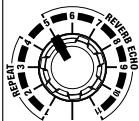
Sample Settings
■ AMBIENCE
This sound adds a sense of space using a short delay and reverb.
RE-20 ROLAND SPACE ECHO RE-201 COSM SPACE ECHO

BASS

REPEAT RATE

TREBLE

INTENSITY

REVERB VOLUME

ECHO VOLUME
MODE SELECTOR
REVERB ONLY

PEAK LEVEL
INPUT VOLUME


■ RICH ECHO
This is a sumptuous sound with a rich reverb added to the delay. This produces an even greater effect when played back in stereo.
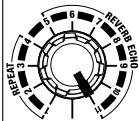
■ MULTI SLAP
Effective with muting techniques for giving the sound a prominent contour. This is even more effective with phrases timed to the repeat sound.
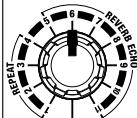
SPACE
Connecting an expression pedal and using the pedal to control the intensity in real time allows you to produce even more fantastic sounds. To make this setup effective, set the INTENSITY knob at a position between three o'clock and maximum.
RE-20 ROLAND SPACE ECHO RE-201 COSM SPACE ECHO

BASS

REPEAT RATE

TREBLE

INTENSITY

REVERB VOLUME

ECHO VOLUME
MODE SELECTOR
REVERB ONLY

PEAK LEVEL
INPUT VOLUME

RE-20 ROLDANSPACESCHORE-201 COSM SPACE ECHO

BASS

REPEAT RATE

TREBLE

INTENSITY

REVERB VOLUME

ECHO VOLUME
MODE SELECTOR
REVERE ONLY

PEAK LEVEL
INPUT VOLUME


RE-20 ROLAND SPACE ECHO RE-201 COSM SPACE ECHO

BASS

REPEAT RATE

TREBLE

INTENSITY

REVERB VOLUME

ECHO VOLUME
MODE SELECTOR
REVERB ONLY

PEAK LEVEL

INPUT VOLUME

Main Specifications
RE-20: Space Echo
Nominal Input Level
-20 dBu (INPUT VOLUME knob: center), max +4 dBu
Input Impedance
1 MΩ
Nominal Output Level
-20 dBu
Output Impedance
1 kΩ
Recommended Load Impedance
10k or greater
Display
Virtual Tape Display
Controls
EFFECT ON/OFF pedal
TAP pedal
BASS knob
TREBLE knob
REVERB VOLUME knob
REPEAT RATE knob
INTENSITY knob
ECHO VOLUME knob
MODE SELECTOR knob
INPUT VOLUME knob
DIRECT switch
Indicators
POWERindicator
(serves also as battery check indicator)
PEAK LEVEL indicator
EFFECT ON/OFF indicator
TAP indicator
Connectors
INPUT jacks A/MONO, B (1/4 inch phone type)
OUTPUT jacks A/MONO, B (1/4 inch phone type)
EXP PEDAL jack (1/4 inch TRS phone type)
DC IN jack (DC 9 V)
Power Supply
DC 9 V: Dry battery LR6/R6 (AA) type x 6, AC Adaptor (PSA series)
Current Draw
75mA (9 V max.)
- Expected battery life under continuous use:
Carbon: 9 hours
Alkaline: 32 hours
These figures will vary depending on the actual conditions of use.
Dimensions
1.2kg / 2 lbs 11 oz (including batteries)
Accessories
Owner's Manual
Leaflet ("USING THE UNIT SAFELY,"
"IMPORTANT NOTES," and "Information")
Dry battery R6 (AA) type (carbon) x 6
Options
AC Adaptor (PSA series)
Expression pedal (Roland EV-5)
-
0 dBu = 0.775 Vrms
-
In the interest of product improvement, the specifications and/or appearance of this unit are subject to change without prior notice.
For EU Countries


This symbol indicates that in EU countries, this product must be collected separately from household waste, as defined in each region. Products bearing this symbol must not be discarded together with household waste.

This equipment has been tested and found to comply with the limits for a Class B digital device, pursuant to Part 15 of the FCC Rules. These limits are designed to provide reasonable protection against harmful interference in a residential installation. This equipment generates, uses, and can radiate radio frequency energy and, if not installed and used in accordance with the instructions, may cause harmful interference to radio communications. However, there is no guarantee that interference will not occur in a particular installation. If this equipment does cause harmful interference to radio or television reception, which can be determined by turning the equipment off and on, the user is encouraged to try to correct the interference by one or more of the following measures:
Reorient or relocate the receiving antenna.
- Increase the separation between the equipment and receiver.
- Connect the equipment into an outlet on a circuit different from that to which the receiver is connected.
- Consult the dealer or an experienced radio/TV technician for help.
This device complies with Part 15 of the FCC Rules. Operation is subject to the following two conditions:
(1) This device may not cause harmful interference, and
(2) This device must accept any interference received, including interference that may cause undesired operation.
Unauthorized changes or modification to this system can void the users authority to operate this equipment.
This equipment requires shielded interface cables in order to meet FCC class B Limit.
For Canada
NOTICE
This Class B digital apparatus meets all requirements of the Canadian Interference-Caising Equipment Regulations.