
CE-20 - Guitar Multi-Effects ROLAND - Free user manual and instructions
Find the device manual for free CE-20 ROLAND in PDF.


| Product Type | Multi-effects for guitar |
| Brand | ROLAND |
| Model | CE-20 |
| Dimensions (approx.) | 250 x 180 x 60 mm |
| Weight (approx.) | 1.2 kg |
| Power Supply | 9V DC AC adapter (included) or 6 x AA batteries |
| Power Consumption | 120 mA max |
| Main Functions | Chorus, flanger, phaser, delay, reverb, vibrato, equalizer, modulation |
| Number of built-in effects | 10 |
| Preset Memory | Yes, 20 user presets |
| Connectivity | 6.35mm jack input, 6.35mm jack output, AUX input, headphone output |
| Control | Foot pedals, potentiometers, switches |
| Housing Material | Sturdy steel |
| Care and Cleaning | Wipe with a soft, dry cloth. Do not use solvents. |
| Safety | Do not expose to moisture. Disconnect before cleaning. |
| Spare Parts and Repairability | Potentiometer pots, switches, jack sockets available. Repair by authorized center. |
| General Information | Class B digital device, complies with Canadian standards. |
Frequently Asked Questions - CE-20 ROLAND
User questions about CE-20 ROLAND
0 question about this device. Answer the ones you know or ask your own.
Ask a new question about this device
Download the instructions for your Guitar Multi-Effects in PDF format for free! Find your manual CE-20 - ROLAND and take your electronic device back in hand. On this page are published all the documents necessary for the use of your device. CE-20 by ROLAND.
USER MANUAL CE-20 ROLAND
Thank you, and congratulations on your choice of BOSS CE-20 Dimensional Processor.
Before using this unit, carefully read the sections entitled: "USING THE UNIT SAFELY" and "IMPORTANT NOTES" (separate sheet).
These sections provide important information concerning the proper operation of the unit. Additionally, in order to feel assured that you have gained a good grasp of every feature provided by your new unit, this manual should be read in its entirety. The manual should be saved and kept on hand as a convenient reference.
Main Features
- Provides six chorus sound types, including newly developed "RICH," "BASS," and "ACOUSTIC" sounds, plus CE-1 and SDD-320 modeling.
- New "BRILLIANCE" control lets you adjust the guitar's harmonic content and the chorus's characteristic glistening effect.
- "AMBIENCE" control developed especially for chorus lets you add greater body and richness to the chorus effect.
- All inputs and outputs are stereo-compatible.
- Internal preamp (+4dBu) lets you apply chorus to guitar and bass amp sends and returns even after sounds are created.
- Comes equipped with a headphone jack, allowing you to use headphones for easy monitoring.
- Can run on battery power (six R6/LR6 (AA) type).
Copyright © 2001 BOSS CORPORATION
All rights reserved. No part of this publication may be reproduced in any form without the written permission of BOSS CORPORATION.
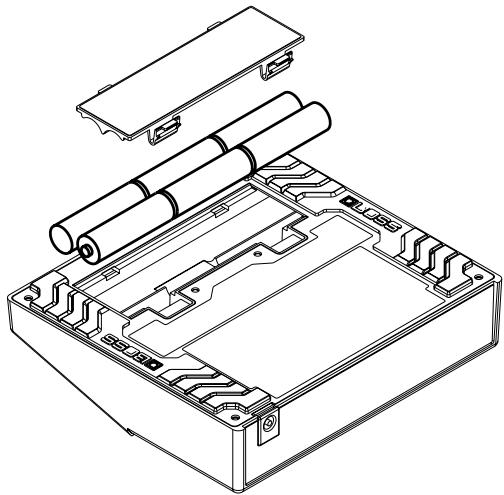
Installing Batteries
Batteries are supplied with the unit. The life of these batteries may be limited, however, since their primary purpose was to enable testing.
Insert the included batteries as shown in figure, being careful to orient the batteries correctly.
NOTE
- When turning the unit upside-down, get a bunch of newspapers or magazines, and place them under the four corners or at both ends to prevent damage to the buttons and controls. Also, you should try to orient the unit so no buttons or controls get damaged.
- When turning the unit upside-down, handle with care to avoid dropping it, or allowing it to fall or tip over.
- Make sure the "+" and "-" ends of the batteries are oriented correctly.
- When the batteries run down, the POWER indicator gets dim. If this happens, replace with new batteries.
- When replacing the batteries, use six AA type.
- Avoid using new batteries together with used ones. In addition, avoid mixing different types of batteries. Doing so can result in fluid leakage.
- Battery life can vary depending on battery type.

Continuous usage time under battery power is about 10 hours with alkaline batteries and about 4 hours with carbon batteries. (This may vary according to usage conditions.)
Making the Connections
NOTE
- The use of an AC adaptor is recommended as the unit's power consumption is relatively high. Should you prefer to use batteries, please use the alkaline type.
- Noise may be produced if wireless communications devices, such as cell phones, are operated in the vicinity of this unit. Such noise could occur when receiving or initiating a call, or while conversing. Should you experience such problems, you should relocate such wireless devices so they are at a greater distance from this unit, or switch them off.
-
Use a cable from Roland to make the connection. If using some other make of connection cable, please note the following precautions.
-
Some connection cables contain resistors. Do not use cables that incorporate resistors for connecting to this unit. The use of such cables can cause the sound level to be extremely low, or impossible to hear. For information on cable specifications, contact the manufacturer of the cable.
-
When the unit is running on battery power, the power comes on when you insert the connector plug into the INPUT R (MONO) jack.
- To prevent malfunction and/or damage to speakers or other devices, always turn down the volume, and turn off the power on all devices before making any connections.
- If there are batteries in the unit while an AC adaptor is being used, normal operation will continue should the line voltage be interrupted (power blackout or power cord disconnection).
- Once the connections have been completed, turn on power to your various devices in the order specified. By turning on devices in the wrong order, you risk causing malfunction and/or damage to speakers and other devices.
When powering up: Turn on the power to your guitar amp last.
When powering down: Turn off the power to your guitar amp first.
- Always make sure to have the volume level turned down before switching on power. Even with the volume all the way down, you may still hear some sound when the power is switched on, but this is normal, and does not indicate a malfunction.
- When operating on battery power only, the unit's indicator will become dim when battery power gets too low. Replace the battery as soon as possible.
- Turn on the power before you connect headphones. When turning off the power, first unplug the headphones, then switch off the power.
- Please observe due caution when using headphones while the LEVEL switch is set to +4 dBu, since their volume may get significantly higher.
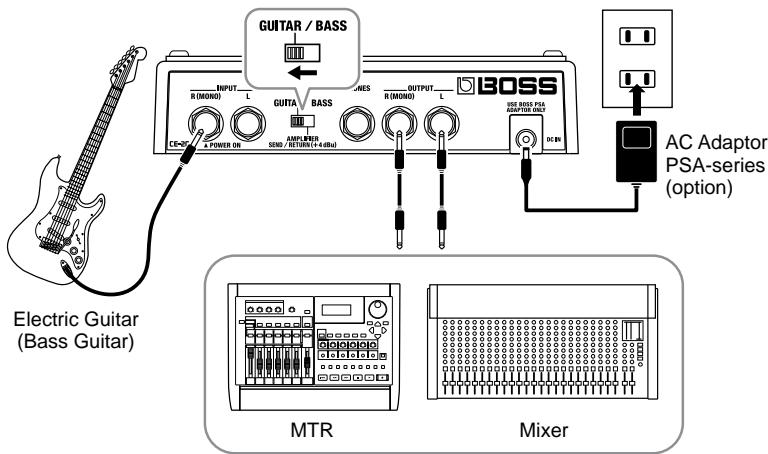
Connecting to a Guitar/Bass Amp
Monaural Connection
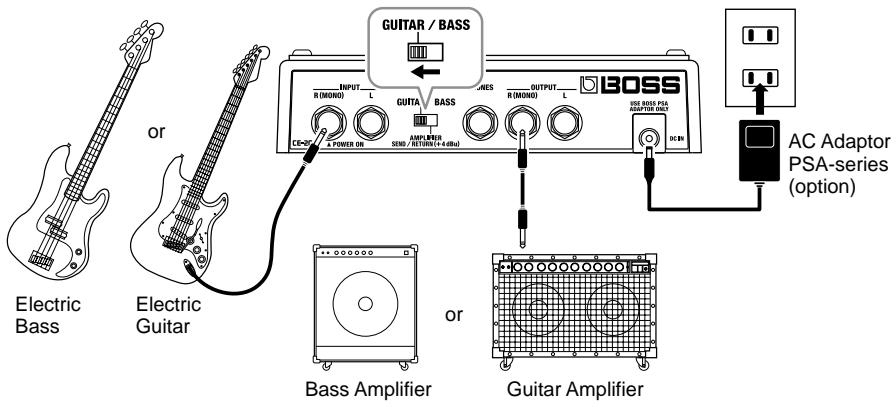
Stereo Connection
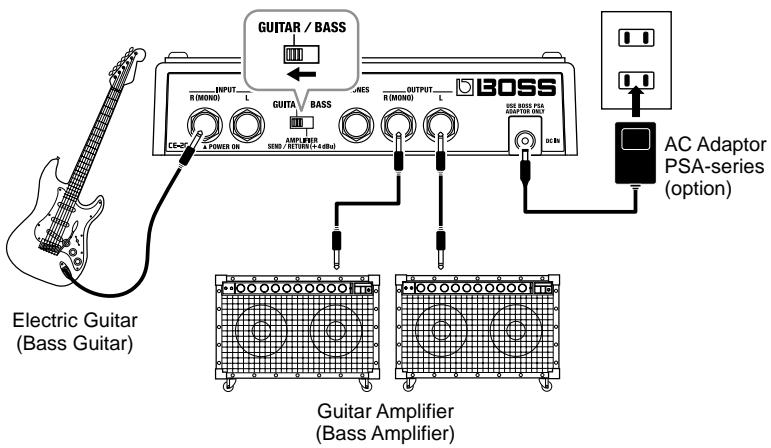
Connecting the Stereo Output and the Effects Processor
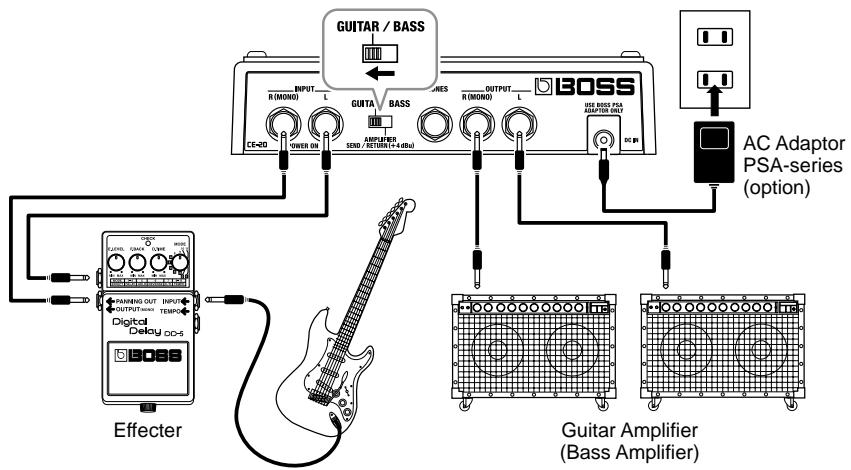
Electric Guitar
(BassGuitar)
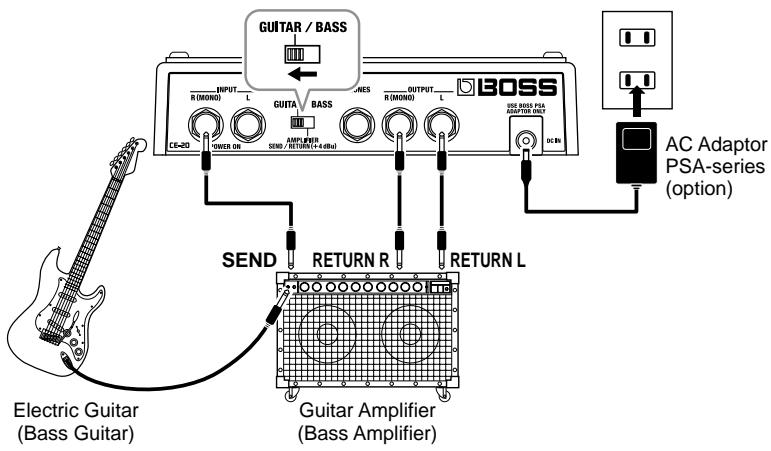
Connecting to SEND/RETURN on the Guitar/Bass Amp
- Match the send output level on the guitar/bass amp and the level setting on the unit. If the PEAK indicator lights up frequently, turn down the output on the guitar/bass amp.
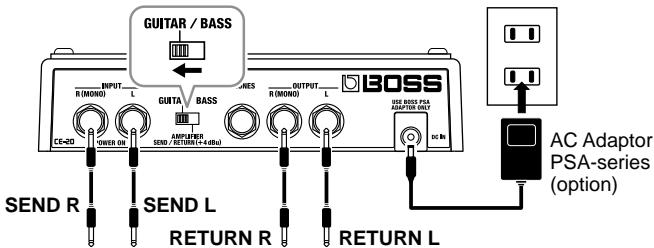
- When the guitar/bass amp's SEND/RETURN level is at +4 dBu, set the LEVEL switch on the rear panel of the unit to +4 dBu.
Monaural Send/Monaural Return
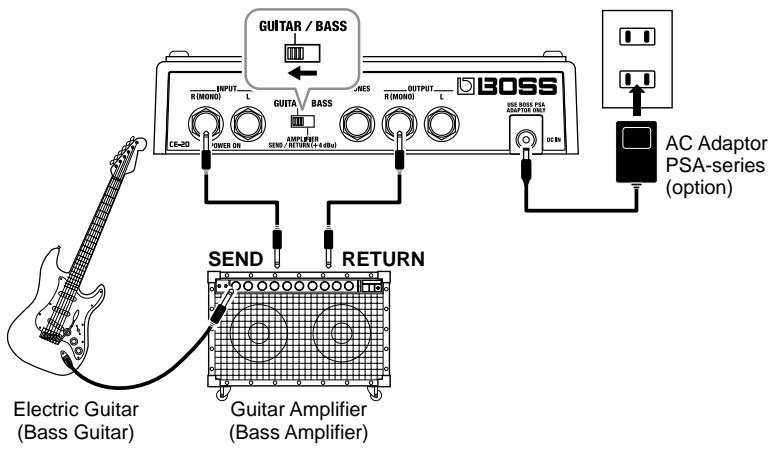
Monaural Send/Monaural Return
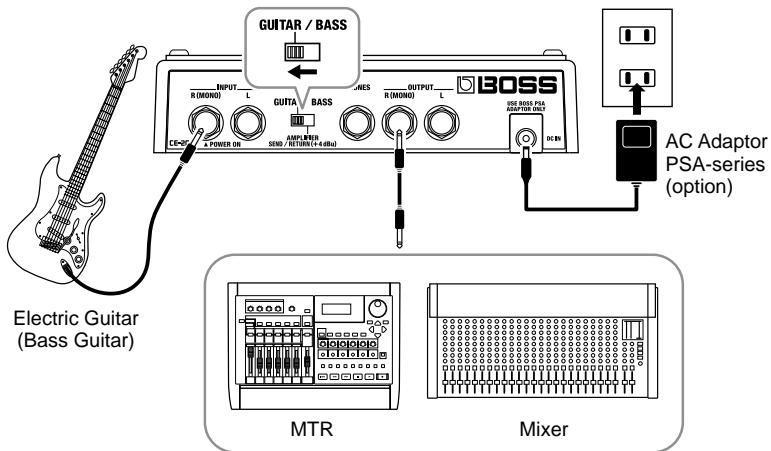
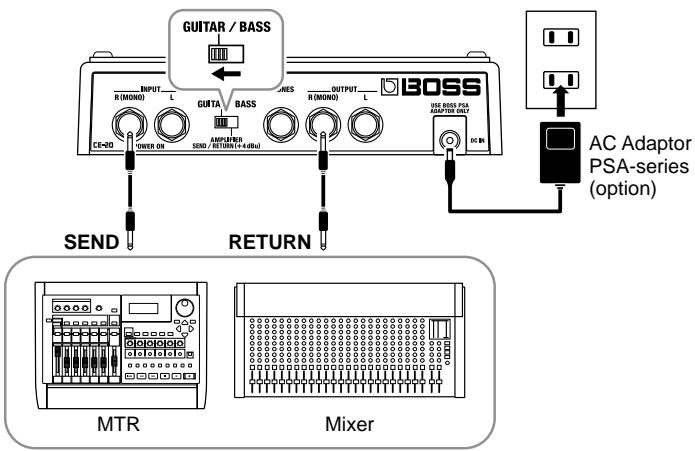
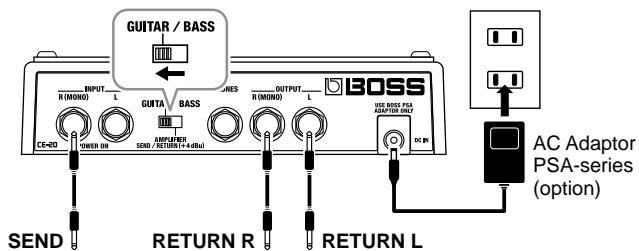
Connecting to an MTR or Mixer
Monaural Connection
Stereo Connection
Connecting to SEND/RETURN on the MTR or Mixer
- Match the send output level on the MTR or Mixer and the level setting on the unit. If the PEAK indicator lights up frequently, turn down the output on the MTR or Mixer.
- When the MTR or Mixer's SEND/RETURN level is at +4 dBu, set the LEVEL switch on the rear panel of the unit to +4 dBu.
When the CE-20 is connected to a mixer's or multitrack recorder's sends or returns, you can then elect to output only the chorus sound, with the direct sound turned off.
For more details, refer to "Switching the Direct Sound On and Off" (p. 22).
Monaural Send/Monaural Return
Monaural Send/Stereo Return
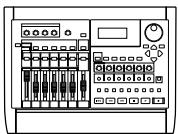
MTR
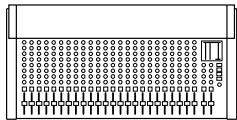
Mixer
Stereo Send/Stereo Return
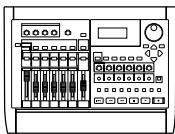
MTR
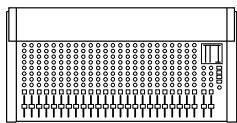
Mixer
"MANUAL" is selected when the power is turned on.
EFFECT ON/OFF Pedal Operation
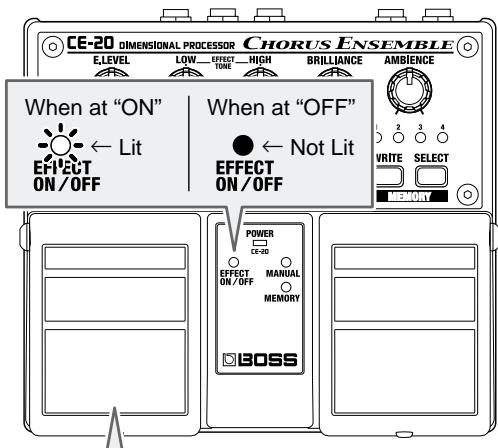
Each press of the EFFECT ON/OFF pedal switches effects on or off. When effects are off, the sound coming in through the INPUT jack is output unchanged.
- When direct sound is set to OFF, no signal is output from the OUTPUT jacks when the effects are off. When the effects are turned on, only the effect sound is output.
The factory default setting for direct sound is ON.

"Switching the Direct Sound On and Off" (p. 22)
MANUAL/MEMORY Pedal Operation
The Pedal mode (1-3) changes the function of the MANUAL/MEMORY pedal (or the MANUAL/MEMORY pedal used with the EFFECT ON/OFF pedal). Use the most appropriate setting for your particular application.
At the factory settings, Pedal mode is set to "1." When changing the Pedal mode settings, refer to p. 12.
Pedal mode: 1
Pressing the MANUAL/MEMORY pedal cycles you through a series of selections, in this order: MANUAL MEMORY 1 MEMORY 2 MEMORY 3 MEMORY 4 MANUAL. This convenient feature makes it easier to switch memories in which multiple memories are used.

Pedal mode: 2
Pressing the MANUAL/MEMORY pedal switches you between MANUAL and the selected memory (shown by the lit indicator). This is convenient when you want to switch an effect sound on and off instantly.

Pedal mode: 3
Pressing the MANUAL/MEMORY pedal toggles you between MANUAL and the selected memory (shown by the lit indicator).
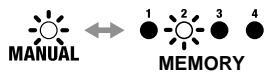
You can also select among Memories 1-4 by pressing the MANUAL/MEMORY pedal and EFFECT ON/OFF pedal simultaneously. This is convenient for both switching effect sounds on and off instantly, and switching memories between songs.

Changing the Pedal Mode Settings
Use the following procedure when changing the Pedal mode settings.
-
The pedal mode setting is stored in memory when the power is switched off.
-
Switch off the power.
-
When running on battery power:
Disconnect the connection plug from the INPUT R (MONO) jack.
- When running on power from an AC adaptor:
Disconnect the plug from the AC ADAPTOR jack.
-
While holding down the SELECT button, switch on the power.
-
When running on battery power:
Insert the connection plug into the INPUT R (MONO) jack.
- When running on power from an AC adaptor:
Insert the AC adaptor plug into the AC ADAPTOR jack.
When the button is released, the MANUAL and MEMORY indicators light up, and the memory indicator for the current Pedal mode setting flashes.
- Set the pedal mode (1-3) pressing the SELECT button.
Pedal mode 1: MEMORY 1 indicator flashes.
Pedal mode 2: MEMORY 2 indicator flashes.
Pedal mode 3: MEMORY 3 indicator flashes.
- Press the WRITE button.
After the MEMORY Number indicator begins flashing rapidly, the setting is stored in memory and the unit returns to its ordinary state.
- To cancel the setting change and return the unit to its ordinary state, then before you press the WRITE button, operate the MANUAL/MEMORY or EFFECT ON/OFF pedal.
| Pedal Mode | EFFECT ON/OFF Pedal | EFFECT ON/OFF Pedal + MANUAL/MEMORY Pedal | MANUAL/MEMORY Pedal |
| 1 | effect on/off | - | Switches MANUAL/MEMORY 1/2/3/4 |
| 2 | effect on/off | - | Switches MANUAL/MEMORY |
| 3 | effect on/off | Selects from MEMORY 1-4 | Switches MANUAL/MEMORY |
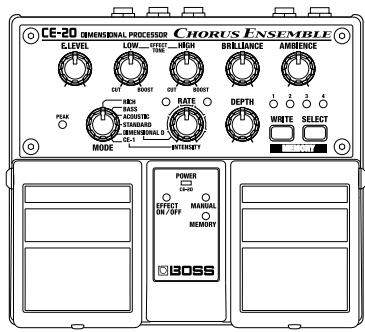
Panel Operation
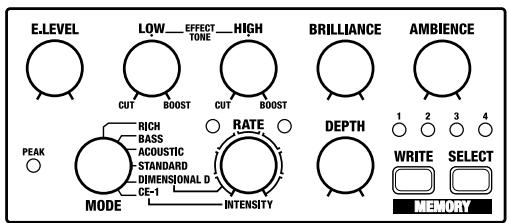
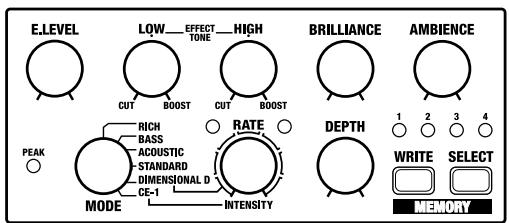
In order to follow along with the instructions given here, you should start out by having effects switched ON (press the EFFECT ON/OFF pedal and confirm that the EFFECT ON/OFF indicator has lighted), and press the MANUAL/MEMORY pedal to switch MANUAL (MANUAL indicator has lighted).
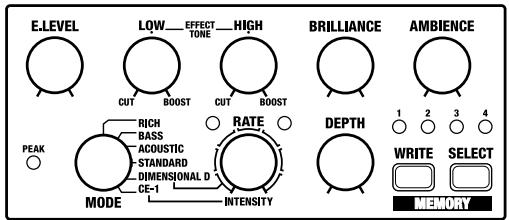
Also set the knobs as shown in the illustration.
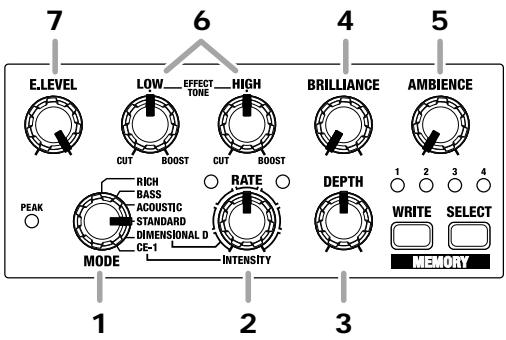
- Select an appropriate chorus effect from the six available types.
- Adjust the chorus rate by rotating the RATE knob.
-
Adjust the chorus depth by rotating the DEPTH knob.
-
No function is assigned to this knob when MODE is set to "DIMENSIONAL D" or "CE-1."
-
Rotate the BRILLIANCE knob to adjust the amount of "glisten" in the high end.
- Rotate the AMBIENCE knob to adjust the amount of body and richness in the effect sound.
- Adjust the tonal qualities of the effect sound with the EFFECT TONE LOW and HIGH knobs.
- Adjust the volume of the effect sound with the E. LEVEL knob.
Storing Settings (Write Operation)
Storing the "MANUAL" Sound in Memory

Do not switch off the power while a write operation is in progress.
- Create the sound you want when set to "MANUAL."
- Press the WRITE button.
The MEMORY indicator and the indicator for the currently selected memory flash, and the CE-20 is put into write standby.
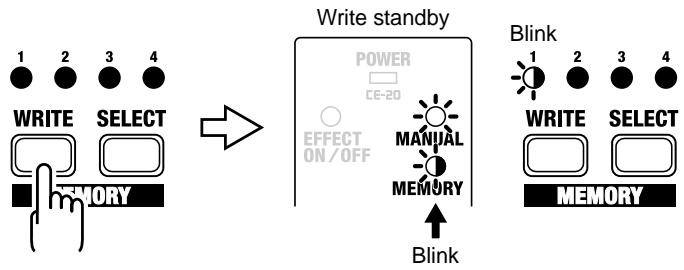
- Press the SELECT button to select the memory (number) to which you want to store the sound.
The indicator for the selected MEMORY number flashes.
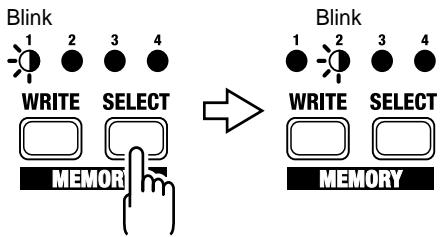
4. Press the WRITE button.
The write operation is completed when the MEMORY indicator and the indicator for the write-destination memory begin to flash more rapidly.
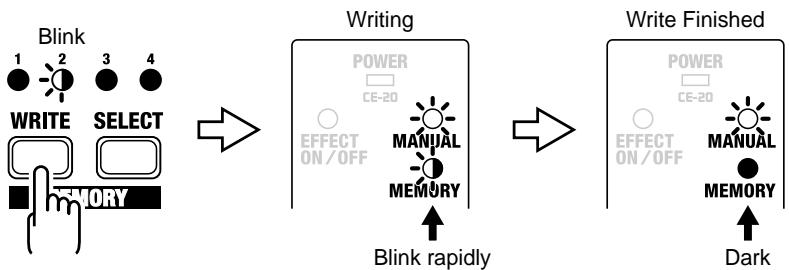
- To cancel the write operation, then before you press the WRITE button, rotate the knob or operate the MANUAL/MEMORY pedal.
Changing and Storing the "MEMORY" Sound

Do not switch off the power while a write operation is in progress.
- Press the MANUAL/MEMORY pedal or the SELECT button to change to the "MEMORY" sound.
-
Operate the knobs to change the sound.
-
To avoid sudden inadvertent changes in sound, the E.LEVEL, LOW, HIGH, BRILLIANCE, AMBIENCE, RATE, and深度 knobs are designed so that the setting does not change unless the knob is first turned as far as the stored setting value. Once the position of the knob matches the setting value stored in memory, the sound starts to change.
When a setting changes, the MEMORY indicator flashes automatically.
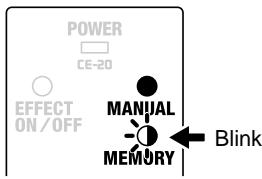
- Press the WRITE button.
The MEMORY indicator and the indicator for the currently selected MEMORY number start to flash, and the CE-20 is put into write standby.
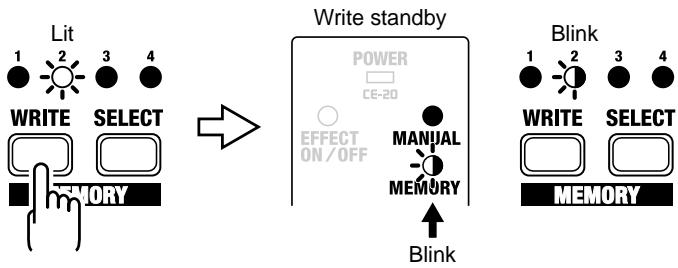
4. Press the SELECT button to select the memory (number) to which you want to store the sound.
The indicator for the selected MEMORY number flashes.
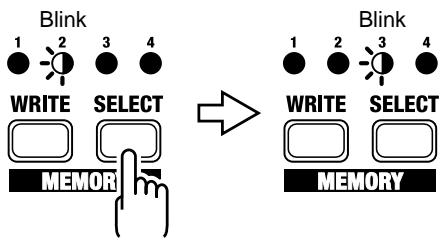
5. Press the WRITE button.
The write operation is completed when the MEMORY indicator and the indicator for the write-destination memory begin to flash more rapidly.
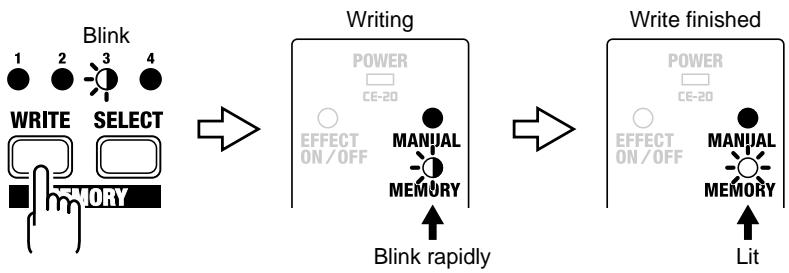
* If the knob or the MANUAL/MEMORY pedal position is changed before the WRITE button is pressed, the write operation is cancelled, and the CE-20 is returned to the status in effect in Step 2.
Front Panel
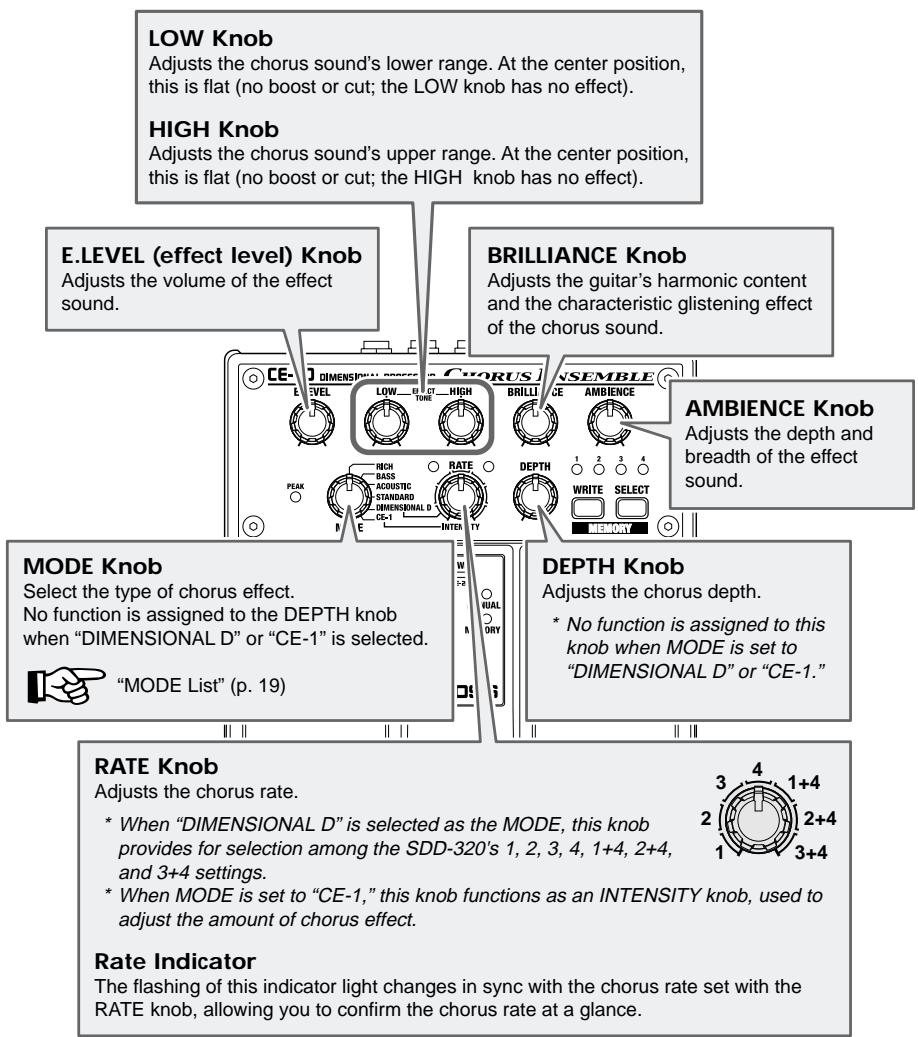
MODE List
| Type | Features |
| RICH | Chorus with unprecedented breadth and minimal thinning of the sound. |
| BASS | Chorus specially tuned for bass that maintains the low end. Great for that bass or heavy guitar sound. |
| ACOUSTIC | Chorus tuned especially for acoustic guitar. Ripple is minimized for a natural-sounding chorus effect. |
| STANDARD | General chorus sound. A perfect sound suitable for any kind of instrument. |
| DIMENSIONAL D | Models the Roland DIMENSION D (SDD-320). Provides a clear, crisp chorus sound. With this mode selected, you can use the RATE knob to switch between 1, 2, 3, 4, 1+4, 2+4, and 3+4 settings. * The DEPTH knob is assigned no function in this mode. |
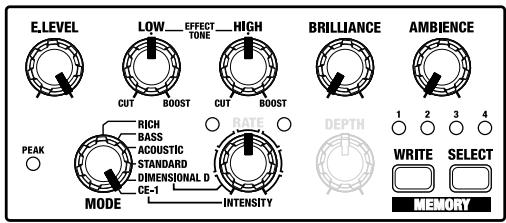
| CE-1 | Models that venerable classic, the BOSS “CE-1” Chorus Effect. This effect provides a chorus sound with the CE-1's characteristic analog warmth. When the CE-1 mode is selected, the RATE knob functions as an INTENSITY knob, allowing you to adjust the amount of chorus effect applied. * The DEPTH knob is assigned no function in this mode. |
PEAK Indicator
This lights up when the signal is at before clipping. If the PEAK indicator lights up frequently, turn down the E.LEVEL knob. Also check the LOW, HIGH, BRILLIANCE, and AMBIENCE knob settings; if raised, try reducing these settings. If in spite of these measures the PEAK indicator continues to light up, lower the output level of the device connected to the INPUT jacks or set the LEVEL switch to +4 dBu.
MEMORY Number Indicator (1-4)
The indicator for the currently selected MEMORY number (1-4) lights. The indicator flashes while the CE-20 is in write standby; the indicator flashes more rapidly while the write operation is in progress.
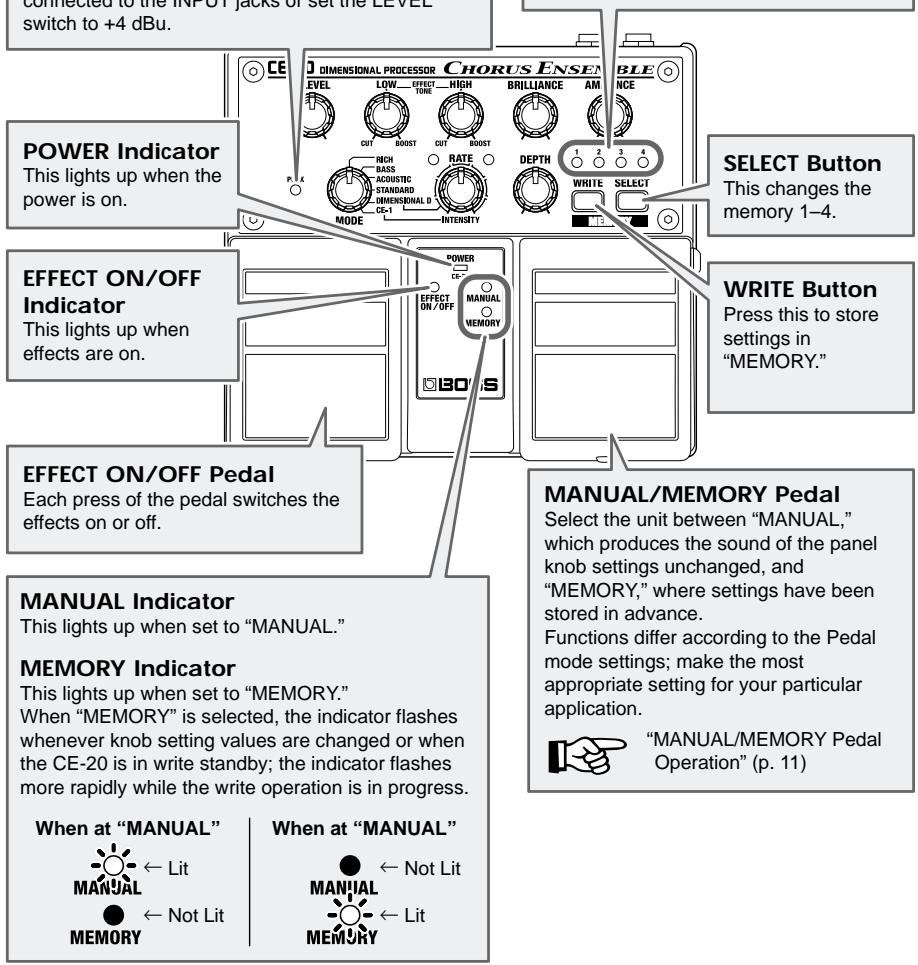
INPUT Jacks (R (MONO), L)
This is the input jack for connecting to the output of an electric guitar or other instrument or effects processor.
For monaural use, make the connection to the R (MONO) jack.

"Making the Connections" (p. 3-9)
- The INPUT R (MONO) jack also doubles as the power switch when the unit is running on battery power. The power comes on when a plug is inserted into the INPUT R (MONO) jack, and goes off when it is unplugged. Unplug any connected cords when the unit is not in use.
PHONES Jack
You can connect headphones here to monitor the sound.
- Turn on the power before you connect headphones. When turning off the power, first unplug the headphones, then switch off the power.
- Please observe due caution when using headphones while the LEVEL switch is set to +4 dBu, since their volume may get significantly higher.
AC Adaptor Jack
This jack is for connecting an AC adaptor (BOSS PSA-series, sold separately). Using an AC adaptor makes possible long performances with no worry about batteries going dead.
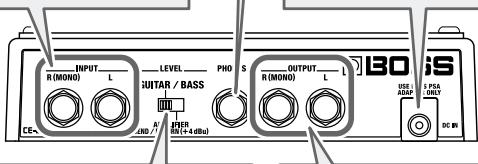
LEVEL Switch
This switch sets the input level to correspond to the device connected to the INPUT jacks.
GUITAR/BASS:
When using an electric guitar or bass guitar.
AMPLIFIER, SEND/RETURN:
When connected to send or return on a guitar amp or the like, or when connected to a large-volume output device

"Making the Connections" (p. 3-9)
OUTPUT Jacks (R (MONO), L)
This jack is for connection to a guitar/bass amp, another effects processor, mixer, MTR, or the like.
For monaural use, make the connection to the R (MONO) jack.

"Making the Connections" (p. 3-9)
Switching the Direct Sound On and Off
When the CE-20 is connected to a mixer's or multitrack recorder's sends or returns, you can then elect to output only the chorus sound, with the direct sound turned off.
Use the following steps to turn the direct sound on and off.
-
Switch off the power.
-
When running on battery power:
Disconnect the connection plug from the INPUT R (MONO) jack.
- When running on power from an AC adaptor:
Disconnect the plug from the AC ADAPTOR jack.
-
While holding down the EFFECT ON/OFF pedal, switch on the power.
-
When running on battery power:
Insert the connection plug into the INPUT R (MONO) jack.
- When running on power from an AC adaptor:
Insert the AC adaptor plug into the AC ADAPTOR jack.
When the pedal is released, the MEMORY number indicators 1 and 2 flash.
- Press the EFFECT ON/OFF pedal to set the direct sound to ON or OFF.
EFFECT ON/OFF indicator lit: direct sound is output.
EFFECT ON/OFF indicator off: direct sound is not output.
- Press the WRITE button.
After the MEMORY number indicators 1 and 2 begin flashing rapidly, the setting is stored in memory and the unit returns to its ordinary state.
- To cancel the setting change and the unit returns to its ordinary state, then before you press the WRITE button, operate the MANUAL/MEMORY pedal.
Changing How Memory Numbers Are Indicated
Not only can you confirm the currently selected memory merely by checking the lit MEMORY number indicators, you can also change the pattern in which the indicators light up. Select the pattern that provides the easiest way to check the memory in any particular environment.

When using the CE-20 in dimly lit surroundings, you can confirm memory numbers more easily by using the Lighting Pattern 2 setting.
Lighting Pattern 1 (Normal):
Only the indicator for the selected memory lights up (or flashes).
Lighting Pattern 2:
The number of indicators lighting up (or flashing) corresponds to the selected memory number.
When MEMORY 1 is selected: Indicator 1 lights up.
When MEMORY 2 is selected: Indicators 1 and 2 light up.
When MEMORY 3 is selected: Indicators 1, 2, and 3 light up.
When MEMORY 4 is selected: Indicators 1, 2, 3, and 4 light up.
You can select the indicator lighting pattern by means of the following procedure.
1. Switch off the power.
- When running on battery power:
Disconnect the connection plug from the INPUT R (MONO) jack.
- When running on power from an AC adaptor:
Disconnect the plug from the AC ADAPTOR jack.
2. While holding down the WRITE button and the SELECT button, switch on the power.
- When running on battery power:
Insert the connection plug into the INPUT R (MONO) jack.
- When running on power from an AC adaptor:
Insert the AC adaptor plug into the AC ADAPTOR jack.
When the button is released, the MANUAL indicator flashes, and either indicator no. 1 alone, or all of the indicators from 1 through 4 flash.
3. Press the MEMORY SELECT button to set the MEMORY indicator lighting pattern.
Lighting Pattern 1: Indicator 1 alone lights.
Lighting Pattern 2: Indicators 1-4 all light.
4. Press the WRITE button.
After the MEMORY Number indicator begins flashing rapidly, the setting is stored in memory and the unit returns to its ordinary state.
- To cancel the setting change and the unit returns to its ordinary state, then before you press the WRITE button, operate the MANUAL/MEMORY or EFFECT ON/OFF pedal.
Returning Settings to Their Factory Defaults
You can restore the memories (1-4), pedal mode settings, and the direct sound mute settings to their original factory values.
| Memory Settings | Memory 1 (p. 26) | SUPER RICH |
| Memory 2 (p. 26) | BASS STANDARD | |
| Memory 3 (p. 27) | DEEP CHORUS | |
| Memory 4 (p. 28) | CE-1 | |
| Pedal Mode (p. 11–12) | 1 | |
| Direct Sound ON/OFF (p. 22) | ON | |
| MEMORY Number Indication (p. 23) | Lighting Pattern 1 | |

Carrying out the following procedure completely clears the content currently stored in the memories (1-4).
- Switch off the power.
- When running on battery power:
Disconnect the connection plug from the INPUT R (MONO) jack.
- When running on power from an AC adaptor:
Disconnect the plug from the AC ADAPTOR jack.
-
While holding down the WRITE button, switch on the power.
-
When running on battery power:
Insert the connection plug into the INPUT R (MONO) jack. - When running on power from an AC adaptor:
Insert the AC adaptor plug into the AC ADAPTOR jack.
When you release the button, the MEMORY Number indicators (1-4) flash.
- Press the WRITE button.
After the MEMORY Number indicators (1-4) begin flashing rapidly, the setting is stored in memory and the unit returns to its ordinary state.
- To cancel the setting change and the unit returns to its ordinary state, then before you press the WRITE button, operate the MANUAL/MEMORY or EFFECT ON/OFF pedal.
Troubleshooting
The power doesn't come on.
Is the guitar connected correctly to the INPUT R (MONO) jack?
Check the connections again (p. 3-9).
- When running off batteries, the unit won't switch on unless there's something plugged into the INPUT jack. This helps conserve the batteries.
Is the plug connected to the INPUT L jack?
When using battery power, connect the plug to the INPUT R (MONO) jack.
Have the batteries run down?
Replace with fresh batteries (p. 2).
Is the specified AC adaptor (PSA-series sold separately) connected correctly?
Check the connections again (p. 3-9).
There is no sound/volume is too low.
Is the other equipment connected correctly?
Check the connections again (p. 3-9).
Is the volume turned down on the connected guitar/bass amp, effects processor, or other device?
Check the settings on the connected equipment (p. 3-9).
Is the LEVEL switch on the rear panel set correctly?
Set the LEVEL switch to match the connected equipment (p. 3-9).
Is the direct sound ON/OFF set to OFF?
Only the effect sound is output when this is set to OFF. When you want to output the direct sound as well, set this to ON (p. 22).
Is the effect level set to minimum?
Operate the E. LEVEL knob to adjust the effect level.
Sound is distorted.
Are the EFFECT TONE (LOW/HIGH), BRILLIANCE, and AMBIENCE knobs positioned correctly?
Sounds may become distorted with the knobs at certain settings. Turn down one or more of these knobs, or turn down the E. LEVEL knob until the PEAK indicator does not light up too frequently. If in spite of these measures the sound is still distorted, lower the output level of the device connected to the INPUT jacks, or set the LEVEL switch to AMPLIFIER SEND/RETURN (+4 dBu).
Is the LEVEL switch set to GUITAR/BASS?
When connecting to guitar amps, bass amps, or other such gear, or when connecting to equipment that outputs sound at high volumes, set the LEVEL switch to AMPLIFIER SEND/RETURN (+4 dBu).
Pressing the MEMORY/MANUAL pedal does not call up the intended memory.
Is the proper Pedal mode set for your current application?
→ The MANUAL/MEMORY pedal (or the MANUAL/MEMORY pedal when pressed simultaneously with EFFECT ON/OFF pedal) functions differently according to the Pedal mode settings. Use the most appropriate setting for your particular application (p. 11-12).
The volume level of the instrument connected to INPUT jack is too low.
Could you be using a connection cable that contains a resistor?
Use a connection cable that does not contain a resistor.
Sample Settings
RICH
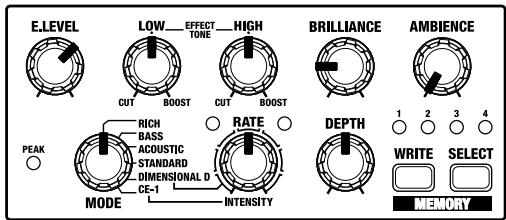
SUPER RICH (Memory 1)
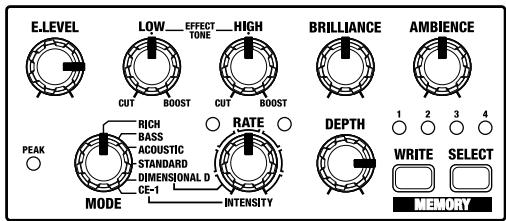
BASS STANDARD (Memory 2)
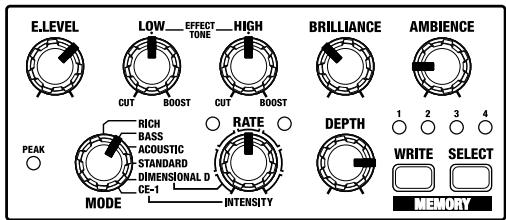
CHORUS FOR HEAVY RIFF
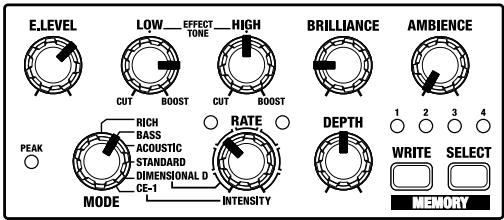
ACOUSTIC STANDARD
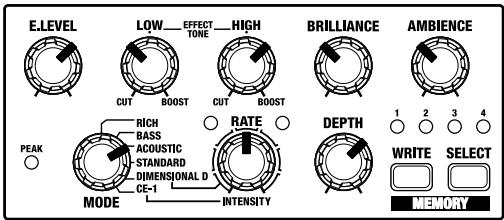
DEEP CHORUS (Memory 3)
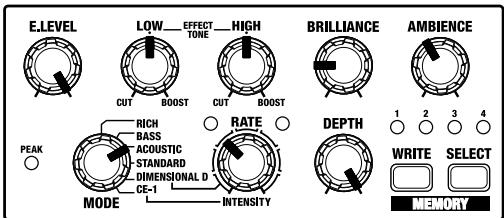
STANDARD ANALOG
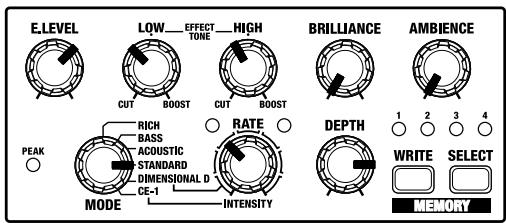
DIMENSIONAL D
Roland DIMENSION D (SDD-320) Modeling Sound
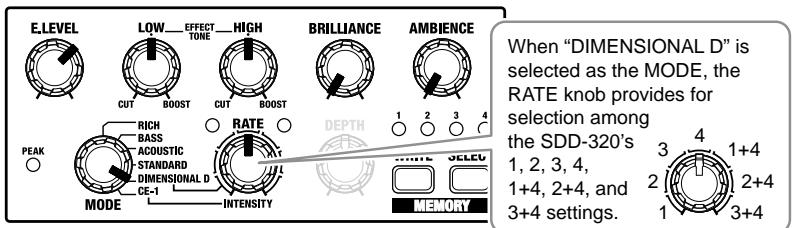
CE-1 (Memory 4)
BOSS CHORUS ENSEMBLE (CE-1) Modeling Sound



Specifications
CE-20: Dimensional Processor
Nominal Input Level
-20 dBu (GUITAR/BASS)
+4 dBu (AMPLIFIER SEND/RETURN)
Input Impedance
1 MΩ
Nominal Output Level
-20 dBu (GUITAR/BASS)
+4 dBu (AMPLIFIER SEND/RETURN)
Output Impedance
1 kΩ (OUTPUT R (MONO), L)
33Ω (PHONES)
Recommended Load Impedance
10 kΩ
Residual Noise Level
-93 dBu or less (IHF-A typ.)
Controls
EFFECT ON/OFF Pedal
MANUAL/MEMORY Pedal
E. LEVEL Knob
LOW Knob
HIGH Knob
BRILLIANCE Knob
AMBIENCE Knob
MODE Knob
RATE Knob
DEPTH Knob
MEMORY WRITE Button
MEMORY SELECT Button
LEVEL Switch
Indicators
RPOWER Indicator
(serves also as battery check indicator)
EFFECT ON/OFF Indicator
MANAUL Indicator
MEMORY Indicator
PEAK Indicator
RATE Indicator
MEMORY Number Indicator 1-4
Connectors
INPUT Jacks (R (MONO), L)
(1/4 inch phone type)
PHONES Jack (stereo 1/4 inch phone type)
OUTPUT Jacks (R (MONO), L)
(1/4 inch phone type)
AC Adaptor Jack
Power
Dry battery (R6/LR6 (AA) type) x 6: DC 9V
AC Adaptor (DC 9V)
Current draw
160mA (9 V max.)
- Expected battery life under continuous use:
Carbon: 4 hours
Alkaline: 10 hours
These figures will vary depending on the
actual conditions of use.
Dimensions
1.1kg / 2 lbs 7 oz (including batteries)
Accessories
Owner's Manual
Leaflet ("USING THE UNIT SAFELY,"
"IMPORTANT NOTES," and "Information")
Dry battery (LR6 (AA) type) x 6
- We recommend that alkaline batteries be used when replacing the batteries.
Options
AC Adaptor (PSA-series)
* 0 dBu = 0.775 Vrms
- In the interest of product improvement, the specifications and/or appearance of this unit are subject to change without prior notice.
This product complies with the requirements of European Directive 89/336/EEC.
-For the USA
FEDERAL COMMUNICATIONS COMMISSION RADIO FREQUENCY INTERFERENCE STATEMENT
This equipment has been tested and found to comply with the limits for a Class B digital device, pursuant to Part 15 of the FCC Rules. These limits are designed to provide reasonable protection against harmful interference in a residential installation. This equipment generates, uses, and can radiate radio frequency energy and, if not installed and used in accordance with the instructions, may cause harmful interference to radio communications. However, there is no guarantee that interference will not occur in a particular installation. If this equipment does cause harmful interference to radio or television reception, which can be determined by turning the equipment off and on, the user is encouraged to try to correct the interference by one or more of the following measures:
Reorient or relocate the receiving antenna.
- Increase the separation between the equipment and receiver.
- Connect the equipment into an outlet on a circuit different from that to which the receiver is connected.
- Consult the dealer or an experienced radio/TV technician for help.
This device complies with Part 15 of the FCC Rules. Operation is subject to the following two conditions:
(1) This device may not cause harmful interference, and
(2) This device must accept any interference received, including interference that may cause undesired operation.
Unauthorized changes or modification to this system can void the users authority to operate this equipment.
This equipment requires shielded interface cables in order to meet FCC class B Limit.
For Canada
NOTICE
This Class B digital apparatus meets all requirements of the Canadian Interference-Causing Equipment Regulations.