
ARX-02 - Synthesizer ROLAND - Free user manual and instructions
Find the device manual for free ARX-02 ROLAND in PDF.


| Product type | Synthesizer expansion card |
| Brand | Roland |
| Model | ARX-02 |
| Dimensions | Approximately 150 x 100 x 20 mm |
| Weight | Approximately 50 g |
| Power supply | Powered by the host device via the expansion connector |
| Main functions | Sound and polyphony expansion for compatible Roland synthesizers |
| Maintenance and cleaning | Wipe with a dry, soft cloth. Do not use solvents. |
| Safety | Avoid static electricity during installation. Handle by the edges. |
| Spare parts and repairability | Parts not available separately. Contact an authorized Roland service center. |
| General information | Expansion card to add high-quality sounds to Roland synthesizers. |
Frequently Asked Questions - ARX-02 ROLAND
User questions about ARX-02 ROLAND
0 question about this device. Answer the ones you know or ask your own.
Ask a new question about this device
Download the instructions for your Synthesizer in PDF format for free! Find your manual ARX-02 - ROLAND and take your electronic device back in hand. On this page are published all the documents necessary for the use of your device. ARX-02 by ROLAND.
USER MANUAL ARX-02 ROLAND
SuperNATURAL Expansion Board
ARX-02
ELECTRIC PIANO
Owner's Manual
取拔説明書
SuperNATURAL
ARX-02 ELECTRIC PIANO
Owner's Manual
Before using this product, carefully read the sections entitled: "USING THE UNIT SAFELY" and "IMPORTANT NOTES" (p. 4; p. 6). These sections provide important information concerning the proper operation of the product. Additionally, in order to feel assured that you have gained a good grasp of every feature provided by your new product, Owner's Manual should be read in its entirety. The manual should be saved and kept on hand as a convenient reference.
Copyright © 2008 ROLAND CORPORATION
All rights reserved. No part of this publication may be reproduced in any form without the written permission of ROLAND CORPORATION.
USING THE UNIT SAFELY
INSTRUCTIONS FOR THE PREVENTION OF FIRE, ELECTRIC SHOCK, OR INJURY TO PERSONS
About WARNING and CAUTION Notices
| ▲WARNING | Used for instructions intended to alert the user to the risk of death or severe injury should the unit be used improperly. |
| ▲CAUTION | Used for instructions intended to alert the user to the risk of injury or material damage should the unit be used improperly. * Material damage refers to damage or other adverse effects caused with respect to the home and all its furnishings, as well to domestic animals or pets. |
About the Symbols
| A | The △ symbol alerts the user to important instructions or warnings. The specific meaning of the symbol is determined by the design contained within the triangle. In the case of the symbol at left, it is used for general cautions, warnings, or alerts to danger. |
| B | The ○ symbol alerts the user to items that must never be carried out (are forbidden). The specific thing that must not be done is indicated by the design contained within the circle. In the case of the symbol at left, it means that the unit must never be disassembled. |
| C | The ● symbol alerts the user to things that must be carried out. The specific thing that must be done is indicated by the design contained within the circle. In the case of the symbol at left, it means that the power-cord plug must be unplugged from the outlet. |
ALWAYS OBSERVE THE FOLLOWING

WARNING
- Do not open or perform any internal modifications on the product.

- Do not open or perform any internal modifications on the product. (The only exception would be where this manual provides specific instructions which should be followed in order to put in place user-installable options; see p. 8.)

- Do not attempt to repair the product, or replace parts within it (except when this manual provides specific instructions directing you to do so). Refer all servicing to your retailer, the nearest Roland Service Center, or an authorized Roland distributor, as listed on the "Information" page.


WARNING
-
Never use or store the product in places that are:
-
Subject to temperature extremes (e.g., direct sunlight in an enclosed vehicle, near a heating duct, on top of heat-generating equipment); or are
- Damp (e.g., baths, washrooms, on wet floors); or are
- Humid; or are
- Exposed to rain; or are
- Dusty; or are
-
Subject to high levels of vibration.
-
In households with small children, an adult should provide supervision until the child is capable of following all the rules essential for the safe operation of the product.


WARNING
- Protect the product from strong impact.
(Do not drop it!)

- Before installing the ARX-02, you must first always turn off the unit (Fantom-G6/G7/G8) and unplug its power cord.


CAUTION
- Install the circuit board only into the specified unit (Fantom-G6/G7/ G8). Remove only the specified screws during the installation.

IMPORTANT NOTES
When you purchase the ARX-02 SuperNATURAL Expansion Board from an authorized Roland dealer, the included sounds and samples are licensed, not sold, to you by Roland Corporation, for commercial use in music production, public performance, broadcast, etc.
You may use any of the included phrases and/or samples in a commercial or non-commercial recording without paying any additional license fees. However, you must strictly adhere to the following crediting guidelines on any music recording that utilize material from ARX-02.
Reproduction or duplication of this collection or any of the sound recording contained in the ARX-02, either as they exist on this expansion board or by any means of reformatting, mixing, filtering, re-synthesizing, processing or otherwise
editing for use in another product or for re-sale, is strictly prohibited without the express written consent of Roland. All unauthorized giving, trading, lending, renting, re-issue, redistribution or re-sale of the sounds included in the ARX-02 are expressly prohibited.
In Plain English: Be creative in your application of the ARX-02 sounds, and keep this library for your use only. DO NOT COPY IT.
Roland constantly monitors other Soundware releases to check for copyright infringements, and will prosecute all piracy and copyright violations to the fullest extent of the law.
THIS LIBRARY IS GUARANTEED TO BE 100% COPYRIGHT CLEAN.
Placement
- This device may interfere with radio and television reception. Do not use this device in the vicinity of such receivers.
Additional Precautions
- To avoid disturbing your neighbors, try to keep the product's volume at reasonable levels (especially when it is late at night).
- When you need to transport the product, package it in the box (including padding) that it came in, if possible. Otherwise, you will need to use equivalent packaging materials.
- In the interest of product improvement, the specifications and/or appearance of this product are subject to change without prior notice.


N225
Contents
USING THE UNIT SAFELY. 4
IMPORTANT NOTES 6
Installing the Expansion Board in Your Product ....8
Installation in Your Product. 8
Confirmation After Installation. 11
To Remove the Board from the Product 12
ARX Series SuperNATURAL Expansion Boards 17
Roland SuperNATURAL Technology 17
ARX-02 ELECTRIC PIANO 17
The Structure of ARX-02 ELECTRIC PIANO 18
Setting of Patch 20
The Basic Screen 20
Selecting a patch 21
Saving a patch (on the Fantom-G) 21
Selecting a Type (Type/Level Screen) 22
Adjusting the Sound (Pickup/Bell Screen) 24
Selecting an Effect (MFX Screen) 26
MFX Switch 26
MFX Types 26
Selecting the Type of Pre Amp (Pre Amp Screen) 32
PreAmpSwitch 32
PreAmp Types 32
Selecting the Type of Speaker (Speaker Screen) 35
Initializing a Patch (Utility Screen) 35
Specifications 37
Index 38
Installing the Expansion Board in Your Product
Cautions when installing
- Before you install this expansion board (hereafter referred to as "the board"), you should carefully read the procedure for installing expansion boards given in the owner's manual of the product in which you're installing it.
-
To avoid the risk of damage to internal components that can be caused by static electricity, please carefully observe the following whenever you handle the board.
-
Before you touch the board, always first grasp a metal object (such as a water pipe), so you are sure that any static electricity you might have been carrying has been discharged.
- When handling the board, grasp it only by its edges. Avoid touching any of the electronic components or connectors.
-
Save the bag in which the board was originally shipped, and put the board back into it whenever you need to store or transport it.
-
Do not touch any of the printed circuit pathways or connection terminals.
- Never use excessive force when installing a circuit board. If it doesn't fit properly on the first attempt, remove the board and try again.
- When you've finished installing the expansion board, follow the steps described in the owner's manual of your device to verify that the board was installed correctly.
Installation in Your Product
- As described in your product's owner's manual, expose the slot in which the expansion board is to be installed.
- Orient the board with the slot of your product as shown in the illustration.
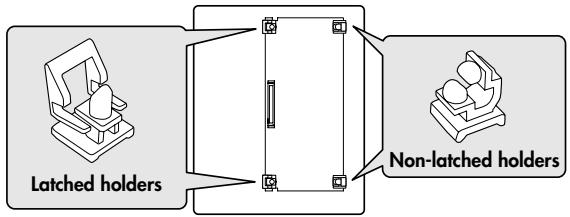
Slot of the product
Board
(expansion board)
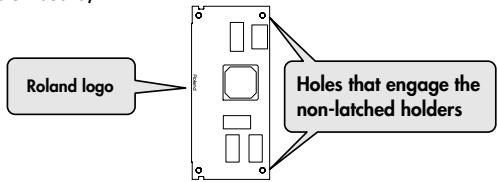
- Insert the board into the product's non-latched board holders until you hear a click.
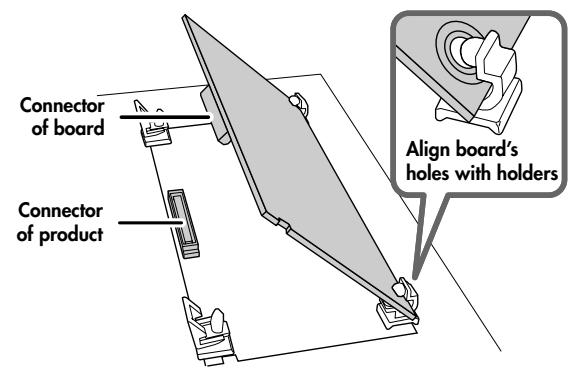
- Gently lower the board into place.
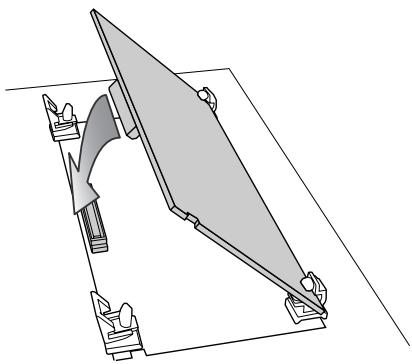
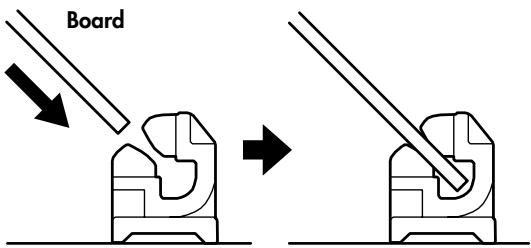
Non-latched holders
- From above, press down on the board at the three locations indicated in the illustration until the latched board holders lock into place.
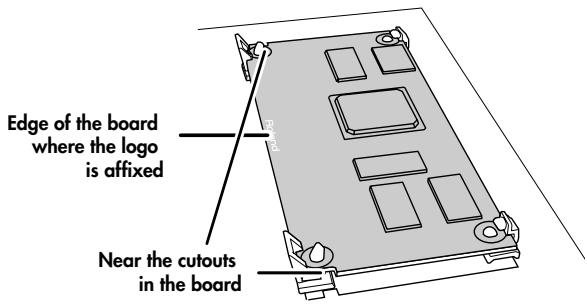
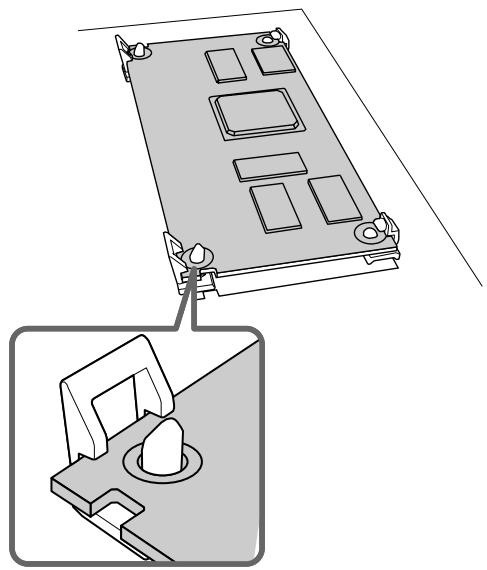
- Verify that the latched board holders are locked.
- Return the expansion board installation slot to its original state.
Confirmation After Installation
After you've finished installing the expansion board, you will need to perform the following procedure to confirm the installation. This installation procedure needs to be performed only the first time you power up your device after installing the expansion board.
- Power up your device as described in its owner's manual.
- If the expansion board was installed correctly, an installation confirmation screen will appear. Press the [F8 (Execute)] button to begin installation.
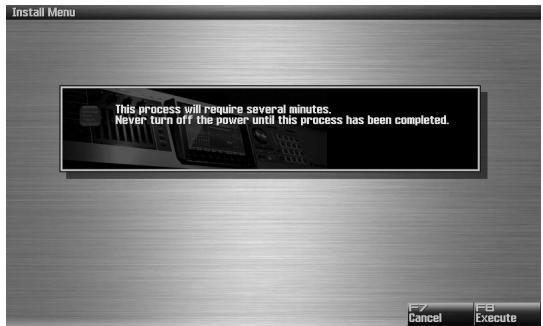
* The screen shown here is for when the board is installed in the Fantom-G.

If the installation confirmation screen does not appear the first time you power up after installing the expansion board, it is likely that the board was not installed correctly. Check once again to make sure that the board is correctly installed.

It may take one to five minutes before installation is finished. Never turn off the power during this installation process.
- When you see the Power Off screen indicating that installation is finished, switch your device's power off, then on again as described in its owner's manual.
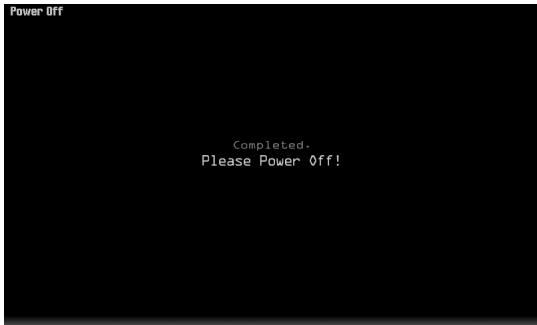
This completes the expansion board installation process.
To Remove the Board from the Product
- As described in your product's owner's manual, expose the slot in which the expansion board was installed.
- Unlatch the latched board holders.
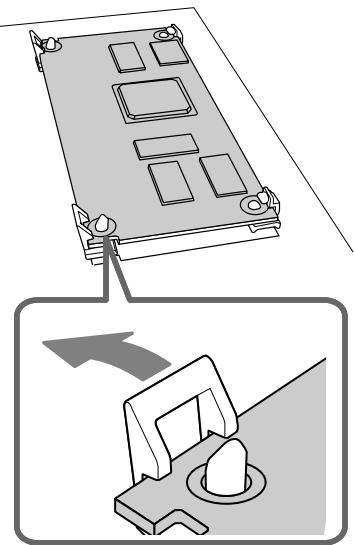
- Verify that the two latched board holders are unlocked, then gently pull up the board and disconnect the connector.
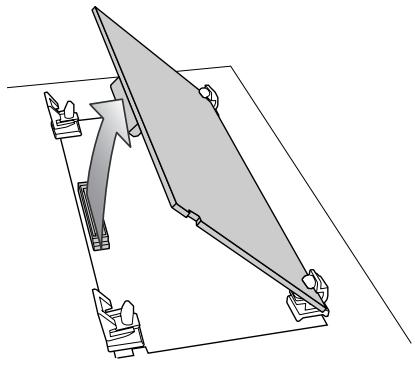
- Disengage the board from the non-latched board holders, and remove the board.
for Canadian Safety Standard
ARX Series SuperNATURAL Expansion Boards
The ARX series SuperNATURAL expansion boards represent a further evolution for Roland's line of expansion solutions, which began with the SR-JV80 series and SRX series—they are a completely new type of expansion board. SuperNATURAL technology delivers natural, richly expressive sounds and effects along with a dedicated graphic user interface, all adding up to a comprehensive application environment that allows an unprecedented degree of expressive playability and customization.
Roland SuperNATURAL Technology
SuperNATURAL
SuperNATURAL is Roland's breakthrough sound-generating technology that enables a new level of realism and expression. SuperNATURAL reproduces the delicate, organic tonal changes and playing nuances of acoustic and electric musical instruments.
ARX-02 ELECTRIC PIANO
Functions for detailed and intuitive customization
The ARX-02 uses SuperNATURAL technology to faithfully reproduce the sound-producing mechanism and tonal characteristics of an electric piano. You'll be able to enjoy performing electric piano sounds with an unprecedented degree of realism.
Customization allows you to change not only the type of electric piano model, but also details such as the distance between the tone bars and pickups, the angle of the tone bars, the character of the bell, and tonal differences resulting from the condition of the instrument. You'll be able to create the exact electric piano sounds you want, in the same way as a specialist electric piano technician.
Electric piano sounds with SuperNATURAL technology for the ultimate in expressive feel
The ARX-02 provides five amp models that are tuned for electric piano. These allow variations of volume dynamics to create infinite gradations of the tone and distortion that are characteristic of the electric piano, in ways that would be difficult for tone-generation methods based on sampled waveforms. You'll have the same detailed and dynamic performance control as on a real electric piano.
Numerous multi-effects suitable for an electric piano (such as phaser and chorus) are also provided, allowing you to create a wide variety of electric piano sounds.
The Structure of ARX-02 ELECTRIC PIANO
Basic structure
The ARX series SuperNATURAL expansion boards receive performance data and control data from a host instrument compatible with the ARX series, and send audio signals to the host instrument.
- The ARX series supports up to sixteen parts, but this product is designed with only one part.
- When this product is installed to the Fantom-G, you can apply effects to its output such as reverb that are inside the Fantom-G.
-
Since this product realizes a wide range of editing, depending on the playback device that you use and the settings of the parameters of this product, symptoms such as distorting and cracking sounds may occur. In this case, please do the following.
-
Make the parameters that are related to the level of this product to a smaller value.
- Make the output level of the device that this product is installed smaller.
-
Lower the volume of the playback device.
-
This product does not correspond to the following parameters of the Fantom-G. When this product is installed to the Fantom-G, the following parameters will be ignored if they are edited.
-
Part Output Level
Part EFX1 Send Level
Part EFX2 Send Level
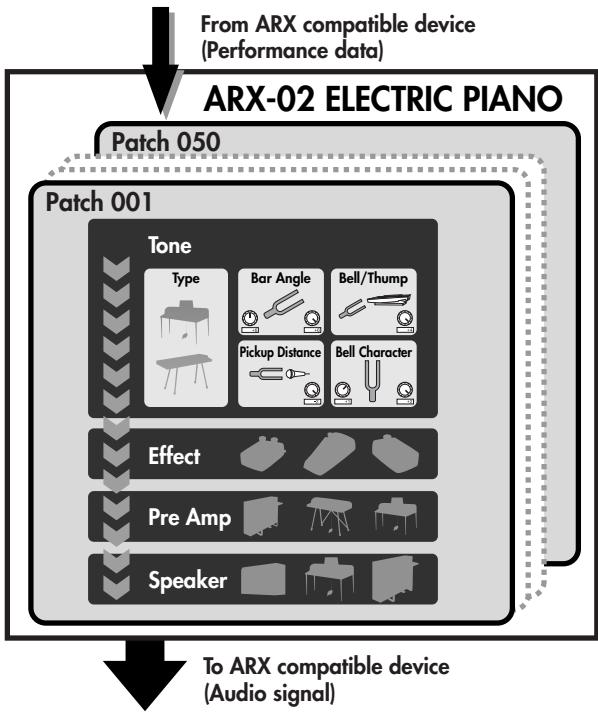
Sound generator section
Sound generation on the ARX-02 involves four stages: Tone (Type, Pickup/Bell), MFX, Pre Amp, and Speaker.
The Tone stage specifies mainly the settings of the electric piano itself, such as differences due to the type or model of the electric piano, and the way in which the condition of the instrument affects the sound.
The MFX stage lets you apply various effects.
The Pre Amp stage lets you make pre-amp settings. Since it is independent of the Tone stage, you can also create combinations that do not exist in reality.
The Speaker stage let you make speaker settings.
Patches
The sound generator settings can be saved as "patches."
The ARX-02 Electric Piano contains fifty patches.
If the ARX-02 is installed in a Fantom-G, this patch data is saved in the Fantom-G Project.
About this manual
- The screen images used in this manual are taken from a Fantom-G with the ARX-02 installed. The various procedures described also assume that you are using the ARX-02 installed in a Fantom-G.
For details on how to move the cursor or edit a value, refer to the owner's manual for the device in which you've actually installed the ARX-02.
The Basic Screen
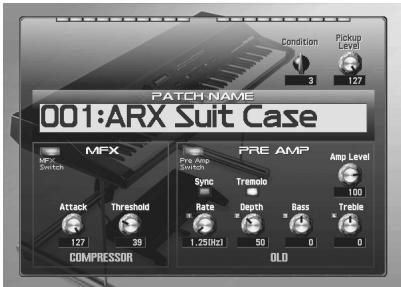
The basic screen shows the PATCH NAME, as well as the main parameters of the patch.
| Parameter | Description | Page |
| Condition | Specifies the condition of the electric piano. | p. 22 |
| Pickup Level | Volume of the electric piano tone. | p. 22 |
| Amp Level | Output Level of the "Pre Amp." | p. 32 |
| MFX Switch | Turns MFX on/off. | p. 26 |
| Pre Amp Switch | Turns Pre Amp on/off. | p. 32 |
- For details on the parameters in MFX section, refer to "Selecting an Effect (MFX Screen)" (p. 26)
- For details on the parameters in Pre Amp section, refer to "Selecting the Type of Pre Amp (Pre Amp Screen)" (p. 32)
Selecting a patch
Move the cursor to PATCH NAME and change the value to select a patch (001-050).
Saving a patch (on the Fantom-G)
A patch you've created is temporary; it will be lost if you select a different patch. If you want to save the patch you've edited, proceed as follows.
- Press the [WRITE] button on the Fantom-G.
- Assign a name to the patch. For details on how to assign a name, refer to the Fantom-G owner's manual.
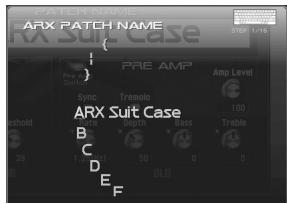
- When you've finished assigning the name, press the [F8 (OK)] button.
- Select a patch number, and press the [F8 (WRITE)] button.
- When the confirmation screen appears, press the [F7 (OK)] button to save the patch.
Selecting a Type (Type/Level Screen)
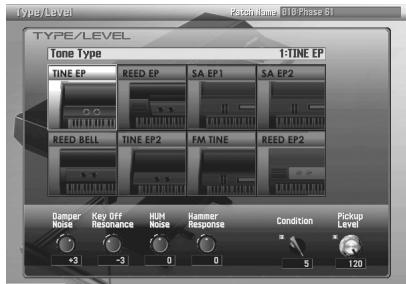
In the Type/Level screen you can select the type, condition and character of the electric piano.
| Parameter | Value | Description |
| Tone Type | TINE EP | This is an Electric Piano that widely used in the '70s. It is a standard sound that was loved by jazz and fusion players, and continues to have numerous fans to this day. This sound is characterized by a belllike attack and a mild tone, and is indispensable in today's styles, such as smooth jazz and acid jazz. |
| REED EP | This is an Electric Piano that made its appearance in the '60s and was widely used in rock and R&B. It has a distinctive dynamism, with gentle pianissimo sounds and strongly played notes that are reminiscent of resonance sounds on a synthesizer. This Electric Piano continues to be used by numerous musicians today. | |
| SA EP1 | This is the E.Piano 1 sound of the Roland RD-1000, which was released in 1986. | |
| SA EP2 | This is the E.Piano 2 sound of the RD-1000. | |
| REED BELL | This is a new type of Electric Piano, combining the characteristics of a TINE EP and a REED EP. | |
| TINE EP2 | This is a new type of Electric Piano. It is a variation of the TINE EP. | |
| FM TINE | ||
| REED EP2 | This is a new type of Electric Piano. It is a variation of the REED EP. | |
| Condition | 1–5 | Specifies the condition of the Electric Piano that was selected in "Tone Type." |
| Pickup Level | 0–127 | This adjusts the volume of the Electric Piano tone. |
Adjusting the Damper Noise (Damper Noise)
This adjusts the damper noise (the noise heard when you press the damper pedal to release the tone bars).
| Parameter | Value | Description |
| Damper Noise | -10–0→10 | Increasing this value will make the damper noise louder. |
- Depending on the selected Tone Type (p. 22), this may have no effect.
Adjusting the Key-off Sound (Key Off Resonance)
This adjusts resonances such as the key-off sound (the faint sound heard when you release a key).
| Parameter | Value | Description |
| Key Off Resonance | -10–0→10 | Higher values will produce a louder key-off sound. At a setting of -10 there will be no key-off sound at all. |
- Depending on the selected Tone Type (p. 22), this may have no effect.
Adjusting the Hum Noise (HUM Noise)
This adjusts the amount of hum and other noise that leaks into the pickups.
Electric Pianos were susceptible to various types of noise, and this noise would sometimes be output along with the sounds of the performance. Depending on the effect settings, such noises can produce an authentic, lively atmosphere.
| Parameter | Value | Description |
| HUM Noise | -10–0→10 | Adjusting this value from 0 toward the negative side will produce a clearer sound, while adjusting it toward the positive side will produce a dirty sound. At a setting of -10 there will be no hum at all. |
- Depending on the selected Tone Type (p. 22), this may have no effect.
Changing the Timing of Sounds in Response to the Velocity (Hammer Response)
This sets the interval from the time the key is played to when the sound is produced.
| Parameter | Value | Description |
| Hammer Response | -64–0–+63 | As the value is decreased, the timing of the sound is delayed more when more force is used to play the keys. As the value is increased, the timing of the sound is delayed more when less force is used to play the keys. |
Adjusting the Sound (Pickup/Bell Screen)
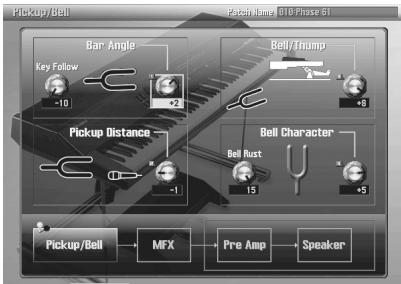
In the Pickup/Bell screen you can adjust the sound of electric piano.
Adjusting the Thickness of the Sound (Bar Angle)
The typical Electric Piano produces sound when a hammer strikes a metal rod called the fine with tone bar, whose vibrations are detected by a pickup. On this type of piano, the tonal character can be adjusted by changing the angle of the tone bars and pickups.
Equivalent tonal changes can also be produced for Electric Pianos that don't use tone bars.
| Parameter | Value | Description |
| Key Follow | -10–0→10 | Changes the Bar Angle effect relative to the key. Higher settings will produce more change. Positive (+) settings will increase the Bar Angle effect when higher keys are pressed. Negative (-) settings will decrease the Bar Angle effect when higher keys are pressed. |
| Bar Angle | -10–0→10 | Higher settings will emphasize the fundamental, producing a thicker sound. |
Adjusting the Character of the Attack (Bell/Thump)
This adjusts the balance between two components of the attack; the Bell component and the Thump produced by the hammer.
| Parameter | Value | Description |
| Bell/Thump | -10–0→10 | Adjusting this value from 0 toward the negative side will emphasize the bell sound, while adjusting it toward the positive side will emphasize the hammer sound. |
Adjusting the Nuances of the Sound (Pickup Distance)
The typical Electric Piano uses pickups to convert the vibrations of the tone bars into sound. By adjusting this parameter, you can obtain the effect of changing the distance between the tone bars and the pickups.
Equivalent tonal changes can also be produced for Electric Pianos that don't use tone bars.
| Parameter | Value | Description |
| Pickup Distance | -2-0++2 | Lowering this value will move the tone bars and pickups farther apart. This makes it easier for you to produce varied dynamics. Increasing this value will produce a more powerful sound. |
Adjusting the Character of the Bell (Bell Character)
This adjusts the tonal character of the bell sound included in the attack.
| Parameter | Value | Description |
| Bell Rust | 0–15 | Increasing this value will reduce highfrequency content of the bell sound. |
| Bell Character | -10–0–+10 | Adjusting this value from 0 toward the negative side will produce a heavier character, while adjusting it toward the positive side will produce a lighter character. |
Selecting an Effect (MFX Screen)
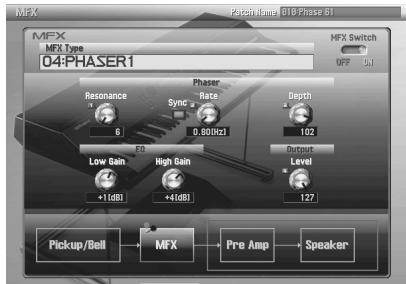
You can apply effects that are tuned specifically for the Electric Piano.
The available parameters will depend on the effect you select.
MFX Switch
| Parameter | Value | Description |
| MFX Switch | OFF, ON | Turns MFX on/off. |
MFX Types
- For details on the "note" that can be selected for some parameters, refer to "About Note" (p. 36)
MFX 00:THRU
No effect will be applied.
MFX 01: EQUALIZER
| Parameter | Value | Description |
| Low Freq | 200, 400 Hz | Frequency of the low range. |
| Mid1 Freq | 200–8000 Hz | Frequency of Middle Range 1. |
| Mid2 Freq | 200–8000 Hz | Frequency of Middle Range 2. |
| High Freq | 2000, 4000, 8000 Hz | Frequency of the high range. |
| Low Gain | -15→15 dB | Gain of the low frequency range. |
| Mid1 Gain | -15→15 dB | Gain of Middle Range 1. |
| Mid2 Gain | -15→15 dB | Gain of Middle Range 2. |
| High Gain | -15→15 dB | Gain of the high frequency range. |
| Mid1 Q | 0.5, 1.0, 2.0, 4.0, 8.0 | Width of Middle Range 1 Select a higher value to narrow Middle Range 1. |
| Mid2 Q | 0.5, 1.0, 2.0, 4.0, 8.0 | Width of Middle Range 2 Select a higher value to narrow Middle Range 2. |
| Level | 0–127 | Output level |
MFX 02: SUPER FILTER
| Parameter | Value | Description |
| Type | LPF, BPF, HPF, NOTCH | Filter type Frequency range that will pass through each filter LPF: frequencies below the cutoff BPF: frequencies in the region of the cutoff HPF: frequencies above the cutoff NOTCH: frequencies other than the region of the cutoff |
| Slope | -12, -24, -36 dB | Amount of attenuation per octave -12 dB: gentle -24 dB: steep -36 dB: extremely steep |
| Cutoff | 0–127 | Cutoff frequency of the filter Increasing this value will raise the cutoff frequency. |
| Resonance | 0–127 | Filter resonance level Increasing this value will emphasize the region near the cutoff frequency. |
| Gain | 0→+12 dB | Amount of boost for the filter output |
| Mod Sw | OFF, ON | On/off switch for cyclic change |
| Modulation Wave | TRI, SQR, SIN, SAW1, SAW2 | How the cutoff frequency will be modulated TRI: triangle wave SQR: square wave SIN: sine wave SAW1: sawtooth wave (upward) SAW2: sawtooth wave (downward) |
| Sync | OFF, ON | When this is set to ON, the effect is synchronized with the tempo. See "About Note" (p. 36). |
| Rate | 0.05–10.00 Hz, note | Frequency of modulation |
| Depth | 0–127 | Depth of modulation |
| Parameter | Value | Description |
| Attack | 0–127 | Speed at which the cutoff frequency will change This is effective if Modulation Wave is SQR, SAW1, or SAW2. |
| Level | 0–127 | Output level |
MFX 03:CHORUS
| Parameter | Value | Description |
| Mode | 1-PHASE, 2-PHASE, 3-PHASE, 6-PHASE | Number of chorus stages. |
| Pre Delay | 0.0–100 ms | Adjusts the delay time from the direct sound until the chorus sound is heard. |
| Sync | OFF, ON | When this is set to ON, the effect is synchronized with the tempo. See “About Note” (p. 36). |
| Rate | 0.05–10.00 Hz, note | Frequency of modulation |
| Depth | 0–127 | Depth of modulation |
| Phase | 0–180 deg | Spatial spread of the sound |
| Balance | D100:0W–D0:100W | Volume balance between the direct sound (D) and the chorus sound (W) |
| Level | 0–127 | Output Level |
MFX 04:PHASER1
| Parameter | Value | Description |
| Resonance | 0–127 | Amount of feedback |
| Sync | OFF, ON | When this is set to ON, the effect is synchronized with the tempo. See “About Note” (p. 36). |
| Rate | 0.05–10.00 Hz, note | Frequency of modulation |
| Depth | 0–127 | Depth of modulation |
| Low Gain | -15–+15dB | Boost or cut in the low end |
| High Gain | -15–+15dB | Boost or cut in the high end |
| Level | 0–127 | Output Level |
MFX 05:PHASER2
| Parameter | Value | Description |
| Mode | 4-STAGE,8-STAGE,12-STAGE | Number of stages in the phaser |
| Manual | 0-127 | Adjusts the basic frequency from which the sound will be modulated. |
| Resonance | 0.127 | Amount of feedback |
| Feedback | -98-+98 % | Adjusts the proportion of the phaser sound that is fed back into the effect. Negative (-) settings will invert the phase. |
| Mix | 0-127 | Level of the phase-shifted sound |
| Sync | OFF, ON | When this is set to ON, the effect is synchronized with the tempo. See “About Note” (p. 36). |
| Rate | 0.05-10.00 Hz, note | Frequency of modulation |
| Depth | 0-127 | Depth of modulation |
| Polarity | INVERSE, SYNCHRO | Selects whether the left and right phase of the modulation will be the same or the opposite. INVERSE: The left and right phase will be opposite. When using a mono source, this spreads the sound. SYNCHRO: The left and right phase will be the same. Select this when inputting a stereo source. |
| Low Gain | -15-+15 dB | Gain of the low range |
| High Gain | -15-+15 dB | Gain of the high range |
| Level | 0-127 | Output Level |
MFX 06: FLANGER
| Parameter | Value | Description |
| Pre Delay | 0.0–100 ms | Adjusts the delay time from the direct sound until the flanger sound is heard. |
| Sync | OFF, ON | When this is set to ON, the effect is synchronized with the tempo. See “About Note” (p. 36). |
| Rate | 0.05–10.00 Hz, note | Frequency of modulation |
| Depth | 0–127 | Depth of modulation |
| Phase | 0–180 deg | Spatial spread of the sound |
| Feedback | -98→+98 % | Adjusts the proportion of the flanger sound that is fed back into the effect. Negative (-) settings will invert the phase. |
| Low Gain | -15→+15 dB | Gain of the low range |
| High Gain | -15→+15 dB | Gain of the high range |
| Balance | D100:0W–D0:100W | Volume balance between the direct sound (D) and the flanger sound (W) |
| Level | 0–127 | Output Level |
MFX 07: DELAY
| Parameter | Value | Description |
| Sync | OFF, ON | When this is set to ON, the effect is synchronized with the tempo. See “About Note” (p. 36). |
| Delay Time | 0–1300 ms, note | Delay time from when sound is input to delay until the delay sound is heard. |
| Acceleration | 0–15 | When you change the delay time, this setting specifies the time over which it will change from the current delay time to the new setting. The speed of pitch change will change together with the delay time. |
| Feedback | -98++98 % | Specifies the percentage (%) of the delay sound that will be returned to the input. Positive (+) settings return the sound at the original phase, and negative (-) settings return the phase-reversed sound. |
| HF Damp | 200–8000 Hz, BYPASS | Specifies the frequency at which to cut the high range of the delay sound returned to the input. Choose the BYPASS setting if you don’t want to cut. |
| Low Gain | -15--+15 dB | Gain of the low range |
| High Gain | -15--+15 dB | Gain of the high range |
| Balance | D100:0W–D0:100W | Volume balance between the direct sound (D) and the delay sound (W) |
| Level | 0–127 | Output Level |
MFX 08: REVERB
| Parameter | Value | Description |
| Type | ROOM1, ROOM2, STAGE1, STAGE2, HALL1, HALL2 | Type of reverb ROOM1: short reverb with high density ROOM2: short reverb with low density STAGE1: reverb with greater late reverberation STAGE2: reverb with strong early reflec-tions HALL1: very clear-sounding reverb HALL2: rich reverb |
| Pre Delay | 0.0–100 ms | Adjusts the delay time from the direct sound until the reverb sound is heard. |
| Time | 0–127 | Time length of reverberation |
| HF Damp | 200–8000 Hz, BYPASS | Adjusts the frequency above which the high frequency content of the reverb sound will be cut, or “damped.” If you do not want to cut the high frequencies, set this parameter to BYPASS. |
| Low Gain | -15–+15dB | Boost or cut in the low end |
| High Gain | -15–+15dB | Boost or cut in the high end |
| Balance | D100:0W–D0:100W | Volume balance between the direct sound (D) and the reverb sound (W) |
| Level | 0–127 | Output Level |
MFX 09: LINE DRIVE
| Parameter | Value | Description |
| Strength | SOFT, HARD | HARD produces stronger distortion than SOFT. |
| Type | 1, 2 | Varies the nuances of the distortion. |
| Drive | 0–127 | Degree of distortion This also affects the volume. |
| Low Gain | -15–+15dB | Boost or cut in the low end |
| High Gain | -15–+15dB | Boost or cut in the high end |
| Level | 0–127 | Output Level |
- This reproduces the distortion that occurs when an electrical circuit is slightly overloaded.
MFX 10: COMPRESSOR
| Parameter | Value | Description |
| Attack | 0–127 | This sets the time it takes until the level is compressed after the input exceeds the Threshold. |
| Threshold | 0–127 | Adjusts the volume at which compression begins |
| Post Gain | 0–+18dB | Adjusts the output gain. |
| Low Gain | -15–+15dB | Boost or cut in the low end |
| High Gain | -15–+15dB | Boost or cut in the high end |
| Level | 0–127 | Output Level |
MFX 11: WAH
| Parameter | Value | Description |
| Filter Type | LPF, BPF | Filter Type LPF: The wah effect will be applied over a wide frequency range. BPF: The wah effect will be applied over a narrow frequency range. |
| Manual | 0–127 | When Control Type is set to “PEDAL,” you can use this parameter to modify the tonal character. |
| Peak | 0–127 | Adjusts the amount of the wah effect that will occur in the range of the center frequency. Set a higher value to narrow the range to be affected. |
| Sens | 0–127 | When Control Type is set to “TOUCH,” this adjusts the sensitivity to the volume used in changing the tone. |
| Control Type | TOUCH, PEDAL | Effect Control Types TOUCH: The tone changes in response to changes in the volume. PEDAL: The tone changes according to the function of the Manual parameter, and controller number 4 (CC#4) of MIDI message. |
| Depth | 0–127 | Depth of modulation |
| Level | 0–127 | Output Level |
MFX 12: RING MODULATOR
| Parameter | Value | Description |
| Frequency | 0–127 | Adjusts the frequency at which modulation is applied. |
| Sens | 0–127 | Adjusts the amount of frequency modulation applied. |
| Polarity | UP, DOWN | Determines whether the frequency modulation moves towards higher frequencies (UP) or lower frequencies (DOWN). |
| Low Gain | -15↔15dB | Boost or cut in the low end |
| High Gain | -15↔15dB | Boost or cut in the high end |
| Balance | D100:0W–D0:100W | Volume balance between the direct sound (D) and the effect sound (W) |
| Level | 0–127 | Output Level |
Selecting the Type of Pre Amp (Pre Amp Screen)
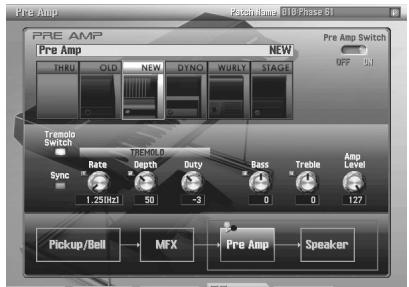
This switches the amp of the Electric Piano. By changing the combination of Electric Piano type and amp type, you can create a variety of sounds ranging from standard Electric Piano sounds to new sounds that have not been heard before.
Pre Amp Switch
| Parameter | Value | Description |
| Pre Amp Switch | OFF, ON | Turns Pre Amp on/off |
Pre Amp Types
- For details on the "note" that can be selected for some parameter, refer to "About Note" (p. 36)
THRU
No pre amp will be used.
OLD
This combines TINE EP(p. 22), reproducing a typical Electric Piano sound of the early '70s.
| Parameter | Value | Description |
| Tremolo Switch | OFF, ON | Turns tremolo on/off. |
| Tremolo Sync | OFF, ON | When this is set to ON, the effect is synchronized with the tempo See “About Note” (p. 36). |
| Tremolo Rate | 0.05–10.00 Hz, note | Frequency of the tremolo |
| Tremolo Depth | 0–127 | Depth of the tremolo |
| Tremolo Duty | -10→+10 | Specifies the duty cycle of the LFO waveform used to apply tremolo. Increasing this value will increase the duty cycle of the LFO waveform for the L-channel; the duty cycle for the R-channel will decrease. |
| Bass | -50→+50 | Amount of boost/cut for the low frequency range |
| Treble | -50→+50 | Amount of boost/cut for the high frequency range |
| Level | 0–127 | Output Level |
NEW
This combines TINE EP (p. 22), reproducing a typical Electric Piano sound of the late '70s through '80s.
| Parameter | Value | Description |
| Tremolo Switch | OFF, ON | Turns the tremolo on/off. |
| Tremolo Sync | OFF, ON | When this is set to “note,” the effect is synchronized with the tempo See “About Note” (p. 36). |
| Tremolo Rate | 0.05–10.00 Hz, note | Frequency of the tremolo |
| Tremolo Depth | 0–127 | Depth of the effect |
| Tremolo Duty | -10–+10 | Specifies the duty cycle of the LFO waveform used to apply tremolo. Increasing this value will increase the duty cycle of the LFO waveform for the L-channel; the duty cycle for the R-channel will decrease. |
| Bass | -50–+50 | Amount of boost/cut for the low frequency range |
| Treble | -50–+50 | Amount of boost/cut for the high frequency range |
| Level | 0–127 | Output Level |
DYNAMO
This amp type is a modification of OLD case or NEW case, and is marked by a bright sound and distinctive distortion that occurs when you play strongly. When used in conjunction with TINE EP (p. 22), this will reproduce the Electric Piano sounds used in numerous recordings of the early '80s.
| Parameter | Value | Description |
| Tremolo Switch | OFF, ON | Turns the tremolo on/off. |
| Tremolo Sync | OFF, ON | When this is set to ON, the effect is synchronized with the tempo See “About Note” (p. 36). |
| Tremolo Rate | 0.05–10.00 Hz, note | Frequency of the tremolo |
| Tremolo Depth | 0–127 | Depth of the tremolo |
| Tremolo Shape | 0–127 | Adjusts the tremolo waveform Values near 0 will approach a triangle wave, and values near 127 will approach a pulse wave. The effect will also change depending on the Tremolo Depth setting. |
| Bass Boost | 0–127 | Amount of boost/cut for the low frequency range |
| Filter Curve | 0–127 | Amount of boost/cut for the middle frequency range |
| Over Tone | 0–127 | Amount of boost/cut for the high frequency range |
| Limiter | OFF, ON | Selects whether the limiter will be applied (on) or not (off). |
| Level | 0–127 | Output Level |
WURLY
This combines REED EP (p. 22), reproducing a typical Electric Piano sound of the '60s.
| Parameter | Value | Description |
| Vibrato Switch | OFF, ON | Turns the vibrato on/off. |
| Vibrato Sync | OFF, ON | When this is set to ON, the effect is synchronized with the tempo See “About Note” (p. 36). |
| Vibrato Rate | 0.05–10.00 Hz, note | Frequency of the vibrato |
| Vibrato Depth | 0–127 | Depth of the vibrato |
| Bass | -50–+50 | Amount of boost/cut for the low frequency range |
| Treble | -50–+50 | Amount of boost/cut for the high frequency range |
| Level | 0–127 | Output Level |
STAGE
This simulates playing a stage piano.
| Parameter | Value | Description |
| Tremolo Switch | OFF, ON | Turns the tremolo on/off. |
| Tremolo Sync | OFF, ON | When this is set to ON, the effect is synchronized with the tempo See “About Note” (p. 36). |
| Tremolo Rate | 0.05–10.00 Hz, note | Frequency of the tremolo |
| Tremolo Depth | 0–127 | Depth of the tremolo |
| Tremolo Duty | -10–+10 | Specifies the duty cycle of the LFO waveform used to apply the tremolo. Increasing this value will increase the duty cycle of the LFO waveform for the L-channel; the duty cycle for the R-channel will decrease. |
| Bass | -50–+50 | Amount of boost/cut for the low frequency range |
| Treble | -50–+50 | Amount of boost/cut for the high frequency range |
| Level | 0–127 | Output Level |
Selecting the Type of Speaker (Speaker Screen)
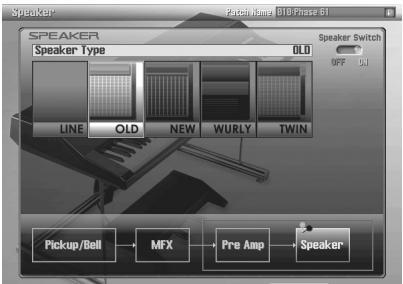
In the Speaker screen you can select the type of the speaker.
| Parameter | Value | Description |
| Speaker Switch | OFF, ON | Turns speaker on/off. |
| Speaker Type | LINE | This is a sound via LINE OUT. No speaker used. |
| OLD | Reproducing a typical Electric Piano sound of the early '70s. | |
| NEW | Reproducing a typical Electric Piano sound of the late '70s through '80s. | |
| WURLY | Reproducing a typical Electric Piano sound of the '60s. | |
| TWIN | This simulates playing through a guitar amp. |
Initializing a Patch (Utility Screen)
In the Utility screen you can initialize patches.
This operation lets you return the settings of the current patch to their default values.
- Select the patch that you want to initialize.
- In the Utility screen, choose Patch Init.
- When the confirmation screen appears, press the [F7 (OK)] button.
If you decide to cancel, press the [F8 (EXIT)] button.
- If you've installed the ARX-02 in a Fantom-G6/G7/G8, executing a Factory Reset for the Fantom-G6/G7/G8 will reset the expansion boards to their factory-set condition.
About Note
Some parameters (such as Rate or Delay Time) can be set in terms of a note value instead of a time value.
Such parameters provide the "Sync" switch that allows you to switch between setting the parameter as a note value or as a numerical value.
If you want to set Rate (Delay Time) as a numerical value, set the Sync switch to "OFF" (unlit). If you want to set it as a note value, set the Sync switch to "ON" (lit).
| Value | Description |
| 1/64T(3) | Sixty-fourth-note triplet |
| 1/64(5) | Sixty-fourth note |
| 1/32T(3) | Thirty-second-note triplet |
| 1/32(5) | Thirty-second note |
| 1/16T(3) | Sixteenth-note triplet |
| 1/32.(5) | Dotted thirty-second note |
| 1/16(5) | Sixteenth note |
| 1/8T(3) | Eighth-note triplet |
| 1/16.(5) | Dotted sixteenth note |
| 1/8(5) | Eighth note |
| 1/4T(3) | Quarter-note triplet |
| 1/8.(5) | Dotted eighth note |
| 1/4(5) | Quarter note |
| 1/2T(3) | Half-note triplet |
| 1/4.(5) | Dotted quarter note |
| 1/2(5) | Half note |
| 1/1T(0.3) | Whole-note triplet |
| 1/2.(5) | Dotted half note |
| 1/1(0) | Whole note |
| 2/1T(0.3) | Double-note triplet |
| 1/1.(0.3) | Dotted whole note |
| 2/1(0.3) | Double note |
ARX-02 ELECTRIC PIANO
| Maximum Polyphony | 64 voices (varies according to the sound generator load) |
| Part | 1 part |
| User Memory | Patches: 50 (including pre-loaded Patches) |
| Effects | MFX: 1 system (12 types) EQUALIZER SUPER FILTER CHORUS PHASER1 PHASER2 FIANGER DELAY REVERB LINE DRIVE COMPRESSOR WAH RING MODULATOR |
| Customize Functions | Condition Bar Angle Pickup Distance Bell/Thump Bell Character Damper Noise Key Off Resonance HUM Noise Hammer Response Model Type Speaker Type and more |
| Accessories | Owner's manual Screwdriver |
- In the interest of product improvement, the specifications and/or appearance of this unit are subject to change without prior notice.
A
Amp Level 20
B
Bar Angle 24
Basic screen 20
Bell Character 25
Bell Rust 25
Bell/Thump 24
C
CHORUS 27
COMPRESSOR 30
Condition 20, 22
D
Damper Noise 23
DELAY 29
DYNO 33
E
EQUALIZER 26
F
FLANGER 29
FM TINE 22
H
Hammer Response 23
HUM Noise 23
K
Key Follow 24
Key Off Resonance 23
L
LINE 35
LINE DRIVE 30
M
MFX Screen 26
MFX Switch 20, 26
N
NEW 33
0
OLD 32
P
Patch
Initialize 35
Save 21
Select 21
PATCH NAME 21
PHASER1 28
PHASER2 28
Pickup Distance 25
Pick up Level 20
Pickup/Bell Screen 24
Pre Amp 32
Pre Amp Screen 32
PreAmpSwitch 20,32
R
REED BELL 22
REED EP 22
REED EP2 22
REVERB 30
RING MODULATOR 31
s
SA EP1 22
SA EP2 22
Speaker Screen 35
Speaker switch 35
STAGE 34
SUPER FILTER 27
T
THRU 26,32
TINE EP 22
TINE EP2 22
Tone Type 22
Type/Level screen 22
U
Utility Screen 35
W
WAH 31
WURLY 34
-For the USA
FEDERAL COMMUNICATIONS COMMISSION RADIO FREQUENCY INTERFERENCE STATEMENT
This equipment has been tested and found to comply with the limits for a Class B digital device, pursuant to Part 15 of the FCC Rules. These limits are designed to provide reasonable protection against harmful interference in a residential installation. This equipment generates, uses, and can radiate radio frequency energy and, if not installed and used in accordance with the instructions, may cause harmful interference to radio communications. However, there is no guarantee that interference will not occur in a particular installation. If this equipment does cause harmful interference to radio or television reception, which can be determined by turning the equipment off and on, the user is encouraged to try to correct the interference by one or more of the following measures:
- Reorient or relocate the receiving antenna.
- Increase the separation between the equipment and receiver.
- Connect the equipment into an outlet on a circuit different from that to which the receiver is connected.
- Consult the dealer or an experienced radio/TV technician for help.
This device complies with Part 15 of the FCC Rules. Operation is subject to the following two conditions:
(1) this device may not cause harmful interference, and
(2) this device must accept any interference received, including interference that may cause undesired operation.
Unauthorized changes or modification to this system can void the users authority to operate this equipment. This equipment requires shielded interface cables in order to meet FCC class B Limit.
For Canada
NOTICE
This Class B digital apparatus meets all requirements of the Canadian Interference-Caising Equipment Regulations.
AVIS
DECLARATION OF CONFORMITY Compliance Information Statement
Model Name : ARX-02
Type of Equipment : Expansion Board
Responsible Party : Roland Corporation U.S.
Address: 5100 S. Eastern Avenue, Los Angeles, CA 90040-2938
Telephone: (323) 890-3700
For EU Countries

This symbol indicates that in EU countries, this product must be collected separately from household waste, as defined in each region. Products bearing this symbol must not be discarded together with household waste.
DE Dieses Symbol beudeut, dass diesen Produkt in EU-Ländern getrennt vom Haumann gesammelt werden muss gemäß den regionalen Bestimmungen. Mit thisem Symbol gekennzechnete Produkte länger nicht zusammen mit den Haumann entsorgt werden.
FR Ce symbole indique que dans les pays de l'Union europeenne, ce produit doit être collecté séparément des ordures menagérées selon les directives en vigueur dans chacun de ces pays. Les produits portant ce symbole ne doivent pas été mis au rebut avec les ordures menagérées.
Questo symbolo indica che nei paesi della Comunita europea甚么o prodotto delve essere smaltito separamente dai normali rifiuti domestici, seconda la legislazione in vigore in ciascun paese. I prodotti che riportano甚么o symbolog non devono essere smaltiti insieme ai rifutti domestici. Ai sensi dell'art. 13 del D.Lgs. 25 luglio n° 151.
ES Este SYMBOLICA que en los paises de la Unión Europea este producto debe recogerse aparte de los residuos domesticos, tal como este regulado en cada zona. Los productos con thissymbolo no se deben depositar con los residuos domesticos.
PT Este*sobligo indica que nos paises da UE, a recolha这是我uve dojo devera ser feita separadamente do lixo domestico, de accordo os regulamentos de cada regiao. Os produits que presente thisbolo nao deleve o eliminados juntamente com o lixo domestico.
NL Dit symbol geeft an dat in landen van de EU dit product geschienen van huishoudelijk afval moet worden angeboden, zaals bepaald per gemeente of regio. Produkten die van dit symbol voor verzoor, mogen nicht samen met huishoudelijk afval worden verwijdert.
Dette symbol angiver, at i EU-lande skal dette produit opsamples adskilt fra husholdningsaffd. som defineret i hver enkelt region. Produkter med dette symbol ma alike smides ud sammen med hushholdningsaffd.
Dette symbole indikerat atopdetukmajbehands smpesialfalli EU-land, iht. til retiningslijen for den enkeltere regionen, og kike kastes amermed vanlig hushholdningsavfall. Produktok som er merket med dette symbole, ma kike kastes amermed vanlig hushholdningsavfall.
SE
Produnger angen at i EU-lander maste den har produit kasseras separat fran hushallsavfall, i enlighem med varje regions bestammelser.
Produktur med den har symbolen fär inte kasseras tillsammas med hushallsavfall.
Tama kemirinta iimasee, etta tuote on EU-maiasa kerattivaraillan kottitouaisjuteiste kunkin alueen voimassa olevien mairayrsten mukaisesti. Talla merkinannala varustetuja tuotaeta i sahavittaa kottitouaisjuteiden mukana.
HU e szimbolum alkjeti, hogny az Europai Unioban et a termeket a háztartásihulladétól alkülenöfù, ad oztirgóban érvényesSzabáyózászerint kell gúyérján. A ezzzé a szimbðllummal ellattort hemtermeket nem szabad a háztartásihulladék ökő dobni.
PL Symbol oznaca, ze zgodnica z regulacjami w odpowidnim regionie, w krajach UE produktu nie naleye wyrzucă z odpadami dowmody. Produktow opatronychym symblemo nie mozza utlizowacrazem z odpadami dowomymi.
Tento symbol uadáva, ze v zemich EU musi bytentytrovyrobek shirán oddelene od mucóho odpadu, jak je urceno pro kádý region. Vyrokbny nesouci tento symbol se nésmi vyhazov spo ul somáčin odapem.
SK Tento symbol vyadruje, zv krajinach EU sa musi zber toto produkty vykonavat'odelene od domoveho opadup, poda nariai duplhny v konkretnej krajine. Produkty s'tmyto symbolom sa nemu vyhazovat spo lu s domovym opadom.
See smibol naitab, et EL-1 maades tuleb see toode olemprugist eradi koguda, ni nagu on igas piirkonnmas marratetud. Selle smboliga margitud tooteid ei tohi ara visata koos olemprugica.
Sis symbolis rodo, kad ES salyse sis produktas turi buti sureknamas atskirai nuo buitini atlieuk, kaip nustatya kiekviename regiona. Siuo simboliu pazenklint Produktai turi tuti ismetami katu su buitinemis atlekomis.
Sis symbols norada, ka ES valstsi so produktu jaievac atseviksi no majsaimmiecibas atkritiuniem, kaoteiki katra regiona. Produktus ar so simulbod nedrifik izmest kopa ar majsaimmiecibas atkritiuniem.
Ta simuloz oznacujce, ja de treba proizvod v drzavah EU zbirati loceno od gospodinskij odpadkov, takoto deloclono v vsaki regijl. Proizvod s tem znakom ni dovoljeno odlagdat skupaj z gospodinskijmi odpadki.
To oujpoAo uOuOJouyoi oU OUoyee nE.E. To oujxuequoVooiouo JpOVA UoUOyEAoojuaOra ta UoUOIAooaOooqOIOU, oujovoa o ooa oooTovr o afoe poyoo. Ta ooiOvora ovo fpeovor to oujxuequo OoujpoAo dev noy e aoouotrooia jauMa ta oooaaooqOooTPO
有关产品中所含有害物质的说明
A Fanny Trading Office 9, EBN Hagar Al Askalany Street, ARD E1 Golf, Heliopolis, Cairo 11341,Egypt TEL: (022)-418-5531
REUNION
Maison FOY - YAM Marcel 25 Rue Jules Hermann, Chaudron - BP79 97491 Ste Clotilde Cedex, REUNION ISLAND TEL: (0262)218-429
SOUTH AFRICA
T.O.M.S. Sound & Music (Pty)Ltd. 2 ASTRON ROAD DEN JOHANESBURGZA 2 SOUTH AFRICA TEL: (011)4173400
Paul Bothner(PTY) Ltd.
Royal Cape Park, Unit 21
Londonderry Road, Ottery 7800
Cape Town, SOUTH AFRICA
TEL: (021) 7994900
ASIA
CHINA
Roland Shanghai Electronics Co.,Ltd. 5F.No.1500 Pingliang Road Shanghai 200090,CHINA TEL: (021) 5580-0800
Roland Shanghai Electronics Co.,Ltd. (BEIJING OFFICE) 10F. No.183 Section Anhuaxil Chaoyang District Beijing 100011 CHINA TEL: (010)6426-5050
HONG KONG
Tom Lee Music Co., Ltd.
Service Division
22-32 Pun Shan Street, Tsuen Wan, New Territories, HONG KONG
TEL: 2415 0911
Parsons Music Ltd.
8th Floor, Railway Plaza, 39 Chatham Road South, T.S.T., Kowloon, HONG KONG
TEL: 2331 1863
INDIA
Rivera Digitect (India) Pvt. Ltd. 411, Nirman Kendra Mahalaxmi Flats Compound Off. Dr. Edwin Moses Road, Mumbai-400011, INDIA TEL: (022) 2493 9051
INDONESIA
PT Citta IntiRama
Jl. Cideng Timur No. 15J-15O
Jakarta Pusat
INDONESIA
TEL: (021) 6324170
KOREA
Cosmos Corporation
1461-9, Seocho-Dong,
Seocho Ku, Seoul, KOREA
TEL: (02) 3486-8855
MALAYSIA
Roland Asia Pacific Sdn. Bhd. 45-1, Block C2, Jalan PJU 1/39, Dataran Prima, 47301 Petaling Jaya, Selangor, MALAYSIA TEL: (03) 7805-3263
VIET NAM
Suiho NhaC Company, Ltd 370 Cach Mang Thang Tam St. Dist.3, Ho Chi Minh City, VIETNAM Tel:9316540
PHILIPPINES
G.A.Yupango & Co. Inc. 339 Gil J.Puyat Avenue Makati, Metro Manila 1200, PHILIPPINES TEL: (02) 899 9801
SINGAPORE
SWEE LEE MUSIC COMPANY PTE. LTD. 150 Sims Drive, SINGAPORE 387381 TEL:6846-3676
TAIWAN
ROLAND TAIWAN
ENTERPRISE CO., LTD.
Room 5, 9fL No.112 Chung Shan N.Road Sec.2, Taipei,
TAIWAN, R.O.C.
TEL: (02) 2561 3339
THAILAND
Theera Music Co., Ltd. 100-108 Soi Veng Nakhornkasem, New Road,Sumpantawongse, Bangkok 10100 THAILAND TEL: (02) 224-8821
AUSTRALIA/ NEW ZEALAND
AUSTRALIA/ NEW ZEALAND
Roland Corporation Australia Pty., Ltd. 38 Campbell Avenue Dee Why West. NSW 2099 AUSTRALIA
For Australia
Tel: (02) 9982 8266
For New Zealand
Tel: (09) 3098 715
CENTRAL/LATIN AMERICA
ARGENTINA
Instrumentos Musiques S.A.
Av.Santa Fe 2055
(1123) Buenos Aires
ARGENTINA
TEL: (011) 4508-2700
BARBADOS
A&B Music Supplies LTD 12 Webster Industrial Park Wildey,St.Michael,Barbados TEL:246)430-1100
BRAZIL
Roland Brasil Ltda.
Rua San Jose, 780 Sala B
Parque Industrial San Jose
Cotia - São Paulo - SP, BRAZIL
TEL: (011) 4615 5666
CHILE
Commercial Fancy II S.A.
Rut: 96,919,420-1
Nataniel Cox #739, 4th Floor
Santiago - Centro, CHILE
TEL: (02) 688-9540
COLOMBIA
Centro Musical Ltda.
Cra 43 B No 25 A 41 Bododega 9
Medellin, Colombia
TEL: (574)3812529
COSTA RICA
JUAN Bansbach Instrumentos
Musicales
Ave.1. Calle 11, Apartado
10237,
San Jose, COSTA RICA
TEL: 258-0211
CURACAO
Zeelandia Music Center Inc.
Orionweg 30
Curacao, Netherland Antilles
TEL: (305)5926866
DOMINICAN REPUBLIC
155, New National Road
Patras 26442, GREECE
TEL:2610435400
HUNGARY
Roland East Europe Ltd.
Warehouse Area DEPO'Pf.83
H-2046 Torokbalint,
HUNGARY
TEL: (23) 511011
IRELAND
Roland Ireland
G2 Calmount Park, Calmount
Avenue, Dublin 12
Republic of IRELAND
TEL: (01) 4294444
ITALY
Roland Italy S. p. A.
Danvik Center 28, 2 tr.
S-131 30 Nacka SWEDEN
TEL: (0)8 702 00 20
SWITZERLAND
Roland (Switzerland) AG
Atlantic Close, Swansea
Enterprise Park, SWANSEA SA7 9FJ
UNITED KINGDOM
TEL: (01792) 702701
MIDDLE EAST
BAHRAIN
Moon Stores
No.1231&1249 Rumaytha
Building Road 3931, Manama
339BAHRAIN
TEL: 17 813 942
IRAN
MOCO INC.
No.41 Nike St., Dr.Shariyati Ave.,
Roberoye Cerahe Mirdamad
Tehran, IRAN
TEL: (021)-2285-4169
ISRAEL
Halilit P. Greenspoon & Sons
Ltd.
8 Retzif Ha'alia Hashnia St.
Tel-Aviv-Yafo ISRAEL
TEL: (03) 6823666
JORDAN
Al-Yousifi Service Center
P.O.Box 126 (Safat) 13002
KUWAIT
TEL:00965802929
LEBANON
Chahine S.A.L.
George Zeidan St., Chahine
Bldg., Achrafieh, P.O.Box: 16
Beirut,LEBANON
TEL: (01) 20-1441
OMAN
TALENTZ CENTRE L.L.C.
Malatan House No.1
Al Noor Street, Ruwi
SULTANATE OF OMAN
TEL:24783443
QATAR
Al Emadi Co. (Badie Studio &
Stores)
P.O.Box 62Doha,QATAR
TEL:4423-554
SAUDI ARABIA
aDawliah Universal
Electronics APL
Behind Pizza Inn
Prince Turkey Street
aDawliah Building,
POBOX2154
Alkhobar 31952
SAUDI ARABIA
TEL: (03) 8643601
SYRIA
Technical Light & Sound
Center
Rawda, Abdul Qader Jazairi St.
Bldg.No.21,P.O.BOX 13520,
Damascus, SYRIA
TEL: (011) 223-5384
ZUHAL DIS TICARET A.S.
Galip Dede Cad. No.37
Beyoglu - Istanbul / TURKEY
TEL: (0212) 249 85 10
U.A.E.
Zak Electronics & Musical
Instruments Co. L.L.C.
Zabeel Road, Al Sherooq Bldg.,
No.14,Ground FloorDubai
U.A.E.
TEL: (04) 3360715
NORTH AMERICA
CANADA
Roland Canada Ltd.
(Head Office)
5480 Parkwood Way
Richmond B.C.,V6V 2M4
CANADA
TEL: (604) 270 6626
Roland Canada Ltd.
(Toronto Office)
170 Admiral Boulevard
Mississauga On L5T 2N6
CANADA
TEL: (905) 362 9707
U.S.A.
Roland Corporation U.S.
5100 S. Eastern Avenue
Los Angeles, CA 90040-2938
U.S.A.
TEL: (323) 890 3700
Roland Corporation
ARX-02 ELECTRIC PIANO
取拔説明書
MFX 12:RING MODULATOR
(1)
Key Off Resonance 63
L
LINE DRIVE 70
N
NEW 73
0
OLD 72
P
PATCH NAME 61
PHASER1 68
PHASER2 68
Pick up Distance 65
Pickup/Bell画面 64
PreAmp画面 72
R
REED BELL 62
REED EP 62
REED EP2 62
REVERB 70
RING MODULATOR 71
SA EP1 62
SA EP2 62
Speaker画面 75
STAGE 74
SUPER FILTER 67
SuperNATURAL 57
T
THRU 66、72
TINE EP 62
TINE EP2 62
Tone Type 62
Type/Level画面 62
U Utility画面 75
W WAH 71 WURLY 74
い フライサイーダ 66
155
韵音符 76
基板木儿一 53