
CY-5 - Electronic drum ROLAND - Free user manual and instructions
Find the device manual for free CY-5 ROLAND in PDF.


User questions about CY-5 ROLAND
0 question about this device. Answer the ones you know or ask your own.
Ask a new question about this device
Download the instructions for your Electronic drum in PDF format for free! Find your manual CY-5 - ROLAND and take your electronic device back in hand. On this page are published all the documents necessary for the use of your device. CY-5 by ROLAND.
USER MANUAL CY-5 ROLAND
Thank you, and congratulations on your choice of the Roland CY-5.
Before using the CY-5, carefully read the sections entitled: "USING THE UNIT SAFELY" and "IMPORTANT NOTES" (p. 2; p. 3). These sections provide important information concerning the proper operation of the unit. Additionally, in order to feel assured that you have gained a good grasp of every feature provided by your new unit, this owner's manual should be read in its entirety. The manual should be saved and kept on hand as a convenient reference.
Main Feature
The CY-5 has been designed to be used as a hi-hat pad or a cymbal pad, with the corresponding mounting parts for both functions included in the package. The dual trigger pad allows one to play edge shots, bow shots and choking techniques can be used. It's an ideal "add on" to any existing set up.
Package Contents
CY-5 (cymbal pad)
- Connection Cable (stereo)
Drum Key

□ Attachment Set for Cymbal
Wing Nut

Felt Washer

Stopper

Cable Tie
Owner's Manual (this manual)
□ Attachment Set for Hi-Hat
Upper Clutch

Clutch Felt (S)

Clutch Felt (L)
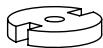
Lower Clutch

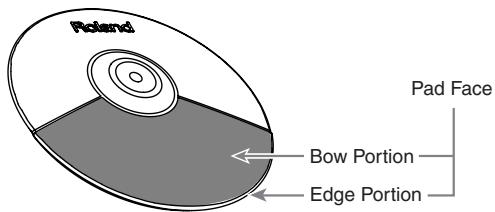
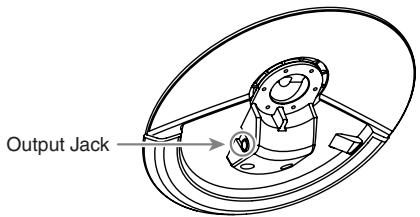
Names of Components
Copyright © 2006 ROLAND CORPORATION
All rights reserved. No part of this publication may be reproduced in any form without the written permission of ROLAND CORPORATION.
USING THE UNIT SAFELY
INSTRUCTIONS FOR THE PREVENTION OF FIRE, ELECTRIC SHOCK, OR INJURY TO PERSONS
About WARNING and CAUTION Notices
| ▲WARNING | Used for instructions intended to alert the user to the risk of death or severe injury should the unit be used improperly. |
| ▲CAUTION | Used for instructions intended to alert the user to the risk of injury or material damage should the unit be used improperly. * Material damage refers to damage or other adverse effects caused with respect to the home and all its furnishings, as well to domestic animals or pets. |
About the Symbols
| ▲ | The △ symbol alerts the user to important instructions or warnings. The specific meaning of the symbol is determined by the design contained within the triangle. In the case of the symbol at left, it is used for general cautions, warnings, or alerts to danger. |
| ◎ | The ⊙ symbol alerts the user to items that must never be carried out (are forbidden). The specific thing that must not be done is indicated by the design contained within the circle. In the case of the symbol at left, it means that the unit must never be disassembled. |
| ◆ | The ● symbol alerts the user to things that must be carried out. The specific thing that must be done is indicated by the design contained within the circle. In the case of the symbol at left, it means that the power-cord plug must be unplugged from the outlet. |
ALWAYS OBSERVE THE FOLLOWING
WARNING


-
Never use or store the unit in places that are:
-
Before using this unit, make sure to read the instructions below, and the Owner's Manual.
- Do not open or perform any internal modifications on the unit.
-
Do not attempt to repair the unit, or replace parts within it (except when this manual provides specific instructions directing you to do so). Refer all servicing to your retailer, the nearest Roland Service Center, or an authorized Roland distributor, as listed on the "Information" page.
-
Subject to temperature extremes (e.g., direct sunlight in an enclosed vehicle, near a heating duct, on top of heat-generating equipment); or are
- Damp (e.g., baths, washrooms, on wet floors); or are
- Humid; or are
- Exposed to rain; or are
- Dusty; or are
- Subject to high levels of vibration.


WARNING
- This unit should be used only with a stand (MDS series) that is recommended by Roland (p. 4, p. 5).

- When using the unit with a stand (MDS series) recommended by Roland, the stand must be carefully placed so it is level and sure to remain stable. If not using a stand, you still need to make sure that any location you choose for placing the unit provides a level surface that will properly support the unit, and keep it from wobbling.

- Do not allow any objects (e.g., flammable material, coins, pins); or liquids of any kind (water, soft drinks, etc.) to penetrate the unit.

- In households with small children, an adult should provide supervision until the child is capable of following all the rules essential for the safe operation of the unit.

- Do not drop it!


CAUTION
- Try to prevent cords and cables from becoming entangled. Also, all cords and cables should be placed so they are out of the reach of children.

- Never climb on top of, nor place heavy objects on the unit.

- Should you remove nuts, washers, etc. keep them in a safe place out of children's reach, so there is no chance of them being swallowed accidentally.

IMPORTANT NOTES
In addition to the items listed under "USING THE UNIT SAFELY" on page 2-3, please read and observe the following:
Placement
- Do not expose the unit to direct sunlight, place it near devices that radiate heat, leave it inside an enclosed vehicle, or otherwise subject it to temperature extremes. Excessive heat can deform or discolor the unit.
- Do not allow rubber, vinyl, or similar materials to remain on the unit for long periods of time. Such objects can discolor or otherwise harmfully affect the finish.
Maintenance
- For everyday cleaning wipe the unit with a soft, dry cloth or one that has been slightly dampened with water. To remove stubborn dirt, use a cloth impregnated with a mild, non-abrasive detergent. Afterwards, be sure to wipe the unit thoroughly with a soft, dry cloth.
- Never use benzine, thinners, alcohol or solvents of any kind, to avoid the possibility of discoloration and/or deformation.
Additional Precautions
-
Use a reasonable amount of care when using the unit's buttons, sliders, or other controls; and when using its jacks and connectors. Rough handling can lead to malfunctions.
-
When connecting / disconnecting all cables, grasp the connector itself—never pull on the cable. This way you will avoid causing shorts, or damage to the cable's internal elements.
- To avoid disturbing your neighbors, try to keep the unit's volume at reasonable levels. You may prefer to use headphones, so you do not need to be concerned about those around you (especially when it is late at night).
- This instrument is designed to minimize the extraneous sounds produced when it's played. However, since sound vibrations can be transmitted through floors and walls to a greater degree than expected, take care not to allow these sounds to become a nuisance to neighbors, especially when performing at night and when using headphones.
- The rubber portion of the striking surface is treated with a preservative to maintain its performance. With the passage of time, this preservative may appear on the surface as a white stain, or reveal how the pads were struck during product testing. This does not affect the performance or functionality of the product, and you may continue using it with confidence.
Making the Settings
Using the CY-5 as a cymbal pad
When mounting the CY-5 on a cymbal stand, use ONLY the attachment set as shown below.
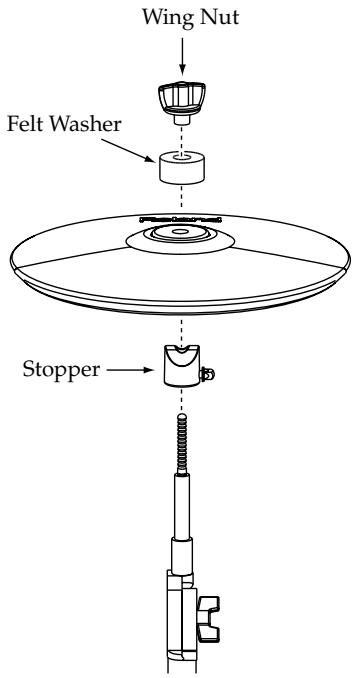
1. Mount the cymbal stopper as shown below.
The cymbal stopper keeps the cymbal from rotating, allowing proper function of the pad, and also prevents cables from winding around the stand.
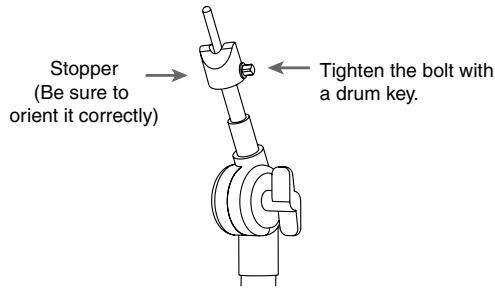
- Attach the CY-5 so the Roland logo is positioned on the opposite side of the playing area.
3. Tighten the felt washer and the wing nut.
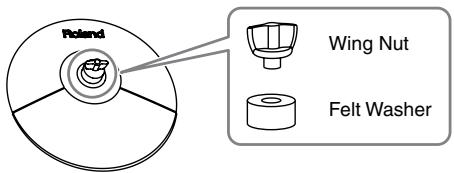
Wing Nut tension
The wing nut should be tightened to allow the movement you desire. BUT, if it is too loose, double triggering may occur.
Use ONLY the included felt washer and wing nut.
Standard, metal wing nuts found on most cymbal stands should never be used.
4. Use the included connection cable and connect the output jack of the CY-5 to the trigger input jack of the percussion sound module.
Connect the L-shaped plug of the included cable to the CY-5.

To make use of edge shot and choking play techniques, you'll need to connect to a trigger input jack on the percussion sound module that accommodates rim shots (p. 6).
- To prevent malfunction and/or damage to speakers or other devices, always turn down the volume, and turn off the power on all devices before making any connections.
5. Secure the cable with the provided cable tie.
Leave enough slack, so that the cymbal can still move freely, without pulling on the cable.
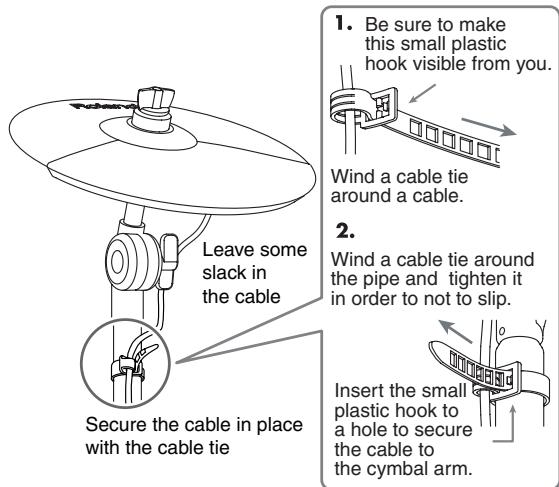
- For the CY-5 to function correctly, the trigger type and trigger parameters in the sound module must be adjusted. See Page 6.
Using the CY-5 as a hi-hat pad
When mounting the CY-5 on an L-Rod (pad mount), use ONLY the attachment set as shown below.
Acceptable rod diameters: 10.5-11.5 mm (7/16 to 1/2 inch)
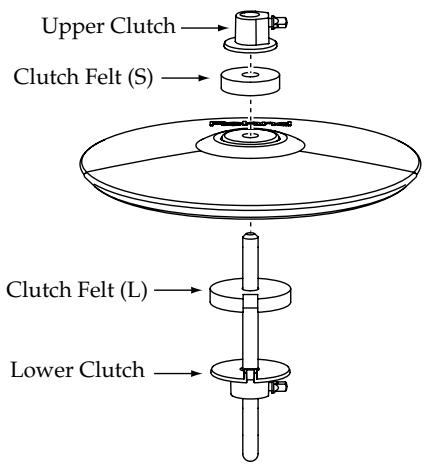
1. Mounting the lower clutch and the clutch felt (L).
Align the notched section as shown below. Then place the clutch felt so it fits securely.
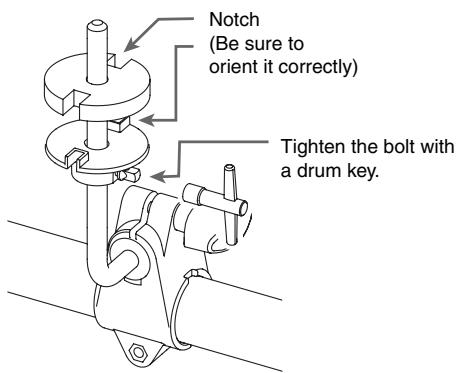
2. Mount the CY-5 so it fits the lower clutch as shown below.
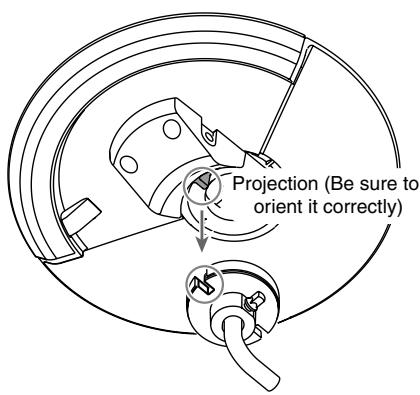
3. Place the clutch felt (S), and while applying some pressure, mount the upper clutch as shown.
Afterwards, you can adjust the upper clutch to have the movement you desire. If it is too loose, double triggering may occur.
Be sure the Roland logo is on the opposite side of the playing area.

4. Use the included connection cable and connect the output jack of the CY-5 to the trigger input jack of the percussion sound module.
Connect the L-shaped plug of the included cable to the CY-5.

To make use of edge shot and choking play techniques, you'll need to connect to a trigger input jack on the percussion sound module that accommodates rim shots (p. 6).
- To prevent malfunction and/or damage to speakers or other devices, always turn down the volume, and turn off the power on all devices before making any connections.
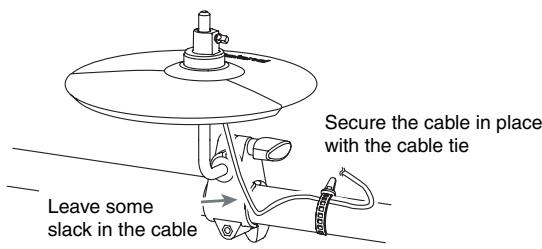
5. Secure the cable with the provided cable tie to the stand pipe.
Leave enough slack, so that the pad can still move freely without pulling on the cable.
6. For the CY-5 to function correctly, the trigger type in the sound module must be adjusted. See page 6.
Trigger Settings For Percussion Sound Module
When using the CY-5, trigger parameter settings will be different depending on the module you are using.
Below you will find the parameters that correspond to different sound modules.
Make the trigger type setting for the percussion sound module.
TD-3 (Percussion Sound Module)
Trigger Type (EYP):Cy(CY)
Only the inputs listed below are capable of producing an edge shot and a choking play techniques.
- SNARE
HI-HAT
CRASH1
CRASH2
RIDE
TD-6V (Percussion Sound Module)
TrigTyp: Cy Type
TD-12/TD-20 (Percussion Sound Module)
Trig Type: CY6
Playing Methods

Do NOT play on the hard plastic section of the pad.
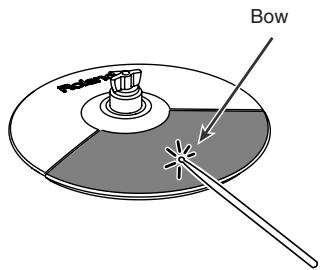
Bow Shot
This is the most common playing method, playing the pad face of the cymbal. It corresponds to the sound of the "head-side" of the connected trigger input.
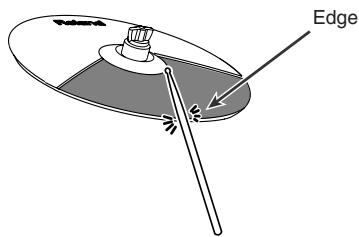
Edge Shot
This playing method involves striking the edge with the shoulder of the stick. It corresponds to the sound of the "rimside" of the connected trigger input.

To make use of edge shot, you'll need to connect to a trigger input jack on the percussion sound module that accommodates rim shots.
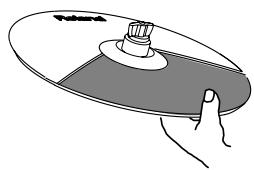
Choking
Choking (pinching) the cymbal's edge with the hand immediately after hitting the cymbal makes the sound stop.

To make use of choking play techniques, you'll need to connect to a trigger input jack on the percussion sound module that accommodates rim shots.
Specifications
CY-5
Size: 10 inches
Triggers: 2 (Bow, Edge)
Dimensions: 246 (W) x 246 (D) x 45 (H) mm 9-11/16 (W) x 9-11/16 (D) x 1-13/16 (H) inches
Weight: 380g / 14oz (without attachment)
Accessories: Owner's Manual
Connection Cable
Drum Key
Attachment Set for Cymbal
Wing Nut
Felt Washer
Stopper
Attachment Set for Hi-hat
Upper Clutch
Lower Clutch
Clutch Felt (L)
Clutch Felt (S)
Cable Tie
Options: Cymbal Mount (MDY-10U)
Drum Stands (MDS-3C, MDS-6C, MDS-12, MDS-20)

In the interest of product improvement, the specifications and/or appearance of this unit are subject to change without prior notice.

Continuous playing may cause dis-coloration of the pad, but this will not affect the Pad's function.
AFRICA
EGYPT
Al Fanny Trading Office
9, EBN Hagar Al Askalany Street.
ARD E1 Golf, Heliopolis,
Cairo 11341, EGYPT
TEL: 20-2-417-1828
REUNION
Royal Cape Park, Unit 24
Londonderry Road, Ottery 7800
Cape Town, SOUTH AFRICA
TEL: (021) 799 4900
ASIA
CHINA
Roland Shanghai Electronics
Co.Ltd.
5F.No.1500 Pingliang Road
Shanghai 200090, CHINA
TEL: (021) 5580-0800
Roland Shanghai Electronics
Co., Ltd.
(BEIJING OFFICE)
10F. No.18 3 Section Anhuaxili
Chaoyang District Beijing
100011 CHINA
TEL: (010) 6426-5050
HONG KONG
Tom Lee Music Co., Ltd.
Service Division
22-32 Pun Shan Street, Tsuen
Wan, New Territories
HONG KONG
TEL:241
Parsons Music Ltd.
8th Floor, Railway Plaza, 39
Chatham Road South, T.S.T.
Kowloon, HONG KONG
TEL:23331863
INDIA
Rivera Digitec (India) Pvt. Ltd.
411, Nirman Kendra
Mahalaxmi Flats Compound
Off. Dr. Edwin Moses Road,
Mumbai-400011, INDIA
TEL: (022) 2493 9051
INDONESIA
PT Citra IntiRama
JI. Cideng Timur No. 15J-15O
Jakarta Pusat
INDONESIA
TEL: (021) 6324170
KOREA
Cosmos Corporation
1461-9, Seocho-Dong,
Seocho Ku, Seoul, KOREA
TEL: (02) 3486-8855
MALAYSIA
Roland Asia Pacific Sdn. Bhd.
45-1, Block C2, Jalan PJU 1/39,
Dataran Prima, 47301 Petalin
Jaya, Selangor, MALAYSIA
TEL: (03) 7805-3263
VIET NAM
Suoi Nhae Company, Ltd
370 Cach Mang Thang Tam St.
Dist.3, Ho Chi Minh City
VIET NAM
TEL: 9316540
PHILIPPINES
G.A. Yupangco & Co. Inc.
339 Gil J. Puyat Avenue
Makati, Metro Manila 1200,
PHILIPPINES
TEL: (02) 899 9801
SINGAPORE
SWEE LEE MUSIC
COMPANY PTE. LTD.
150 Sims Drive,
SINGAPORE 387381
TEL: 6846-3676
TAIWAN
ROLAND TAIWAN
ENTERPRISE CO., LTD.
Room 5, 9fl. No. 112 Chung
Shan N.Road Sec.2, Taipei,
TAIWAN, R.O.C.
TEL: (02) 2561 3339
THAILAND
Theera Music Co., Ltd.
330 Soi Verng NakornKasem,
New Road, Sumpantawongse,
Bangkok 10100, THAILAND
TEL: (02) 224-8821
AUSTRALIA/
NEW ZEALAND
AUSTRALIA/
NEW ZEALAND
Roland Corporation
Australia Pty., Ltd.
38 Campbell Avenue
Dee Why West. NSW 2099
AUSTRALIA
For Au
Tel: (02) 9982 8266
For New Zealand
Tel: (09) 3098 715
CENTRAL/LATINAMERICA
ARGENTINA
Instrumentos Musicales S.A.
Av.Santa Fe 2055
(1123) Buenos Aires
ARGENTINA
TEL: (011) 4508-2700
BARBADOS
A&B Music Supplies LTD
12 Webster Industrial Park, Wimberley Road, Wimberley, UK
Widley, St. Michael, barbados
TEL: (246)430-1100
BRAZIL
Roland Brasil Ltda
Rua San Jose, 780 Sala B
Parque Industrial San Jose
Cotia - Sao Paulo - SP, BRAZIL
TEL: (011) 4615 5666
CHILE
Comercial Fancy II S.A.
Rut.: 96.919.420-1
Nataniel Cox #739, 4th Floor
Santiago - Centro, CHILE
TEL: (02) 688-9540
COLOMBIA
Centro Musical Ltda.
Cra 43 B No 25 A 41 Bododega 9
Medellin, Colombia
TEL: (574)38125296
COSTA RICA
JUAN Bansbach Instrumentos
Musicales
Panama City, REP. DE
PANAMA
TEL:315-0101
PARAGUAY
Distribuidora De
Instrumentos Musicales
J.E. Oleary ESQ. Manduvira
Asuncion PARAGUAY
TEL: (595) 21 492147
PERU
Audionet
155, New National Road
Patras 26442, GREECE
TEL: 2610 435400
HUNGARY
Roland East Europe Ltd.
Warehouse Area DEPO' Pf.83
H-2046 Torokbalint, 157-171
HUNGARY
TEL: (23) 511011
IRELAND
Roland Ireland
G2 Calmount Park, Calmount
Avenue, Dublin 12
Republic of IRELAND
TEL: (01) 4294444
ITALY
Roland Italy S. p. A.
Danvik Center 28, 2 tr
S-131 30 Nacka SWEDEN
TEL: (0)8702 00 20
SWITZERLAND
Roland (Switzerland) AG
Enterprise Park, SWANSEA
SA79FJ
UNITED KINGDOM
TEL: (01792) 702701
MIDDLE EAST
BAHRAIN
Moon Stores
No.1231&1249 Rumaytha
Building Road 3931, Manama
339BAHRAIN
TEL: 17 813 942
IRAN
MOCO INC.
No.41 Nike St., Dr.Shariyati Ave.,
Roberoye Cerahe Mirdamad
Tehran, IRAN
TEL: (021) 285-4169
ISRAEL
Halilit P. Greenspoon & Sons
Ltd.
8 Retzif Ha'alia Hashnia St.
Tel-Aviv-Yafo ISRAEL
TEL: (03) 6823666
JORDAN
Abdullah Salem Street,
Safat, KUWAI
TEL: 243-6399
LEBANON
Chahine S.A.L
George Zeidan St., Chahine
Bldg., Achrafieh, P.O.Box: 16
5857
Beirut, LEBANON
TEL: (01) 20-14
OMAN
TALENTZ CENTRE L.L.C.
Malatan House No.1
Al Noor Street, Ruwi
SULTANATE OF OMAN
TEL:24783443
QATAR
Al Emadi Co. (Badie Studio &
Stores)
P.O.Box 62Doha, QATAR
TEL: 4423-554
SAUDI
aDawliah Universal
Electronics APL
Corniche Road, Aldossary
Bldg., 1st Floor, Alkhobar,
31952 SAUDI ARABIA
P.O.Box 2154,Alkhobar 31952
SAUDI ARABIA
TEL: (03) 898 2081
SYRIA
Technical Light & Sound
Center
Rawda, Abdul Qader Jazairi St.
Bldg. No. 21, P.O.BOX 13520,
Damascus, SYRIA
TEL: (011) 223-5384
TURKEY
ZUHAL DIS TICARET A.S.
Galip Dede Cad. No.37
Beyoglu - Istanbul / TURKEY
TEL: (0212) 249 85 10
U.A.E.
Zak Electronics & Musical
Instruments Co. L.L.C.
Zabeel Road, Al Sherooq Bldg.,
No. 14, Ground Floor, Dubai,
U.A.E.
TEL: (04) 3360715
NORTH AMERICA
CANADA
Roland Canada Ltd.
(Head Office)
5480 Parkwood Way
Richmond B.C.,V6V2M4
CANADA
TEL: (604) 270 6626
Roland Canada Ltd.
(Toronto Office)
170 Admiral Boulevard
Mississauga On L5T 2N6
CANADA
TEL: (905) 362 9707
U.S.A.
Roland Corporation U.S.
5100 S. Eastern Avenue
Los Angeles, CA 90040-2938
U.S.A.
TEL: (323) 890 3700