
MW4-245GEX - 01-05 - Microwave FAGOR - Free user manual and instructions
Find the device manual for free MW4-245GEX - 01-05 FAGOR in PDF.



| Product type | Combination microwave with grill and convection |
| Brand | FAGOR |
| Model | MW4-245GEX - 01-05 |
| Microwave power | 900 W (max) |
| Functions | Microwave, Grill (2 levels), Convection, Duo (2-level reheating), Defrost, Simmer, Reheat, Cook, Combinations (microwave+grill, convection+microwave) |
| Programming | Automatic by weight or food type, manual by time, rotary selectors, AUTO buttons |
| Display | Digital display with food and function guidance |
| Turntable | Yes, removable, with turntable stop function |
| Included accessories | Turntable, roller ring, drive coupling, racks (fixed and foldable depending on model), 2 DUO steam effect plate covers |
| Capacity | Approximately 25 L (estimate) |
| Dimensions (W x D x H) | Approximately 51 x 42 x 30 cm (estimate) |
| Weight | Approximately 15 kg (estimate) |
| Power supply | 220-240 V, 16 A, with mandatory grounding |
| Consumption | Not specified, but thermal protection 16 A |
| Installation | Freestanding or built-in (kit optional), clearances: 5 cm sides, 14 cm above, 10 cm rear |
| Cleaning | Damp soapy sponge, avoid abrasives, dishwasher safe for DUO plates |
| Safety | Child lock (LOC), empty safety (SECU), automatic stop if door opened |
| Repairability | Interventions only by qualified professional, do not remove protective covers |
| Spare parts | Turntable, roller ring, drive coupling, racks, DUO plate covers (available from dealer) |
| Warranty | Not specified, contact manufacturer's after-sales service |
| General information | Manual available in multiple languages, lifespan optimized by regular maintenance |
Frequently Asked Questions - MW4-245GEX - 01-05 FAGOR
User questions about MW4-245GEX - 01-05 FAGOR
0 question about this device. Answer the ones you know or ask your own.
Ask a new question about this device
Download the instructions for your Microwave in PDF format for free! Find your manual MW4-245GEX - 01-05 - FAGOR and take your electronic device back in hand. On this page are published all the documents necessary for the use of your device. MW4-245GEX - 01-05 by FAGOR.
USER MANUAL MW4-245GEX - 01-05 FAGOR
Operating instructions.. page 45
P PORTUGUES
Programmation express
The control Panel 49
Setting the clock/Microwave power settings 50
The display 51
The selector knobs / Programming 52
Microwave programming 53
The Duo Function 54
The grilling racks* 56
The grill function* / Programming the grill* 57
The microwave + grill function / Programming* 58
Security / Child lock / Recommendations 62
Care & cleaning 63
Troubleshooting guide 64
After Sales Service 65
*for certain models
Important safety instructions.
Read carefully and keep for future reference.
Installation
BEFORE CONNECTION
- Check whether your oven has suffered any damage during transport (deformed door or door seal, etc.). If you see any signs of damage, contact your dealer before use.
- Verify the power voltage. If there is a PERMANENT undervoltage (200-210 volts), consult your electrical installer.
**For full-built in model MW3-309 CEX refer to the installation instructions furnished with the microwave oven.
LOCATION
- The oven must be set on a work surface at least 85~cm above floor level.
- Place the oven on a flat and horizontal surface, away from any source of heat or steam. To ensure the stability of the microwave oven, the front left foot is adjustable (5 positions). Turn it to raise or lower the appliance.
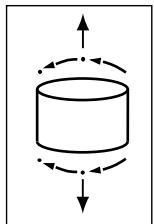
- Make sure that air may circulate freely around the oven.
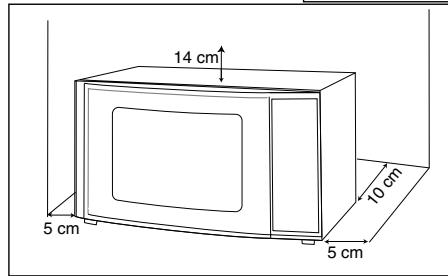
Leave sufficient space around the oven :
- 5 cm between the sides of the oven and any walls or objects
- 14 cm above the oven
-
10 cm behind the oven.
-
Allow nothing to obstruct the ventilation louvers at the back of the appliance.
- Make sure the electrical plug will be accessible after installation.
ELECTRICAL CONNECTION
- Your installation must be protected by a 16 Amp thermal fuse.
- It is mandatory to use a power point with a ground terminal, connected in accordance with current safety regulations.
- In your electrical installation, provide a device that is accessible to the installer, capable of separating the appliance from the mains power and whose contact opening is at least 3mm at all of the poles.
- Never operate the oven if the supply cord and/ or its plug are damaged. In case of damage, call in a specialised technician trained by the manufacturer.
Warning
- Your appliance is designed exclusively for the domestic purposes of defrosting, heating or cooking foods. The manufacturer bears no responsibility in the case of improper usage.
- Only use ustensils that are suitable for use in microwave ovens.
- To avoid deterioration of your microwave oven, never operate it empty or without the turntable.
- Never tamper with the lock mechanism of your microwave oven; you could cause damage requiring repair by an authorised technician.
- When heating food in plastic or paper containers, keep an eye on the oven due to the possibility of ignition.
- It is not advisable to use metal recipients, forks, spoons, knives, metal ties or staples for deep-freeze bags.
- The contents of feeding bottles are baby food jars shall be stirred or shaken and the temperature checked before consumption in order to avoid burns.
- Only allow children to use the oven without supervision when adequate instructions have been given so that the child is able to use the oven in a safe way and understands the hazards of improper use.
- Liquids and other foods must not be heated in sealed containers they are liable to explode.
- Eggs in their shell and whole hard-boiled eggs should not be heated in microwave ovens since they may explode, even after microwave heating has ended.
- Microwave heating of beverages can result in delayed eruptive boiling, therefore care must be taken when handling the container.
- For small amounts (one sausage, a single croissant, etc.), place a glass of water alongside the food item.
- Time settings that are too long may dry out and burn the food. To avoid such incidents, never use the same cooking times as those recommended for traditional ovens.
- If smoke is observed, switch off or unplug the appliance and keep the door closed in order to stifle any flames.
- In order to evacuate moisture, your appliance is fitted with a delayed ventilation function. Depending on the applied cooking mode (solo/grill/combination), the oven ventilation will continue to operate after the cooking end.
General description
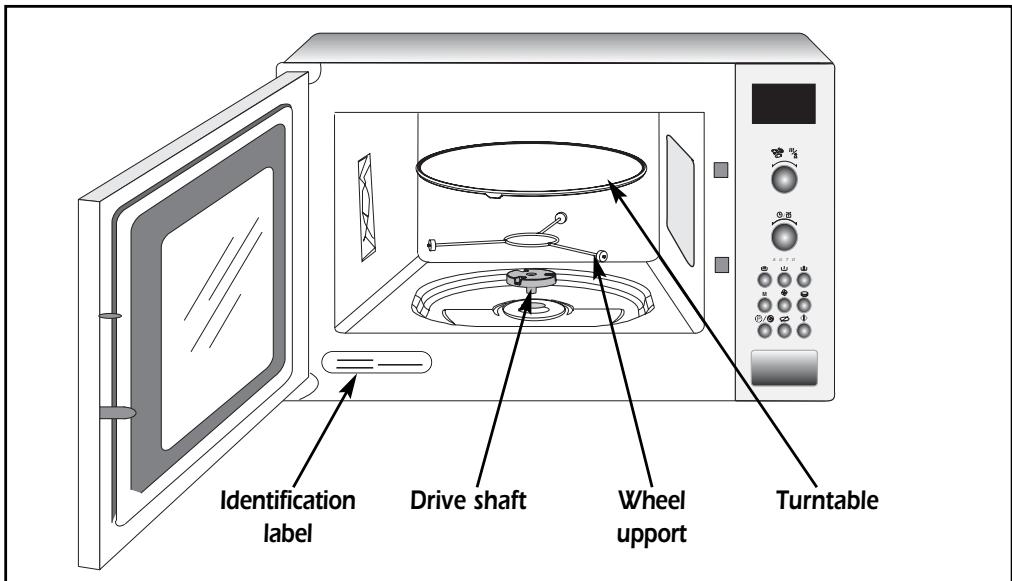
THE TURNTABLE :
ensures equal cooking of food throughout with no need to stir or turn the dish.
- It may be used as a cooking platter.
- Rotation is controlled by the drive shaft and the wheel support.
- The turntable revolves in both directions.
- If it does not turn, verify that all components are properly positioned.
- For easy removal, wells are provided on either side.
TURNTABLE OFF
stops the turntable from revolving in order to use platters which require the entire oven space.
THE WHEEL SUPPORT :
Do not try to rotate the roller ring manually, as you could damage the drive system. If it does not turn smoothly, make sure that there is nothing in the well beneath the turntable.
The control panel
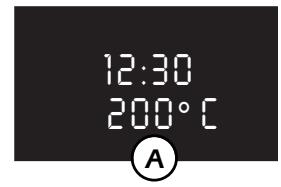
A Display window :
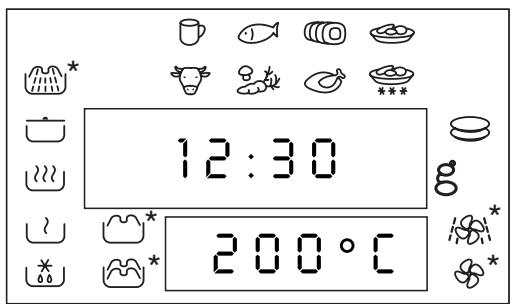
to simplify programming, the display indicates : the time of day, the types of food and fucntions, the the minutes / seconds or weight programmed .
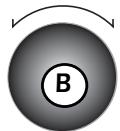
B The selector knob
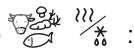
to choose the food type or function.
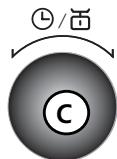
C The selector knob 日
to choose the programme time or weight.
D-E-F The "A U T O" keys 山 山 山 山 山 山 山 山 山 山 山 山 山 山 山 山 山 山
automatically set the appropriate programa-time according to the weight and the selected food type.
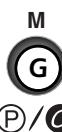
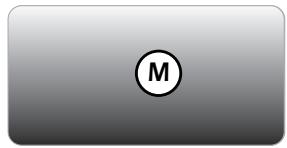
G The MODE key M:
to choose the appropriate function, with the selector knob % .
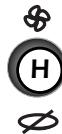
H The HOT AIR key
*: to cook as if with
a traditional oven, with or without microwave power.
The GRIL key 一 ^ 一
to directly programme the grill function.
The DUO key :
for dual level reheating; to be used with the steam effect plate stackers.
J The PAUSE/CANCEL key /
to interrupt (press once) or cancel a programme (press twice).
Also used to set the clock.
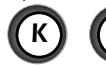
K STOP-TURNTABLE key :
to stop the turntable from revolving.
L START key 品
to start all programmes.
M DOOR OPEN button :
press this button to open the door or stop the appliance.

A U T O



*according to model
Setting the clock
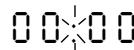
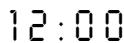
After first plugging in your microwave oven or after a power outage, the clock reads : and the two dots flash.
To set the clock :
- Press the PAUSE / CANCEL key / for 5 seconds.
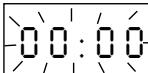
"O O : O O" flashes, and a tone sounds requesting the hour be set.
-
Turn the selector knob to display the correct time.
-
Validate by pressing the PAUSE / CANCEL key () / . Your clock is set.
Microwave power settings
| POWER SETTING | APPLICATION |
| DEFROST | To defrost all frozen food or to top off cooking of delicate dishes or to cook very slowly. |
| SIMMER | To finish programmes begun with the HIGH COOK power setting, for instance beans, lentils, ordairy products. (This power setiing is available when you program-me the function using the mode M key.) |
| HEAT | To heat up all liquids and all fresh or frozen pre-cooked dishes. |
| HIGH COOK | To cook vegetables, fish, poultry and soup. |
| Microwave output power: 900 W | |
When you select the type of food, the appropriate power setting is automatically programmed.
The display
*for certain models
The display and the selector knobs guide you in your choice of :
les aliments

beverages

fish

pork, veal turkey

fresh ready-made dishes

beef, lamb

vegetables

poultry

frozen ready-made dishes
the functions

DEFROST

SIMMER

REHEAT

COOK

DUO

MICROWAVE + GRILL*

FAN HEAT*

FAN HEAT + MICROWAVE*
the 2 level grill*

LOW GRILL

HIGH GRILL
the weight for an AUTO programme
the length of the programme (or time of day)
12:00
The food type or function being selected will flash in the display.
The selector knobs
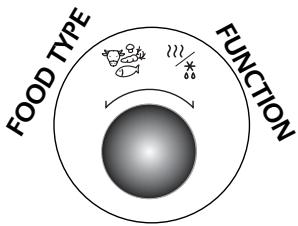
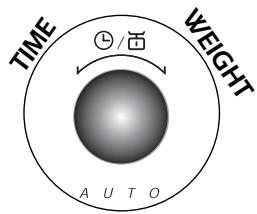
The 2 selector knobs are used for the various programmes:
The first to select
- the food type

- the function

the second to programme
- the length of the programme

- the weight of the food

Programming
Your microwave oven is now plugged in and the clock is set.
Open the door. Set the dish inside, close the door. If the door is nor properly shut, the appliance will not operate.
- 3 beeps announce the end of a programme. The beeps are repeated every minute for 10 minutes until you open the door.
- If you think there is insufficient space for the dish to turn freely inside the oven, press the STOP TURNTABLE key before or during the programme. (you may not stop the turntable during a programme using the Duo function).
If there is an error in the programming, press the CANCEL key / 6 twice.
Microwave programming
Available programmes :

Express programming
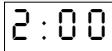
Set the desired programme length (ex. 2 minutes) with the selector knob .
Press start . The maximum power setting is programmed directly for quick reheating.


Automatic programming by weight :
with the A U T O keys, the programme length is calculated automatically.
Choose the food type with the selector knob (ex. fish).
Press one of the microwaving keys 山山 山山 or _山 x_山 (ex. COOK _山 x_山 ) or press the M key and choose your function with the selector knob _山 x_山 . Press the M key again.
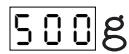
50g blinks; programme the weight of your food item using the selector knob (ex. 500 g).
Press start . The appropriate power level is programmed, the adequate programme length is displayed automatically (ex. 7 min) and the programme begins.



Automatic programming by food type
Choose your food type with the selector knob (ex. fresh ready-made dishes).
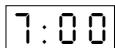
Press the M key, choose your function with the selector knob x . (ex. HEAT ); the appropriate microwave power setting for that food item is programmed automatically.
Set the desired programme length (ex. 7 min) with the selector knob 口 .
Press start



Automatic programming by function
Press the MODE M key, choose the desired function with the selector knob The SIMMER function is available in this programme.
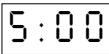
Set the desired programme length (ex. 5 minutes), with the selector knob .
Press start

The DUO function : dual level reheating
The DUO function enables you to heat up two plates at the same time, all the while retaining full flavor due to the steam effect provided by the Duo plate stackers.
Just cover the plates, stack them one on top of the other, and place together on the center of the turntable.
Use the Duo button together with the Duo plate stackers.
The advantages of the plate stackers :
- Food retains full flavour due to the steam effect.
Dishes are heated evenly throughout. - Drying out of food is minimized.
Programme time can be reduced. - By preventing splattering, they help keep your oven clean.
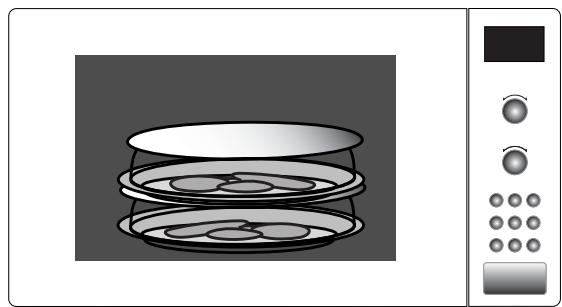
The Duo function can be used to heat up fresh or refrigerated dishes.
Neither the defrosting or heating of frozen products nor the cooking of dishes is recommended.
Care of your Duo plate stackers :
- A sponge, hot water and liquid detergent are all you need to clean your plate stackers. Do not use a metal scouring pad or scouring powder.
- The Duo plate stackers are dishwasher-safe.
Do not use the DUO plate stackers with the grill, microwave + grill, fan oven or microwave + fan oven functions as this could cause them irremediable damage.
The DUO function : dual level reheating
The DUO plate stackers
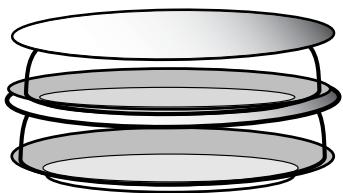
The Duor plate stackers with steam action :
2 plate stackers so that you can heat up 2
fresh or refrigerated dishes at the same time.
Example: Heating up 2 plates of ravioli = 5 min.
- Cover the two plates with the Double Decker plate stackers, and place in the center of the turntable.
Press the Duo key , 00:00 flashes, is displayed.
Set the time with the selector knob 已 , ex. 5 minutes : 05:00 is displayed.
Press start , the Duo reheating function begins.
As a general rule:
For a homogenous dish such as mashed potatoes, peas, celery etc.:
2 plates of 200g
3/4min
For a mixed consistency dish such as franks and beans, beef bourguignon, ravioli, etc.:
2 plates of 300g
5/6min
The times indicated below are based on heating of refrigerated dishes, or room temperature for canned goods.
The grilling racks*
*according to model
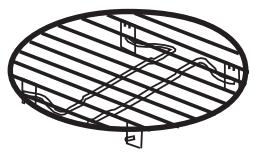
Make sure that the rack is always well centered on the turntable.
Never use any metal dish with the rack with the microwave, grill + microwave or fan + microwave functions.
Nevertheless you may heat up food in an aluminium tray if you place a plate between the tray and the rack.
The rack :
to brown low dishes with the grill or microwave + grill functions
The rack for models featuring the grill function
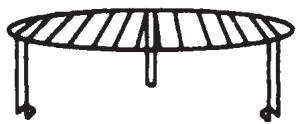
The folding rack :
To fold down the rack :
push in on the protruding hooks and fold in the stands
with the Grill or Grill + Microwave functions choose the rack level according to the dish you wish to grill
- high position to brown dishes which are rather flat
- low position as required for other dishes.
The 2 level rack for models featuring the fan function
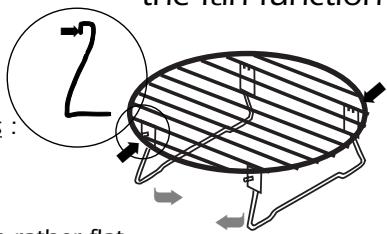
high position
with the fan or fan + microwave functions : always set your dishes on the rack folded down to the low position.
low position (folded)
The grill function


*according to model
This function enables you to brown dishes such as gratins or meat. It may be used before or after cooking, as called for in the recipe.
- For those models featuring the fan function, 2 grilling levels are available :
HIGH GRILL and LOW GRILL. As a rule, use the HIGH GRILL level to grill meat and fish and the LOW GRILL level with the simultaneous microwave + grill function for gratins and to brown delicate dishes.
The HIGH GRILL level is featured on the grill models.
- According to the food item you wish to grill, you may either set the dish on the rack or directly on the turntable.
- After grilling make sure to use an oven mitt to handle dishes, and remember to use only ovenproof cookware such as ceramic dishes or heat resistant glass. Always allow the grill to cool off 25 minutes before touching it.
WARNING : certain exposed parts may heat up during use of the grill. Be sure to keep children away.
**On certain models the grill folds down for easy cleaning.
The folded down position is solely for cleaning the oven ceiling, not for use.
Programming the grill*
*according to model
Using the 2 level grill*
▼ Press the M key, choose the HIGH GRILL or LOW GRILL
with the selector knob .
Set the desired programme length with the selector knob 日 and press start 日 .
Using the single grill*
Press the grill key , or press the M key, choose the GRILL function with the selector knob .
Set the desired programme length with the selector knob, and press start 心
The microwave + grill function*

*according to model
This function enables you to use the microwaves and grill simultaneously, for rapid cooking.
- To guarantee quality cooking results, the high or low grill level combined with an intermediate microwave power level are automatically programmed.

Automatic programming by the weight :you enter only the weight of the food item and programming is automatic

Choose the desired food type with the selector knob ex. poultry.

Press the M key. Select the microwave + grill function with the selector knob. The microwave power level and the grill level are automatically adapted to your dish.
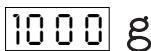
Press the M key, 50g flashes; programme the weight of your food item with the selector knob ex. 1000 g.
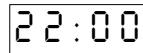
Press start ; the suitable time is displayed (ex. 22 min) and the programme begins.

Automatic programming by the food type : with the M key
Choose your food type amongst the available categories with the selector knob , ex. turkey roast.

Press the M key, and then select the microwave + grill function with the selector knob 12 The microwave power level as well as the grill level are automatically adapted to your dish.

Set the programme length with the selector knob 日 ex. 20 min.
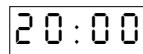
Press start

Programming by function : with the M key
If your food item does not correspond to any of the available categories, select the microwave + grill function with the M key. An intermediate microwave power level together with the high grill are programmed.

Set the programme length with the selector knob ex. 10 min.
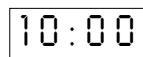
Press start 1
The fan functions*
*according to model
2 convection cooking functions are available :
the fan function

to cook and brown food just as in a traditional convection oven
the fan ^+ microwave function

- to combine microwave power with fan cooking, for considerable time savings.
Pointers
The cooking temperature may be set from 50^ - 250^ by 5^ steps.
Cooking time may be set from 0 - 90 by 1 minute steps.
- It is always preferable to set a minimal cooktime and extend if necessary; check the browning of your dishes to avoid overcooking.
Remember to always place your dishes on the rack in the low position when using the fan function or fan ^+ microwave function. This will ensure even heat distribution thereby providing optimal cooking results.
Use only heat-resistant ovenware.
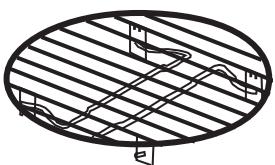
Folded-down rack
- Never use metal dishes when cooking with the fan + microwave function
Always use an oven mitt to remove your dish as it may become quite hot.
Programming the fan function*
*according to model
with the fan key :
tailor the programme to your cooking needs : function / temperature / programme length.
Press the fan key, is displayed.
175^ flashes, requesting you programme the cooking temperature ex. 200^ , with the selector knob .
Wait until 00:00 flashes, requesting you set the length of the programme, ex. 30 minutes, with the selector knob .
Press start 1 , the programme begins.

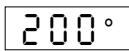
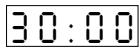
Example : to bake an apple pie
Using your favorite recipe, prepare the pie in the glass pie dish. Set the dish on the rack in the low position and place together on the turntable.
① Press the fan key


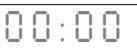
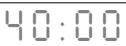
2Programme 220° with the selector knob L
③Programme 40 min with the selector knob L.
(4) Press start , the turntable revolves, the oven light comes on.
At the end of the cooktime, remember to use an oven mitt to remove the dish.
Programming the fan + microwave function*
*according to model
Example : to cook a 1 kg roast beef
Set the roast in a non-metallic roasting pan, dress and season to taste. Put the pan on the rack in the low position and place together on the center of the turntable.
You may program the fan function 3 different ways :
Automatic programming by the weight : all you need to enter is the weight of the food and the appropriate program is set automatically.
Choose the food type (ex. beef) with the selector knob
▼ Press the MODE M key, choose the function fan + microwaves with the selector knob .
▼ Press the M key.: the cooking temperature is automatically adapted to the roast beef. 50g flashes, requesting that you enter the weight: for a 1-kilo roast, enter 1000 with the selector knob
Press start , the appropriate programme length and temperature for the roast are displayed, (ex. 30 min, 200^ ), the programme begins.


Automatic programming by the cooktime: you choose the cooktime yourself according to person
Choose the food type (ex. beef) with the selector knob
Press the M key, choose the function fan + microwaves with the selector knob.
(\nabla) Set the programme length ex. 30 minutes, with the selector knob (\left\lfloor \begin{array}{l}\text{口}\ \text{口}\ \text{口}\ \text{口}\ \text{口}\ \text{口}\ \text{口}\ \text{口}\ \text{口}\ \text{口}\ \text{口}\ \text{口}\ \text{口}\ \text{口}\ \text{口}\ \text{口}\ \text{口}\ \text{口}\ \text{口}\ \text{口}\ \text{口}\


Press start , the temperature is displayed, the programme begins.
with the fan key : tailor your program by selecting the function, temperature and cooking time you wish.
Press the fan key twice, is displayed.
175° flashes, requesting you enter the desired cook temperature, ex. 200^ with the selector knob .
Wait until 00:00 flashes, requeting youset the programme length ex. 30 minutes, with the selector knob .
Press start 1 , the programme begins.


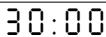
Security
If after having entered a programme and closed the door you wait longer than 30 seconds before pressing the START key , the oven will not operate and the message S E C U will appear in the display window, to prevent start-up of an empty oven.
In order for the oven to operate, open and then close the door and press the START key. Otherwise, press the CANCEL key / and reprogramme.
Security
You may programme "Child lock" to prevent unsupervised operation of your oven.
To set :
Press the Stop button for 5 seconds with the open door, "LOC" will appear.
To release :
Proceed as above / press the Stop button for 5 seconds with the door open..
Recommendations
- You may stop or start the turntable revolving during a programme by pressing the TURNTABLE STOP key (except with the Duo function).
- To change the food type or function selection, press the CANCEL key / twice and programme again.
- If you open the door before the end of the programme, shut the door and press the START key to continue the programme.
- When using the defrost function 00 , a beep indicates the mid-point of the programme (the oven continues to operate); to obtain the best results, turn the food at this time, close the door and press the START key to continue the second half of the programme.
- If you remove a dish before the end of the programme, press the CANCEL key / twice to erase the programme.
REMARKS :
If you wait longer than 3 minutes to press the START key 1 after having entered a programme, it will be cancelled (the clocktime will be displayed).
- If you wish to defrost frozen food after using one of the fan functions, for better results, first let the microwave oven cool down for about ten minutes.
Care & cleaning
WARNING : It is recommended to clear the oven regularly and to take any food deposit inside and outside the appliance.Use a soapy and wet cloth. If the appliance is not kept clean, its surface could deteriorat and adversely affect its life and possibly result in a hazardous situation. If the door or door seals are damaged, the oven must not be operated until it has been repaired by a competent person.
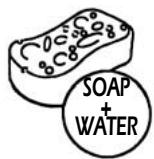
A steam cleaner is not to be used.
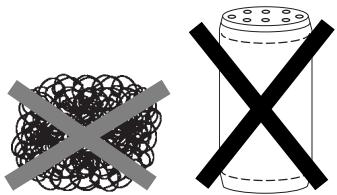
- Do not use abrasives, alcohol or solvents as they are liable to damage the oven.
-
In the event of unsavory odors or caked-on dirt, boil water containing lemon juice or vinegar in a cup for 2 minutes and clean the walls with a little dishwashing liquid.
-
For those ovens with grill or convection heat functions, the top and rear air vents become very hot. Do not touch these parts after use; wait till the appliance has cooled down in order to clean it. Use a fine steel wool pad on the metal parts.
-
The turntable can be removed for cleaning. Wells are provided on both sides for easy access. If you remove the drive shaft, do not allow water to enter the motor shaft hole.
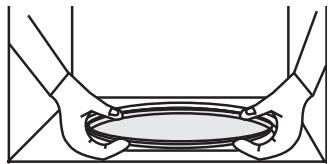
Be sure to put the turntable, the drive shaft and the wheel support back in their proper place.
Troubleshooting guide
Problem
The message "S E C U" is displayed.
The time counts down, but the appliance does not function (the turntable does not rotate, the light does not come on and the food is not heated).
The microwave oven is noisy when operating.
Condensation forms on the door glass.
The grill element smokes when heating up.
The turntable does not revolve correctly.
The microwave programmes do not produce the desired results.
The appliance produces sparks.
Suggestion
Cancel the security: open then shut the door and press the START key
Press the TURNTABLE OFF key for 5 seconds.
Adjust the front left foot. Clean the wheels and the well area beneath the turntable.
Clean the vents under the appliance.
Clean all cooking residue from the grill element.
Clean the wheels and the well beneath the turntable.
Clean the vents under the appliance. Make sure that you use only containers which are suitable for microwave cooking.
Check whether the wheel support is correctly positioned.
Thoroughly clean the appliance: remove any greasy deposits, cooking residue, etc...
Move any metal objects away from the oven walls.
Never use metallic containers with a rack.
After-sales service
If the equipment has sustained any damage :
- Check that the door is not deformed.
-
If the oven does not operate, before calling the repairman :
-
Check the electrical supply.
- Check that the door is properly closed.
- Check your programming.
CAUTION : never attempt to repair your oven yourself.
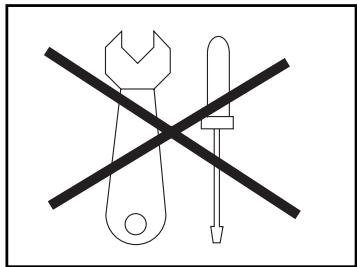
WARNING : it is dangerous for anyone other than qualified personnel to make any repairs requiring removal of the cover providing protection from exposure to microwave energy.
Only a specially trained technician is qualified to repair your microwave oven.
Indice
Instalacao 67
Cuidado 68
Apresentacao 69
Quadro de commando 70
- Programmation express
- Installation
- BEFORE CONNECTION
- LOCATION
- ELECTRICAL CONNECTION
- Warning
- General description
- THE TURNTABLE :
- TURNTABLE OFF
- THE WHEEL SUPPORT :
- The control panel
- Setting the clock
- To set the clock :
- The display
- les aliments
- the functions
- the 2 level grill*
- The selector knobs
- The first to select
- the second to programme
- Programming
- Your microwave oven is now plugged in and the clock is set.
- Microwave programming
- Available programmes :
- Express programming
- Automatic programming by weight :
- Automatic programming by food type
- Automatic programming by function
- The DUO function : dual level reheating
- The DUO plate stackers
- As a general rule:
- The grilling racks*
- The rack :
- The folding rack :
- The grill function
- Programming the grill*
- Using the 2 level grill*
- Using the single grill*
- The microwave + grill function*
- Automatic programming by the weight :you enter only the weight of the food item and programming is automatic
- Automatic programming by the food type : with the M key
- Programming by function : with the M key
- The fan functions*
- convection cooking functions are available :
- the fan function
- the fan + microwave function
- Pointers
- Programming the fan function*
- with the fan key :
- Example : to bake an apple pie
- Programming the fan + microwave function*
- Example : to cook a 1 kg roast beef
- Security
- Recommendations
- REMARKS :
- Care & cleaning
- Troubleshooting guide
- Problem
- Suggestion
- After-sales service
- Indice
Brand : FAGOR
Model : MW4-245GEX - 01-05
Category : Microwave