
PKG 82 A1 - Headphones POWERFIX - Free user manual and instructions
Find the device manual for free PKG 82 A1 POWERFIX in PDF.



| Product type | Protective audio headset with integrated radio receiver |
| Brand | POWERFIX |
| Model | PKG 82 A1 |
| Dimensions (W x H x D) | 14.5 x 18 x 10 cm |
| Weight (without accessories) | approx. 300 g |
| Power supply | 2 x 1.5 V AA batteries (Mignon/LR6) |
| Typical battery life | approx. 48 hours |
| FM radio frequency range | 87.5 - 108 MHz |
| AUX audio input | 3.5 mm stereo jack |
| Maximum sound level | 82 dB(A) ± 5% |
| Frequency response | 20 Hz - 20 kHz |
| Impedance | 32 Ω ± 10% |
| Microphone function | Yes, allows conversing without removing the headset |
| BASS BOOST function | Yes, amplifies low frequencies |
| Radio station memory | 8 presets |
| Display | LCD screen (frequency, time, battery status) |
| Seal cushion material | PVC |
| Headband material | PVC |
| Size range | Small, medium, large (adjustable) |
| Operating temperature | +5 °C to +45 °C |
| Humidity (without condensation) | 5 - 90% |
| Care and cleaning | Clean with a soft, damp cloth; avoid moisture penetration |
| Warranty | 3 years (manufacturing defects) |
Frequently Asked Questions - PKG 82 A1 POWERFIX
User questions about PKG 82 A1 POWERFIX
0 question about this device. Answer the ones you know or ask your own.
Ask a new question about this device
Download the instructions for your Headphones in PDF format for free! Find your manual PKG 82 A1 - POWERFIX and take your electronic device back in hand. On this page are published all the documents necessary for the use of your device. PKG 82 A1 by POWERFIX.
USER MANUAL PKG 82 A1 POWERFIX
KAPSELGEHÖRSCHUTZ PKG 82 A1
DE AT CH
KAPSELGEHÖRschUTZ
Bedienungsanleitung
IT CH
Operating instructions
FR CH
CASQUE DE PROTECTION AUDITIVE
Mode d'emploi
NL
GEHOORBESCHERMINGSKAPPEN
Gebruksaanwijzig
DE AT CH
Before reading, unfold the page containing the illustrations and familiarise yourself with all functions of the device.
| DE/AT/CH | Bedienungsanleitung | Seite | 1 |
| FR/CH | Mode d'emploi | Page | 17 |
| IT/CH | Istruzioni per l'uso | Pagina | 33 |
| NL | Gebruiksaanwijzing | Pagina | 49 |
| GB | Operating instructions | Page | 65 |
Inhaltsverzeichnis
Einführung. 2
sf = discrepancy standard
H=110dB,M=107dB,L=95dB
Garanzia
H=110dB,M=107dB,L=95dB
Garantie
Information for these operating instructions 66
Copyright 66
Limited liability 66
Intended use. 66
Warning symbols used. 67
Safety 68
Risk of hearing damage 68
Risk of accidents 68
Interaction with batteries 69
Basic Safety Instructions. 69
Commissioning .70
Safety instructions. 70
Items supplied and transport inspection 70
Disposal of the packaging .71
Battery insertion/exchange.71
Putting the circumcaural ear protectors on. 71
Operating components . . .72
Handling and operation . .72
Setting the time. 72
Radio operation 73
Playback from external audio devices 74
Switching the microphone for level dependency on/off. 75
Bass Boost 75
Battery display 75
Cleaning 75
Cleaning the housing. 76
Troubleshooting .76
Malfunction causes and remedies .76
Storage / Disposal .77
Storage. 77
Disposal of the device 77
Disposing of the batteries. 77
Appendix .77
Notes on the EU Declaration of Conformity 77
Technical data 78
Warranty 79
Service 79
Importer 80
Introduction
Information for these operating instructions
Congratulations on the purchase of your new device.
You have clearly decided in favour of a quality product. These operating instructions are a component of the Circumaural Ear Protectors PKG 82 A1 (hereafter designated as the device). They contain important information in regard to safety, use and disposal. Before using the product, familiarise yourself with all of these operating and safety instructions. Use the product only as described and only for the specified areas of application. In addition, pass these documents on, together with the product, to any future owner.
Copyright
This documentation is copyright protected. Any duplication and/or reprinting, entirely or partially, as well as reproduction of illustrations, also in modified form, is only permitted with written consent from the manufacturer.
Limited liability
The manufacturer assumes no responsibility for damage caused by failure to observe these instructions, improper use, incompetent repairs, making unauthorized modifications or for using unapproved replacement parts.
Intended use
These Circumaural Ear Protectors have a facility for the reproduction of audio signals for entertainment purposes. These Circumaural Ear Protectors limit the sound pressure level of a sound signal at the ear to 82 dB(A).
This device is intended exclusively for non-commercial use to
- Listen to radio stations and audio material,
- Reduce hazardous levels of noise at the ear.
This device is not intended for any other use or for uses beyond those mentioned. Claims of any kind for damage resulting from unintended use will not be accepted. The operator alone bears the risk.
Warning symbols used
In these extant operating instructions the following warnings are used:
DANGER
A warning of this danger level indicates a threateningly dangerous situation
If the dangerous situation is not avoided, it could lead to death or serious physical injury.
Pay heed to the instructions in this warning to avoid the death of or serious physical injury to people.
WARNING
A warning of this danger level signifies a possible dangerous situation.
If the dangerous situation is not avoided it can lead to injuries.
Follow the directives in this warning to avoid personal injuries.
TAKE NOTE
A warning of this danger level signifies possible property damage.
If the situation is not avoided it can lead to property damage.
Follow the directives in this warning to avoid property damage.
NOTICE
A notice signifies additional information that assists in the handling of the device.
Safety
In this chapter you will receive important safety information regarding the handling of the device. This device complies with the statutory safety regulations. Incorrect usage can lead to personal injury and property damage.
Risk of hearing damage

WARNING

Risks as a result of extremely high sound levels!
Loud music can lead to hearing damage.
- Avoid extreme sound levels, especially over extended periods of time, when you are using these Circumaural Ear Protectors.
These Circumaural Ear Protectors have a level-dependent adjustment which works slowly and is therefore not suitable for impulse noise. These Circumaural Ear Protectors are therefore unsuitable for gunsport enthusiasts and hunters.
Risk of accidents

WARNING
Danger through impaired perception!
- Acoustical warning and indication signals and environmental noises can sound different when you are wearing these Circumaural Ear Protectors. Make yourself aware of how these signals deviate in their sound so that you can recognise the signals in the appropriate situations.
The perception of warning signals in certain workplaces may be affected when using the sound reproducing system.
Do not use these Circumaural Ear Protectors when operating an automobile, a bicycle or in any other situation in which impaired environmental sound perception could present a risk to yourself or others.
Interaction with batteries
WARNING
Danger from improper use! The risk of explosions and leakages exists!
For safe handling of batteries observe the following safety instructions:
Do not throw batteries into a fire.
Never short-circuit batteries.
Do not attempt to recharge batteries.
Regularly check the condition of the batteries. Leaking battery acid can cause permanent damage to the device. Special caution should be applied when handling damaged or leaking batteries. Danger from acid burns! Wear protective gloves.
- Store batteries in a place inaccessible to children. When swallowed seek immediate medical attention.
If you do not intend to use the device for an extended period, remove the batteries.
Basic Safety Instructions
For safe handling of the device observe the following safety information:
Before use check the device for visible external damage. Do not put into operation a device that is damaged or has been dropped.
- Damaged cables or connections should be replaced by authorised qualified personnel or by the Customer Service department.
This device is not intended for use by individuals (including children) with restricted physical, physiological or intellectual abilities or deficiencies in experience and/or knowledge unless they are supervised by a person responsible for their safety or receive from this person instruction in how the device is to be used.
Children should be supervised to ensure that they do not play with the device.
A repair to the device during the warranty period may only be carried out by a Customer Service department authorised by the manufacturer otherwise no additional warranty claims can be considered for subsequent damages.
- Do not carry out any unauthorised reconstruction or customisation to these Circumaural Ear Protectors.
Protect the device from moisture and liquid penetration.
Do not operate the device close to open flames (e.g. candles).
Avoid direct solar radiation.
These Circumaural Ear Protectors are to be set up, adjusted, cleaned and maintained as per the instructions in this manual. If they are not, the protective effect of the Circumaural Ear Protectors could be negatively affected.
The full protective effect is assured only if the Circumaural Ear Protectors are worn during the entire period spent in noisy environments.
The Circumaural Ear Protectors, and especially the sealing rings, may show signs of aging over time. The sealing rings should be checked regularly for cracks and permeability. Only in this way can the full protective effect be achieved.
This product can be damaged by certain chemical substances. Further information should be requested from the importer.
The performance may deteriorate due to depletion of the batteries. The typical duration in continuous use which may be expected from the batteries of these Circumaural Ear Protectors is approximately 48 hours.
The sound output from the circuit for the sound regeneration may exceed the external noise level.
Commissioning
Safety instructions

DANGER
With the commissioning of the device risks can occur to persons and property!
Pay heed to the following safety instructions to avoid risks:
- Packaging materials may not be used as playthings. There is a risk of suffocation!
Items supplied and transport inspection
The device is delivered with the following components as standard:
Circumaural Ear Protectors
- Jackplug cable, 3.5 to 3.5 mm( 100 cm)
2× 1.5V Batteries (AA/Mignon/LR6)
These operating instructions
NOTICE
Check the contents to ensure that they are complete and for visible damage.
If the delivery is not complete or is damaged due to defective packaging or through transportation contact the Service Hotline (see chapter Service).
Disposal of the packaging
The packaging protects the device from transport damage. The packaging materials are selected from the point of view of their environmental friendliness and disposal technology and are therefore recyclable.

The recirculation of packaging into the material circuit saves on raw material and reduces generated waste. Dispos of packaging material that is no longer needed in compliance with the regionally established regulations.
Battery insertion/exchange
Ensure that the on/off switch 7 is in the OFF position.
Open the battery compartment 3 on the Circumaural Ear Protectors.
Insert two new batteries of type AA into the battery compartment ③. Be sure to insert the batteries with the correct polarity.
Close the battery compartment ③.
Putting the circumcaural ear protectors on
Before putting them on, comb any hair lying over the ears to the side and remove any ear jewelry which might affect the acoustic seal.
Guide the headband ② over your head and then adjust the capsules so that your ears are completely covered.
Press the capsules firmly onto your ears and then slide the headband ② downwards to achieve a secure fit on the head.
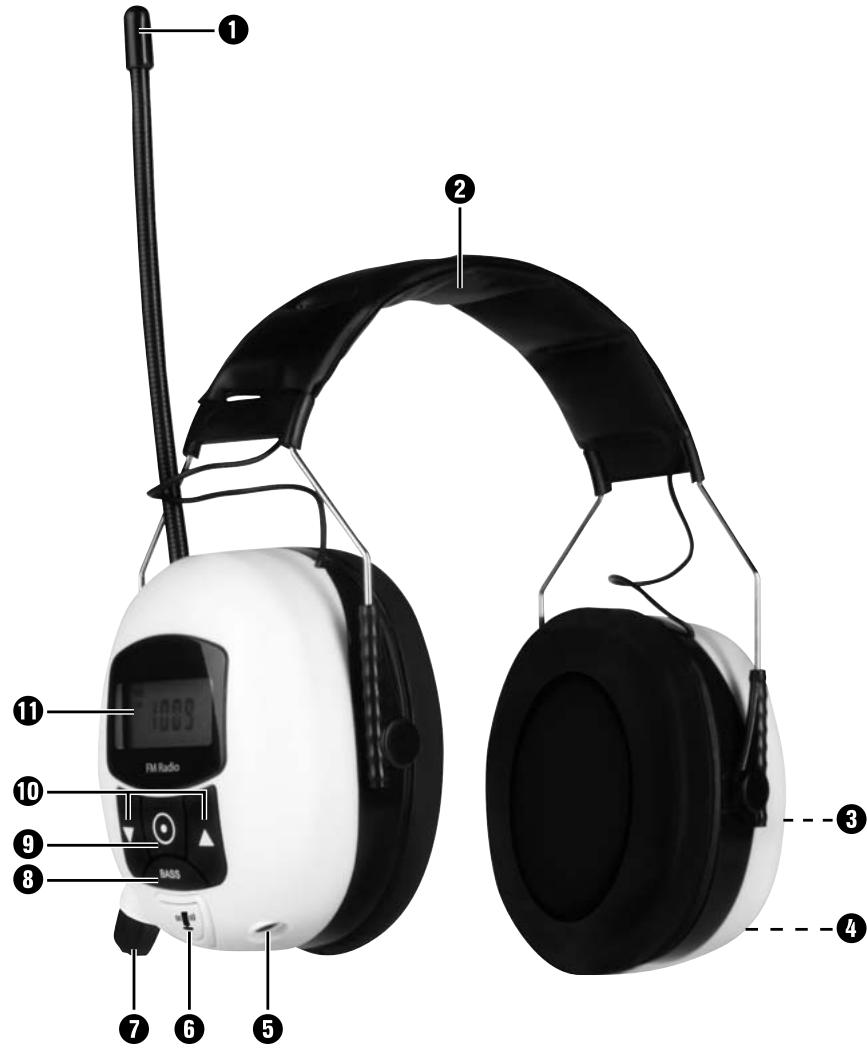
Operating components
Antenna
2 Headband
3 Battery compartment
4 Microphone
AUX IN socket (3.5 mm jackplug)
6 Microphone button [11]
On/off switch with volume control
BASS button
9 Menu button
10 Buttons ▲▼
11 Display
Handling and operation
In this chapter you receive important information about the handling and operation of the device.
Setting the time
Ensure that the on/off switch 7 is in the OFF position.
Press the Menu () 9 button. The numbers for the hours indicator blink.
With the buttons 10 set the current number for the hours.
Press the Menu 9 button once again. The numbers for the minutes indicator blink.
With the buttons 10 set the current number for the minutes.
Finally, press the Menu 9 button once again. The programmed time will be taken over.
NOTICE
If, during the adjustment, no changes are entered for about 15 seconds, the device saves the settings already activated and switches back to the former mode.
Radio operation
NOTICE
The technical characteristics of the device allow an adjustable frequency range outside the permitted VHF (FM) receiver range of 87.5 - 108 MHz. In some countries, different national regulations may apply to the assigned radio frequency ranges. Please note that information received outside of the assigned radio frequency ranges may not be used, passed on to third parties or otherwise misused.
Switching the radio on / off
NOTICE
The radio can be switched on only when there is not a jackplug cable connected to the AUX IN socket 5.
To switch the radio on, turn the on/off switch ⑦ clockwise until you feel that a resistance has been overcome.
To switch the radio off, turn the on/off switch anti-clockwise until you feel that a resistance has been overcome.
Adjusting the volume.
To increase the sound volume, turn the on/off switch ⑦ clockwise.
To reduce the sound volume, turn the on/off switch ⑦ anti-clockwise.
Automatic radio station search
Precondition: The device is in the radio mode.
Press and hold one of the buttons 10 for at least two seconds. The device searches for the nearest radio station with sufficient reception quality. The frequency of the radio station is indicated in the display 11.
Repeat this procedure until you have found a radio station to your liking.
Manual station selection
Precondition: The device is in the radio mode.
By making individual presses on one of the 10 buttons, set the desired radio station. The frequency of the radio station is indicated in the display 11.
Saving radio stations
Precondition: The device is in the radio mode.
The device has 8 memory slots available for saving transmission frequencies. To save a radio station frequency, proceed as follows:
Tune in to the desired radio station as previously described.
Press and hold the button Menu 9 until 11 a M appears in the display and the number of the memory slot blinks.
Press one of the buttons 10 to select the desired memory slot for the selected radio station, between I and B.
Finally, press the Menu 9 button once again. The reception frequency of the chosen radio station is now stored in the selected memory slot.
Retrieving saved radio stations
Precondition: The device is in the radio mode.
Repeatedly press the button Menu 9 to select the memory slot of the saved radio station, between I and B.
Playback from external audio devices
Connect an external audio device, for example an MP3 player, to the AUX IN socket 5 on the underside of the Circumaural Ear Protectors.
Switch the device on with the on/off switch 7 and set the desired sound volume level. In the display 1 appears RU IN.
Start playback on the external audio device and adjust the sound volume level.
NOTICE
Pay heed to the operating instructions for the external audio device.
Switching the microphone for level dependency on / off
NOTICE
These Circumaural Ear Protectors are equipped with a level-dependent sound absorption. Check the correct functioning before using them. Should a displacement or a failure of the batteries be established, replace the batteries. Thereby, pay heed to the instructions for the exchange of the batteries (see section "Battery insertion/exchange").
With the microphone you can conduct discussions without having to remove the Circumaural Ear Protectors. For this proceed as follows:
While listening to music, press the microphone button (1)1) 6 on the Circumaural Ear Protectors. In the display appears M I C.
The audio signal (radio or Aux) is interrupted, permitting a short conversation without having to remove the Circumaural Ear Protectors.
Press the microphone button (1) once again to switch the microphone off and continue playback of the audio signal.
Bass Boost
With the bass boost you can switch in an enhanced reproduction of the lower frequencies.
Press the button BASS to switch the Bass Boost on or off. When the bass boost is switched on, BASS BOOST appears in the display 11.
Battery display
The battery indicator blinks in the display 11 and a signal tone sounds when the battery voltage is too low.
Insert new batteries as described in the section "Battery insertion/exchange".
Cleaning
TAKE NOTE
Damage to the device!
Make sure when you are cleaning the device that no moisture gets inside in order to avoid irreparable damage to it.
Cleaning the housing
Clean the surfaces of the device with a soft, dry cloth.
Troubleshooting
In this chapter you will receive important information for malfunction localization and remedies.
Malfunction causes and remedies
The following table will help with localizing and remedying minor malfunctions:
| Defect | Possible cause | Solution |
| The display indi-cates nothing. | The batteries are incorrectly inserted in the battery com-partment ③. | Insert the batteries as per the diagramme in the battery compartment ③. |
| Batteries are discharged. | Insert new batteries. | |
| No sound | The volume is set to minimum. | Increase the sound volume level by turning the on/off switch ⑦. |
| Playback of the external audio device is not started. | Start playback on the external audio device. | |
| The plug of the jack plug cable is not properly inserted in the connection socket. | Ensure that the connector plug is completely inserted into the connection socket. | |
| The microphone ④ is switched on. | Switch the microphone ④ off. | |
| Background noise in radio reception | The radio station setting is not properly tuned in. | Tune the station in correctly with the buttons ▲▼ 10. |
| The reception is too weak. | Try moving the antenna ① to improve reception. |
NOTICE
If you cannot solve the problem with the aforementioned methods please contact the Customer Service department.
Storage / Disposal
Storage
Should you choose to not use the device for an extended period, remove the batteries and store it in a clean, dry place away from direct sunlight.
Disposal of the device

Do not dispose of the device in your normal domestic waste. This product is subject to the provisions of the European Directive 2002/96/EC-WEEE (Waste Electrical and Electronic Equipment).
Dispose of the device through an approved disposal centre or at your community waste facility. Observe the currently applicable regulations. In case of doubt, please contact your waste disposal centre.
Disposing of the batteries
Do not dispose of the batteries with household waste. Every consumer is statutorily obliged to dispose of batteries or rechargeable batteries at a collecting point in his town / district or at a shop selling batteries. This obligation is intended to ensure that batteries are disposed of in an environmentally safe fashion. Only dispose of batteries when they are fully discharged.
Appendix
Notes on the EU Declaration of Conformity
In regard to compliance with fundamental requirements and other relevant provisions, this device complies with the European Electromagnetic Compatibility Directive 2004/108/EC.
In addition, this device has been tested as per the European Standard EN 352-1: 2002, EN 352-4: 2001+A1: 2005 and EN 352-8: 2008 and fulfills the safety requirements of the PPE Directive 89/686/EEC. Test certificate issued by PZT GmbH, EU Identification Number 1974.
The complete original declaration of conformity can be obtained from the importer.

Technical data
| Dimensions (W x H x D) | 14,5 x 18 x 10 | cm |
| Weight (excl. accessories) | approx. 300 | g |
| Operating temperature | +5 - +45 | °C |
| Humidity (no condensation) | 5 - 90 | % |
| Power supply: Battery | 2 x 1.5 V Typ AA/Mignon/LR6 (supplied) | |
| Frequency range Radio (VHF) | 87.5 - 108 MHz | |
| Operating time (average) | approx. 48 h | |
| Broadband voltage identifier | >75 mV | |
| Frequency response | 20 Hz - 20 kHz | |
| Impedance | 32 Ohm ± 10 % | |
| Sound volume in the capsules | max. 82 dB(A) ± 5 % | |
| Material in sealing cushions | PVC | |
| Material in headband | PVC | |
| Size range of the Circumaural Ear Protectors | Small, Medium and Large | |
Insulation values as per EN 24869-1:
| Frequency (Hz) | 63 | 125 | 250 | 500 | 1000 | 2000 | 4000 | 8000 |
| Mf (dB) | 17.0 | 14.9 | 21.5 | 26.6 | 33.5 | 29.7 | 33.1 | 32.2 |
| sf (dB) | 4.4 | 2.2 | 1.8 | 2.6 | 2.3 | 3.3 | 3.0 | 6.0 |
| Mf-sf (dB) | 12.6 | 12.7 | 19.7 | 24.0 | 31.2 | 26.4 | 30.1 | 26.2 |
SNR=28dB H=28dB M=26dB L=20dB
Clarification:
Mf = Middle insulation value
sf = Standard deviation
H = Insulation value at high frequencies (assumed sound insulation for sound with LC-LA =-2dB)
M = Insulation value at medium frequencies (assumed sound insulation for sound with LC-LA = +2 dB)
L = Insulation value at low frequencies (assumed sound insulation for sound with LC-LA = +10 dB)
SNR = Single Number Rating (this value is calculated from the measured C-weighted noise levels LC and is used to estimate the effective A-weighted sound level in the ear).
Audio input
Input voltage for max. output level of 78 dB (A)
-14 dBm corresponds to 154 mV
Max sound level radio receiver
77 dB(A)
Level dependence
Criterion level
H=110dB,M=107dB,L=95dB
Warranty
The warranty for this appliance is for 3 years from the date of purchase. The appliance has been manufactured with care and meticulously examined before delivery.
Please retain your receipt as proof of purchase. In the case of a warranty claim, please make contact by telephone with our Customer Service Department. Only in this way can a post-free despatch for your goods be assured.
NOTICE
The warranty covers only claims for material and manufacturing defects, but not for transport damage, wearing parts or for damage to fragile components, e.g. buttons or batteries.
This product is for domestic use only and is not intended for commercial use. The warranty is void in the case of abusive and improper handling, use of force and internal tampering not carried out by our authorised service branch.
Your statutory rights are not restricted in any way by this warranty. The warranty period is not extended by repairs made under the warranty. This applies also to replaced and repaired parts.
Damages and defects extant at the time of purchase must be reported immediately after unpacking, resp. no later than two days after the date of purchase.
Repairs made after the lapse of the warranty period are subject to charge.
Service

Service Great Britain
Tel.: 0871 5000 720 (£ 0.10/Min.)
E-Mail: kompernass@lidl.co.uk
IAN71832
Importer
KOMPERNASS GMBH
BURGSTRASSE 21
44867 BOCHUM, GERMANY
www.kompernass.com
GB
KOMPERNASS GMBH
Burgstraße 21
D-44867 Bochum
www.kompernass.com
- KAPSELGEHÖRSCHUTZ PKG 82 A1
- KAPSELGEHÖRschUTZ
- CASQUE DE PROTECTION AUDITIVE
- GEHOORBESCHERMINGSKAPPEN
- DE AT CH
- Inhaltsverzeichnis
- Einführung. 2
- Garanzia
- Garantie
- Safety 68
- Commissioning .70
- Operating components . . .72
- Handling and operation . .72
- Cleaning 75
- Troubleshooting .76
- Storage / Disposal .77
- Appendix .77
- Introduction
- Information for these operating instructions
- Copyright
- Limited liability
- Intended use
- Warning symbols used
- DANGER
- A warning of this danger level indicates a threateningly dangerous situation
- WARNING
- A warning of this danger level signifies a possible dangerous situation.
- TAKE NOTE
- A warning of this danger level signifies possible property damage.
- NOTICE
- Safety
- Risk of hearing damage
- Risks as a result of extremely high sound levels!
- Risk of accidents
- Danger through impaired perception!
- Interaction with batteries
- Danger from improper use! The risk of explosions and leakages exists!
- Basic Safety Instructions
- Commissioning
- Safety instructions
- With the commissioning of the device risks can occur to persons and property!
- Items supplied and transport inspection
- Disposal of the packaging
- Battery insertion/exchange
- Putting the circumcaural ear protectors on
- Operating components
- Handling and operation
- Setting the time
- Radio operation
- Switching the radio on / off
- Adjusting the volume.
- Automatic radio station search
- Manual station selection
- Saving radio stations
- Retrieving saved radio stations
- Playback from external audio devices
- Switching the microphone for level dependency on / off
- Bass Boost
- Battery display
- Cleaning
- Damage to the device!
- Cleaning the housing
- Troubleshooting
- Malfunction causes and remedies
- Storage / Disposal
- Storage
- Disposal of the device
- Disposing of the batteries
- Appendix
- Notes on the EU Declaration of Conformity
- Technical data
- Audio input
- Level dependence
- Warranty
- Service
- Service Great Britain
- Importer
Brand : POWERFIX
Model : PKG 82 A1
Category : Headphones