
AVENT SCD506 - Baby monitor PHILIPS - Free user manual and instructions
Find the device manual for free AVENT SCD506 PHILIPS in PDF.
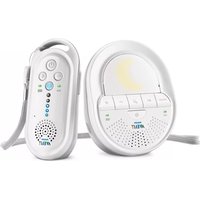


| Product Type | Baby Video Monitor |
| Brand | Philips |
| Model | AVENT SCD506 |
| Screen | 2.8 inches, color, LCD |
| Screen Resolution | 320 x 240 pixels |
| Maximum Range | 300 meters in open field |
| Night Vision | Yes, infrared (LEDs) |
| Two-Way Communication | Yes, with walkie-talkie |
| Built-in Night Light | Yes, with star projection |
| Temperature Indicator | Yes, displayed on parent unit |
| Power Supply | AC adapter (parent unit and camera) |
| Backup Battery | Yes, rechargeable battery built into parent unit |
| Dimensions (parent unit) | 130 x 80 x 50 mm |
| Dimensions (camera) | 70 x 60 x 100 mm |
| Total Weight | Approximately 450 g (with accessories) |
| Material | BPA-free plastic |
| Care and Cleaning | Clean with a soft, dry cloth. Do not immerse. |
| Safety | Low voltage, compliant with CE standards |
| Spare Parts and Repairability | AC adapter available as spare part. Repair possible by authorized center. |
| Warranty | 2 years |
Frequently Asked Questions - AVENT SCD506 PHILIPS
User questions about AVENT SCD506 PHILIPS
0 question about this device. Answer the ones you know or ask your own.
Ask a new question about this device
Download the instructions for your Baby monitor in PDF format for free! Find your manual AVENT SCD506 - PHILIPS and take your electronic device back in hand. On this page are published all the documents necessary for the use of your device. AVENT SCD506 by PHILIPS.
USER MANUAL AVENT SCD506 PHILIPS


-1
1_
-1
1
English 6
Danish 16
German 26
Spanish 37
French 48
Italian 58
Dutch 69
Norwegian 80
Portuguese 90
Finnish 101
Swedish 111
Turkish 121
Greek 131
Arabic 142
6 English
Introduction
Congratulations on your purchase and welcome to Philips Avent! To fully benefit from the support that Philips Avent offers, register your product at www.philips.com/welcome.
Philips Avent is dedicated to producing caring, reliable products that give parents the reassurance they need. This Philips Avent baby monitor provides round-the-clock support by ensuring you can always hear your baby clearly without any distracting noise. The DECT technology guarantees zero interference and a crystal clear sound between the baby unit and the parent unit.
General description (Fig. 1)
1 Parent unit 2 'Talk' button 3 'Sensitivity' button 4 'Link' light 5 Speaker 6 Microphone 7 Sound level lights 8 ECO Max button with light 9 Battery status light 10 Volume + and - buttons 11 On/off button 12 Neck strap loop 13 Battery compartment 14 Socket for small plug 15 Lid of battery compartment 16 Rechargeable batteries 17 Adapter with small plug 18 Neck strap 19 Baby unit 20 Nightlight 21 Microphone 22 PAGE button 23 Power-on light 24 On/off button 25 Speaker 26 Battery status light 27 Volume + button 28 Volume - button 29 Lullaby play/stop button 30 Next lullaby button 31 Nightlight on/off button 32 Battery compartment 33 Socket for small plug 34 Lid of battery compartment 36 Adapter with small plug
35 Non-rechargeable 1.5 V R6 AA batteries (not supplied)
Important safety information
Read this important information carefully before you use the appliance and save it for future reference.
IMPORTANT
This baby monitor is intended as an aid. It is not a substitute for responsible and proper adult supervision and should not be used as such.
Never leave your baby alone in your home. Always make sure there is someone present to look after the baby and take care of its needs.
Disclaimer
Please note that you use this baby monitor at your own risk. Koninklijke Philips N.V. and its subsidiary companies are not responsible for the operation of this baby monitor or your use of it and therefore do not accept any liability in connection with your use of this baby monitor.
Danger
- Never immerse any part of the baby monitor in water or any other liquid. Do not place the appliance where water or any other liquid can drip or splash onto it. Never use the baby monitor in moist places or close to water.
- Never put any object on top of the baby monitor and do not cover it. Do not block any ventilation openings. Install according to the manufacturer's instructions.
- Cords present a potential strangulation hazard. Keep cords out of the reach of children (more than 1 meter/3.5 feet away). Never place the baby monitor inside the baby's bed or playpen (Fig. 2).
- There is a danger of explosion if disposable or rechargeable batteries are replaced incorrectly. Only replace them with the same type.
Warning
- Check if the voltage indicated on the adapter corresponds to the local mains voltage before you connect the appliance.
- Do not modify or cut off any part of the adapter and its cord, as this causes a hazardous situation.
- Only use the adapter supplied (model S003PV0600050).
- If the adapter is damaged, always have it replaced with one of the original type in order to avoid a hazard.
- This appliance can be used by children aged from 8 years and above and persons with reduced physical, sensory or mental capabilities or lack of experience and knowledge if they have been given supervision or instruction concerning use of the appliance in a safe way and understand the hazards involved. Children shall not play with the appliance. Cleaning and user maintenance shall not be made by children without supervision.
- Protect the mains cord from being walked on or pinched particularly at plugs, convenience receptacles, and the point where they exit from the appliance.
- Make sure that you place the baby monitor in such a way that its cord does not obstruct a doorway or passage. If you place the baby monitor on a table or low cabinet, do not let the mains cord hang over the edge of the table or worktop. Make sure the cord does not lie on the floor where it presents a tripping hazard.
- Keep the packaging materials (plastic bags, cardboard buffers, etc.) out of the reach of children, as they are not a toy.
- To prevent electric shock, do not open the housing of the baby unit or parent unit except for the battery compartments.
Caution
- Use the appliance at a temperature between 0°C (32°F) and 40°C (104°F).
8 English
- Do not install the appliance near any heat sources such as radiators, heat registers, stoves or other apparatus (including amplifiers) that produce heat.
- Make sure that your hands are dry when you handle adapters, plugs and mains cord and also when you insert or replace disposable and rechargeable batteries.
- All the required markings are located on the battery compartment of the parent unit and baby unit and on the bottom enclosure of the charger (if any).
- For the parent unit, only use the rechargeable battery supplied with the baby monitor.
- Charge the rechargeable battery as described in the user manual.
- The parent unit can only be recharged with the rechargeable battery supplied.
- To prevent battery explosion or leakage, which can damage the baby monitor and cause burns and skin or eye irritation:
- Do not recharge non-rechargeable batteries in the parent unit.
- Remove rechargeable and disposable batteries if you are not going to use the baby monitor for more than 30 days.
- Make sure the + and - poles of the batteries point in the right direction.
- Keep the batteries away from excessive heat such as sunshine, fire or the like.
- Do not leave empty batteries in the baby unit.
- To prevent batteries from heating up or releasing toxic materials, hydrogen or oxygen, do not overcharge, short-circuit, reverse charge or damage batteries.
- To handle damaged or leaking batteries, wear protective gloves to protect your skin.
Compliance with standards
- This product complies with the radio interference requirements of the European Community (Fig. 3).
- Philips Consumer Lifestyle hereby declares that this baby monitor is in compliance with the essential requirements and other relevant provisions of Directive 2014/53/EU (DECT: frequency band 1880-1900 MHz, maximum radio-frequency power: 250 mW). A copy of the EC Declaration of Conformity (DoC) is available online at www.philips.com/support.
Electromagnetic fields (EMF)
This Philips appliance complies with all applicable standards and regulations regarding exposure to electromagnetic fields.
Preparing for use
Baby unit
We advise you to operate the baby unit from the mains. To guarantee automatic power backup in case of mains failure, you can insert four 1.5V AA alkaline batteries (not included).
Do not use rechargeable batteries. The baby unit does not have a charging function and rechargeable batteries discharge slowly when they are not in use.
1 Remove the lid of the battery compartment (Fig. 4). 2 Insert four non-rechargeable 1.5V R6 AA batteries. Make sure that the + and - poles point in the right direction (Fig. 5). 3 Reattach the lid. 4 Put the small plug in the baby unit and put the adapter in the wall socket (Fig. 6).
Parent unit
The parent unit runs on two rechargeable 850mAh Ni-MH batteries that are supplied with the baby monitor. Charge the parent unit before you use it for the first time and when the batteries are low.
1 Make sure that the parent unit is switched off and disconnected from the mains. 2 Remove the lid of the battery compartment (Fig. 7). 3 Insert the rechargeable batteries. Make sure that the + and - poles point in the right direction (Fig. 8). 4 Reattach the lid. 5 Put the power adapter in the parent unit and put the adapter in the wall socket (Fig. 9).
The battery status indicator flashes green to indicate that the appliance is charging.
Note: It takes 4 charge and discharge cycles before the rechargeable batteries reach their full capacity.
The normal charging time is 10 hours, and the normal operating time is 24 hours.
Rechargeable batteries:
Manufacturer
Model Rating
BYD H-AAA850A-MB20 1.2V Ni-MH AAA/R03 850mAh
GPI PH85AAAHC 1.2V Ni-MH AAA/R03 850mAh
Using the baby monitor
Positioning the baby monitor
Keep the baby unit out of the reach of the baby. Never place the baby unit inside the baby's bed or playpen.
Because the cord of the baby unit presents a potential strangulation hazard, make sure that the baby unit and its cord are at least 1 metre/3.5 feet away from your baby. (Fig. 10)
To prevent a high-pitched sound from one or both units, make sure the parent unit is at least 1.5 metres/5 feet away from the baby unit.
Note: When the parent unit is out of range of the baby unit, the parent unit beeps from time to time. The link indicator on the parent unit flashes red.
Linking parent unit and baby unit
1 Press and hold the on/off button on the baby unit for two seconds (Fig. 11).
- All lights on the baby unit light up briefly.
2 Press and hold the on/off button on the parent unit for two seconds (Fig. 12).
- All lights on the parent unit light up briefly.
- The 'link' light flashes red and the parent unit starts to search for the baby unit.
- When the parent unit and baby unit are linked, the 'link' light turns solid green (Fig. 13).
- If no connection is established, the 'link' light flashes red and the parent unit beeps from time to time.
Note: It takes less than 15 seconds to establish the link between the parent unit and the baby unit.
What to do if no link is established
- If the parent unit is out of range, place it closer to the baby unit, but not closer than 1 metre/3.5 feet.
- If the baby or parent unit is too close to another DECT appliance (e.g. a cordless phone), switch off this appliance or move the unit away from this appliance.
- If the baby unit is switched off, switch it on.
Operating range
- The operating range is 330 metres/1000 feet outdoors and up to 50 metres/150 feet indoors.
- The operating range of the baby monitor varies depending on the surroundings and factors that cause interference. Wet and moist materials cause so much interference that the range loss is up to 100%. For interference from dry materials, see the table below.
| Dry materials | Material thickness Loss of range |
| Wood, plaster, cardboard, glass (without metal, wires or lead) | < 30cm (12in) 0-10% |
| Brick, plywood < 30cm (12in) 5-35% | |
| Reinforced concrete < 30cm (12in) 30-100% | |
| Metal grilles or bars < 1cm (0.4in) 90-100% | |
| Metal or aluminium sheets < 1cm (0.4in) 100% | |
Functions and feedback on the baby unit
Nightlight
The nightlight produces a soft glow that comforts your baby.
1 Press the nightlight button on the back of the baby unit to switch on the nightlight (Fig. 14). 2 Press the nightlight button again to switch off the nightlight.
Lullaby function
1 Press the lullaby play/stop button on the baby unit to play the last selected lullaby (Fig. 15). The selected lullaby repeats for 30 minutes. 2 Press the next lullaby button to select another lullaby from the list (Fig. 16). 3 To adjust the sound level of the lullaby, press the + or - button on the baby unit. 4 To stop lullaby playing, press the lullaby play/stop button on the baby unit.
Paging the parent unit
If you have lost the parent unit, you can use the PAGE button on your baby unit to locate the parent unit. This function only works when the parent unit is switched on.
1 Press the PAGE button on the baby unit (Fig. 17). The parent unit produces a paging alert tone. 2 To stop the paging alert tone, press the PAGE button on the baby unit again or press any button on the parent unit. The paging alert tone stops automatically after 2 minutes.
Battery status light
The battery status light is solid green when the baby unit is operating on battery power and the batteries contain enough energy.
The battery status light flashes red quickly when the batteries run low while the baby unit is operating on battery power (Fig. 18).
Note: The battery status light is off when the baby unit is powered by the adapter.
Replace the batteries when they run low.
Functions and feedback on the parent unit
Volume
There are five volume levels and a 'volume off' setting.
Setting the volume level
1 Press the + button or the - button once.
The sound level lights show the current volume (Fig. 19).
2 Press the + button to increase the volume or press the - button to decrease the volume. 3 If you do not press a button for more than 3 seconds, the sound level lights go out and the setting is saved.
Volume off
Below the lowest volume setting, there is a 'volume off' setting.
1 Press the + button or the - button once. The sound level lights show the current volume. 2 Press and hold the - button for more than 3 seconds to set the volume to off.
Note: The sound level lights always show that the baby produces sounds, even if the volume is set to off.
Talk function
1 If you want to comfort your baby, press the TALK button on the parent unit and talk clearly into the microphone on the front from a distance of 15-30cm (0.5-1ft) (Fig. 20).
The 'link' light starts flashing green.
Note: If you have set the volume for the lullaby higher on the baby unit, the sound will also be louder when you use the talk function on the parent unit.
2 Release the TALK button when you have finished talking.
Battery status light
When the rechargeable batteries of the parent unit are low, the battery status light flashes red and the parent unit beeps (Fig. 21). The remaining operating time is at least 30 minutes.
When the rechargeable battery of the parent unit is almost empty, the battery status light flashes red.
If you do not connect the parent unit to the mains to charge it when the battery status light flashes red, the parent unit switches off.
The battery status light flashes green when the parent unit is charging (Fig. 21).
Microphone sensitivity
This option allows you to set the microphone sensitivity of the baby unit. The microphone sensitivity determines what noise level the baby unit picks up, e.g. you will want to hear when your baby cries, but you may be less interested in its babbling.
Note: The parent unit uses less power when it is set to a lower sensitivity level.
1 Press the 'sensitivity' button once (Fig. 22). The sound level lights light up briefly and show the current sensitivity level (Fig. 19). 2 Press the 'sensitivity' button again within 3 seconds to increase the sensitivity level. When the maximum sensitivity level has been reached, the lowest sensitivity level will be selected again. 3 If you do not press a button for more than 3 seconds, the sound level lights go out and the setting is saved.
ECO mode
Smart ECO is a standard feature on this baby monitor. It automatically reduces the DECT signal from the baby unit to save energy. To save even more energy, activate the ECO Max mode. In this mode, the DECT signal of the baby unit is switched off as long as the baby does not make a sound.
Caution: When the baby makes a sound, there may be a slight delay in response because the DECT signal has to switch on again before the baby unit can send feedback to the parent unit.
Please note the following:
- In ECO Max mode, you do not receive feedback when the baby unit is switched off or when the parent unit is out of range of the baby unit. You can check the connection by pressing any button on the parent unit.
Activating the ECO Max mode
Make sure that the parent unit is linked to the baby unit.
1 Press the ECO Max button (Fig. 23).
The ECO Max indicator lights up blue. The 'link' light starts flashing green slowly approx. 1 minute after the baby has stopped making sounds (Fig. 24).
When the parent unit receives a DECT signal from the baby unit because the baby makes a sound, the 'link' light turns solid green.
Deactivating ECO Max mode
1 Press the ECO Max button (Fig. 23).
The ECO Max indicator goes out.
Warranty and support
If you need information or support, please visit www.philips.com/support or read the international warranty leaflet.
Recycling
- This symbol means that this product shall not be disposed of with normal household waste (2012/19/EU) (Fig. 25).
- This symbol means that this product contains rechargeable and disposable batteries which shall not be disposed of with normal household waste (2006/66/EC) (Fig. 26).
- Follow your country's rules for the separate collection of electrical and electronic products, and rechargeable and disposable batteries. Correct disposal helps prevent negative consequences for the environment and human health.
Removing rechargeable and disposable batteries
To remove rechargeable and disposable batteries, see the instructions for placing and/or removing batteries in the user manual.
Frequently asked questions
| Question | Answer |
| Why don't the power-on light of the baby unit and the 'link' light of the parent unit light up when I press the on/off buttons of the units? | Perhaps the rechargeable battery of the parent unit is empty and the parent unit is not plugged in. Put the small plug in the parent unit and put the adapter in a wall socket. Then press the on/off button to establish connection with the baby unit. |
| Perhaps the non-rechargeable batteries of the baby unit are empty and the baby unit is not connected to the mains. Replace the non-rechargeable batteries or connect the baby unit to the mains. Then press the on/off button to establish connection with the parent unit. | |
| Why doesn't the battery status light on the parent unit light up when I start recharging the parent unit? | It takes a few minutes before the battery status lightlights up, especially when the parent unit is charged for the first time or has not been in use for a long period. |
| Is my baby monitor secure from eavesdropping and interference? | The DECT technology of this baby monitor guarantees no interference from other equipment and no eavesdropping. |
| Why does the parent unit beep? | If the parent unit beeps while the 'link' light fashes red, the connection with the baby unit is lost. Move the parent unit closer to the baby unit to re-establish the connection between the parent unit and the baby unit. |
| If the parent unit beeps and the battery status light flashes red, recharge the parent unit. | |
| If the baby unit is switched off, switch on the baby unit. | |
| Why does the parent unit produce a high-pitched noise? | The units may be too close to each other. Make sure that the parent unit and the baby unit are at least 1.5 metres/5 feet away from each other. It takes a few seconds for the high-pitched noise to stop. |
| The volume of the parent unit may be too high. Decrease the volume of the parent unit. |
Question Answer
| Why don't I hear a sound/ Why can't I hear my baby cry? | The volume of the parent unit may be too low or may be switched off. Increase the volume of the parent unit. |
| The microphone sensitivity level of the baby unit may be too low. Increase the microphone sensitivity level on the parent unit. | |
| The baby unit and the parent unit may be out of range of each other. Reduce the distance between the units. | |
| Why does the parent unit react too quickly to other sounds? | The baby unit also picks up other sounds than those of your baby. Move the sound sources away from the baby unit. |
| The microphone sensitivity level of the baby unit may be too high. Decrease the microphone sensitivity level on the parent unit. | |
| Why does the parent unit react slowly to the baby's crying? | The microphone sensitivity level of the baby unit may be too low. Increase the microphone sensitivity level on the parent unit. |
| The ECO Max mode is on and the baby unit only switches on the DECT signal when the baby makes sounds. Switch off the ECO Max mode to make the baby unit transmit DECT signals continuously and to make the parent unit respond more quickly to your baby's sounds. | |
| Why do the non-rechargeable batteries of the baby unit run low quickly? How can I save battery power? | The microphone sensitivity level of the baby unit may be too high, which causes the baby unit to transmit more often. Decrease the microphone sensitivity level in the menu of the parent unit. |
| The speaker volume on the baby unit may be too high, which causes the baby unit to consume a lot of energy. Decrease the speaker volume of the baby unit. | |
| Perhaps you switched on the nightlight. If you want to use the nightlight, we advise you to run the baby unit on mains power. | |
| To save energy, activate the ECO Max mode. | |
| The specific operating range of the baby monitor is 330 metres/1000 feet. Why does my baby monitor manage a much smaller distance than that? | The specified range is only valid outdoors in open air. |
| Why is the operating time of my parent unit shorter than 24 hours? | When the parent unit is charged for the first 4 times, the operating time is less than 24 hours. The rechargeable batteries only reach the full capacity after you charge and discharge them at least 4 times. |
| The volume and microphone sensitivity of the parent unit may be too high, which causes the parent unit to consume a lot of energy. Decrease the volume and the microphone sensitivity of the parent unit. | |
| The parent unit may be switched on during charging. Switch off the parent unit during charging. |
Question Answer
| What happens during a power failure? | If the parent unit is sufficiently charged and there are batteries in the baby unit, the baby monitor continues to operate during a power failure. |
| The parent unit switched off by itself and I can't I switch it on again. What should I do? | Remove the batteries from the parent unit, reinsert them in the parent unit, and the parent unit will switch on automatically. You can also put the small plug in the parent unit and the adapter in the wall socket, and then the parent unit will switch on automatically. |
| Why does it take up to 10 hours to charge the parent unit, even if the batteries are not completely discharged? | You have removed and then reinserted the batteries. This causes the parent unit to charge the batteries fully up to 10 hours. |
| To maintain a long battery lifetime over the years, charging is slowed down when the batteries are more than 50% charged. |
Introduction
Rechargeable batteries:
Manufacturer
Model Index
BYD H-AAA850A-MB20 1.2 V Ni-MH AAA/R03 850 mAh
GPI PH85AAAHC 1.2 V Ni-MH AAA/R03 850 mAh
"Talk" function
2

3

4

5

7

8


10

11

12

13

14

15

16

17

18

19


21

22

23

24
25

26

75% recycled paper
75% recycled paper


- ENGLISH
- INTRODUCTION
- GENERAL DESCRIPTION (FIG. 1)
- IMPORTANT SAFETY INFORMATION
- IMPORTANT
- DISCLAIMER
- DANGER
- WARNING
- CAUTION
- COMPLIANCE WITH STANDARDS
- ELECTROMAGNETIC FIELDS (EMF)
- PREPARING FOR USE
- BABY UNIT
- PARENT UNIT
- MANUFACTURER
- MODEL RATING
- USING THE BABY MONITOR
- POSITIONING THE BABY MONITOR
- LINKING PARENT UNIT AND BABY UNIT
- WHAT TO DO IF NO LINK IS ESTABLISHED
- OPERATING RANGE
- FUNCTIONS AND FEEDBACK ON THE BABY UNIT
- NIGHTLIGHT
- LULLABY FUNCTION
- PAGING THE PARENT UNIT
- BATTERY STATUS LIGHT
- FUNCTIONS AND FEEDBACK ON THE PARENT UNIT
- VOLUME
- SETTING THE VOLUME LEVEL
- VOLUME OFF
- TALK FUNCTION
- MICROPHONE SENSITIVITY
- ECO MODE
- ACTIVATING THE ECO MAX MODE
- DEACTIVATING ECO MAX MODE
- WARRANTY AND SUPPORT
- RECYCLING
- REMOVING RECHARGEABLE AND DISPOSABLE BATTERIES
- MODEL INDEX
- TALK" FUNCTION
Brand : PHILIPS
Model : AVENT SCD506
Category : Baby monitor