
SF 150 HR - Wristwatch Trevi - Free user manual and instructions
Find the device manual for free SF 150 HR Trevi in PDF.


| Product Type | Wristwatch |
| Brand | Trevi |
| Model | SF 150 HR |
| Case dimensions | 45 mm diameter, 12 mm thickness |
| Weight | 50 g |
| Power supply | CR2032 button cell battery |
| Battery life | Approximately 2 years |
| Display | LCD digital display |
| Main functions | Time, date, stopwatch, alarm, backlight |
| Water resistance | Splash resistant (not suitable for swimming) |
| Case material | ABS plastic |
| Strap material | Silicone |
| Care and cleaning | Clean with a soft, dry cloth. Avoid contact with chemicals. |
| Safety instructions | Do not expose to water beyond splashes. Replace with identical battery. Keep out of reach of children. |
| Spare parts and repairability | CR2032 battery and strap available for replacement. Repair not provided by the manufacturer. |
| General information | Trevi SF 150 HR digital watch. Supplied with user manual. |
Frequently Asked Questions - SF 150 HR Trevi
User questions about SF 150 HR Trevi
0 question about this device. Answer the ones you know or ask your own.
Ask a new question about this device
Download the instructions for your Wristwatch in PDF format for free! Find your manual SF 150 HR - Trevi and take your electronic device back in hand. On this page are published all the documents necessary for the use of your device. SF 150 HR by Trevi.
USER MANUAL SF 150 HR Trevi
natural_image
Silhouette of two runners with concentric circles indicating muscle or exercise zones (no text or symbols)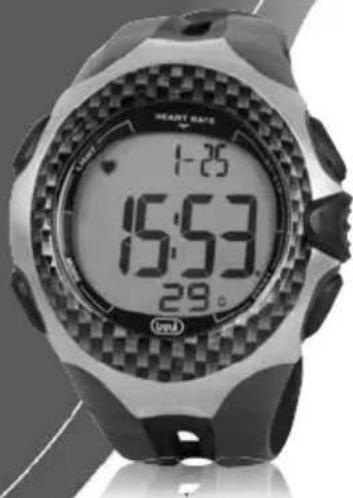
• manuale istruzioni
- USER MANUAL
• GUIDE DE L'UTILISATEUR
• BEDIENUNGSANLEITUNG
• MANUAL DE USUARIO

natural_image
Close-up of a black plastic or leather component with smooth curved surfaces (no text or symbols visible)natural_image
Top-down view of a wristwatch with visible mechanical components and no text or symbols3.
Regolazione +
3.
Regolazione -
- sci

natural_image
Close-up of a wristwatch with black and white casing (no visible text or symbols)natural_image
Technical line drawing of a mechanical component with no visible text or symbolsnatural_image
Simple line drawing of a human torso with curved arms (no text or symbols)Congratulations on your purchase of a highly reliable Heart Rate Monitor, it is a user-friendly fitness tool to keep track of your personal fitness level. To develop basic understands and gain maximum benefit from this Heart Rate Monitor, please read this user manual carefully. We wish you an enjoyable workout with it.
Functions and Summary
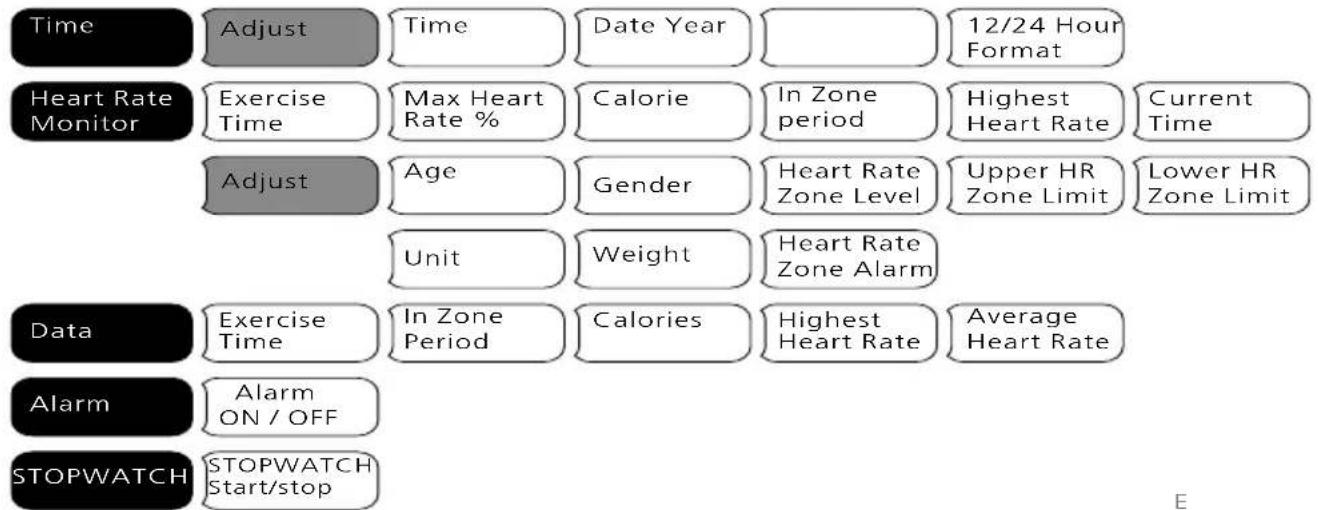
flowchart
graph TD
    A["Time"] --> B["Adjust"]
    B --> C["Time"]
    C --> D["Date Year"]
    D --> E["12/24 Hour Format"]
    F["Heart Rate Monitor"] --> G["Exercise Time"]
    G --> H["Max Heart Rate %"]
    H --> I["Calorie"]
    I --> J["In Zone period"]
    J --> K["Highest Heart Rate"]
    K --> L["Current Time"]
    M["Data"] --> N["Exercise Time"]
    N --> O["In Zone Period"]
    O --> P["Calories"]
    P --> Q["Highest Heart Rate"]
    Q --> R["Average Heart Rate"]
    S["Alarm"] --> T["Alarm ON / OFF"]
    U["STOPWATCH"] --> V["STOPWATCH Start/stop"]
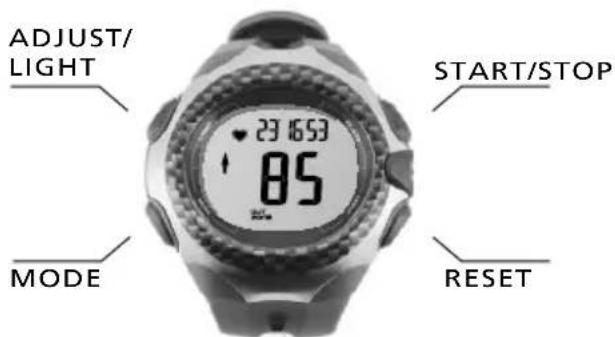
MODE
-Scrolls through various modes of the watch
-Advances to next variable in setting sequence
ADJUST/LIGHT
-Activates Light
-Enters the setting sequence for each setting mode
-Clears session data
START/STOP
-Increases variable in setting sequence
-Pauses time in HRM mode
RESET
-Decreases variable in setting sequence
-Toggles through sub modes
-Toggles between pounds/kilograms
-Ends session
QUICK START wearing the chest belt
ENGLISH
Follow steps 1. through 4. to wear the chest belt and go for a run.

natural_image
Technical line drawing of a mechanical component with symmetrical arms and central hub (no text or symbols)- Open the chest belt. 2. Insert the tab into the hole, make sure tab and hole are on the same level.

natural_image
Pure electrical circuit lines without any symbols
natural_image
Pure electrical circuit lines without any symbols-
Position on rib cage under the chest. Make sure the chest belt is positioned in the right direction and worn directly against the skin.
-
Lift the belt slightly from the skin and wet both grooved areas on the back to ensure strong connection between your pulse and the chest belt.
QUICK START zone selection
ENGLISH

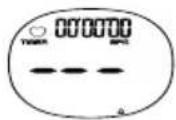
No Signal
Three dash lines will appear if the watch is not receiving transmission from the chest belt.
H
LEVEL 1
55 - 70%
Sustain a healthy heart and lose weight.
LEVEL 2
70 - 80%
Develop endurance and increase stamina.
LEVEL 3
80 - 100%
Sustain excellent fitness condition and increase muscle strength.
Graphical representation of Maximum Heart Rate

Current HR reach less than 60% of your max. heart rate.

Current HR reach less than 60-85% of your max. heart rate.

Current HR reach 85% or above of your max.heart rate.
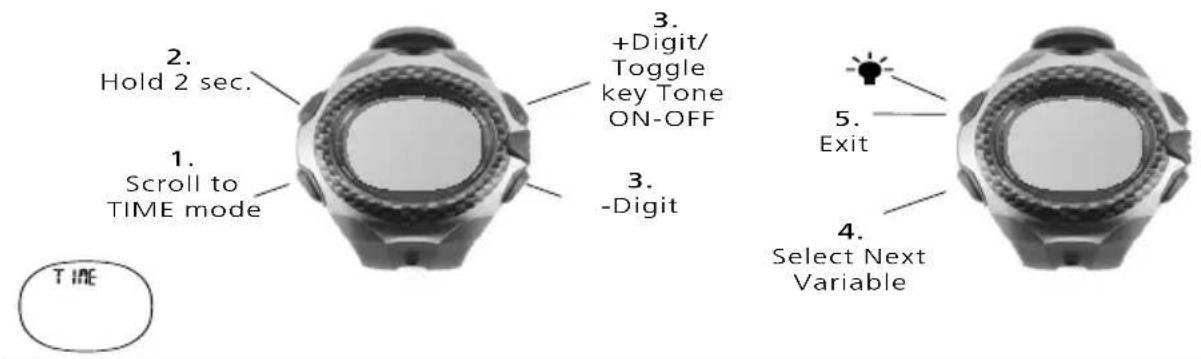
TIME set time
ENGLISH
In TIME mode you can set the Time, Date, and Hour Format. Follow steps 1. through 5. to set the time and date.

HEART RATE MONITOR getting started
ENGLISH
PRINCIPLE OF THE HEART RATE ZONE
It is important that you know your maximum heart rate, training zone, upper heart rate limit and lower heart rate limit before you begin. They help you achieve the maximum health benefits out of your workout. We recommend consulting a medical practitioner or registered physician before setting your personal training-schedule and target. Or you can set your own upper and lower limit using the following as a reference guide:
Calculation of Maximum Heart Rate: MALE=220-Age, FEMALE=226-Age
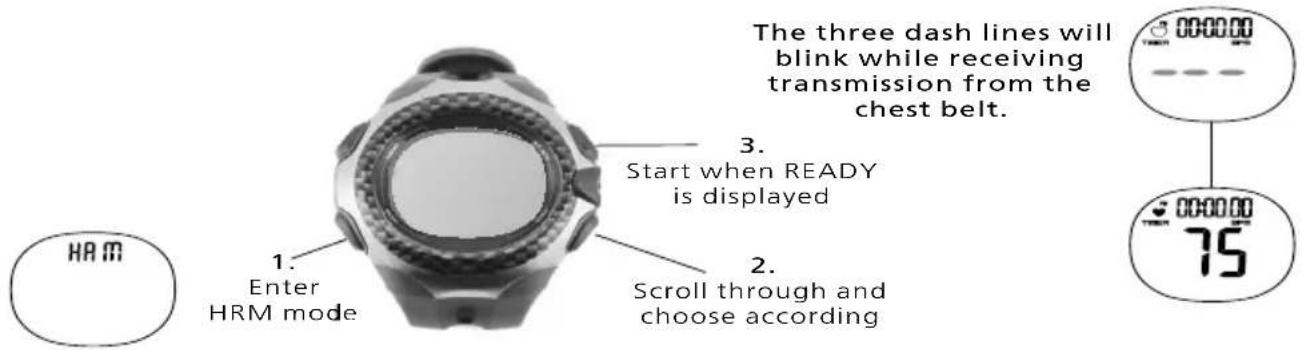
Getting Started
Follow steps 1. through 3. to get ready and start your run.
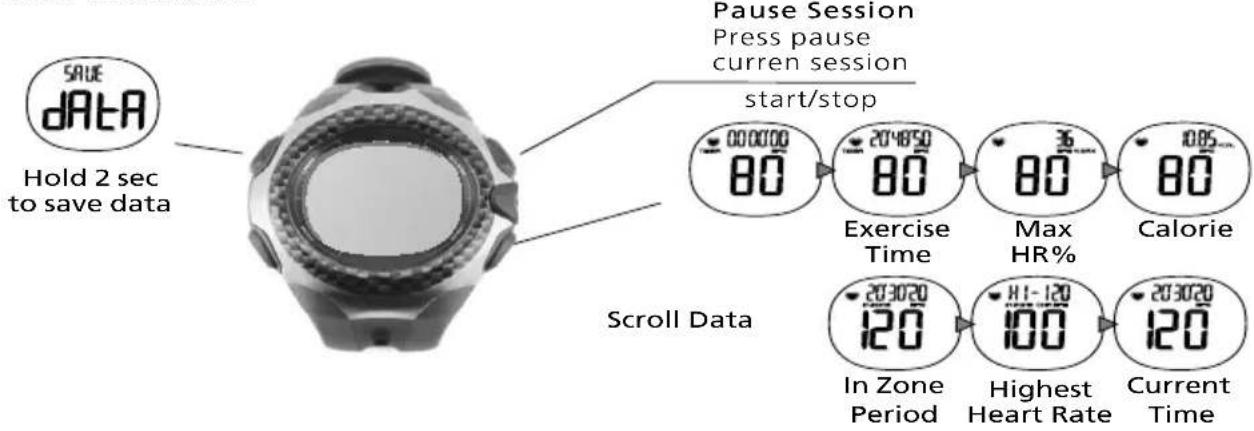
HEART RATE MONITOR data display/zone range
ENGLISH
The exercise time is displayed under the heart rate by default. Press the START/STOP key to view other information.
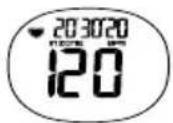
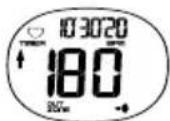
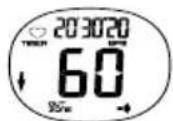
In-Zone
Your heart rate is within your zone range
Out-Zone
If your heart rate is out of zone, the High or Low arrows will display
HEART RATE MONITOR user settings
ENGLISH
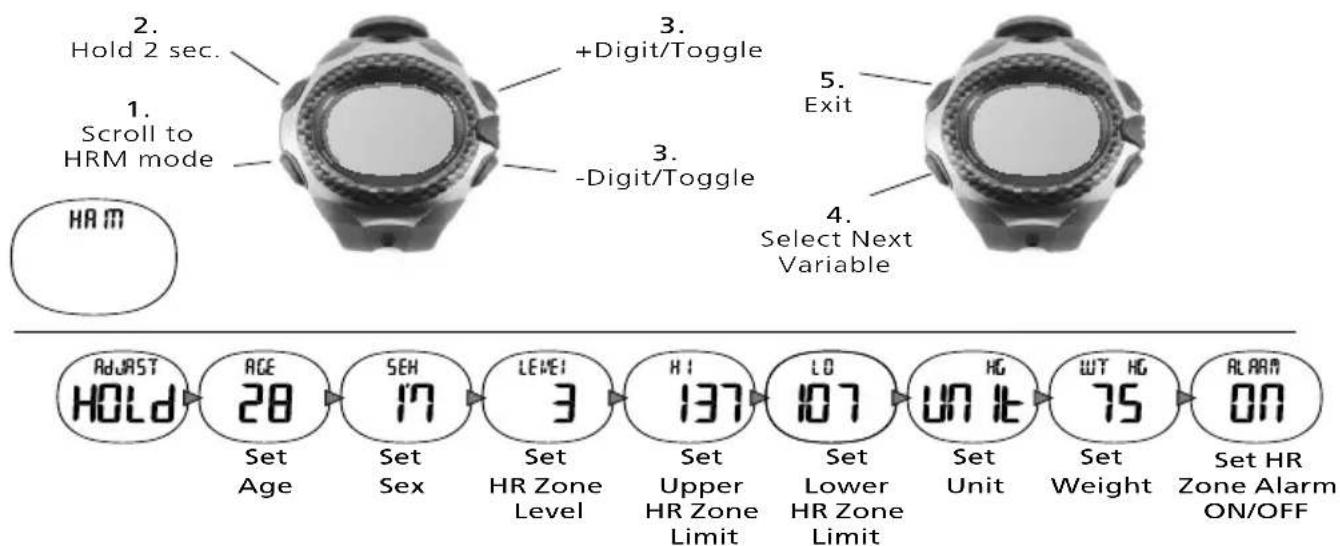
Your heart rate is measured in beats per minute (bpm) and setting a heart rate zone allows you to work with an upper and lower heart rate limit. Follow steps 1. through 5. to adjust the User Settings.
HR SETTING heart rate intensity chart
ENGLISH
This is an alternative to check your heart rate zones based on gender, age and weight. Starting with your Max Heart Rate (MHR), use the chart to calculate your zones depending on the intensity of your workout. Please note that this chart may not be suitable for everyone.
| Max Heart RateMale=220-AgeFemale=226-Age | Level 1(55-70%)Sustain a healthy heart and lose weight | Level 2(70-80%)Develop endurance and increase stamina | Level 3(80-100%)Sustain excellent fitness condition and increase muscle strength | |||||||||||
| Age | Male | Female | Male Female | Male Female | Male Male Female | |||||||||
| 20 | 200 | 206 | 110 | 140 | 113 | 144 | 140 | 160 | 144 | 164 | 160 | 200 | 164 | 206 |
| 25 | 195 | 201 | 107 | 136 | 110 | 140 | 136 | 156 | 140 | 160 | 156 | 195 | 160 | 201 |
| 30 | 190 | 196 | 104 | 133 | 107 | 137 | 133 | 152 | 137 | 156 | 152 | 190 | 156 | 196 |
| 35 | 185 | 191 | 101 | 129 | 105 | 133 | 139 | 148 | 133 | 152 | 148 | 185 | 152 | 191 |
| 40 | 180 | 186 | 99 | 126 | 102 | 130 | 126 | 144 | 130 | 148 | 144 | 180 | 148 | 186 |
| 45 | 175 | 181 | 96 | 122 | 99 | 126 | 122 | 140 | 126 | 144 | 140 | 175 | 144 | 181 |
| 50 | 170 | 176 | 93 | 119 | 96 | 123 | 119 | 136 | 123 | 140 | 136 | 170 | 140 | 176 |
| 55 | 165 | 171 | 90 | 115 | 94 | 119 | 115 | 132 | 119 | 136 | 132 | 165 | 136 | 171 |
| 60 | 160 | 166 | 88 | 112 | 91 | 116 | 112 | 128 | 116 | 132 | 128 | 160 | 132 | 166 |
| 65 | 155 | 161 | 85 | 108 | 88 | 112 | 108 | 124 | 112 | 128 | 124 | 155 | 128 | 161 |
| 70 | 150 | 156 | 82 | 105 | 85 | 109 | 105 | 120 | 109 | 124 | 120 | 150 | 124 | 156 |
| 75 | 145 | 151 | 79 | 101 | 83 | 105 | 101 | 116 | 105 | 120 | 116 | 145 | 120 | 151 |
DATA overall information of performance
ENGLISH
In DATA mode you can view your stored data from the last session.
Follow steps 1. through 2. to manage your data. *Please note only one session worth of data can be stored.

ALARM set alarm
ENGLISH
In ALARM mode you can toggle ON/OFF for the alarm and adjust the time.
Follow steps 1. through 5. to adjust alarm settings.

STOPWATCH
ENGLISH
In stopwatch mode,
Please follow the instructions in section 1-3. The, start operation.
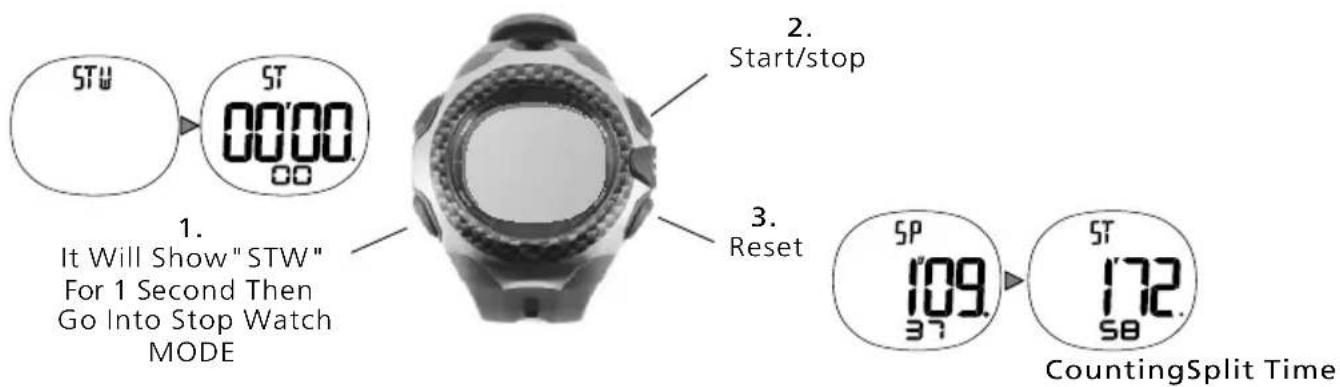
flowchart
graph TD
    A["STW"] --> B["0000 00"]
    B --> C{It Will Show "STW" For 1 Second Then Go Into Stop Watch MODE}
    C --> D["2. Start/stop"]
    C --> E["3. Reset"]
    E --> F["5P 109 37"]
    F --> G["5T 172 58"]
    G --> H["CountingSplit Time"]
BATTERY requirement
ENGLISH
Warning: Keep watch batteries away from children, If swallowed, contact a doctor immediately.
Warning: Batteries contain chemical substances.
They should be disposed of properly according to local regulations.
WATCH Battery Type: CR2032 Lithium
Battery Life: The battery is estimated to last 1 year depending on frequency and
use of certain features.
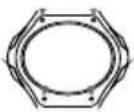
- Unscrew all four corners to remove the caseback

- Remove old battery

3. Insert a CR 2032 lithium battery with the writing facing you

- Replace the caseback
HR Chest Belt Battery Type: CR2032 Lithium
Battery Life: The battery is estimated to last 1 year if the chest belt is used one hour per day.
1.

Use a coin to unscrew the battery hatch on the watch by turning counter clockwise
2.

Remove old battery and insert a CR 2032 lithium battery with the writing facing you
3.

Replace the battery hatch

*Please make sure the O-ring (rubber ring surrounding battery) has not been removed from its place.
WE STRONGLY RECOMMEND TAKING YOUR WATCH TO A LOCAL RETAILER OR JEWELLER TO HAVE THE BATTERY REPLACED TO AVOID THE POSSIBILITY OF PERMANENTLY DAMAGING THE WATCH.
TROUBLESHOOTING
Heart rate doesn't display on watch
- The chest belt may not be positioned correctly.
- The grooved sensors may not be wet enough, wet and try again.
- It is recommended that the grooved sensors are directly on your skin.
Heart rate reading on watch is inconsistent or stops
- The battery may need to be replaced in the chest belt.
- Sources of electromagnetic fields can cause interference. (Appliances, computers, and power lines)
Watch beeps continuously
- If the zone alarm is on and your heart rate is not in any of the zone ranges, the watch will beep to indicate you are out of the zones.
Watch display may be frozen due to static electricity
- The display may be frozen due to static electricity or recent battery replacements, If this occurs, press on all 4 side buttons at the same time to reset to factory settings.
CARE & MAINTENANCE
ENGLISH
Avoid extreme force, shock, dust temperature, or humidity. Such conditions may cause malfunctioning, a shorter electronic lift span, damaged batteries, or distorted parts.
Rinse the watch with fresh water to avoid materials building up that can interfere with the reception of the pulse.
Do not use abrasive or corrosive materials to clean the watch or chest belt. Abrasive cleaning agents may scratch the plastic parts and corrode the electronic circuit..
Avoid tampering the internal components of the watch. Doing so will terminate the sensors warranty and may cause damage.
AVANT-PROPOS
FRANÇAIS
natural_image
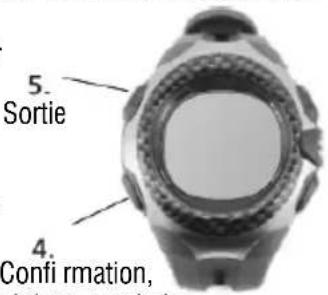
Top-down view of a smartwatch with visible lens and buttons (no text or symbols)- Réglementation+
3. Réglementation -
natural_image
Technical line drawing of a mechanical component with symmetrical arms and central hub (no text or symbols)natural_image
Simple line drawing of a human torso with curved arms (no text or symbols)natural_image
Diagram of a mechanical or fluidic component with a circular inset showing a rectangular feature, no text or symbols present.natural_image
Technical line drawing of a mechanical component with symmetrical arms and central oval feature (no text or symbols)natural_image
Pure electrical circuit lines without any symbols
natural_image
Pure diagram of a symmetrical mechanical or fluidic component with no text, numbers, or symbolsWatch display may be frozen due to static electricity
natural_image
Top-down view of a smartwatch with visible mechanical components and no text or symbols3.
Regulación +
3.
Regulación -
-
Salida

natural_image
Close-up of a wristwatch with no visible text or symbols on the dial (pure technical illustration)4.
natural_image
Technical line drawing of a mechanical component with symmetrical arms and central hub (no text or symbols)natural_image
Simple line drawing of a human torso with curved arms (no text or symbols)Precautions for correct disposal of the product.
The symbol shown on the equipment indicates that waste must be disposed of in “separate collection” and so the product must not be disposed of together with urban waste.
The user must take the product to special “separate waste collection centres” provided by local government, or deliver it to the retailer against the purchase of a new product.
Separate collection of waste and subsequent treatment, recycling and disposal operations promotes the production of equipment with recycled materials and limits negative effects on the environment and on health caused by improper handling of waste.
Illegal disposal of the product leads to the enforcement of administrative penalties.

- MODE
- ADJUST/LIGHT
- START/STOP
- RESET
- QUICK START wearing the chest belt
- ENGLISH
- QUICK START zone selection
- No Signal
- LEVEL 1
- LEVEL 2
- LEVEL 3
- TIME set time
- HEART RATE MONITOR getting started
- PRINCIPLE OF THE HEART RATE ZONE
- Getting Started
- HEART RATE MONITOR data display/zone range
- In-Zone
- Out-Zone
- HEART RATE MONITOR user settings
- HR SETTING heart rate intensity chart
- DATA overall information of performance
- ALARM set alarm
- STOPWATCH
- BATTERY requirement
- TROUBLESHOOTING
- Heart rate doesn't display on watch
- Heart rate reading on watch is inconsistent or stops
- Watch beeps continuously
- Watch display may be frozen due to static electricity
- CARE & MAINTENANCE
- AVANT-PROPOS
- FRANÇAIS
- Precautions for correct disposal of the product.
Brand : Trevi
Model : SF 150 HR
Category : Wristwatch