
SB01GB - Soundbar BIGBEN INTERACTIVE - Free user manual and instructions
Find the device manual for free SB01GB BIGBEN INTERACTIVE in PDF.


| Product Type | Soundbar |
| Brand | Bigben Interactive |
| Model | SB01GB |
| Dimensions (L x H x D) | Approx 950 x 65 x 90 mm |
| Weight | Approx 2.5 kg |
| Power Supply | 220-240 V, 50/60 Hz |
| Output Power | 40 W RMS |
| Wireless Connectivity | Bluetooth 5.0 |
| Audio Inputs | 3.5 mm AUX, USB-A, HDMI ARC |
| Main Functions | TV sound amplification, USB playback, remote control |
| Care and Cleaning | Wipe with a soft dry cloth. Do not use abrasive products. |
| Safety | Do not expose to moisture, heat sources, or liquids. |
| Spare Parts | Remote control, audio cable, power cable |
| Repairability | Contact Bigben after-sales service for any repairs. |
| General Information | Compact soundbar ideal for enhancing your TV sound. Compatible with most TVs. |
Frequently Asked Questions - SB01GB BIGBEN INTERACTIVE
User questions about SB01GB BIGBEN INTERACTIVE
0 question about this device. Answer the ones you know or ask your own.
Ask a new question about this device
Download the instructions for your Soundbar in PDF format for free! Find your manual SB01GB - BIGBEN INTERACTIVE and take your electronic device back in hand. On this page are published all the documents necessary for the use of your device. SB01GB by BIGBEN INTERACTIVE.
USER MANUAL SB01GB BIGBEN INTERACTIVE
MODE D'EMPLOI
LISEZ COMPLÈTEMENT CE MANUEL D'UTILISATION AVANT D'UTILISER CET APPAREIL ET CONSERVEZ CE LIVRET POUR VOUS Y RÉFÉRER ULTÉRIEUREMENT.
Contenu de la boîte
Mise sous tension
customerservice@bigben-interactive.be
ESPAÑA, sat@bigbeninteractive.es
ITALIA, support@bigbeninteractive.it
www.bigben.eu
Fabriqué en Chine


Email : bigben-infobe@bigben-interactive.be
Bigben Int.Belgium
Ernest Solvay
1480 Tubize, Belgium
Thank you for purchasing the Bigben Bluetooth SoundBar System.
Please keep this instruction manual for future reference. If you require any assistance or help please contact the Helpline.
Warranty
This product bearing the Bigben trademark, is guaranteed by the manufacturer for a period of 1 year from the date of purchase, and will, during this period be replaced with the same or a similar model, at our option, free of charge, if there is a defect due to faulty material, or workmanship. This guarantee does not cover defects arising from accidental damage, misuse or wear and tear, and is available only to the original purchaser of the product. This does not affect your statutory rights.

OPERATING INSTRUCTIONS
PLEASE READ THIS USER MANUAL COMPLETELY BEFORE OPERATING THIS UNIT AND RETAIN THIS BOOKLET FOR FUTURE REFERENCE.
Box Contents:
1 x Sound Bar 1 x AC adaptor 1 x Optical cable 1 x RCA cable
1 x Users manual 1 x AUX cable,
Layout of operation buttons and connections


Power on
Plug in the adapter and connect to electric outlet, press power button to turn on the unit. Blue LED light is on and blinks when the unit goes into Bluetooth mode as default.
Power off
Press power button to turn off the unit, blue LED light turns off.
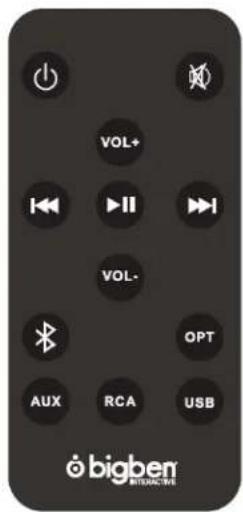
Volume +/-, PREVIOUS, NEXT
long press"volume +/-
"to adjust volume, short press"volume +"to go to next song, shot press"volume - "to go to previous song
Pair SoundBar with other Bluetooth enabled devices
- Turn on the unit, the power button LED (in front of the grill) blinks indicating it is searching Bluetooth devices.
- Activate the Bluetooth function on your mobile devices, search and select SB01 in the Bluetooth device list.
- After successful paired, select "SB01" in the Bluetooth device list, and press connect.
- LED turns to solid blue indicating the speaker is paired with your device via Bluetooth.
Pair SB01 via NFC function with NFC enabled devices
- Power ON the unit
-
Enable NFC and Bluetooth on your phone(NFC settings may be found under your devices"More/Additional Settings")
-
Lightly swipe your phone down the NFC logo on top of device, while making minimal contact. The indicator shall turns solid ON that means successfully paired.
AUX-in
- Press power button to power on the unit.
- Press mode button to switch mode: Bluetooth>AUX
- Connect SB01 with music device via AUX cable.
- Play music from your music devices.
RCA
- Press power button to power on the unit
- Press mode button to switch mode: Bluetooth> AUX > RCA
- Connect SB01 with music device via RCA cable.
- Play music from your music devices.
USB PLAY
- Press power button to power on the unit
- Press mode button to switch mode: Bluetooth> AUX > RCA >USB PLAY
- Connect SB01 with music device via USB cable.
- Play music from your music devices.
OPTICAL
- Press power button to power on the unit
- Press mode button to switch mode: Bluetooth> AUX > RCA >USB PLAY> OPTICAL
- Play music from your music devices.
P.S. SB01 goes to last mode you were playing automatically after restart.
Remote Control
You can also operate via remote control according to instruction above.
Specifications Specifications
Multimedia wireless Soundbar 2.0 Multimedia wireless Soundbar 2.0
Output power: 30W RMS Output power: 30W RMS
Speaker driver: 2"x 4 Speaker driver: 2"x 4
Power supply by ac 220v ac adapter Power supply by ac 220v ac adapter
TROUBLE SHOTTING / Q & A TROUBLE SHOTTING / Q & A
Q1: If the pairing is not successful? Q1: If the pairing is not successful?
A1: Turn of the speaker and turn on again, then repair again.
Q2: The sound is low or completely silent. Q2: The sound is low or completely silent.
A2: Make sure the connection (either Bluetooth or AUX) is fully functioning and secure. If you are using the AUX port check the cable is connected properly. Check the speaker and audio device volume and that an audible music track is playing.
Q3: My device cannot find the speaker Q3: My device cannot find the speaker
A3: Ensure the Bluetooth is on and not hidden on your audio device and that the speaker is not paired to another device.
Don't throw the electrical and electronical appliances into the usual dustbin.
- Bring them to a collecting point.
- Some parts contained in these appliances may be dangerous for health and environment.
Imported by BIGBEN INTERACTIVE SA
396, Rue de la Voyette
CRT2 - FRETIN
CS 90414
59814 LESQUIN Cedex - France
www.bigben.eu

Rev0
bigben INTERACTIVE
customerservice@bigben-interactive.be
ESPAÑA, sat@bigbeninteractive.es
ITALIA, support@bigbeninteractive.it
www.bigben.eu
Made in China


DISPOSAL OF OLD ELECTRICAL & ELECTRONIC EQUIPMENT
This symbol on the product or on its packaging indicates that this product shall not be treated as household waste. Instead it should be taken to an applicable collection point for the recycling of electrical and electronic equipment.
By ensuring that this equipment is disposed of correctly you will help prevent potential negative consequences for the environment and human health, which could otherwise be caused by inappropriate waste handling of this product.
The recycling of materials will help to conserve natural resources. For more information please contact your local council or waste disposal service.
Important Safeguards & Precautions
- This Unit is for indoor use only.
- Do not expose to dust, direct sunlight, wet weather conditions, high humidity, high temperatures or mechanical shock.
- Do not expose the unit, to splashing, dripping rain or moisture. Do not immerse in liquid.
- Do not disassemble; there are no serviceable parts inside.
- Do not use if the equipment is damaged.
- Never carry the unit by its cables.
-
For external cleaning, use a soft, clean, damp cloth only.
-
Use of detergents may damage the cabinet finish.
- Only use the cables that are supplied with this equipment.
- The socket-outlet shall be installed near the equipment and shall be easily accessible.
- If the power cable is damaged, it must be replaced by the manufacturer, its after-sales service or by a similarly qualified person in order to avoid any dangers.
- This device is not designed to be used by anyone (including children) with impaired physical, sensory or mental capacity, or by anyone without appropriate experience or knowledge unless they have received prior guidance or instructions related to the use of this device from someone who is responsible for their safety. Children should be supervised to ensure that they do not play with the device.
- Ensure that the cables do not impair or effect the use of the vehicle in any way.
Hereby, Bigben Interactive SA, declares that the SB01/MULTISOUNDBAR device complies with the essential requirements of the directive 1995/5/EC of the European Parliament and of the Council of 9 March 1999 on radio equipment and telecommunications terminal equipment and the mutual recognition of their conformity.
To download the full statement, please visit our website: http://www.bigben.eu/support and the section `declaration of conformity'.
TECHNICAL HELPLINE INFORMATION
The Technical Helpline is a live one-to-one service
UK: 0905 710 0015
Hours: 10:00am till 5:00pm, Monday to Friday
(All calls are charged at 30 pence per minute. All callers must be over 16 years of age. Permission must be obtained from the person paying the bill. Parental supervision is recommended).
Eire: 154 056 3001
Hours: 10:00am till 5:00pm, Monday to Friday
(All calls are charged at 60 euro cents per minute. All callers must be over 16 years of age.
Permission must be obtained from the person paying the bill.
Parental supervision is recommended).
To ensure that your call is handled quickly and effectively please ensure that you have the model number and any other relevant information regarding your product.
Calls may be recorded for training purposes.
SB01 / BARRA DE SONIDO MULTIMEDIA
Encendido
customerservice@bigben-interactive.be
ESPAÑA, sat@bigbeninteractive.es
ITALIA, support@bigbeninteractive.it
www.bigben.eu
Fabricado en China



ISTRUZIONI D'USO
PRIMA DI UTILIZZARE L'APPARECCHIO, LEGGERE PER INTERO IL PRESEN RVARLO PER TE MANUALE E CONSE CONSULTAZIONI FUTURE.
Accensione
customerservice@bigben-interactive.be
ESPAÑA, sat@bigbeninteractive.es
ITALIA, support@bigbeninteractive.it
www.bigben.eu
Prodotto in Cina


support@bigbeninteractive.it
Sistema Bluetooth SoundBar
Obrigado por comprar o Sistema Bluetooth SoundBar da Bigben.
Especificações
Soundbar 2.0 Multimédia sem fios
RESOLUÇÃO DE PROBLEMAS / PERGUNTAS E RESPOSTAS
customerservice@bigben-interactive.be
ESPAÑA, sat@bigbeninteractive.es
ITALIA, support@bigbeninteractive.it
www.bigben.eu
BEDIENUNGSANLEITUNG
Einschalten
Technische Daten
Drahtlose Multimedia-SoundBar 2,0
www.bigben-interactive.de
VEILIGHEIDSINSTRUCTIES
NWIJZING VOLLEDIG DOOR LEES DEZE GEBRUIKS ALVORENS DEZE EENHEID IT TE BEDIENEN, EN BEWAAR D BOEKJE VOOR UW ADMINISTRATIE.
Inhoud doos:
1 x SoundBar 1 x wisselstroomadapter 1 x optische kabel 1 x RCA-kabel
Specifications
Draadloze multimedia-SoundBar 2.0
customerservice@bigben-interactive.be
ESPAÑA, sat@bigbeninteractive.es
ITALIA, support@bigbeninteractive.it
www.bigben.eu
Made in China


28, Avenue Ernest Solvay
1480 Tubize
www.bigben.eu
Email : customerservice@bigben-interactive.be


- MODE D'EMPLOI
- CONTENU DE LA BOÎTE
- MISE SOUS TENSION
- WARRANTY
- OPERATING INSTRUCTIONS
- BOX CONTENTS
- POWER ON
- POWER OFF
- VOLUME +/-, PREVIOUS, NEXT
- PAIR SOUNDBAR WITH OTHER BLUETOOTH ENABLED DEVICES
- PAIR SB01 VIA NFC FUNCTION WITH NFC ENABLED DEVICES
- AUX-IN
- RCA
- USB PLAY
- OPTICAL
- REMOTE CONTROL
- SPECIFICATIONS SPECIFICATIONS
- TROUBLE SHOTTING / Q & A TROUBLE SHOTTING / Q & A
- DON'T THROW THE ELECTRICAL AND ELECTRONICAL APPLIANCES INTO THE USUAL DUSTBIN
- BIGBEN INTERACTIVE
- DISPOSAL OF OLD ELECTRICAL & ELECTRONIC EQUIPMENT
- IMPORTANT SAFEGUARDS & PRECAUTIONS
- TECHNICAL HELPLINE INFORMATION
- UK: 0905 710 0015
- EIRE: 154 056 3001
- SB01 / BARRA DE SONIDO MULTIMEDIA
- ENCENDIDO
- ISTRUZIONI D'USO
- ACCENSIONE
- ESPECIFICAÇÕES
- RESOLUÇÃO DE PROBLEMAS / PERGUNTAS E RESPOSTAS
- BEDIENUNGSANLEITUNG
- EINSCHALTEN
- TECHNISCHE DATEN
- VEILIGHEIDSINSTRUCTIES
- INHOUD DOOS
- SPECIFICATIONS
Brand : BIGBEN INTERACTIVE
Model : SB01GB
Category : Soundbar